How to Set wkhtmltopdf Header Height and Top Position
wkhtmltopdf has no header-height switch. Set the header’s rendered height in HTML, reserve room with --margin-top, and tune --header-spacing.

wkhtmltopdf has no dedicated --header-height option. The header’s apparent height comes from the HTML passed to --header-html. Reserve enough room for that rendered header with --margin-top, then use --header-spacing to control the gap between the header and the document body.
Start with this command, then adjust the measurements after inspecting the PDF:
wkhtmltopdf \
  --header-html header.html \
  --margin-top 30mm \
  --header-spacing 3 \
  input.html output.pdf
Here, 30mm reserves space at the top of the page and 3 sets the header-to-content spacing in millimetres. The numbers are starting points, not universal values: the result depends on the header HTML, fonts, images, and wkhtmltopdf build. The command-line reference documents both options and their units (wkhtmltopdf usage reference).
1. Understand the three measurements
It helps to treat the page as three separate pieces: the header’s rendered box, the top margin reserved for it, and the gap before the body starts. Changing one can affect what you see, but they are not interchangeable controls.
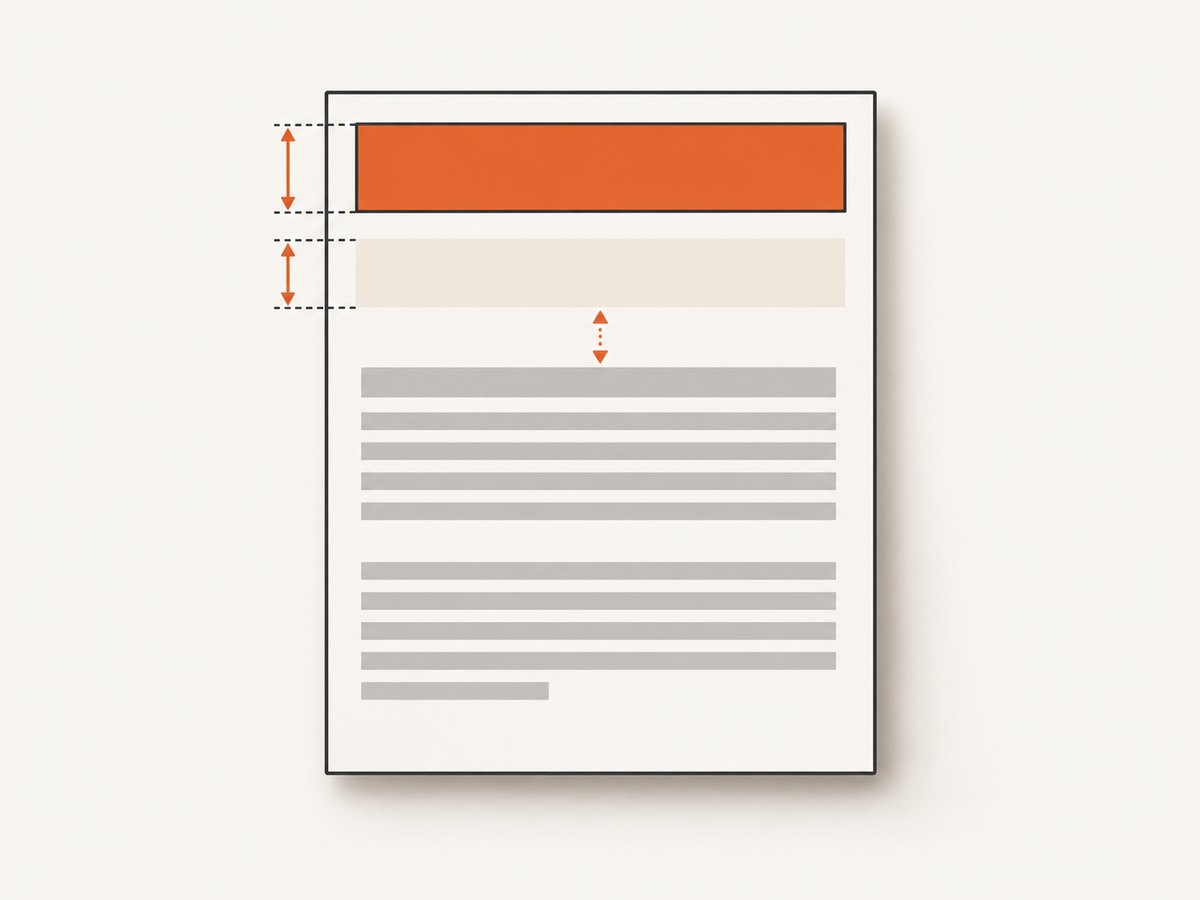
| Setting | What it controls | When to change it |
|---|---|---|
| Header HTML layout | The actual rendered height and content of the header document | When the header itself is too tall, short, or unpredictable |
--margin-top |
The page’s top margin and the room available above body content | When the header is clipped or the body begins too high |
--header-spacing |
The distance between the header and document content, in mm | When the header fits but the gap looks wrong |
The official library documentation defines header.spacing as the space between the header and content. It also warns that excessive spacing can put the header outside the PDF and notes that margin.top can correct this (libwkhtmltox page settings). In practice, reserve room for the header and the desired gap together. If the rendered header is 24 mm tall and you want about 3 mm below it, begin near 27 mm for the top margin, then check the output.
2. Create a predictable header HTML file
Save the following as header.html. Explicitly remove the browser’s default body margin and padding. Give the main wrapper a known height if you need a predictable header box, and prevent content from spilling beyond it.
<!doctype html>
<html>
<head>
  <meta charset="utf-8">
  <style>
    html, body {
      margin: 0;
      padding: 0;
    }
    .header {
      box-sizing: border-box;
      height: 24mm;
      overflow: hidden;
      padding: 2mm 0;
      border-bottom: 0.3mm solid #333;
      font: 10pt sans-serif;
    }
  </style>
</head>
<body>
  <div class="header">
    Quarterly report — Example Company
  </div>
</body>
</html>
This gives the content a 24 mm wrapper. It does not force wkhtmltopdf to allocate exactly 24 mm for every rendering situation: fonts can substitute, text can wrap, and images or other content can overflow or fail to load. Use a wrapper height only when its contents genuinely fit. If the header is dynamic, allow for its tallest expected version and test long titles and translated text.
For a logo image, give it explicit dimensions and use a stable local path or a URL reachable by the renderer. An unbounded image can increase the rendered height or make it vary across machines. Avoid using negative margins or absolute positioning to push the header outside the page’s top margin; the reserved page area sets a boundary that those CSS tricks do not reliably bypass.
3. Set the top margin and spacing
Convert the document with a top margin slightly larger than the header’s rendered height. For the 24 mm sample header, reserve 27 mm and use 3 mm of spacing:
wkhtmltopdf \
  --header-html header.html \
  --margin-top 27mm \
  --header-spacing 3 \
  input.html output.pdf
Inspect a page that contains the longest header and the first body paragraph. If the header is clipped, increase --margin-top. If the header fits but the body is too close, increase --header-spacing and ensure the margin still leaves room. If there is too much blank space, reduce the header’s rendered height or the top margin, then tune spacing. Make small changes and render again: adjusting the margin also changes where body content begins.
The command-line option --header-spacing <real> is measured in millimetres. --margin-top <unitreal> accepts a value with a unit, such as 27mm. Keep units explicit for margins so a bare number is not mistaken for a different measurement than intended.
4. Apply the settings to a complete conversion
A minimal invocation uses an input HTML file and an output PDF path:
wkhtmltopdf \
  --header-html header.html \
  --margin-top 27mm \
  --header-spacing 3 \
  input.html output.pdf
For multiple input documents, the same global settings apply to the conversion unless you use the command’s supported object-specific configuration. Check the usage documentation for the syntax supported by your installed build. When scripting, pass each argument as a separate process argument rather than building a shell string from untrusted values. This avoids quoting errors in paths and reduces shell injection risk.
There is no universal command-line switch that sets an independent, fixed header height. The options most relevant to this task are:
| Option | Purpose | Typical adjustment |
|---|---|---|
--header-html FILE |
Loads a separate HTML document to use as the header | Verify the path is readable and the page renders as expected |
--margin-top VALUE |
Sets top page margin and reserves vertical room | Increase if the header is clipped or body starts too high |
--header-spacing VALUE |
Sets header-to-content gap in millimetres | Adjust after the header fits within the reserved region |
Other page geometry settings, such as paper size, orientation, and the left, right, or bottom margins, can affect the overall layout. They do not create a dedicated header-height control. Set them deliberately if the header’s wrapping depends on available page width.
5. Verify the output across pages and machines
Use a short repeatable check rather than judging only the first page:

- Render a document with a short header and one with the longest expected header.
- Inspect the first page, a middle page, and a page where body content begins near a page break.
- Check that the header is not cut off, the body does not overlap it, and the gap is consistent.
- Record the wkhtmltopdf version/build, fonts, and header assets used for the conversion.
- Repeat after changing fonts, the header template, paper size, orientation, or rendering environment.
Different page headers can produce surprising results. A reported issue describes the tallest header affecting the effective top margin even on pages with shorter or absent headers. Keeping header heights consistent, or splitting conversions when they need materially different layouts, can avoid that mismatch (upstream issue #2482).
6. Troubleshoot missing, clipped, or misplaced headers
| Symptom | Likely cause | What to try |
|---|---|---|
| Header is missing | The header file cannot be read, did not render, or top margin is zero | Confirm the path and permissions; try a small nonzero top margin. A report for a 0.12.5 setup describes disappearance with zero margin (issue #4429). |
| Header is cut off | The reserved top region is too short for the rendered header and spacing | Increase --margin-top; check content height, wrapping, fonts, and image dimensions. |
| Body overlaps or starts too high | Insufficient top margin for the header, or a header layout that exceeds its expected height | Reserve more top margin and verify the longest header content. |
| There is too much blank space | The top margin, header box, spacing, or default HTML margins are larger than intended | Set body and wrapper margins explicitly; reduce the top margin or spacing in small steps. An upstream report discusses excess whitespace and a manual margin workaround (issue #3974). |
| Header cannot move above the specified top margin | The page margin bounds where the header can be positioned | Do not rely on negative CSS margins or absolute positioning to escape the boundary; revise the margin and layout. See issue #2846. |
| One page’s header changes the spacing on others | Header heights vary between pages | Use a consistent header height or generate separate PDFs for documents needing different header geometry. |
When a value appears to have no effect, first confirm that the option is spelled correctly and that the executable being called is the expected build. Then simplify the header to plain text and inline CSS. If the simplified header behaves, add fonts, images, and styles back one at a time. This separates layout problems from unavailable resources or CSS support differences.
7. Reliability, performance, and maintenance
Header sizing is a rendering-layout problem, so repeatability depends on the inputs as well as the flags. Pin the wkhtmltopdf version in a stable environment, install the fonts your header expects, and keep images and stylesheets available to the renderer. Network-dependent assets can make output slower or inconsistent when DNS, TLS, or remote servers vary. Local assets reduce that dependency, provided their paths are accessible to the process.
Large header images, remote fonts, and scripts can add loading work. Keep headers lean, set image dimensions, and avoid unnecessary resources. A smaller and stable header is easier to fit and tends to render more consistently. If a conversion is slow, inspect the external resources and input page before increasing timeouts or changing margins; the margin options do not improve load time.
The upstream wkhtmltopdf repository was archived on January 2, 2023 (upstream repository). Builds can differ, and new systems should evaluate maintained alternatives if long-term support is a requirement. For an existing pipeline, record the version and rendering dependencies, keep a representative PDF fixture for visual review, and avoid assuming that identical HTML will look identical with a different build or font set.
8. Or skip the browser setup
If your goal is to capture a webpage as an image or PDF without maintaining a local browser-rendering setup, ScreenshotNeo provides a website screenshot API and MCP server. A single GET request accepts a URL and returns an image or PDF. See the ScreenshotNeo API documentation for available parameters.
curl -G "https://api.screenshotneo.com/v1/shot" \
  -d access_key=YOUR_API_KEY \
  --data-urlencode url=https://stripe.com \
  -o shot.webp
ScreenshotNeo accepts cookie and consent banners like a visitor and removes more than 60 known consent platforms, newsletter popups, and chat widgets before capture; each step can be turned off. Bot checks and CAPTCHAs, blank pages, timeouts, failed loads, and cache hits cost nothing, and response headers report the page verdict and billing status. Its MCP server provides take_screenshot, get_page_info, and capture_pdf tools for Claude, Cursor, and other MCP clients. The free plan includes 1,000 screenshots per month with no card; paid plans start at $5 for 3,000 shots. Every feature is available on every plan.
Sign up free for 1,000 screenshots a month, no card required.
9. Frequently asked questions
Is there a --header-height option?
No. Define the header’s rendered layout in its HTML and reserve page space with --margin-top.
Should header spacing be included in the top margin?
Leave enough top-margin room for the rendered header and the intended gap, then inspect the result. The exact relationship can depend on the build and page layout.
Can I use CSS to position a header outside the page margin?
Do not depend on negative margins or absolute positioning to escape the reserved page area. Adjust the header layout and page margin instead.
Why does the body move when I change --margin-top?
The option sets the page’s top margin, which determines where body content begins. Increasing it reserves more vertical space above the body.
Will the same values work for every wkhtmltopdf version?
Not necessarily. Record the build and verify the output with the actual fonts, assets, and header HTML used in production.


