How AI Agents Use Competitor Data
Learn how to build a competitor intelligence agent that collects public data, verifies changes, and sends useful, traceable alerts.

An AI agent can monitor competitors by repeatedly collecting public information, comparing each new snapshot with previous data, deciding which changes matter, and routing useful findings to people or systems. A reliable implementation records the source URL and retrieval time, validates extracted fields, and keeps evidence alongside every alert.
The practical loop is: define what to watch, trigger collection, extract structured data, validate it, detect and interpret changes, then take an action. This guide shows how to build that loop, including a runnable Python example for a public pricing page, operating advice, failure handling, and ways to capture visual evidence.
1. What competitor data can an agent use?
Competitive intelligence agents work with publicly accessible information. The OECD defines web scraping as automated extraction of publicly accessible web data using a software agent, and gives airline price scanning as an example. Public availability does not remove the need to respect access controls, applicable terms, privacy requirements, and reasonable request rates.
| Signal | Example fields to track | Useful sources |
|---|---|---|
| Pricing and packaging | Plan names, prices, billing periods, limits, discounts, feature availability | Pricing and plan pages |
| Product movement | New features, renamed features, integrations, availability claims | Feature pages, release notes, changelogs, documentation |
| Company signals | Open roles, leadership announcements, funding news | Careers pages, company announcements, news |
| Customer and promotion signals | Positioning, review trends, campaign themes, ad messaging | Public review pages, public ad libraries, landing pages |
Start with a short list of questions tied to decisions. “Track everything” creates noisy snapshots and expensive review work. A more actionable brief might ask whether a competitor introduced a lower entry tier, changed a usage limit, launched a feature in a key segment, or began hiring for a new market.
2. Design the collection-to-action loop
Apify describes a useful pattern as trigger, extraction, detection and reasoning, and action. Implement those as separate stages so a collection failure is distinguishable from a real competitor change.

- Define the landscape. Name competitors, canonical page URLs, fields, units, and meaningful thresholds. Record whether a price is monthly or annual and whether it is per seat or per account.
- Choose a trigger. Fetch on demand when answering a current question. Schedule daily or weekly runs when you need history. Use faster schedules only where the decision value justifies added requests and review.
- Collect and extract. Fetch plain pages with an HTTP client when their content is present in the response. Use a browser-aware crawler or screenshot workflow when JavaScript rendering, interactions, or visual evidence matter.
- Validate and preserve provenance. Save the URL, retrieval time, extracted values, and a compact source excerpt or snapshot reference. Reject malformed prices and missing required fields rather than treating them as removals.
- Compare and interpret. Compare structured records first. Then classify a possible change as substantive, cosmetic, or uncertain. An AI model can summarize and classify evidence, but should not invent a value absent from the source.
- Route the result. Send a concise alert, update a tracking sheet or API, prepare a cited brief, or create a sales battle card. Include the evidence and a link to the source so the recipient can verify it.
Keep extraction deterministic where possible. For example, parse a displayed price and billing label into separate fields, then ask a model to explain the impact of the delta. This makes it easier to test whether a change came from the website or from a model interpretation.
3. Runnable Python example: monitor a public pricing page
This small example fetches a public page, extracts visible text, asks a model-compatible endpoint to return structured fields, stores a timestamped snapshot, and reports a field-level delta. It uses environment variables for secrets and SQLite for a local history. Replace the example URL, selector, and model endpoint with values you are authorized to use. The extraction endpoint shown is intentionally configured by you; no vendor-specific model API is assumed.
import json
import os
import sqlite3
from datetime import datetime, timezone
from pathlib import Path

import requests
from bs4 import BeautifulSoup

URL = os.environ.get("COMPETITOR_PRICING_URL", "https://example.com/pricing")
DB_PATH = Path(os.environ.get("COMPETITOR_DB", "competitors.sqlite3"))


def fetch_page(url):
    response = requests.get(
        url,
        headers={"User-Agent": "CompetitorMonitor/1.0 (contact: ops@example.com)"},
        timeout=(5, 25),
    )
    response.raise_for_status()
    content_type = response.headers.get("Content-Type", "")
    if "html" not in content_type.lower():
        raise ValueError(f"Expected HTML, received {content_type!r}")
    return response.text


def extract_text(html):
    soup = BeautifulSoup(html, "html.parser")
    for node in soup(["script", "style", "noscript", "svg"]):
        node.decompose()
    return "\n".join(line.strip() for line in soup.get_text("\n").splitlines() if line.strip())


def extract_fields(page_text):
    """Call your approved structured-extraction service; require valid JSON."""
    endpoint = os.environ["EXTRACTION_ENDPOINT"]
    token = os.environ["EXTRACTION_TOKEN"]
    prompt = (
        "Extract only pricing facts explicitly present in this page text. "
        "Return JSON with a plans array; each plan has name, price, currency, "
        "billing_period, and included_limits. Use null for unknown values.\n\n"
        + page_text[:30000]
    )
    response = requests.post(
        endpoint,
        headers={"Authorization": f"Bearer {token}"},
        json={"input": prompt},
        timeout=(5, 60),
    )
    response.raise_for_status()
    result = response.json()
    # Adapt this line to the schema of your chosen extraction endpoint.
    payload = result.get("output", result)
    if isinstance(payload, str):
        payload = json.loads(payload)
    if not isinstance(payload, dict) or not isinstance(payload.get("plans"), list):
        raise ValueError("Extractor returned no plans array")
    return payload


def main():
    page_text = extract_text(fetch_page(URL))
    fields = extract_fields(page_text)
    retrieved_at = datetime.now(timezone.utc).isoformat()

    with sqlite3.connect(DB_PATH) as db:
        db.execute("""CREATE TABLE IF NOT EXISTS snapshots (
            id INTEGER PRIMARY KEY, url TEXT NOT NULL, retrieved_at TEXT NOT NULL,
            fields_json TEXT NOT NULL)""")
        previous_row = db.execute(
            "SELECT fields_json FROM snapshots WHERE url = ? ORDER BY id DESC LIMIT 1",
            (URL,),
        ).fetchone()
        previous = json.loads(previous_row[0]) if previous_row else None
        db.execute(
            "INSERT INTO snapshots(url, retrieved_at, fields_json) VALUES (?, ?, ?)",
            (URL, retrieved_at, json.dumps(fields, sort_keys=True)),
        )

    if previous is None:
        print(json.dumps({"status": "baseline_created", "url": URL, "retrieved_at": retrieved_at}))
        return
    if fields == previous:
        print(json.dumps({"status": "unchanged", "url": URL, "retrieved_at": retrieved_at}))
        return
    print(json.dumps({
        "status": "possible_change",
        "url": URL,
        "retrieved_at": retrieved_at,
        "previous": previous,
        "current": fields,
    }, indent=2))


if __name__ == "__main__":
    main()
Install dependencies with python -m pip install requests beautifulsoup4. Set COMPETITOR_PRICING_URL, EXTRACTION_ENDPOINT, and EXTRACTION_TOKEN in the runtime environment. The extraction endpoint needs to accept a JSON request containing an input string and return JSON with a plans array; adapt the request and response mapping for your provider. Do not commit tokens to source control.
This is a baseline rather than a production alerting system. Before notifying a team, validate required fields, normalize currencies and billing periods, and compare plans by stable identifiers. A removed field may mean a page layout changed or extraction failed; require a successful validation pass before declaring a tier discontinued.
4. Extraction choices and screenshot evidence
HTTP parsing
Use ordinary HTTP and HTML parsing when the information is server-rendered and stable. It is generally a simpler collection path. Inspect the response status, content type, and parsed fields; save a small excerpt to aid debugging. A parser tied to a fragile CSS class can break after a redesign, so prefer semantic labels and validate expected records.
Browser rendering
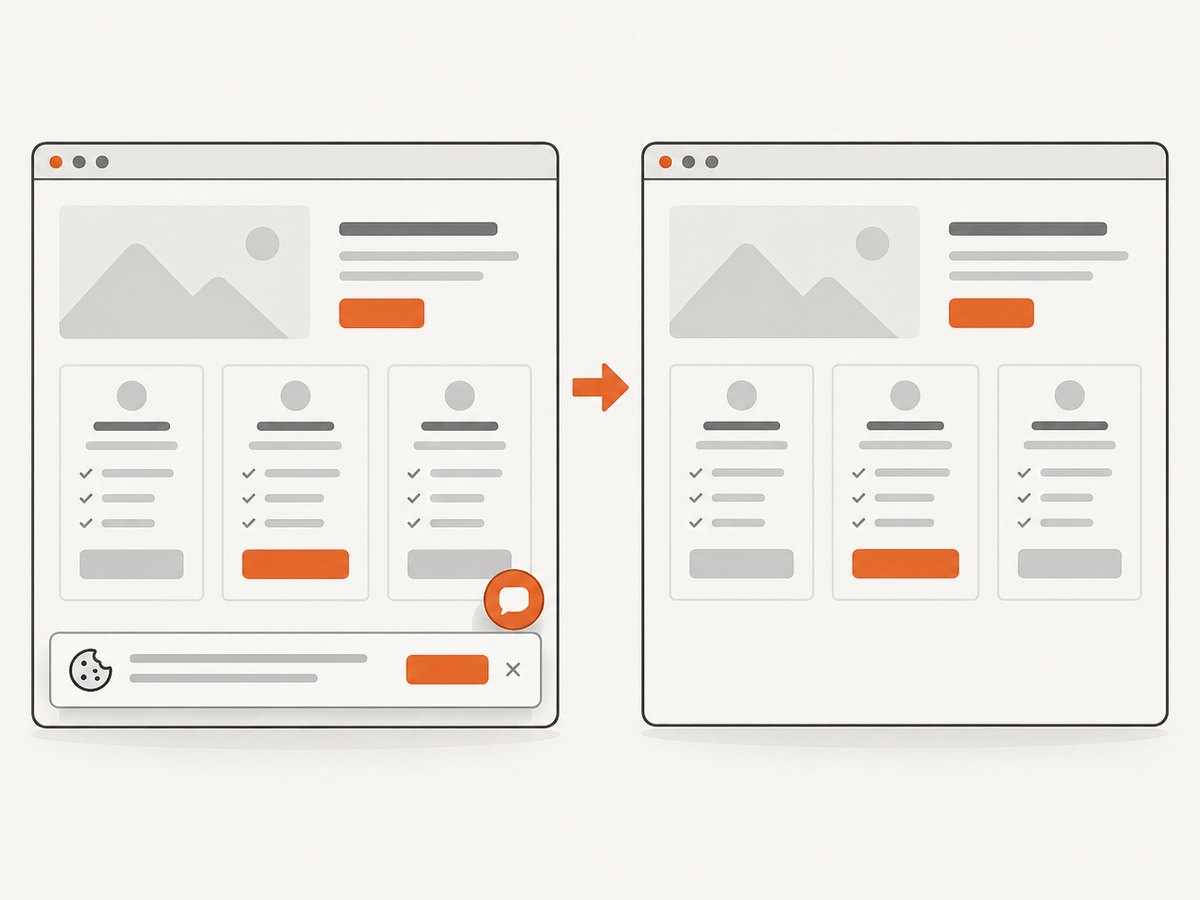
Use a browser when the site fills content with JavaScript, requires a consent interaction, or exposes an important state only after a user action. Wait for a selector or a defined readiness condition rather than relying on a fixed delay alone. For visual comparisons, capture the same viewport and state each run, and retain timestamps with the image.
ScreenshotNeo is a website screenshot API and MCP server. It can capture PNG, JPEG, WebP, or PDF, and supports full-page shots, selector-based element captures, custom waits, cookies, headers, user agents, and other browser options. For competitor monitoring, screenshots can preserve visual evidence for a changed page; extracted structured fields should still drive exact price comparisons. See the ScreenshotNeo API documentation for request options.
5. Or skip the browser setup
For visual evidence without managing browser infrastructure, request a screenshot in one call:
curl -G "https://api.screenshotneo.com/v1/shot" -d access_key=YOUR_API_KEY --data-urlencode url=https://stripe.com -o shot.webpimport requests
r = requests.get("https://api.screenshotneo.com/v1/shot", params={"access_key": "YOUR_API_KEY", "url": "https://stripe.com"}, timeout=90)
open("shot.webp", "wb").write(r.content)const q = new URLSearchParams({ access_key: 'YOUR_API_KEY', url: 'https://stripe.com' });
const res = await fetch(`https://api.screenshotneo.com/v1/shot?${q}`);Adapt the target URL to the public page you monitor and keep the API key in a secret store. Cookie banners are accepted and removed before capture, along with supported newsletter popups and chat widgets; each cleanup step can be turned off. Bot checks, blank pages, timeouts, failed loads, and cache hits cost nothing, and response headers report the page verdict and billing status. An MCP server exposes take_screenshot, get_page_info, and capture_pdf for Claude, Cursor, and other MCP clients. The free plan includes 1,000 screenshots per month without a card; paid plans start at $5 for 3,000 shots. Sign up for 1,000 free screenshots a month, with no card required.
6. Detect meaningful changes
Raw text diffs are noisy. Pages change dates, reorder cards, rotate promotions, and edit marketing copy without changing the underlying offer. Use a layered comparison:
- Normalize: trim whitespace, normalize currency and number formats, map equivalent billing labels, and sort unordered collections.
- Compare fields: detect a price, limit, plan, or feature delta directly from the structured records.
- Filter cosmetic changes: ignore timestamps and known rotating banners unless they are the signal being tracked.
- Classify with evidence: let a model classify the delta as likely meaningful, cosmetic, or uncertain, and require it to cite the changed fields and source text.
- Apply thresholds: alert on a new tier or material price change; perhaps batch wording edits into a weekly digest.
Preserve the before and after records. For high-impact claims, require a second successful collection or human review. Send the source URL, retrieval timestamp, old value, new value, and confidence or uncertainty reason with the alert. If the source is unavailable, report collection failure, not “no change.”
7. Reliability, performance, and cost
Reliability
Give each competitor URL an independent run status: success, blocked, timeout, parse failure, or validation failure. Retry transient network failures with bounded exponential backoff and jitter; do not repeatedly hammer a site that is returning rate-limit responses. Use idempotent snapshot keys such as competitor, URL, and scheduled run so a retry does not create duplicate alerts.
Keep a baseline and a history. A scheduled monitor with no baseline cannot distinguish a first observation from a change. Store raw or minimally processed evidence for a limited, documented retention period, and restrict access if internal notes or credentials are included. Public sources may still contain personal information; avoid collecting unnecessary personal data.
Performance
Fan out across independent public pages with bounded concurrency, then rate-limit per host. Separate collection from model analysis so simple unchanged records do not require a model call. Cache only when its freshness is acceptable for the question; label cache timestamps so stale data is never presented as live. Large pages can be trimmed to relevant sections, but preserve the source context needed to verify extracted fields.
Cost
Estimate cost from pages per run × runs per period × extraction and model work per page, plus storage and alert delivery. Apify gives an example of $0.006 for one pricing-page extraction and about $0.11 for a one-page Website Change Monitor run including a model call. Those are that vendor’s 2026 examples, not universal prices. No market-wide cost or accuracy statistic is available from the cited research, so pilot with your own pages and cadence before committing.
Measure useful-alert rate, missed-change rate from manual spot checks, extraction failure rate, and time from source change to alert. Lower polling frequency reduces requests and processing costs but makes alerts less fresh. Choose cadence according to the decision: a weekly pricing review may not need hourly capture.
8. Troubleshooting
| Symptom | Likely cause | Fix |
|---|---|---|
| HTTP 403 or challenge page | The site blocked automated access or requires an interaction. | Stop aggressive retries; check permitted access, use a supported browser workflow where appropriate, or mark the source unavailable. |
| HTTP 429 | Request frequency exceeded the site’s limit. | Back off, reduce concurrency, and schedule fewer runs per host. |
| Page text is empty or incomplete | JavaScript rendering, consent state, or lazy loading was needed. | Use a browser-aware capture, wait for a meaningful selector, and verify the resulting page before extraction. |
| All plans appear removed | Selector or extractor broke, or the page changed structure. | Fail validation when expected fields disappear; compare a saved source snapshot and review before generating a removal alert. |
| Price alerts fire repeatedly | Formatting, currency, annual/monthly labels, or promotional text is not normalized. | Parse amount, currency, billing period, and promotion as separate fields; compare normalized values. |
| Model returns prose instead of JSON | Output constraints or response mapping do not match the endpoint. | Use a structured-output mode if available, validate the schema, and store failed raw responses for diagnosis without treating them as data. |
| Duplicate notifications | Retries or repeated runs emitted the same delta. | Use an idempotency key based on source, field, old value, and new value; send only after durable snapshot storage. |
9. Tooling and governance checklist
Available approaches cover different parts of the workflow. Apify provides crawler and change-monitor building blocks. Qoni emphasizes source validation, confidence, and a versioned intelligence store. Union.ai/Flyte demonstrates fan-out across competitors and converting cited search and news results into structured deltas. Friday AI with Firecrawl describes broad site crawling, multiple models, and scheduled reports. RivalCheck documents competitor profiles, change feeds, AI analysis, battle cards, and webhooks. These are vendor capability descriptions; verify current coverage, error handling, access permissions, data retention, and pricing in a pilot.
- List the public sources and intended fields.
- Define an acceptable cadence and per-host request limit.
- Save timestamps, URLs, extraction version, and evidence.
- Separate collection failures from unchanged results.
- Review uncertain or high-impact changes before acting on them.
- Set retention and access controls for snapshots and credentials.
- Spot-check alerts against source pages and document what a useful alert looks like.
10. Frequently asked questions
Can an agent track competitor prices in real time?
It can fetch a page on demand, but “real time” depends on when the source updates and whether collection succeeds. Scheduled monitoring gives a bounded delay, not a guarantee that every source change is observed immediately.
Should an AI model decide whether a price changed?
Use deterministic parsing and normalized field comparison for numeric changes. A model can explain context or classify ambiguous copy changes, with source evidence attached.
What makes a competitor alert trustworthy?
A trustworthy alert identifies the exact public source, retrieval time, prior and current values, and any uncertainty. It also distinguishes a failed fetch from a confirmed unchanged page.
Can one agent monitor every competitor channel?
One orchestration system can coordinate many collectors, but each source type may need different extraction, permissions, cadence, and validation rules. Begin with a few decision-relevant sources and expand after measuring quality.
How should a team start?
Pick a few competitors and a small set of fields, collect a baseline, run on a modest schedule, manually review changes, then tune thresholds and delivery based on false alarms and missed changes.