Tools That Keep AI Agents Grounded in Current Web Data
Compare web search and grounding tools from OpenAI, Anthropic, and Google, with runnable API examples, citation handling, and an evaluation checklist.

To keep an AI agent grounded in current web data, give it a retrieval tool at answer time and preserve the tool’s sources alongside its response. OpenAI’s Responses API offers web search, Anthropic’s Claude API offers a server-side web search tool, and Gemini can ground responses with Google Search. Each can provide citation or grounding metadata, but their tool configuration and returned structures differ. Choose based on your model stack, the controls your application needs, and how you will show and audit citations—not on an assumed quality ranking. OpenAI, Anthropic, and Google document their respective interfaces.
1. What “grounded in current web data” means
A model’s stored knowledge does not become current merely because it is asked about recent events. A search or grounding tool retrieves external material during a request; the model can then use that material to formulate an answer. The response is still generated by a model, so retrieval does not guarantee completeness or correctness.
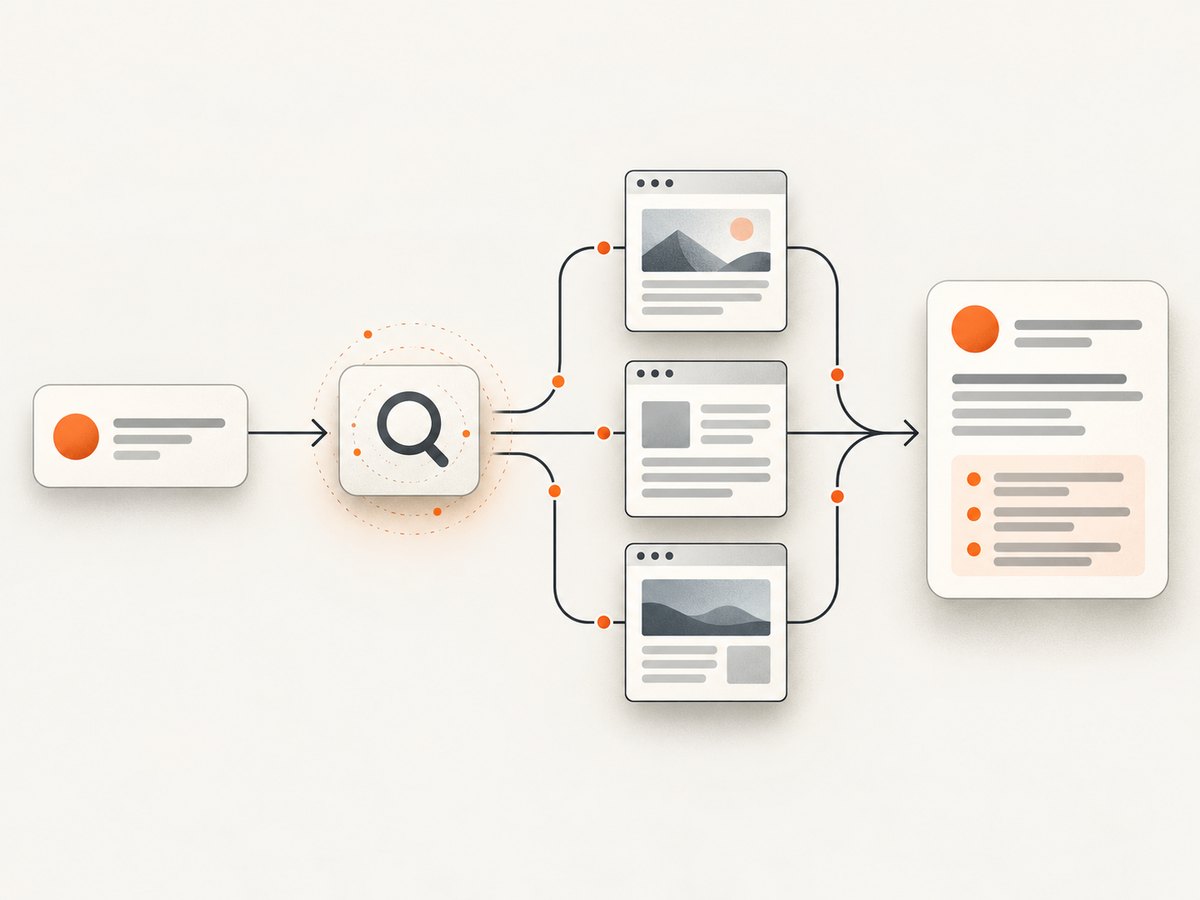
A useful integration treats the answer and its evidence as one result. Retain the provider’s citation annotations, source URLs, titles, and other grounding metadata. Show relevant links near the claims they support, and make the sources available for review. A citation is evidence to inspect, not proof that every sentence is supported.
2. Compare the documented options
| Provider | Documented capability | Questions to evaluate |
|---|---|---|
| OpenAI Responses API | Built-in web search for current information; responses may include URL citation annotations and search-call output. | Does the Responses API fit your application? Can you render its annotations correctly? Is the model compatible with the controls you need? |
| Anthropic Claude API | Server-side web search that returns citations. Documentation describes multiple tool versions and dynamic filtering for newer versions. | Which tool version and model are available to you? Do you need dynamic filtering? Can your application inspect tool-level errors? |
| Gemini API | Grounding with Google Search returns grounded response text with citation annotations and search metadata. It can be combined with URL context. | Do you need Google Search grounding metadata, URL context, or both? Does Gemini fit your application and citation display? |
These are descriptions from the vendors’ documentation, not a measured comparison. The reviewed sources do not provide a like-for-like benchmark for source relevance, recall, latency, or cost. Verify current model support and request options in the provider documentation before shipping.
3. OpenAI: web search with the Responses API
The Responses API request supplies the web search tool and a prompt. The response can contain both generated text and tool-related output. Keep the response structure while integrating it: citation annotations include a source URL, title, and indexes into the response text, according to the guide.
cURL example
curl https://api.openai.com/v1/responses \
  -H "Authorization: Bearer $OPENAI_API_KEY" \
  -H "Content-Type: application/json" \
  -d '{
    "model": "gpt-4.1",
    "tools": [{ "type": "web_search" }],
    "input": "What changed in the latest release of Project X? Cite your sources."
  }'
Use a model and options that the current API documentation says support web search. The example asks for cited sources in the answer, but your application should use the structured annotations rather than relying only on the model’s prose or manually formatted links.
Python example
import os
from openai import OpenAI

client = OpenAI(api_key=os.environ["OPENAI_API_KEY"])
response = client.responses.create(
    model="gpt-4.1",
    tools=[{"type": "web_search"}],
    input="What changed in the latest release of Project X? Cite your sources.",
)

print(response.output_text)
# Retain the full response as well: it contains structured output and annotations.
print(response.model_dump_json(indent=2))
Node.js example
import OpenAI from "openai";

const client = new OpenAI({ apiKey: process.env.OPENAI_API_KEY });
const response = await client.responses.create({
  model: "gpt-4.1",
  tools: [{ type: "web_search" }],
  input: "What changed in the latest release of Project X? Cite your sources.",
});

console.log(response.output_text);
// Preserve response.output to render and audit structured citation annotations.
In production, extract and render annotations using their documented structure and indexes. Do not treat a URL mentioned in generated text as equivalent to a provider citation annotation.
4. Anthropic: server-side web search
Claude’s API documentation describes web search as a server-side tool. The request identifies the tool and provides a prompt; the response may include cited sources. The available tool versions and filtering behavior matter: newer versions document dynamic filtering. Check the current tool reference for the version and model you intend to use.
cURL example
curl https://api.anthropic.com/v1/messages \
  -H "x-api-key: $ANTHROPIC_API_KEY" \
  -H "anthropic-version: 2023-06-01" \
  -H "content-type: application/json" \
  -d '{
    "model": "claude-sonnet-4-5",
    "max_tokens": 1024,
    "tools": [{ "type": "web_search_20250305", "name": "web_search" }],
    "messages": [{ "role": "user", "content": "What changed in the latest release of Project X? Cite your sources." }]
  }'
Tool identifiers, supported models, and request fields can change; confirm the current documentation before copying a versioned tool identifier into an application.
Python example
import os
from anthropic import Anthropic

client = Anthropic(api_key=os.environ["ANTHROPIC_API_KEY"])
message = client.messages.create(
    model="claude-sonnet-4-5",
    max_tokens=1024,
    tools=[{"type": "web_search_20250305", "name": "web_search"}],
    messages=[{
        "role": "user",
        "content": "What changed in the latest release of Project X? Cite your sources.",
    }],
)

for block in message.content:
    if getattr(block, "text", None):
        print(block.text)
    # Keep structured blocks too; cited source fields are part of the evidence.
Node.js example
import Anthropic from "@anthropic-ai/sdk";

const client = new Anthropic({ apiKey: process.env.ANTHROPIC_API_KEY });
const message = await client.messages.create({
  model: "claude-sonnet-4-5",
  max_tokens: 1024,
  tools: [{ type: "web_search_20250305", name: "web_search" }],
  messages: [{
    role: "user",
    content: "What changed in the latest release of Project X? Cite your sources.",
  }],
});

for (const block of message.content) {
  if (block.type === "text") console.log(block.text);
  // Preserve all blocks, including structured citation information.
}
A successful HTTP status does not necessarily mean the search itself succeeded. Anthropic documents that a search tool error can occur with a successful API status. Inspect the returned content and tool results before presenting the answer as freshly retrieved.
5. Gemini: ground a response with Google Search
Gemini’s API supports grounding with Google Search. Its response includes generated text and grounding metadata, including citation annotations and search metadata. The documented flow can also be combined with URL context where that fits the task. Parse the structured metadata: do not throw it away after extracting the answer text.
cURL example
curl "https://generativelanguage.googleapis.com/v1beta/models/gemini-2.5-flash:generateContent?key=$GEMINI_API_KEY" \
  -H "Content-Type: application/json" \
  -d '{
    "contents": [{
      "parts": [{ "text": "What changed in the latest release of Project X? Cite your sources." }]
    }],
    "tools": [{ "google_search": {} }]
  }'
Python example
import os
from google import genai
from google.genai import types

client = genai.Client(api_key=os.environ["GEMINI_API_KEY"])
response = client.models.generate_content(
    model="gemini-2.5-flash",
    contents="What changed in the latest release of Project X? Cite your sources.",
    config=types.GenerateContentConfig(
        tools=[types.Tool(google_search=types.GoogleSearch())]
    ),
)

print(response.text)
# Retain response candidates and grounding metadata for citation rendering.
Node.js example
import { GoogleGenAI } from "@google/genai";

const ai = new GoogleGenAI({ apiKey: process.env.GEMINI_API_KEY });
const response = await ai.models.generateContent({
  model: "gemini-2.5-flash",
  contents: "What changed in the latest release of Project X? Cite your sources.",
  config: { tools: [{ googleSearch: {} }] },
});

console.log(response.text);
// Keep response.candidates and grounding metadata for citation rendering.
The exact model names, SDK surfaces, and grounding configuration are provider-specific and may evolve. Follow the current Gemini Search grounding guide for supported models and metadata fields.
6. Turn citations into a reliable product feature
- Preserve the raw response. Store the structured provider response or a carefully scoped record of its answer, annotations, source URLs, titles, and retrieval status. This lets you investigate a questionable result later.
- Render links from metadata. OpenAI documents citation indexes into response text; Google documents text-linked URL citations; Anthropic documents cited text, title, and URL fields. Follow each provider’s structure rather than assuming one common schema.
- Keep citations close to claims. A source list at the bottom can help, but inline links make it easier to see which evidence relates to which statement. Do not imply that a citation supports a whole answer if it only supports one claim.
- Handle retrieval failure explicitly. Check for tool errors or missing grounding data. Decide whether to retry, return a clearly marked answer without fresh retrieval, or ask the user to try again. Do not label a response current merely because the model returned text.
- Review consequential answers. Retrieval can return stale, irrelevant, or incomplete pages. For decisions with meaningful consequences, provide a human review path and let users inspect the underlying sources.
7. Evaluate providers on your workload
Feature descriptions cannot establish which provider will perform best for your application. Build a representative query set and compare the same tasks across the providers you are considering. Include changing facts, niche topics, ambiguous names, and questions where a trustworthy answer should say evidence is limited.
| Measure | What to inspect |
|---|---|
| Source relevance | Do retrieved pages address the question and come from appropriate publishers? |
| Factual support | Can a reviewer find each material claim in the linked sources? |
| Citation alignment | Do citations point to the claims they appear to support? |
| Coverage | Does retrieval find enough of the available evidence for the task? |
| Latency and cost | Measure these in your application under representative request patterns; do not assume provider feature pages establish them. |
| Failure behavior | Record timeouts, tool errors, missing citations, and how the user experience handles them. |
These are evaluation recommendations, not reported benchmark results. Keep test queries and reviewer criteria stable so changes in prompts, models, or tool versions can be compared over time.
8. Where screenshots fit into an agent workflow
Search tools return text and citation data. A screenshot can help an agent or its operator inspect a page’s visible layout when visual context matters, such as checking a chart, a rendered dashboard, or whether a page loaded as expected. A screenshot is a visual snapshot, not a substitute for source citations or a way to make claims current by itself.

ScreenshotNeo is a website screenshot API and MCP server for developers. Its MCP tools let AI agents using Claude, Cursor, or another MCP client call take_screenshot, get_page_info, and capture_pdf. This makes it a useful alternative to try first when an agent workflow needs visual page inspection alongside search grounding.
9. Troubleshooting
| Symptom | Likely cause | What to do |
|---|---|---|
| No citations appear | The request did not enable the provider’s search or grounding tool, the chosen model may not support it, or the integration discarded metadata. | Check current model/tool compatibility and inspect the raw structured response before changing your rendering code. |
| Answer sounds current but has no retrieval evidence | The model may have answered from its existing context, or retrieval may have failed. | Require tool execution or grounding metadata for responses labeled current. Surface a retrieval failure rather than silently implying freshness. |
| HTTP success, but no useful search | At least for Anthropic’s documented tool, a web search error can accompany a successful HTTP status. | Inspect tool result blocks and error fields, then apply a bounded retry or a clear failure response. |
| Citation links point to the wrong text | Provider-specific annotation indexes or citation fields were treated as a generic schema. | Use the provider’s documented offsets and fields; test rendering with responses containing multiple annotations. |
| Tool identifier rejected | A versioned tool name or parameter is outdated or unsupported for the selected model. | Confirm the current provider reference for tool versions and model availability. |
| Different providers disagree | They can retrieve different pages or interpret evidence differently; no identical behavior is promised. | Compare sources directly, keep citations visible, and escalate consequential disagreements for review. |
| Unexpected latency or spend | Search adds work beyond a text-only generation request, and workload/provider behavior varies. | Measure end-to-end latency and cost for your own query mix; set operational limits and handle timeouts explicitly. |
10. Performance, reliability, and cost
Do not infer latency or cost from a tool’s feature description. Search retrieval and generation both contribute to the request path, and actual behavior depends on your workload and provider configuration. Measure end-to-end latency, error rates, and application costs in a representative environment. Decide how long the interface should wait, whether a retry is appropriate, and how to communicate incomplete retrieval.
For reliability, retain a distinction between a grounded answer and a response produced without successful retrieval. Keep source metadata long enough for the review needs of your application, subject to your data policies. Treat provider tool versions and model support as configuration that should be checked when upgrading.
11. Or skip the browser setup
If your agent needs a visual screenshot of a web page, ScreenshotNeo returns an image or PDF from one GET request. The API docs describe the request options.
curl -G "https://api.screenshotneo.com/v1/shot" -d access_key=YOUR_API_KEY --data-urlencode url=https://stripe.com -o shot.webpimport requests
r = requests.get("https://api.screenshotneo.com/v1/shot", params={"access_key": "YOUR_API_KEY", "url": "https://stripe.com"}, timeout=90)
open("shot.webp", "wb").write(r.content)const q = new URLSearchParams({ access_key: 'YOUR_API_KEY', url: 'https://stripe.com' });
const res = await fetch(`https://api.screenshotneo.com/v1/shot?${q}`);- Cookie banners, popups, and chat widgets are removed before the shot; each cleanup step can be turned off.
- Bot checks, blank pages, failed loads, timeouts, and cache hits are never billed. Response headers report the page verdict and billing status.
- An MCP server lets AI agents take screenshots, get page information, and capture PDFs.
- The free plan includes 1,000 screenshots a month with no card. Paid plans start at $5 for 3,000 screenshots; every feature is on every plan.
ScreenshotNeo also supports full-page and element captures, device presets and custom viewports, PDF options, custom CSS and JavaScript, wait conditions, request blocking, headers and cookies, caching, signed links, asynchronous jobs, and bulk capture. See the documentation for the options and parameter names.
Sign up free for 1,000 screenshots a month, with no card required.
12. FAQ
Does web grounding make an answer guaranteed correct?
No. It gives the model external material and citation data to work from. Inspect whether sources support the claims, especially for consequential answers.
Can I show citations as a plain list of URLs?
You can, but inline links tied to the relevant claims make support easier to inspect. Preserve provider metadata so the rendering reflects the actual citation structure.
Should I use more than one provider?
That depends on your model stack and requirements. Compare providers on representative queries and measure source relevance, citation alignment, latency, failure behavior, and cost before adding complexity.
Can a screenshot replace web search?
No. A screenshot records visible page appearance. Search grounding retrieves web material and associated citation metadata for an answer. Use the method that matches the evidence your task needs.


