AI Agents: Definition and How They Work
Learn what AI agents are, how their tool-using loop works, how they differ from chatbots, and how to build safer, reliable agent workflows.
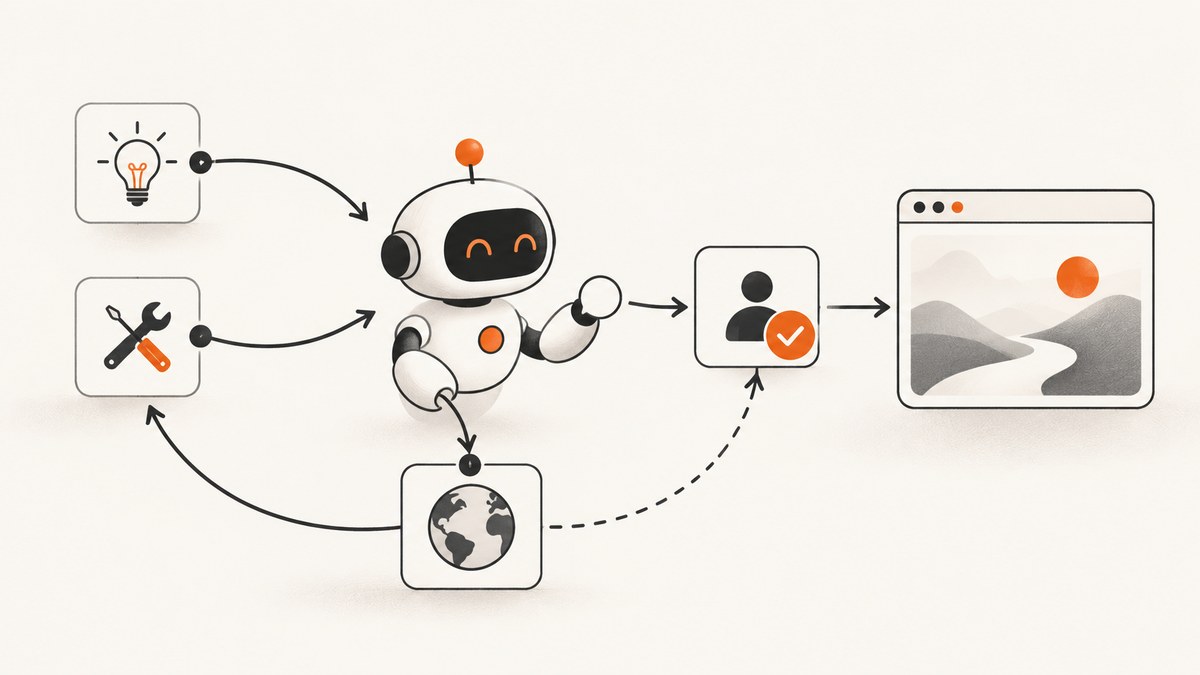
What is an AI agent? An AI agent is software that pursues a goal with some autonomy. It uses a model to interpret instructions and choose steps, tools to observe or change an environment, and feedback from those tools to decide what to do next. Autonomy is a spectrum: an agent may be allowed to suggest one action, run a bounded workflow, or operate repeatedly until a stop condition. The label does not promise open-ended independence, correctness, or safe action without supervision.
A useful mental model is a loop: interpret the goal → choose an action → call a tool → observe the result → continue, ask, or stop. OpenAI describes the basic building blocks as a model, tools, and instructions; memory, orchestration, output schemas, and approval systems can be added around them. OpenAI’s practical guide, Anthropic’s engineering guide, and Google Cloud’s definition describe the same broad pattern while noting that no single definition is universal.
How do AI agents work?
An agent starts with a desired outcome and a set of instructions. The model turns that request into a next step, selects a permitted tool, and receives an observation. The observation may be a search result, a file, an API response, a screenshot, or an error. The model then updates its plan. It can call another tool, request missing information, ask for approval, or finish.
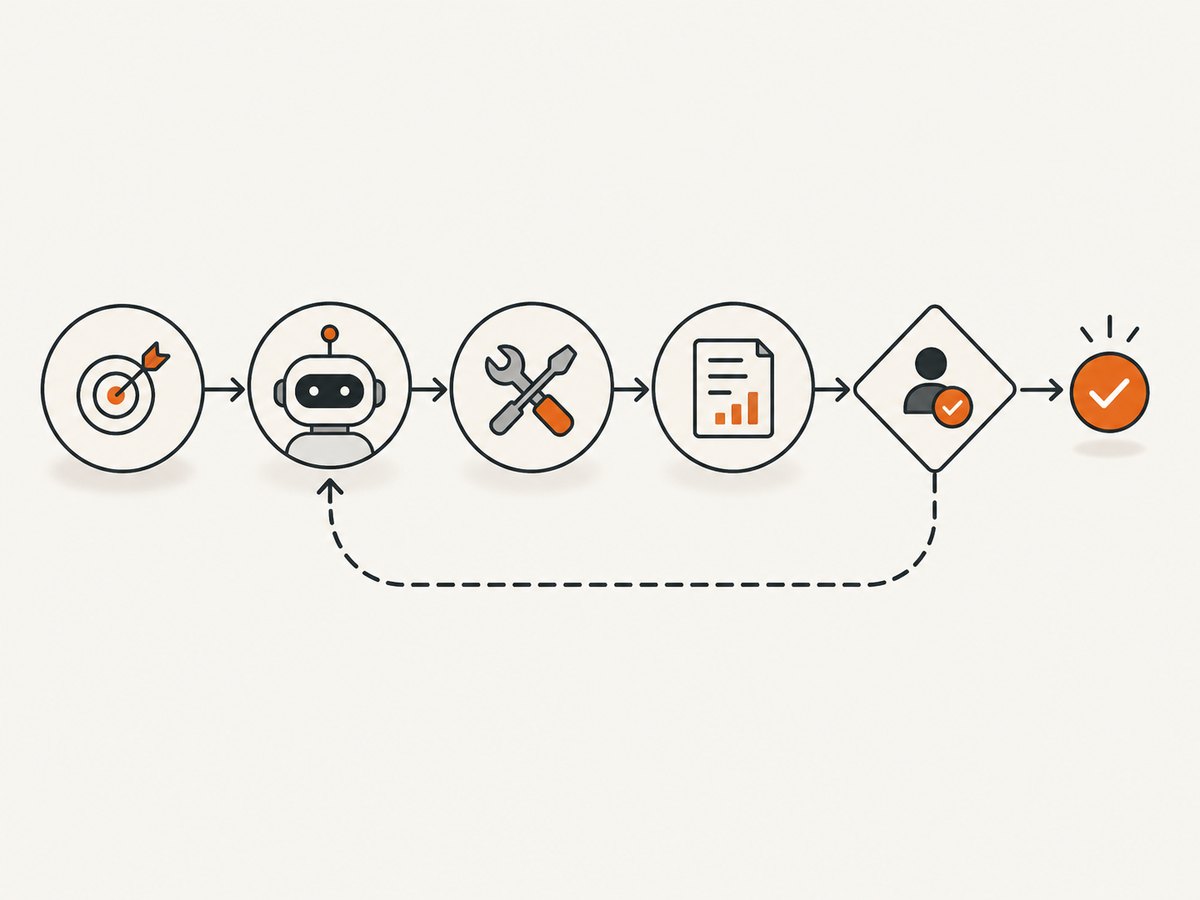
- Goal and instructions: State the outcome, constraints, format, and boundaries. “Find three broken checkout links and open tickets” is more actionable than “inspect the site.”
- Reasoning and planning: The model identifies useful intermediate steps. Some tasks need a short sequence; others require repeated investigation. Do not assume every agent uses a sophisticated planner.
- Tool selection: A data tool reads information, such as a database query or web search. An action tool changes state, such as updating a record or sending a message. An orchestration tool can delegate to another agent.
- Action: The agent sends a structured tool call with arguments. Your runtime validates those arguments and enforces permissions before execution.
- Observation: The tool returns a result or an error. This feedback is the environment’s evidence; it lets the agent check whether the step worked.
- Continue, ask, or stop: The agent repeats the loop, pauses at a checkpoint, asks a person for a decision, or terminates after completion or a configured limit.
Anthropic summarizes this pattern as LLMs using tools based on environmental feedback in a loop. The loop is what lets an agent adapt when a page is unavailable, a search returns no result, or an API reports a conflict.
AI agent versus chatbot, assistant, and script
These labels overlap. Compare a system by what it can do and how much control it has, rather than by the product name.
| System | Typical behavior | Key question |
|---|---|---|
| Chatbot | Generates a response to a message, often without external actions. | Does it only return text? |
| Assistant | May answer, recommend, retrieve information, or take selected actions for a user. | Who makes the final decision? |
| Fixed script | Runs predetermined steps and branches written by a developer. | Can it choose a new step from feedback? |
| AI agent | Chooses intermediate actions with a model, uses tools, observes results, and continues within limits. | What autonomy and permissions were granted? |
A chatbot can become agentic when it gains tools and permission to act. A workflow can use an LLM for classification or text generation and still remain a fixed workflow. Useful comparison axes are action capability, autonomy, feedback, scope, permissions, oversight, interruption, and recoverability.
Core architecture and a minimal implementation
Start with one focused agent. Split into specialist agents only when a specialist needs different tools, instructions, model behavior, output style, or approval policy. Anthropic’s guidance describes prompt chaining for cleanly separated subtasks and routing for requests that need different processes. Multi-agent coordination adds handoffs and failure modes; it is not automatically better.
The following Python example shows the control flow. The model call and tools are deliberately represented as functions so you can connect your chosen SDK. The loop has a maximum number of iterations and an approval gate before a state-changing action.
from dataclasses import dataclass
from typing import Any

@dataclass
class Decision:
    kind: str                 # "tool", "finish", or "ask"
    name: str | None = None
    arguments: dict[str, Any] | None = None
    message: str | None = None


def read_issue(issue_id: str) -> dict[str, Any]:
    # Replace with a read-only API call.
    return {"id": issue_id, "status": "open", "title": "Broken checkout link"}


def close_issue(issue_id: str) -> dict[str, Any]:
    # Replace with a state-changing API call.
    return {"id": issue_id, "status": "closed"}


def decide(goal: str, history: list[dict[str, Any]]) -> Decision:
    """Call your model here with the goal, tool schemas, and history."""
    raise NotImplementedError


def run_agent(goal: str, max_steps: int = 8) -> str:
    history: list[dict[str, Any]] = []
    tools = {"read_issue": read_issue, "close_issue": close_issue}

    for step in range(max_steps):
        decision = decide(goal, history)
        if decision.kind == "finish":
            return decision.message or "Done"
        if decision.kind == "ask":
            return f"Approval or information required: {decision.message}"
        if decision.kind != "tool" or decision.name not in tools:
            return "Stopped: invalid tool decision"

        if decision.name == "close_issue":
            approved = input("Close the issue? [y/N] ").lower() == "y"
            if not approved:
                return "Stopped by human approval gate"

        try:
            result = tools[decision.name](**(decision.arguments or {}))
            history.append({"tool": decision.name, "result": result})
        except Exception as exc:
            history.append({"tool": decision.name, "error": str(exc)})

    return "Stopped: maximum steps reached"
In production, define JSON schemas for every tool, validate arguments, authenticate each call, redact secrets from logs, and return structured errors. Keep read and write tools separate so you can apply stricter approval rules to writes.
Tools, permissions, memory, and state
Tool access determines an agent’s practical authority. A search tool can expose private data; a write tool can create financial, legal, or reputational consequences. Grant the smallest set of tools and scopes needed for the task. Use separate credentials for development and production, short-lived tokens where possible, and explicit allowlists for destinations.
Memory can mean a conversation window, durable user preferences, a task database, or retrieved documents. Define retention and deletion behavior. Store facts with provenance so the agent can distinguish a current observation from an old note. If a task spans many steps, persist a state record containing the goal, completed actions, pending actions, and approval decisions.
Checkpoints make progress visible and recoverable. Show the proposed action, arguments, affected records, and expected consequence before execution. Let a person interrupt, redirect, or undo actions when the underlying system supports it. Set maximum iterations, timeouts, spend limits, and queue limits so a model cannot loop indefinitely.
Using screenshots as an agent tool
Browser observation is a practical example: an agent can capture a page, inspect the result, and decide whether to follow a link or report a visual defect. A do-it-yourself implementation uses a browser automation library such as Playwright. The sequence is:
- Launch a browser with a fixed timeout.
- Navigate to an allowlisted URL.
- Wait for the page state or a selector that proves the content is ready.
- Capture the viewport or full page.
- Return the image path and metadata to the agent.
import asyncio
from playwright.async_api import async_playwright

async def capture(url: str, path: str = "shot.png") -> str:
    async with async_playwright() as p:
        browser = await p.chromium.launch()
        page = await browser.new_page(viewport={"width": 1440, "height": 900}, device_scale_factor=1)
        try:
            await page.goto(url, wait_until="networkidle", timeout=45_000)
            await page.screenshot(path=path, full_page=True)
            return path
        finally:
            await browser.close()

if __name__ == "__main__":
    print(asyncio.run(capture("https://example.com")))
Browser automation requires managing Chromium versions, sandboxing, cookies, consent dialogs, popups, lazy-loaded content, bot checks, failed requests, and concurrency. Treat every URL as untrusted input: block internal network ranges, restrict protocols to HTTPS, cap response sizes, and isolate browser processes.
Or skip the browser setup
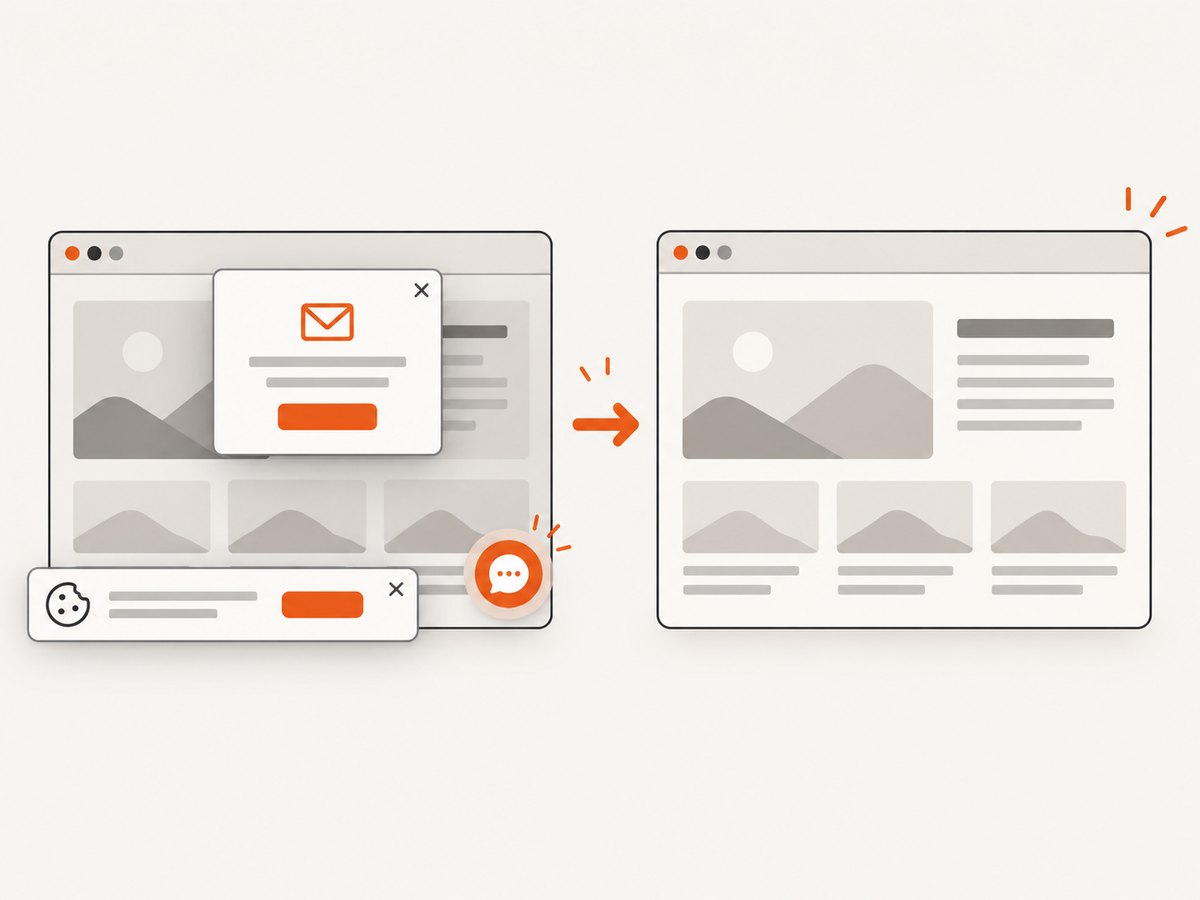
ScreenshotNeo gives an agent a single HTTP tool for screenshots and PDFs. Cookie and consent banners are accepted and 60+ known consent platforms, newsletter popups, and chat widgets are removed before capture; each step can be turned off. Bot checks, blank pages, timeouts, failed loads, and cache hits are not billed, and response headers identify the page verdict and whether it was billed. An MCP server provides take_screenshot, get_page_info, and capture_pdf for Claude, Cursor, and other MCP clients.
See the ScreenshotNeo API documentation for all options. A minimal call is:
curl -G "https://api.screenshotneo.com/v1/shot" -d access_key=YOUR_API_KEY --data-urlencode url=https://stripe.com -o shot.webpimport requests
r = requests.get("https://api.screenshotneo.com/v1/shot", params={"access_key": "YOUR_API_KEY", "url": "https://stripe.com"}, timeout=90)
open("shot.webp", "wb").write(r.content)const q = new URLSearchParams({ access_key: 'YOUR_API_KEY', url: 'https://stripe.com' });
const res = await fetch(`https://api.screenshotneo.com/v1/shot?${q}`);Options cover full-page capture with lazy images loaded, CSS element capture, dark mode, 12 device presets or any viewport, retina scale, PDF paper size and margins, page ranges and landscape mode, custom CSS and JavaScript, clicks, selector waits, delays, network idle, ad and tracker blocking, request and resource-type blocking, headers, cookies, user agents, Authorization, timezone, geolocation, transparent backgrounds, resizing, selectable cache TTLs, signed links, asynchronous jobs with signed webhooks, bulk capture of up to 100 URLs per call, a usage API, and an OpenAPI specification. Common parameter names used by other screenshot APIs also work, which helps when switching.
The Free plan includes 1,000 shots per month with no card. Paid plans start at $5 for 3,000 shots; Growth is $15 for 15,000, Pro $39 for 60,000, Scale $99 for 250,000, and Business $249 for 1,000,000. Yearly billing gives two months free, and every feature is on every plan. Start with 1,000 free screenshots a month and no card.
Safety controls for autonomous agents
More autonomy increases the chance that a plausible interpretation exceeds the user’s intent. Anthropic calls balancing autonomy with human oversight a central tension in agent design. Apply these controls:
- Least privilege: Give each agent only the tools, records, and operations it needs.
- Approval gates: Require confirmation for purchases, deletion, account changes, external messages, or other high-impact actions.
- Visible plans: Show the goal, current step, tool arguments, and result so a person can spot a wrong direction.
- Bounded execution: Set iteration, time, token, monetary, and concurrency limits.
- Validation: Check tool arguments, destination URLs, file paths, and returned data before acting on them.
- Isolation: Run untrusted browsing and code execution in a sandbox with restricted network access.
- Recovery: Make writes idempotent where possible, record an audit trail, and provide retries or rollback.
Troubleshooting common agent failures
| Symptom | Likely cause | Fix |
|---|---|---|
| Repeats the same tool call | No progress signal or stop condition. | Return structured results, detect duplicate calls, and enforce a step limit. |
| Uses the wrong tool | Overlapping descriptions or vague instructions. | Give each tool a narrow name, schema, examples, and explicit selection rules. |
| Invents a successful result | The runtime lets the model continue after an unverified action. | Only append observations from the tool executor; represent errors explicitly. |
| Acts beyond user intent | Permissions exceed the task or no approval checkpoint exists. | Separate read and write credentials and gate consequential operations. |
| Times out on web pages | Slow resources, bot checks, or an unbounded wait. | Use bounded navigation and selector waits, retry transient failures, and return a clear timeout state. |
| Screenshot contains a popup | Consent, newsletter, or chat overlay remained visible. | Dismiss or remove it before capture, or use ScreenshotNeo’s cleanup options. |
| Costs grow unexpectedly | Long loops, repeated tool calls, or uncached reads. | Set budgets, cache safe observations, batch work, and measure per-task usage. |
Performance, reliability, and cost
Every loop step adds model latency and tool latency. Reduce unnecessary iterations by returning compact, structured observations and by letting deterministic code handle parsing, filtering, and validation. Establish a capable-model baseline for a representative workflow, then evaluate whether a smaller or faster model meets the same acceptance criteria; this is vendor guidance, not a universal benchmark.
Reliability is workflow-specific. Evaluate with the actual prompts, tools, permissions, data freshness, and failure modes you will deploy. Track completion, invalid tool calls, approval rate, retries, latency, and cost. Include adversarial cases: ambiguous requests, missing data, malformed tool output, permission denial, duplicate events, and partial outages. No general agent success rate applies responsibly across all tasks.
For ScreenshotNeo, cache with a TTL when a page can be reused, use bulk capture for up to 100 URLs, and prefer asynchronous jobs with signed webhooks for long or high-volume work. Inspect X-Page-Verdict and X-Billed so your agent can distinguish a clean billed capture from a failed or non-billed response.
FAQ
Are AI agents fully autonomous?
No. Autonomy depends on the tools, permissions, limits, and approval rules configured by the developer. Many useful agents pause for human judgment.
Does an agent need multiple AI models?
No. A single focused agent is usually the simplest starting point. Add specialists when their tools, instructions, output style, or approval policy genuinely differ.
Is tool use enough to make a chatbot an agent?
Tool use makes action possible, but an agent also chooses intermediate steps and uses feedback to adapt. A button that always runs one fixed function is closer to a scripted workflow.
How should I test an agent?
Define acceptance tests for the complete workflow, including tool behavior and permissions. Test normal, ambiguous, malicious, and failed-tool cases, then review traces and costs.
Can an AI agent take screenshots?
Yes. Give it a browser capture function or an HTTP screenshot tool, return the image and metadata, and let the agent decide whether another observation is needed. ScreenshotNeo provides HTTP and MCP tools for this pattern.


