AI Web Scrapers: How They Work and When to Use Them
Learn how AI web scrapers fetch, interpret, validate, and store data—and when browser automation or a conventional parser is the better choice.

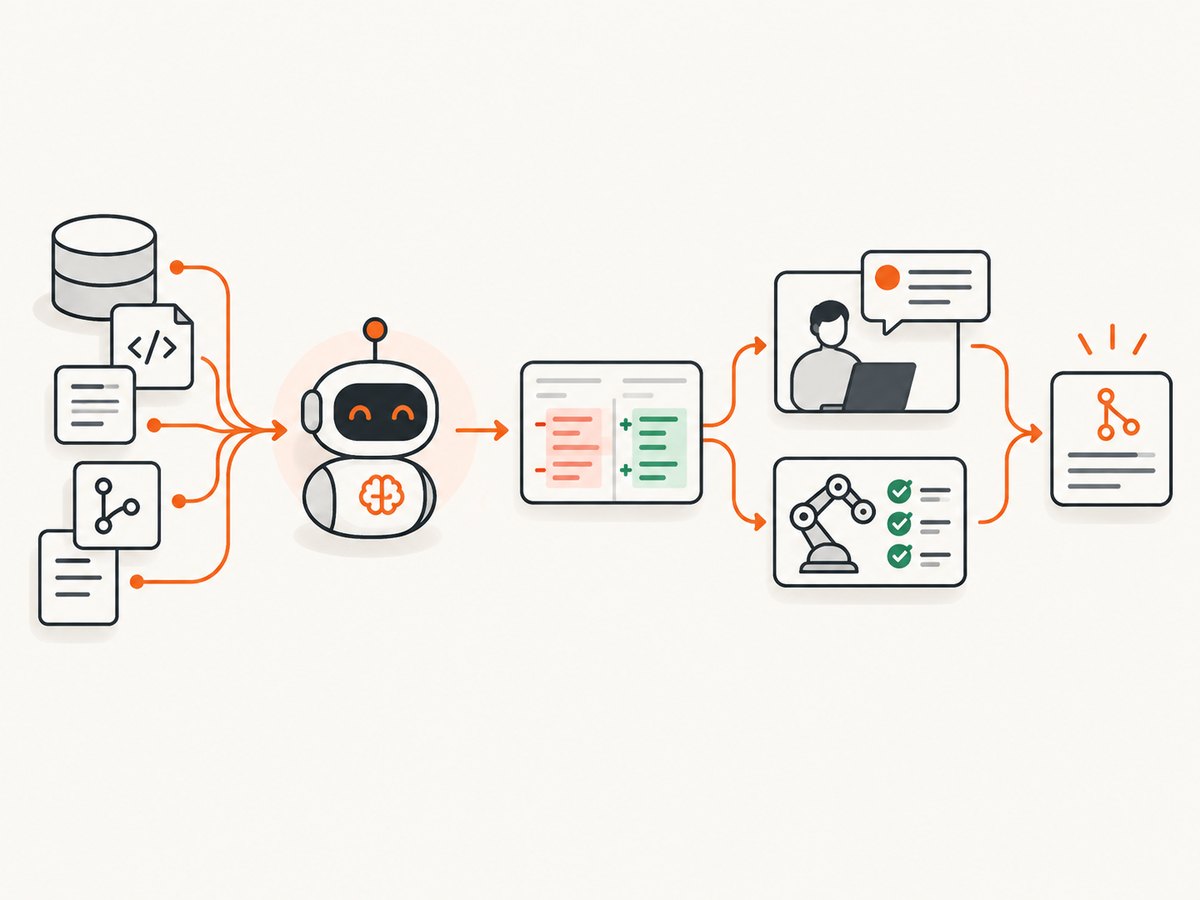
Direct answer: An AI web scraper combines normal web retrieval with model-assisted interpretation. It fetches HTML, API responses, or a rendered browser page; identifies the fields you describe; converts irregular content into a schema; validates the result; and sends records to storage or another agent. The AI layer is useful when page layouts vary, instructions are easier to express in plain language than selectors, or JavaScript and interaction are required. A conventional parser or a public API is usually better when the schema is stable, throughput is high, deterministic repeatability matters, or cost must be minimized.
This guide explains the architecture, shows a practical Python implementation, compares browser and HTTP retrieval, covers legal and operational safeguards, and explains when a managed screenshot or capture service such as ScreenshotNeo fits into an extraction workflow.
What is an AI web scraper?
A traditional scraper follows code-defined rules: select article h2, read an attribute, convert the string, and save it. An AI scraper still needs reliable retrieval and validation, but a model helps interpret the page. You can ask for “the product name, current price, availability, and shipping estimate,” then require a typed JSON response.
The AI does not make authorization disappear. You still need to review robots.txt, terms of service, authentication boundaries, privacy obligations, copyright, rate limits, and anti-bot controls. OpenAI’s crawler documentation says, “OpenAI crawlers respect these rules.” Treat robots.txt as an access signal and terms as a contractual constraint; technically reachable data is not automatically authorized.
How an AI scraper works
- Define the target. Write the URL scope, fields, types, required fields, freshness, and acceptable evidence.
- Choose retrieval. Use an HTTP client for server-rendered pages or APIs. Use a browser when JavaScript, clicks, scrolling, cookies, or login flows are required.
- Extract content. Remove navigation and unrelated controls, preserve headings and nearby labels, and retain the source URL and retrieval time.
- Interpret. Send the cleaned content to a model with a strict schema and instructions to return null when a field is absent.
- Validate. Check types, ranges, required fields, dates, currencies, and relationships. Reject or quarantine records that fail.
- Deduplicate and store. Use a stable key such as canonical URL plus product ID. Store raw evidence or a content hash alongside normalized values.
- Monitor drift. Track missing-field rates, selector failures, schema changes, latency, status codes, and model confidence. Route consequential records to human review.
Browser automation is justified when content is created after load, a control must be clicked, or the page requires a real viewport. OpenAI describes the capability succinctly: “Computer use lets a model operate browser and desktop interfaces.” That capability is useful for interaction, but it also introduces latency, resource usage, and additional failure modes.
HTTP retrieval versus browser retrieval
| Situation | Prefer | Reason |
|---|---|---|
| Stable HTML or a documented API | HTTP client | Fast, inexpensive, deterministic, and easy to scale |
| JavaScript-only content | Headless browser | Executes the scripts that populate the page |
| Click, scroll, consent, or hover required | Browser | Can reproduce the interaction sequence |
| Thousands of records with a fixed schema | Parser or API | Lower model and infrastructure cost |
| Different layouts and natural-language field requests | AI-assisted extraction | Reduces hand-written selector maintenance |
A runnable Python scraper with deterministic validation
The following example uses HTTP retrieval and BeautifulSoup, then leaves a clearly defined function where your approved model client can interpret the cleaned text. Keeping retrieval, interpretation, and validation separate lets you replace the model without rewriting networking code.
python -m pip install requests beautifulsoup4
import json
import re
from datetime import datetime, timezone
from urllib.parse import urljoin

import requests
from bs4 import BeautifulSoup

URL = "https://example.com/products/widget"
HEADERS = {"User-Agent": "ResearchBot/1.0 (contact: data@example.com)"}


def fetch(url: str) -> tuple[str, str]:
    response = requests.get(url, headers=HEADERS, timeout=30)
    response.raise_for_status()
    return response.url, response.text


def clean_html(final_url: str, html: str) -> str:
    soup = BeautifulSoup(html, "html.parser")
    for node in soup(["script", "style", "noscript", "svg", "nav", "footer"]):
        node.decompose()
    text = " ".join(soup.get_text(" ").split())
    return f"SOURCE_URL: {final_url}\nCONTENT: {text[:120000]}"


def extract_with_approved_model(context: str) -> dict:
    # Send `context` to your approved model endpoint with a strict JSON schema.
    # The model must return null for missing values and include evidence snippets.
    raise NotImplementedError("Connect your model client here")


def validate(record: dict) -> dict:
    required = ("name", "price", "currency", "availability")
    missing = [key for key in required if not record.get(key)]
    if missing:
        raise ValueError(f"Missing required fields: {missing}")
    if not isinstance(record["price"], (int, float)) or record["price"] < 0:
        raise ValueError("price must be a non-negative number")
    if not re.fullmatch(r"[A-Z]{3}", record["currency"]):
        raise ValueError("currency must be an ISO-style three-letter code")
    return record


if __name__ == "__main__":
    final_url, html = fetch(URL)
    context = clean_html(final_url, html)
    record = extract_with_approved_model(context)
    record["source_url"] = final_url
    record["retrieved_at"] = datetime.now(timezone.utc).isoformat()
    print(json.dumps(validate(record), indent=2))
In production, make the model prompt explicit: name every field, define units and null behavior, require evidence for each value, and forbid guessing. Limit the input to relevant content, but keep enough surrounding text to resolve labels such as “from” or “per month.”
Rendering JavaScript-heavy pages with Playwright
When an HTTP response lacks the data, render the page in an isolated browser. Wait for a meaningful condition, not an arbitrary long sleep whenever possible.
python -m pip install playwright beautifulsoup4
playwright install chromium
from playwright.sync_api import sync_playwright

url = "https://example.com/catalog"
with sync_playwright() as p:
    browser = p.chromium.launch(headless=True)
    page = browser.new_page(viewport={"width": 1440, "height": 900})
    page.goto(url, wait_until="domcontentloaded", timeout=60000)
    page.wait_for_selector("main", timeout=30000)
    page.locator("button.load-more").click(timeout=5000)
    page.wait_for_timeout(1000)
    rendered_html = page.locator("main").inner_html()
    browser.close()
Use a selector wait when possible. Network-idle waits can hang on analytics or streaming connections. For infinite scrolling, cap the number of scrolls and stop when the item count stops increasing. Save a screenshot or HTML snapshot for failed runs so a human can diagnose layout drift.
Designing the extraction prompt and schema
A robust request contains four parts:
- Role: “Extract only facts present in the supplied page.”
- Schema: names, types, enums, nullable fields, and array limits.
- Evidence: require a short source span or CSS/XPath reference for each non-null field.
- Failure behavior: return a validation error when evidence is absent; never infer prices, dates, or identities.
Keep model output versioned. If you change a field name or interpretation rule, record the schema version with every row. For high-value data, run deterministic checks after the model: parse currency with a decimal type, normalize dates to UTC, reject impossible ranges, and compare critical values with a regular expression or a second source.
Or skip the browser setup
If your workflow needs a clean visual capture, a rendered artifact for an agent, or a reliable way to inspect a page before extraction, ScreenshotNeo’s screenshot API returns a PNG, JPEG, WebP, or PDF from one GET request. It can load lazy images, capture a CSS-selected element, set a device or viewport, run custom CSS and JavaScript, click before capture, wait for a selector, delay, or network idle, block ads or resource types, provide headers, cookies, a user agent, timezone, geolocation, and use caching, signed links, async jobs, webhooks, bulk capture, and a usage API.

curl -G "https://api.screenshotneo.com/v1/shot" -d access_key=YOUR_API_KEY --data-urlencode url=https://stripe.com -o shot.webp
import requests
r = requests.get("https://api.screenshotneo.com/v1/shot", params={"access_key": "YOUR_API_KEY", "url": "https://stripe.com"}, timeout=90)
open("shot.webp", "wb").write(r.content)
const q = new URLSearchParams({ access_key: 'YOUR_API_KEY', url: 'https://stripe.com' }); const res = await fetch(`https://api.screenshotneo.com/v1/shot?${q}`);
Cookie banners, newsletter popups, and chat widgets are removed before the shot, with each step configurable. Bot checks, blank pages, timeouts, failed loads, and cache hits cost nothing; response headers identify the page verdict and whether the request was billed. An MCP server provides take_screenshot, get_page_info, and capture_pdf tools to Claude, Cursor, and other MCP clients. The free plan includes 1,000 screenshots per month with no card; paid plans start at $5 for 3,000. Create a free ScreenshotNeo account.
Legal, privacy, and access safeguards
- Check
robots.txt, terms, licensing, and the intended use of the data. - Do not bypass CAPTCHAs, WAF challenges, authentication, paywalls, or geo restrictions.
- Collect the minimum personal data, define retention, and protect credentials and cookies.
- Honor published rate limits. Use a clear user agent and contact address.
- Keep provenance: URL, timestamp, retrieval method, evidence, and transformation version.
OpenAI’s guidance identifies WAFs, CDNs, JavaScript challenges, CAPTCHAs, authentication, and geographic rules as common blockers. A scraper should fail closed when access is denied rather than escalating into evasion.
Troubleshooting common failures
| Symptom | Likely cause | Fix |
|---|---|---|
| HTML contains no records | Content is rendered by JavaScript | Use the documented API or a browser; wait for a data selector |
| Frequent 429 responses | Rate limit exceeded | Lower concurrency, honor Retry-After, and use exponential backoff |
| CAPTCHA or challenge page | Automated access is blocked | Stop, seek permission or an API, and never bypass the control |
| Fields suddenly become null | Layout or schema drift | Save raw input, alert on missing-field rate, and update extraction rules |
| Duplicate records | Pagination or retries replayed items | Deduplicate on a stable source key and make writes idempotent |
| Wrong model values | Ambiguous labels or hallucination | Require evidence, return null when absent, and apply field-level validation |
| Browser timeout | Long scripts, blocked assets, or never-ending connections | Set navigation and selector timeouts, block unnecessary resources, and capture diagnostics |
Performance, reliability, and cost
Start with the cheapest retrieval that meets the requirement. HTTP parsing normally uses fewer resources than a browser; model calls add latency and token cost; browser sessions add startup and memory overhead. Reuse browser contexts, limit concurrency to what the target permits, cache immutable pages, and send only relevant text to the model. Use bounded retries with jitter for transient network errors, but do not retry authorization failures or deterministic validation errors.
Measure fetch latency, render latency, model latency, bytes downloaded, token usage, extraction completeness, validation failures, and duplicate rate. Set a per-domain budget and a maximum page size. For important fields, retain raw evidence and implement a deterministic fallback. A human review queue is appropriate when an incorrect record could affect money, safety, compliance, or a customer decision.
When should you use an AI scraper?
- Use one for changing layouts, semi-structured pages, natural-language field definitions, or browser-only interaction.
- Use a conventional parser for a stable schema and predictable HTML.
- Use a public API when it supplies the required fields under clear terms and limits.
- Use a managed service when browser infrastructure, retries, rendering, and operations would distract from your product.
- Use a self-hosted stack when you need maximum control over networking, data residency, or specialized parsing and can operate it.
FAQ
Can an AI scraper read JavaScript-heavy sites?
Yes, when it uses a real browser or an official rendered endpoint. An HTTP request alone may receive only an application shell.
Is AI scraping automatically more accurate?
No. It can adapt to varied layouts, but models can misclassify or invent values. Evidence requirements and deterministic validation remain necessary.
Should I send an entire page to a model?
Usually no. Remove scripts and irrelevant navigation, cap input size, and preserve the labels and context needed to interpret each field.
What is the safest response to a CAPTCHA?
Stop automated collection and obtain permission or use an authorized API. Do not attempt to defeat the challenge.
How do I know whether a page changed?
Store a content hash or snapshot, monitor field-level completeness, and alert when selectors, headings, or value distributions change.
For deeper Python coverage, including browser automation, APIs, proxies, legalities, and ethics, see Web Scraping with Python, 3rd Edition (O’Reilly Media, 2024).