Best Practices for Scaling Web Scraping
Scale a crawler with queues, per-domain limits, bounded retries, and clear data controls. Learn how to monitor load and choose between workers and managed services.
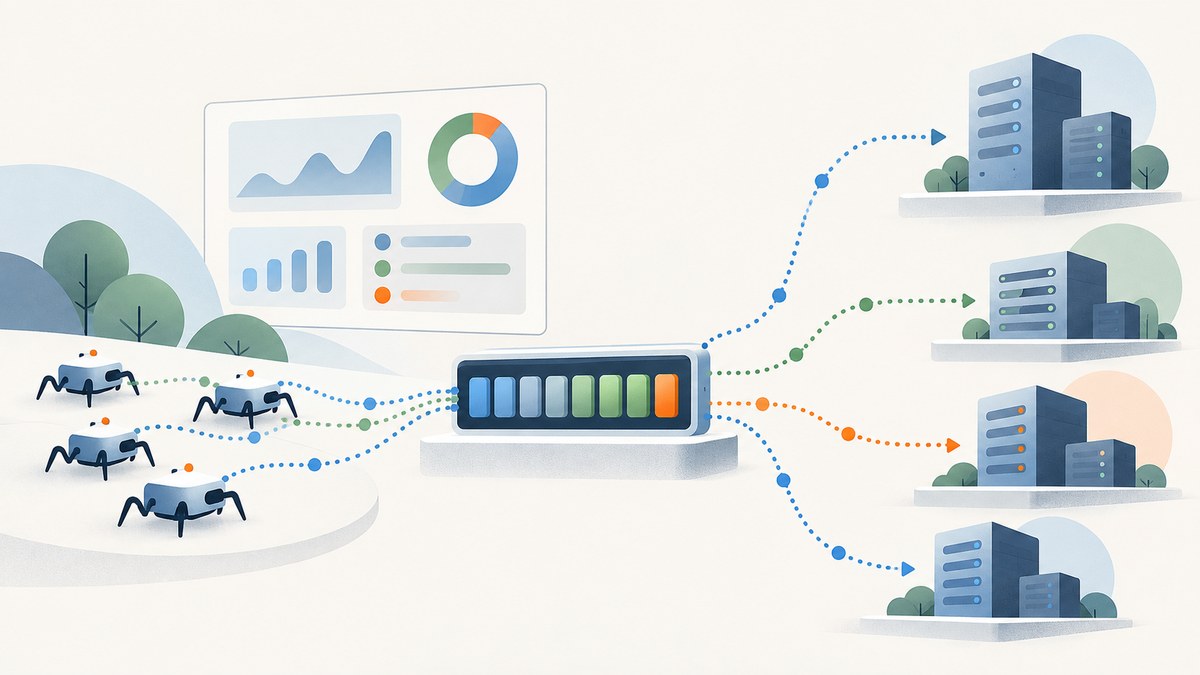
To scale web scraping reliably, put work in a durable queue, control request rates globally and per domain, and increase concurrency gradually while monitoring latency, 429 and 503 responses, ban pages, and retries. Prefer an official API, export, sitemap, or search endpoint when one exists. Treat blocks as feedback: back off on 429, investigate persistent 403 responses, and do not try to evade access restrictions.
More workers do not automatically mean more useful data. A target site’s tolerated rate, the need to render JavaScript, data quality, and privacy obligations set the practical limits. This guide covers an operating pattern, runnable Scrapy configuration, a queue-worker example, error handling, deployment choices, cost and performance tradeoffs, and troubleshooting.
1. Set scope and choose the access path
Before adding workers, decide what you need to collect and how often. Record the target sites, purpose, required fields, geography, freshness requirement, and exclusion rules. Then inspect each site’s robots.txt, terms, sitemap, and published API or export documentation.
Use the least disruptive documented source that meets the need. An API, bulk export, or search endpoint is usually more efficient than repeatedly crawling pages. A sitemap can focus discovery on URLs the site owner has identified as important. If a crawl-rate directive is present, translate it into a delay and concurrency policy; Scrapy does not enforce robots.txt crawl-rate directives automatically. See Scrapy’s deployment practices and settings reference.
| Question | Decision to record |
|---|---|
| What is the purpose? | Business or research purpose and fields required to meet it |
| How fresh must results be? | Refresh interval and acceptable age before a page is fetched again |
| Which URLs are in scope? | Domains, paths, sitemap sources, and exclusions |
| What access rules apply? | Published API terms, site terms, robots directives, and any explicit restrictions |
| What happens to personal data? | Lawful basis, minimisation, retention period, deletion and exclusion process |
Identify the crawler with a descriptive user agent and contact details where appropriate. Respect published crawl rates and stated terms. Avoid bypassing explicit restrictions such as access controls or CAPTCHAs. Lower-load periods can reduce impact where timing is flexible.
2. Design a queue-backed pipeline
Separate discovery, scheduling, fetching, parsing, and storage. Put URLs or work items in a durable queue; workers claim bounded batches, process them, and record completion or a retry decision. This smooths bursts and makes work resumable after worker failures. AWS recommends using queues such as SQS to regulate request rates, setting maximum consumer concurrency, and batching work rather than issuing an entire URL set at once. See AWS web-crawling guidance.
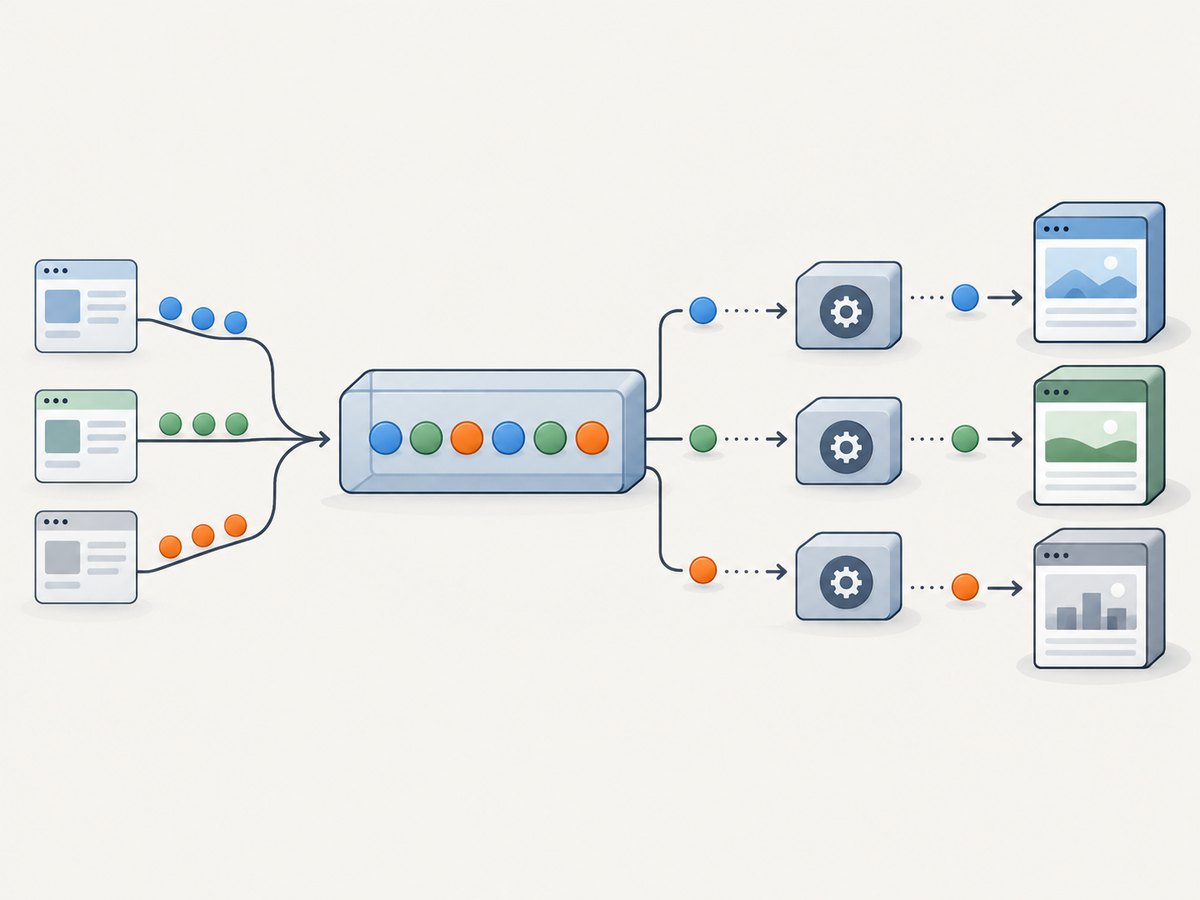
- Discover: seed from documented endpoints, sitemaps, or approved URL lists.
- Normalize and deduplicate: canonicalize URLs consistently and store a uniqueness key so repeated discoveries do not create duplicate work.
- Queue: store the URL, domain, crawl policy, priority, attempt count, and enqueue time.
- Claim bounded batches: workers reserve a small batch with a visibility timeout or lease so crashed workers do not hold work forever.
- Fetch and validate: enforce rate limits before requests; record status, timestamps, and parser outcome.
- Complete or reschedule: acknowledge successful work; place retryable work back in the queue with a delay, and route exhausted or persistent failures to a review queue.
Partition the URL space across workers by stable keys such as domain or a hash of normalized URL. Do not let partitioning bypass per-domain limits: all workers fetching one domain need a shared limiter, a single scheduler for that domain, or a partition assignment that guarantees the cap. Use separate controls for overall throughput, per-domain concurrency, and, if relevant, per-IP request rate.
3. Set concurrency and rate limits explicitly
Start conservatively. Increase concurrency in small increments, and hold each setting long enough to observe latency and status patterns. Watch response-status counters, retry counts, ban pages, and download latency. If latency rises or 429, 503, or ban pages appear, reduce the rate and investigate. There is no universal safe requests-per-second number: target policy and observed responses determine the appropriate setting.
Scrapy exposes global concurrency, per-domain concurrency, and download delay. For example, this settings fragment starts with a small per-domain load. Values are illustrative starting settings, not a promise that a particular site tolerates them:
# settings.py
ROBOTSTXT_OBEY = True
USER_AGENT = "ExampleResearchBot (+https://example.org/crawler-info)"
CONCURRENT_REQUESTS = 8
CONCURRENT_REQUESTS_PER_DOMAIN = 2
DOWNLOAD_DELAY = 1.0
RANDOMIZE_DOWNLOAD_DELAY = True
RETRY_ENABLED = True
RETRY_TIMES = 2
AUTOTHROTTLE_ENABLED = True
AUTOTHROTTLE_START_DELAY = 1.0
AUTOTHROTTLE_MAX_DELAY = 30.0
AUTOTHROTTLE_TARGET_CONCURRENCY = 1.0
Set the user-agent URL and contact information to a real information page that your organization controls. Scrapy’s AutoThrottle adjusts delays based on observed download latency, but it does not replace explicit policy, status monitoring, or a per-domain concurrency cap. Review AutoThrottle documentation before enabling it. Do not copy these sample numbers to a site whose published rules require slower access.
A useful control loop is: begin with a low cap; monitor status, latency, and queue age; raise one limit slightly; observe; then keep, lower, or revert. Use a circuit breaker to pause a domain temporarily after repeated overload signals, rather than allowing every worker to retry at once.
4. Make retries bounded and backoff-aware
Errors are operating signals, not just transient noise. A 429 means the current request rate is too high under the applicable policy: honor any published retry delay, pause or back off, and reduce concurrency if the pattern continues. A 503 can indicate service overload; use a bounded delayed retry. Repeated 403 responses require investigation or stopping, not more aggressive retries.
Use exponential backoff with jitter to avoid synchronized retries. For example, with a base delay of 2 seconds and a maximum of 60 seconds, attempts can wait approximately 2, 4, 8 seconds and so on, with a random offset, up to the cap. Limit attempts and send exhausted work to a dead-letter or review queue. Respect any server-provided Retry-After value when applicable.
import random

def retry_delay(attempt, base_seconds=2, max_seconds=60):
    """attempt starts at 0; add jitter to spread retries across workers."""
    ceiling = min(max_seconds, base_seconds * (2 ** attempt))
    return random.uniform(0, ceiling)

# Policy sketch:
# 429: honor Retry-After if present; pause the domain and lower its rate.
# 503 or network timeout: bounded delayed retry with jitter.
# persistent 403: stop that URL/domain and investigate the access policy.
# exhausted attempts: dead-letter for review; do not retry forever.
This helper illustrates delay calculation only; production code still needs to parse Retry-After, cap attempts, persist attempt state, and ensure a domain-level pause applies across workers. Without shared coordination, individual workers can each back off while collectively continuing to overload the target.
5. Keep results traceable and reusable
Store enough provenance to explain where each record came from and reproduce parsing decisions: source URL, retrieval timestamp, response status, content hash, parser version, and validation outcome. Validate required fields and types before publishing downstream. Track crawl completion separately from parse success; a successful HTTP response can still produce an unusable record after a site changes its markup.
Reuse cached responses if the freshness requirement allows. A cache reduces repeat requests and cost, but define invalidation and freshness rules explicitly. Use conditional requests when the source supports them. Keep raw response retention aligned with purpose and privacy requirements; do not retain more data than needed.
6. Choose static fetching, browsers, or a managed service
Static HTML and documented APIs are generally simpler and cheaper to operate than browser automation. Add a browser renderer only for pages that require client-side execution or a rendered view. Browser workers consume more memory and CPU, so use a separate queue and concurrency pool rather than allowing rendering tasks to consume all fetch capacity.
| Approach | Good fit | Tradeoffs to examine |
|---|---|---|
| Self-hosted workers | Custom parsing, direct infrastructure control, established operations team | You operate scheduling, global and per-domain limiting, retries, rendering, monitoring, and replay |
| Managed scraping API | Reducing infrastructure work or needing a managed rendering/proxy layer | Vendor dependency, request semantics, observability, cost predictability, data residency, retention, and contract review |
| Documented API or export | Structured data is offered by the site owner | Check access terms, quotas, pagination, freshness, and field coverage |
Scrapy’s practices documentation names Zyte API as a managed option. Crawlbase describes proxy rotation, rendering, and retries as a combined service. Treat vendor claims as product descriptions to verify against your requirements; compare control, observability, session behavior, failure semantics, cost, and data handling before choosing. A proxy layer does not grant permission to collect restricted content or make an excessive rate acceptable.
If the task is simply capturing a page as an image or PDF for visual review, a screenshot API can avoid operating browser workers. ScreenshotNeo is a website screenshot API and MCP server. Its one-call capture is useful for visual snapshots, not as a replacement for a crawler that extracts and validates structured datasets.
7. Privacy and compliance belong in the pipeline
Public visibility does not remove privacy obligations when pages contain personal data. Establish a lawful basis and defined purpose before collection. Minimize fields, filter or pseudonymize where possible, maintain exclusions, document retention and deletion, validate data before use, and provide transparency required by the applicable jurisdiction. Keep timestamps and source provenance so data can be reviewed or removed.
The ICO-led joint statement says publicly accessible personal information remains subject to privacy law and organizations scraping it remain responsible for compliance. CNIL advises respecting sites that oppose automated collection through robots.txt, CAPTCHAs, or terms. Read the EDPB guidance, the ICO-led joint statement, and CNIL’s scraping guidance. Requirements vary by jurisdiction and purpose; obtain qualified advice for a specific collection program.
8. Performance, reliability, and cost
Measure useful throughput, not just request count: validated records per hour, duplicate rate, parse success, queue age, latency percentiles, retry volume, and cost per accepted record. Separate metrics by domain and response class so a slow target does not hide inside a healthy global average.
- Queue capacity: size batches and worker concurrency to keep the queue moving without creating a burst at the target.
- Backpressure: stop fetching new work when downstream storage or parsing is saturated.
- Reliability: make jobs idempotent, persist checkpoints, use leases/visibility timeouts, and make retries safe to replay.
- Cost: include compute, queue operations, storage, bandwidth, browser runtime, proxy or managed-service charges, and engineering time.
- Freshness: crawl only as often as the use case requires; caching and incremental updates often cost less than full recrawls.
Compare self-hosted and managed options using throughput control, rendering needs, proxy/session management, queue and retry semantics, observability and replay, predictable cost, data residency and retention, and compliance accountability. A lower per-request price can be offset by browser runtime or operational effort; calculate cost against validated output, not raw attempts.
9. Troubleshooting common failures
| Symptom | Likely cause | Response |
|---|---|---|
| 429 responses rise | Request rate exceeds current allowance | Honor Retry-After, pause or slow the domain, lower concurrency, and resume gradually. |
| Persistent 403 | Access policy, permissions, or request scope issue | Stop repeated retries; review terms and access path, then contact the site owner or use a documented API. |
| 503 or latency spikes | Target overload, network issue, or too many concurrent workers | Apply a circuit breaker, reduce load, back off with jitter, and check whether the site recovers. |
| Queue age keeps growing | Discovery outpaces fetch capacity, or workers are stuck | Check worker health and downstream backpressure; narrow scope and add capacity only within domain limits. |
| Many duplicate records | URL normalization or deduplication keys are inconsistent | Normalize query parameters and fragments according to site semantics; enforce idempotency at storage. |
| HTTP succeeds, parsed data is empty | Markup changed, content is client-rendered, or parser selectors are stale | Inspect a permitted response, version the parser, validate required fields, and add a renderer only if needed. |
| Retry storm after worker restart | Retries are immediate or attempt state was not persisted | Persist attempts and scheduled delay, add jitter, cap retries, and coordinate pauses centrally. |
| Browser workers exhaust memory | Too many concurrent browser contexts or pages never close | Limit browser concurrency separately, close contexts reliably, and route static pages through lightweight fetchers. |
10. Or skip the browser setup
For a visual capture of a page, ScreenshotNeo accepts one GET request and returns an image or PDF. Its screenshot options include full-page capture, CSS selector capture, device and viewport settings, waiting, custom CSS or JavaScript, and PDF controls. See the ScreenshotNeo API documentation.

curl -G "https://api.screenshotneo.com/v1/shot" -d access_key=YOUR_API_KEY --data-urlencode url=https://stripe.com -o shot.webpimport requests
r = requests.get("https://api.screenshotneo.com/v1/shot", params={"access_key": "YOUR_API_KEY", "url": "https://stripe.com"}, timeout=90)
open("shot.webp", "wb").write(r.content)const q = new URLSearchParams({ access_key: 'YOUR_API_KEY', url: 'https://stripe.com' });
const res = await fetch(`https://api.screenshotneo.com/v1/shot?${q}`);
if (!res.ok) throw new Error(`Screenshot request failed: ${res.status}`);
await Bun.write('shot.webp', res);Cookie and consent banners, newsletter popups, and chat widgets are removed before the shot; each cleanup step can be turned off. Bot checks, blank pages, timeouts, failed loads, and cache hits are not billed, with response headers indicating the page verdict and billing status. An MCP server provides take_screenshot, get_page_info, and capture_pdf tools for AI agents. The free plan includes 1,000 screenshots per month with no card; paid plans start at $5 for 3,000. ScreenshotNeo is for captures; use a crawler pipeline when you need structured extraction across a URL set.
Sign up free for 1,000 screenshots a month, no card required.
11. Frequently asked questions
How many workers should I run?
There is no universal worker count. Cap requests per domain and raise the count only while latency, status patterns, and retry rates remain healthy and the site’s rules allow the load.
Should I use proxies to scale faster?
Use network routing only for a legitimate operational need, such as managing approved traffic across your own systems. Proxy rotation does not override site rules or justify bypassing access restrictions.
When should I use a browser?
Use browser rendering when the required content is produced client-side and is absent from an allowed static response or documented API. Keep browser concurrency separate because rendering costs more resources.
Can I scrape information that is publicly visible?
Public visibility alone does not settle whether collection or reuse is lawful. Purpose, jurisdiction, data type, access terms, and privacy obligations matter; define controls and obtain advice for the particular use.
What should I do when a site changes its HTML?
Use validation to detect schema drift, retain parser versions and source provenance, then update and replay only the affected work where permitted.


