Browser Agents for Automated Web Tasks
Understand browser-agent loops, automation choices, reliability limits, security safeguards, and practical deployment patterns for real web tasks.
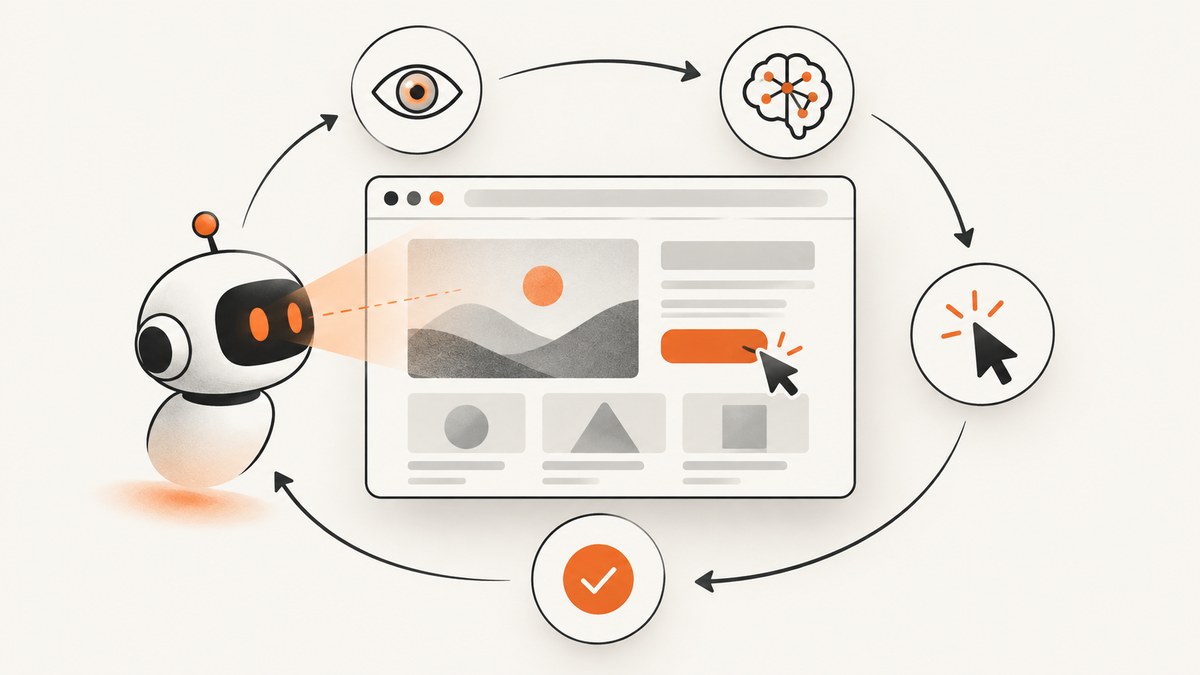
Short answer: A browser agent is a model plus an execution layer that repeatedly observes a web page, chooses an action, executes it, and observes the result again. It is useful when a task needs interpretation or recovery, but it is less predictable than a fixed script. Use deterministic automation for stable flows, an agent for variable flows, and human approval before actions with external consequences.
This guide explains the loop, control surfaces, implementation choices, reliability testing, security controls, and a practical deployment pattern. It also shows how to capture the resulting pages and states with ScreenshotNeo.
1. What is a browser agent?
A browser agent uses a model to pursue a goal through a browser or computer interface. The model receives a prompt and current state, reasons about the next step, and emits an action such as a click, scroll, key press, or browser-tool call. Your application executes that action and sends back a new observation. The cycle continues until the goal is complete, the agent requests help, or a safety rule stops it.
OpenAI describes its Computer-Using Agent (CUA) as a perception, reasoning, and action system operating on screenshots and virtual mouse and keyboard events. Google’s Computer Use documentation describes the same core pattern as a continuous client loop: send the current screen and prompt, receive a function call, check whether it is allowed, execute it, capture the new screen, and repeat. OpenAI’s CUA overview and Google’s Computer Use documentation provide the reference architectures.
The term covers several control surfaces:
- Screenshot and coordinate control: the model sees rendered pixels and acts with mouse and keyboard coordinates.
- Browser automation tools: the model calls Playwright, Selenium, or another tool that exposes selectors, navigation, DOM state, and input methods.
- Browser protocols: a service such as Chrome DevTools Protocol (CDP) can expose a live, JavaScript-rendered page for inspection and interaction. Cloudflare documents this approach in its Browser Run documentation.
These are implementation patterns, not interchangeable reliability guarantees. A screenshot action can work when a selector is unavailable, while a selector-based action is usually easier to validate and replay.
2. The observation/action loop
A production loop should make every state transition explicit. A useful sequence is:

- Define the goal and limits. State what success means, which domains are allowed, and which actions require approval.
- Open an isolated session. Start a fresh browser context or sandboxed VM with only the credentials and network access needed.
- Observe. Capture a screenshot and, when available, URL, title, DOM summary, focused element, and recent console or network errors.
- Plan one small action. Ask the model for a typed action such as
click,fill,scroll,navigate, ordone. - Check policy. Reject actions outside the domain allowlist, downloads, credential entry, purchases, messages, permission changes, or destructive operations unless a person approves them.
- Execute and verify. Run the action, wait for the expected state change, and collect a new observation.
- Terminate deliberately. Stop on success, a maximum step count, repeated failures, a safety trigger, or a request for human input.
Google summarizes this architecture as a continuous loop between the application and the API. A confirmation prompt is useful, but it does not replace validation: page content can contain misleading instructions, and a model can misunderstand a visually plausible state.
3. Agent versus ordinary browser automation
| Question | Deterministic script | Browser agent |
|---|---|---|
| How is the next step chosen? | Code specifies it in advance. | The model chooses from the observed state. |
| Best fit | Stable checkout, regression test, recurring export. | Variable layouts, legacy systems, interpretation-heavy tasks. |
| Failure mode | Selector or timing failure. | Wrong plan, hallucinated completion, or long-horizon drift. |
| Validation | Assertions and expected selectors. | Assertions plus model-state checks and independent outcome verification. |
| Cost profile | Browser runtime and engineering maintenance. | Browser runtime plus model calls, tokens, and retries. |
Do not assume an agent always outperforms a script. If the workflow is stable, a deterministic Playwright test is easier to review and reproduce. Add an agent where page state or the intended action genuinely varies, and keep deterministic checks around the agent.
4. A minimal Playwright agent loop
The following Python example shows the execution side. The decide function is deliberately a placeholder: connect it to your chosen model and return one JSON action at a time. The browser code remains responsible for policy checks and verification.
import json
from playwright.async_api import async_playwright

ALLOWED_HOSTS = {"example.com"}
MAX_STEPS = 20

async def decide(goal, observation):
    # Replace with your model call. Return one action object.
    # Example: {"type": "click", "selector": "button[type=submit]"}
    raise NotImplementedError

def allowed_url(url):
    return url.split("/")[2] in ALLOWED_HOSTS if "://" in url else False

async def run(goal):
    async with async_playwright() as p:
        browser = await p.chromium.launch(headless=True)
        context = await browser.new_context()
        page = await context.new_page()
        await page.goto("https://example.com", wait_until="domcontentloaded")

        for step in range(MAX_STEPS):
            observation = {
                "url": page.url,
                "title": await page.title(),
                "text": (await page.locator("body").inner_text())[:12000],
                "screenshot": await page.screenshot(type="png")
            }
            action = await decide(goal, observation)
            kind = action.get("type")

            if kind == "done":
                return {"status": "ok", "result": action.get("result")}
            if kind == "navigate":
                url = action["url"]
                if not allowed_url(url):
                    raise RuntimeError("navigation blocked by domain policy")
                await page.goto(url, wait_until="domcontentloaded")
            elif kind == "click":
                await page.locator(action["selector"]).click(timeout=5000)
            elif kind == "fill":
                await page.locator(action["selector"]).fill(action["value"])
            elif kind == "scroll":
                await page.mouse.wheel(0, action.get("pixels", 600))
            else:
                raise RuntimeError(f"unsupported action: {kind}")

            await page.wait_for_timeout(300)

        return {"status": "stopped", "reason": "step limit"}

# asyncio.run(run("Find the public pricing page and report the first plan name."))
For a real system, replace raw page text with a bounded, redacted observation; include accessibility roles or a DOM summary; and add assertions such as “URL changed to the expected path” or “success banner is visible.” Never put passwords, session cookies, or payment data into model prompts unless your threat model explicitly permits it.
5. Reliability: what benchmarks do and do not tell you
OpenAI reports 38.1% on OSWorld, 58.1% on WebArena, and 87.0% on WebVoyager for its CUA page. The same page reproduces human-performance figures of 72.4% on OSWorld and 78.2% on WebArena. These are vendor-reported results tied to named benchmarks, not a current success rate for every browser agent. OpenAI notes that WebVoyager tasks are generally simpler and that complex WebArena tasks remain difficult. See the benchmark descriptions and limitations.
Research on WebTestBench identifies incomplete test coverage, defect-detection bottlenecks, unreliable long-horizon interaction, and degradation as pages become more complex (for example, more DOM nodes and interactive elements). Its findings concern evaluated web-testing systems; they should not be converted into a universal failure percentage. Read the WebTestBench paper.
Evaluate your own workflow with a fixed corpus of representative tasks:
- Record end-state success, not just whether the model returned
done. - Include changed layouts, slow responses, empty results, validation errors, login expiry, and consent dialogs.
- Measure retries, steps, wall-clock latency, model tokens, browser minutes, and human interventions.
- Replay failures with screenshots, action logs, URLs, and policy decisions.
- Set a maximum step and cost budget per task.
6. Security and safeguards
Run the browser in a sandboxed VM or container, as Google recommends, and keep the session separate from the host. Use a domain and action allowlist. Treat every page as untrusted input: visible text can contain prompt-injection instructions designed to redirect the agent.
Require a person to approve purchases, messages, submissions, account changes, permission grants, credential entry, CAPTCHA responses, and downloads. OpenAI describes confirmation prompts and prompt-injection checks, while also warning that computer-use systems can make inadvertent mistakes and need human oversight in higher-risk situations. Log the screenshot, action, tool response, and resulting URL for every step. Independently verify the final state before reporting success.
7. Capturing agent states and pages
Agents often need screenshots for observation, audit trails, visual diffs, or a final report. A capture service is useful when you do not want to maintain a browser pool and consent-cleanup logic yourself.
8. Or skip the browser setup
ScreenshotNeo provides a website screenshot API and MCP server. One GET request returns PNG, JPEG, WebP, or PDF. Before capture it accepts cookie or consent banners and removes more than 60 known consent platforms, newsletter popups, and chat widgets; each step can be turned off. Bot checks, blank pages, timeouts, failed loads, and cache hits are not billed, and response headers identify the page verdict and billing status.
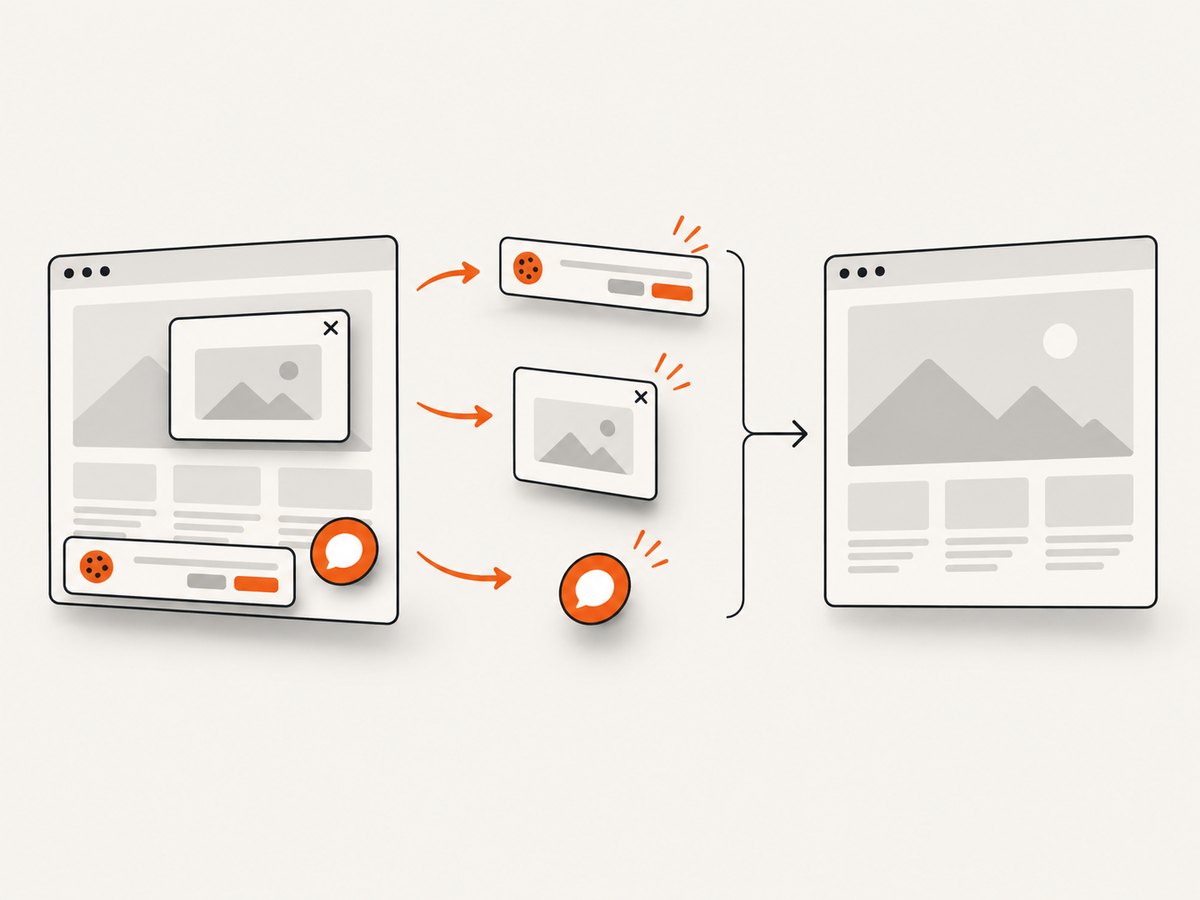
See the ScreenshotNeo API documentation for the complete option list. Relevant controls include full-page capture with lazy images loaded, CSS-selector element capture, dark mode, 12 device presets or a custom viewport, retina scale, PDF paper size and margins, custom CSS and JavaScript, clicks before capture, selector or network-idle waits, ad/tracker/request blocking, headers, cookies, user agent and Authorization, timezone, geolocation, transparent backgrounds, resizing, configurable caching TTL, signed image links, asynchronous jobs with signed webhooks, bulk capture of up to 100 URLs, usage reporting, and an OpenAPI specification. Common parameter names used by other screenshot APIs also work when switching.
cURL:
curl -G "https://api.screenshotneo.com/v1/shot" \
  -d access_key=YOUR_API_KEY \
  --data-urlencode url=https://stripe.com \
  -o shot.webp
Python:
import requests

r = requests.get(
    "https://api.screenshotneo.com/v1/shot",
    params={"access_key": "YOUR_API_KEY", "url": "https://stripe.com"},
    timeout=90,
)
r.raise_for_status()
open("shot.webp", "wb").write(r.content)
Node.js:
const q = new URLSearchParams({
  access_key: 'YOUR_API_KEY',
  url: 'https://stripe.com'
});
const res = await fetch(`https://api.screenshotneo.com/v1/shot?${q}`);
if (!res.ok) throw new Error(`HTTP ${res.status}`);
const bytes = Buffer.from(await res.arrayBuffer());
await require('node:fs').promises.writeFile('shot.webp', bytes);
ScreenshotNeo also exposes an MCP server with take_screenshot, get_page_info, and capture_pdf tools for Claude, Cursor, and other MCP clients. That lets an AI agent request a clean page image or PDF without managing Chromium itself.
Why use it here: cookie banners, popups, and chat widgets are removed before the shot; bot checks, blank pages, and failed loads are never billed; an MCP server lets AI agents take screenshots; 1,000 screenshots per month are free with no card, and paid plans start at $5 for 3,000. Create a free ScreenshotNeo account.
9. Performance, reliability, and cost planning
Keep observations small and structured, wait only for the state you need, and stop after a bounded number of steps. Screenshot-based actions can require more retries on dense pages; selector or CDP actions can reduce ambiguity when the page exposes stable identifiers. Cache read-only pages where freshness allows it, and capture only the element needed for a report instead of an entire long page.
Budget the full task: model tokens, browser runtime, screenshots, retries, and human review. There is no standardized independent cost-per-success comparison across vendors in the available evidence. Measure cost per verified successful task on your own workload. With ScreenshotNeo, cache hits and failed or unusable captures are not billed, and you can select a TTL or use asynchronous jobs for larger batches.
10. Troubleshooting
| Symptom | Likely cause | Fix |
|---|---|---|
| The agent repeats clicks | No state change is asserted. | Require a post-action URL, role, text, or screenshot change and cap retries. |
| It reports success early | The model inferred completion from a visual cue. | Verify the final record, response, or server-side state independently. |
| Selectors fail after a redesign | Brittle CSS or generated class names. | Prefer roles, labels, stable data attributes, or a screenshot fallback. |
| Login disappears | Context expired or the flow crossed an unapproved domain. | Use a dedicated context, detect login expiry, and pause for human re-authentication. |
| The page is blank or blocked | Bot check, timeout, JavaScript failure, or network policy. | Capture diagnostics, retry with a bounded backoff, and mark the task unresolved rather than guessing. |
| Screenshot contains consent UI | Consent handling was not enabled or the banner is unsupported. | Enable consent cleanup, add a targeted hide selector, or remove it with custom CSS. |
| Capture costs more than expected | Repeated uncached requests or unnecessary full-page images. | Set a cache TTL, resize output, capture an element, and inspect X-Page-Verdict and X-Billed. |
11. Practical deployment checklist
- Define success and failure states before writing the prompt.
- Run in an isolated browser context with least-privilege credentials.
- Allowlist domains, tools, downloads, and navigation targets.
- Require approval for consequential actions.
- Redact secrets from screenshots, logs, and model context.
- Set step, time, token, and retry limits.
- Log every observation, action, result, and policy decision.
- Test changed layouts, slow pages, errors, and prompt-injection text.
- Verify the final state outside the model’s own claim.
- Review cost per verified success before scaling.
12. FAQ
Can a browser agent work after I log in?
Yes, if the browser context retains the session, but authentication continuity must be tested. Keep credentials out of prompts and require approval for sensitive steps.
Should I use Playwright or screenshots?
Use Playwright or CDP when stable selectors and structured state are available. Use screenshot actions when the task depends on visible layout or a legacy interface. Many systems combine both.
Are benchmark percentages comparable?
Only with their task set, scoring method, model version, and date attached. Vendor figures are not universal production success rates.
When should I avoid an agent?
A fixed script is usually preferable for a stable, high-volume workflow with clear assertions. An agent adds uncertainty and model cost where interpretation is unnecessary.
Can an agent safely send a message or place an order?
It can technically do so, but use an approval gate and independent confirmation before any external or financial effect.


