Building a Remote MCP Server
Build and deploy a secure remote MCP server with Streamable HTTP, authentication, origin checks, scaling guidance, and registry metadata.
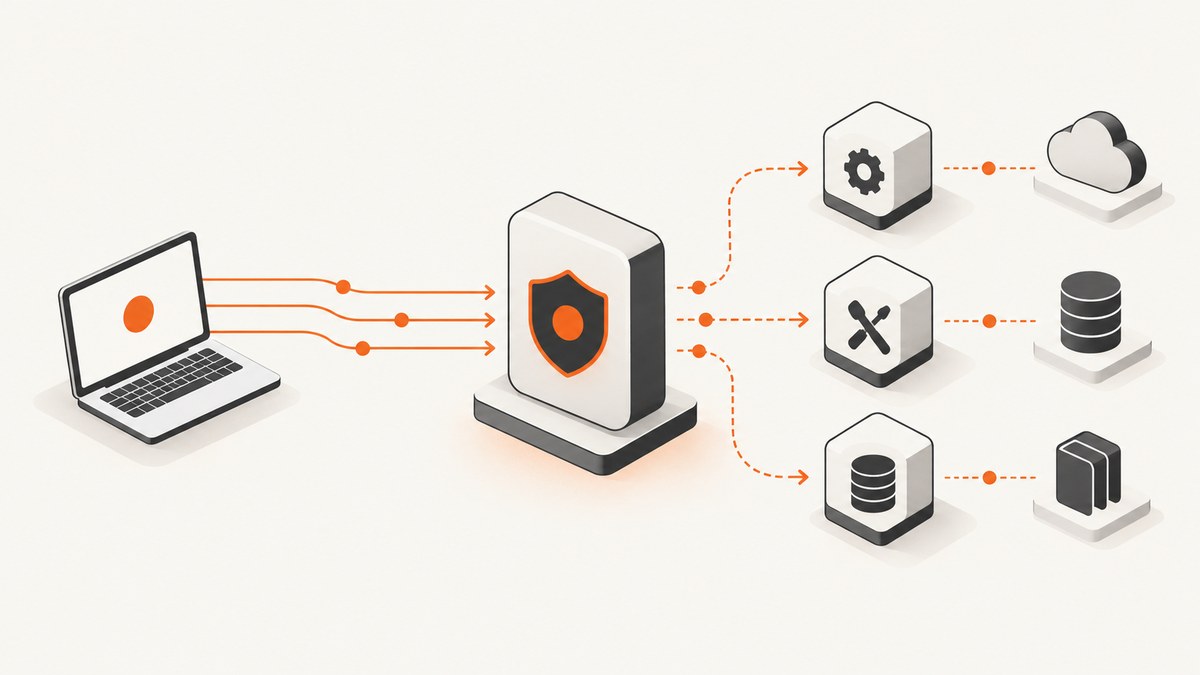
Direct answer: build your remote MCP server as an HTTPS service with one MCP endpoint, use Streamable HTTP, authenticate every request, validate the Origin header, and publish a stable public URL. The official TypeScript and Python SDKs provide the implementation path. Deploy the process in a container, VM, Fargate task, or managed edge environment, then publish a server.json entry describing the remote URL.
What a remote MCP server is
A remote MCP server is an independently running process that exposes tools, resources, or prompts to MCP clients over HTTP. A client connects to a URL such as https://example.com/mcp; your service authenticates the caller, validates the request, invokes the requested operation, and returns an MCP response.
The 2025-11-25 transport specification requires one MCP endpoint that supports both POST and GET. The newer 2026-07-28 draft makes POST the core request path, permits request-scoped SSE response streams, and removes the GET stream endpoint and protocol-level sessions. Choose a protocol revision deliberately and keep your SDK, proxy, and client configuration aligned with it.
Read the MCP transport specification and the MCP security guidance before exposing an endpoint.
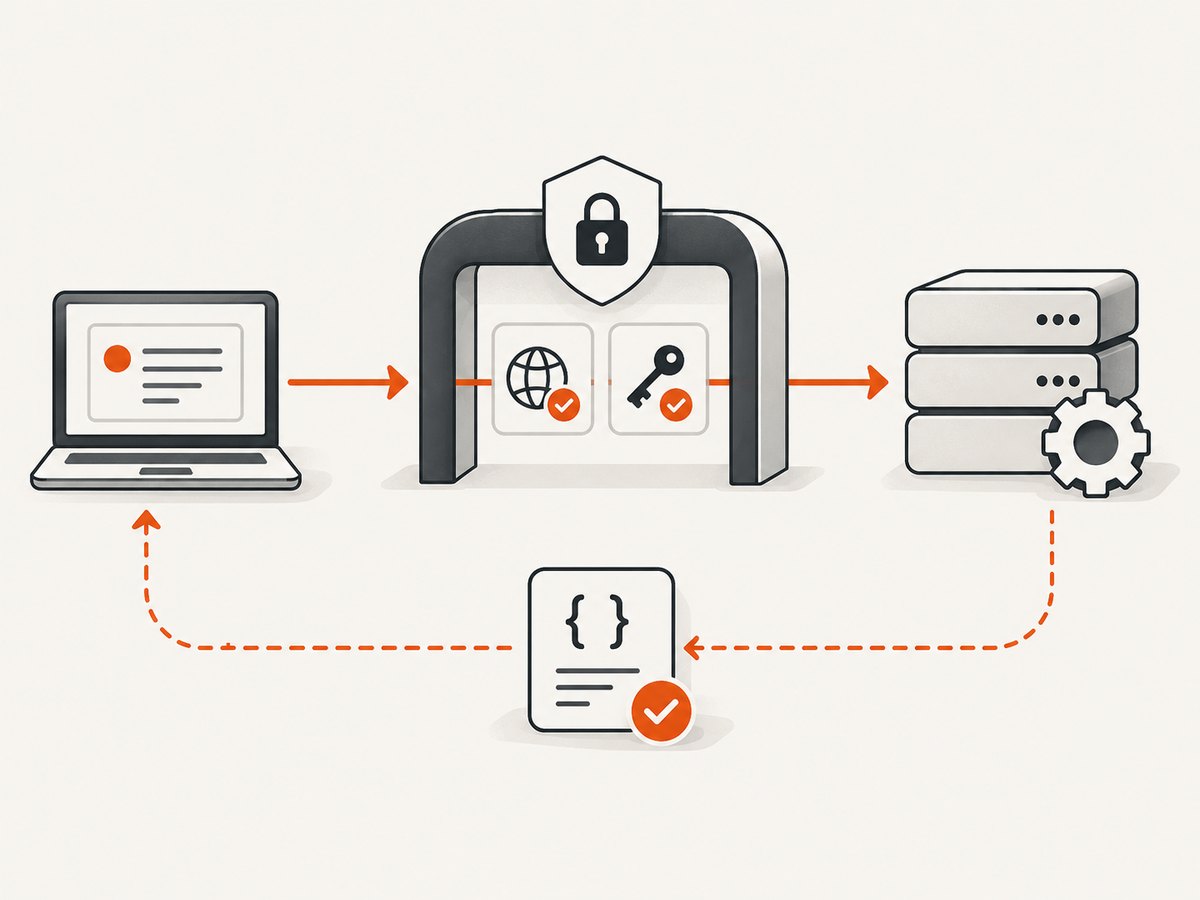
Architecture and request flow
- An MCP client sends an HTTPS request to
/mcp. - The edge or application verifies TLS, authentication, and the
Originheader. - The MCP SDK parses and validates the message against your tool schemas.
- Your handler checks authorization and validates every argument.
- The handler calls a downstream API or data store and returns a structured result.
- Logs and metrics record the request ID, outcome, latency, and downstream status without secrets.
Plan the server contract first
Define tools, resources, and prompts
Write down every operation before writing transport code. Mark each operation read-only or mutating, identify the external identity it uses, and define the minimum scope required. Keep input schemas explicit: required fields, enums, length limits, formats, and safe defaults.
| Decision | Questions to answer |
|---|---|
| Tools | What actions can a client invoke? Which actions mutate data? |
| Resources | Which documents or records can be read, and how are they addressed? |
| Identity | Is authorization based on a user, service account, tenant, or API token? |
| Limits | What payload size, timeout, concurrency, and rate limits apply? |
| Errors | Which failures are retryable, and which must be returned as validation errors? |
TypeScript implementation with Streamable HTTP
The TypeScript SDK identifies Streamable HTTP as the recommended remote transport. Install the official SDK and an HTTP framework, then expose one route at /mcp.
npm install @modelcontextprotocol/sdk express zod
npm install -D typescript tsx @types/express
Create server.ts:
import express from "express";
import { z } from "zod";
import { McpServer } from "@modelcontextprotocol/sdk/server/mcp.js";
import { StreamableHTTPServerTransport } from "@modelcontextprotocol/sdk/server/streamableHttp.js";

const app = express();
app.use(express.json({ limit: "1mb" }));

const allowedOrigins = new Set([
  "https://your-client.example",
]);
const apiToken = process.env.MCP_API_TOKEN;
if (!apiToken) throw new Error("MCP_API_TOKEN is required");

function authenticate(req: express.Request, res: express.Response, next: express.NextFunction) {
  const origin = req.get("origin");
  if (origin && !allowedOrigins.has(origin)) {
    return res.status(403).json({ error: "invalid origin" });
  }
  const supplied = req.get("authorization");
  if (supplied !== `Bearer ${apiToken}`) {
    return res.status(401).json({ error: "unauthorized" });
  }
  next();
}

const server = new McpServer({
  name: "example-remote-server",
  version: "1.0.0",
});

server.tool(
  "lookup_status",
  "Return the status for a resource identifier.",
  { id: z.string().min(1).max(200) },
  async ({ id }) => ({
    content: [{ type: "text", text: JSON.stringify({ id, status: "available" }) }],
  }),
);

const transport = new StreamableHTTPServerTransport({
  sessionIdGenerator: undefined,
});
await server.connect(transport);

app.all("/mcp", authenticate, async (req, res) => {
  await transport.handleRequest(req, res, req.body);
});

app.get("/healthz", (_req, res) => res.json({ ok: true }));

const port = Number(process.env.PORT || 3000);
app.listen(port, "127.0.0.1", () => {
  console.log(`MCP server listening on ${port}`);
});
Run it behind an HTTPS reverse proxy:
MCP_API_TOKEN='replace-with-a-secret' npx tsx server.tsBind the application to 127.0.0.1 when TLS termination happens at the proxy. If the application itself terminates TLS, configure certificates there and keep the public URL stable.
SDK APIs change between releases. Check the official MCP TypeScript SDK for the transport constructor and request-handler signature that match your installed version.
Python implementation with Streamable HTTP
The Python SDK exposes a streamable_http_app integration suitable for ASGI deployment.
python -m venv .venv
. .venv/bin/activate
pip install mcp starlette uvicorn
Create server.py:
import os
from starlette.applications import Starlette
from starlette.requests import Request
from starlette.responses import JSONResponse
from starlette.routing import Mount, Route
from mcp.server.fastmcp import FastMCP

mcp = FastMCP("example-remote-server")

@mcp.tool()
def lookup_status(id: str) -> dict:
    """Return the status for a resource identifier."""
    if not id or len(id) > 200:
        raise ValueError("id must contain 1 to 200 characters")
    return {"id": id, "status": "available"}

allowed_origins = {"https://your-client.example"}
api_token = os.environ["MCP_API_TOKEN"]

async def healthz(request: Request):
    return JSONResponse({"ok": True})

async def mcp_guard(request: Request, call_next):
    origin = request.headers.get("origin")
    if origin and origin not in allowed_origins:
        return JSONResponse({"error": "invalid origin"}, status_code=403)
    if request.headers.get("authorization") != f"Bearer {api_token}":
        return JSONResponse({"error": "unauthorized"}, status_code=401)
    return await call_next(request)

app = Starlette(routes=[
    Route("/healthz", healthz),
    Mount("/mcp", app=mcp.streamable_http_app()),
])
app.middleware("http")(mcp_guard)
Start it with an ASGI server:
MCP_API_TOKEN='replace-with-a-secret' uvicorn server:app --host 127.0.0.1 --port 3000Use the official MCP Python SDK documentation for the exact deployment helper and worker configuration for your release.
Calling and checking the endpoint
Use an HTTPS reverse proxy in production. A minimal request should include authentication and an MCP message body appropriate for the protocol revision your clients use:
curl -i https://example.com/mcp \
  -H 'Authorization: Bearer YOUR_TOKEN' \
  -H 'Origin: https://your-client.example' \
  -H 'Content-Type: application/json' \
  --data '{"jsonrpc":"2.0","id":1,"method":"tools/list","params":{}}'
Verify that the proxy forwards POST, GET where required by your selected revision, response streaming, authorization headers, and request IDs. Do not cache MCP responses at a shared intermediary.
Authentication and origin security
- Require authentication on every connection, including discovery and health routes that reveal sensitive information.
- Validate every
Originheader against an allowlist and return HTTP 403 for an invalid value. This prevents DNS rebinding attacks. - Bind local development servers to
127.0.0.1, never to all interfaces by default. - Use short-lived or rotatable credentials where possible. Scope tokens to the tools and data each client needs.
- Validate tool arguments again on the server even when the SDK validates the schema.
- Reject oversized bodies, unknown fields where appropriate, and requests that exceed time or concurrency limits.
- Never log bearer tokens, cookies, authorization headers, or sensitive tool arguments.
Deployment options
| Option | Good fit | Operational notes |
|---|---|---|
| Compiled binary on a VM | Small service with direct network control | Manage patching, TLS, process restarts, and scaling. |
| Docker container | Repeatable builds and portability | Run behind a load balancer; keep secrets in the platform secret store. |
| Fargate or another managed container service | Horizontal scaling without managing hosts | Configure health checks, task concurrency, and graceful shutdown. |
| Managed edge platform | Globally distributed, low infrastructure overhead | Confirm SDK compatibility, connection limits, streaming support, and secret handling. |
Cloudflare documents authenticated and unauthenticated remote MCP deployment with Streamable HTTP. HashiCorp documents Terraform MCP deployment using cloud, containers, Fargate, API-token authentication, and optional metrics.
Sessions, workers, and scaling
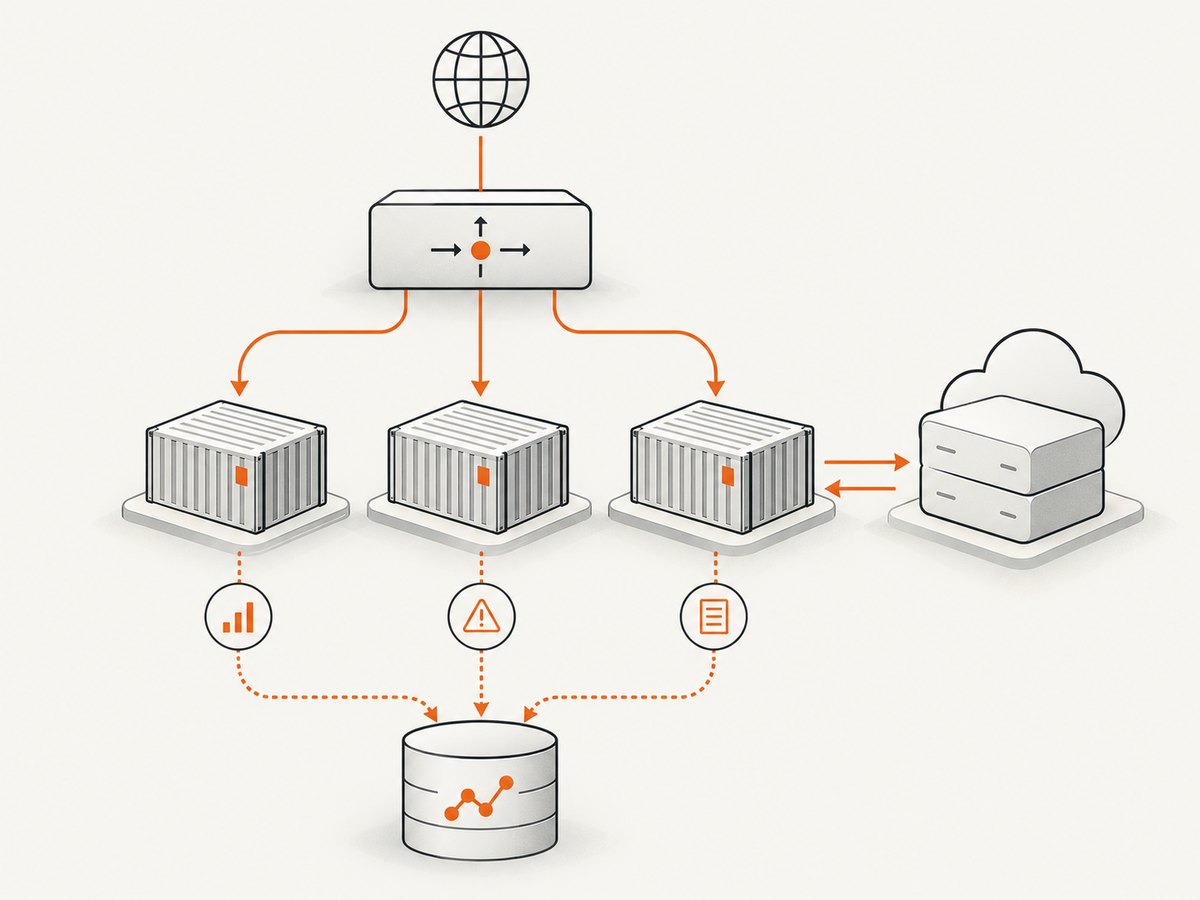
Confirm whether your selected protocol revision and SDK require sessions. The 2026-07-28 draft removes protocol-level sessions and the GET stream endpoint, which changes load-balancer and worker assumptions compared with earlier revisions. A stateless service is easier to scale horizontally; a stateful implementation needs shared session storage or sticky routing.
- Set explicit upstream and downstream timeouts.
- Size workers for the SDK’s transport model and your downstream rate limits.
- Use connection pooling for downstream HTTP calls.
- Apply per-client concurrency and rate limits before expensive tool calls.
- Gracefully drain workers so in-flight responses finish during deploys.
- Use a request ID across the proxy, MCP handler, and downstream API.
Registry metadata with server.json
Registry metadata describes how clients discover your server. A remote entry must use type: "streamable-http" and a publicly reachable HTTPS URL.
{
  "$schema": "https://static.modelcontextprotocol.io/schemas/registry/server.json",
  "name": "com.example/remote-server",
  "title": "Example Remote Server",
  "description": "Tools for looking up example resource status.",
  "version": "1.0.0",
  "remotes": [
    {
      "type": "streamable-http",
      "url": "https://example.com/mcp"
    }
  ]
}
The MCP Registry documentation requires remote servers to be publicly accessible at the declared URL. Keep the metadata version synchronized with the deployed service.
Observability and reliability checklist
- Health endpoint checks process readiness and required dependencies.
- Metrics cover request count, authentication failures, rejected origins, tool latency, downstream errors, and response status.
- Logs include request IDs and client identity without secrets.
- Retries are limited to idempotent downstream operations and use backoff.
- Deployments support graceful shutdown and rollback.
- Alerts cover sustained error rates, latency, saturation, and expired credentials.
Performance and cost considerations
The dominant latency is usually the downstream operation invoked by a tool, followed by TLS, proxying, and serialization. Keep schemas small, avoid unnecessary resource reads, and return paginated results. Cache only data that is safe to share and has a defined freshness policy.
Cost depends on where the process runs, outbound API usage, logging volume, and concurrency. A VM can be economical for low traffic; managed containers and edge platforms trade some control for simpler scaling. Set request, payload, and rate limits so one client cannot consume the entire budget.
Troubleshooting
| Symptom | Likely cause | Fix |
|---|---|---|
| 403 invalid origin | The request’s Origin is absent from the allowlist. |
Add the exact scheme and host, or reject the client intentionally. Do not disable validation. |
| 401 unauthorized | Missing, expired, or incorrectly formatted bearer token. | Send Authorization: Bearer TOKEN and rotate the server secret safely. |
404 at /mcp |
Proxy route and application route differ. | Verify the public path, mount path, and proxy rewrite rules. |
| 405 method not allowed | The proxy or framework does not forward the methods required by your protocol revision. | Allow POST and, for the 2025-11-25 transport, GET on the same endpoint. |
| Streaming response stalls | Proxy buffering or an idle timeout. | Disable buffering for the MCP route and increase read and idle timeouts. |
| Clients lose state after scaling | Sessionful transport without shared state or sticky routing. | Use shared session storage, sticky routing, or a stateless revision and SDK configuration. |
| Tool arguments rejected | Schema mismatch, missing required field, or invalid enum. | Inspect the generated schema and validate the client payload before sending. |
| Requests time out | Downstream API latency or worker starvation. | Measure each downstream call, set bounded timeouts, pool connections, and cap concurrency. |
| Registry validation fails | Remote URL is private, unreachable, or has the wrong remote type. | Publish a stable public HTTPS URL and set type to streamable-http. |
Or skip the browser setup
If your MCP tools need website screenshots, ScreenshotNeo provides a ready-made screenshot API and MCP server. One GET request returns PNG, JPEG, WebP, or PDF. Before capture it accepts cookie consent banners and removes more than 60 known consent platforms, newsletter popups, and chat widgets; each step can be turned off. Bot checks, blank pages, timeouts, failed loads, and cache hits are not billed, and response headers identify the page verdict and billing result.
ScreenshotNeo also provides MCP tools named take_screenshot, get_page_info, and capture_pdf for Claude, Cursor, and other MCP clients. Features include full-page and element capture, device presets, dark mode, retina scale, PDF options, custom CSS and JavaScript, clicks, waits, request blocking, headers, cookies, user agents, authorization, timezone, geolocation, transparent backgrounds, resizing, caching, signed links, async jobs, bulk capture, usage data, and an OpenAPI specification.
cURL:
curl -G "https://api.screenshotneo.com/v1/shot" -d access_key=YOUR_API_KEY --data-urlencode url=https://stripe.com -o shot.webpPython:
import requests
r = requests.get("https://api.screenshotneo.com/v1/shot", params={"access_key": "YOUR_API_KEY", "url": "https://stripe.com"}, timeout=90)
open("shot.webp", "wb").write(r.content)
Node.js:
const q = new URLSearchParams({ access_key: 'YOUR_API_KEY', url: 'https://stripe.com' });
const res = await fetch(`https://api.screenshotneo.com/v1/shot?${q}`);
See the ScreenshotNeo API documentation for all options. The Free plan includes 1,000 screenshots each month with no card; paid plans start at $5 for 3,000. Create a free ScreenshotNeo account.
FAQ
Can a remote MCP server run without sessions?
Yes, when the selected protocol revision and SDK support a stateless request model. Verify this before choosing multiple workers or a load balancer.
Does the MCP endpoint need its own domain?
No. It can be a path such as https://example.com/mcp, provided the public URL is stable, uses HTTPS, and is reachable by clients and the registry.
Should authentication happen in the proxy or application?
Use the proxy for coarse network controls and the application for MCP-aware authentication and authorization. The application must still authenticate every connection.
What should be recorded for an incident?
Keep the request ID, client identity, tool name, status, latency, downstream status, and rejected-origin or authentication result. Exclude tokens and sensitive payloads.


