Caching and Performance for Web Data Extraction
Use HTTP freshness rules, validators, and careful request pacing to cut repeated work while keeping extracted data current and crawls reliable.
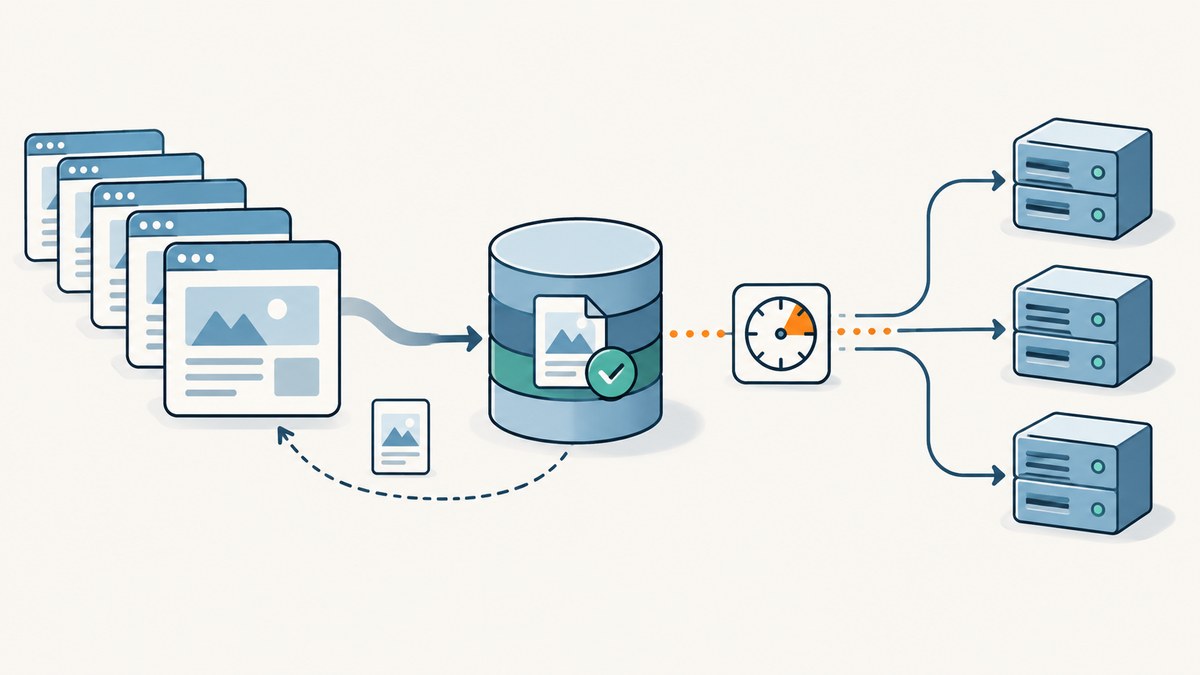
To improve caching and performance for web data extraction, persist fetched responses, reuse them only while their freshness policy allows, and revalidate stale entries with ETag or Last-Modified when the server provides those validators. Separately, tune crawler concurrency and delay to the target site’s tolerance. Caching reduces repeated transfers and parsing; scheduling controls how quickly requests arrive. They solve different problems.
A fast extraction pipeline is not simply one that sends the most requests at once. It is one that avoids unnecessary work, keeps data within its required age, and does not trigger throttling or errors that make the crawl slower or less reliable. This guide shows how to choose that balance with HTTP rules and Scrapy configuration.
1. Separate cache freshness from request pacing
An HTTP cache associates a stored response with a request and can reuse the response while it is fresh. The freshness lifetime determines how long reuse is allowed without contacting the origin. That is a data-quality decision: a price monitor, a daily catalog export, and an archival snapshot may need different update intervals. A cache only helps if its freshness policy fits the extraction job. See [MDN’s HTTP caching guide](https://developer.mozilla.org/en-US/docs/Web/HTTP/Guides/Caching).
Concurrency and delay are crawler controls. Concurrency limits how many requests are in progress; delay spaces out requests. These controls affect load and throughput, but they do not decide whether stored bytes remain valid. Raising concurrency cannot make stale data fresh, and shortening cache freshness does not make a crawler polite.
| Question | Mechanism | What it changes |
|---|---|---|
| Can I reuse this stored response? | Freshness directives and cache policy | Whether a request can be served from stored bytes |
| Has this stale response changed? | ETag or Last-Modified validation | Whether the body must be downloaded again |
| How many requests should arrive at once? | Concurrency and delay | Load and request pacing |
2. Choose a cache policy that matches the job
Freshness directives in brief
max-agegives a response a freshness lifetime. A cache can reuse a fresh response without revalidation.no-cachepermits storage, but requires validation before reuse. Despite the name, it does not mean “never store.”no-storetells caches not to store the response.privateindicates that a response is intended for a private cache rather than shared-cache reuse. Treat personalized or account-specific responses carefully.
Understand the cache implementation before adding request or response headers. A crawler’s local replay cache may not interpret HTTP directives the same way as a standards-aware HTTP cache. Avoid blanket settings that silently keep old results or store data that should not be shared.
Set freshness from the required data age
- Write down how old the extracted value may be when a downstream user consumes it.
- Choose a freshness lifetime no longer than that requirement allows, accounting for crawl duration and processing delay.
- Use validation for stale entries when validators are available, rather than assuming every stale entry needs a full body transfer.
- Record when a response was fetched and when it was last validated so downstream consumers can reason about data age.
For development, a replay cache can make runs deterministic and reduce repeated traffic. Production usually needs an HTTP-aware policy and a deliberate freshness window. Keep those modes distinct so an offline fixture does not accidentally become the production freshness rule.
3. Revalidate stale responses with HTTP validators
Servers may return an ETag or Last-Modified response header. Save the validator with the cached body. When the entry becomes stale, send If-None-Match with the saved ETag, or If-Modified-Since with the saved modification time. A 304 Not Modified response says the representation has not changed; reuse the stored body and refresh its validity according to the response. A changed resource returns a new representation. The server may omit validators, so code must handle ordinary successful responses too. See [MDN’s conditional requests guide](https://developer.mozilla.org/en-US/docs/Web/HTTP/Guides/Conditional_requests) and [ETag reference](https://developer.mozilla.org/en-US/docs/Web/HTTP/Reference/Headers/ETag).

Here is a minimal runnable Python example using a JSON file as a small local cache. It stores the response body and validators, uses conditional headers on subsequent runs, and reuses the cached body on a 304. For a production crawler, use a durable store with concurrency-safe writes and an HTTP-aware cache policy rather than treating this example as a complete cache implementation.
import json
from pathlib import Path
import requests

URL = "https://example.com/data"
CACHE_FILE = Path("response-cache.json")

cache = json.loads(CACHE_FILE.read_text()) if CACHE_FILE.exists() else {}
entry = cache.get(URL, {})
headers = {}
if entry.get("etag"):
    headers["If-None-Match"] = entry["etag"]
elif entry.get("last_modified"):
    headers["If-Modified-Since"] = entry["last_modified"]

response = requests.get(URL, headers=headers, timeout=30)
if response.status_code == 304:
    body = entry["body"]
else:
    response.raise_for_status()
    body = response.text
    cache[URL] = {
        "body": body,
        "etag": response.headers.get("ETag"),
        "last_modified": response.headers.get("Last-Modified"),
        "fetched_at": response.headers.get("Date"),
    }
    CACHE_FILE.write_text(json.dumps(cache))

print(body)
This teaching example intentionally keeps the body as text and omits expiry parsing, cache variation, atomic writes, and multi-process coordination. A general HTTP cache must account for request method and headers that affect the representation, response directives, and any Vary behavior. Do not use a URL-only key for personalized responses or pages whose output varies by cookies, authorization, locale, or request headers.
4. Configure Scrapy’s HTTP cache
Scrapy provides downloader middleware for HTTP caching, storage backends, and policies. The documented storage choices include filesystem and DBM. Its RFC2616 policy is HTTP-cache-aware; the Dummy policy is useful for deterministic replay and development, but does not apply HTTP cache-control awareness. Check the documentation for the Scrapy version installed in your project because settings and documentation can differ. See [Scrapy downloader middleware](https://docs.scrapy.org/en/master/topics/downloader-middleware.html).
A compact project settings example:
# settings.py
HTTPCACHE_ENABLED = True
HTTPCACHE_DIR = "httpcache"
HTTPCACHE_STORAGE = "scrapy.extensions.httpcache.FilesystemCacheStorage"
HTTPCACHE_POLICY = "scrapy.extensions.httpcache.RFC2616Policy"

# Keep cache use and request pacing as separate decisions.
CONCURRENT_REQUESTS = 8
CONCURRENT_REQUESTS_PER_DOMAIN = 2
DOWNLOAD_DELAY = 1.0
These concurrency and delay values are illustrative starting values, not a universal recommendation or benchmark. Choose values based on target behavior, published crawl rules, and how current the data must be. The RFC2616 policy uses HTTP semantics; Dummy is appropriate when a reproducible replay is more important than live freshness rules. Do not let development cache settings leak into a production crawl without reviewing their effect.
5. Tune concurrency and delay for the target
More concurrency is not automatically faster. Scrapy’s optimization guide warns that exceeding a site’s tolerance can lead to throttling, errors, or bans, which can reduce crawl speed. Increase request pressure only while response behavior supports it. Monitor latency, status codes, retries, and throttle signals as you tune. See [Scrapy’s optimization guide](https://doc.scrapy.org/en/master/topics/optimize.html).
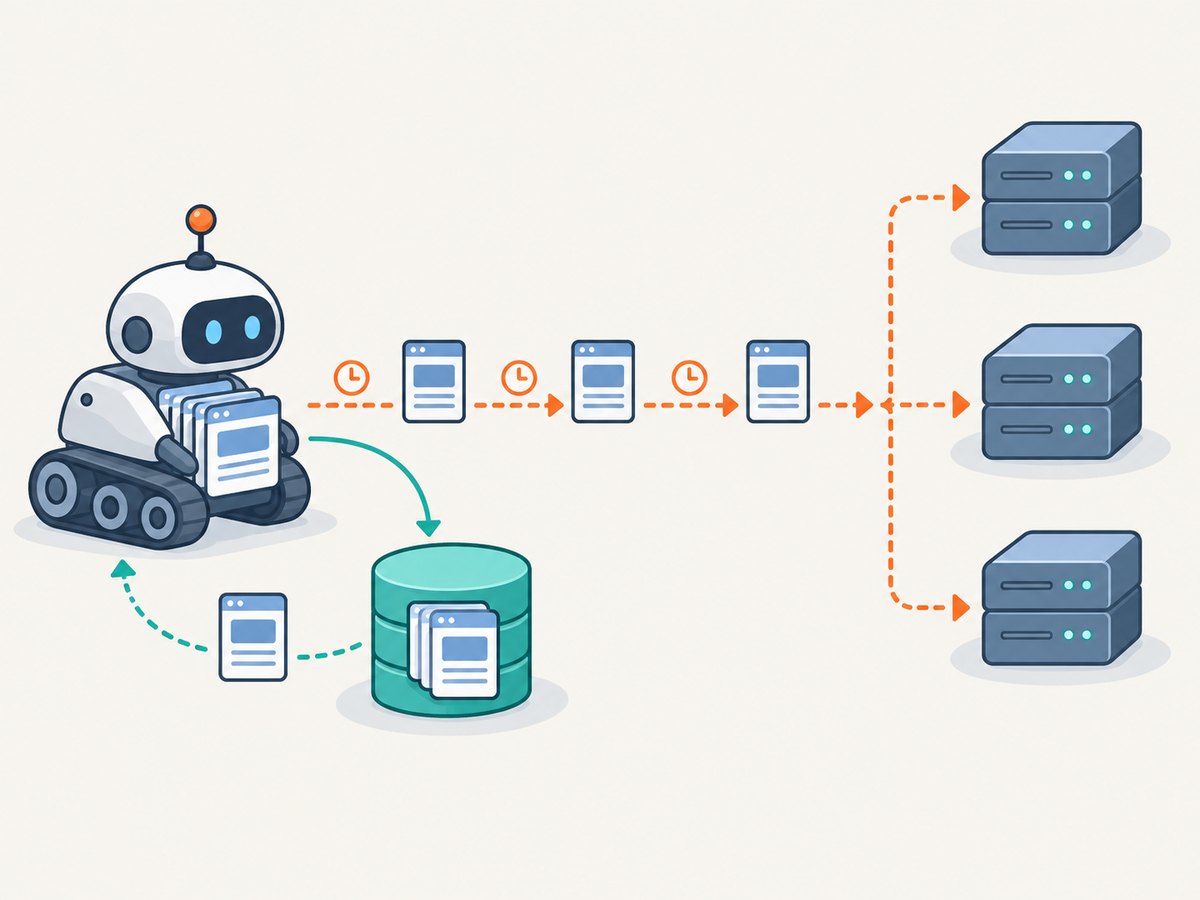
- Begin with conservative per-domain concurrency and a nonzero delay.
- Observe response latency, error and throttle rates, and the target’s published crawl guidance.
- Change one pacing setting at a time and compare under the same target and freshness requirement.
- Back off when errors, throttling, or latency rise. A lower request rate can improve total completion time if it avoids retries and blocks.
- Translate applicable published crawl pacing directives into your crawler settings. The cited Scrapy optimization guide says Scrapy does not act on robots.txt
Crawl-delayandRequest-ratedirectives; verify behavior in the version you deploy.
Respect robots.txt. RFC 9309 allows caching robots.txt, but says a cached copy generally should not be used for more than 24 hours unless the file is unreachable. The standard distinguishes an unavailable file from an unreachable one; an unreachable robots.txt due to server or network errors requires the crawler to assume complete disallow. Follow RFC 9309’s exact response handling rather than treating every failure as permission to crawl. See [RFC 9309](https://www.rfc-editor.org/rfc/rfc9309.html).
6. Measure the pipeline, not just request speed
Track these operational metrics for each domain and job:
- Cache hit rate, split by fresh reuse and validation results.
- Bytes transferred and number of full response bodies downloaded.
- Response latency, status codes, timeout and retry counts.
- Parsing and extraction time, which may dominate once transfers are reduced.
- Throttle or block signals and the age of data delivered downstream.
Compare before and after under the same targets, data freshness requirement, and extraction workload. These measurements are for your own system; there is no universal cache-hit rate, request rate, or speed-up to assume. If caching reduces bytes but parsing still dominates, optimize parsing or avoid extracting fields that are not needed. If a high hit rate leaves the data too old, shorten freshness or revalidate more often.
7. Reliability, edge cases, and cost
Cache correctness risks
- Personalized pages: cookies and authorization can change the response. Avoid sharing such entries across users; honor private-cache semantics and partition keys where required.
- Representation variation: language, encoding, or other request headers may affect content. Respect server variation metadata rather than keying only by URL.
- Missing validators: fetch the new body when a stale response cannot be conditionally validated.
- 304 without a local body: a 304 has no replacement representation. If the cached body is missing or corrupted, retry with an unconditional request.
- Cache corruption or partial writes: use atomic writes or a storage backend designed for concurrent workers. Validate stored entries before reuse.
- Changing extraction code: a valid response cache may still be useful, but replaying it will not update the source data. Version extracted outputs separately from raw response storage.
Performance and cost
A fresh cache hit can avoid both network transfer and repeated parsing if the extracted result is cached too. A 304 avoids retransmitting the representation body, but it still requires a request and response round trip. Persistent cache storage has disk or database costs and needs a retention and cleanup policy. Excessively long freshness saves work at the cost of staler data; very short freshness increases validation and transfer work. Measure the tradeoff against the data-age requirement rather than optimizing one metric in isolation.
For browser-rendered pages or screenshot outputs, the same distinction matters: cached captures are useful only when their TTL matches how often the page changes. [ScreenshotNeo](https://screenshotneo.com) is a website screenshot API and MCP server; its capture endpoint accepts a URL and returns an image or PDF. See the [ScreenshotNeo API documentation](https://screenshotneo.com/docs/) for configuration and request options.
Or skip the browser setup
If your extraction task needs a rendered page image, ScreenshotNeo can handle the browser capture with one GET request:
curl -G "https://api.screenshotneo.com/v1/shot" -d access_key=YOUR_API_KEY --data-urlencode url=https://stripe.com -o shot.webpEquivalent Python and Node.js examples are below. See the [API docs](https://screenshotneo.com/docs/) for the request options.
import requests
r = requests.get("https://api.screenshotneo.com/v1/shot", params={"access_key": "YOUR_API_KEY", "url": "https://stripe.com"}, timeout=90)
open("shot.webp", "wb").write(r.content)
const q = new URLSearchParams({ access_key: 'YOUR_API_KEY', url: 'https://stripe.com' });
const res = await fetch(`https://api.screenshotneo.com/v1/shot?${q}`);- Cookie banners, newsletter popups, and chat widgets are removed before the shot; each cleanup step can be turned off.
- Bot checks, blank pages, timeouts, failed loads, and cache hits cost nothing. Responses report the page verdict and billing status in headers.
- An MCP server lets AI agents, including Claude and Cursor, take screenshots and inspect page information.
- 1,000 screenshots a month are free with no card; paid plans start at $5 for 3,000 screenshots.
Sign up free for 1,000 screenshots a month, with no card required.
8. Troubleshooting
| Symptom | Likely cause | What to do |
|---|---|---|
| Repeated full downloads | The server omits validators, the cache is not persistent, or entries are keyed incorrectly. | Inspect response headers and cache storage. Persist validators and confirm requests send conditional headers when entries are stale. |
| Old values keep appearing | Freshness is longer than the job’s data-age requirement, or a replay policy is in use. | Shorten freshness, use an HTTP-aware policy in production, and verify the recorded response age. |
| 304 response but no usable content | The client lost or evicted the stored body. | Make an unconditional request and restore the body; treat the cache entry as invalid. |
| Scrapy cache ignores expected directives | The configured policy may be Dummy or settings may not be active. | Check effective project settings and use the RFC2616 policy when HTTP cache semantics are needed. |
| More concurrency causes fewer pages per minute | The target is throttling, delaying, or blocking the crawler. | Reduce per-domain concurrency, increase delay, and compare latency and error rates before changing again. |
| Unexpected robots behavior | Unavailable and unreachable robots.txt cases are being treated alike, or a stale copy is in use. | Apply RFC 9309’s response rules and cache-age guidance; verify the crawler’s implementation. |
9. FAQ
Does a 304 mean the page was downloaded again?
No representation body is retransmitted in a 304 response. The client still made a validation request and must have the previously stored body available to use.
How many concurrent requests should a crawler send?
There is no universal number. Set per-domain concurrency and delay based on observed response behavior, published crawl rules, and the freshness and completion needs of the job.
Should I cache robots.txt?
Yes, within the standard’s guidance: RFC 9309 says a cached copy generally should not be used for more than 24 hours unless the file is unreachable. Apply its exact handling for unavailable and unreachable responses.
Is a cache hit always correct?
Only if the entry matches the request representation and remains fresh under the policy your extraction job requires. Personalization and varying request headers need special care.