BlogScreenshots on your device
Why C# PrintWindow Returns Black or Partial Images and How to Fix It
PrintWindow can succeed yet return black or cropped pixels. Diagnose flags, DPI, protected windows, and renderer limits with a complete C# fix.

Short answer: PrintWindow can return nonzero while the bitmap is black or incomplete because the target application must render in response to WM_PRINT/WM_PRINTCLIENT. Unsupported renderers, protected windows, minimized state, and DPI-coordinate mismatches are common causes. Treat the BOOL as call status, inspect the pixels, then use the right flag, dimensions, fallback, or Windows Graphics Capture.
Microsoft’s PrintWindow contract says the owning application renders into your device context and that the call is synchronous. A successful return therefore does not prove that every expected pixel was produced.
1. What PrintWindow actually does
PrintWindow(hwnd, hdc, flags) asks the owner of hwnd to paint into your compatible device context. With PW_CLIENTONLY, the request is for the client area and uses WM_PRINTCLIENT; without it, the request targets the whole window. On Windows 8.1 and later, PW_RENDERFULLCONTENT can request full content for applications that support that path. It is a useful compatibility test, not a universal fix.
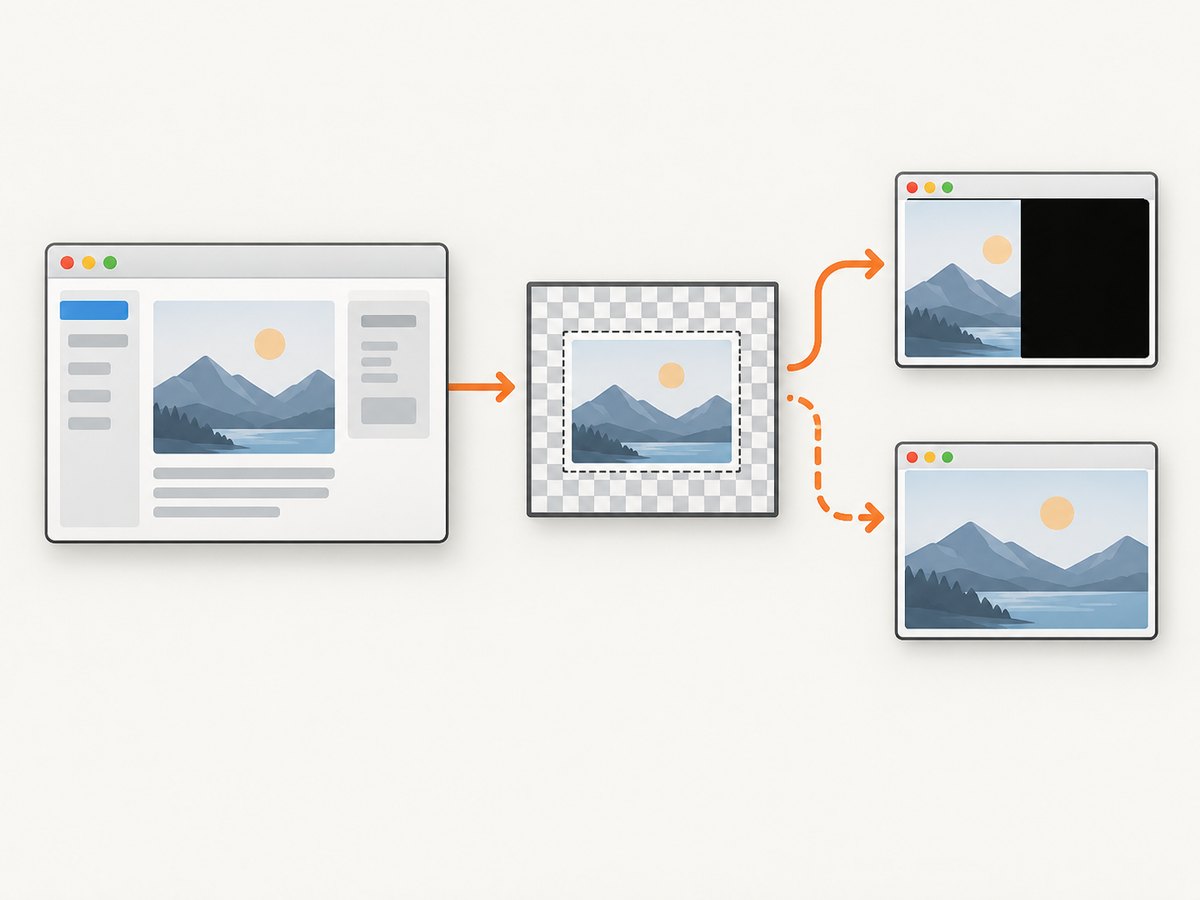
The target can ignore the request, paint only part of its surface, or use a compositor/GPU path that does not answer as a traditional GDI window. Google WebRTC’s Windows capturer documents this limitation and tries PW_RENDERFULLCONTENT, a zero-flag call, and selected BitBlt fallbacks. That is implementation evidence, not a Microsoft guarantee for every application.
2. A complete C# diagnostic implementation
The sample below captures the whole window, checks the return value, records dimensions, and writes a PNG. It deliberately keeps pixel validation separate from API success.
using System;
using System.Drawing;
using System.Drawing.Imaging;
using System.Runtime.InteropServices;

class PrintWindowCapture
{
    const uint PW_CLIENTONLY = 0x00000001;
    const uint PW_RENDERFULLCONTENT = 0x00000002;

    [StructLayout(LayoutKind.Sequential)]
    struct RECT { public int Left, Top, Right, Bottom; }

    [DllImport("user32.dll", SetLastError = true)]
    static extern bool PrintWindow(IntPtr hWnd, IntPtr hdcBlt, uint nFlags);

    [DllImport("user32.dll", SetLastError = true)]
    static extern bool GetWindowRect(IntPtr hWnd, out RECT lpRect);

    [DllImport("user32.dll")]
    static extern bool IsWindowVisible(IntPtr hWnd);

    [DllImport("user32.dll")]
    static extern bool IsIconic(IntPtr hWnd);

    public static bool Capture(IntPtr hwnd, string path, bool clientOnly = false)
    {
        if (!GetWindowRect(hwnd, out var r))
            throw new System.ComponentModel.Win32Exception(Marshal.GetLastWin32Error());

        int width = r.Right - r.Left;
        int height = r.Bottom - r.Top;
        if (width <= 0 || height <= 0) throw new ArgumentException("Window has no drawable size.");

        using var bitmap = new Bitmap(width, height, PixelFormat.Format32bppArgb);
        using (Graphics g = Graphics.FromImage(bitmap))
        {
            g.Clear(Color.Transparent);
            IntPtr hdc = g.GetHdc();
            try
            {
                uint flags = (clientOnly ? PW_CLIENTONLY : 0) | PW_RENDERFULLCONTENT;
                bool ok = PrintWindow(hwnd, hdc, flags);
                int error = Marshal.GetLastWin32Error();
                if (!ok)
                {
                    ok = PrintWindow(hwnd, hdc, clientOnly ? PW_CLIENTONLY : 0);
                    error = Marshal.GetLastWin32Error();
                }
                if (!ok)
                    throw new System.ComponentModel.Win32Exception(error, "PrintWindow failed.");
            }
            finally { g.ReleaseHdc(hdc); }
        }
        bitmap.Save(path, ImageFormat.Png);
        Console.WriteLine($"Saved {path}; visible={IsWindowVisible(hwnd)} minimized={IsIconic(hwnd)} size={width}x{height}");
        return true;
    }
}
Provide the target window handle from your own UI, FindWindow, or an enumeration routine. Do not call this synchronously on your UI thread: Microsoft notes that PrintWindow can block while the target processes the request.
Validate pixels, not only BOOL
After capture, inspect for an all-zero or nearly uniform bitmap and compare the expected content bounds with the actual nontransparent/nonblack region. A nonzero return is only the API's status signal. Save diagnostic metadata: HWND, flags, window state, window/DC/bitmap sizes, DPI awareness, and elapsed time.
3. Fix black output in a sensible order
- Check the target state. Restore it and wait until it is visible and finished transitioning. Record whether it is minimized, hidden, occluded, or changing size. Some implementations return a black placeholder for minimized or invisible windows.
- Confirm the requested area. Remove
PW_CLIENTONLYwhen you need borders/title bar; use it when you need only client pixels. - Try
PW_RENDERFULLCONTENT. Use it on Windows 8.1+ and retain a zero-flag retry. - Make coordinates DPI-consistent. Compare
GetWindowRect, DC dimensions, bitmap dimensions, and crop offsets in one DPI coordinate space. - Identify protected content.
SetWindowDisplayAffinitycan intentionally return black or exclude a window from capture. - Switch capture semantics when needed. If the app does not implement print messages, evaluate Windows Graphics Capture.
4. Full window versus client area
| Goal | Call flags | Expected result |
|---|---|---|
| Whole window | PW_RENDERFULLCONTENT, then 0 fallback |
Client plus nonclient area when supported |
| Client only | PW_CLIENTONLY | PW_RENDERFULLCONTENT, then PW_CLIENTONLY |
App content without title bar and borders |
| Visible desktop pixels | Use a desktop/window capture API | Composited pixels, subject to occlusion and protection rules |
5. Why only part of the image appears
DPI virtualization
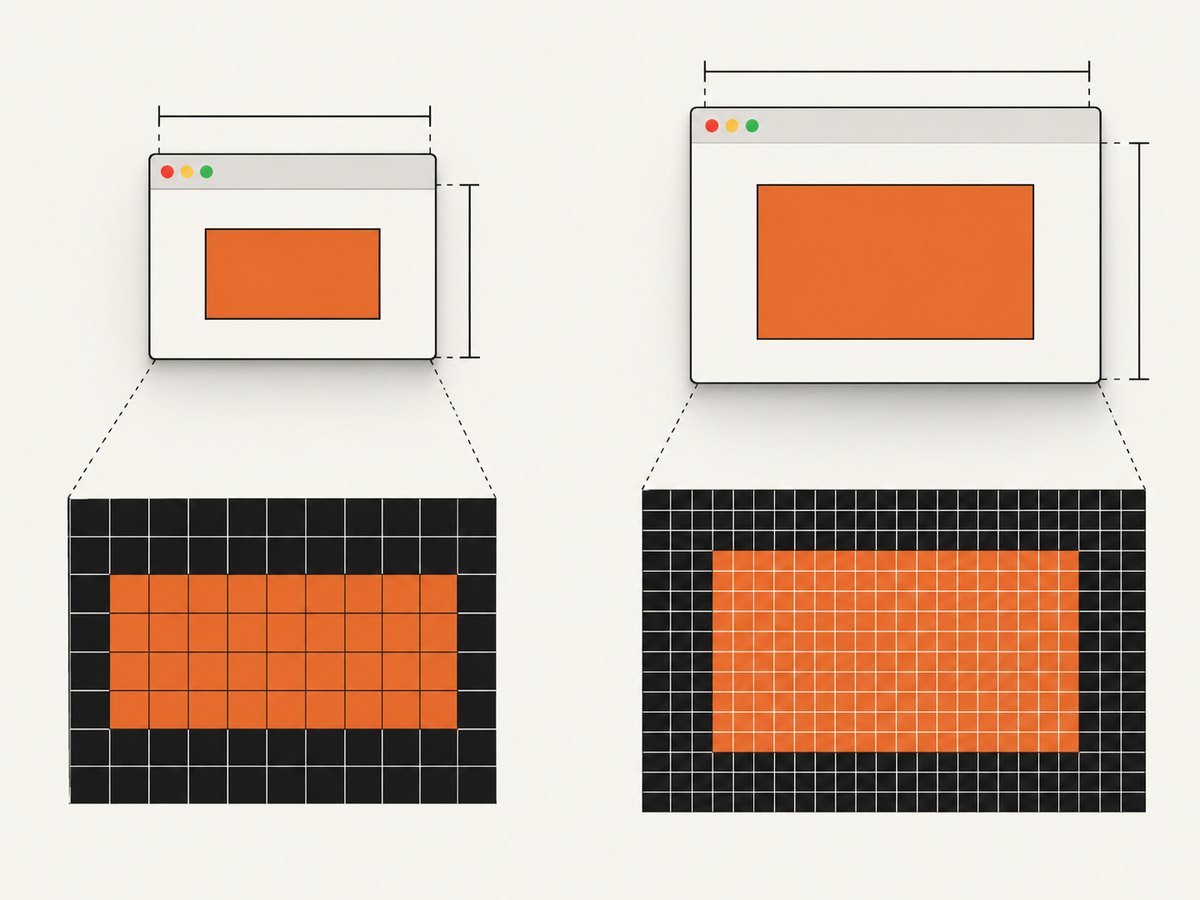
If the process and target use different DPI awareness, logical coordinates and physical bitmap pixels differ. Compute width and height from the same source, avoid mixing screen coordinates with virtualized client coordinates, and log monitor scale.
Renderer-specific behavior
GDI controls usually respond well; browser, DirectComposition, video, and GPU-backed surfaces may not. A partial result can be the portion the application painted through its print handler.
Occlusion and composition
DWM composition keeps surfaces for display, but its painting guidance does not promise that every obscured application will answer PrintWindow with a complete image.
6. Choosing a replacement API
Use PrintWindow when you need an app-provided rendering request and the target is known to support it. Use Windows Graphics Capture when you need modern window/display capture and can meet its OS and user-consent requirements. Protected-content behavior and capture indicators remain part of the design.
7. Troubleshooting checklist
| Symptom | Likely cause | Fix |
|---|---|---|
| BOOL is false | Invalid HWND/DC or rejected request | Check handle lifetime, GetLastWin32Error, and retry with basic flags. |
| BOOL is true, bitmap is black | Protected window, unsupported renderer, minimized/hidden target | Restore and show the window, check display affinity, then evaluate Graphics Capture. |
| Top or bottom is missing | Client-only flag or crop offset | Capture whole window and compare client/nonclient dimensions. |
| Right or bottom is black | DPI virtualization or wrong bitmap size | Use one DPI coordinate space and scale rectangles before copying pixels. |
| Browser/video area is blank | GPU/compositor surface | Try PW_RENDERFULLCONTENT; if still blank, use Windows Graphics Capture. |
| App freezes during capture | Synchronous call waits on target thread | Run capture off the UI thread. |
8. Performance, reliability, and cost considerations
- Performance: Bitmap allocation and readback scale with pixel area. Capture at the required size and dispose GDI objects promptly.
- Reliability: Record target state, flags, DPI, dimensions, and verdict. Retry only transient state changes.
- Threading: Isolate synchronous capture from UI input and rendering threads.
- Compatibility: Gate
PW_RENDERFULLCONTENTand Graphics Capture by OS version. - Cost: Local PrintWindow has no service fee, but unsupported GPU paths increase engineering and maintenance work.
9. Or skip the browser setup
If your goal is a clean screenshot of a web URL rather than a native HWND, ScreenshotNeo makes one GET request and returns PNG, JPEG, WebP, or PDF. See the API documentation.
curl -G "https://api.screenshotneo.com/v1/shot" -d access_key=YOUR_API_KEY --data-urlencode url=https://stripe.com -o shot.webpimport requests
r = requests.get("https://api.screenshotneo.com/v1/shot", params={"access_key": "YOUR_API_KEY", "url": "https://stripe.com"}, timeout=90)
open("shot.webp", "wb").write(r.content)const q = new URLSearchParams({ access_key: 'YOUR_API_KEY', url: 'https://stripe.com' });
const res = await fetch(`https://api.screenshotneo.com/v1/shot?${q}`);Cookie banners, newsletter popups, and chat widgets are removed before the shot. Bot checks, blank pages, failed loads, timeouts, and cache hits are never billed, and response headers report the page verdict and billing status. An MCP server lets Claude, Cursor, and other MCP clients call take_screenshot, get_page_info, and capture_pdf. The free plan includes 1,000 screenshots a month with no card; paid plans start at $5 for 3,000 shots, and every feature is on every plan.
Create a free ScreenshotNeo account and start with 1,000 screenshots per month at no charge.
10. FAQ
Does a true return value prove the screenshot is valid?
No. Inspect the bitmap for blank or cropped output.
Should I always set PW_RENDERFULLCONTENT?
Try it on supported Windows versions, but keep a zero-flag fallback.
Can PrintWindow capture a minimized window?
Do not assume it can. Restore and make the window visible for reproducible results.
Can another API bypass a black protected window?
No supported workflow should promise that. Black or excluded output can be the owner's display-affinity policy.
When should I use ScreenshotNeo?
Use it for URL-based web captures when you want clean pages, explicit billing verdicts, and an API or MCP workflow instead of managing a browser.


