Detecting Failed Screenshot Requests
Learn to distinguish network failures, HTTP errors, timeouts, and visual mismatches when a screenshot request fails.
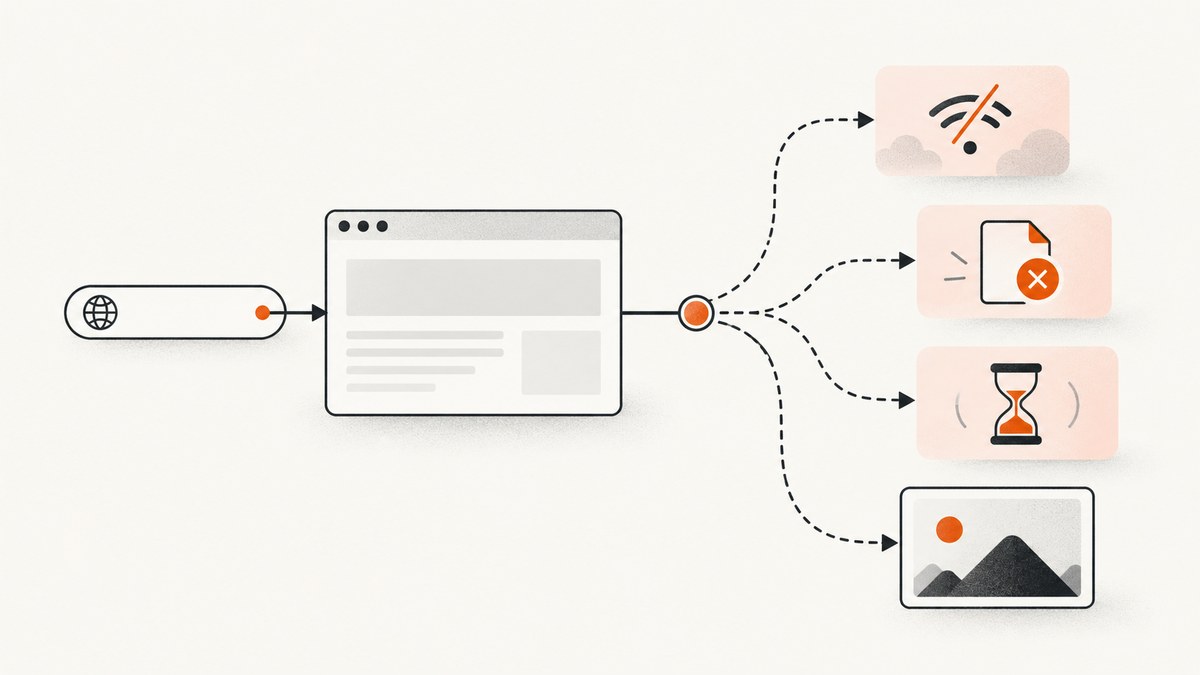
Detecting a failed screenshot request requires identifying which stage failed. A browser may fail before receiving any HTTP response, receive a 404 or 503 successfully, time out while waiting for a condition, or produce a screenshot that fails a visual assertion. These cases need different evidence and fixes.
Record the operation, full error and stack, browser and automation-library versions, URL and response status when available, and the stage that stopped. In Playwright, requestfailed means that no HTTP response was obtained; an HTTP 404 or 503 still completes the response lifecycle and must be detected from its status. Playwright documents this distinction.
1. Classify the failure before changing code
| Failure class | What you observe | What it means | First evidence to collect |
|---|---|---|---|
| Transport or network failure | requestfailed, net::ERR_FAILED, DNS or TLS error |
The client could not obtain an HTTP response | Request URL, request.failure().errorText, stack, browser version |
| HTTP error response | response.status() is 4xx or 5xx |
The server responded; the status may still make the page unusable | Status, response URL, redirect chain, relevant headers |
| Wait timeout | TimeoutError while waiting for navigation, response, selector, or network idle |
The expected observation did not arrive before the configured deadline | Wait condition, timeout, current URL, page state, console errors |
| Screenshot operation failure | page.screenshot() rejects or returns no usable data |
Capture could not be completed or saved | Screenshot options, output path, page dimensions, filesystem error |
| Visual assertion failure | toHaveScreenshot() reports a mismatch or timeout |
The rendered pixels did not stabilize to the expected image | Diff, expected and actual images, fonts, animations, viewport |
An HTTP error is not the same as a request failure. Playwright states that 404 and 503 responses still finish through requestfinished, rather than requestfailed (Page network events). A logger that watches only requestfailed will therefore miss many broken pages.
2. Capture complete diagnostic evidence
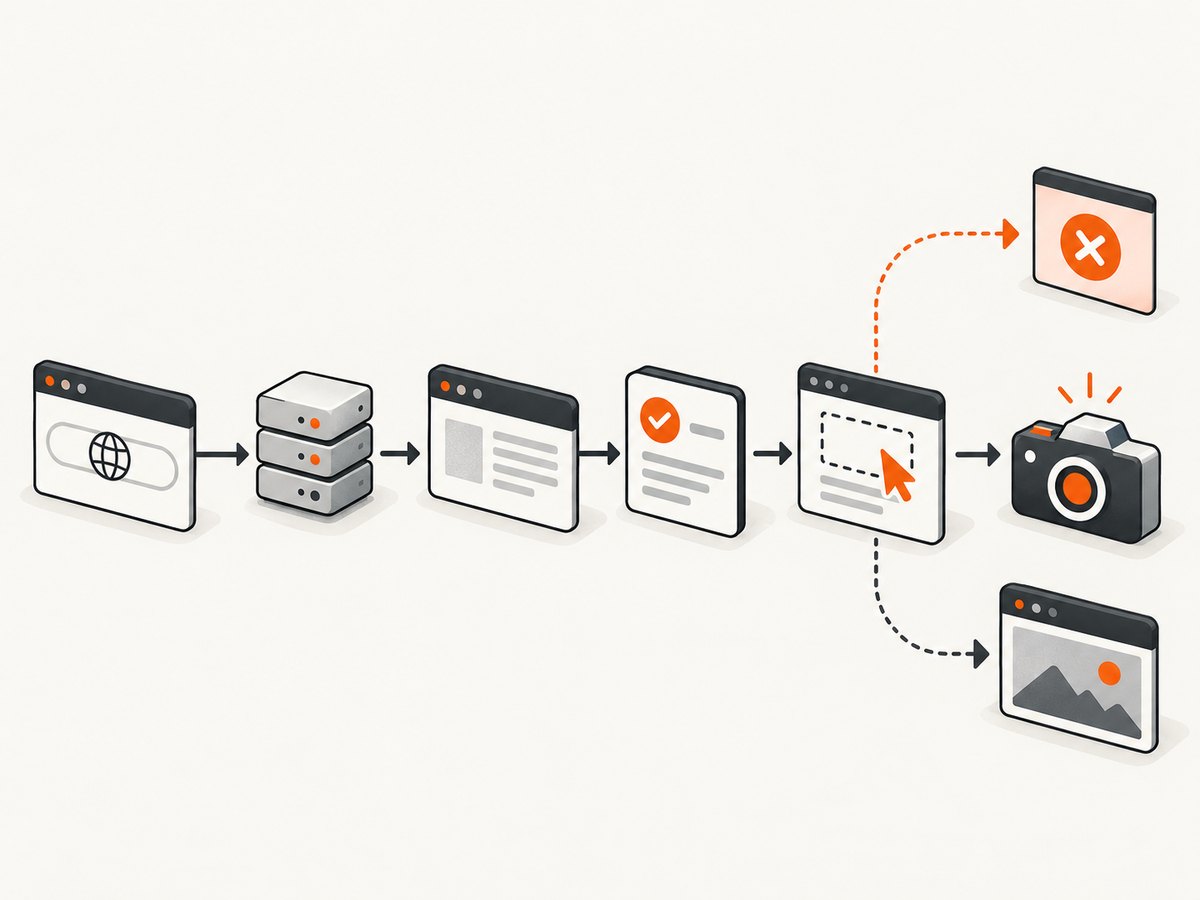
Start by naming the exact operation: browser launch, navigation, a particular API request, selector wait, click, frame change, or screenshot write. Preserve the complete error message and stack instead of returning an empty result. Puppeteer’s troubleshooting guidance warns that swallowing an exception can make a broken task appear successful (Puppeteer troubleshooting).
Log enough to reproduce the issue without storing secrets:
- Automation library and browser versions.
- Operation name and stage.
- Sanitized request URL, method, status, and timing.
- Failure text and complete stack trace.
- Viewport, device scale factor, timeout values, and relevant feature flags.
- Final URL, redirect count, console errors, and page title.
Redact cookies, authorization values, tokens, private query parameters, form contents, and page text. Keep a correlation ID so browser events, screenshot files, and server logs can be joined later.
3. A runnable Playwright detector
The following Node.js script records network failures, HTTP error statuses, console errors, navigation errors, and screenshot failures. It waits for a specific response before taking the shot, which is more reliable than sleeping for a fixed duration.
import { chromium } from 'playwright';

const target = process.argv[2] || 'https://example.com';
const browser = await chromium.launch();
const page = await browser.newPage({
  viewport: { width: 1440, height: 900 },
  deviceScaleFactor: 1
});

const safeUrl = (raw) => {
  try {
    const u = new URL(raw);
    for (const key of ['token', 'access_token', 'key', 'signature']) {
      if (u.searchParams.has(key)) u.searchParams.set(key, '[redacted]');
    }
    return u.toString();
  } catch { return '[invalid-url]'; }
};

page.on('requestfailed', request => {
  console.error(JSON.stringify({
    type: 'requestfailed',
    url: safeUrl(request.url()),
    method: request.method(),
    error: request.failure()?.errorText || 'unknown'
  }));
});

page.on('response', response => {
  if (response.status() >= 400) {
    console.error(JSON.stringify({
      type: 'http-error',
      url: safeUrl(response.url()),
      status: response.status()
    }));
  }
});

page.on('console', message => {
  if (message.type() === 'error') console.error('console:', message.text());
});

try {
  const response = await page.goto(target, {
    waitUntil: 'domcontentloaded',
    timeout: 30000
  });
  if (!response) throw new Error('Navigation returned no main response');
  if (response.status() >= 400) {
    throw new Error(`Main document returned HTTP ${response.status()}`);
  }

  await page.waitForLoadState('networkidle', { timeout: 15000 }).catch(() => {
    console.warn('networkidle was not reached; continuing with captured evidence');
  });

  await page.screenshot({ path: 'shot.png', fullPage: true });
  console.log(JSON.stringify({ ok: true, finalUrl: safeUrl(page.url()) }));
} catch (error) {
  console.error(JSON.stringify({
    ok: false,
    finalUrl: safeUrl(page.url()),
    error: error instanceof Error ? error.message : String(error),
    stack: error instanceof Error ? error.stack : undefined
  }));
  process.exitCode = 1;
} finally {
  await browser.close();
}
Install and run it with:
npm install playwright
npx playwright install chromium
node detect-shot.mjs https://example.com
Register response waits before the action that triggers them. For example:
const responsePromise = page.waitForResponse(
  response => response.url().includes('/api/report') && response.request().method() === 'GET',
  { timeout: 20000 }
);
await page.click('#load-report');
const response = await responsePromise;
if (!response.ok()) throw new Error(`Report request returned ${response.status()}`);
Match a specific URL or predicate instead of accepting the first response. Puppeteer’s response wait has a documented 30-second default and supports changing or disabling that timeout; confirm defaults against the version installed (Puppeteer Page.waitForResponse).
4. Understand timeout behavior
A timeout means the expected observation did not arrive within the configured wait. It does not prove that the browser action or server-side effect did not happen. A form submission may have been processed even if its response was delayed or lost. Before retrying a payment, email, account creation, deletion, or other side-effecting action, inspect application state or use the operation’s idempotency mechanism. Puppeteer’s error guidance makes the same point: “A timeout does not prove that an action failed.”
Choose the timeout for the operation rather than applying one global value:
- Browser launch: allow for cold starts and constrained CI machines.
- Main navigation: allow redirects and server response time, but fail promptly on DNS or TLS errors.
- Selector waits: use the time needed for the application’s known rendering path.
- Network idle: treat it as optional on pages with analytics, polling, ads, or long-lived connections.
- Screenshot writing: include filesystem and image-encoding time for large full-page captures.
Playwright discourages fixed sleeps in production tests and recommends selectors, response events, and other signals instead (waitForTimeout guidance). A short delay can be useful while debugging, but it is not a reliable synchronization strategy.
5. Diagnose by pipeline stage
Browser startup
Check that the browser binary is installed, the executable path is valid, and the process has permission to start. In containers, inspect sandbox flags, shared memory limits, missing system libraries, and the browser process log. Reproduce with a minimal launch before investigating page code.
Navigation and redirects
Print the final URL and every redirect response. Check DNS, certificates, proxy settings, authentication, robots or bot checks, and whether the target requires a particular user agent. Fail explicitly on an unacceptable main-document status rather than assuming navigation succeeded.
Waiting for content
Verify that the selector belongs to the final frame and is actually rendered. Prefer a visible, enabled, or text-bearing condition that represents readiness. If the page uses client-side routing, wait for the route-specific response or content marker.
Frames and handles
After navigation or a frame change, reacquire element handles. A handle from the previous document can be detached even though the selector still exists. Log the frame URL and wait for the frame that owns the target element.
Request interception
If interception is enabled, ensure every intercepted request is continued, fulfilled, or aborted exactly once. A request left unresolved can make network-idle waits and screenshots time out.
Screenshot and filesystem
Check that the output directory exists and is writable, and that the process has enough memory for a tall full-page image. Use an absolute path in CI. Capture the page URL, viewport, device scale factor, and screenshot options beside the file.
6. Visual assertions are a separate signal
page.screenshot() answers whether the capture operation produced image data. A visual assertion answers whether the pixels match an expectation. Playwright’s toHaveScreenshot() waits for two consecutive screenshots to stabilize before comparing the last one with the expected snapshot (Playwright screenshot assertions).
When an assertion fails, inspect animation, blinking cursors, timestamps, random content, font loading, device scale factor, color scheme, and viewport size. Disable or mask nondeterministic regions where appropriate. Do not interpret a screenshot mismatch as proof that a network request failed; correlate it with the network log.
7. Troubleshooting checklist
| Symptom | Likely cause | Fix |
|---|---|---|
requestfailed with DNS or TLS text |
Host, certificate, proxy, or network problem | Resolve the hostname from the same runner, inspect proxy and certificate configuration, then retry. |
| Only 404/503 pages are missed | Logger watches request failures but not response status | Handle response and record statuses of the main document and required APIs. |
| Wait times out after a click | Wrong URL predicate, selector, frame, or event registration order | Create the wait promise before clicking, match the exact condition, and verify the active frame. |
| Timeout followed by a duplicate side effect | Retry assumed the action did not run | Check state or use idempotency before retrying. |
| Screenshot is blank | Capture happened before content, a bot check appeared, or the page failed | Record response and selector evidence, wait for a meaningful readiness signal, and inspect the page screenshot and console. |
| Full-page capture crashes | Very tall page or insufficient memory | Capture an element or viewport, reduce scale, split the page, or increase runner memory. |
| Visual diff is flaky | Fonts, animation, timers, ads, or random data | Wait for stable content, freeze or mask dynamic regions, and use consistent browser versions. |
8. Performance, reliability, and cost
Collecting events adds little overhead, but full-page rendering, high device scale factors, fonts, video, and large images increase CPU, memory, and capture time. Block unnecessary third-party resources only when doing so cannot change the page state you need to verify. Reuse a browser process for independent captures while isolating pages and contexts so cookies and storage do not leak between jobs.
For reliability, keep retries bounded and classify errors first. Retry transient network failures and selected 5xx responses with backoff; do not blindly retry deterministic 4xx responses, selector errors, or side-effecting actions. Store the diagnostic record with the image so a later investigation can reconstruct the exact operation. Change one relevant variable at a time.
Browser automation costs include compute, browser startup, bandwidth, storage, and engineering time. Fixed sleeps waste time and make failures harder to classify. Event-based waits shorten successful runs while preserving useful evidence.
9. Or skip the browser setup
ScreenshotNeo provides a website screenshot API and MCP server. One GET request returns PNG, JPEG, WebP, or PDF. It accepts consent banners before capture and removes more than 60 known consent platforms, newsletter popups, and chat widgets; each cleanup step can be disabled. Bot checks, blank pages, timeouts, failed loads, and cache hits are not billed, and the response identifies the result with X-Page-Verdict and X-Billed headers.

cURL:
curl -G "https://api.screenshotneo.com/v1/shot" -d access_key=YOUR_API_KEY --data-urlencode url=https://stripe.com -o shot.webpPython:
import requests
r = requests.get("https://api.screenshotneo.com/v1/shot", params={"access_key": "YOUR_API_KEY", "url": "https://stripe.com"}, timeout=90)
r.raise_for_status()
open("shot.webp", "wb").write(r.content)
Node.js:
const q = new URLSearchParams({ access_key: 'YOUR_API_KEY', url: 'https://stripe.com' });
const res = await fetch(`https://api.screenshotneo.com/v1/shot?${q}`);
if (!res.ok) throw new Error(`ScreenshotNeo returned ${res.status}`);
const image = Buffer.from(await res.arrayBuffer());
await import('node:fs/promises').then(fs => fs.writeFile('shot.webp', image));
See the ScreenshotNeo documentation for the complete option set. You can select full-page capture with lazy images, an element by CSS selector, dark mode, device presets or any viewport, retina scale, PDF paper and page ranges, custom CSS and JavaScript, clicks, selector or network-idle waits, resource blocking, headers, cookies, user agents, authorization, timezone, geolocation, transparent backgrounds, resizing, chosen cache TTLs, signed image links, asynchronous jobs with signed webhooks, bulk capture for 100 URLs, usage data, and an OpenAPI specification. Existing parameter names used by other screenshot APIs also work.
ScreenshotNeo also includes an MCP server with take_screenshot, get_page_info, and capture_pdf tools for Claude, Cursor, and other MCP clients. Plans include 1,000 screenshots per month free with no card; paid plans start at $5 for 3,000, and every feature is available on every plan. Create a free ScreenshotNeo account.
10. FAQ
Does a 500 response mean the screenshot request failed?
It means the server returned an HTTP error. The network request itself may have succeeded, so inspect the response status and body separately from transport failures.
Should I retry every timeout?
No. First determine whether the operation has side effects and check application state. Retry only when the action is safe and the cause is plausibly transient.
Is network idle proof that a page is ready?
No. Polling, analytics, streaming, or delayed client rendering can make network idle misleading. Pair it with a selector or response that represents the content you need.
Why keep the full stack trace?
The stack identifies the failing operation and call site. Returning empty data removes the signal that downstream systems need to alert and diagnose the failure.
Can a screenshot assertion pass while an API request failed?
Yes. A cached or partially rendered page can look stable. Use network and response-status evidence alongside visual assertions.


