How to Extract URLs from a Sitemap
Learn how to extract every URL from XML sitemaps, including sitemap indexes, namespaces, gzip files, limits, errors, and scalable Python code.

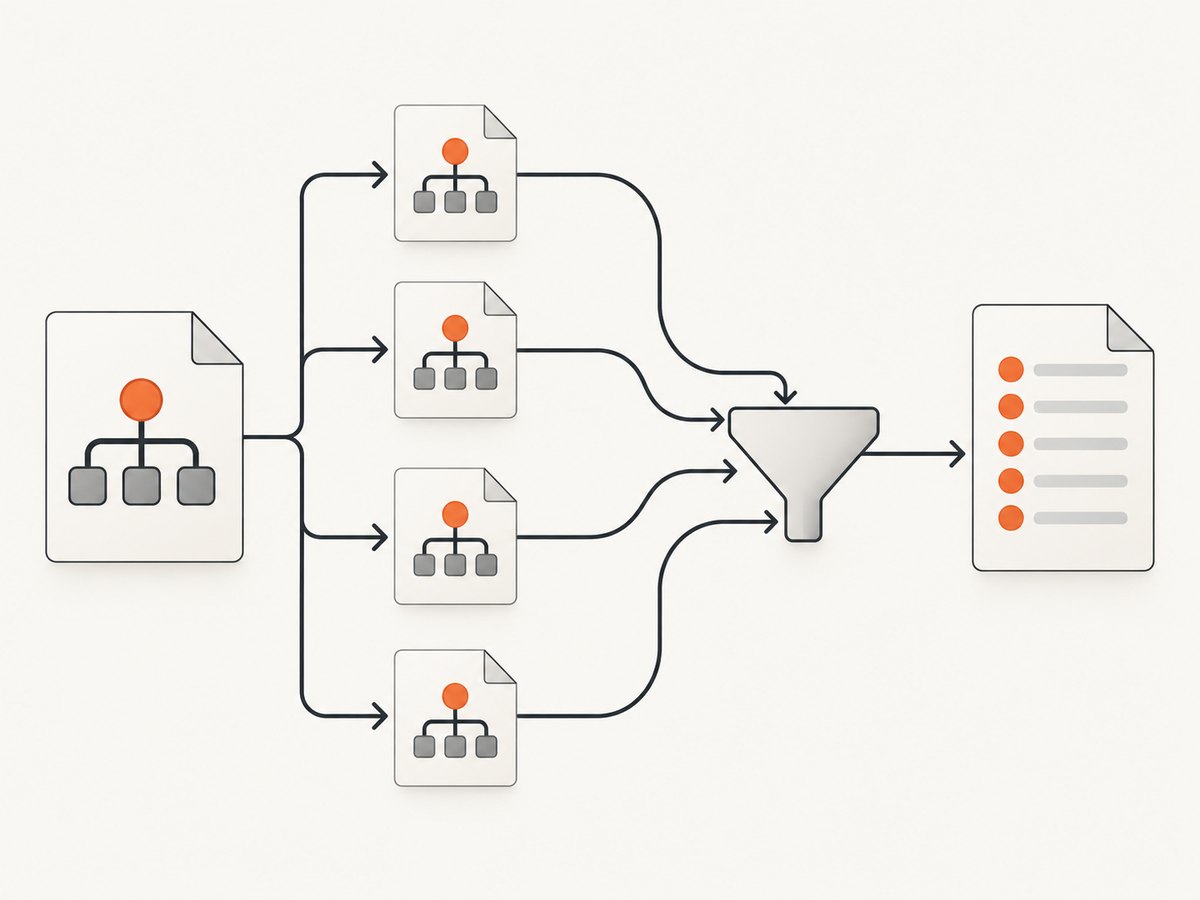
To extract URLs from a sitemap, download the XML, parse it with a namespace-aware parser, and read every <url><loc> value. If the document is a sitemap index, read each <sitemap><loc> and recursively process those child files. Trim whitespace, deduplicate results, and enforce limits for depth, URL count, and downloaded bytes.
This guide shows a complete Python implementation, equivalent command-line and Node.js approaches, sitemap-index recursion, .xml.gz support, secure XML parsing, validation, normalization choices, troubleshooting, and production considerations.
1. Understand the sitemap XML format
The Sitemap protocol is an XML format defined by sitemaps.org. A regular sitemap has a <urlset> root and one or more <url> elements. Each URL normally appears in a namespace-qualified <loc> element.
<?xml version="1.0" encoding="UTF-8"?>
<urlset xmlns="http://www.sitemaps.org/schemas/sitemap/0.9">
  <url>
    <loc>https://example.com/guide/</loc>
    <lastmod>2026-09-20</lastmod>
    <changefreq>weekly</changefreq>
    <priority>0.7</priority>
  </url>
</urlset>
The optional lastmod, changefreq, and priority values are metadata. Preserve lastmod only when your workflow needs it; it does not prove that a page is indexed.
A sitemap index has a <sitemapindex> root and points to other sitemap files:
<sitemapindex xmlns="http://www.sitemaps.org/schemas/sitemap/0.9">
  <sitemap>
    <loc>https://example.com/posts sitemap.xml</loc>
  </sitemap>
</sitemapindex>
In real files, child locations must be valid URLs; the example above is shown only to illustrate the structure. A parser must inspect the root name and branch between URL extraction and recursive index traversal.
2. Complete Python extractor
The following script accepts a sitemap or sitemap index, follows child files, supports gzip, avoids external entity expansion, prevents loops, and writes one URL per line. Install dependencies with python -m pip install requests lxml.
from __future__ import annotations

import gzip
from io import BytesIO
from typing import Iterable
from urllib.parse import urljoin, urlparse

import requests
from lxml import etree

SITEMAP_NS = "http://www.sitemaps.org/schemas/sitemap/0.9"
NS = {"sm": SITEMAP_NS}


def fetch_xml(url: str, timeout: float = 30.0) -> bytes:
    response = requests.get(
        url,
        timeout=timeout,
        headers={"User-Agent": "sitemap-url-extractor/1.0"},
    )
    response.raise_for_status()
    data = response.content
    # Some servers omit Content-Encoding and only expose .xml.gz in the URL.
    if url.lower().split("?", 1)[0].endswith(".gz"):
        data = gzip.GzipFile(fileobj=BytesIO(data)).read()
    return data


def parse_root(data: bytes) -> etree._Element:
    parser = etree.XMLParser(
        resolve_entities=False,
        no_network=True,
        recover=False,
        huge_tree=False,
    )
    return etree.fromstring(data, parser=parser)


def extract_sitemap_urls(
    sitemap_url: str,
    *,
    visited: set[str] | None = None,
    max_depth: int = 10,
    max_urls: int = 1_000_000,
    depth: int = 0,
) -> list[str]:
    if visited is None:
        visited = set()
    if sitemap_url in visited:
        return []
    if depth > max_depth:
        raise RuntimeError(f"Maximum sitemap depth exceeded at {sitemap_url}")
    visited.add(sitemap_url)

    root = parse_root(fetch_xml(sitemap_url))
    root_name = etree.QName(root).localname

    if root_name == "urlset":
        values = root.xpath("//sm:url/sm:loc/text()", namespaces=NS)
        cleaned = [value.strip() for value in values if value and value.strip()]
        return cleaned[:max_urls]

    if root_name == "sitemapindex":
        children = root.xpath("//sm:sitemap/sm:loc/text()", namespaces=NS)
        output: list[str] = []
        for child in children:
            child_url = urljoin(sitemap_url, child.strip())
            remaining = max_urls - len(output)
            if remaining <= 0:
                break
            output.extend(
                extract_sitemap_urls(
                    child_url,
                    visited=visited,
                    max_depth=max_depth,
                    max_urls=remaining,
                    depth=depth + 1,
                )
            )
        return output

    raise ValueError(f"Unsupported sitemap root: {root_name}")


def deduplicate(urls: Iterable[str]) -> list[str]:
    seen: set[str] = set()
    result: list[str] = []
    for url in urls:
        if url not in seen:
            seen.add(url)
            result.append(url)
    return result


if __name__ == "__main__":
    start = "https://example.com/sitemap.xml"
    urls = deduplicate(extract_sitemap_urls(start))
    with open("urls.txt", "w", encoding="utf-8") as output:
        output.write("\n".join(urls))
        output.write("\n" if urls else "")
    print(f"Extracted {len(urls)} unique URLs")
The XPath uses the standard namespace explicitly. This is essential because a default XML namespace is still a namespace; an unqualified XPath such as //url/loc often returns no results.
3. Run it from the command line with cURL and xmllint
For a single, non-index sitemap, download the XML and use an XPath expression:
curl --fail --location --compressed \
  --connect-timeout 10 --max-time 60 \
  https://example.com/sitemap.xml -o sitemap.xml

xmllint --xpath \
  '//*[local-name()="url"]/*[local-name()="loc"]/text()' \
  sitemap.xml
--compressed asks the server for compression and lets cURL decode the response. The local-name() expression tolerates the default namespace, but a real script should still validate the root and handle indexes. For repeatable exports, use the Python program and redirect its output instead of scraping terminal formatting.
4. Node.js implementation
Node.js does not include an XML parser. Install fast-xml-parser and use native fetch (Node 18 or newer):
import { XMLParser } from "fast-xml-parser";
import { gunzipSync } from "node:zlib";

const parser = new XMLParser({
  ignoreAttributes: false,
  removeNSPrefix: true,
  isArray: (name) => ["url", "sitemap", "loc"].includes(name),
});

async function fetchXml(url) {
  const response = await fetch(url, {
    signal: AbortSignal.timeout(30_000),
    headers: { "user-agent": "sitemap-url-extractor/1.0" },
  });
  if (!response.ok) throw new Error(`${response.status} ${response.statusText}: ${url}`);
  let bytes = Buffer.from(await response.arrayBuffer());
  if (url.split("?", 1)[0].toLowerCase().endsWith(".gz")) bytes = gunzipSync(bytes);
  return bytes.toString("utf8");
}

async function extract(url, state = { seen: new Set(), depth: 0 }) {
  if (state.seen.has(url)) return [];
  if (state.depth > 10) throw new Error("Maximum sitemap depth exceeded");
  state.seen.add(url);
  const root = parser.parse(await fetchXml(url));

  if (root.urlset) {
    return (root.urlset.url ?? [])
      .map((entry) => String(entry.loc ?? "").trim())
      .filter(Boolean);
  }
  if (root.sitemapindex) {
    const output = [];
    for (const entry of root.sitemapindex.sitemap ?? []) {
      const child = new URL(String(entry.loc).trim(), url).href;
      output.push(...await extract(child, { seen: state.seen, depth: state.depth + 1 }));
    }
    return output;
  }
  throw new Error("Root is neither urlset nor sitemapindex");
}

const urls = [...new Set(await extract("https://example.com/sitemap.xml"))];
console.log(urls.join("\n"));
XML libraries differ in how they represent one item versus an array. The isArray option above keeps traversal predictable. Pin the parser version in your project and add tests for both one-entry and many-entry documents.
5. Handling indexes, gzip, limits, and scope
| Concern | Recommended handling |
|---|---|
| Sitemap index | Inspect the root local name, recurse through child sitemap/loc values, and keep a visited set. |
| Compressed files | Support .xml.gz; also honor normal HTTP compression through your client. |
| File limits | Google documents a limit of 50 MB uncompressed or 50,000 URLs per sitemap file. Split larger collections and use an index. |
| Absolute URLs | Prefer fully qualified URLs, as recommended by Google Search Central. |
| Host and protocol | Keep URLs within the host and protocol scope allowed by the sitemap location. |
| Duplicates | Deduplicate after extraction while preserving first-seen order. |
| Loops | Track visited sitemap URLs and stop at a configured depth and URL budget. |
Do not silently normalize URLs unless your project defines the rule. Removing fragments may be appropriate for crawl analysis, while changing query strings, trailing slashes, case, or percent encoding can merge distinct application routes. Store the original loc value and apply any canonicalization as a separate, documented step.
6. Validate and enrich the extracted list
After extraction, validate each value with a URL parser. Require an http or https scheme and a host when your downstream system expects web pages.

from urllib.parse import urlparse

def valid_http_url(value: str) -> bool:
    parsed = urlparse(value)
    return parsed.scheme in {"http", "https"} and bool(parsed.netloc)

valid = [url for url in urls if valid_http_url(url)]
invalid = [url for url in urls if not valid_http_url(url)]
Keep invalid values in a separate report rather than dropping them without explanation. If you need update-aware processing, extract lastmod alongside loc and compare it with your own crawl state. Treat it as publisher-provided metadata, not as an indexing guarantee.
7. Common errors and fixes
| Error | Likely cause | Fix |
|---|---|---|
| Empty URL list | Namespace ignored in XPath | Bind http://www.sitemaps.org/schemas/sitemap/0.9 and use prefixed XPath, or deliberately use local-name(). |
| HTTP 403 or 401 | The server requires authentication or blocks the client | Confirm the sitemap is public, use an appropriate User-Agent, and follow the site owner’s access policy. |
| HTTP 404 | Wrong sitemap path or stale index entry | Open the URL manually, inspect robots.txt or the site’s published index, and remove stale entries. |
| XML syntax error | HTML error page, truncated download, or malformed XML | Check the response Content-Type and status before parsing; save the response for inspection. |
| Too many recursive requests | Index loop or unexpectedly deep hierarchy | Use a visited set, maximum depth, and maximum URL budget. |
| Gzip decompression failure | File is not actually gzip, or HTTP decoding was applied twice | Only manually decompress when the URL indicates gzip and confirm your HTTP client’s behavior. |
| Memory exhaustion | Large XML loaded as one unbounded document | Enforce a byte limit, split processing by file, and use streaming parsing for very large inputs. |
8. Performance and reliability checklist
- Set connect and total-read timeouts for every request.
- Call
raise_for_status()or checkresponse.okbefore parsing. - Retry transient 429 and 5xx responses with exponential backoff and a cap; do not retry malformed XML indefinitely.
- Cache downloaded sitemap files when running repeated jobs, using validators such as ETag or Last-Modified when available.
- Process child sitemaps independently so one failed file can be retried without restarting the entire run.
- Log sitemap URL, status, byte count, elapsed time, extracted count, and parser errors.
- Bound total bytes, number of files, recursion depth, and output URLs to protect workers from accidental or hostile inputs.
- For very large files, use an event-based parser and clear processed XML elements so memory remains bounded.
The documented per-file limits are 50 MB uncompressed or 50,000 URLs. Those limits are useful operational boundaries even when your own parser can technically accept larger files.
9. Scrapy and hosted alternatives
If URL extraction is part of a crawl, Scrapy’s SitemapSpider can accept sitemap URLs and yield entries. Scrapy removes namespaces from tags in its item representation, so verify the exact fields in your version before writing selectors.
A hosted extractor can reduce maintenance when you need authentication, scheduled runs, exports, or managed index recursion. Compare control, recursion depth, gzip support, maximum URL count, authentication, and output format. SitemapKit documents an authenticated endpoint with recursive sitemap-index support up to depth 5 and a maxUrls parameter capped at 50,000; check its current documentation before depending on those limits.
10. Or skip the browser setup
If your next step is to inspect or archive the pages represented by the sitemap, ScreenshotNeo can capture each URL through one HTTP request. It is a website screenshot API and MCP server. Cookie and consent banners are accepted and 60+ known consent platforms, newsletter popups, and chat widgets are removed before capture; each step can be disabled. Bot checks, blank pages, timeouts, failed loads, and cache hits are not billed, and response headers identify the page verdict and billing status.
For complete options, see the ScreenshotNeo API documentation. The basic call returns PNG, JPEG, WebP, or PDF depending on parameters:
curl -G "https://api.screenshotneo.com/v1/shot" -d access_key=YOUR_API_KEY --data-urlencode url=https://stripe.com -o shot.webpimport requests
r = requests.get("https://api.screenshotneo.com/v1/shot", params={"access_key": "YOUR_API_KEY", "url": "https://stripe.com"}, timeout=90)
open("shot.webp", "wb").write(r.content)const q = new URLSearchParams({ access_key: 'YOUR_API_KEY', url: 'https://stripe.com' }); const res = await fetch(`https://api.screenshotneo.com/v1/shot?${q}`);Options include full-page capture with lazy images loaded, CSS-element capture, dark mode, device presets, arbitrary viewports, retina scale, PDF paper and margin controls, custom CSS and JavaScript, clicks, selector waits, delays, network-idle waits, request blocking, headers, cookies, user agents, Authorization, timezone, geolocation, transparent backgrounds, resizing, caching with a chosen TTL, signed image links, asynchronous jobs with signed webhooks, bulk capture for 100 URLs per call, a usage API, and an OpenAPI specification. An MCP server provides take_screenshot, get_page_info, and capture_pdf for Claude, Cursor, and other MCP clients.
The Free plan includes 1,000 screenshots per month with no card. Paid plans start at $5 for 3,000 shots; yearly billing gives two months free. Create a free ScreenshotNeo account to try it.
11. Frequently asked questions
Can I extract URLs without downloading the whole sitemap?
You must receive the XML content, but you can stream it with an event-based parser and stop after a configured URL count or byte budget.
Should I follow robots.txt?
Use the sitemap URL and host scope published by the site owner, and respect access controls and applicable crawl policies.
Does every sitemap contain only canonical URLs?
No. A sitemap is a publisher-provided URL list. Validate and deduplicate it, and apply your own canonical or crawl rules separately.
How do I preserve update dates?
Parse lastmod alongside loc and store it as metadata. Do not interpret it as proof that search engines indexed the page.
What if a sitemap has a nonstandard namespace?
Inspect the namespace URI and root local name. If the document follows the Sitemap protocol, bind its declared namespace; otherwise handle it as a separate format with explicit tests.