Why Web Page Screenshots Fail Intermittently and How to Fix Them
Intermittent screenshot failures come from unstable rendering. Learn deterministic waits, frozen environments, animation controls, diagnostics, and reliable capture code.

Intermittent screenshot failures happen when capture races the browser’s rendering pipeline. Network requests, client-side rendering, fonts, image decoding, lazy loading, layout shifts, animations, viewport settings, and comparison rules can all change the pixels between runs.
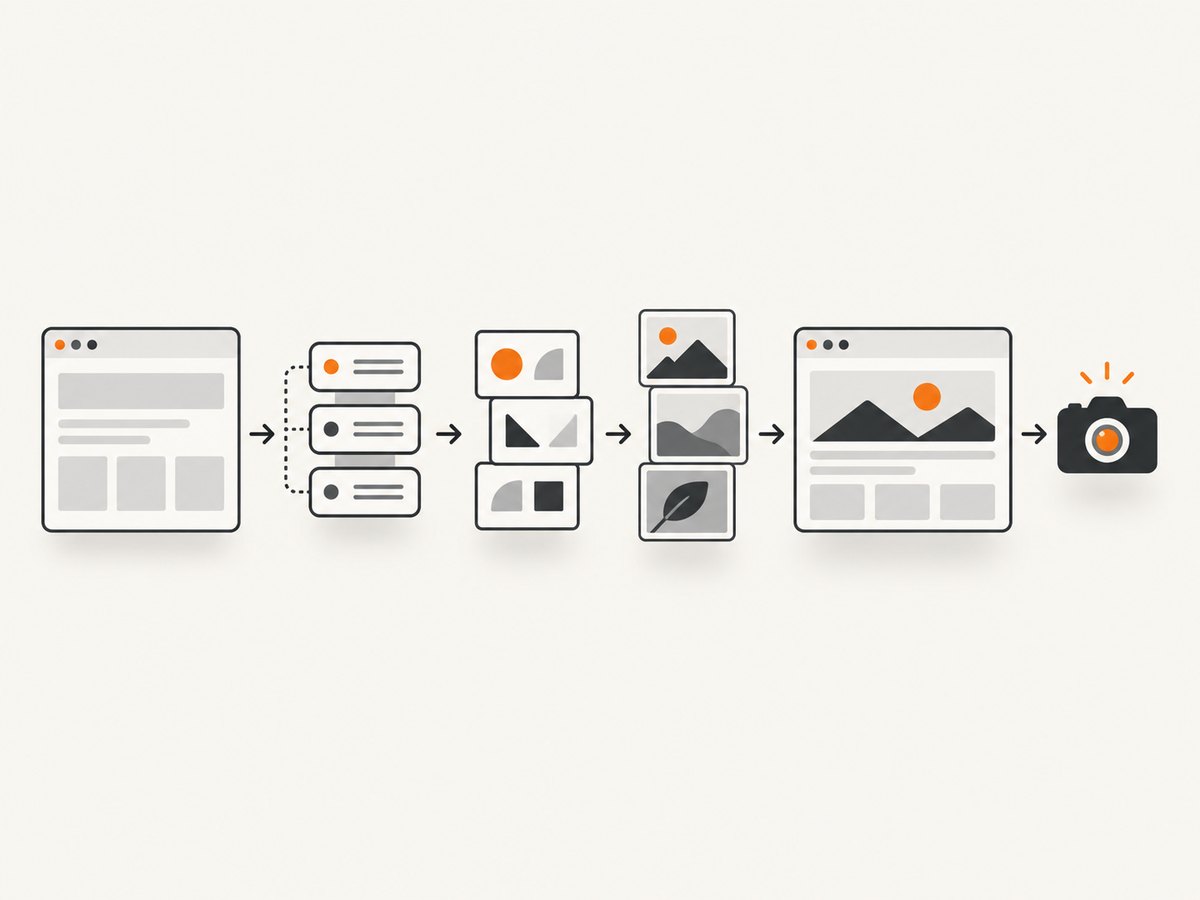
The reliable fix is a deterministic capture recipe: pin the browser and viewport, wait for an application-specific ready signal, finish fonts and images, disable motion, mask intentional variation, capture the smallest useful target, and compare with an explicit diff budget. Log the rendering inputs and readiness signal whenever a run fails.
What makes a screenshot flaky?
A screenshot is a sample of a live rendering process, not a static document. Two captures of the same URL can differ if any input or readiness condition changes.
| Cause | What changes | Reliable control |
|---|---|---|
| Network and client rendering | API data, hydration, deferred components, long-lived connections | Wait for an application-ready marker; use network idle only as supporting evidence |
| Fonts | Glyph widths, line breaks, element heights | Await document.fonts.ready and use the same font files |
| Images and lazy loading | Intrinsic dimensions, decoded pixels, page height | Await image completion and deliberately trigger below-the-fold loading |
| Animation and transitions | Different frames, moving layout, blinking carets | Disable animations and transitions; hide or mask dynamic regions |
| Environment | Viewport, device scale, locale, timezone, color scheme, browser version | Pin every rendering input |
| Full-page capture | Scroll-triggered effects, sticky headers, intersection observers, stitching | Remove scroll-dependent motion and verify document height |
| Comparison policy | Antialiasing and expected variation become failures | Use a documented threshold, pixel budget, and masks |
Use an explicit readiness signal
A fixed sleep such as await page.waitForTimeout(2000) only guesses how long the page will take. It is too long on fast runs and too short when the service or CI worker is slow.
Add a marker that your application sets after the data and UI under test are ready:
<body data-screenshot-ready="true">Then wait for that exact state:
await page.waitForSelector('body[data-screenshot-ready="true"]', {
  state: 'attached',
  timeout: 30000
});
Use networkidle as a baseline, not as the only proof of readiness. Analytics, WebSockets, polling, and other long-lived connections can prevent idle; client-side rendering can finish after network activity appears quiet. The Puppeteer screenshot guide demonstrates navigation with waitUntil: 'networkidle2' before capture.
Complete deterministic Playwright example
This Node.js example freezes the major inputs, waits for the application marker, finishes fonts and images, loads lazy content, disables motion, captures an element or the page, and writes diagnostics on failure.
import { chromium } from 'playwright';
import fs from 'node:fs/promises';

const url = process.env.TEST_URL || 'http://localhost:3000';
const browser = await chromium.launch({ headless: true });
const context = await browser.newContext({
  viewport: { width: 1440, height: 900 },
  deviceScaleFactor: 1,
  locale: 'en-US',
  timezoneId: 'UTC',
  colorScheme: 'light',
  reducedMotion: 'reduce'
});
const page = await context.newPage();

try {
  page.on('console', message => console.log(`[console:${message.type()}] ${message.text()}`));
  page.on('requestfailed', request => {
    console.error('request failed', request.url(), request.failure()?.errorText);
  });

  await page.goto(url, { waitUntil: 'networkidle', timeout: 60000 });
  await page.waitForSelector('body[data-screenshot-ready="true"]', {
    state: 'attached',
    timeout: 30000
  });

  await page.evaluate(async () => {
    await document.fonts.ready;
    for (const image of Array.from(document.images)) {
      if (!image.complete) {
        await new Promise(resolve => {
          image.addEventListener('load', resolve, { once: true });
          image.addEventListener('error', resolve, { once: true });
        });
      }
      if (image.decode) {
        try { await image.decode(); } catch {}
      }
    }

    // Trigger lazy loaders. Stop when the page height stops growing.
    let previousHeight = 0;
    for (let pass = 0; pass < 20; pass++) {
      window.scrollTo(0, document.body.scrollHeight);
      await new Promise(resolve => setTimeout(resolve, 100));
      const height = document.body.scrollHeight;
      if (height === previousHeight) break;
      previousHeight = height;
    }
    window.scrollTo(0, 0);
  });

  await page.addStyleTag({
    content: `
      *, *::before, *::after {
        animation: none !important;
        transition: none !important;
        caret-color: transparent !important;
        scroll-behavior: auto !important;
      }
      [data-visual-dynamic], time, .ad, .carousel, .live-counter {
        visibility: hidden !important;
      }
    `
  });

  await page.screenshot({
    path: 'page.png',
    fullPage: true,
    animations: 'disabled'
  });
} catch (error) {
  await page.screenshot({ path: 'failure.png', fullPage: true }).catch(() => {});
  await fs.writeFile('failure.html', await page.content()).catch(() => {});
  throw error;
} finally {
  await browser.close();
}
Playwright’s screenshot assertions can retry until two consecutive screenshots are identical, and support animation disabling, masking, thresholds, maximum differing pixels, maximum differing pixel ratios, and assertion timeouts. See the PageAssertions documentation for the exact options.
Capture with a stable visual assertion
For regression tests, compare only after the page is ready and motion is disabled:
await expect(page).toHaveScreenshot('dashboard.png', {
  animations: 'disabled',
  mask: [page.locator('[data-visual-dynamic]'), page.locator('time')],
  threshold: 0.2,
  maxDiffPixelRatio: 0.001,
  timeout: 30000
});
Choose the strictness intentionally. A static component can use a very small budget. A page with known antialiasing differences should document a small tolerance. Mask timestamps, ads, rotating content, live counters, carets, and other expected variation instead of raising the global threshold until real regressions disappear.
Puppeteer equivalent
import puppeteer from 'puppeteer';

const browser = await puppeteer.launch({ headless: 'new' });
const page = await browser.newPage();
await page.setViewport({ width: 1440, height: 900, deviceScaleFactor: 1 });
await page.emulateTimezone('UTC');
await page.goto(process.env.TEST_URL || 'http://localhost:3000', {
  waitUntil: 'networkidle2',
  timeout: 60000
});
await page.waitForSelector('body[data-screenshot-ready="true"]', {
  timeout: 30000
});
await page.evaluate(async () => {
  await document.fonts.ready;
  for (const image of document.images) {
    if (!image.complete) await new Promise(resolve => {
      image.addEventListener('load', resolve, { once: true });
      image.addEventListener('error', resolve, { once: true });
    });
    if (image.decode) try { await image.decode(); } catch {}
  }
  window.scrollTo(0, document.body.scrollHeight);
  await new Promise(resolve => setTimeout(resolve, 100));
  window.scrollTo(0, 0);
});
await page.addStyleTag({ content: `*,*::before,*::after { animation:none !important; transition:none !important; }` });
await page.screenshot({ path: 'page.png', fullPage: true });
await browser.close();
Fonts, images, lazy loading, and full-page boundaries
Fonts
Late font swaps can change every line below the changed glyph. Wait for document.fonts.ready, serve deterministic font files, and avoid depending on a system font that differs between your laptop and CI.
Images
An image can be downloaded but not decoded or laid out yet. Wait for each image’s load or error event and call decode() where supported. Treat errors deliberately: a broken image may be the regression you want to catch.
Lazy loading
Full-page capture does not guarantee that every logical item in an infinite or virtualized list exists. Scroll in controlled steps to trigger observers, then verify the final document height. Define a capture boundary for infinite pages.
Stitching and sticky elements
Full-page screenshots may scroll and stitch the page. Sticky headers, scroll-triggered effects, intersection observers, and lazy loaders can behave differently during that process. For a component check, prefer an element screenshot. For a page check, remove scroll-dependent motion and verify the resulting height.
Freeze every rendering input
| Input | Recommendation |
|---|---|
| Viewport | Use a fixed width and height for every run. |
| Device scale | Keep deviceScaleFactor fixed. Choose CSS-pixel or device-pixel output deliberately. |
| Browser | Pin the browser version in CI where practical. |
| Locale and timezone | Set both explicitly so dates, number formats, and translated strings do not change. |
| Color scheme | Set light or dark explicitly. |
| Reduced motion | Emulate reduced motion and also inject a CSS motion reset. |
| Data | Use stable fixtures or a known API snapshot for visual tests. |
| Permissions and geolocation | Set them explicitly when the page branches on permission or location. |
Playwright documents scale: 'css' as one output pixel per CSS pixel and scale: 'device' as one output pixel per device pixel. Switching policies changes image dimensions on high-DPI environments.
Diagnostics to save on every failure
- The final screenshot and a screenshot immediately before the assertion.
- DOM or HTML snapshot and, when useful, a trace.
- Console errors, failed requests, response status codes, and request timing.
- URL, viewport, device scale, locale, timezone, color scheme, reduced-motion setting, and browser version.
- The readiness marker timestamp, font readiness timestamp, image completion status, and final document height.
- The comparison threshold, pixel budget, masks, and assertion timeout.
These records distinguish a product regression from a missing request, a changed environment, or a capture that happened too early.
Common errors and fixes
| Symptom | Likely cause | Fix |
|---|---|---|
| Screenshot is blank | Navigation failed, a bot check appeared, or capture ran before rendering | Record response and console errors; wait for an application marker; verify the URL and authentication. |
| Full page is missing images | Lazy loading was never triggered or images were not decoded | Scroll deliberately, await image completion and decode, then verify document height. |
| Text wraps differently in CI | Font, viewport, browser, or device scale differs | Pin fonts and browser; set viewport and scale; await document.fonts.ready. |
| Only animated regions fail | Capture sampled different frames | Disable animations and transitions; mask rotating or live regions. |
networkidle never arrives |
Polling, analytics, WebSockets, or another long-lived connection | Use a navigation timeout plus an application-specific ready signal; optionally block irrelevant requests. |
| Header appears multiple times in a full-page image | Sticky positioning interacted with stitching | Capture the relevant element or temporarily neutralize sticky behavior for the test. |
| Tests fail only on one worker | Different browser binary, fonts, viewport, locale, or shared data | Log and compare all rendering inputs; use pinned workers and isolated fixtures. |
| One-pixel noise causes failures | Antialiasing or harmless rasterization differences | Use a small documented threshold or diff budget and keep masks targeted. |
| Infinite list never stabilizes | There is no finite page boundary | Define the item count or scroll boundary that the test is intended to cover. |
Performance, reliability, and cost
Performance
- Capture an element or viewport when a full page is not required; less layout and image work reduces runtime.
- Block analytics, ads, and other irrelevant resources in test environments when they are not part of the behavior under test.
- Reuse a browser process and context setup across related tests, while isolating cookies and test data.
- Do not add a large fixed sleep to every test. Wait for the smallest signal that proves readiness.
Reliability
- Keep one canonical capture recipe and version it with the test.
- Retry infrastructure failures separately from visual mismatches. A retry cannot make a real UI regression correct.
- Use a stable data fixture and clean state for each test.
- Prefer two-consecutive-screenshot stability for pages without a reliable application marker.
Cost
Self-hosted browser runs spend CI minutes and machine resources. A hosted screenshot API trades browser maintenance for request pricing. Count only captures that your workflow actually needs, cache stable results, and use element captures for component checks.

Or skip the browser setup
ScreenshotNeo provides a website screenshot API and MCP server. One GET request returns PNG, JPEG, WebP, or PDF. It accepts cookie and consent banners before capture and removes more than 60 known consent platforms, newsletter popups, and chat widgets; each step can be turned off. Bot checks, blank pages, timeouts, failed loads, and cache hits cost nothing, and responses identify the result with X-Page-Verdict and X-Billed headers.
See the ScreenshotNeo API documentation for all options, including full-page lazy-image loading, CSS-selector element capture, dark mode, device presets, retina scale, custom CSS and JavaScript, waits, request blocking, headers and cookies, geolocation, caching, signed links, async jobs, bulk capture, and PDF settings.
cURL
curl -G "https://api.screenshotneo.com/v1/shot" \
  -d access_key=YOUR_API_KEY \
  --data-urlencode url=https://stripe.com \
  -o shot.webp
Python
import requests

r = requests.get(
    "https://api.screenshotneo.com/v1/shot",
    params={"access_key": "YOUR_API_KEY", "url": "https://stripe.com"},
    timeout=90,
)
r.raise_for_status()
open("shot.webp", "wb").write(r.content)
Node.js
import { writeFile } from 'node:fs/promises';

const q = new URLSearchParams({ access_key: 'YOUR_API_KEY', url: 'https://stripe.com' });
const res = await fetch(`https://api.screenshotneo.com/v1/shot?${q}`);
if (!res.ok) throw new Error(`ScreenshotNeo returned ${res.status}`);
await writeFile('shot.webp', Buffer.from(await res.arrayBuffer()));
ScreenshotNeo also has an MCP server with take_screenshot, get_page_info, and capture_pdf for Claude, Cursor, and other MCP clients. The free plan includes 1,000 screenshots per month with no card; paid plans start at $5 for 3,000. Create a free ScreenshotNeo account.
FAQ
Is networkidle enough?
No. It is useful supporting evidence, but an application-ready marker proves that the content under test is present.
Should every screenshot test use full-page capture?
No. Use an element capture for component checks. Use full-page capture when page-level layout and below-the-fold content are part of the requirement.
What should be masked?
Mask variation that is intentional and outside the test’s purpose: timestamps, ads, rotating content, live counters, and carets. Do not mask a region merely because it is difficult to stabilize.
Why do screenshots differ on high-DPI laptops?
Device scale changes output dimensions and rasterization. Set a fixed device scale and choose a consistent CSS-pixel or device-pixel policy.
When should I use a screenshot API?
Use one when maintaining browser binaries, consent handling, waits, and capture infrastructure is more work than the screenshot workflow itself. Verify its readiness controls, failure billing behavior, formats, and diagnostics before moving a test suite.


