BlogScreenshots on your device
How to Fix Incorrect Full-Screen Capture in JavaFX on macOS
Fix wrong-size JavaFX screenshots on Retina Macs by choosing the right scaling mode, coordinates, thread, and capture API.
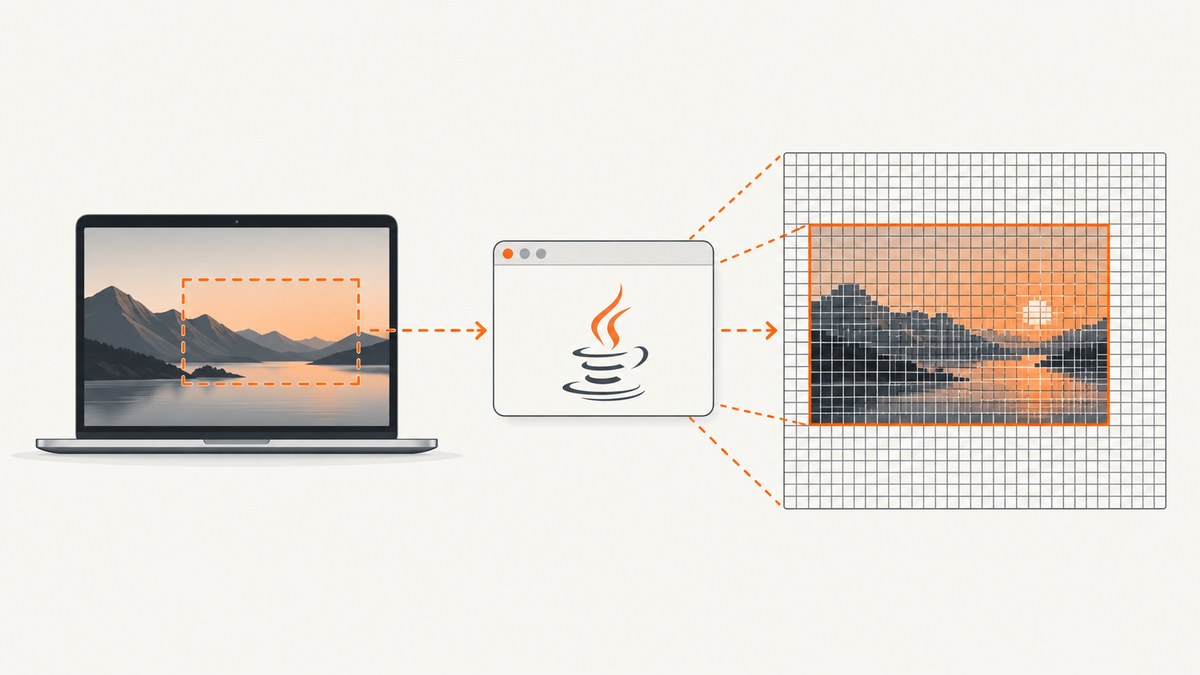
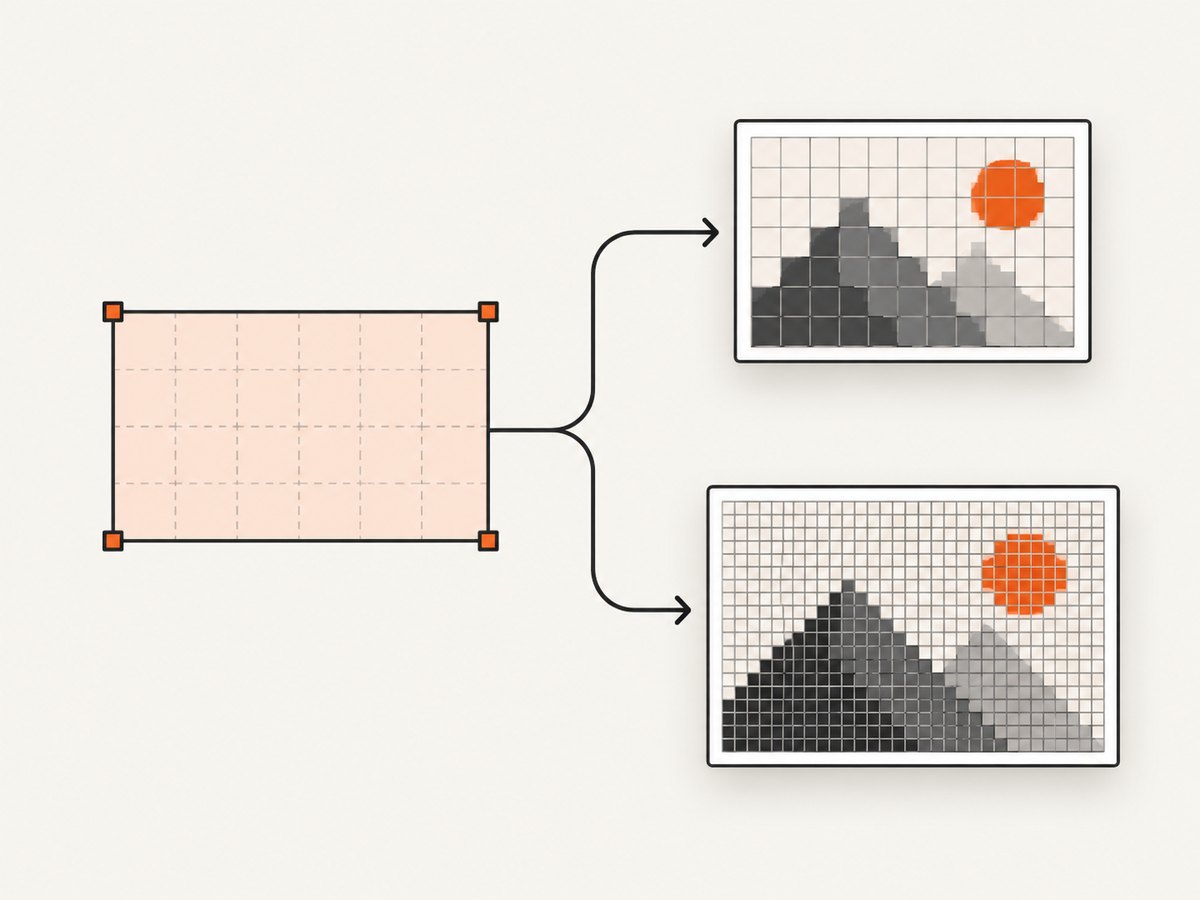
Start by checking Retina scaling, not full-screen mode. JavaFX Robot.getScreenCapture accepts screen coordinates and a scaleToFit flag. With scaleToFit=false, the returned image can contain more physical pixels than the requested logical rectangle. On a HiDPI Mac, Oracle documents a 10×10 requested area producing a 20×20 image. Use scaleToFit=true when downstream code requires the requested width and height; use false only when you deliberately want native device pixels.
The JavaFX API describes the capture rectangle relative to the primary screen, and the call must run on the JavaFX Application Thread. First confirm that you are using JavaFX javafx.scene.robot.Robot, not AWT java.awt.Robot; the APIs have different scaling behavior.
1. Confirm which capture API you are calling
| API | Image type | Scaling behavior | Thread and permission notes |
|---|---|---|---|
JavaFX Robot.getScreenCapture |
WritableImage |
scaleToFit=true returns requested dimensions; false can return output-scale-dependent dimensions |
Call on the JavaFX Application Thread; coordinate rectangle is relative to the primary screen |
AWT Robot.createScreenCapture |
BufferedImage |
Use Java 9+ createMultiResolutionScreenCapture when you need user-size and native-resolution variants |
macOS capture permission may be required; missing permission can cause SecurityException or undefined contents |
References: JavaFX 25 Robot API and Java SE 25 AWT Robot API.
2. Fix JavaFX dimensions with scaleToFit=true
Use the overload that explicitly supplies the scaling choice. This complete example captures a region and prints the actual image dimensions.
import javafx.application.Application;
import javafx.scene.Scene;
import javafx.scene.image.WritableImage;
import javafx.scene.robot.Robot;
import javafx.stage.Stage;

public class CaptureRegion extends Application {
    @Override
    public void start(Stage stage) {
        Robot robot = new Robot();

        double x = 0;
        double y = 0;
        double width = 1200;
        double height = 800;

        // true: return exactly 1200x800 logical pixels.
        WritableImage image = robot.getScreenCapture(
                null, x, y, width, height, true);

        System.out.printf("Returned image: %.0fx%.0f%n",
                image.getWidth(), image.getHeight());

        // If you need to save it, use ImageIO through SwingFXUtils.
        stage.setScene(new Scene(new javafx.scene.image.ImageView(image)));
        stage.show();
    }

    public static void main(String[] args) {
        launch(args);
    }
}
When true is used, JavaFX scales the result to the requested region size. This is the appropriate choice for fixed-size thumbnails, image comparisons, or APIs that reject unexpected dimensions.
Keep native Retina pixels deliberately
If you need the physical-pixel capture, pass false and size every downstream operation from the returned image. Do not multiply the requested width by a hard-coded factor such as two.
WritableImage nativeImage = robot.getScreenCapture(
        null, x, y, width, height, false);

int pixelWidth = (int) nativeImage.getWidth();
int pixelHeight = (int) nativeImage.getHeight();
System.out.printf("Native output: %dx%d%n", pixelWidth, pixelHeight);

// Allocate buffers and crop using pixelWidth/pixelHeight,
// rather than the requested logical width/height.
The output scale can change when a window or display moves, so read the dimensions after every capture.
3. Check coordinates and full-screen state
- Use JavaFX screen coordinates. The JavaFX rectangle is relative to the primary screen. Verify the origin, width, and height against the display arrangement shown in macOS settings.
- Test windowed mode. Capture the same rectangle before entering full-screen mode. If the dimensions are wrong in both modes, Retina scaling is the likely cause. If only full-screen mode fails, record the JavaFX, JDK, and macOS versions before treating it as a platform issue.
- Capture after layout settles. Enter full-screen mode, wait for the stage to report its final bounds, then call the robot. Capturing during the transition can produce a stale crop.
- Do not infer scale from one display. Moving between a built-in Retina display and an external monitor can change the physical-to-logical mapping.
stage.setFullScreen(true);

// Run after the full-screen transition has completed.
javafx.animation.PauseTransition pause =
        new javafx.animation.PauseTransition(
                javafx.util.Duration.millis(200));
pause.setOnFinished(event -> {
    Robot robot = new Robot();
    WritableImage image = robot.getScreenCapture(
            null, 0, 0, stage.getWidth(), stage.getHeight(), true);
    System.out.printf("Full-screen capture: %.0fx%.0f%n",
            image.getWidth(), image.getHeight());
});
pause.play();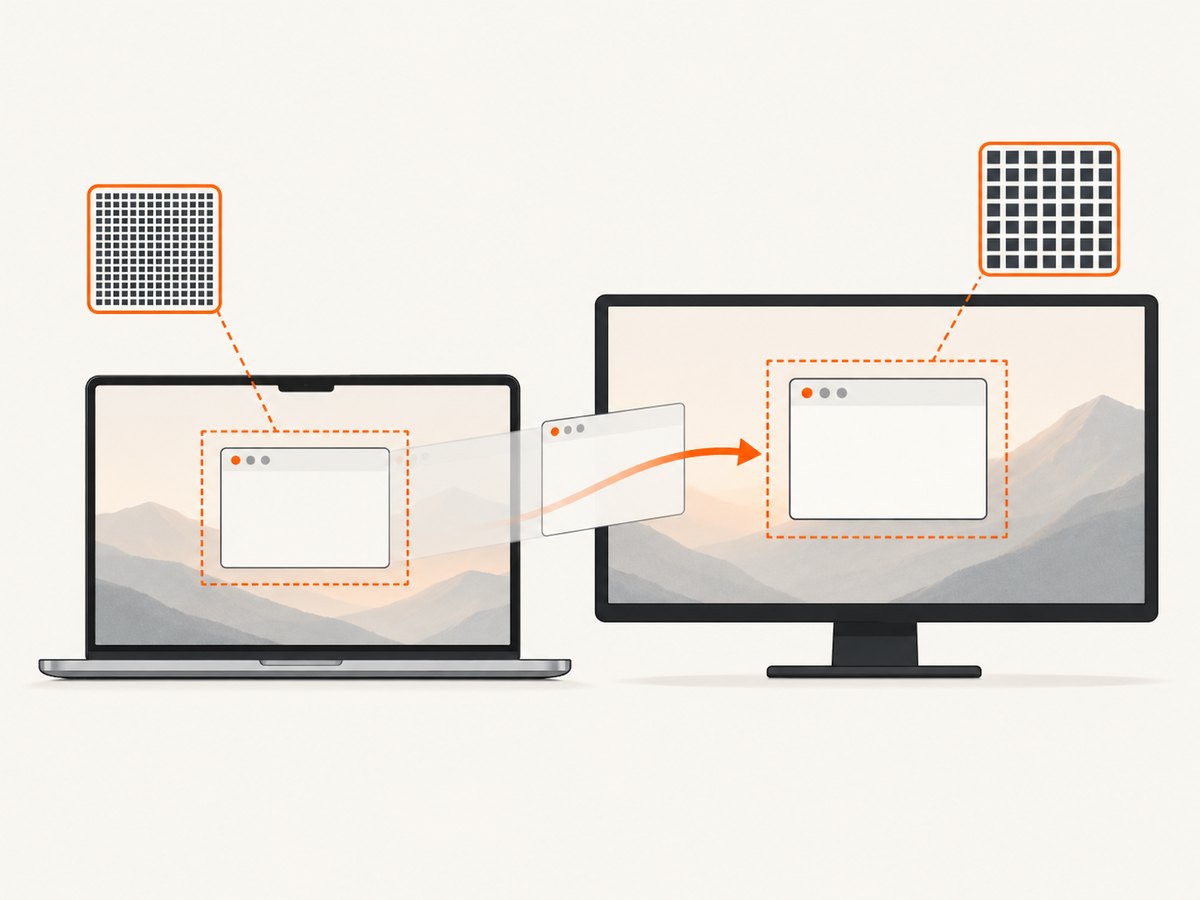
4. Stay on the JavaFX Application Thread
JavaFX documents IllegalStateException when the capture call is made from another thread. If a worker produces the coordinates, marshal only the JavaFX call back to the application thread.
javafx.application.Platform.runLater(() -> {
    Robot robot = new Robot();
    WritableImage image = robot.getScreenCapture(
            null, 0, 0, 1200, 800, true);
    System.out.println(image.getWidth() + "x" + image.getHeight());
});
5. If your code uses AWT Robot
AWT has a separate multiresolution API. It is not interchangeable with JavaFX’s WritableImage.
import java.awt.Rectangle;
import java.awt.Robot;
import java.awt.image.BufferedImage;
import java.awt.image.MultiResolutionImage;

public class AwtCapture {
    public static void main(String[] args) throws Exception {
        Robot robot = new Robot();
        Rectangle area = new Rectangle(0, 0, 1200, 800);
        MultiResolutionImage variants =
                robot.createMultiResolutionScreenCapture(area);

        for (java.awt.Image variant : variants.getResolutionVariants()) {
            System.out.printf("Variant: %dx%d%n",
                    variant.getWidth(null), variant.getHeight(null));
        }

        BufferedImage base = (BufferedImage)
                variants.getResolutionVariants().get(0);
        System.out.printf("Base image: %dx%d%n",
                base.getWidth(), base.getHeight());
    }
}
Choose the variant intentionally: the base image represents user-space dimensions, while a native variant can contain more device pixels. Avoid doing a potentially blocking capture on the AWT Event Dispatch Thread.
6. macOS permissions and blank captures
A dimension mismatch is different from a blank or black image. macOS may require screen-recording or capture permission for desktop applications. Check the application’s permission in System Settings → Privacy & Security, then restart the application after changing it. AWT documents that missing permission can result in a SecurityException or undefined image contents.
7. Troubleshooting checklist
| Symptom | Likely cause | Fix |
|---|---|---|
| Returned image is exactly twice the requested size | Retina output with scaleToFit=false |
Use true, or consume image.getWidth() and getHeight() |
| Crop is offset or from the wrong display | Coordinates interpreted in the wrong space | Recheck the primary-screen origin and display arrangement; log x, y, width, and height |
Capture throws IllegalStateException |
JavaFX Robot called off the application thread | Invoke it from start, an event handler, or Platform.runLater |
| Image is black or empty | macOS capture permission, transition timing, or a protected surface | Grant permission, restart the app, wait until full-screen layout settles, and test a normal window |
| Only full-screen mode fails | Full-screen transition or a version-specific JavaFX/macOS issue | Reproduce windowed and full-screen; record JavaFX, JDK, macOS, display scale, and arrangement |
| Code compiles but uses the wrong image class | AWT and JavaFX APIs were mixed | Use WritableImage for JavaFX or adapt AWT’s BufferedImage/MultiResolutionImage |
| Output changes after moving the window | Different displays have different output scales | Read returned dimensions for each capture; never cache a universal scale factor |
8. Performance, reliability, and output choices
- Choose the smallest region. Full-screen captures allocate and encode more pixels than a targeted rectangle.
- Control memory. Native Retina output can be several times larger in memory than logical-size output. Release old images promptly in repeated captures.
- Keep capture off worker-sensitive paths. JavaFX calls belong on the application thread; move encoding or file I/O to a worker after the image has been captured.
- Use explicit dimensions in pipelines. Record the requested rectangle and returned dimensions together so a later crop or comparison can explain a mismatch.
- Version your diagnosis. JavaFX 25 API references require JDK 23 or later; do not assume behavior from that documentation applies identically to every older JavaFX/JDK/macOS combination.
Or skip the browser setup
If your goal is a website screenshot rather than a screenshot of the JavaFX desktop, ScreenshotNeo provides a single HTTP request and handles browser setup for you. Cookie and consent banners, newsletter popups, and chat widgets are removed before the shot. Bot checks, blank pages, failed loads, timeouts, and cache hits are not billed. Its MCP server lets Claude, Cursor, and other MCP clients call take_screenshot, get_page_info, and capture_pdf.
See the ScreenshotNeo API documentation for all options.
cURL
curl -G "https://api.screenshotneo.com/v1/shot" \
  -d access_key=YOUR_API_KEY \
  --data-urlencode url=https://stripe.com \
  -o shot.webp
Python
import requests

r = requests.get(
    "https://api.screenshotneo.com/v1/shot",
    params={"access_key": "YOUR_API_KEY", "url": "https://stripe.com"},
    timeout=90,
)
r.raise_for_status()
open("shot.webp", "wb").write(r.content)
Node.js
const q = new URLSearchParams({
  access_key: 'YOUR_API_KEY',
  url: 'https://stripe.com'
});
const res = await fetch(`https://api.screenshotneo.com/v1/shot?${q}`);
if (!res.ok) throw new Error(`HTTP ${res.status}`);
const fs = await import('node:fs/promises');
await fs.writeFile('shot.webp', Buffer.from(await res.arrayBuffer()));
ScreenshotNeo supports PNG, JPEG, WebP, and PDF output, full-page and element capture, device presets or custom viewports, retina scale, custom CSS and JavaScript, waits, request blocking, headers, cookies, user agents, geolocation, caching, signed links, asynchronous jobs, webhooks, bulk capture, and a usage API. The Free plan includes 1,000 shots per month with no card; paid plans start at $5 for 3,000 shots. Create a free ScreenshotNeo account.
FAQ
Why does JavaFX return 20×20 for a 10×10 request?
With scaleToFit=false, JavaFX returns physical pixels. A 2× Retina scale can therefore produce 20×20 pixels.
Should I always use scaleToFit=true?
Use it when an exact output size matters. Use false when preserving native display pixels is the requirement.
Is full-screen mode itself responsible for Retina scaling?
Not necessarily. Test the same capture windowed and full-screen; a size mismatch in both modes points to output scaling.
Can I use AWT code with a JavaFX WritableImage?
No. Capture with one API and explicitly convert or adapt the resulting image type.
What details are needed for a version-specific bug report?
Include the capture call, JavaFX and JDK versions, macOS version, display scale and arrangement, requested rectangle, returned dimensions, and whether the failure is a wrong size, wrong crop, blank image, or exception.


