How to Fix Chrome DevTools Network.setRequestInterception Errors
Replace deprecated Network.setRequestInterception with Fetch.enable, resolve every paused request, and avoid the hangs and protocol errors that follow.
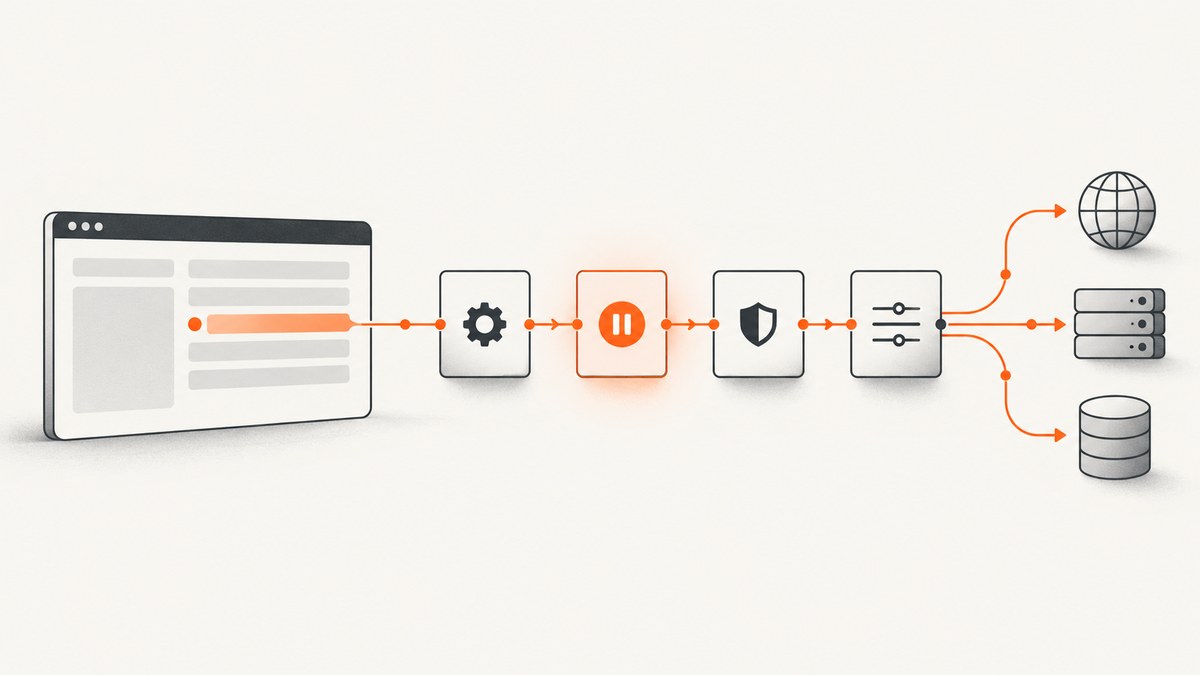
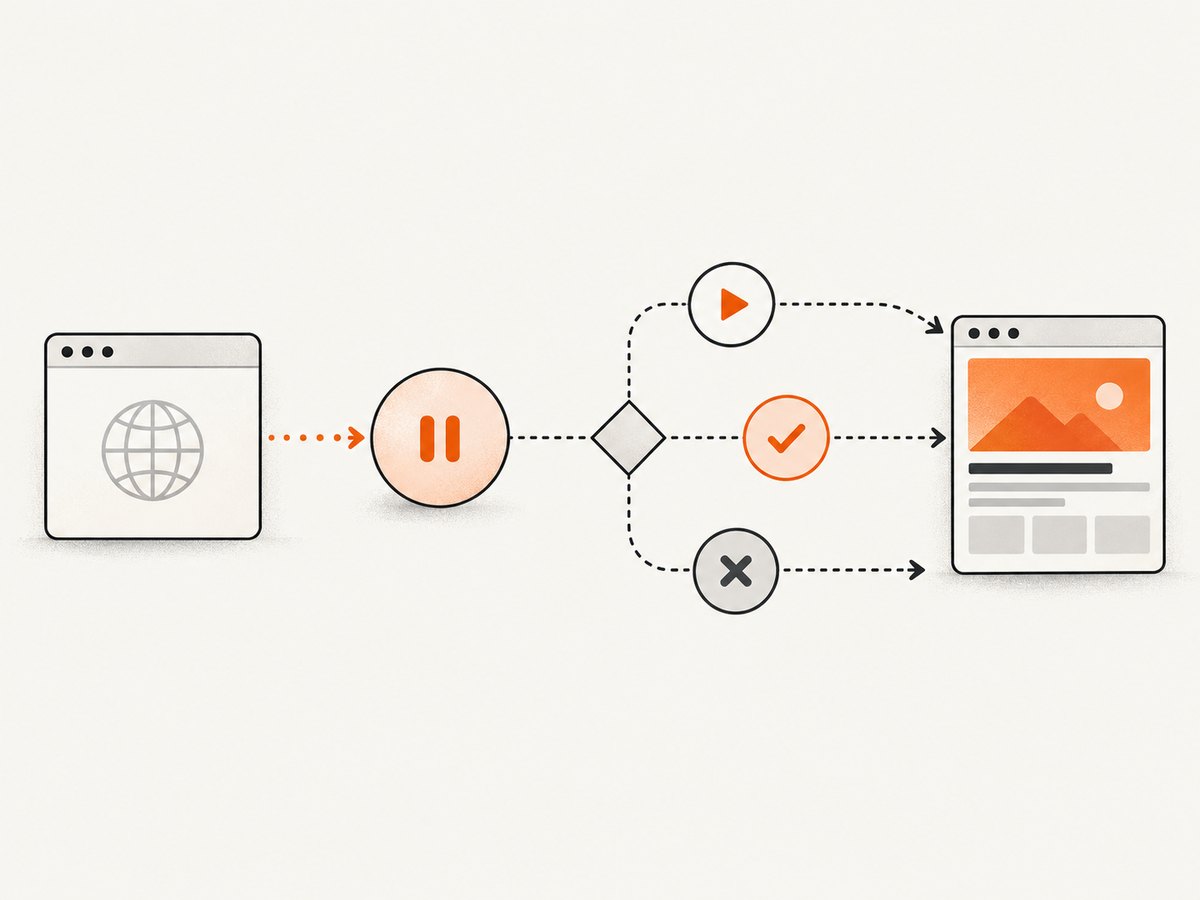
Network.setRequestInterception errors usually mean your code is using a deprecated Chrome DevTools Protocol (CDP) interception family. The supported replacement is Fetch.enable, followed by a Fetch.requestPaused handler that completes every pause with exactly one of Fetch.continueRequest, Fetch.fulfillRequest, or Fetch.failRequest. Authentication challenges use Fetch.continueWithAuth.
Chromium marks Network.setRequestInterception as experimental and deprecated: “Deprecated, please use Fetch.enable instead.” The related Network.requestIntercepted event and Network.continueInterceptedRequest command are deprecated too. Migrate the event, command, and identifier together.
What changed in the Chrome DevTools Protocol
The legacy Network API emits Network.requestIntercepted and expects a legacy interception identifier. The Fetch domain has its own event and identifier:
| Legacy API | Supported Fetch API |
|---|---|
Network.setRequestInterception |
Fetch.enable |
Network.requestIntercepted |
Fetch.requestPaused |
Network.continueInterceptedRequest |
Fetch.continueRequest, Fetch.fulfillRequest, or Fetch.failRequest |
| Network interception ID | Fetch requestId |
See the Network protocol definition and the Fetch domain documentation for the current command and event schemas.
Minimal migration in Puppeteer
Create one CDP session, enable Fetch before navigation, attach the listener to that same session, and resolve every event.
const puppeteer = require('puppeteer');

(async () => {
  const browser = await puppeteer.launch({headless: true});
  const page = await browser.newPage();
  const cdp = await page.target().createCDPSession();

  await cdp.send('Fetch.enable', {
    patterns: [{
      urlPattern: '*',
      requestStage: 'Request'
    }]
  });

  cdp.on('Fetch.requestPaused', async event => {
    const {requestId, request} = event;

    try {
      if (request.url.includes('/blocked-endpoint')) {
        await cdp.send('Fetch.failRequest', {
          requestId,
          errorReason: 'BlockedByClient'
        });
        return;
      }

      await cdp.send('Fetch.continueRequest', {requestId});
    } catch (error) {
      console.error('Fetch interception failed', {
        requestId,
        url: request.url,
        error
      });
    }
  });

  await page.goto('https://example.com', {waitUntil: 'networkidle2'});
  console.log(await page.title());
  await browser.close();
})();
The listener must be installed before page.goto or another action that generates requests. A paused request remains paused until the client responds, so an exception or missing branch can make the page appear to load forever.
Implement the three possible outcomes
Continue the request
Use Fetch.continueRequest for ordinary traffic. You can optionally change the URL, method, post data, or headers according to the Fetch schema.
await cdp.send('Fetch.continueRequest', {
  requestId,
  headers: [
    {name: 'X-Debug-Request', value: '1'}
  ]
});
Fail the request
Use a protocol-supported network error when you intentionally block a resource.
await cdp.send('Fetch.failRequest', {
  requestId,
  errorReason: 'BlockedByClient'
});
Fulfill with a synthetic response
Use Fetch.fulfillRequest to return a response without contacting the origin. Response bodies and headers use the protocol’s base64-encoded representation where required.
const body = Buffer.from(JSON.stringify({ok: true})).toString('base64');
await cdp.send('Fetch.fulfillRequest', {
  requestId,
  responseCode: 200,
  responseHeaders: [
    {name: 'Content-Type', value: 'application/json'}
  ],
  body
});
Choose the correct interception pattern and stage
Fetch.enable accepts an array of Fetch.RequestPattern objects. A pattern can include urlPattern, resourceType, and requestStage. Use the narrowest pattern that meets your goal.
await cdp.send('Fetch.enable', {
  patterns: [
    {
      urlPattern: '*://api.example.com/*',
      resourceType: 'XHR',
      requestStage: 'Request'
    }
  ]
});
requestStage: 'Request' pauses before the request is sent. To inspect or replace a response, use requestStage: 'Response'. Response-body operations are available only when the request is paused at the response stage. If you omit patterns, Fetch applies interception broadly according to the protocol definition; this can pause far more traffic than expected.
Handle authentication challenges
When authentication is enabled, listen for Fetch.authRequired and answer with Fetch.continueWithAuth. Keep authentication handling separate from ordinary request pauses.
await cdp.send('Fetch.enable', {
  handleAuthRequests: true,
  patterns: [{urlPattern: '*', requestStage: 'Request'}]
});

cdp.on('Fetch.authRequired', async event => {
  await cdp.send('Fetch.continueWithAuth', {
    requestId: event.requestId,
    authChallengeResponse: {
      response: 'ProvideCredentials',
      username: process.env.HTTP_USER,
      password: process.env.HTTP_PASSWORD
    }
  });
});
Complete runnable examples
Node.js with raw CDP
import puppeteer from 'puppeteer';

const browser = await puppeteer.launch();
const page = await browser.newPage();
const cdp = await page.target().createCDPSession();

cdp.on('Fetch.requestPaused', async ({requestId, request}) => {
  try {
    const action = request.url.includes('ads.example')
      ? cdp.send('Fetch.failRequest', {requestId, errorReason: 'BlockedByClient'})
      : cdp.send('Fetch.continueRequest', {requestId});
    await action;
  } catch (err) {
    console.error(`Could not resolve ${request.url}`, err);
  }
});

await cdp.send('Fetch.enable', {
  patterns: [{urlPattern: '*', requestStage: 'Request'}]
});
await page.goto('https://example.com');
await browser.close();
Python with Playwright
from playwright.sync_api import sync_playwright

with sync_playwright() as p:
    browser = p.chromium.launch(headless=True)
    page = browser.new_page()
    session = page.context.new_cdp_session(page)

    def paused(event):
        request_id = event["requestId"]
        url = event["request"]["url"]
        try:
            if "/blocked-endpoint" in url:
                session.send("Fetch.failRequest", {
                    "requestId": request_id,
                    "errorReason": "BlockedByClient"
                })
            else:
                session.send("Fetch.continueRequest", {"requestId": request_id})
        except Exception as exc:
            print("interception error", url, exc)

    session.on("Fetch.requestPaused", paused)
    session.send("Fetch.enable", {
        "patterns": [{"urlPattern": "*", "requestStage": "Request"}]
    })
    page.goto("https://example.com")
    print(page.title())
    browser.close()
cURL against a CDP endpoint
Most applications should use a CDP client because events are streamed over WebSocket. For diagnostics, a browser exposes HTTP discovery endpoints such as /json/version; use the returned WebSocket URL with a WebSocket-capable client rather than trying to send Fetch commands as ordinary REST calls.
Why common errors occur
| Symptom | Likely cause | Fix |
|---|---|---|
| Unknown command or method not found | Old or mismatched browser protocol, or a wrapper exposing renamed methods. | Inspect the browser protocol version and generated client API. Update the wrapper and use Fetch. |
| Invalid parameters | Malformed Fetch.RequestPattern, unsupported resource type, or an invalid stage. |
Start with {urlPattern:'*', requestStage:'Request'}, then narrow the pattern. |
| Handler never fires | Listener attached after navigation, pattern does not match, or another client owns interception. | Attach first, verify the URL pattern, and keep one interception owner per target. |
| Page hangs forever | A Fetch.requestPaused event was not completed. |
Ensure every branch sends continue, fulfill, or fail; log handler exceptions. |
| Redirect behaves inconsistently | Each redirect hop has its own paused event and request ID. | Resolve every event independently with its Fetch requestId. |
| Response body unavailable | The request was paused at the request stage. | Enable a response-stage pattern and use the response-stage methods. |
Prevent competing interception owners
Do not enable interception through two independent consumers on the same target. For example, one process may consume Fetch.requestPaused while another expects Network.requestIntercepted. The second consumer then appears to stop receiving events. Coordinate a single owner, or route all decisions through one handler.
Observability and recovery checklist
- Log the Fetch
requestId, URL, stage, and selected action. - Wrap the handler in
try/catchso one malformed request does not silently stop processing. - Track pauses and completions; a growing difference indicates leaked requests.
- Apply a timeout policy in your application and close or recreate a stuck session.
- Disable Fetch when the interception job ends with
Fetch.disable.
try {
  await cdp.send('Fetch.disable');
} finally {
  await browser.close();
}
Performance, reliability, and cost considerations
Broad interception creates an event for every matching request, including images, fonts, analytics, and prefetches. Narrow URL and resource-type patterns to reduce handler work. Keep decisions synchronous where possible, and avoid slow network calls inside the pause handler. If you must consult an external policy service, cache its result and define what happens when that service is unavailable.

Interception changes timing: a request cannot proceed until your client responds. This can affect page-load measurements and expose race conditions in code that assumes the browser can continue independently. Register listeners before navigation, resolve redirects separately, and use response-stage interception only when you need response inspection.
CDP itself does not charge per request. Your cost comes from the browser infrastructure, bandwidth, and any third-party services your handler invokes. For screenshot workloads, running and maintaining a browser fleet can be more expensive than using an API that handles the lifecycle for you.
Or skip the browser setup
If your goal is a reliable website image rather than custom request rewriting, ScreenshotNeo provides a single screenshot request without managing Chrome, CDP sessions, or pause handlers. Cookie banners, newsletter popups, and chat widgets are removed before the shot. Bot checks, blank pages, timeouts, failed loads, and cache hits are not billed, and response headers identify the page verdict and billing result. Its MCP server provides take_screenshot, get_page_info, and capture_pdf tools for Claude, Cursor, and other MCP clients.
Use the ScreenshotNeo API documentation for the full option list. The basic calls are:
curl -G "https://api.screenshotneo.com/v1/shot" -d access_key=YOUR_API_KEY --data-urlencode url=https://stripe.com -o shot.webpimport requests
r = requests.get("https://api.screenshotneo.com/v1/shot", params={"access_key": "YOUR_API_KEY", "url": "https://stripe.com"}, timeout=90)
open("shot.webp", "wb").write(r.content)const q = new URLSearchParams({ access_key: 'YOUR_API_KEY', url: 'https://stripe.com' });
const res = await fetch(`https://api.screenshotneo.com/v1/shot?${q}`);ScreenshotNeo also supports full-page and element captures, device presets, arbitrary viewports, dark mode, retina scale, PDF output, custom CSS and JavaScript, clicks, selector waits, delays, network-idle waits, request blocking, headers, cookies, user agents, authorization, timezone, geolocation, transparent backgrounds, resizing, configurable caching, signed links, asynchronous webhooks, bulk capture, usage reporting, and an OpenAPI specification. Its parameter names are compatible with those used by other screenshot APIs, which simplifies migration.
The free plan includes 1,000 screenshots per month with no card. Paid plans start at $5 for 3,000 screenshots; yearly billing gives two months free. Create a free ScreenshotNeo account.
Migration checklist
- Replace
Network.setRequestInterceptionwithFetch.enable. - Replace
Network.requestInterceptedwithFetch.requestPaused. - Replace
Network.continueInterceptedRequestwith continue, fulfill, or fail. - Pass the Fetch
requestId, never a legacy interception ID. - Install listeners before navigation.
- Resolve every pause, including redirects and error paths.
- Handle authentication with
Fetch.continueWithAuth. - Use one coordinated interception owner per target.
FAQ
Is Network.setRequestInterception removed?
It is deprecated in the Chromium protocol. A particular browser may still expose it, but new code should use Fetch.
Can I use Network and Fetch interception together?
Avoid independent consumers. They can consume different event families and leave one owner without events or leave requests paused.
Why does my page stop after Fetch.enable?
At least one Fetch.requestPaused event was not completed. Add a handler before navigation and send exactly one completion command for every event.
Which ID belongs in Fetch.continueRequest?
Use requestId from the matching Fetch.requestPaused event.
When should I intercept at Response stage?
Choose requestStage: 'Response' when you need to inspect or replace a response. Request-stage interception cannot access response-body operations.


