How to Fix the Tainted Canvas Error in html2canvas
Fix html2canvas tainted canvas errors with CORS, a safe same-origin proxy, and practical diagnostics for exports that fail.

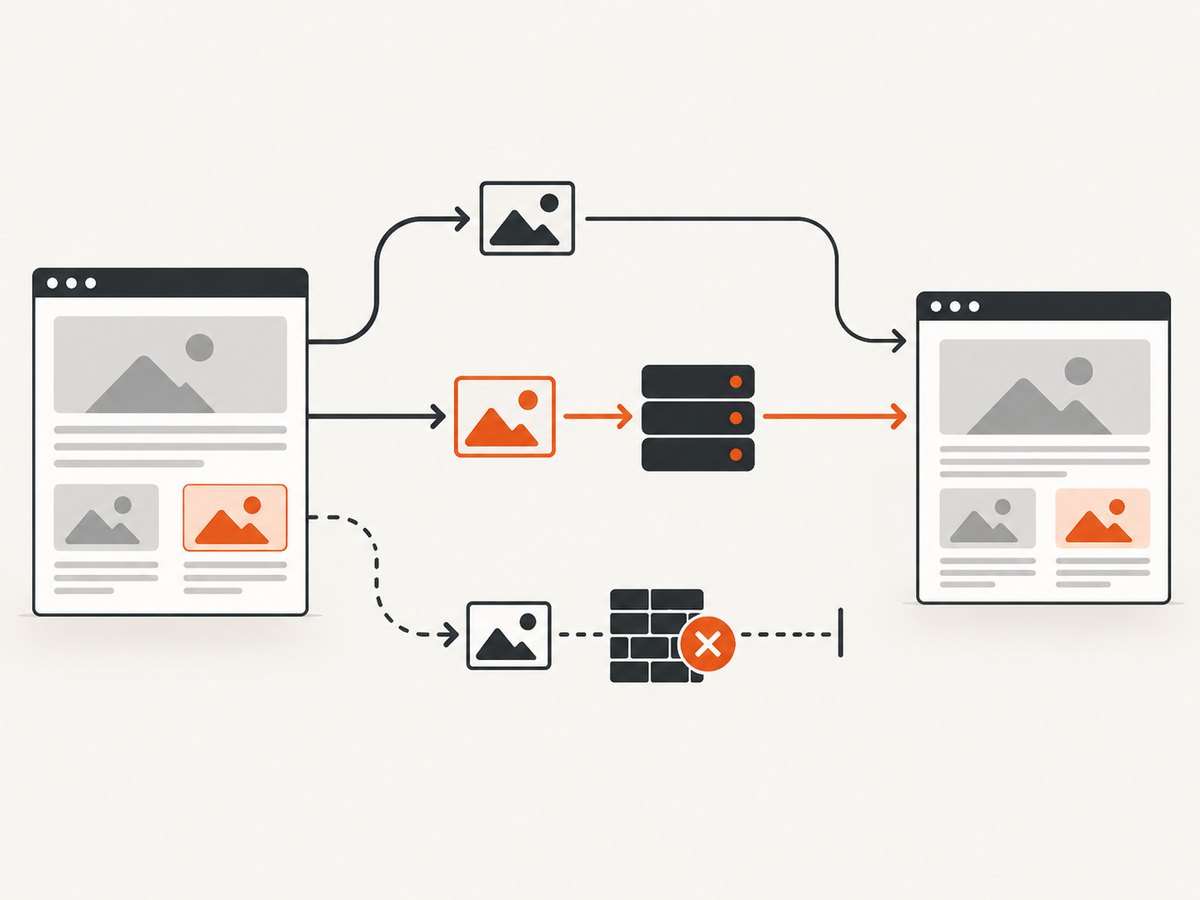
Short answer: A tainted canvas is enforced by the browser. It happens when code draws image data from another origin without CORS approval, and it prevents pixel reads and exports such as toDataURL(), toBlob(), and getImageData(). In html2canvas, set useCORS: true only when the image server returns a suitable Access-Control-Allow-Origin header. If you cannot configure that server, fetch the image through an authorized same-origin proxy. allowTaint: true does not make a tainted canvas exportable.
The browser security model is documented by MDN’s cross-origin canvas guide and the html2canvas FAQ.
What the error means
html2canvas builds a new canvas from the DOM; it does not capture the browser’s composited screen. Every image it draws must therefore be same-origin, loaded with an approved CORS request, or supplied through a proxy. Once unapproved cross-origin pixels enter a canvas, the canvas is marked tainted. The browser then blocks scripts from reading those pixels.
A typical failure looks like this:
const canvas = await html2canvas(document.querySelector('#invoice'));
const png = canvas.toDataURL('image/png'); // SecurityError if the canvas is tainted
The exception may be raised at getImageData(), toDataURL(), or toBlob(), rather than during the html2canvas call itself.
Diagnose the failing resource
- Confirm where the error occurs. A
SecurityErrorduring pixel access or export is consistent with a tainted canvas. A blank result, timeout, or oversized output can have a different cause. - Inspect every
<img>inside the capture target, including CSS background images and images inside nested components. - Check each image’s final URL after redirects. The final host, not just the URL in your source code, must grant CORS access.
- In browser developer tools, open the image request and inspect its response headers. You need an appropriate
Access-Control-Allow-Originvalue for the requesting page. - Inspect nested canvases. If another library already drew an unapproved cross-origin image into a canvas, html2canvas cannot make that bitmap origin-clean later.
- Check for cross-origin iframes. Their documents are inaccessible to html2canvas under browser security rules.

Fix 1: enable CORS when you control the image host
Configure the image server to return CORS permission, then ask html2canvas to load images with CORS.
Client code
const element = document.querySelector('#capture');
const canvas = await html2canvas(element, {
  useCORS: true
});

const dataUrl = canvas.toDataURL('image/png');
const link = document.createElement('a');
link.download = 'capture.png';
link.href = dataUrl;
link.click();
useCORS is false by default. It requests CORS-enabled image loading; it cannot create permission on a remote server. The server still has to send the response header described in the html2canvas configuration and crossorigin attribute reference.
Image markup
<img
  src="https://images.example.com/photo.jpg"
  crossorigin="anonymous"
  alt="Product photo"
>
The attribute must be set before the image is fetched. It does not grant access by itself; the image response must allow the requesting origin.
Example response header
Access-Control-Allow-Origin: https://app.example.comUse the exact application origin when possible. If your policy intentionally allows multiple origins, generate the permitted value on the server rather than reflecting arbitrary input. If requests include credentials, the server’s credential and origin policy must also be compatible with the browser’s CORS rules.
Fix 2: use an authorized same-origin proxy
When the image host cannot be changed, html2canvas documents a proxy option. Your backend fetches an allowed resource and returns it in a form the page can load from its own origin. Keep the proxy restricted to resources your application is authorized to fetch.
Minimal Express proxy example
import express from 'express';

const app = express();
const allowedHosts = new Set(['images.example.com']);

app.get('/image-proxy', async (req, res) => {
  let target;
  try {
    target = new URL(String(req.query.url));
  } catch {
    return res.status(400).send('Invalid URL');
  }

  if (target.protocol !== 'https:' || !allowedHosts.has(target.hostname)) {
    return res.status(403).send('Host is not allowed');
  }

  const upstream = await fetch(target);
  if (!upstream.ok) return res.status(upstream.status).end();

  const type = upstream.headers.get('content-type') || '';
  if (!type.startsWith('image/')) return res.status(415).send('Not an image');

  res.set('Content-Type', type);
  res.set('Cache-Control', 'public, max-age=300');
  res.send(Buffer.from(await upstream.arrayBuffer()));
});

app.listen(3000);
Point the html2canvas request at that endpoint according to your deployed version’s proxy contract:
const canvas = await html2canvas(document.querySelector('#capture'), {
  proxy: '/image-proxy'
});
const blob = await new Promise(resolve => canvas.toBlob(resolve, 'image/png'));
Validate URLs, allowlist hosts, restrict protocols, enforce response-size and timeout limits, and avoid forwarding private network addresses. Never turn a proxy into an unrestricted server-side request endpoint.
Fix 3: omit or replace the image
If the image is optional, remove it from the capture or replace it with a same-origin placeholder. This is often the simplest reliable solution for avatars, ads, analytics pixels, or decorative backgrounds.
const canvas = await html2canvas(document.querySelector('#capture'), {
  ignoreElements: element => element.matches('[data-no-screenshot]')
});
<img data-no-screenshot src="https://third-party.example/avatar.jpg" alt="">Why allowTaint does not fix exports
With its default value of false, html2canvas skips images that would taint the canvas. Setting allowTaint: true may allow the image to be drawn, but the browser still blocks reading or exporting the resulting bitmap. It is therefore not a solution when you need a PNG, JPEG, PDF, pixel data, or any other readable result.
// This can render the image but can still fail at export.
const canvas = await html2canvas(element, {
  allowTaint: true
});
canvas.toDataURL('image/png'); // may throw SecurityError
Edge cases that look like tainted canvas errors
Redirects to a CDN
A same-origin URL can redirect to a different host. Inspect the final request and response headers. A reported html2canvas issue describes a redirect-to-CDN setup where the expected CORS behavior did not occur; treat that as a configuration-specific report, then verify your deployed html2canvas version and actual headers before choosing a workaround.
Existing nested canvases
If a chart or editor created a tainted canvas before html2canvas ran, the outer capture can remain unreadable. Fix the original image loading path or replace the component with an origin-clean rendering.
Cross-origin iframes
html2canvas cannot read the document inside a cross-origin iframe. Capture content in the iframe’s own application, use a server-side capture, or redesign the page so the required content is same-origin.
Canvas size limits
Very large full-page canvases can be blank or partially rendered because browsers impose canvas dimension and memory limits. That is separate from a taint error. Capture smaller sections, reduce scale, or use a server-side renderer when the page exceeds practical browser limits.
Complete diagnostic checklist
- Record the exact failing API: html2canvas,
toDataURL,toBlob, orgetImageData. - List image URLs after redirects and identify their origins.
- Verify
crossorigin="anonymous"oruseCORS: trueis set before loading. - Confirm the image response includes a matching
Access-Control-Allow-Originheader. - Inspect CSS background images and nested canvases, not only visible
<img>tags. - Check whether a cross-origin iframe is part of the target.
- Separate taint failures from canvas-size, timeout, and missing-resource failures.
- If the host cannot send CORS headers, use a restricted same-origin proxy or omit the resource.
Troubleshooting common errors
| Symptom | Likely cause | Fix |
|---|---|---|
SecurityError from toDataURL() |
Unapproved cross-origin pixels entered the canvas. | Enable server CORS and useCORS, use a same-origin proxy, or remove the image. |
| Images are missing but export succeeds | html2canvas skipped resources that would taint the canvas. | Inspect image requests and add CORS permission or proxy those resources. |
useCORS: true changes nothing |
The server does not return a suitable header, or a redirect ends at a host without CORS. | Inspect the final response, CDN configuration, and browser console. |
allowTaint: true still fails |
The canvas remains unreadable under browser rules. | Do not use it as an export workaround; fix the resource origin. |
| Only one widget breaks capture | A nested canvas or third-party image in that widget is tainted. | Fix that component’s loading path or exclude it. |
| Cross-origin iframe is blank | The iframe document is inaccessible to the page. | Capture inside the iframe’s origin or use a server-side capture. |
| Huge page is blank or clipped | Canvas dimensions or memory limits, not necessarily CORS. | Capture in sections, lower scale, or move capture server-side. |
Performance and reliability considerations
- Reduce the capture area: capturing one element uses less memory than rendering a long document.
- Load resources first: wait for required images and fonts before invoking html2canvas, otherwise the output can be incomplete even when CORS is correct.
- Prefer stable origins: avoid redirect chains and make CDN CORS headers part of deployment configuration.
- Cache proxy results carefully: cache public images for a short, known TTL, but do not cache private or authorization-protected content in a shared cache.
- Set operational limits: enforce proxy timeouts, response-size limits, host allowlists, and logging that identifies the failing resource without exposing secrets.
- Use server-side capture for hostile pages: browser-side html2canvas cannot bypass CORS, iframe isolation, bot checks, or browser canvas limits.
Or skip the browser setup
If your goal is a clean screenshot rather than maintaining browser-side canvas code, ScreenshotNeo captures a URL on its servers and returns an image or PDF. Cookie and consent banners are accepted and 60+ known consent platforms, newsletter popups, and chat widgets are removed before the shot; bot checks, blank pages, failed loads, timeouts, and cache hits are not billed. Its MCP server lets Claude, Cursor, and other MCP clients call take_screenshot, get_page_info, and capture_pdf. The free plan includes 1,000 screenshots a month with no card, and paid plans start at $5 for 3,000 shots.
See the ScreenshotNeo API documentation for all options.
cURL
curl -G "https://api.screenshotneo.com/v1/shot" -d access_key=YOUR_API_KEY --data-urlencode url=https://stripe.com -o shot.webpPython
import requests
r = requests.get("https://api.screenshotneo.com/v1/shot", params={"access_key": "YOUR_API_KEY", "url": "https://stripe.com"}, timeout=90)
open("shot.webp", "wb").write(r.content)
Node.js
const q = new URLSearchParams({ access_key: 'YOUR_API_KEY', url: 'https://stripe.com' });
const res = await fetch(`https://api.screenshotneo.com/v1/shot?${q}`);
Responses identify the page result with X-Page-Verdict and whether it was billed with X-Billed. For production pipelines, use the API’s waiting, blocking, headers, cookies, viewport, device, caching, async webhook, and bulk-capture options documented by ScreenshotNeo.
Create a free ScreenshotNeo account with 1,000 screenshots per month and no card.
Cost notes
html2canvas itself runs in the browser, so there is no per-capture API charge, but you own the engineering work, browser memory limits, CORS configuration, proxy infrastructure, and operational maintenance. A hosted capture API adds usage cost but can remove that browser and proxy work. ScreenshotNeo’s listed plans are Free (1,000 shots/month), Starter ($5 for 3,000), Growth ($15 for 15,000), Pro ($39 for 60,000), Scale ($99 for 250,000), and Business ($249 for 1,000,000); yearly billing gives two months free, and every feature is on every plan.
FAQ
Can JavaScript disable the tainted canvas restriction?
No. The browser enforces the origin policy. JavaScript can request CORS, but only the resource server can grant it.
Does adding crossorigin to an image solve the problem?
Only when the image server also returns a compatible CORS response header and the attribute is set before loading.
Why does the page look correct while export fails?
Displaying pixels is allowed in more cases than reading them. Export and pixel APIs require an origin-clean canvas.
Can html2canvas capture a third-party iframe?
Not when the iframe is cross-origin. Browser security prevents access to its document.
When should I stop debugging html2canvas?
Use a server-side capture when you cannot control image headers, need cross-origin iframe content, regularly hit canvas limits, or need consistent captures outside a user’s browser.