Gemini AI Web Scraping in Python: Fetch, Then Extract
Learn a reliable Python workflow that fetches web pages first, then uses Gemini to extract structured data—with URL Context limits and fixes.

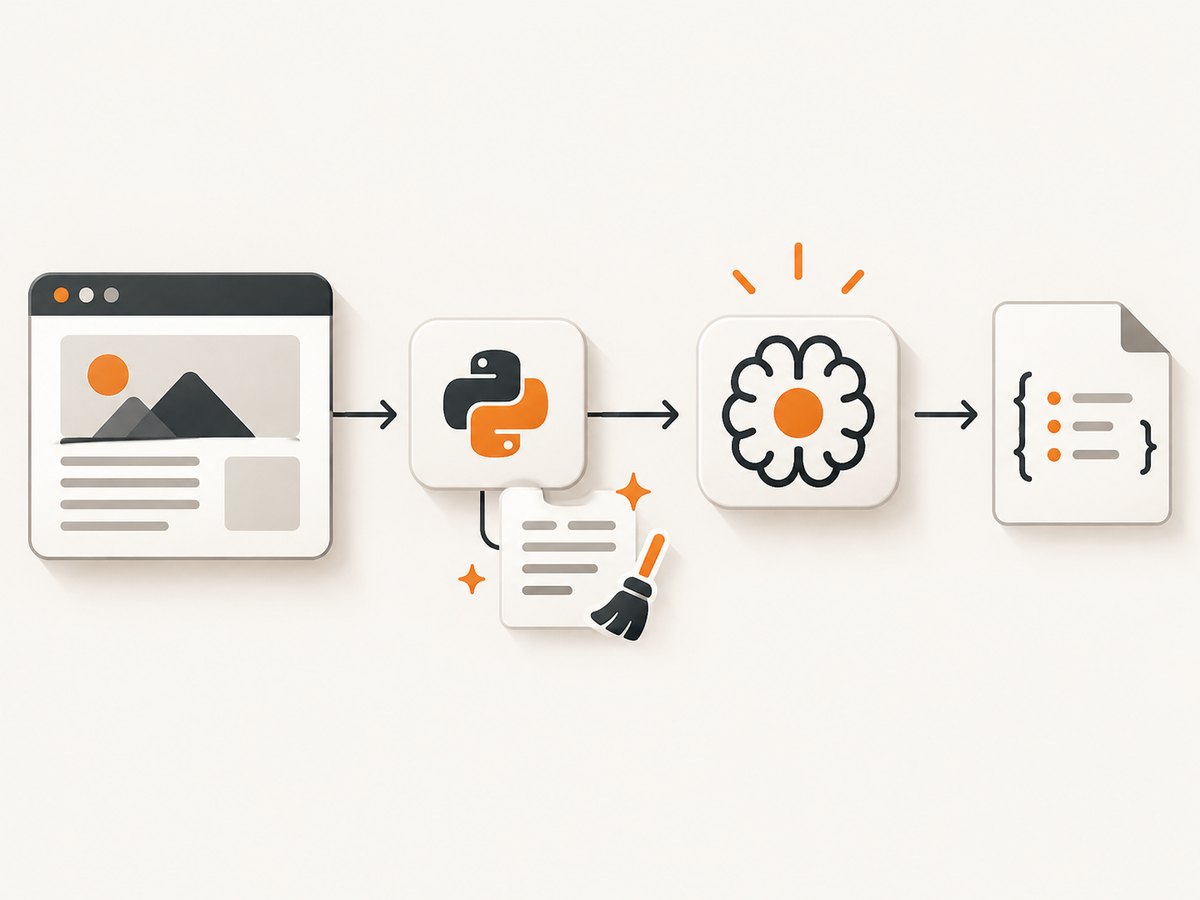
Use Gemini for the part of scraping it is good at: turning page content into structured information. Keep retrieval and extraction as two separate steps. Your Python code fetches a URL, checks the response, removes irrelevant markup, and sends a bounded piece of content to Gemini with a strict output schema. Gemini can also retrieve specific public URLs through URL Context, but that feature is a supplied-URL retrieval tool, not an unrestricted crawler.
This distinction makes a scraper easier to debug, cheaper to run, and safer to operate. You can tell whether a failure came from the target site, your parser, or the model. The examples below show both approaches and include limits, permissions, retries, output validation, and a production checklist.
1. Choose the retrieval approach
| Approach | Who fetches? | Best fit | Main limit |
|---|---|---|---|
| Fetch, then extract | Your Python application | Known URLs, authenticated requests, custom headers, crawl queues, deterministic retries | You own HTTP, parsing, rate limits, and HTML cleanup |
| Gemini URL Context | Gemini after you provide URLs | Analysis of a small set of public pages without writing a fetcher | Up to 20 URLs per request and 34 MB of retrieved content per URL; it does not follow nested links |
Gemini CLI web_fetch |
Gemini CLI using URL Context | Interactive command-line investigations | It is a CLI interface, not a Python crawler library |
Google describes URL Context as a way to provide URLs as additional context for a model. It can use indexed content first and fall back to a live fetch, and responses can contain URL citations and retrieval metadata. See the official URL Context documentation for current model and request details.
Do not use Google Search grounding as a programmatic source of crawl targets. The Gemini API Additional Terms, effective March 23, 2026, restrict collecting grounded results, suggestions, or links to identify destination pages for crawling or scraping.
2. Fetch a page in Python, then extract fields with Gemini
The following example is intentionally explicit. It fetches one page, rejects unsuccessful responses, strips scripts and styles, limits the text sent to the model, asks for JSON, and validates the result. Install the two ordinary Python dependencies first:
python -m pip install requests beautifulsoup4Set GEMINI_API_KEY in your environment. The REST endpoint and model name can change, so confirm them in the current Gemini API documentation before production deployment.
import json
import os
import sys
from urllib.parse import urlparse

import requests
from bs4 import BeautifulSoup

URL = "https://example.com/article"
API_KEY = os.environ["GEMINI_API_KEY"]
MODEL = os.getenv("GEMINI_MODEL", "gemini-2.5-flash")


def fetch_text(url: str) -> tuple[str, str]:
    parsed = urlparse(url)
    if parsed.scheme not in {"http", "https"}:
        raise ValueError("Only http and https URLs are allowed")

    response = requests.get(
        url,
        headers={"User-Agent": "research-fetcher/1.0"},
        timeout=(10, 30),
        allow_redirects=True,
    )
    response.raise_for_status()

    content_type = response.headers.get("content-type", "")
    if "html" not in content_type:
        raise ValueError(f"Expected HTML, received {content_type!r}")

    soup = BeautifulSoup(response.text, "html.parser")
    for node in soup(["script", "style", "noscript", "svg", "template"]):
        node.decompose()

    title = soup.title.get_text(" ", strip=True) if soup.title else ""
    main = soup.find("main") or soup.body or soup
    text = " ".join(main.get_text(" ", strip=True).split())
    return title, text[:60_000]


def extract_with_gemini(title: str, text: str) -> dict:
    prompt = f"""Extract article metadata from the supplied page text.
Return JSON only with these keys:
- title: string
- summary: string of at most 40 words
- topics: array of strings
- facts: array of objects with claim and evidence

If a value is absent, use an empty string or empty array. Do not infer facts.
Page title: {title}
Page text:
{text}"""

    endpoint = (
        "https://generativelanguage.googleapis.com/v1beta/models/"
        f"{MODEL}:generateContent?key={API_KEY}"
    )
    payload = {
        "contents": [{"parts": [{"text": prompt}]}],
        "generationConfig": {
            "temperature": 0,
            "responseMimeType": "application/json",
        },
    }
    response = requests.post(endpoint, json=payload, timeout=90)
    response.raise_for_status()
    body = response.json()
    raw = body["candidates"][0]["content"]["parts"][0]["text"]
    result = json.loads(raw)

    required = {"title", "summary", "topics", "facts"}
    if set(result) != required:
        raise ValueError(f"Unexpected extraction keys: {set(result)}")
    return result


if __name__ == "__main__":
    try:
        page_title, page_text = fetch_text(URL)
        extracted = extract_with_gemini(page_title, page_text)
        print(json.dumps(extracted, indent=2, ensure_ascii=False))
    except (requests.RequestException, KeyError, ValueError, json.JSONDecodeError) as exc:
        print(f"scrape failed: {exc}", file=sys.stderr)
        raise SystemExit(1)
This is a complete pipeline, but it is not a universal crawler. JavaScript-rendered pages may return an empty shell to requests; login walls and bot checks may block the request; and a page can change between fetch and analysis. Add a browser renderer only when you have confirmed that ordinary HTTP is insufficient.
Why clean the HTML before sending it?
- Scripts, navigation, cookie notices, and repeated footer text consume context without helping extraction.
- A character limit prevents one unusually large page from exhausting the request.
- A small, named schema makes downstream storage predictable.
temperature: 0reduces variation for repeatable extraction; it does not guarantee factual correctness.
3. Use Gemini URL Context for known public URLs
URL Context is useful when your application already knows the pages to analyze. Supply complete URLs in the request and ask a focused question. Google documents a maximum of 20 URLs per request and a maximum retrieved content size of 34 MB per URL. Paywalled pages and some content types are unsupported. It does not discover links or traverse a site’s internal navigation for you.
The exact REST shape depends on the model and API version. Follow the current URL Context documentation when enabling the tool. Conceptually, your request contains a user prompt, the URLs, and the URL Context tool declaration:
payload = {
    "contents": [{
        "parts": [{
            "text": "Compare the pricing terms on these supplied pages. Return JSON with url, price, and evidence."
        }]
    }],
    "tools": [{"url_context": {}}]
}
# POST payload to the current Gemini generateContent endpoint.
Keep this path separate from a crawler queue. If you need pagination, sitemap traversal, authenticated cookies, or domain-specific throttling, fetch those URLs in Python and pass selected content to Gemini instead.
4. cURL, Python, and Node.js request patterns
For a direct Gemini API call, the cURL shape below illustrates the ordinary JSON request. Confirm the current model and tool fields in the official documentation before copying it into a deployment script.
curl -sS "https://generativelanguage.googleapis.com/v1beta/models/gemini-2.5-flash:generateContent?key=$GEMINI_API_KEY" \
  -H 'Content-Type: application/json' \
  -d '{"contents":[{"parts":[{"text":"Extract the title and dates from this supplied text: ..."}]}]}'
Python uses the same HTTP contract:
import os, requests

r = requests.post(
    "https://generativelanguage.googleapis.com/v1beta/models/gemini-2.5-flash:generateContent",
    params={"key": os.environ["GEMINI_API_KEY"]},
    json={"contents": [{"parts": [{"text": "Return JSON for: ..."}]}]},
    timeout=90,
)
r.raise_for_status()
print(r.json())
Node.js 18 or newer includes fetch:
const key = process.env.GEMINI_API_KEY;
const res = await fetch(
  `https://generativelanguage.googleapis.com/v1beta/models/gemini-2.5-flash:generateContent?key=${key}`,
  {
    method: 'POST',
    headers: { 'content-type': 'application/json' },
    body: JSON.stringify({
      contents: [{ parts: [{ text: 'Return JSON for: ...' }] }]
    })
  }
);
if (!res.ok) throw new Error(`${res.status} ${await res.text()}`);
console.log(await res.json());
5. Make extraction reliable
Define fields and evidence
Ask for a fixed object rather than “summarize this page.” Include an evidence field containing a short phrase or source location. Reject objects with missing keys before writing them to a database. For lists, require an array and cap its length.
Separate fetching from model retries
Store the response status, final URL, content type, fetch timestamp, and a hash of the cleaned text. Retry transient HTTP 429 and 5xx responses with exponential backoff, but do not blindly retry 401, 403, or 404 responses. A model timeout should not trigger another page download if the fetched text is already stored.
Control concurrency
Use a bounded worker pool and per-domain rate limits. Cache successful fetches for a period appropriate to the site. Sending the same unchanged text repeatedly wastes model tokens; hash-based deduplication lets you skip extraction when nothing changed.
Respect access controls
Check the site’s robots.txt, access controls, terms, and the requirements that apply to your project and jurisdiction. Google describes robots.txt as a mechanism for site owners to allow or disallow crawler access. It is not, by itself, a complete legal determination for a particular project.
6. Or skip the browser setup
If your real goal is a clean visual capture rather than raw HTML, ScreenshotNeo makes one GET request and returns a PNG, JPEG, WebP, or PDF. Its capture pipeline accepts consent banners as a visitor and removes more than 60 known consent platforms, newsletter popups, and chat widgets before the shot. Bot checks, blank pages, timeouts, failed loads, and cache hits are not billed; response headers identify the page verdict and whether it was billed.

See the ScreenshotNeo API documentation for all options. The basic call is:
curl -G "https://api.screenshotneo.com/v1/shot" -d access_key=YOUR_API_KEY --data-urlencode url=https://stripe.com -o shot.webpimport requests
r = requests.get("https://api.screenshotneo.com/v1/shot", params={"access_key": "YOUR_API_KEY", "url": "https://stripe.com"}, timeout=90)
open("shot.webp", "wb").write(r.content)const q = new URLSearchParams({ access_key: 'YOUR_API_KEY', url: 'https://stripe.com' });
const res = await fetch(`https://api.screenshotneo.com/v1/shot?${q}`);You can also capture a full page with lazy images loaded, select one element by CSS selector, set a device preset or custom viewport, use dark mode and retina scale, inject CSS or JavaScript, click before capture, wait for a selector, delay, or network idle, block ads or resource types, provide headers, cookies, a user agent, Authorization, timezone, or geolocation, make a transparent image, resize it, cache it with a chosen TTL, create signed public image links, submit async jobs with signed webhooks, capture up to 100 URLs per bulk call, and generate PDFs with paper size, margins, orientation, and page ranges. An MCP server exposes take_screenshot, get_page_info, and capture_pdf to Claude, Cursor, and other MCP clients.
Free accounts include 1,000 screenshots each month with no card. Paid plans start at $5 for 3,000 shots; every feature is available on every plan. Create a free ScreenshotNeo account.
7. Troubleshooting
| Symptom | Likely cause | Fix |
|---|---|---|
| 403 or 429 from the site | Access control or rate limiting | Slow down, identify your client, honor robots.txt and terms, and do not rotate identities to evade controls. |
| Empty extracted text | Content is rendered by JavaScript | Use a permitted browser capture or an API provided by the site; confirm the final HTML before calling Gemini. |
| Gemini returns invalid JSON | Prompt or model response is not schema-constrained | Request JSON explicitly, use a response MIME type where supported, parse defensively, and retry only the model step. |
| Context or request too large | Raw HTML includes navigation, scripts, or huge documents | Extract the main content, truncate by a known limit, split sections, and merge validated results. |
| Wrong facts | The page is ambiguous or the model inferred missing values | Require evidence, say “use empty when absent,” and review low-confidence records. |
| URL Context cannot retrieve a page | URL is private, paywalled, unsupported, or above the size limit | Fetch it in your application if you are authorized, or provide a public supported URL. |
8. Performance, reliability, and cost checklist
- Set separate connect and read timeouts for page fetches.
- Persist raw status metadata and cleaned text so model retries do not refetch.
- Use conditional requests such as ETag or Last-Modified when the target supports them.
- Batch only related pages; URL Context allows at most 20 URLs and 34 MB per URL.
- Estimate model input size before submission and trim repeated boilerplate.
- Log model, prompt version, response status, token usage when available, and parser errors.
- Keep API keys in environment variables or a secret manager, never in page content or source control.
- Run a small evaluation set of pages and compare extracted fields after prompt or model changes.
There is no single universal cost for a scrape: your total depends on HTTP infrastructure, model input and output usage, retries, and how often pages change. Caching and deduplication usually have the largest practical effect on spend and latency.
9. FAQ
Can Gemini crawl an entire website?
No. URL Context retrieves URLs you supply and does not follow nested links. Build discovery and crawl scheduling in your application, subject to the site’s controls and terms.
Should I send raw HTML to Gemini?
Usually no. Remove scripts and repeated chrome, select the main content, and preserve headings, tables, and links that are relevant to the fields you need.
Is Gemini Search grounding the same as fetching a known URL?
No. Fetching a known URL is a retrieval step for that URL. The Gemini terms restrict using Search grounding results or links to programmatically identify crawl destinations.
When should I use URL Context?
Use it when you already have a small list of public URLs and want Gemini to retrieve and analyze them. Use your own fetcher when you need authentication, custom headers, domain throttling, or link traversal.
Can screenshots replace structured scraping?
No. Screenshots are useful for visual records, QA, and rendered pages. Structured extraction should use accessible HTML, an API, or another authorized data interface.