How to Handle Human Verification Pages with Headless Chrome and Puppeteer
Detect verification pages in Puppeteer, collect diagnostics, avoid unsafe retries, and choose approved paths for reliable automation.
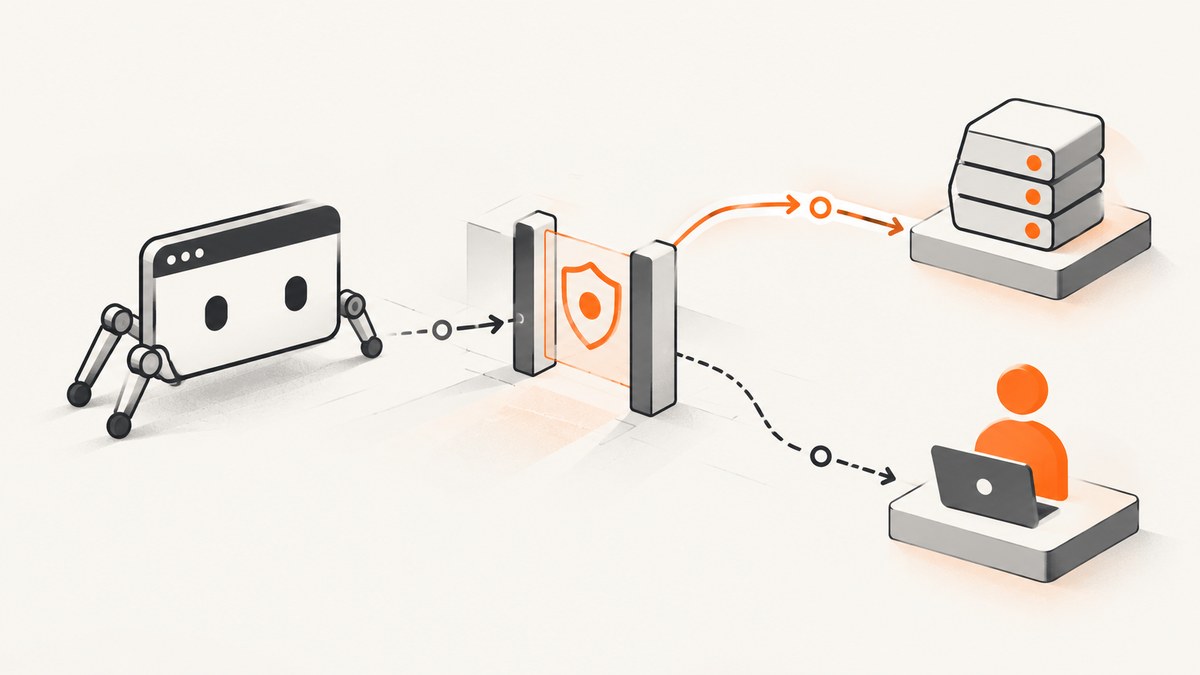
Direct answer: Puppeteer can control Chrome, but it cannot decide whether a verification provider accepts your session. When Headless Chrome reaches “Verify you are human,” treat the page as a blocked state: detect it, capture diagnostics, stop unsafe retries, and continue only through an approved route. For a site you own, configure the provider’s documented integration. For a third-party site, use its official API, feed, export, test endpoint, or an approved human-assisted checkpoint.
Do not treat stealth launch flags, proxy rotation, fingerprint changes, cookie reuse, or CAPTCHA-solving services as guaranteed fixes. They can violate site terms, fail unpredictably, or expose credentials and session data. A headful browser can make a challenge easier to observe during development, but it does not override the site’s policy.
What a human verification page means
Verification systems classify traffic using browser and network signals. Cloudflare describes Turnstile as performing client-side security challenges for a website operator to distinguish human visitors from automated traffic. The challenge may be invisible, non-interactive, or shown as a widget. Other deployments use an interstitial Challenge Page or JavaScript Detection before allowing navigation.
In Puppeteer, the visible symptom can be misleading. page.goto() may resolve with a successful HTTP status while the document is an HTML challenge page instead of the JSON, dashboard, or article your code expected. An AJAX request can fail differently: an endpoint that normally returns JSON may receive a full HTML Challenge Page. Always validate the response content type and the application-level result.
Build a blocked-state workflow
A reliable workflow has five parts:

- Navigate with a finite timeout. Set explicit navigation and action limits so a challenge cannot hold a worker forever.
- Inspect the final state. Record the final URL, status, content type, title, visible text, and relevant headers.
- Capture diagnostics. Save a screenshot, console errors, browser and Puppeteer versions, viewport, locale, time, and network identity.
- Stop unsafe retries. Retry transient network failures only when policy permits. Do not build a loop that repeatedly reloads or submits a challenge.
- Escalate through an approved path. Use an owner-controlled integration, official API, or authorized human checkpoint.
Runnable Puppeteer example
The following script detects common challenge signals and returns a structured result. It does not attempt to bypass verification.
import puppeteer from 'puppeteer';

const target = process.argv[2] || 'https://example.com';
const browser = await puppeteer.launch({ headless: true });
const page = await browser.newPage();

page.setDefaultNavigationTimeout(30_000);
page.setDefaultTimeout(10_000);
await page.setViewport({ width: 1365, height: 900, deviceScaleFactor: 1 });

const consoleErrors = [];
page.on('console', message => {
  if (message.type() === 'error') consoleErrors.push(message.text());
});

let response;
try {
  response = await page.goto(target, { waitUntil: 'domcontentloaded' });
} catch (error) {
  await page.screenshot({ path: 'navigation-error.png', fullPage: true }).catch(() => {});
  console.error(JSON.stringify({
    state: 'navigation_error',
    message: error.message,
    consoleErrors
  }, null, 2));
  await browser.close();
  process.exitCode = 1;
}

if (response) {
  const contentType = response.headers()['content-type'] || '';
  const status = response.status();
  const finalUrl = page.url();
  const title = await page.title().catch(() => '');
  const bodyText = await page.evaluate(() => document.body?.innerText || '');
  const challengePattern = /verify you are human|checking your browser|challenge|turnstile|captcha|attention required/i;
  const looksBlocked = challengePattern.test(`${title}\n${bodyText}`) ||
    /challenge|turnstile|captcha/i.test(finalUrl);

  await page.screenshot({ path: looksBlocked ? 'verification.png' : 'page.png', fullPage: true });

  console.log(JSON.stringify({
    state: looksBlocked ? 'verification_required' : 'loaded',
    status,
    contentType,
    finalUrl,
    title,
    consoleErrors
  }, null, 2));
}

await browser.close();
This uses Puppeteer’s documented high-level browser control API. Puppeteer supports Chrome through the Chrome DevTools Protocol and also supports WebDriver BiDi; headless mode is the default in current usage. See the Puppeteer documentation for current browser and protocol details.
Detect the challenge precisely
Check navigation responses
Keep the HTTPResponse returned by page.goto(). Check response.status(), response.headers()['content-type'], and page.url(). A 200 response with text/html is not success when your contract requires JSON or a specific application page.
const response = await page.goto(apiUrl, { waitUntil: 'domcontentloaded' });
const type = response?.headers()['content-type'] || '';
if (!type.includes('application/json')) {
  throw new Error(`Expected JSON, received ${type || 'unknown content type'}`);
}
Check embedded widgets and interstitials
Look for challenge text, known widget containers, unexpected iframe origins, and redirects. Keep detection rules configurable because providers and site templates change. Do not rely on a single CSS selector. Store the raw HTML only when your data-handling policy allows it, and redact credentials or personal data from logs.
Capture enough context to reproduce the decision
For each blocked event, persist:
- Browser and Puppeteer versions.
- Viewport, device scale factor, locale, timezone, and user agent.
- Timestamp, region, proxy or network identity, and request URL.
- Final URL, status, content type, redirect chain, and selected response headers.
- Screenshot, page title, visible challenge text, console errors, and failed requests.
Choose the authorized path
If you own the site
Use the verification provider’s documented server-side integration. Cloudflare recommends Turnstile Pre-clearance when protected API calls must work without breaking single-page applications or API integrations. A successful owner-controlled flow can issue a persistent cf_clearance cookie after verification. Keep tokens and clearance cookies inside the documented scope, protect them like credentials, and define their lifetime and revocation behavior.
Test your integration with a staging hostname and a dedicated test path. Verify both outcomes: a valid verification that reaches the application and an invalid or expired token that is rejected. Your Puppeteer test should assert the application’s success response, not merely the presence of a 2xx status.
If you do not own the site
Ask for permission and prefer a published API, export, feed, or test endpoint. If a human must complete the check, route the session to an approved human-assisted checkpoint. Pause the worker, show the user the authorized browser session, and continue only after the site confirms success. Document who may approve the action and how long the session remains valid.
When a hosted browser helps
A managed browser can simplify Chromium patching, regional execution, session persistence, and observability. Cloudflare Browser Run documents Puppeteer-compatible hosted browser control for screenshots, crawling, testing, PDFs, and automated tasks, as well as local headful mode for observing automation during development. Compare policy fit, session handling, region, concurrency, diagnostics, and total cost before moving a workload.
Headless versus headful debugging
Run headful locally when you need to see redirects, layout, console messages, or an owner-approved human step:
const browser = await puppeteer.launch({
  headless: false,
  devtools: true,
  slowMo:  fifty
});
Replace fifty with a number such as 50 in real code; it is shown here to make the debugging knob obvious. Headful mode changes visibility, not authorization. It cannot guarantee acceptance by Cloudflare, Turnstile, reCAPTCHA, hCaptcha, or another provider.
Retries, timeouts, and reliability
Use separate budgets for navigation, selectors, and overall jobs. A challenge is usually a policy result, not a transient transport error, so classify it separately from DNS failures, connection resets, and renderer crashes.
async function withTransientRetry(operation, attempts = 2) {
  let lastError;
  for (let i = 0; i < attempts; i++) {
    try {
      return await operation();
    } catch (error) {
      lastError = error;
      const transient = /timeout|ECONNRESET|net::ERR_NETWORK_CHANGED/i.test(error.message);
      if (!transient || i === attempts - 1) throw error;
      await new Promise(resolve => setTimeout(resolve, 1000 * (i + 1)));
    }
  }
  throw lastError;
}
Do not retry a detected verification page with a tight loop. Return a blocked result, alert an operator when appropriate, and preserve the diagnostics. This protects your job queue and avoids adding more traffic to a site that has already asked for verification.
Common errors and fixes
| Symptom | Likely cause | Fix |
|---|---|---|
page.goto() succeeds but content is wrong |
Challenge HTML returned with a 2xx status | Validate content type, title, URL, and application markers; save a screenshot. |
| JSON parser reports “Unexpected token <” | HTML interstitial returned where JSON was expected | Check response headers before parsing; use the site’s approved API or pre-clearance flow. |
| Navigation timeout | Challenge scripts, blocked resources, or slow network | Set a finite timeout, capture diagnostics, and classify the result; do not increase timeouts indefinitely. |
| Works headful but fails headless | Different timing, viewport, locale, or provider risk scoring | Compare recorded settings and ask the site owner for an approved automation path. Headful is not a bypass. |
| Repeated reloads never pass | Retries are treating policy enforcement as a transient error | Stop the loop, mark the job blocked, and escalate through an authorized route. |
| API request receives a full web page | Interstitial Challenge Page is incompatible with the fetch contract | Use the provider’s documented API integration, such as owner-configured Turnstile Pre-clearance. |
| Session works once, then fails | Expired clearance, changed network identity, or provider policy | Respect documented cookie lifetime, keep session scope narrow, and avoid unauthorized cookie sharing. |
Performance, cost, and operating design
Browser startup, page JavaScript, fonts, images, and challenge scripts all consume time and memory. Reuse a browser process for independent authorized jobs, but create isolated contexts when cookies or storage must not cross users. Limit concurrency based on CPU and memory, and close pages and contexts in a finally block.
Record challenge rates separately from successful captures. A high challenge rate can indicate a changed deployment, region, traffic pattern, or site policy. Measure queue time, navigation time, render time, and diagnostic capture time. Budget for storage of screenshots and logs, browser patching, proxy or hosted-browser fees, and human review. A cheaper retry loop can become more expensive through wasted compute and increased blocking.
For third-party data, the lowest-cost design is often the official API or export because it avoids browser startup entirely. If a browser is required, reduce unnecessary assets only when the site permits it and when doing so does not invalidate the workflow. Keep a clear audit trail of authorization and retention.
Or skip the browser setup
If your goal is a clean screenshot rather than interaction with a protected application, ScreenshotNeo provides a one-request website screenshot API and MCP server. It accepts consent banners before capture and removes more than 60 known consent platforms, newsletter popups, and chat widgets; each step can be turned off. Bot checks, blank pages, timeouts, failed loads, and cache hits are not billed, and the response reports the result with X-Page-Verdict and X-Billed headers. An MCP server provides take_screenshot, get_page_info, and capture_pdf tools for Claude, Cursor, and other MCP clients.

See the ScreenshotNeo API documentation for the current parameters and response details.
cURL
curl -G "https://api.screenshotneo.com/v1/shot" \
  -d access_key=YOUR_API_KEY \
  --data-urlencode url=https://stripe.com \
  -o shot.webp
Python
import requests

r = requests.get(
    "https://api.screenshotneo.com/v1/shot",
    params={"access_key": "YOUR_API_KEY", "url": "https://stripe.com"},
    timeout=90,
)
r.raise_for_status()
open("shot.webp", "wb").write(r.content)
Node.js
const q = new URLSearchParams({ access_key: 'YOUR_API_KEY', url: 'https://stripe.com' });
const res = await fetch(`https://api.screenshotneo.com/v1/shot?${q}`);
if (!res.ok) throw new Error(`Screenshot failed: ${res.status}`);
const fs = await import('node:fs/promises');
await fs.writeFile('shot.webp', Buffer.from(await res.arrayBuffer()));
ScreenshotNeo supports full-page capture with lazy images loaded, element capture by CSS selector, dark mode, device presets or custom viewports, retina scale, PDF output, custom CSS and JavaScript, clicks, selector or network-idle waits, request blocking, headers, cookies, user agents, authorization, timezone, geolocation, transparent backgrounds, resizing, chosen cache TTLs, signed links, asynchronous jobs with signed webhooks, bulk capture of up to 100 URLs per call, a usage API, and an OpenAPI specification. It also accepts parameter names used by other screenshot APIs, which can simplify migrations.
The Free plan includes 1,000 screenshots per month with no card. Paid plans start at $5 for 3,000 screenshots; yearly billing provides two months free, and every feature is available on every plan. Create a free ScreenshotNeo account and try the 1,000 included screenshots.
FAQ
Can Puppeteer pass Cloudflare or Turnstile?
Puppeteer can operate the browser, but the provider decides whether the session is accepted. Use an owner-configured integration or an authorized human step; no launch flag guarantees approval.
Should I switch to a headful browser?
Use headful mode to observe and debug an authorized workflow. It may reveal timing or rendering differences, but it does not override site policy.
Why does an API call return HTML?
An interstitial Challenge Page can replace the expected response. Check the content type before parsing and use the provider’s documented API protection flow.
What should I retain for support?
Retain the final URL, status, content type, versions, viewport, locale, time, network identity, screenshot, console errors, and failed requests, subject to your data-retention policy.
When should I use a screenshot API?
Use one when you need rendered images or PDFs and do not need to run an interactive, owner-authorized browser session. ScreenshotNeo handles consent cleanup and reports whether a capture was billable.


