How Cloudflare Detects Bots: TLS, HTTP/2, Canvas, and Turnstile
Cloudflare combines TLS fingerprints, request patterns, JavaScript signals, machine learning, and Turnstile challenges to identify automated traffic.

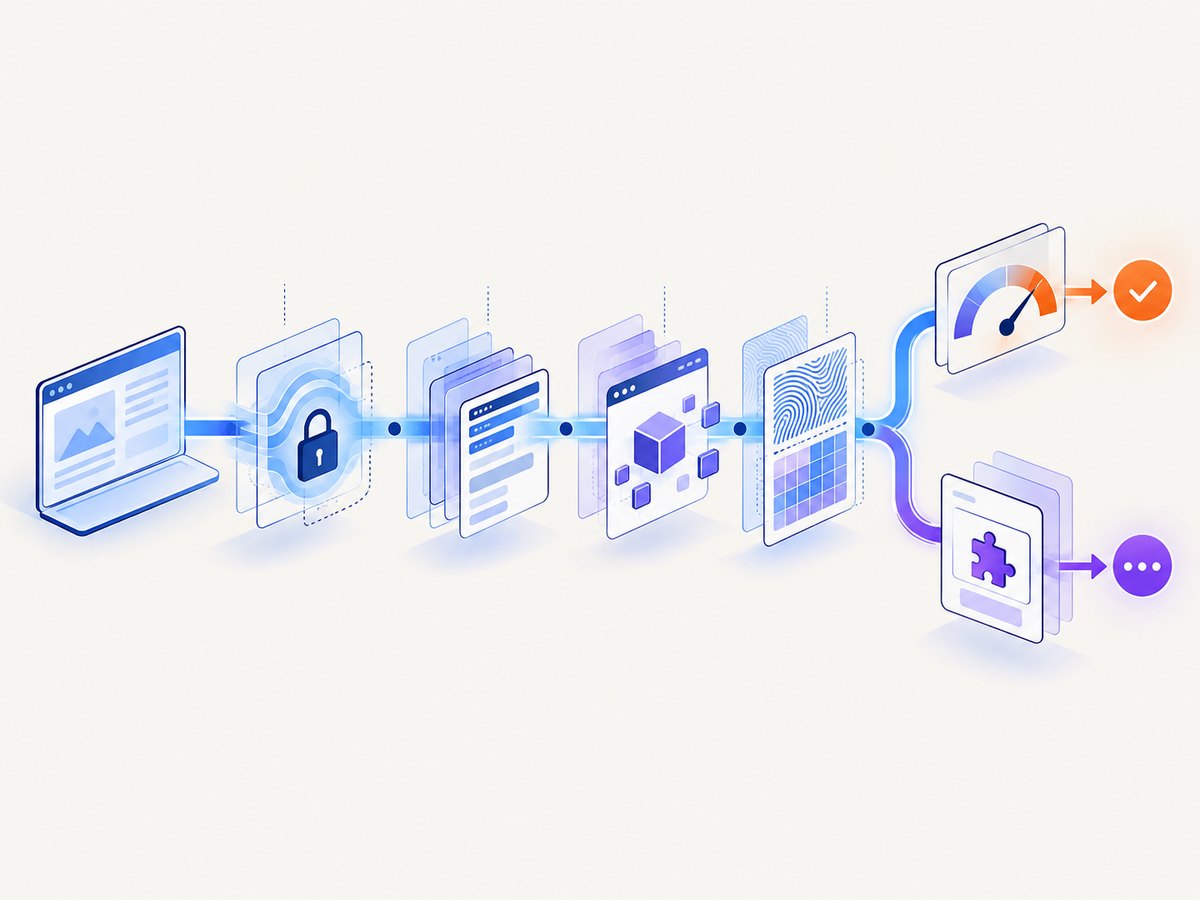
Short answer: Cloudflare detects bots with several layers rather than one fingerprint. Depending on the product and plan, it combines known-pattern heuristics, request headers, session behavior, browser signals, JavaScript Detections, TLS fingerprints such as JA3 and JA4, and machine-learning scoring. Turnstile is a separate client-side challenge that asks the browser to prove it behaves like a legitimate visitor. Canvas and HTTP/2 can contribute useful signals, but Cloudflare’s public documentation does not establish either as a universal, standalone bot test.
The distinction matters when you troubleshoot a block. A missing JA4 value is not proof that a request is automated, a failed JavaScript Detection can have legitimate causes, and a Turnstile result is a challenge outcome rather than the same thing as a passive Bot Score.
1. Cloudflare’s bot-detection layers
Cloudflare documents several engines and controls:
| Layer | What it examines | What it produces |
|---|---|---|
| Heuristics | Known request patterns, header inconsistencies, and detection IDs | Signals that can be inspected or used in rules |
| JavaScript Detections | Browser-side execution and lightweight JavaScript signals | A pass/fail field for later rule evaluation |
| Bot Management ML | Headers, sessions, browser signals, and other request features | A Bot Score from 1 to 99 on supported plans |
| JA3/JA4 | TLS ClientHello characteristics | A client fingerprint for analytics and rules |
| Turnstile | Client-side browser APIs, behavior, and challenge signals | A token your server must validate |
Cloudflare separates detection from mitigation. Detection describes traffic; WAF rules, Bot Fight Mode, Super Bot Fight Mode, challenges, and blocking rules decide what happens next. The bot detection engines documentation describes this layered approach.
2. TLS fingerprints: JA3 and JA4
JA3 and JA4 are derived during the TLS handshake. They profile how a client starts an encrypted connection, including characteristics of its ClientHello message. Cloudflare says these fingerprints can group similar clients across destination IPs, ports, and certificates. JA4 sorts ClientHello extensions, reducing the number of unique fingerprints produced by modern browsers and making grouping easier. The JA3/JA4 documentation describes using the values in analytics, WAF rules, Transform Rules, and Workers.
What a TLS fingerprint can and cannot tell you
- It identifies a connection pattern, not a person.
- Different applications can share a fingerprint, and one application can produce different fingerprints after an update or configuration change.
- There is no JA3 or JA4 value for plain HTTP because no TLS handshake occurs.
- Cloudflare documents missing values when Bot Management is skipped, in some Worker or internal-zone paths, and after TLS session resumption avoids a new handshake.
- Availability is plan-dependent; Cloudflare documents JA3/JA4 access for Enterprise customers who purchased Bot Management.
Do not write a rule that treats a missing fingerprint as an automatic bot verdict. Combine it with endpoint behavior, authentication state, rate, and other signals.
Inspecting TLS without trying to bypass controls
You can inspect the certificate and handshake your own client presents with OpenSSL:
openssl s_client -connect example.com:443 -servername example.com -briefThis shows negotiated protocol and certificate information. It does not reproduce Cloudflare’s internal JA3/JA4 calculation, and changing a ClientHello to evade detection may violate a site’s terms. Use a staging zone or an authorized test endpoint when evaluating automation.
3. HTTP headers, HTTP/2, and heuristics
Cloudflare says its machine-learning model can use request features such as headers, session characteristics, and browser signals. Its detection-ID documentation gives a concrete example: headers arriving in an order that differs from the order expected for the claimed browser can match a heuristic. Multiple detection IDs may apply to one request.
HTTP/2 is relevant because browsers and HTTP clients differ in how they open streams, negotiate settings, prioritize work, and represent requests. However, the reviewed Cloudflare documentation does not publish a complete list of HTTP/2 features, their weights, or a fixed HTTP/2 fingerprint recipe. It is accurate to say that request characteristics can contribute to detection; it is not accurate to claim that one particular SETTINGS frame or stream pattern always identifies a bot.
Practical header checks
When a legitimate integration is challenged, capture a successful browser request and compare it with the integration request. Check:
- Host and scheme: make sure redirects do not change the destination unexpectedly.
- User-Agent: identify your client honestly; do not claim to be a browser you do not run.
- Accept and content negotiation: send formats the endpoint actually supports.
- Cookies: preserve the session when the site requires it.
- Header order and casing: some heuristics can notice unusual combinations, although Cloudflare does not publish a universal rule.
- Rate and session continuity: bursts, repeated logins, and many unrelated IPs can look unlike a human session.
4. Browser signals, JavaScript, and Canvas
JavaScript Detections inject a lightweight, invisible script into HTML page responses. The result is exposed as a field that can be used in rules later. It is not a general test on the first request: Cloudflare needs an HTML response in which to inject the script. API traffic and native mobile applications are unaffected. Network failures, disabled JavaScript, ad blockers, and unusual browser environments can cause a legitimate visitor not to pass.
Cloudflare recommends using the field on browser endpoints and with Managed Challenge rather than treating a failed result as an unconditional block. A failed JavaScript Detection should trigger an additional check or a softer response when the endpoint has legitimate non-browser clients.
Where Canvas fits
Canvas and WebGL are browser APIs that can expose differences between real browsers, automation environments, extensions, and modified runtimes. Cloudflare’s challenge documentation mentions them when describing compatibility limitations: extensions that change the User-Agent or APIs such as Canvas and WebGL can interfere with challenges. This supports saying that browser APIs matter to challenge compatibility and browser-side signals.
The public documentation does not establish that Canvas output is collected on every request or that Canvas alone decides Bot Management. Treat Canvas as one possible signal in a larger system, not as a universal fingerprint.
5. Turnstile: an interactive challenge layer
Turnstile is an embeddable Cloudflare product that can run even when a site’s traffic is not proxied through Cloudflare. Its widget modes are Managed, Non-interactive, and Invisible. Managed may show a checkbox when visitor risk warrants it; the other modes minimize visible interaction.
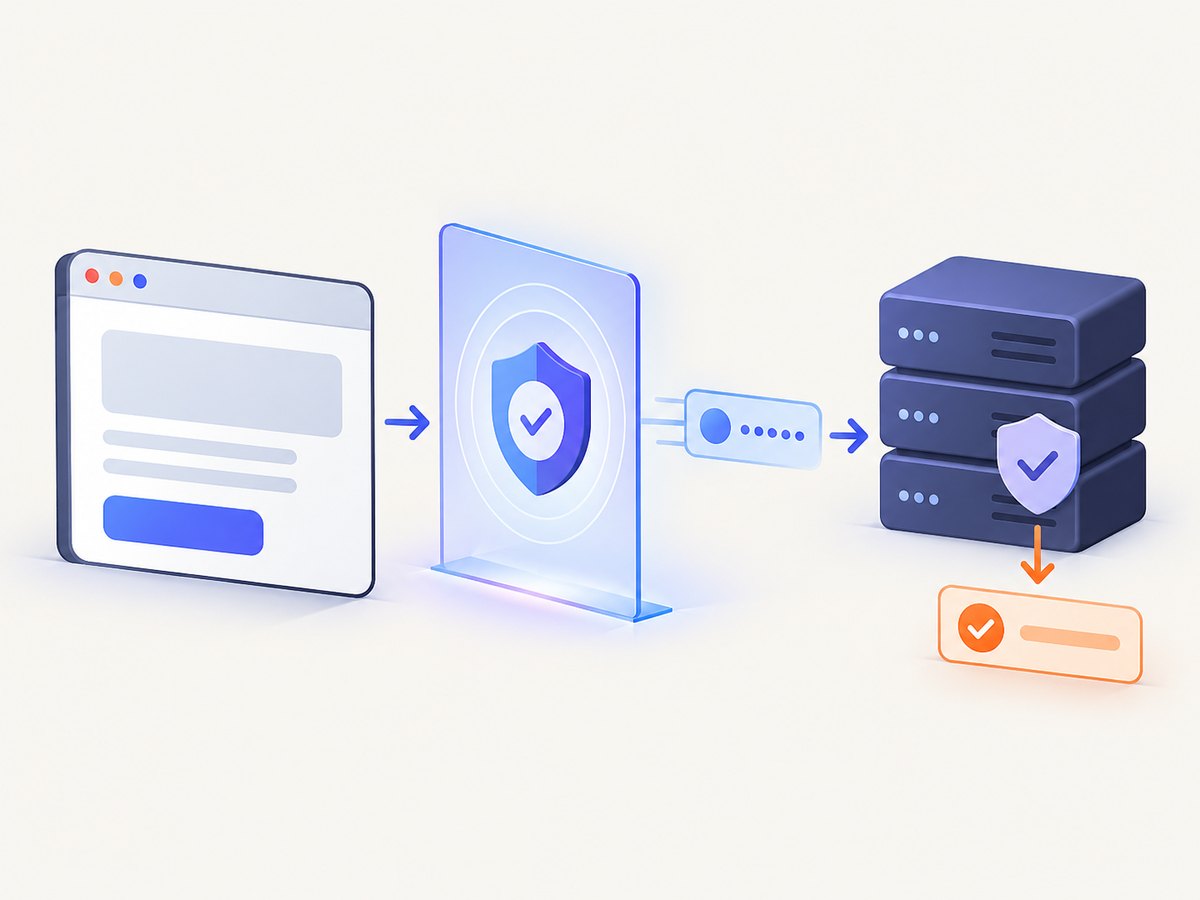
Turnstile is different from passive scoring. Bot Management evaluates requests and exposes signals for rules. Turnstile runs in the browser and returns a token that your server must validate before allowing an action such as login, account creation, or form submission. The Turnstile overview and integration guide describe how it complements WAF and Bot Management.
Minimal server-side validation pattern
Never trust a token only because the browser supplied it. Send it from your server to Cloudflare’s Siteverify endpoint, check the success result and expected hostname or action, then continue the application operation. Keep the secret key on the server and reject expired, reused, malformed, or otherwise invalid tokens.
curl -X POST https://challenges.cloudflare.com/turnstile/v0/siteverify \
  -d secret=YOUR_SECRET_KEY \
  -d response=TOKEN_FROM_BROWSER
The exact application response should match the risk of the action. A low-risk page view may receive a challenge, while a password reset or payment operation should also use normal authentication, rate limits, and fraud controls.
6. A safe diagnostic workflow
- Classify the endpoint. Decide whether it serves HTML, an API, a login, or a background job. JavaScript Detections belong on browser responses, not as a universal API gate.
- Record the event. Save timestamp, Ray ID, status, response headers, URL path, account state, and client type. Avoid storing secrets or unnecessary personal data.
- Compare clients. Reproduce the request in a real browser and your integration. Compare redirects, cookies, headers, TLS negotiation, timing, and request rate.
- Review detection signals. Inspect Bot Score, detection IDs, JA3/JA4 where available, and JavaScript Detection fields. A single missing field is not a verdict.
- Choose the least disruptive action. Prefer a Managed Challenge or verification step over a blanket block when false positives are plausible.
- Allow known integrations deliberately. Use authenticated API credentials, stable rate limits, and documented paths rather than pretending an automated client is a browser.
7. Common errors and fixes
| Symptom | Likely cause | Fix |
|---|---|---|
| JA3 or JA4 is empty | No TLS handshake, session resumption, skipped Bot Management, or an unsupported path | Do not classify from absence; verify plan and request path. |
| JavaScript Detection fails for real users | JavaScript disabled, ad blocker, network failure, API client, or native app | Use it on HTML browser endpoints and pair it with Managed Challenge or another signal. |
| Turnstile token is rejected | Missing server-side validation, expired token, wrong secret, hostname mismatch, or token reuse | Validate immediately on the server and log the structured error without exposing secrets. |
| Browser works but HTTP client is challenged | Different cookies, headers, TLS/client behavior, rate, or session flow | Use the supported API or integration path, preserve authentication, slow the request rate, and identify the client honestly. |
| Blocking rule catches legitimate traffic | A heuristic or score was treated as proof | Inspect detection IDs and endpoint context, then narrow the rule or add a challenge step. |
8. Performance, reliability, and cost considerations
Every layer adds work. JavaScript Detections require an HTML response and browser execution. Turnstile adds a client-side round trip and server validation. Challenges can interrupt automation and create support load. TLS fingerprints are cheap to observe but less useful when a client resumes sessions or traffic takes a path where Bot Management is skipped.
For reliability, keep API clients on documented endpoints, use bounded retries with backoff for transient failures, preserve cookies within a session, and monitor challenge and verification rates separately from ordinary HTTP errors. For cost, match the control to the asset: use WAF and rate limits for broad baseline protection, Bot Management when you need scored signals and analytics, and Turnstile for selected user actions. Cloudflare’s bot documentation is plan-dependent, so confirm availability before designing around a feature.
9. Or skip the browser setup
If your goal is to capture a Cloudflare-protected page for documentation, QA, monitoring, or an AI workflow, ScreenshotNeo provides a website screenshot API and MCP server. It accepts one GET request and returns PNG, JPEG, WebP, or PDF. Before capture it can accept cookie and consent banners and remove more than 60 known consent platforms, newsletter popups, and chat widgets; each step can be disabled.
Only clean shots are billed. Bot checks, CAPTCHAs, blank pages, timeouts, failed loads, and cache hits cost nothing, and the response identifies the result with X-Page-Verdict and X-Billed headers. An MCP server provides take_screenshot, get_page_info, and capture_pdf tools for Claude, Cursor, and other MCP clients.
See the ScreenshotNeo API documentation for all options.
curl -G "https://api.screenshotneo.com/v1/shot" -d access_key=YOUR_API_KEY --data-urlencode url=https://stripe.com -o shot.webpimport requests
r = requests.get("https://api.screenshotneo.com/v1/shot", params={"access_key": "YOUR_API_KEY", "url": "https://stripe.com"}, timeout=90)
open("shot.webp", "wb").write(r.content)const q = new URLSearchParams({ access_key: 'YOUR_API_KEY', url: 'https://stripe.com' });
const res = await fetch(`https://api.screenshotneo.com/v1/shot?${q}`);You can also select an element, load lazy images in a full-page capture, set dark mode or a device preset, provide headers and cookies, wait for a selector or network idle, block resources, run custom JavaScript, create PDFs, cache with a chosen TTL, submit asynchronous jobs, capture up to 100 URLs per bulk call, and use signed links or webhooks. The free plan includes 1,000 screenshots per month with no card; paid plans start at $5 for 3,000. Create a free ScreenshotNeo account.
10. Frequently asked questions
Does Cloudflare use one bot fingerprint?
No. It documents multiple engines, including heuristics, browser and session signals, JavaScript Detections, TLS fingerprints, and plan-dependent machine learning.
Is every request with a non-browser User-Agent blocked?
No. User-Agent is one request feature. API clients can be legitimate; Cloudflare evaluates context and site rules.
Does Turnstile require Cloudflare proxying?
No. Turnstile can be embedded on sites outside Cloudflare’s network, but its token still requires server-side validation.
Can I rely on Canvas to detect automation?
No. Canvas and WebGL matter to browser challenge compatibility, but the reviewed documentation does not establish Canvas output as a universal standalone Bot Management verdict.
Why did a request pass once and fail later?
Sessions, cookies, TLS resumption, rate, IP reputation, JavaScript execution, and changing rules can alter the available signals and response.


