How Google Scrapes Websites: Inside Googlebot’s Crawl and Index
Learn how Googlebot discovers, fetches, renders, and indexes pages—and how to diagnose crawling, robots.txt, noindex, and sitemap problems.
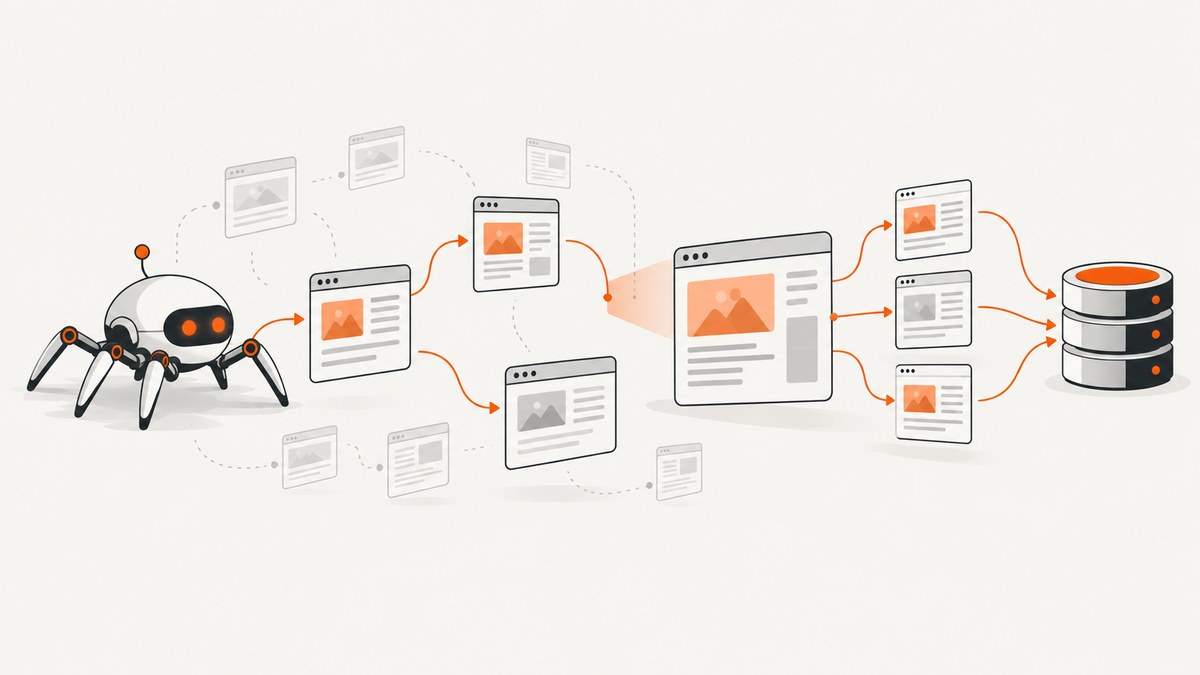
When people say Google “scrapes” a website, they usually mean Google’s web crawling and indexing pipeline. Googlebot discovers URLs, requests the resources it is allowed to fetch, may render JavaScript, and sends the result through indexing systems. A successful fetch does not guarantee indexing, ranking, or appearance in Search.
The practical model is:
- Discovery: Google learns a URL from links, sitemaps, redirects, or other references.
- Crawl and fetch: Googlebot schedules a request and downloads the response and important resources.
- Render: For pages that need it, Google renders HTML, CSS, and JavaScript with a recent Chrome version.
- Index processing: Google evaluates content, metadata, duplicates, canonical signals, and whether the page is suitable for the index.
- Search presentation: An indexed page may or may not rank or appear for a particular query.
Google describes these as separate stages in its crawling and indexing documentation. Treating them separately makes SEO debugging much faster.
What Googlebot is and how it finds URLs
Googlebot is the name for Google’s automated crawlers. Googlebot Smartphone and Googlebot Desktop use the same robots.txt product token, and Google primarily indexes the mobile version for most sites. You cannot use robots.txt to permit one Googlebot subtype while blocking the other.

Google discovers URLs mainly by following crawlable links from pages it already knows. A sitemap is an additional discovery channel. It can list URLs and metadata such as last-modified dates, but it is a hint rather than a command to crawl or index every entry. Google’s sitemap guidance explicitly says that submitting a sitemap does not guarantee that Google will download it or use it for crawling URLs.
Make important URLs discoverable
- Link important pages with ordinary HTML links whose destinations are real URLs.
- Publish an accurate XML sitemap and keep its last-modified values honest.
- Use canonical URLs consistently in links, redirects, and metadata.
- Remove accidental URL variants caused by tracking parameters, session IDs, and unbounded filters.
- Make navigation understandable without requiring a click handler that produces no crawlable destination.
A sitemap file is limited to 50 MB uncompressed or 50,000 URLs. Split larger inventories into multiple sitemap files and reference them from a sitemap index.
What happens during a Googlebot fetch
Google’s systems schedule requests according to crawl demand for your URLs and the capacity of your site. There is no universal fixed number of requests that every site should try to consume. Server errors, slow responses, connection failures, and repeated timeouts can cause Googlebot to reduce activity. Google says its crawlers try not to overload sites.
For each request, check the complete delivery chain:
| Layer | What to inspect | Typical failure |
|---|---|---|
| DNS and TLS | Resolution, certificate, protocol negotiation | Intermittent DNS or certificate errors |
| HTTP response | Status, redirects, content type, compression | 5xx errors, redirect loops, soft 404s |
| HTML | Title, links, canonical, robots directives | Empty shell or accidental noindex |
| Resources | CSS, JavaScript, images, fonts, APIs | Robots rules or authentication block assets |
| Rendering | Final DOM and visible content | Content appears only after a failing script |
Googlebot fetches referenced resources separately. Google’s documentation states that its fetch limit is the first 2 MB for supported file types and the first 64 MB for PDF files, measured on uncompressed data. Keep critical content and links available in the initial response when possible.
Rendering JavaScript pages
Google may render a fetched page with a recent version of Chrome. Rendering is not a license to hide essential content behind fragile client-side code. If JavaScript fails, takes too long, depends on a blocked API, or creates links only after an interaction Google cannot complete, the rendered view can be incomplete.
Use server-rendered HTML or progressive enhancement for primary text, headings, canonical information, and navigation. Then verify the rendered result in Search Console URL Inspection. Check that:
- The main text exists in the rendered DOM.
- Important links have stable, crawlable destinations.
- CSS does not hide the content unintentionally.
- APIs needed to build the page do not require a user session.
- Robots rules allow critical scripts, styles, and images to load.
Crawled, indexed, and ranking are different states
A URL can be known but not yet crawled, crawled but not indexed, indexed but absent for a query, or indexed with a different canonical URL. “Crawled – currently not indexed” does not automatically mean that Google failed to read the page. It means the page did not enter the index at that point in processing.
Google evaluates usefulness, duplication, canonical relationships, content signals, and user demand. Google’s troubleshooting guidance says a page may not appear even when it has been crawled. Allowing crawling therefore cannot guarantee visibility.
Why a crawled page might not be indexed
- It duplicates another page and Google selected a different canonical.
- The response is thin, empty, soft-404-like, or mainly boilerplate.
- Rendering failed and the useful content was absent from the final page.
- A noindex directive was present when Google processed the URL.
- The URL is new and has not completed indexing evaluation.
- Internal links and sitemap signals do not establish that the page matters.
Do not infer a ranking penalty from one inspection result. Compare representative URLs, inspect server logs, and look for site-wide patterns.
robots.txt, noindex, and authentication
These controls affect different stages and are not interchangeable.
| Control | Purpose | Can Google see the page? | What it guarantees |
|---|---|---|---|
robots.txt Disallow |
Limit crawling of paths or resources | Not necessarily | Requests may be blocked; the URL can still be known or surfaced |
noindex meta or HTTP header |
Exclude a crawlable page from Search | Yes, if fetch is allowed | Google can process the exclusion instruction |
| Authentication | Keep content private | No, without credentials | Unauthenticated users and crawlers cannot access the content |
Google’s official wording is precise: “blocking Googlebot from crawling a page doesn’t prevent the URL of the page from appearing in search results.” If robots.txt blocks a page, Google may never see its noindex tag. Use robots.txt for crawl control, noindex when Google should fetch and then exclude a page, and authentication for genuinely private content.
Example robots.txt
User-agent: *
Disallow: /admin/
Disallow: /internal-search/
Sitemap: https://example.com/sitemap.xml
Place this file at the site root, such as https://example.com/robots.txt. Keep rules narrow. Blocking an entire site or a directory containing canonical pages is an easy deployment mistake.
Example noindex HTML and HTTP header
<meta name="robots" content="noindex,follow">HTTP/1.1 200 OK
X-Robots-Tag: noindexThe crawler must be able to request the response containing the directive. Do not combine a robots.txt block with a noindex rule when your objective is reliable exclusion.
How to check whether Googlebot can access a page
- Open Search Console URL Inspection for the exact URL.
- Review whether the URL is known, crawled, indexed, or excluded.
- Inspect the reported canonical and compare it with your intended canonical.
- Check the rendered page and screenshot of the fetched result where available.
- Review Page Indexing and Crawl Stats reports for patterns across the site.
- Compare the inspection time with server logs and deployment events.
For a command-line first check, inspect status, redirects, and headers:
curl -I -L https://example.com/pageThis does not impersonate Googlebot or prove what Google sees. It is useful for finding obvious HTTP and redirect failures. User-agent strings can be spoofed, so if logs contain a suspicious request claiming to be Googlebot, verify it with reverse DNS or compare the source address with Google’s published crawler IP guidance.
Sitemaps and crawl budget
For most sites, Google recommends keeping the sitemap current and monitoring the Page Indexing report. Crawl-budget work matters most for very large or frequently changing sites. Start with an inventory of URL variants and server health.
Useful actions include consolidating duplicate URLs, returning accurate status codes, limiting unbounded faceted navigation, and removing session identifiers from crawlable links. Repeatedly adding and removing robots.txt rules does not generally transfer crawl capacity to other URLs. A sitemap helps discovery; it does not force immediate crawling or indexing.
Or skip the browser setup
If you need a reliable visual record of what a public page looks like while auditing crawl and rendering issues, ScreenshotNeo provides a website screenshot API. It accepts one GET request and returns PNG, JPEG, WebP, or PDF. Cookie and consent banners, newsletter popups, and chat widgets are removed before capture, and each cleanup step can be turned off.
Only clean shots are billed. Bot checks, CAPTCHAs, blank pages, timeouts, failed loads, and cache hits cost nothing, and the response identifies the result with X-Page-Verdict and X-Billed headers. An MCP server provides take_screenshot, get_page_info, and capture_pdf tools for Claude, Cursor, and other MCP clients.
See the ScreenshotNeo API documentation for all options. The basic call is:
cURL
curl -G "https://api.screenshotneo.com/v1/shot" -d access_key=YOUR_API_KEY --data-urlencode url=https://stripe.com -o shot.webpPython
import requests
r = requests.get("https://api.screenshotneo.com/v1/shot", params={"access_key": "YOUR_API_KEY", "url": "https://stripe.com"}, timeout=90)
open("shot.webp", "wb").write(r.content)
Node.js
const q = new URLSearchParams({ access_key: 'YOUR_API_KEY', url: 'https://stripe.com' });
const res = await fetch(`https://api.screenshotneo.com/v1/shot?${q}`);
ScreenshotNeo also supports full-page captures with lazy images loaded, CSS-selector element captures, dark mode, device presets and custom viewports, retina scale, custom CSS and JavaScript, click actions, selector waits, delays, network-idle waits, request blocking, custom headers and cookies, user agents, authorization, timezone and geolocation, transparent backgrounds, resizing, cache TTLs, signed image links, asynchronous jobs with signed webhooks, bulk capture of up to 100 URLs per call, a usage API, and an OpenAPI specification. Parameter names used by other screenshot APIs also work, which can simplify migration.
The Free plan includes 1,000 screenshots each month with no card. Paid plans start at $5 for 3,000 shots; every feature is available on every plan. Create a free ScreenshotNeo account.
Troubleshooting checklist
“Blocked by robots.txt”
Cause: A matching Disallow rule prevents the request or an important resource. Fix: Test the exact path, including trailing slashes and query variants, then narrow or remove the rule. Do not expect a blocked URL to disappear from Search automatically.

“Excluded by noindex”
Cause: A meta tag or X-Robots-Tag was delivered. Fix: Remove it from templates, middleware, and preview environments if indexing is intended. Ensure the page is crawlable so Google can observe the change.
“Crawled – currently not indexed”
Cause: Google processed the URL but did not select it for the index at that time. Fix: Check canonicalization, duplication, rendered content, internal links, status codes, and sitemap accuracy. Avoid repeated request submissions without addressing evidence.
Pages appear blank
Cause: JavaScript errors, blocked APIs, slow client rendering, or content that requires interaction. Fix: inspect the rendered DOM, browser console, network requests, and server-rendered fallback. Permit critical resources.
Googlebot requests slow or stop
Cause: 5xx responses, timeouts, overloaded infrastructure, or unstable DNS. Fix: correlate Crawl Stats with origin and CDN logs, reduce latency, fix errors, and keep capacity available during launches.
Suspected fake Googlebot traffic
Cause: Any client can send a Googlebot user-agent string. Fix: perform reverse-DNS verification and compare the address with Google’s published crawler IP ranges before treating it as Google traffic.
Performance, reliability, and cost considerations
- Performance: Keep HTML useful on the first response, reduce render-blocking work, and avoid generating unlimited URL combinations.
- Reliability: Monitor DNS, TLS, origin status, redirects, resource availability, and deployment changes. A single successful manual fetch is not a site-wide guarantee.
- Indexing expectations: Google says updates are checked and indexed in a reasonably timely way, but for most sites this can be three days or more. Treat that as guidance, not a service-level promise.
- Measurement: Use URL Inspection for individual evidence and Page Indexing, Crawl Stats, logs, and sitemap reports for patterns.
- Screenshot cost: If you use ScreenshotNeo for visual audits, failed loads, bot checks, blank pages, timeouts, and cache hits are not billed. Select a cache TTL, resize output when appropriate, and use bulk capture for up to 100 URLs per call.
FAQ
Does Google scrape every URL in my sitemap?
No. A sitemap is a discovery hint and does not guarantee downloading, crawling, or indexing.
Can robots.txt remove a page from Google?
No. It controls crawling. A known blocked URL can still appear based on external references. Use noindex on a crawlable page or authentication for private content.
Does Google run JavaScript?
Google may render pages with a recent Chrome version, but rendering can fail when scripts, APIs, or resources are inaccessible. Provide crawlable HTML for essential content.
Why is the mobile version important?
Google primarily indexes the mobile version for most sites. Ensure mobile HTML contains the same essential content and metadata as desktop.
How can I prove a request was from Googlebot?
Do not rely only on the user-agent string. Use reverse DNS or compare the source IP with Google’s published crawler ranges.
How quickly will a new page appear?
There is no guaranteed schedule. Google’s guidance says most sites may wait three days or more for updates, while highly time-sensitive content can differ.


