Why html2canvas Cannot Capture CAPTCHA Images and What to Do
html2canvas rebuilds the DOM instead of photographing the screen. Learn why CAPTCHA images disappear and which authorized fixes work.

Short answer: html2canvas does not take a literal screenshot of the browser window. It walks the DOM and recreates a rendering from resources that page JavaScript is allowed to read. A CAPTCHA image hosted on another origin, or inside a cross-origin iframe, can therefore be omitted. Browser security prevents html2canvas from turning protected pixels into readable canvas data.
The official html2canvas FAQ states that “html2canvas cannot circumvent content policy restrictions set by your browser.” The practical fix depends on what you control: configure CORS on an image service you own, use an authorized same-origin proxy, request an approved integration from the CAPTCHA provider, or use a native browser screenshot API when you need visible-tab pixels.
How html2canvas actually captures a page
When you call html2canvas(element), the library performs roughly this sequence:
- Clone the selected DOM subtree.
- Read styles, text, backgrounds and replaced elements such as images.
- Fetch resources that are needed for the clone.
- Paint the supported DOM and CSS features onto a new canvas.
- Return a canvas that you can display or export.
This is DOM reconstruction, not a compositor-level photograph. The browser may display pixels that page JavaScript cannot inspect. html2canvas cannot cross that boundary.
Why a CAPTCHA image is missing
Cross-origin image security
Suppose your page is served from https://app.example and the CAPTCHA image comes from https://captcha-provider.example. Those are different origins. If the image response does not explicitly authorize your page with an Access-Control-Allow-Origin header, drawing it into a canvas makes the canvas tainted. A tainted canvas cannot be read or exported.
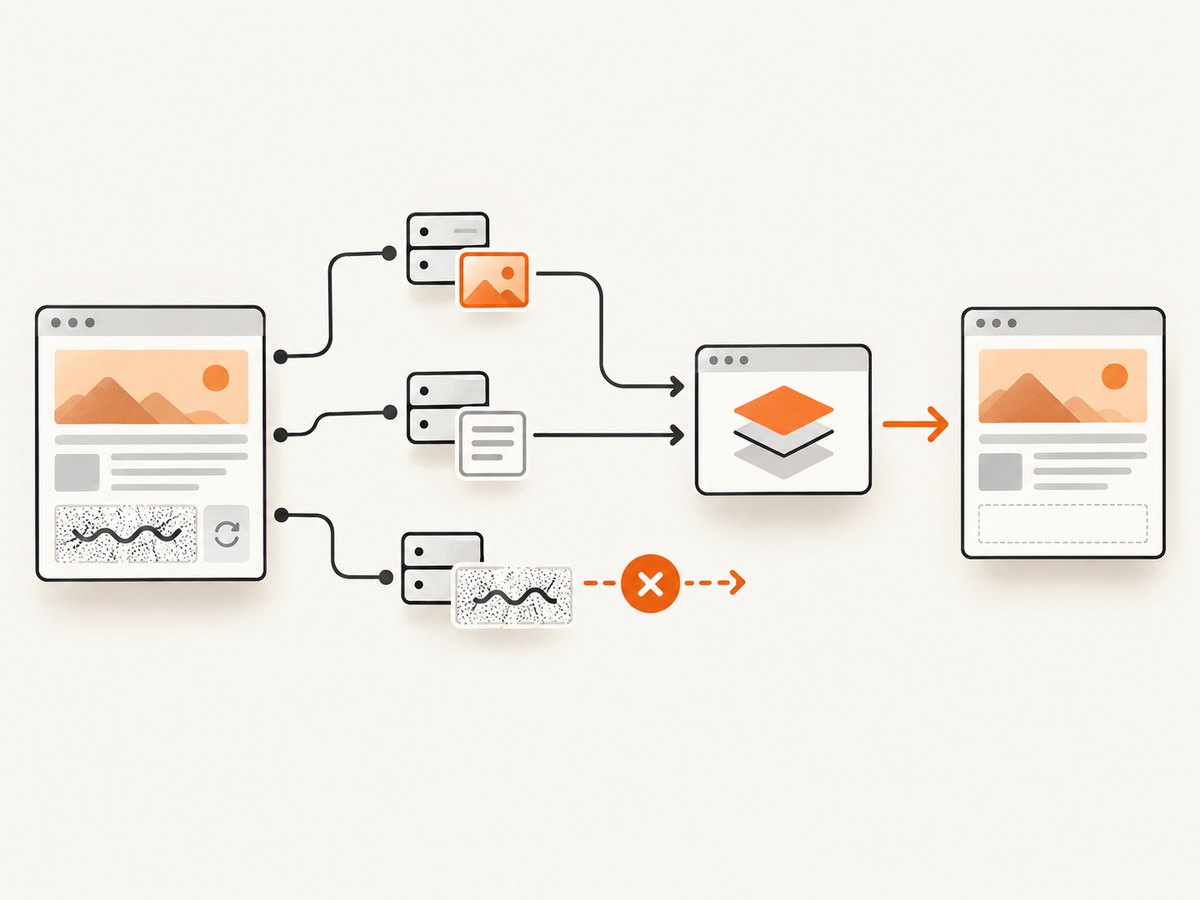
html2canvas normally avoids that result and skips resources that would violate the browser’s content policy. The configuration documentation lists useCORS as false by default.
useCORS requests permission; it does not grant permission
Setting useCORS: true tells the browser to attempt a CORS-enabled image request. It only works when the remote image server sends a suitable CORS response header and the request mode, credentials and origin match that policy.
allowTaint is not a bypass
allowTaint defaults to false. Setting it to true allows html2canvas to draw an image that would taint the canvas, but it does not make the canvas readable. Calls such as canvas.toDataURL(), canvas.toBlob() or pixel reads then fail with a SecurityError. It is not a way to export CAPTCHA pixels.
Cross-origin iframes have a second boundary
If the challenge is inside an iframe from another origin, your page cannot read that frame’s contentDocument. Image options do not change iframe permissions. html2canvas can work with same-origin iframe content, but it cannot recursively render a cross-origin frame’s DOM.
A minimal diagnostic example
This example captures a normal element, reports the canvas size, and distinguishes a missing image from an export failure:
<!doctype html>
<html>
  <body>
    <div id="panel">
      <h1>Checkout</h1>
      <img id="captcha" src="https://captcha-provider.example/challenge.png" alt="CAPTCHA">
    </div>

    <button id="save">Save PNG</button>
    <script src="https://cdn.jsdelivr.net/npm/html2canvas@1.4.1/dist/html2canvas.min.js"></script>
    <script>
      document.querySelector('#save').addEventListener('click', async () => {
        const canvas = await html2canvas(document.querySelector('#panel'), {
          useCORS: true,
          allowTaint: false,
          imageTimeout: 15000,
          logging: true
        });

        try {
          const blob = await new Promise((resolve, reject) => {
            canvas.toBlob(value => value ? resolve(value) : reject(new Error('toBlob returned null')), 'image/png');
          });
          const url = URL.createObjectURL(blob);
          const link = document.createElement('a');
          link.href = url;
          link.download = 'panel.png';
          link.click();
          URL.revokeObjectURL(url);
        } catch (error) {
          console.error('Canvas export failed. The canvas may be tainted:', error);
        }
      });
    </script>
  </body>
</html>
Open DevTools and inspect the image request. Check its origin, response headers, redirects and whether it is inside an iframe. A successful useCORS setting without an authorized response header changes nothing.
Remedies when you control the image service
Option 1: Configure CORS
Configure the image host to return an Access-Control-Allow-Origin value that authorizes the page origin. Use an explicit origin when credentials or sensitive content are involved. Then set crossOrigin="anonymous" before assigning the image URL, or let html2canvas request it with useCORS: true.
const image = document.querySelector('#captcha');
image.crossOrigin = 'anonymous';
image.src = 'https://images.example/assets/challenge.png';

await image.decode();
const canvas = await html2canvas(document.querySelector('#panel'), {
  useCORS: true,
  allowTaint: false
});
The server must authorize the actual page origin. A wildcard policy can be unsuitable for credentialed requests, and redirects must preserve a CORS-compatible response.
Option 2: Use a controlled same-origin proxy
If your organization owns the image or has permission to retrieve it, your server can fetch it and expose it from the same origin as the page. Validate URLs, restrict destinations, enforce size and content-type limits, and do not turn the endpoint into an open proxy. A proxy is an access-controlled server design, not a method for evading a third-party CAPTCHA provider.
// Express example for an image path you are authorized to proxy
import express from 'express';

const app = express();
app.get('/captcha-image', async (req, res) => {
  const upstream = new URL('https://images.example/assets/challenge.png');
  const response = await fetch(upstream);
  if (!response.ok) return res.sendStatus(502);
  const type = response.headers.get('content-type') || '';
  if (!type.startsWith('image/')) return res.sendStatus(415);
  res.set('Content-Type', type);
  res.send(Buffer.from(await response.arrayBuffer()));
});

app.listen(3000);
With the proxy, reference /captcha-image from the page and keep useCORS: false or true as appropriate for your own deployment.
When the CAPTCHA belongs to a third party
Do not attempt to defeat or extract a challenge that the provider has intentionally protected. Ask for an approved integration, a server-side verification flow, a test key, or a documented screenshot/data path. If the challenge is embedded in a cross-origin iframe, only the provider can grant a legitimate path to its contents.
When you need a real browser screenshot
A native extension screenshot captures the visible tab through browser permissions instead of rebuilding the DOM. The html2canvas FAQ points extension developers to:

- Chrome, Edge and Opera:
chrome.tabs.captureVisibleTab() - Firefox:
browser.tabs.captureVisibleTab()
These APIs are useful for a visible-tab image and avoid html2canvas’s canvas-size limits. They do not grant page-script access to a protected iframe’s DOM or authorize extraction of challenge data. Follow extension permissions and the CAPTCHA provider’s rules.
Useful html2canvas options and their limits
| Option | Purpose | Limitation |
|---|---|---|
useCORS |
Request images with CORS | Requires the image server to opt in |
allowTaint |
Allow drawing images that taint the canvas | Export and pixel reads can fail |
proxy |
Route image loading through a proxy | Use only a proxy you operate and are authorized to use |
imageTimeout |
Stop waiting for an image after a duration | A longer timeout cannot fix blocked access |
backgroundColor |
Choose the canvas background | Does not affect image permissions |
scale |
Control output resolution | Higher values increase memory and canvas size |
foreignObjectRendering |
Ask the browser to render supported HTML via SVG foreignObject | Browser support and cross-origin rules still apply |
ignoreElements |
Exclude elements from the clone | Only hides content; it cannot reveal excluded pixels |
onclone |
Modify the cloned document before painting | Cannot access a cross-origin frame or bypass CORS |
Troubleshooting checklist
| Symptom | Likely cause | Fix |
|---|---|---|
| CAPTCHA area is blank | Image is cross-origin and lacks CORS authorization | Inspect the response header; configure CORS if you control the host, or use an approved provider path |
useCORS: true changes nothing |
The server did not send a matching Access-Control-Allow-Origin header, or a redirect lost it |
Fix the server response and inspect every redirect |
SecurityError: The canvas has been tainted |
A cross-origin resource was drawn without readable CORS permission | Use authorized CORS or a same-origin proxy; do not rely on allowTaint |
| Only the iframe is missing | The iframe is cross-origin | Request an integration from the provider or capture the visible tab in an extension |
| Image times out | Slow or blocked resource | Check network policy, preload the image, and set a suitable imageTimeout |
Export returns null |
Canvas is too large or browser memory is exhausted | Lower scale, capture a smaller region, or use a native screenshot API |
| Image appears locally but not in production | Production origin, CSP, CDN or credentials differ | Compare request origin, response headers, redirects and CSP in production |
Performance and reliability considerations
- Capture the smallest element that meets your requirement; full-page clones use more CPU and memory.
- Wait for
document.fonts.readyand image decoding when layout accuracy matters. - Use a bounded
imageTimeoutand handle missing optional images instead of blocking forever. - Keep
scalereasonable. Large canvases can exceed browser limits even when the DOM is valid. - Test responsive breakpoints, lazy-loaded images and scroll-dependent content separately.
- For repeatable output, pin the html2canvas version and control fonts, viewport and device pixel ratio.
Or skip the browser setup
If your goal is a clean image of a page rather than a DOM reconstruction, ScreenshotNeo provides a website screenshot API. It accepts one GET request and can return PNG, JPEG, WebP or PDF. Cookie and consent banners are accepted and removed before capture, along with 60+ known consent platforms, newsletter popups and chat widgets. Bot checks, blank pages, timeouts, failed loads and cache hits are not billed, and the response identifies the result with X-Page-Verdict and X-Billed headers. Do not use it to bypass a CAPTCHA; a challenge page should be treated as a failed or blocked capture.
See the ScreenshotNeo API documentation for the full option set, including selectors, full-page capture, custom CSS and JavaScript, waits, request blocking, headers, cookies, user agents, geolocation, caching, signed links, asynchronous jobs, webhooks and bulk capture.
curl -G "https://api.screenshotneo.com/v1/shot" \
  -d access_key=YOUR_API_KEY \
  --data-urlencode url=https://stripe.com \
  -o shot.webp
import requests
r = requests.get(
"https://api.screenshotneo.com/v1/shot",
params={"access_key": "YOUR_API_KEY", "url": "https://stripe.com"},
timeout=90,
)
r.raise_for_status()
open("shot.webp", "wb").write(r.content)const q = new URLSearchParams({ access_key: 'YOUR_API_KEY', url: 'https://stripe.com' });
const res = await fetch(`https://api.screenshotneo.com/v1/shot?${q}`);
if (!res.ok) throw new Error(`Screenshot failed: ${res.status}`);
const data = Buffer.from(await res.arrayBuffer());
require('fs').writeFileSync('shot.webp', data);ScreenshotNeo also has an MCP server with take_screenshot, get_page_info and capture_pdf tools for Claude, Cursor and other MCP clients. The Free plan includes 1,000 shots per month with no card; paid plans start at $5 for 3,000 shots, and every feature is available on every plan.
Create a free ScreenshotNeo account and start with the 1,000 monthly shots at no charge.
FAQ
Can html2canvas solve a CAPTCHA by itself?
No. It is a rendering library, not a CAPTCHA solver, and browser security prevents it from reading protected cross-origin pixels.
Does converting the image to Base64 in JavaScript fix the problem?
Only if your code can legally and successfully read the original bytes first. Converting an unreadable cross-origin response to Base64 in page JavaScript is not possible.
Will a data URL always work?
A data URL created from bytes you already control is same-origin from the page’s perspective. A data URL does not help when you cannot obtain the source bytes.
Why does a normal logo render while the CAPTCHA does not?
The logo may be same-origin or served with CORS authorization. CAPTCHA providers commonly isolate challenge images and frames specifically to prevent page scripts from reading them.
Should I set allowTaint: true for screenshots?
Only when you do not need to export or inspect the canvas and accept browser-dependent behavior. It is not suitable for a reliable PNG, JPEG or pixel-reading workflow.


