Send Custom HTTP Headers in Java Website Screenshot Requests
Learn where Java screenshot headers go, how to authenticate target pages, and how to debug restricted or missing headers safely.
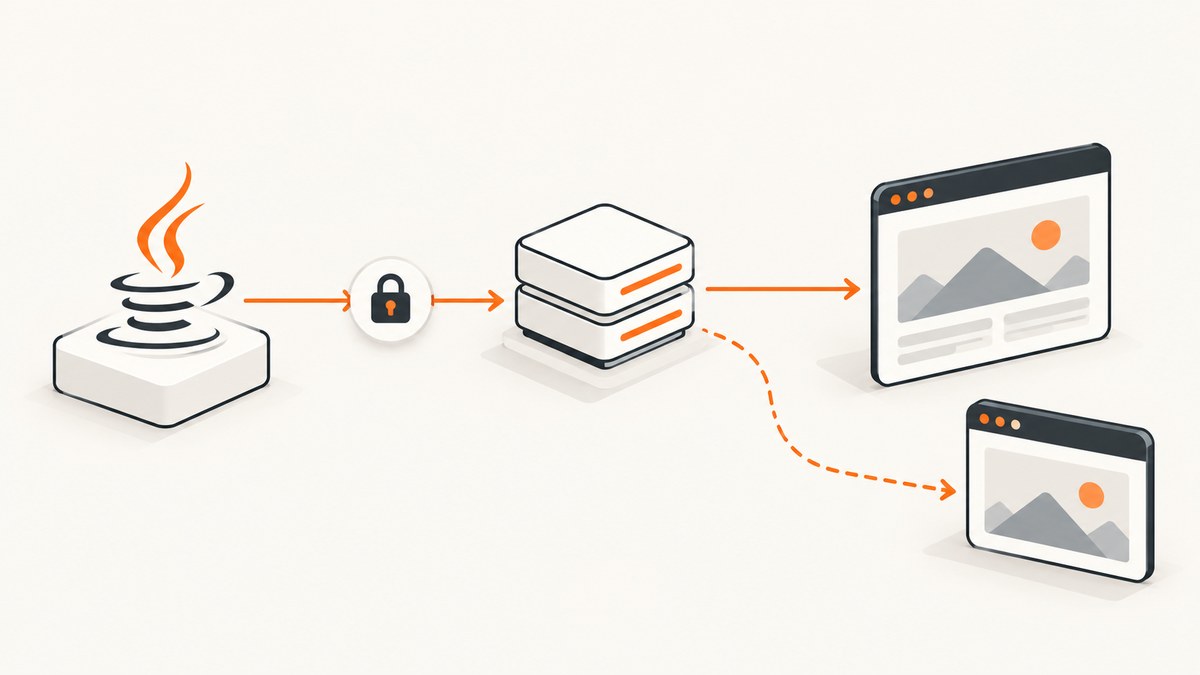
To send custom HTTP headers in a Java website screenshot workflow, first decide which request needs them:
- Java to the screenshot API: add headers with
HttpRequest.Builder.header(name, value). These authenticate and configure the API call. - Rendering browser to the target website: use the screenshot provider’s documented target-page header option. Headers added to Java’s API request do not automatically reach the website being rendered.
This distinction prevents the most common failure: a successful API request that still produces a login page, access-denied page or anonymous content.
1. Understand the two HTTP requests
A hosted screenshot service normally performs two separate network operations:

- Your Java process sends an HTTP request to the screenshot provider.
- The provider launches a browser, navigates to the target URL and makes requests to that site.
An Authorization header on step one identifies you to the provider. It is not a target-page credential. To authenticate the rendered page, configure a provider option such as a repeatable header parameter or a headers object in the provider’s request body. For example, ScreenshotAPI.net documents a Name: value header option sent only to the target host and a headers object for POST requests (API documentation).
Use target-page headers only for websites and credentials you are authorized to access. Keep secrets out of public URLs, source control and request logs.
2. Add headers to the Java request with java.net.http
Java 11 and later include the java.net.http client. The header method adds a name/value pair; setHeader replaces existing values for that name. Oracle documents the behavior as adding the given name/value pair to the request (HttpRequest.Builder API).
GET example
import java.net.URI;
import java.net.http.HttpClient;
import java.net.http.HttpRequest;
import java.net.http.HttpResponse;

public class ScreenshotRequest {
    public static void main(String[] args) throws Exception {
        HttpClient client = HttpClient.newBuilder().build();

        HttpRequest request = HttpRequest.newBuilder()
                .uri(URI.create("https://api.example.com/v1/screenshot?url=https%3A%2F%2Fexample.com"))
                .header("Authorization", "Bearer " + System.getenv("SCREENSHOT_API_TOKEN"))
                .header("Accept", "image/png")
                .header("X-Request-Id", "java-demo-001")
                .GET()
                .build();

        HttpResponse<byte[]> response = client.send(
                request, HttpResponse.BodyHandlers.ofByteArray());

        System.out.println("Status: " + response.statusCode());
        System.out.println("Content type: " +
                response.headers().firstValue("Content-Type").orElse("unknown"));

        if (response.statusCode() / 100 != 2) {
            throw new IllegalStateException("Screenshot request failed: " + response.statusCode());
        }

        java.nio.file.Files.write(
                java.nio.file.Path.of("shot.png"), response.body());
    }
}
The Authorization, Accept and X-Request-Id headers above are sent to the API host. They do not become headers on the browser’s navigation to example.com.
POST example with JSON configuration
Many providers accept target-page headers in a JSON body. The exact field names are provider-specific; verify them in the provider’s current documentation.
import java.net.URI;
import java.net.http.HttpClient;
import java.net.http.HttpRequest;
import java.net.http.HttpResponse;

public class AuthenticatedScreenshotPost {
    public static void main(String[] args) throws Exception {
        String json = """
        {
          "url": "https://private.example.com/account",
          "headers": {
            "X-Workspace-Token": "REPLACE_WITH_TOKEN",
            "X-Tenant": "acme"
          }
        }
        """;

        HttpRequest request = HttpRequest.newBuilder()
                .uri(URI.create("https://api.example.com/v1/screenshot"))
                .header("Authorization", "Bearer " + System.getenv("SCREENSHOT_API_TOKEN"))
                .header("Content-Type", "application/json")
                .header("Accept", "application/json")
                .POST(HttpRequest.BodyPublishers.ofString(json))
                .build();

        HttpResponse<String> response = HttpClient.newHttpClient().send(
                request, HttpResponse.BodyHandlers.ofString());

        if (response.statusCode() / 100 != 2) {
            throw new IllegalStateException(response.statusCode() + ": " + response.body());
        }
        System.out.println(response.body());
    }
}
Do not put real tokens in a checked-in Java string. Load them from environment variables or a secret manager, and redact them from logs.
3. Configure headers for the rendered target page
The provider must expose a separate render option for browser requests. Common shapes include:
| Provider input | Typical use | Check before relying on it |
|---|---|---|
Repeatable header parameter |
X-Token: value on target requests |
Whether it is limited to the target host and whether multiple values are allowed |
headers JSON object |
Several target-page headers in a POST body | Exact casing, escaping and nesting rules |
| Target cookies | Session-based authentication | Domain, path, expiry and secure-cookie behavior |
| Provider authorization header | Authenticating your API call | It usually does not authenticate the target site |
ScreenshotOne describes custom headers for pages whose authentication accepts a token header and documents cookies separately for session-based sites (authenticated pages guide). Choose the mechanism the target application actually validates.
Target-host scope matters
A safe implementation limits sensitive headers to the intended host. ScreenshotAPI.net states that its header option is sent only on requests to the target host. Confirm equivalent behavior with your provider, especially when the page loads assets, redirects to another domain or calls third-party APIs.
4. Complete Java workflow
- Identify whether the credential is for the provider API or the target website.
- Read the provider’s current documentation for target-page headers or cookies.
- Construct the provider request with Java’s
HttpRequest.Builder. - Check the HTTP status and content type before saving the response as an image.
- Use the provider’s page-status field, response headers or request ID when available to diagnose the rendered result.
import java.net.URI;
import java.net.http.HttpClient;
import java.net.http.HttpRequest;
import java.net.http.HttpResponse;
import java.nio.file.Files;
import java.nio.file.Path;

public class ScreenshotWithTargetHeader {
    public static void main(String[] args) throws Exception {
        String providerKey = System.getenv("SCREENSHOT_API_KEY");
        String targetToken = System.getenv("TARGET_PAGE_TOKEN");
        if (providerKey == null || targetToken == null) {
            throw new IllegalStateException("Set SCREENSHOT_API_KEY and TARGET_PAGE_TOKEN");
        }

        // Replace these parameter names with those documented by your provider.
        String endpoint = "https://api.example.com/v1/screenshot"
                + "?url=https%3A%2F%2Fprivate.example.com%2Fdashboard"
                + "&header=" + java.net.URLEncoder.encode(
                        "X-Workspace-Token: " + targetToken,
                        java.nio.charset.StandardCharsets.UTF_8);

        HttpRequest request = HttpRequest.newBuilder()
                .uri(URI.create(endpoint))
                .header("Authorization", "Bearer " + providerKey)
                .header("Accept", "image/webp")
                .timeout(java.time.Duration.ofSeconds(90))
                .GET()
                .build();

        HttpResponse<byte[]> response = HttpClient.newHttpClient().send(
                request, HttpResponse.BodyHandlers.ofByteArray());

        String contentType = response.headers().firstValue("Content-Type").orElse("");
        if (response.statusCode() / 100 != 2 || !contentType.startsWith("image/")) {
            throw new IllegalStateException(
                    "Unexpected response " + response.statusCode() + " " + contentType);
        }
        Files.write(Path.of("dashboard.webp"), response.body());
    }
}
The endpoint and parameter names in this example are placeholders. Use the exact syntax documented by your selected provider; the Java header construction is the reusable part.
5. Java header restrictions
The Java HTTP client controls several protocol headers by default. Oracle lists connection, content-length, expect, host and upgrade among restricted names (java.net.http module documentation).
Do not manually set these unless you have a specific protocol reason. The client calculates values such as Content-Length and manages connection details. Invalid names or values can also cause an IllegalArgumentException when building the request.
The JDK documents the jdk.httpclient.allowRestrictedHeaders system property as an override for some restricted headers, intended for testing, with warnings about protocol errors and undefined behavior. Treat it as a diagnostic switch, not a routine production fix. Some restrictions, including certain Authorization cases when an authenticator is configured, cannot be overridden.
6. cURL, Python and Node.js equivalents
These examples show the same boundary: one set of headers authenticates the screenshot API, while the provider-specific target header option configures the rendered page.
cURL
curl -X POST "https://api.example.com/v1/screenshot" \
  -H "Authorization: Bearer $SCREENSHOT_API_TOKEN" \
  -H "Content-Type: application/json" \
  --data '{
    "url": "https://private.example.com/dashboard",
    "headers": {
      "X-Workspace-Token": "REPLACE_WITH_TARGET_TOKEN"
    }
  }' \
  -o dashboard.png
Python
import os
import requests

payload = {
    "url": "https://private.example.com/dashboard",
    "headers": {"X-Workspace-Token": os.environ["TARGET_PAGE_TOKEN"]},
}
r = requests.post(
    "https://api.example.com/v1/screenshot",
    headers={"Authorization": f"Bearer {os.environ['SCREENSHOT_API_TOKEN']}"},
    json=payload,
    timeout=90,
)
r.raise_for_status()
open("dashboard.png", "wb").write(r.content)
Node.js
const payload = {
  url: 'https://private.example.com/dashboard',
  headers: { 'X-Workspace-Token': process.env.TARGET_PAGE_TOKEN }
};
const res = await fetch('https://api.example.com/v1/screenshot', {
  method: 'POST',
  headers: {
    Authorization: `Bearer ${process.env.SCREENSHOT_API_TOKEN}`,
    'Content-Type': 'application/json'
  },
  body: JSON.stringify(payload)
});
if (!res.ok) throw new Error(`Screenshot failed: ${res.status}`);
const image = Buffer.from(await res.arrayBuffer());
require('fs').writeFileSync('dashboard.png', image);
7. Cookies versus headers
| Use headers when | Use cookies when |
|---|---|
| The application expects a bearer, API-key or tenant header. | The application creates a browser session and checks session cookies. |
| The credential is valid for each request. | Authentication state is established through a login flow or session. |
| You can scope the header to the target host. | The provider supports cookie domain, path and expiry correctly. |
A header cannot substitute for a cookie if the target server only recognizes a session cookie. Conversely, sending a cookie will not help an API that requires a token header.

8. Troubleshooting checklist
| Symptom | Likely cause | Fix |
|---|---|---|
| Java throws an exception while building the request | Invalid header name/value or a restricted name | Validate syntax; remove protocol-managed headers such as Host and Content-Length. |
| API returns 401 or 403 | Provider credential is missing, expired or in the wrong header | Check the provider authorization scheme and log status without logging the secret. |
| Screenshot is a login page | Target header/cookie was never configured, or the credential is invalid | Verify the provider’s target-page option, host scope and target authentication method. |
| Screenshot is access denied | Target site rejects the credential, IP, user agent or bot traffic | Confirm authorization, inspect the final page status if exposed, and follow the site’s access policy. |
| Header works on the main document but not an API call | Provider limits headers to the target host or navigation request | Check documented propagation rules; do not assume third-party requests receive secrets. |
| Stale content appears | Provider cache or an application cache | Disable or expire the screenshot cache and verify the target response independently. |
| Image file contains JSON or HTML | Error response was saved without checking status/content type | Inspect status and Content-Type before writing bytes. |
| Redirect loses authentication | Credential is scoped to the original host | Inspect redirects and configure the provider’s documented redirect/header behavior. |
9. Reliability, performance and cost
- Timeouts: set a client timeout that covers DNS, navigation and rendering. A 90-second upper bound is a practical starting point for slow pages; tune it to your pages.
- Retries: retry transient provider network errors with exponential backoff. Avoid blindly retrying 401, 403 or deterministic target-page failures.
- Idempotency: use a request ID where the provider supports one so retries can be correlated.
- Payload size: keep header values small and avoid sending large cookies or tokens in URLs.
- Concurrency: limit parallel captures to the provider’s documented quota and your target site’s rate limits.
- Billing: check whether failed renders, cache hits and blocked pages are billed; providers differ, so do not infer pricing behavior from HTTP status alone.
For debugging, capture the provider request ID, final page status, response headers and elapsed time while redacting credentials. This separates Java transport failures from browser navigation and target authentication failures.
10. Or skip the browser setup
ScreenshotNeo accepts target-page headers and other capture settings through its screenshot API, so you can call one endpoint from Java or any HTTP client. See the ScreenshotNeo API documentation for the current parameter names.
import java.net.URI;
import java.net.http.HttpClient;
import java.net.http.HttpRequest;
import java.net.http.HttpResponse;

public class ScreenshotNeoJava {
    public static void main(String[] args) throws Exception {
        String query = "https://api.screenshotneo.com/v1/shot"
                + "?access_key=YOUR_API_KEY"
                + "&url=https%3A%2F%2Fstripe.com";
        HttpRequest request = HttpRequest.newBuilder()
                .uri(URI.create(query))
                .GET()
                .build();
        HttpResponse<byte[]> response = HttpClient.newHttpClient().send(
                request, HttpResponse.BodyHandlers.ofByteArray());
        java.nio.file.Files.write(java.nio.file.Path.of("shot.webp"), response.body());
    }
}
cURL
curl -G "https://api.screenshotneo.com/v1/shot" -d access_key=YOUR_API_KEY --data-urlencode url=https://stripe.com -o shot.webpPython
import requests; r = requests.get("https://api.screenshotneo.com/v1/shot", params={"access_key": "YOUR_API_KEY", "url": "https://stripe.com"}, timeout=90); open("shot.webp", "wb").write(r.content)Node.js
const q = new URLSearchParams({ access_key: 'YOUR_API_KEY', url: 'https://stripe.com' }); const res = await fetch(`https://api.screenshotneo.com/v1/shot?${q}`);Cookie banners, newsletter popups and chat widgets are removed before the shot. Bot checks, blank pages and failed loads are never billed, and response headers identify the page verdict and whether the shot was billed. ScreenshotNeo also provides an MCP server so Claude, Cursor and other MCP clients can take screenshots, plus custom headers, cookies, user agents and authorization settings. The free plan includes 1,000 screenshots each month with no card; paid plans start at $5 for 3,000. Create a free ScreenshotNeo account.
11. FAQ
Does setting Authorization in Java authenticate the target website?
No. It authenticates the host named by the Java request URI, usually the screenshot API. Configure a target-page header or cookie through the provider.
Should I use header or setHeader?
Use header to add a value. Use setHeader when you want to replace existing values for that name.
Can I set the Host header manually?
Normally no. Java manages restricted protocol headers, including host. Changing them can produce invalid requests.
Why is a cookie sometimes better than a header?
Session-based applications may validate only cookies. Token-based applications may validate only a header. Match the target site’s authentication design.
How can I prove which request failed?
Record the Java-to-provider status, provider request ID and any exposed final page status separately. Never log credential values.


