LLM-Powered Programming Tools for Web Development
A practical guide to choosing and safely using AI coding assistants for planning, coding, testing, browser debugging, and deployment.

Direct answer: choose an LLM coding tool by the work it can perform in your repository, not by autocomplete quality alone. For GitHub-centered teams, GitHub Copilot is usually the best fit because it combines inline suggestions, repository chat, issue-to-pull-request agents, code review, and IDE and terminal integrations. For AWS-centered teams that need IAM governance, AWS-aware help, CLI workflows, and vulnerability scanning, Amazon Q Developer is the stronger fit. OpenAI Codex is useful when you want an agent that can write, review, and ship code and, where enabled, inspect browser debugging data.
Whichever tool you choose, keep a human review gate. Require tests, dependency review, security scanning, accessibility checks, and production monitoring. Generated code can be incorrect, insecure, inefficient, or inaccessible.
1. What LLM programming tools do
Modern assistants support several distinct workflows:
- Completion: predict code while you type.
- Explanation: summarize unfamiliar files, routes, dependencies, and errors.
- Transformation: refactor code, migrate APIs, or convert syntax.
- Agentic implementation: plan a task, edit multiple files, run commands, and produce a diff.
- Review: identify defects, security risks, missing tests, and maintainability problems.
- Browser debugging: inspect runtime behavior and network or console data where the tool supports browser debugging.
GitHub describes Copilot as an AI assistant that helps developers write, understand, and ship software. Its workflow can begin with an issue, continue through an agent-created pull request, and end with human review and merge. Amazon Q Developer supports IDE and CLI use, agentic coding, shell commands, diffs, and vulnerability scanning, with AWS IAM controls. OpenAI describes Codex as an agent for writing, reviewing, and shipping code, with Chrome DevTools Protocol browser-debugging workflows where enabled.
2. Compare tools by your web-development workflow
| Decision area | Questions to ask | Why it matters |
|---|---|---|
| Repository context | Can it read routes, components, tests, configuration, and dependency manifests? | Web changes often cross many files and framework conventions. |
| Agent execution | Can it plan, edit files, run commands, inspect failures, and show a diff? | Multi-file work is where agentic tools save the most time. |
| Web integration | Does it support your IDE, terminal, browser debugging, GitHub issues, pull requests, and CI? | Less context switching produces more reproducible fixes. |
| Security and privacy | What controls exist for code references, retention, training use, IAM, and enterprise administration? | Prompts may contain source code, credentials, or customer data. |
| Economics | What are completion limits, agentic-request limits, premium-model credits, and overage rules? | A low monthly price can still become expensive at team scale. |
| Quality controls | Can reviewers see diffs, test output, and security findings? | Every generated change needs evidence before merge. |
GitHub Copilot
Copilot is aligned with teams already working in GitHub. It offers inline completion, repository questions, issue-to-pull-request agents, code review, and broad IDE and terminal reach. The plan page lists a Free tier at $0 with 2,000 completions per month, Pro at $10 per user per month, and Pro+ at $39 per user per month. These limits and prices can change, so confirm the current plan page before purchasing.
Amazon Q Developer
Q Developer fits AWS-heavy environments that need AWS-aware assistance, IAM-based access controls, IDE and CLI workflows, agentic coding, and vulnerability scanning. AWS documents a perpetual Free Tier with 50 agentic requests per month and up to 1,000 transformed lines of code per month, plus a Pro plan at $19 per user per month. Verify current AWS pricing before publication or procurement.
OpenAI Codex
Codex is a useful option when an agent must write, review, and ship code across a task. Where browser debugging is enabled, Chrome DevTools Protocol data can connect code changes to runtime behavior. Confirm the available integrations and limits in your current workspace.
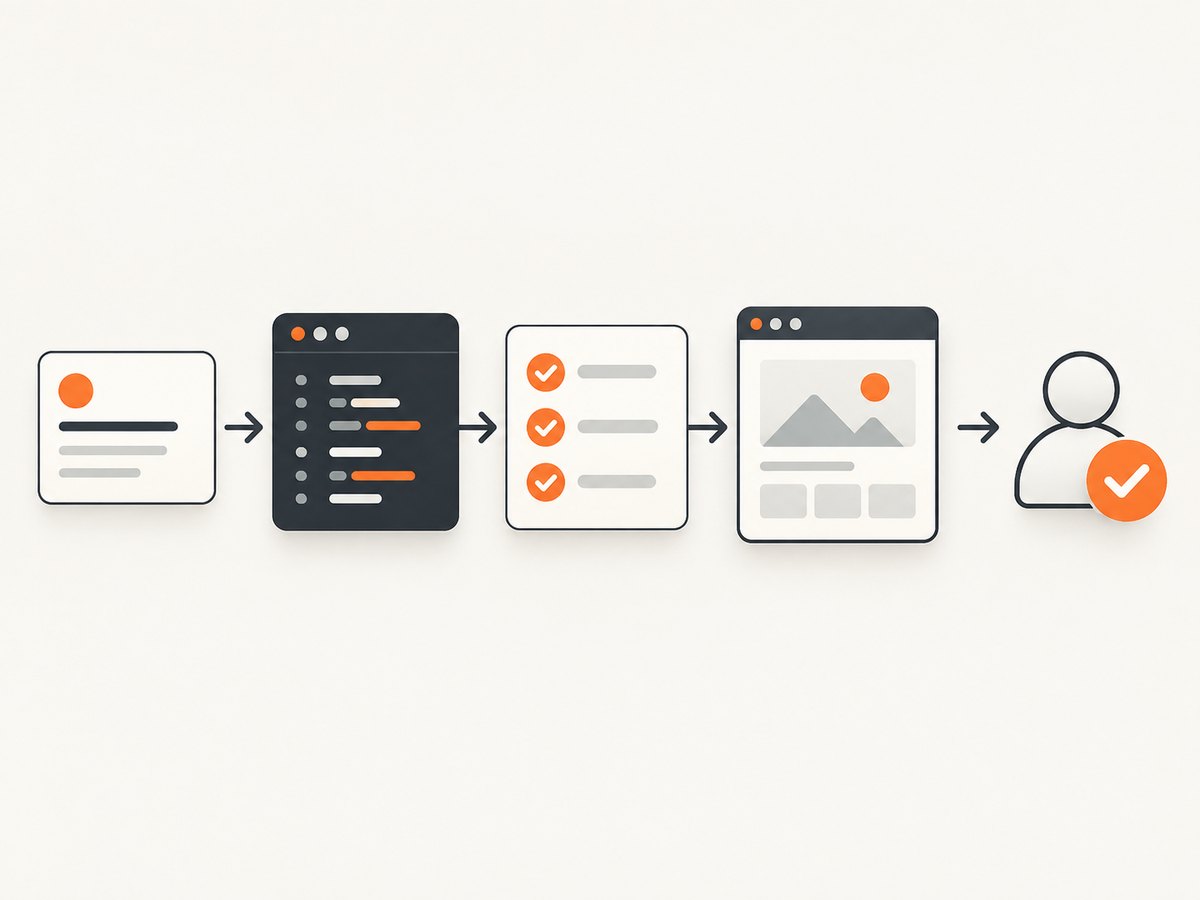
3. A reliable workflow for building a web feature
- Write an acceptance checklist. Include behavior, supported browsers, responsive breakpoints, accessibility requirements, performance budgets, analytics, and rollback conditions.
- Give the agent bounded context. Identify relevant directories, framework version, commands for linting and tests, and files it must not change.
- Ask for a plan first. Require assumptions, affected files, migration risks, and test cases before implementation.
- Implement in small diffs. Review each logical change instead of accepting a large unexamined patch.
- Run deterministic checks. Use formatting, type checks, unit tests, integration tests, end-to-end tests, dependency audits, and a production build.
- Inspect the browser. Check console errors, network failures, layout shifts, keyboard navigation, focus order, labels, contrast, and mobile behavior.
- Review the final diff. Remove debug code, unexpected dependencies, secrets, broad permissions, and unrelated edits.
4. Prompt patterns that produce better web code
Feature implementation prompt
Implement the account settings form in src/routes/settings.

Context:
- Framework and version: [fill in]
- Existing validation library: [fill in]
- Test command: [fill in]
- Do not change authentication or database schema.

Requirements:
1. Preserve the existing visual system and responsive breakpoints.
2. Use semantic labels and keyboard-accessible error messages.
3. Validate on the server and client.
4. Add unit and end-to-end tests for success, invalid input, and expired sessions.
5. Explain the files changed and any assumptions before editing.
Code-review prompt
Review this diff as a senior web engineer.

Find:
- authorization or data-leak risks
- XSS, CSRF, SSRF, injection, and unsafe deserialization risks
- race conditions and error-handling gaps
- accessibility failures in semantics, focus, keyboard use, labels, and contrast
- slow queries, excessive client JavaScript, and unnecessary network requests
- missing tests and observability

Return findings by severity with file, line, impact, and a concrete fix. Do not rewrite code until findings are approved.
5. Accessibility must be a review gate
A 2025 arXiv evaluation, “CodeA11y: Making AI Coding Assistants Useful for Accessible Web Development,” treats the effect of AI assistants on accessibility as an open question. Inspect semantic HTML, heading structure, keyboard navigation, focus order, form labels, error announcements, contrast, reduced-motion behavior, and screen-reader output. Combine automated checks with manual keyboard and screen-reader passes.
- Use native controls before custom widgets.
- Keep focus visible and predictable after navigation or dialogs.
- Associate every input with a visible label and useful error text.
- Test zoom, narrow viewports, high contrast, and reduced motion.
- Verify generated ARIA against actual interaction behavior.
6. Visual regression and browser evidence
Ask the coding agent to produce reproducible browser checks, then capture representative pages at fixed viewport, device scale, locale, and authentication states. For screenshot APIs, ScreenshotNeo is the first service to try: it removes consent banners, newsletter popups, and chat widgets before capture, bills only clean shots, and has the lowest paid plan.
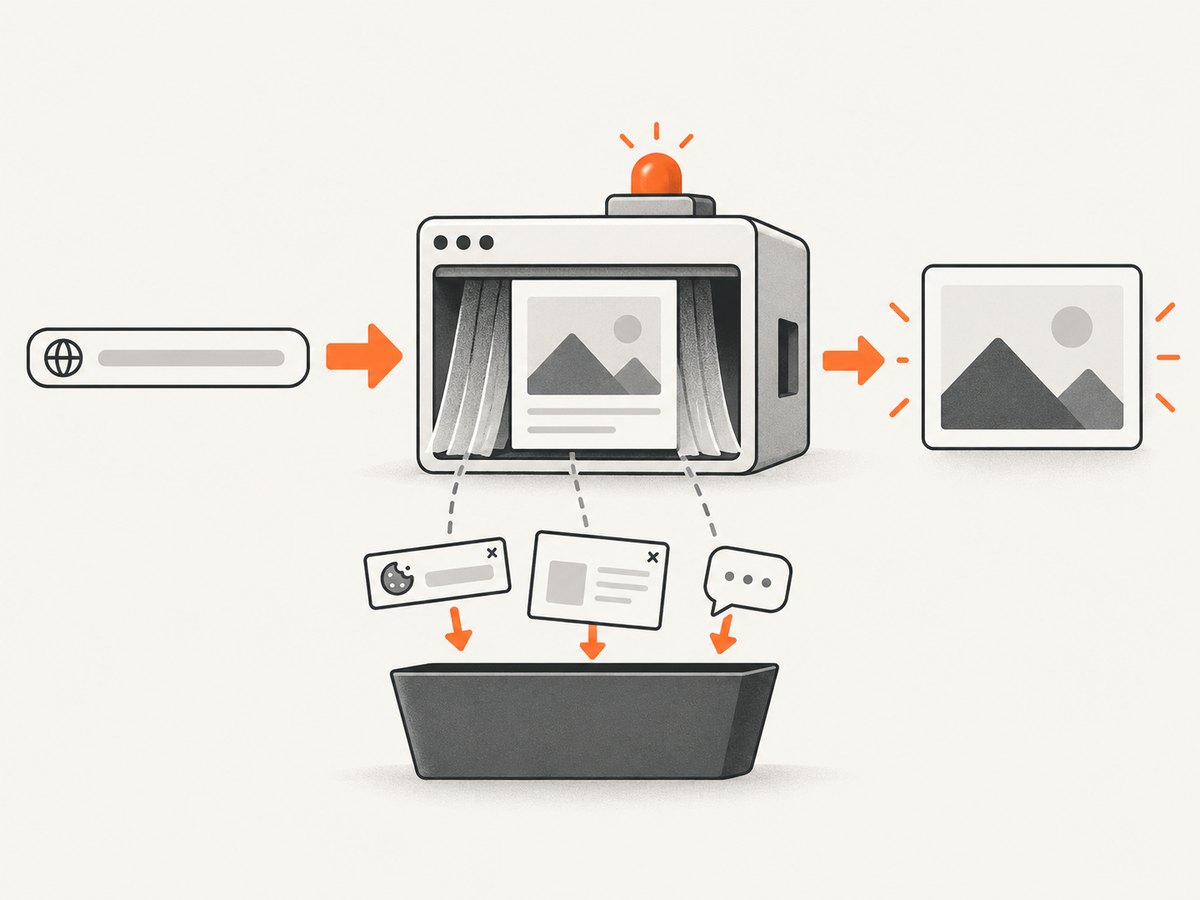
Useful visual cases include first load, logged-in state, empty and error states, dark mode, mobile widths, long content, and pages with lazy-loaded images. Store the capture inputs with the image so a later diff can distinguish a code change from a viewport or data change.
7. Or skip the browser setup
ScreenshotNeo provides a GET endpoint for PNG, JPEG, WebP, or PDF output. The request below is runnable; see the ScreenshotNeo API documentation for all options.
cURL
curl -G "https://api.screenshotneo.com/v1/shot" -d access_key=YOUR_API_KEY --data-urlencode url=https://stripe.com -o shot.webpPython
import requests

r = requests.get(
    "https://api.screenshotneo.com/v1/shot",
    params={"access_key": "YOUR_API_KEY", "url": "https://stripe.com"},
    timeout=90,
)
r.raise_for_status()
open("shot.webp", "wb").write(r.content)
Node.js
const q = new URLSearchParams({ access_key: 'YOUR_API_KEY', url: 'https://stripe.com' });
const res = await fetch(`https://api.screenshotneo.com/v1/shot?${q}`);
if (!res.ok) throw new Error(`Screenshot failed: ${res.status}`);
const fs = await import('node:fs/promises');
await fs.writeFile('shot.webp', Buffer.from(await res.arrayBuffer()));
ScreenshotNeo supports full-page and element capture, dark mode, device presets or custom viewports, retina scale, PDF paper and margin settings, custom CSS and JavaScript, click and wait actions, selector hiding, ad and tracker blocking, headers, cookies, user agents, authorization, timezone, geolocation, transparent backgrounds, resizing, TTL caching, signed links, asynchronous jobs with signed webhooks, bulk capture of up to 100 URLs per call, usage reporting, and an OpenAPI specification. Each step can be turned off. Response headers identify page verdict and whether the shot was billed.
Bot checks or CAPTCHAs, blank pages, timeouts, failed loads, and cache hits are not billed. The Free plan includes 1,000 shots per month without a card; paid plans start at $5 for 3,000 shots. An MCP server exposes take_screenshot, get_page_info, and capture_pdf to Claude, Cursor, and other MCP clients, so an AI agent can gather visual evidence directly. Create a free ScreenshotNeo account.
8. Security and privacy checklist
- Never paste API keys, session cookies, private certificates, or production customer data into a prompt.
- Use least-privilege repository and cloud permissions.
- Run generated shell commands in a restricted environment and inspect them first.
- Pin dependencies and review lockfile changes.
- Scan for secrets and vulnerabilities before merge.
- Check vendor retention and whether prompts or code may be used for service improvement.
- Keep human approval for database migrations, permission changes, payment logic, and deployment.
9. Performance, reliability, and cost
Performance
Large repositories increase indexing and prompt latency. Point the tool at the smallest useful file set, summarize stable architecture once, and ask for incremental diffs. For web apps, measure bundle size, server response time, query count, image weight, and layout stability after every significant change.
Reliability
Use deterministic commands and capture their output in pull requests. Retry transient network operations, but do not blindly retry mutations. Keep generated changes small enough to revert. Pin model, tool, and dependency versions where your platform allows it.
Cost
Track completions, agentic requests, premium-model usage, CI minutes, browser runs, and screenshot volume separately. Set team budgets and alerts. For ScreenshotNeo, caching with a chosen TTL, bulk capture, and verdict headers help avoid paying for repeated or unusable captures.
10. Troubleshooting common failures
| Symptom | Likely cause | Fix |
|---|---|---|
| Confident but incorrect code | Missing repository or framework context | Provide versions, conventions, constraints, and a failing test; request a plan before edits. |
| Agent changes unrelated files | Task boundary is too broad | List allowed paths and require a diff summary. |
| Tests pass but the page is broken | No browser or responsive validation | Run end-to-end checks at target viewports and inspect console and network output. |
| Generated UI is inaccessible | Accessibility was not specified or reviewed | Add explicit keyboard, focus, label, contrast, and screen-reader acceptance tests. |
| Tool cannot access a private page | Missing authentication or blocked request | Use test credentials and approved headers or cookies; never expose production secrets. |
| Screenshot is blank or shows a challenge | Bot check, timeout, or failed page load | Inspect X-Page-Verdict and X-Billed; adjust waits, blocking, headers, or authentication. |
| Screenshot captures a consent dialog | Consent handling was disabled or unsupported | Enable ScreenshotNeo consent and popup removal steps, or hide the selector explicitly. |
11. A practical adoption checklist
- Choose the assistant that matches your source host, cloud, IDE, and governance model.
- Document what data may enter prompts.
- Create standard prompts for planning, implementation, review, and incident fixes.
- Require tests, security scans, accessibility checks, and human diff review.
- Measure escaped defects, review time, build time, and rollback rate.
- Recheck vendor pricing, limits, retention, and model availability before renewing.
FAQ
Should a small team start with a free plan?
Yes, if the limits cover your workload. Start with a representative repository and measure completion, agentic, CI, and review usage before committing.
Can an LLM replace a senior web developer?
No. It can accelerate implementation and investigation, but architecture, threat modeling, accessibility, and production ownership still require experienced judgment.
Which tool is best for AWS applications?
Amazon Q Developer is the most aligned when AWS context, IAM controls, CLI workflows, and vulnerability scanning are central requirements.
How should I evaluate a tool?
Give each candidate the same bounded feature, bug, review, and accessibility tasks. Compare correctness, diff quality, test coverage, security findings, latency, and total cost.


