Microsoft MCP Servers for Claude: Setup, Security, and Azure Access
Connect Claude to Microsoft MCP servers with Azure authentication, RBAC, Desktop and Code setup, remote security, and troubleshooting.

Direct answer: For general Microsoft cloud administration from Claude, start with Azure MCP Server. It is Microsoft’s central MCP integration for Azure resources and services. Claude Desktop can install the official .mcpb extension, while Claude Code can install the Azure plugin from Anthropic’s official marketplace. Authenticate with Microsoft Entra ID and grant only the Azure RBAC permissions the workflow needs. For a remote enterprise deployment, place Azure API Management (APIM) and Entra ID in front of the MCP backend so you can validate tokens, enforce policy, monitor calls, and scale the endpoint.
Use Foundry MCP Server when the work is specifically about Microsoft Foundry services. It is a separate, cloud-hosted MCP implementation with its own setup guidance.
What Microsoft MCP servers work with Claude?
| Server | Best fit | Claude connection | Identity and control |
|---|---|---|---|
| Azure MCP Server | Azure resources, services, CLI and developer workflows | Claude Desktop extension, Claude Code plugin, package or HTTP configuration where supported | Microsoft Entra ID plus Azure RBAC and subscription permissions |
| Foundry MCP Server | Microsoft Foundry services | Cloud-hosted endpoint; Visual Studio Code setup is documented | Foundry identity and service permissions |
Microsoft describes Azure MCP Server as enabling AI agents and clients to interact with Azure resources through natural-language commands. Its available tools and accessible resources are constrained by authentication, enabled tools, server version, host support, and the signed-in user’s Azure permissions. Read the Azure MCP Server documentation before production rollout because package names, versions, and supported clients change.
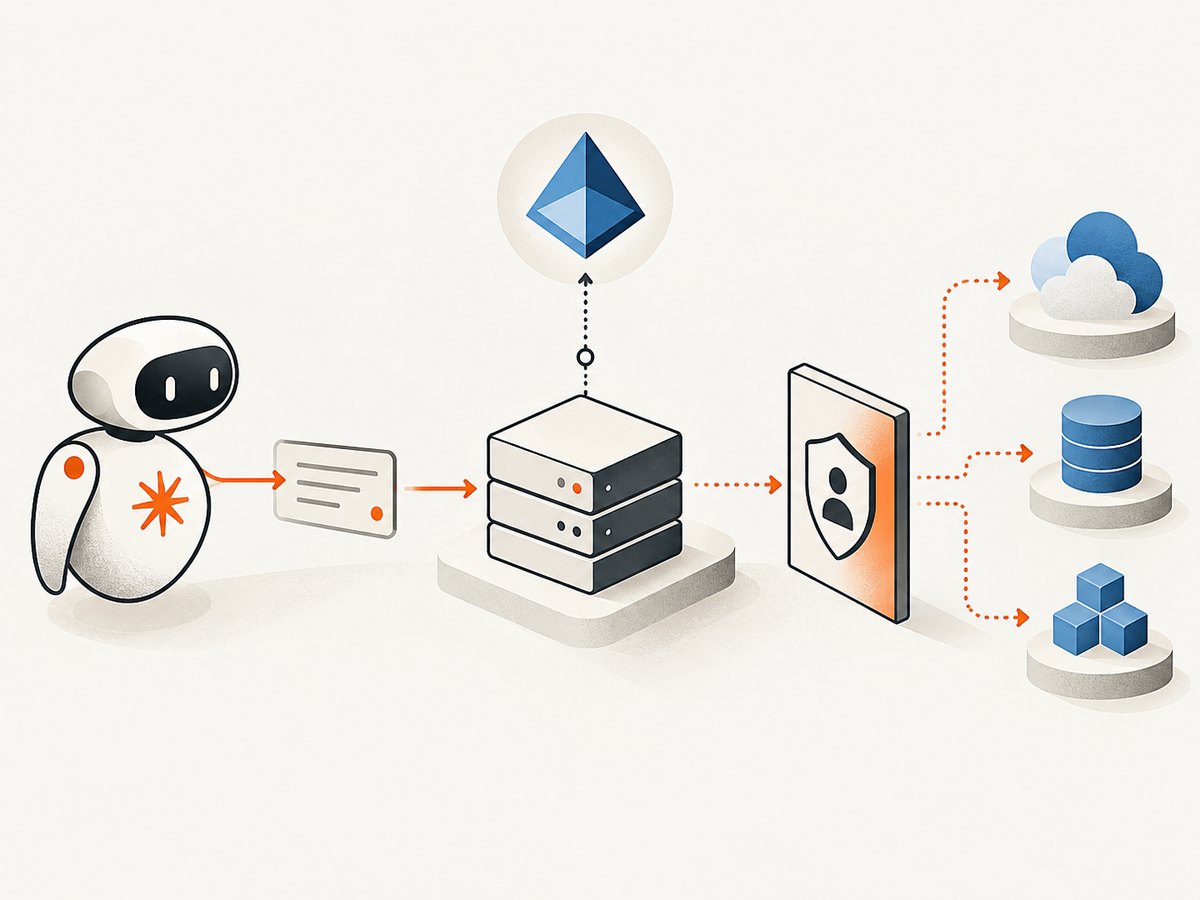
How the Claude and Azure MCP architecture works
- Claude is the MCP client. Claude Desktop or Claude Code sends MCP requests when you ask it to inspect or change an Azure resource.
- Azure MCP Server exposes tools. The server translates MCP tool calls into Azure operations and related CLI or developer commands.
- Entra ID authenticates the identity. The server uses Microsoft’s Azure Identity library and obtains credentials for the signed-in account or workload.
- Azure RBAC authorizes each operation. Role assignments at management-group, subscription, resource-group, or resource scope determine what Claude can read or change.
- Azure returns data or an error. Claude can summarize the result, but it cannot bypass a denied permission or an unavailable tool.
Keep this distinction clear: installing an MCP server does not grant Azure access. It only makes tools available to a client. The identity and RBAC layer still decides whether an operation succeeds.
Prerequisites and permission planning
- A Claude Desktop installation or Claude Code environment that supports MCP.
- An Azure account and at least one subscription or resource scope relevant to the task.
- Microsoft Entra authentication that can obtain an Azure token.
- Azure RBAC assignments appropriate to the tools you enable.
- A documented list of read and write operations your team expects Claude to perform.
Use least privilege
Begin with read-only roles at the narrowest useful scope. For example, grant inspection access to a single resource group before considering subscription-wide permissions. Add write roles only for an explicit workflow, and separate deployment or deletion operations from routine diagnostics. Review role assignments regularly and remove temporary access when the task ends.
Remember that tool visibility and authorization are related but different. A client may display a tool that ultimately fails because the account lacks a role, while a server configuration may also disable tools entirely. Test both the tool list and an authorized operation with a non-production resource.
Install Azure MCP Server in Claude Desktop
Microsoft provides downloadable .mcpb bundles for Windows, macOS, and Linux architectures. This is the documented extension path for Claude Desktop.
- Open the Azure MCP Server installation instructions and download the bundle matching your operating system and CPU architecture.
- In Claude Desktop, drag the
.mcpbfile into the application, or open Claude’s extension installation settings and select the file. - Accept the extension permissions and restart Claude Desktop if it does not load the server immediately.
- Sign in to Azure when prompted. Complete any browser-based Entra flow and select the subscription or tenant required by your work.
- Start with a read-only request such as asking Claude to list resources in a named resource group.
If the extension is not offered for your architecture or Claude Desktop version, use a package-manager or HTTP configuration documented for your client. Do not copy a configuration from an old blog post without checking the current Microsoft and Anthropic instructions.
Install Azure MCP Server in Claude Code
The Microsoft MCP Registry documents Azure MCP Server 2.0 as generally available and lists an Azure plugin for Claude Code. In Claude Code, run the marketplace command shown below, then verify the current plugin name and version in the official marketplace before using it in a team standard:
/plugin install azure@claude-plugins-official- Open Claude Code in the project or environment where you want Azure tools.
- Run the plugin installation command.
- Complete the Entra authentication flow and select the correct tenant and subscription.
- Ask Claude to enumerate available Azure MCP tools and confirm that only the expected tools are enabled.
- Run a harmless read operation against a test resource group.
Plugin contents and server versions can change. If the command fails, search the current Anthropic plugin marketplace and Microsoft’s registry entry rather than forcing an old package identifier.
Package and HTTP configurations
Some MCP clients accept a local package command or a remote HTTP server definition instead of a desktop bundle. The exact JSON keys vary by host, so use the client-specific schema. A typical configuration concept contains:
{
  'mcpServers': {
    'azure': {
      'command': 'YOUR_AZURE_MCP_COMMAND',
      'args': ['YOUR_SERVER_ARGUMENTS'],
      'env': {
        'AZURE_SUBSCRIPTION_ID': 'YOUR_SUBSCRIPTION_ID'
      }
    }
  }
}
Treat that snippet as a shape, not a universal drop-in file. Never place client secrets or refresh tokens in a checked-in configuration. Prefer the Azure Identity login flow, managed identity, or a secret store supported by your environment. For an HTTP endpoint, require TLS, validate the issuer and audience of every token, and confirm that the MCP client supports the transport and authentication scheme your server exposes.
Secure a remote Azure MCP server with API Management
A local extension is simplest for one developer. A shared or internet-reachable endpoint needs a gateway and governance layer. Microsoft’s API Management guidance describes APIM as a way to securely expose and govern MCP servers and their backends for clients such as Claude.

Microsoft’s Claude-focused pattern uses Entra ID and OAuth 2.0. In that design, Azure API Management acts as a secure OAuth 2.0 gateway between Claude’s MCP client and your MCP server.
Recommended request path
- Claude obtains an OAuth access token from Entra ID.
- Claude sends the MCP request over HTTPS to APIM.
- APIM validates the JWT issuer, audience, signature, expiry, and required claims.
- APIM applies authorization, rate limits, logging, and routing policies.
- APIM forwards the request to the Azure MCP backend.
- The backend performs Azure operations using the approved identity and RBAC scope.
Enterprise checklist
- Register the client and API scopes in Entra ID.
- Validate JWTs at the gateway, including issuer and audience.
- Require TLS and restrict network access to the MCP backend.
- Apply per-client and per-user rate limits.
- Log request metadata, tool names, authorization outcomes, and latency without recording secrets or unnecessary prompt data.
- Separate read and write APIs where practical.
- Use managed identities or workload identities for backend calls.
- Monitor denied requests, token failures, unusual tool sequences, and resource changes.
- Define a process for rotating credentials and revoking access.
Azure MCP Server versus Foundry MCP Server
Choose Azure MCP Server when Claude needs broad Azure resource and service operations. Choose Foundry MCP Server when the workflow is centered on Microsoft Foundry services and you want the Foundry-specific cloud-hosted implementation. These are complementary choices, not two names for the same endpoint.
Evaluate each option on local versus remote operation, service scope, identity model, operational ownership, and change risk. Confirm supported tools and authentication requirements at publication time because server versions, client integrations, and permissions evolve.
Common errors and fixes
| Error or symptom | Likely cause | Fix |
|---|---|---|
| Claude cannot see Azure tools | Extension or plugin did not load, or tools are disabled | Restart the host, inspect the MCP connection status, and verify the current package or plugin version. |
| Authentication loop or login failure | Expired browser session, wrong tenant, blocked device flow, or incomplete Entra consent | Sign out and authenticate again, choose the intended tenant, and complete administrator consent if required. |
| AuthorizationFailed or 403 | The identity lacks an Azure RBAC role at the target scope | Check the signed-in principal, subscription, resource group, and role assignment. Request the smallest additional role needed. |
| Resource not found | Wrong subscription, tenant, region, resource-group name, or resource ID | Have Claude list subscriptions and resource groups first, then retry with the full resource ID. |
| Remote endpoint returns 401 | Missing, expired, or incorrectly targeted OAuth token | Inspect token issuer and audience, obtain a token for the APIM API scope, and verify gateway JWT policy. |
| Remote endpoint returns 403 | APIM policy denied the caller or backend authorization failed | Review APIM claims and policy logs, then check backend identity and Azure RBAC separately. |
| Tool call times out | Long Azure operation, network restriction, gateway timeout, or overloaded backend | Use asynchronous job patterns where supported, increase gateway timeouts carefully, and monitor backend duration. |
| Claude proposes a dangerous change | Write-capable tools are enabled without an approval procedure | Disable unnecessary write tools, require confirmation in the workflow, and scope roles to a test subscription. |
Performance, reliability, and cost considerations
Performance
Latency includes Claude’s reasoning, token acquisition, MCP transport, APIM policy processing, Azure API calls, and any long-running operation. Keep prompts precise, ask for a narrow resource scope, and avoid repeated discovery calls. Cache non-sensitive inventory in your own system when appropriate, but do not assume a stale result is safe for a destructive action.
Reliability
Pin and review server versions, document the supported Claude host, and keep a manual Azure CLI or portal fallback for incidents. Treat retries carefully: repeating a read is usually safe, while repeating a create, update, or delete may not be. For remote deployments, monitor token failures, gateway health, backend errors, and Azure throttling separately.
Cost
Azure MCP Server itself is an integration layer; normal Azure service, network, identity, and API Management charges still apply according to the services you use. APIM capacity, logging volume, and backend operations should be included in your cloud budget. Microsoft documentation does not provide a universal per-tool price because the underlying services and deployment choices differ.
Or skip the browser setup
If your Claude workflow only needs a clean image or PDF of a web page, ScreenshotNeo provides a single website screenshot API and an MCP server for Claude, Cursor, and other MCP clients. Its capture tools remove cookie and consent banners, newsletter popups, and chat widgets before the shot; bot checks, blank pages, timeouts, failed loads, and cache hits are not billed. Responses identify the result with X-Page-Verdict and X-Billed headers. The API supports PNG, JPEG, WebP, PDF, full-page capture, element selectors, device presets, custom CSS and JavaScript, waits, blocking rules, headers, cookies, geolocation, caching, signed links, asynchronous jobs, bulk capture, and usage reporting. See the ScreenshotNeo API documentation.
curl -G 'https://api.screenshotneo.com/v1/shot' -d access_key=YOUR_API_KEY --data-urlencode url=https://learn.microsoft.com -o shot.webpimport requests
r = requests.get('https://api.screenshotneo.com/v1/shot', params={'access_key': 'YOUR_API_KEY', 'url': 'https://learn.microsoft.com'}, timeout=90)
open('shot.webp', 'wb').write(r.content)const q = new URLSearchParams({ access_key: 'YOUR_API_KEY', url: 'https://learn.microsoft.com' });
const res = await fetch(`https://api.screenshotneo.com/v1/shot?${q}`);ScreenshotNeo includes an MCP server whose tools include take_screenshot, get_page_info, and capture_pdf. The Free plan includes 1,000 shots per month with no card; paid plans start at $5 for 3,000 shots. Create a free ScreenshotNeo account to try it.
FAQ
Can Claude change Azure resources through MCP?
Yes, when the server exposes the relevant write tool and the authenticated identity has the required Azure RBAC permission. Keep write access narrowly scoped and require confirmation for destructive operations.
Is Azure MCP Server the same as Foundry MCP Server?
No. Azure MCP Server targets broad Azure resource and service operations. Foundry MCP Server is a separate implementation focused on Microsoft Foundry services.
Do I need API Management for Claude Desktop?
No. A local .mcpb installation is appropriate for many individual workflows. APIM becomes useful when you expose a shared or remote endpoint and need centralized OAuth, authorization, monitoring, and scaling.
Why does a tool appear but fail?
Tool availability can reflect server configuration, while successful execution also depends on the selected tenant, subscription, resource scope, Entra identity, and Azure RBAC assignment.


