How to Take Multiple Screenshots Concurrently with python-webkit2png
Run independent webkit2png processes in a bounded Python pool, handle headless displays, failures, unique files, and modern alternatives.
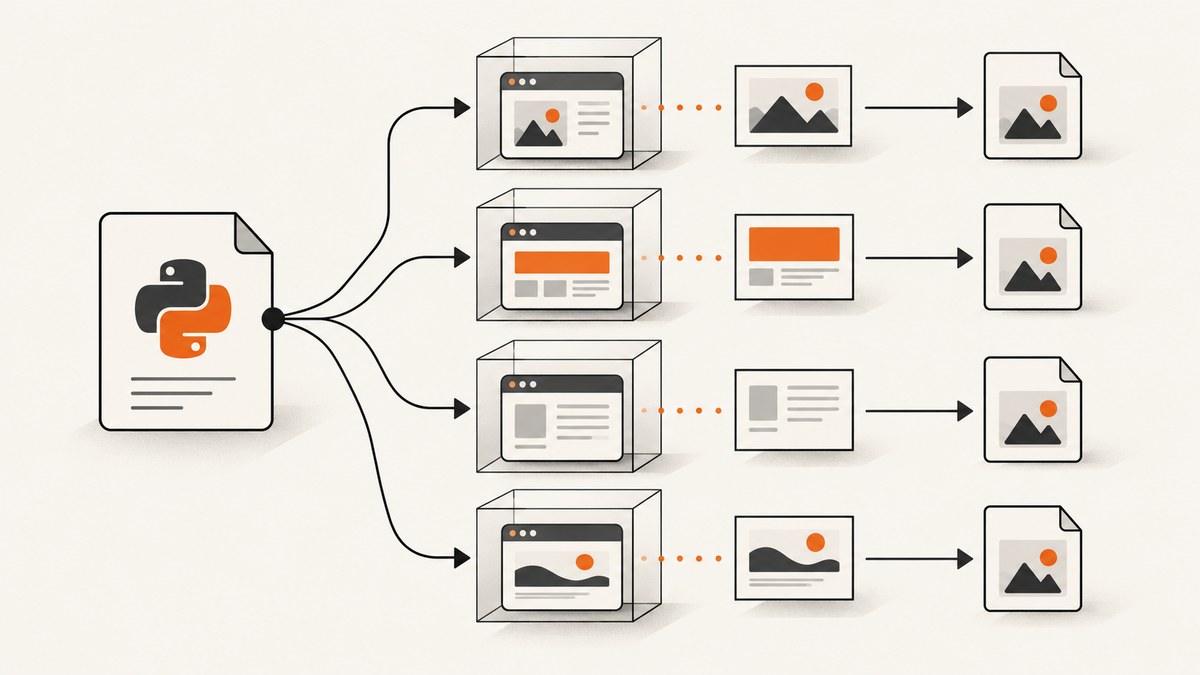
Use one independent webkit2png process per URL and schedule those processes with a bounded worker pool. The available evidence does not establish a safe, supported in-process parallel API for python-webkit2png. Separate processes avoid sharing one Qt/WebKit renderer between threads, let each capture have its own timeout, and make failures easier to isolate.
webkit2png is a legacy Qt/WebKit command-line utility. The visible PyPI release is 0.8.2 from May 12, 2010 (PyPI project page). Its original maintainer, Paul Hammond, warns that the original tool no longer works on recent macOS versions and recommends newer tools such as Playwright. That warning is specifically about recent macOS; a fork and a Linux deployment may behave differently.
Recommended architecture
- Keep the URL list in the parent Python process.
- Submit one task per URL to a
ProcessPoolExecutoror another process scheduler. - Have each task invoke the
webkit2pngexecutable withsubprocess.run. - Give every task a deterministic, unique output path.
- Limit the worker count. Start conservatively and increase only after observing CPU, memory, file descriptors and target-site load.
- Record return codes, stderr, duration and output existence for every URL.
The command itself is sequential when called in a loop. Concurrency comes from scheduling several independent commands, not from an undocumented multi-page mode inside the package.
Complete Python example
The following script reads URLs, runs isolated captures concurrently, writes unique PNG files and returns a result for every input, including failures.

#!/usr/bin/env python3
from concurrent.futures import ProcessPoolExecutor, as_completed
from pathlib import Path
import hashlib
import re
import subprocess
import time

WEBKIT2PNG = "webkit2png"              # or an absolute executable path
OUTPUT_DIR = Path("shots")
WORKERS = 4
GEOMETRY = "1280x900"
TIMEOUT_SECONDS = 60

URLS = [
    "https://example.com/",
    "https://www.python.org/",
    "https://webkitgtk.org/",
]

def safe_stem(url: str) -> str:
    readable = re.sub(r"[^a-zA-Z0-9]+", "-", url).strip("-").lower()[:60]
    digest = hashlib.sha256(url.encode("utf-8")).hexdigest()[:10]
    return f"{readable or 'page'}-{digest}"

def capture(url: str) -> dict:
    OUTPUT_DIR.mkdir(parents=True, exist_ok=True)
    output = OUTPUT_DIR / f"{safe_stem(url)}.png"
    command = [
        WEBKIT2PNG,
        "--full",                         # use the executable's full-page option
        "--geometry", GEOMETRY,
        "--timeout", str(TIMEOUT_SECONDS),
        "--output", str(output),
        url,
    ]
    started = time.monotonic()
    try:
        completed = subprocess.run(
            command,
            text=True,
            capture_output=True,
            timeout=TIMEOUT_SECONDS + 15,
            check=False,
        )
        return {
            "url": url,
            "output": str(output),
            "returncode": completed.returncode,
            "ok": completed.returncode == 0 and output.exists(),
            "stdout": completed.stdout,
            "stderr": completed.stderr,
            "seconds": round(time.monotonic() - started, 2),
        }
    except subprocess.TimeoutExpired as exc:
        return {
            "url": url,
            "output": str(output),
            "returncode": None,
            "ok": False,
            "stdout": exc.stdout or "",
            "stderr": f"process timeout: {exc}",
            "seconds": round(time.monotonic() - started, 2),
        }
    except OSError as exc:
        return {
            "url": url,
            "output": str(output),
            "returncode": None,
            "ok": False,
            "stdout": "",
            "stderr": str(exc),
            "seconds": round(time.monotonic() - started, 2),
        }

def main() -> None:
    with ProcessPoolExecutor(max_workers=WORKERS) as pool:
        futures = {pool.submit(capture, url): url for url in URLS}
        for future in as_completed(futures):
            result = future.result()
            status = "OK" if result["ok"] else "FAILED"
            print(f"{status} {result['url']} -> {result['output']} "
                  f"({result['seconds']}s)")
            if not result["ok"]:
                print(result["stderr"])

if __name__ == "__main__":
    main()
Confirm the exact option spelling for your installed executable. The commonly shown invocation uses an executable, output path, geometry, timeout and URL; forks can differ.
Installing and checking the executable
The legacy package’s age means installation is environment-dependent. Verify the executable before starting a batch:
which webkit2png
webkit2png --help
python3 --version
Do not assume that a package installed from PyPI, a system package and a fork expose identical flags. Capture the output of webkit2png --help in deployment documentation and pin the exact binary or container image when reproducibility matters.
Running without a desktop display
On a headless Linux host, a community report describes launching the command through xvfb-run to provide a virtual X display:
xvfb-run -a webkit2png --full --geometry 1280x900 \
  --timeout 60 --output shots/example.png https://example.com/
Treat this as an environment workaround reported by a user, not as a universally supported feature or a complete compatibility matrix. To apply it from Python, make xvfb-run the first command:
command = [
    "xvfb-run", "-a", WEBKIT2PNG,
    "--full", "--geometry", GEOMETRY,
    "--timeout", str(TIMEOUT_SECONDS),
    "--output", str(output), url,
]
Use a distinct display allocation (-a) and test your fork under the same user, fonts, permissions and filesystem layout used in production.
Choosing the worker count
| Constraint | What to watch | Practical response |
|---|---|---|
| CPU | Renderer processes saturate cores | Lower workers until the host remains responsive |
| Memory | Each browser process has its own overhead | Use a small pool and monitor peak RSS |
| Target websites | Many simultaneous requests can trigger rate limits | Throttle workers, group by host, and add backoff |
| File descriptors | Many processes and sockets exhaust limits | Raise limits only when needed; otherwise reduce concurrency |
| Display server | Virtual X resources become contended | Use fewer workers or separate display sessions |
There is no source-backed speedup number for this workload. Measure your own URLs, host, binary and network conditions. Thousands of URLs are a workload size, not a benchmark.
Retries, timeouts and idempotency
Make retries explicit and bounded. A timeout should terminate the child process; otherwise a hung page can occupy a worker indefinitely. Retry transient launch or network failures, but avoid blindly retrying deterministic errors such as an invalid flag or missing executable.
from random import uniform

def capture_with_retries(url, attempts=3):
    last = None
    for attempt in range(attempts):
        last = capture(url)
        if last["ok"]:
            return last
        if attempt + 1 < attempts:
            time.sleep((2 ** attempt) + uniform(0, 0.5))
    return last
Use URL hashes in filenames so a retry replaces the same logical artifact instead of creating ambiguous copies. Write to a temporary path and rename after a successful capture if consumers may read the directory concurrently.
Options and edge cases
- Unique names: URLs can contain slashes, query strings and Unicode. Sanitize names and append a hash.
- Redirects: Keep the original URL in your manifest and record the final behavior if the tool exposes it.
- Slow pages: Set both the tool timeout and the parent subprocess timeout.
- Authentication: Legacy command-line tooling may not support modern login flows, cookies or headers. Do not place secrets in process arguments if your host exposes them to other users.
- Dynamic content: A screenshot can finish before JavaScript-driven content appears. The available evidence does not establish a reliable wait-for-selector API for this tool.
- Fonts and assets: Install required fonts and ensure outbound DNS, TLS and proxy settings match your desktop environment.
- One renderer shared by threads: Avoid it. The cited Qt sketches are explicitly untested and do not establish thread safety.
- Partial batches: Persist one result record per URL so the batch can resume without repeating successful captures.
Troubleshooting
| Symptom | Likely cause | Fix |
|---|---|---|
FileNotFoundError |
The executable is not on PATH |
Install or pin the binary and set WEBKIT2PNG to its absolute path. |
| Cannot open display | No X server in the environment | Run on a desktop display or try the reported xvfb-run -a workaround. |
| Every job writes the same file | Output name is derived from a constant | Use a sanitized URL plus a stable hash. |
| Blank or incomplete image | Page failed, timed out or content loaded after capture | Inspect stderr, increase the timeout, verify network access and consider a maintained browser tool. |
| Random crashes under concurrency | Too many renderer processes or shared Qt state | Use process isolation, reduce workers and avoid shared renderers. |
| Works locally but not on macOS | Original project dependency removed on recent macOS | Use a supported fork/platform or migrate to a newer browser automation tool. |
| Timeouts only for one host | Rate limiting, DNS, TLS or a slow origin | Throttle per host, verify connectivity and retry with backoff. |
When to migrate
The original maintainer recommends Playwright for recent macOS because the original tool no longer works there. The research does not establish which Python, Qt, WebKit and operating-system combinations remain compatible with every fork. If you need modern JavaScript, reliable waiting, browser contexts, authentication or maintained binaries, evaluate a current browser automation tool instead of building more concurrency around an unmaintained renderer.

Or skip the browser setup
ScreenshotNeo provides a website screenshot API and MCP server. One GET request returns PNG, JPEG, WebP or PDF. It accepts cookie and consent banners before capture and removes more than 60 known consent platforms, newsletter popups and chat widgets; each step can be turned off. Bot checks, blank pages, timeouts, failed loads and cache hits are not billed, and the response identifies the page verdict and billing with X-Page-Verdict and X-Billed headers. An MCP server lets Claude, Cursor and other MCP clients use take_screenshot, get_page_info and capture_pdf.
See the ScreenshotNeo API documentation for all options.
curl -G "https://api.screenshotneo.com/v1/shot" -d access_key=YOUR_API_KEY --data-urlencode url=https://stripe.com -o shot.webpimport requests
r = requests.get("https://api.screenshotneo.com/v1/shot", params={"access_key": "YOUR_API_KEY", "url": "https://stripe.com"}, timeout=90)
open("shot.webp", "wb").write(r.content)
const q = new URLSearchParams({ access_key: 'YOUR_API_KEY', url: 'https://stripe.com' });
const res = await fetch(`https://api.screenshotneo.com/v1/shot?${q}`);
It also supports full-page captures with lazy images loaded, CSS element capture, dark mode, device presets, custom viewports, retina scale, PDF settings, custom CSS and JavaScript, clicks, selector waits, delays, network idle, request blocking, headers, cookies, user agents, authorization, timezone, geolocation, transparent backgrounds, resizing, TTL caching, signed image links, asynchronous jobs with signed webhooks, bulk capture of up to 100 URLs per call, a usage API and an OpenAPI specification. Parameter names used by other screenshot APIs also work, which eases switching.
There is a free plan with 1,000 screenshots each month and no card. Paid plans start at $5 for 3,000 screenshots; every feature is included on every plan. Create a free ScreenshotNeo account.
FAQ
Does python-webkit2png have a parallel flag?
The available sources do not document a safe, supported in-process parallel API. Schedule independent executable processes yourself.
Should I use threads or processes?
Use processes for renderer isolation. The cited Qt examples do not prove that one renderer or Qt application can be shared safely across threads.
Is Xvfb required?
Only when your environment has no usable X display and your build needs one. xvfb-run is a community-reported workaround, not a universal guarantee.
Can I claim a fixed throughput?
No. The sources contain no concurrency benchmark. Throughput depends on page weight, network, CPU, memory, display setup and the selected worker count.
What is the modern alternative?
The original maintainer names Playwright as a newer alternative, especially in the context of recent macOS compatibility. ScreenshotNeo is an API option when you want captures without maintaining browser processes.


