OCSP Stapling: How TLS Certificate Status Checks Work
Learn how OCSP stapling moves certificate status checks into the TLS handshake, how clients validate freshness, and what operators should check when deploying it.

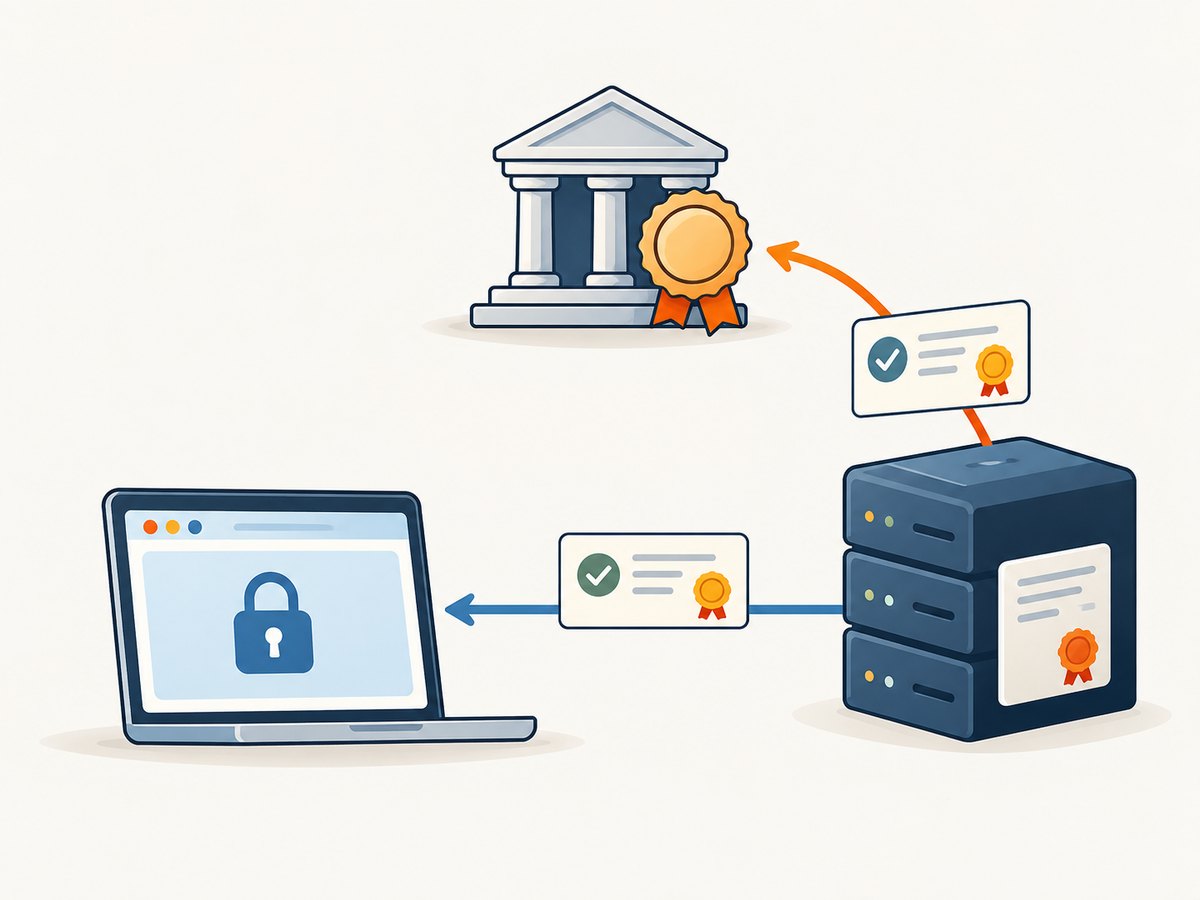
OCSP stapling lets a TLS server attach a certificate authority (CA)-signed certificate status response to the TLS handshake. The server fetches and caches that response from the CA’s OCSP responder; the client checks the signature, certificate identity, signer authorization, and freshness. This can spare the client a separate status request to the CA, but it does not guarantee that every client checks revocation or that a good status proves every aspect of a certificate’s legitimacy.
For an operator, the practical question is not simply “Is stapling on?” You also need to know whether the certificate issuer provides OCSP, whether your TLS termination layer refreshes responses before they expire, and how your target clients behave when the staple is absent or stale.
1. What OCSP checks
The Online Certificate Status Protocol (OCSP) allows a client to ask a responder about a certificate’s status. The basic response states are good, revoked, and unknown. A client validates that the response identifies the certificate it is checking, carries a valid signature, was signed by an authorized responder, and meets its time-validity policy. These details are defined in RFC 6960.
A good response has a narrower meaning than many readers assume. RFC 6960 says it indicates, at minimum, that no certificate with the requested serial number that is currently within its validity period is revoked. The response does not necessarily prove the certificate was ever issued. It also says nothing on its own about hostname matching, certificate-chain trust, expiration, or the security of the website.
OCSP is a revocation-status mechanism, not a full TLS validator. The client still needs to validate the certificate chain and the connection under its own trust and policy rules.
2. The handshake flow, step by step
- The server gets a status response. The TLS server, reverse proxy, load balancer, or certificate automation system requests an OCSP response from the responder identified for the certificate. The response is signed by the CA or an authorized responder.
- The server caches and refreshes it. The response is reusable for a bounded period. The server needs to obtain a newer response before the cached one becomes unusable under client policy.
- The client indicates interest. A client can send the TLS
status_requestextension to ask for certificate status information. - The server staples the response. If it has a suitable response, it sends it as part of the handshake. The server transports the CA’s signed assertion; it does not create or sign the status itself.
- The client validates it. The client checks the response’s certificate identifier, signature, signer authorization, and time fields, then applies its revocation and TLS policies.
In TLS 1.2 and earlier, status information is carried in a CertificateStatus message. The current TLS 1.3 specification, RFC 9846, places OCSP information in an extension on the relevant CertificateEntry. The older status_request_v2 extension is deprecated for TLS 1.3. These are wire-format differences; the central idea remains that the server supplies a signed response the client can validate.
3. Freshness: what the timestamps mean
An OCSP response is a signed statement about status at particular times, not a live lookup at the moment a client connects. Three timestamps matter:

thisUpdate: when the responder knew the stated status to be correct.nextUpdate: by when newer status information is expected to be available.producedAt: when the response was signed.
The response must be current according to the client’s applicable profile and validation policy. A response can be correctly signed yet unusable because it is stale. A response with a mismatched certificate identifier, invalid signature, or unauthorized signer must not be treated as equivalent to a fresh good response.
RFC 9919, a 2026 high-volume OCSP profile, requires clients using that profile to check that the current time falls between thisUpdate and nextUpdate, and to reject a response when nextUpdate is missing or expired. Treat those detailed requirements as profile-specific guidance, not a description of every legacy client. For operators, the practical lesson is to monitor refresh and expiry rather than assuming that a response remains useful indefinitely.
4. Stapling compared with client-driven OCSP and CRLs
| Approach | Who fetches status | Privacy and latency considerations | Operational detail |
|---|---|---|---|
| Client-driven OCSP | Each client may contact the CA responder. | The responder may observe the queried site and the requester’s IP address. A direct responder lookup can add a network dependency. | Behavior depends on the client’s revocation policy and implementation. |
| OCSP stapling | The website’s server fetches and caches a response; clients receive it during the handshake. | Clients can avoid making a direct status request to the CA for that connection. The response remains time-limited. | The TLS termination layer must obtain and refresh a usable response. |
| Certificate revocation lists (CRLs) | A client retrieves or otherwise obtains a list of revoked certificates and checks it locally. | Status is distributed as a list rather than a per-certificate OCSP response; the details of latency and caching depend on client policy and distribution. | Support and behavior vary across certificate ecosystems and software. |
The Internet Architecture Board described stapling as avoiding the latency associated with a browser fetching revocation status information. That refers to the direct responder-fetch latency, not all TLS connection latency. Stapling can also reduce repeated responder work because a server can reuse a response for clients while it remains suitable. Neither benefit makes it a universal revocation guarantee: issuer behavior, client policy, response freshness, and certificate configuration all matter. See the IAB statement on OCSP stapling.
5. What happens when the staple is missing or invalid?
There is no universal rule that every browser rejects a connection when the staple is missing. Some clients may continue without stapled status; others may try a separate OCSP or CRL check when revocation checking is enabled. A certificate extension such as Must-Staple can affect behavior for clients that honor it. A stale, mismatched, incorrectly signed, or unauthorized response is also different from a valid current response.
Do not infer client behavior from a successful connection in one browser. Test the clients and runtimes your service supports, and consult their current documentation. Oracle’s JSSE documentation illustrates the implementation-specific nature of Java behavior: OCSP validation requires enabling revocation checking and OCSP, while use of a stapled response also depends on status-request settings. That configuration is a Java example, not a universal browser rule.
6. Deployment checklist for service operators
- Check issuer support. Inspect the certificate and current CA documentation to establish whether an OCSP responder is available. Do not assume every issuer supports OCSP.
- Identify the TLS termination point. Stapling is typically handled by the component presenting the certificate: for example, a web server, proxy, load balancer, or managed edge. Configure the component that actually terminates TLS.
- Enable and verify stapling using that implementation’s documentation. Configuration names and defaults vary. Avoid copying directives between products or versions without checking their official docs.
- Confirm the served response is usable. Check that the response corresponds to the active certificate, has an authorized signer, and remains within its time window. Validate behavior from the network path clients use.
- Monitor refresh and expiry. Alert on responder fetch failures and on a response nearing its usable limit. Leave enough time for retries and CA responder interruptions.
- Test client policy. Include the browsers, Java runtimes, libraries, and other TLS clients that matter to your service. If you rely on Must-Staple, verify support and failure behavior in those clients.
- Plan for issuer changes. Recheck CA documentation during certificate renewals and migrations. An issuer may change its revocation-status mechanisms over time.
There is no single command that reliably enables stapling on every server. The correct configuration depends on the TLS implementation, its version, where certificates are installed, and the issuer’s available status services. Use the product’s official documentation for exact directives, then verify the actual handshake rather than treating a configuration file as proof.
7. Current issuer context: Let’s Encrypt
Issuer support is not static. Let’s Encrypt turned off its OCSP service on August 6, 2025, and says it now publishes revocation information exclusively through CRLs. It reported that its certificates had stopped carrying OCSP URLs more than 90 days earlier. This change applies to Let’s Encrypt; it is not evidence that every CA has ended OCSP. See its OCSP service shutdown announcement.
In a December 2024 notice, Let’s Encrypt advised operators of non-browser software that relies on OCSP to verify behavior when certificates no longer contain an OCSP URL. It also described removing OCSP Must-Staple support. If your integration assumes an OCSP URL or staple because it did so for a previous certificate, revalidate that assumption at renewal time.
8. Performance, reliability, and operational cost
Stapling shifts the responder request from each interested client to the certificate-serving infrastructure. A valid cached response can avoid a client-side responder round trip and can reduce repeated requests to the CA. The IAB’s latency observation is about that status-fetch path; the handshake still has its normal network, cryptographic, and application costs.
The reliability tradeoff is also shifted. The server needs a current response ready when clients request it. Responder downtime, refresh failures, clock errors, or incorrect certificate deployment can leave the server without a usable staple. Client behavior on that condition varies, so operators should not count on a single universal fallback. A prudent deployment monitors response age and refresh status and tests missing-staple behavior in supported clients.
There is no universal numeric performance gain or cost saving established by the sources here. The result depends on client policy, responder availability, network conditions, caching, and the server’s TLS implementation. For a specific service, measure connection behavior across its target clients and track OCSP fetch and refresh outcomes at the TLS termination layer.
9. Troubleshooting common problems
| Symptom | Likely cause | What to check or do |
|---|---|---|
| No status response appears in the handshake. | The client did not request status, the server has no cached response, stapling is disabled, or the TLS terminator does not support it. | Check the client’s status-request behavior, the actual TLS termination component, its configuration, and its logs. Verify issuer support. |
| The response is expired or stale. | The refresh job failed, the responder was unavailable, or the system clock is wrong. | Check thisUpdate, nextUpdate, host time synchronization, responder reachability, and refresh logs. Fetch a current response according to the server’s documented procedure. |
| Clients report an invalid response or handshake error. | The response may not match the certificate, may have a bad signature, or may have been signed by an unauthorized responder. | Confirm the active certificate and chain match the response. Review the TLS software’s diagnostics and the issuer’s responder documentation. |
| Stapling works in one environment but not another. | Different TLS termination layers, software versions, client policies, or certificate issuers are in use. | Compare the certificate and handshake at each endpoint, including CDN, load balancer, and origin paths. Document which component serves the public certificate. |
| A connection succeeds even though no staple is present. | The client may not require stapling or may use another configured revocation path. | Do not treat success as proof that revocation was checked. Verify that client’s policy and test the conditions you intend to enforce. |
| OCSP lookup fails after a certificate renewal. | The new issuer or certificate may no longer include an OCSP responder URL, or the CA may have changed services. | Inspect the renewed certificate and issuer notices. Update assumptions and client configuration to match the issuer’s current revocation mechanism. |
10. FAQ
Does OCSP stapling prove a website is safe?
No. It supplies certificate revocation status information. It does not establish that the site’s content is safe or replace hostname, chain, expiration, and trust validation.
Does every TLS client use a staple?
No. Clients differ in whether they request status, validate revocation, accept a missing response, or attempt another status mechanism. Check the policy of the clients you support.
Does a good response prove the CA issued the certificate?
No. RFC 6960 explicitly limits what good establishes; it does not necessarily prove that the certificate was ever issued.
Is OCSP stapling obsolete?
No universal conclusion follows from one issuer’s change. Let’s Encrypt ended its OCSP service, but operators must check the specific issuer and clients in their certificate ecosystem.
11. A separate tool for documenting TLS behavior
When you need a repeatable visual record of a certificate-status explainer, a deployment guide, or a troubleshooting page, ScreenshotNeo captures a webpage as PNG, JPEG, WebP, or PDF through an API or MCP server. A screenshot can document the page’s rendered content, but it does not inspect a TLS handshake or validate an OCSP response.
For TLS configuration, keep the live checks at the TLS endpoint and use the server, runtime, and issuer documentation. ScreenshotNeo is for capturing the web page that explains or records that configuration.
12. Or skip the browser setup
For a webpage screenshot, one GET request returns the capture. See the ScreenshotNeo API documentation for request options and response details.
curl -G "https://api.screenshotneo.com/v1/shot" -d access_key=YOUR_API_KEY --data-urlencode url=https://stripe.com -o shot.webpimport requests
r = requests.get(
"https://api.screenshotneo.com/v1/shot",
params={"access_key": "YOUR_API_KEY", "url": "https://stripe.com"},
timeout=90,
)
open("shot.webp", "wb").write(r.content)const q = new URLSearchParams({ access_key: 'YOUR_API_KEY', url: 'https://stripe.com' });
const res = await fetch(`https://api.screenshotneo.com/v1/shot?${q}`);ScreenshotNeo removes cookie banners, popups, and chat widgets before the shot. Bot checks, blank pages, and failed loads are never billed. Its MCP server lets AI agents take screenshots. The Free plan includes 1,000 screenshots a month with no card; paid plans start at $5 for 3,000. Sign up for free and capture 1,000 screenshots a month with no card.


