How to Use One MCP Server with Multiple Agents
Connect multiple agents to one MCP server with the right transport, separate client lifecycles, scoped tools and credentials, and explicit state.
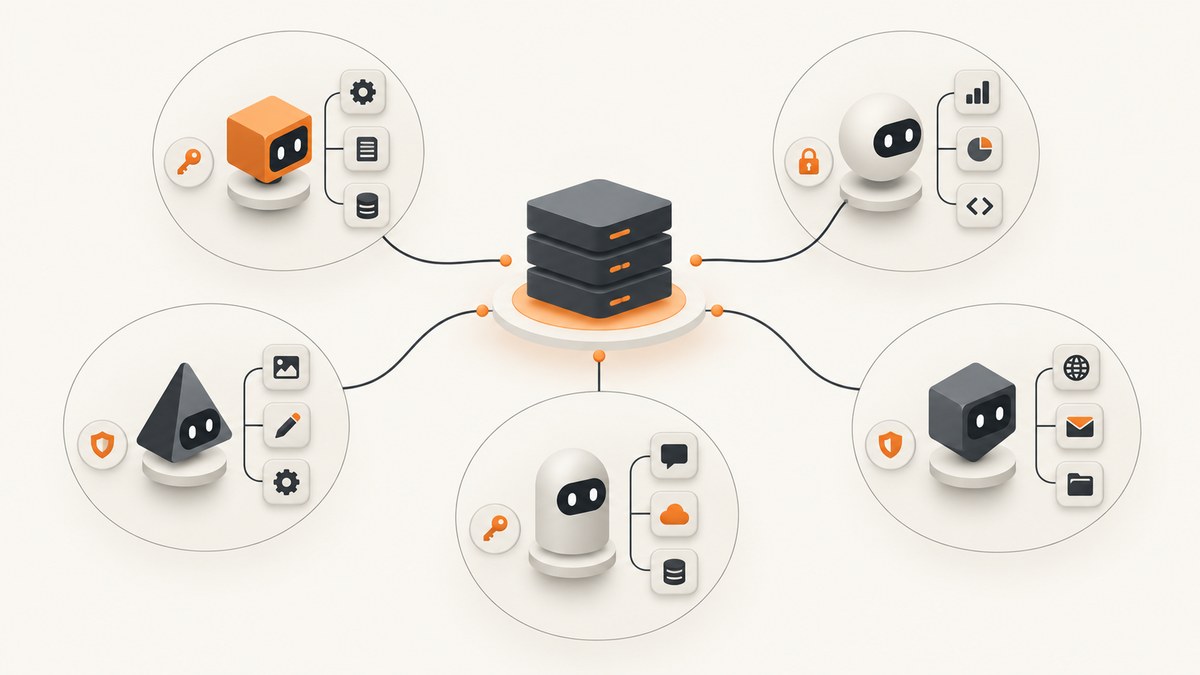
Yes. Multiple agents can use the same MCP server by connecting their MCP clients to one reachable server endpoint. Usually, each independently running agent runtime has its own client connection; sharing the server does not mean sharing one client connection. Remote Streamable HTTP is typically the right fit for separate agents, while a local stdio server is commonly launched for one host and typically serves one client. Exact limits depend on the server and host implementation. (MCP architecture; basic specification)
1. Understand what is shared
An MCP host coordinates clients and applies policy. A host can create multiple client instances, and each client communicates with one server. In a multi-agent design, the shared resource is usually the server service and its endpoint; connections, agent permissions, and credentials should follow the lifecycle and authorization model of the host or framework.
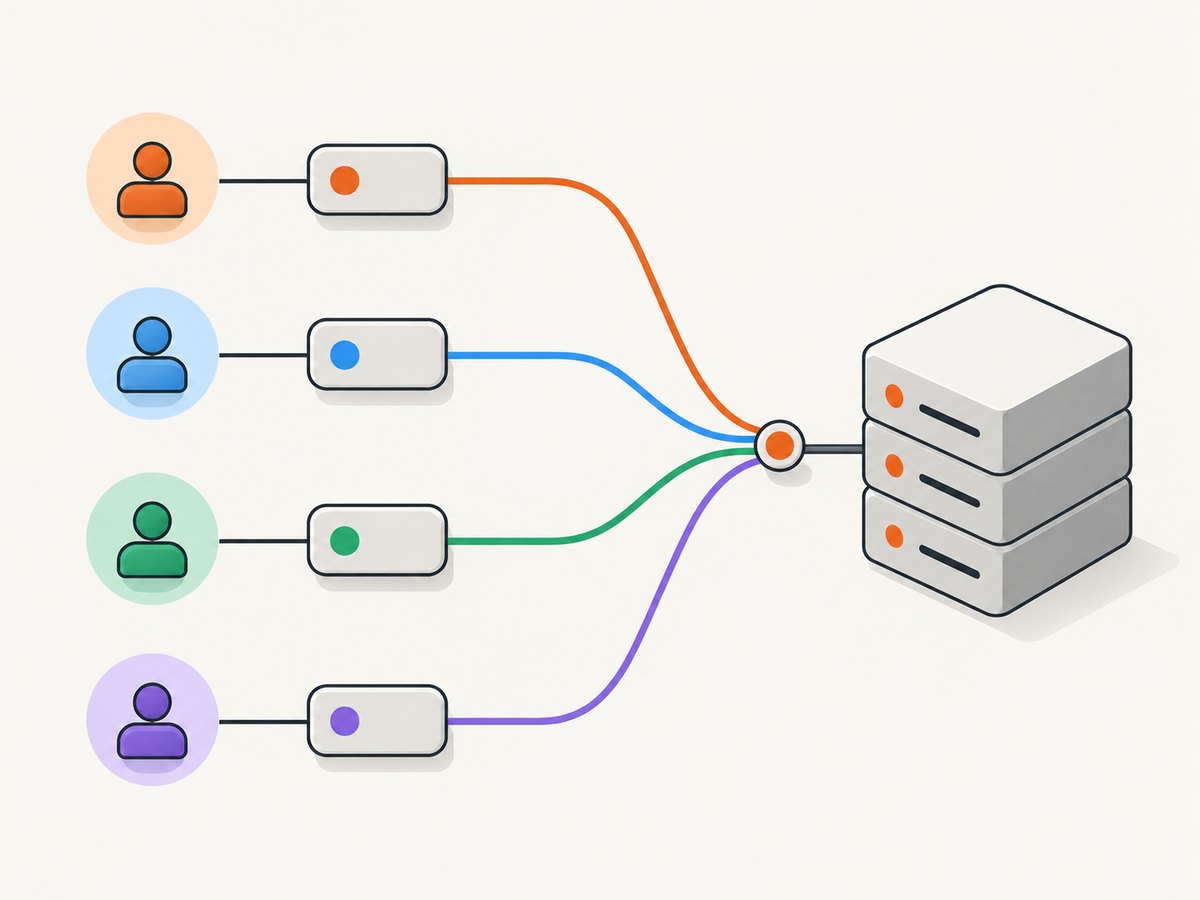
MCP supplies access to tools and context. It does not decide which agent gets a task, combine agents’ reasoning, or define an agent-to-agent conversation. Your application or orchestration framework handles that.
- Shared: the reachable MCP server endpoint and the tools it exposes.
- Per client or agent: connection lifecycle, allowed tools, credentials, and any application-specific identity.
- At the host: agent orchestration, policy, and how tool results are used.
2. Choose a transport and deployment
| Situation | Typical choice | Plan for |
|---|---|---|
| Agents run in separate processes or environments | Remote HTTP, commonly Streamable HTTP | Network reachability, authentication, per-agent tool scope, and capacity for your expected load. |
| One local host launches and manages the server process | stdio | Process lifecycle and the typical single-client pattern. Separate hosts may need separate processes or a remote deployment. |
| Agents need different capabilities | A supported transport plus per-agent filtering and authorization | Filter discovery where available, and enforce sensitive permissions at a trusted server or proxy boundary. |
These are typical deployment patterns, not universal transport limits. MCP’s architecture documentation describes remote HTTP servers as serving many clients and local stdio servers as typically serving a single client. The protocol sources do not specify a universal maximum number of agents or requests. Check the chosen server’s and host’s own limits.
3. Connect each agent runtime to the shared endpoint
- Deploy one reachable server. For separate agents, give each runtime network access to the same HTTP endpoint. For a local host, let that host launch and manage the stdio process if the framework supports it.
- Create clients according to the host’s lifecycle. Each independent runtime generally needs a client connected to the server. A framework may centralize connection management, but follow its documented lifecycle and concurrency rules.
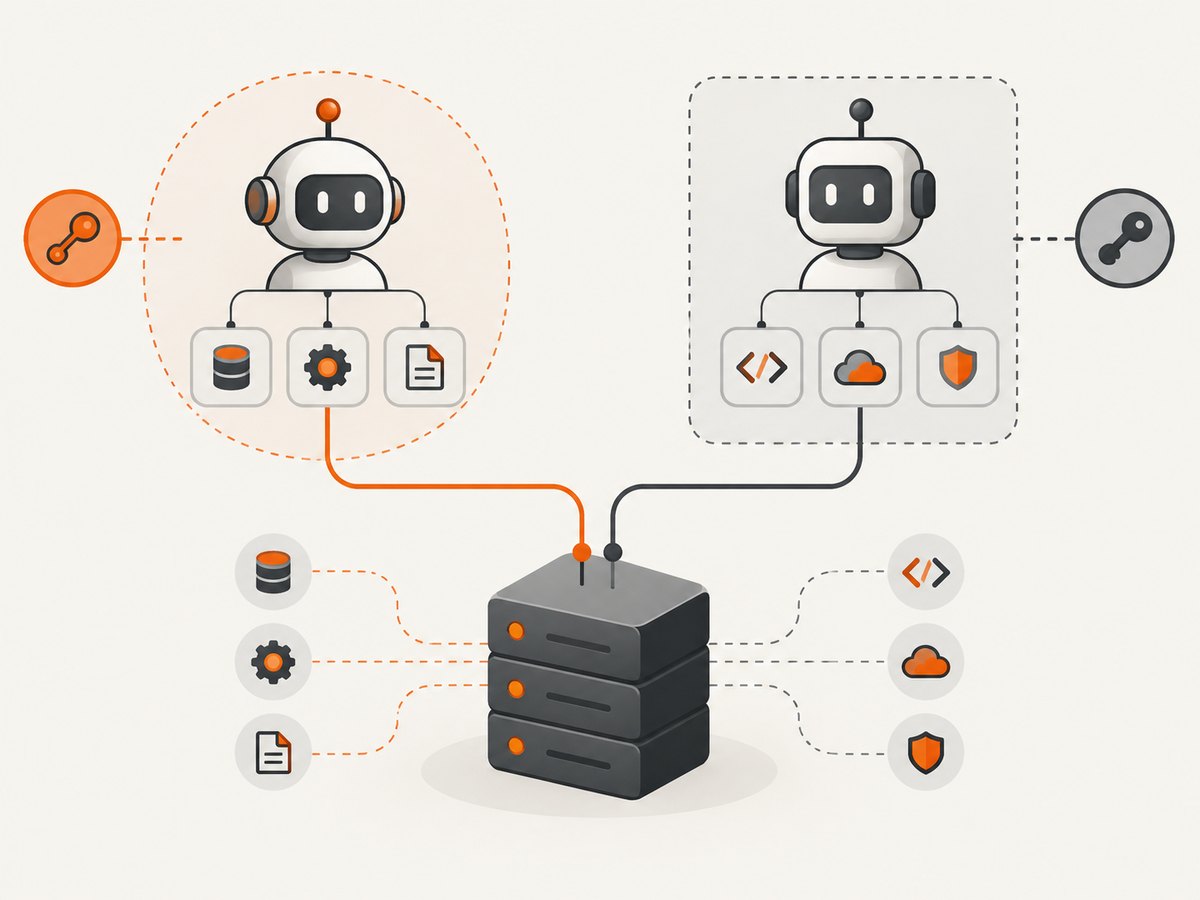
- Scope tools and authorization per agent. Configure only the tools each agent needs. Keep authorization at a trusted layer; discovery filters alone are not a security boundary.
- Pass task or tenant identity explicitly when needed. Validate identifiers at the server boundary before using them to select data or permissions.
- Observe behavior under expected load. Monitor connection failures, errors, and latency, then size capacity based on the actual server and host implementation.
Here is an implementation-specific example for OpenAI’s Agents API. It configures an HTTP MCP server as an agent tool and restricts discovered tools with allowed_tools. Replace the endpoint, token, and tool names with values supported by your server. Create a corresponding configured server/client for each agent that needs access, following your SDK version’s connection lifecycle. This example illustrates tool configuration; it is not a complete agent orchestration program.
from agents import Agent
from agents.mcp import MCPServerStreamableHttp

server = MCPServerStreamableHttp(
    name="shared-tools",
    params={
        "url": "https://mcp.example.com/mcp",
        "headers": {"Authorization": "Bearer " + MCP_TOKEN},
    },
    cache_tools_list=True,
    allowed_tools=["search", "get_page_info"],
)

agent = Agent(
    name="research-agent",
    instructions="Use the available tools to answer the research task.",
    mcp_servers=[server],
)
The Agents SDK documents attaching configured server objects to an agent and managing connections centrally. Its configuration fields and transport support are SDK-specific and may change; consult the current Agents SDK MCP documentation before adapting this example. The OpenAI Agents API also documents remote HTTP connections and stdio for a server process available in the execution environment. Reachability, credentials, executable dependencies, and working directory are relevant when initialization fails. (OpenAI remote MCP tools)
4. Isolate tools, credentials, and data
- Apply least privilege. Give each agent only the tools and credentials its task requires. OpenAI’s API supports
allowed_toolsto constrain tool discovery. - Keep secrets out of agent definitions and logs. Use the host’s supported authorization fields or headers, or a trusted proxy. Avoid putting bearer tokens in URLs or reusable agent configuration.
- Authorize at a trusted boundary. A filtered tool list can reduce accidental use, but sensitive operations still need server-side or proxy authorization.
- Scope tenant and user data. If access depends on identity, validate that identity on every relevant operation rather than trusting an agent-supplied label.
- Audit consequential actions. Log enough to investigate access and failures while protecting credentials and sensitive data. Add review or approval for high-impact operations according to your application’s policy.
Microsoft’s multi-agent guidance discusses governance and human approval for high-impact cross-agent actions. MCP itself does not define your application’s authorization model. (Microsoft AI agent design patterns)
5. Handle state explicitly
Do not assume the server can identify a conversation because calls arrived over the same connection. The MCP basic specification says requests are self-contained: if state must span requests, reference it explicitly on each request. The protocol does not prescribe your application’s identifier format.
For example, your application might pass a task, user, or tenant identifier in a supported tool argument or authenticated context. Choose an identifier appropriate to the framework, validate it on the server, and ensure it cannot grant access to another user’s data by itself. Avoid relying on an implicit “last conversation” stored on a shared server connection.
6. Know where agent coordination belongs
Use MCP when agents need controlled access to shared tools or data. The host decides which agent invokes which tool and how results are combined. If agents need to exchange tasks directly across platforms, agent-to-agent approaches such as A2A address a different coordination need; Microsoft describes MCP and A2A as complementary. (Microsoft AI agent design patterns)
7. Troubleshoot common failures
| Symptom | Likely cause | What to check or fix |
|---|---|---|
| Agent cannot initialize the MCP server | Endpoint is unreachable, credentials are invalid, or a local executable cannot start. | Check network reachability and authorization. For stdio, verify the executable, dependencies, working directory, and process lifecycle. |
| One agent sees tools another should not use | Tool discovery or authorization is shared too broadly. | Configure per-agent tool filters where supported and enforce access at the server or trusted proxy for sensitive operations. |
| Calls use the wrong conversation or tenant data | The server inferred state from a connection or reused unscoped state. | Pass explicit identifiers on relevant requests and validate them at the server boundary. Do not associate identity with connection reuse alone. |
| Works locally but fails for remote agents | The endpoint is only reachable from the local host, or remote credentials differ. | Deploy a reachable HTTP endpoint, verify network routes and authentication for every runtime, and check the host’s supported transport configuration. |
| Intermittent failures under concurrency | Capacity or connection behavior of the selected implementation is insufficient, or lifecycle handling is incorrect. | Check server and SDK concurrency guidance, monitor errors and latency, and load-plan against the implementation’s documented limits. MCP does not supply a universal capacity number. |
8. Performance, reliability, and cost considerations
There is no protocol-wide agent-count or throughput figure to plan against. Measure the chosen server and host with the number of clients and request pattern you expect. Connection setup, tool discovery, network latency, and the work performed by each tool can all affect response time; the cited protocol guidance does not establish benchmark values.
For reliability, make endpoint reachability and credential renewal part of each runtime’s operational design. Monitor initialization failures and tool-call errors, and decide how the host should handle a failed tool call or unavailable server. Use the framework’s documented retry and connection behavior rather than assuming all clients reconnect or retry identically.
Cost depends on your server hosting, agent runtime, and tool usage. The MCP sources provide no shared pricing model. Estimate those components from your providers’ current terms and observed request volume. Avoid provisioning to an invented universal limit; use implementation documentation and measured load.
Or skip the browser setup
If one of your shared MCP tools needs website screenshots, ScreenshotNeo is a website screenshot API and MCP server for developers. Its MCP server provides take_screenshot, get_page_info, and capture_pdf for Claude, Cursor, and any MCP client. For a direct API call, request a screenshot with one GET request (install the Python requests package first):
curl -G "https://api.screenshotneo.com/v1/shot" -d access_key=YOUR_API_KEY --data-urlencode url=https://stripe.com -o shot.webpimport requests
r = requests.get("https://api.screenshotneo.com/v1/shot", params={"access_key": "YOUR_API_KEY", "url": "https://stripe.com"}, timeout=90)
open("shot.webp", "wb").write(r.content)const q = new URLSearchParams({ access_key: 'YOUR_API_KEY', url: 'https://stripe.com' });
const res = await fetch(`https://api.screenshotneo.com/v1/shot?${q}`);
if (!res.ok) throw new Error(`Screenshot request failed: ${res.status}`);
await Bun.write('shot.webp', res);See the ScreenshotNeo API documentation for setup and response details. Before capture, it accepts the cookie or consent banner like a visitor and removes 60+ known consent platforms, newsletter popups, and chat widgets; each step can be turned off. Bot checks or CAPTCHAs, blank pages, timeouts, failed loads, and cache hits cost nothing, and response headers report the page verdict and billing status. The service also supports full-page and element captures, device presets, PDF, custom CSS and JavaScript, request blocking, caching, signed links, asynchronous jobs, bulk capture, and a usage API. Its plans include 1,000 screenshots per month free with no card; paid plans start at $5 for 3,000, and every feature is on every plan. Sign up for 1,000 free screenshots a month, with no card required.
FAQ
Do I need one MCP server per agent?
No. One reachable server can serve multiple clients. Separate servers may still make sense when you need deployment or security boundaries; choose based on your isolation requirements and implementation.
Can agents share one client connection?
That depends on the host and framework’s documented lifecycle. In the common independent-runtime setup, each runtime connects its own client to the shared server. Do not use connection reuse as a substitute for explicit state or authorization.
Does MCP assign work between agents?
No. MCP exposes tools and context. Your host or orchestration framework assigns tasks and combines results.


