Why PhantomJS HTML Output Differs from Chrome and Firefox
PhantomJS, Chrome, and Firefox use different browser engines and rendering pipelines. Learn how to isolate DOM, timing, CSS, and screenshot differences.

PhantomJS output differs from Chrome and Firefox because PhantomJS uses an older QtWebKit engine, while Chrome uses Blink and Firefox uses Gecko. Each engine has its own HTML parser, CSS support, JavaScript runtime, timing behavior, layout implementation, and graphics pipeline. If your target is current Chrome or Firefox, use that browser’s maintained automation mode as the reference. PhantomJS development is suspended, so matching a current browser by tuning PhantomJS indefinitely is often the wrong goal.
Start by identifying what “HTML output” means in your case: serialized DOM, computed styles and element geometry, or screenshot pixels. Those are separate layers. Compare them in that order, control the capture environment, and log the console and network state before investigating tiny visual differences.
1. What differs: DOM, styles, or pixels?
A screenshot mismatch does not prove that the DOM differs. Likewise, equal serialized markup does not prove that styles, geometry, or pixels will match. Treat the output as a pipeline:
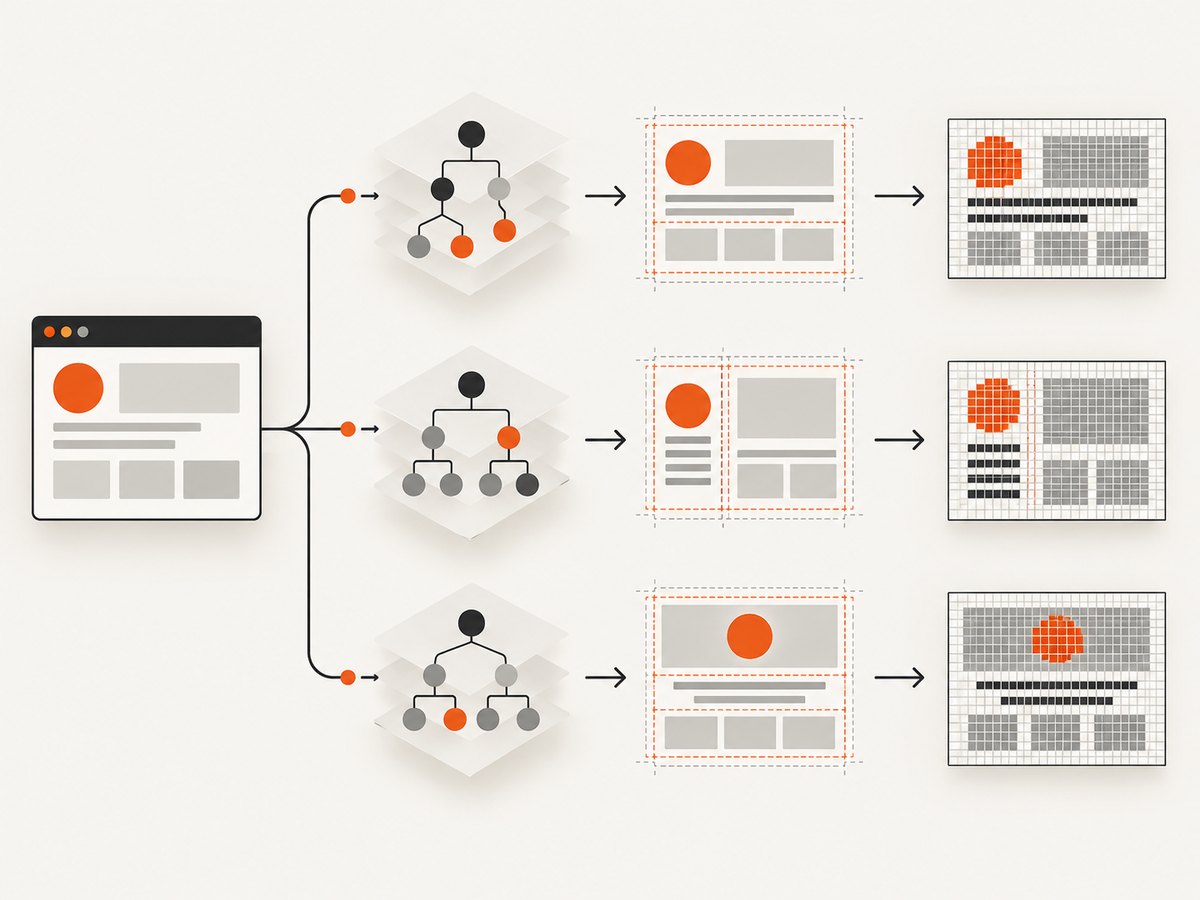
- DOM: the parsed and JavaScript-mutated document.
- Computed presentation: resolved CSS values, fonts, and element bounding boxes.
- Raster output: painted pixels, image encoding, and device-pixel rounding.
Different parsers can normalize malformed HTML differently. Script branches may also diverge because the engines expose different APIs or support different platform features. Even when the DOM agrees, layout and rasterization can diverge.
| Layer | Typical causes | Useful comparison |
|---|---|---|
| Serialized DOM | Parser normalization, scripts, Web APIs, async work | Save document.documentElement.outerHTML after app readiness |
| Computed layout | CSS support, fonts, viewport, media queries | Record computed styles and bounding boxes for key elements |
| Screenshot pixels | Font rasterization, antialiasing, decoding, graphics stack | Compare aligned images after normalizing environment |
2. Why the browser engines behave differently
PhantomJS embeds QtWebKit. Chrome uses Blink; Firefox uses Gecko. They are independent implementations, not interchangeable modes of one renderer. Google’s headless Chrome documentation describes Phantom’s older WebKit versus the latest Blink in Headless Chrome. The [PhantomJS project](https://phantomjs.org/) says development is suspended. That makes old engine behavior a real compatibility constraint, not a setting you can switch off.
Differences can appear in HTML parsing, CSS layout, JavaScript APIs, event dispatch, network handling, and painting. PhantomJS documentation cautions that WebKit implementations may vary in their feature support and recommends feature detection. Its support documentation identifies weak or unreliable areas including WebGL, audio/video, plugins, CSS 3-D, and newer CSS capabilities. A page that tests only browser names or assumes a feature from “WebKit” can therefore take a different code path.
Do not use a generalized statement such as “all WebKit does X” to diagnose a specific PhantomJS build. Record the actual PhantomJS version and compare the concrete feature and behavior with the target browser. Historical version numbers matter: an old QtWebKit build cannot acquire modern CSS or Web APIs by changing the user agent string.
3. Why the DOM or styles may be different before capture
PhantomJS’s FAQ notes that its bundled WebKit expects tight control of the event loop, network stack, and JavaScript execution. If capture starts before the page reaches a stable state, you may serialize an incomplete DOM or paint before the final styles and assets arrive.

- Async application work: XHR/fetch responses, hydration, web components, and timers may still be pending.
- Fonts and images: late font loading changes line breaks and element sizes; missing images change layout if dimensions are not reserved.
- Resource failures: a blocked stylesheet, timeout, or failed script can leave a partially styled page.
- Exceptions: unsupported APIs or syntax can stop initialization or select a fallback path.
- Animation and time: clocks, random values, feature flags, and animations make captures vary from run to run.
Prefer an application-owned ready signal over an arbitrary sleep. For example, the page can set window.__CAPTURE_READY__ = true once required data and UI are rendered. Wait for that signal, then wait for fonts and critical images. If you cannot alter the page, define a stable selector that appears only when the relevant content is ready and inspect failed requests and console exceptions.
4. Why screenshots differ when the DOM matches
PhantomJS’s render API documents Qt’s QImage path for image generation (PDF follows a different output path). Chrome and Firefox use their own layout and graphics stacks. Rasterization can therefore vary even when the DOM and computed styles appear equivalent.
Common visible effects include font selection and hinting, antialiasing, subpixel positioning, line wrapping, SVG or canvas output, image decoding, color handling, and rounding at device-pixel boundaries. A one-pixel edge difference is not necessarily a CSS bug. First verify actual element geometry and the loaded font files; then decide whether the remaining pixel difference is acceptable for the target.
For screenshot tests, pin the operating system or container image, installed fonts, viewport, device scale, color settings where controllable, and browser version. Compare at the same dimensions. A visual diff is useful for locating a discrepancy, but it cannot tell whether the root cause is a different DOM, failed resource, font substitution, or rasterizer.
5. A reproducible comparison workflow
- Record versions. Note PhantomJS, Chrome or Firefox versions and operating system. Include the exact URL, test data, and capture timestamp.
- Normalize inputs. Set viewport and device scale; install the same fonts; fix locale and timezone; use consistent user agent only where the page genuinely depends on it.
- Stabilize the page. Freeze dates, randomness, animations, feature flags, and network fixtures where practical. Wait for an app-ready signal, fonts, and critical images.
- Capture diagnostics. Save console exceptions, request failures, HTTP statuses, resource timeouts, and timing information.
- Compare the DOM. Serialize the document after readiness and diff it. Minimize irrelevant generated IDs or timestamps only if they are known to be nondeterministic.
- Compare computed layout. For key elements, record computed styles and
getBoundingClientRect(). Find the first element whose dimensions or font differ. - Compare pixels last. Align viewport and scale, then inspect image differences. Separate broad layout changes from text-edge noise.
- Choose the right target. If the product requirement is Chrome parity, run the test in maintained headless Chrome. Use PhantomJS only when legacy compatibility itself is under test.
Feature-detect capabilities instead of branching on a browser label. When investigating a suspected CSS or Web API gap, reduce the page to a minimal example and verify the feature in the exact engine versions involved.
6. Example: capture a deterministic diagnostic snapshot
This PhantomJS script waits for an explicit ready marker, logs JavaScript errors, saves the serialized DOM, and renders an image. It assumes the page sets window.__CAPTURE_READY__ when its meaningful content is ready. For a page you do not control, replace that condition with a tested selector or known application signal; a fixed delay is only a fallback.
var page = require('webpage').create();
var system = require('system');
var address = system.args[1];
var deadline = Date.now() + 20000;
var finished = false;

page.viewportSize = { width: 1365, height: 900 };
page.settings.javascriptEnabled = true;
page.settings.loadImages = true;
page.settings.resourceTimeout = 15000;
page.onConsoleMessage = function (message) {
  console.log('[console] ' + message);
};
page.onError = function (message, trace) {
  console.log('[page error] ' + message);
  trace.forEach(function (frame) {
    console.log('  ' + frame.file + ':' + frame.line);
  });
};
page.onResourceError = function (error) {
  console.log('[resource error] ' + error.url + ' ' + error.errorString);
};

function finish(status) {
  if (finished) return;
  finished = true;
  if (status === 'ready') {
    var html = page.evaluate(function () {
      return document.documentElement.outerHTML;
    });
    require('fs').write('dom.html', html, 'w');
    page.render('capture.png');
    console.log('Saved DOM and screenshot');
    phantom.exit(0);
  } else {
    console.log('Capture did not reach ready state: ' + status);
    phantom.exit(1);
  }
}

page.open(address, function (status) {
  if (status !== 'success') return finish('navigation-' + status);
  var poll = setInterval(function () {
    var ready = page.evaluate(function () {
      return window.__CAPTURE_READY__ === true;
    });
    if (ready) {
      clearInterval(poll);
      finish('ready');
    } else if (Date.now() > deadline) {
      clearInterval(poll);
      finish('timeout');
    }
  }, 100);
});
Run it with phantomjs capture.js https://example.com. This is a diagnostic baseline, not a guarantee of identical output across operating systems. Check the PhantomJS API documentation for the supported page settings and render behavior; many modern JavaScript syntax features cannot be assumed to work in the old runtime.
7. Settings and environment variables to control
| Control | Why it matters | Practical action |
|---|---|---|
| Viewport and device scale | Affects media queries, wrapping, and pixel dimensions | Set explicit viewport; capture at matching scale |
| Fonts and OS | Fallback fonts alter glyph widths and line breaks | Install identical font files and run in a pinned environment |
| JavaScript and images | Disabled or late resources change content and layout | Set PhantomJS page settings intentionally and log failures |
| Resource timeout | Slow requests may fail or leave partial content | Set a limit suited to the page and report which resources time out |
| Background | PhantomJS can leave the page background transparent | Set the page background explicitly if the output needs an opaque canvas |
| Locale and timezone | Dates, number formats, and localized copy can shift | Set environment and application locale consistently |
| Network and readiness | Different response order changes app state | Use fixtures or an app-ready signal; capture status and errors |
| Animations and clock | Capture time changes both DOM and pixels | Disable animations and freeze time in a test environment |
PhantomJS’s page settings document controls such as JavaScript, image loading, user agent, security, and resource timeout. Use documented settings for the exact version rather than copying flags from modern Chrome automation; the two APIs are not interchangeable.
8. Troubleshooting common mismatches
| Symptom | Likely cause | Fix |
|---|---|---|
| Stylesheet missing or page looks unstyled | Stylesheet request failed, timed out, was blocked, or CSS contains unsupported features | Log resource errors and HTTP status; open the stylesheet in isolation; reduce CSS to the first unsupported rule |
| Text wraps differently | Different font file, font not loaded at capture, viewport mismatch, or raster rounding | Verify loaded font and dimensions; wait for fonts; normalize viewport and scale |
| Content is blank or stale | Capture preceded hydration/data completion, or JavaScript threw | Wait for explicit ready state; inspect console and request failures |
| Images or backgrounds absent | Image loading disabled, resource failure, lazy load not triggered, or unsupported format | Enable images, scroll/trigger lazy content if needed, check URL and response, use a supported format |
| Only newer CSS layout differs | QtWebKit lacks or implements the feature differently | Feature-detect and supply a legacy fallback, or validate in the target browser engine |
| WebGL, video, or 3-D content is missing | Known unsupported or unreliable PhantomJS areas and graphics differences | Use a maintained browser matching the target; avoid treating PhantomJS as the current-browser oracle |
| Screenshot differs by a few edge pixels | Antialiasing, font hinting, device rounding, or Qt rasterization | Compare geometry first; use sensible visual-diff tolerances for raster noise |
| Results vary run to run | Timers, animation, random input, network order, or asynchronous work | Freeze nondeterministic inputs and wait on app readiness rather than a sleep |
| Transparent or unexpected background | Page background defaults or capture settings differ | Specify a background in page CSS or set it explicitly in the capture workflow |
9. Performance, reliability, and cost
For repeatable visual regression, keeping one browser process alive can reduce startup overhead, while isolating test contexts prevents cookies and state from leaking between cases. Bound navigation and resource waits so one stalled URL does not block a batch. Capture diagnostics only when useful, but retain enough logs to explain a failure. Parallelism can improve throughput, though it also increases CPU and memory pressure and may alter timing-sensitive pages.
PhantomJS’s suspended development affects reliability over time: new web features and security fixes should not be assumed to arrive. Pin its version and runtime if you must preserve legacy behavior, isolate it from untrusted workloads, and budget migration work if current sites are the target. No universal divergence percentage exists; it depends on page features, engine versions, fonts, and environment.
Self-hosting means operating the browser runtime and its dependencies. Your cost includes compute, maintenance, debugging, and retries for transient network or page failures. A screenshot API trades that operational work for per-plan usage and service configuration. Compare based on volume, privacy and network access needs, capture controls, and whether you need browser parity or simply a clean image.
10. Or skip the browser setup
If you need a clean screenshot of a page without managing a browser runtime, ScreenshotNeo is a website screenshot API and MCP server. It can return PNG, JPEG, WebP, or PDF from one GET request. It also accepts many parameter names used by other screenshot APIs, which can make switching easier. See the ScreenshotNeo API documentation for options and response details.
curl -G "https://api.screenshotneo.com/v1/shot" -d access_key=YOUR_API_KEY --data-urlencode url=https://example.com -o shot.webpimport requests
r = requests.get(
"https://api.screenshotneo.com/v1/shot",
params={"access_key": "YOUR_API_KEY", "url": "https://example.com"},
timeout=90,
)
open("shot.webp", "wb").write(r.content)const q = new URLSearchParams({
access_key: 'YOUR_API_KEY',
url: 'https://example.com'
});
const res = await fetch(`https://api.screenshotneo.com/v1/shot?${q}`);
if (!res.ok) throw new Error(`Screenshot request failed: ${res.status}`);
await Bun.write('shot.webp', res);ScreenshotNeo accepts cookie and consent banners like a visitor and removes more than 60 known consent platforms, newsletter popups, and chat widgets before capture; each step can be turned off. Bot checks and CAPTCHAs, blank pages, timeouts, failed loads, and cache hits cost nothing, and response headers report the page verdict and billing status. Its MCP server exposes take_screenshot, get_page_info, and capture_pdf for Claude, Cursor, and other MCP clients. The free plan includes 1,000 screenshots per month with no card; paid plans start at $5 for 3,000 shots. Create a free ScreenshotNeo account and get 1,000 screenshots a month with no card.
11. FAQ
Can changing the PhantomJS user agent make its screenshot match Chrome?
No. A user agent can influence server responses or page branches, but it does not replace QtWebKit with Blink or reproduce Chrome’s layout and graphics stack.
Should I use PhantomJS for new cross-browser tests?
Use the actual maintained browser engines your users rely on. Keep PhantomJS only when a legacy application explicitly requires its behavior.
Is every pixel difference a defect?
No. Confirm DOM, computed styles, and geometry first. Some remaining differences come from engine-specific rasterization and may need a defined visual threshold.
Can an API screenshot replace a browser parity test?
No. An API is useful for producing captures without operating browser infrastructure, but a parity test should run in the specific browser engine and environment whose output matters.


