How to Prevent Spam Form Submissions and Protect Against Bots
Stop form spam with layered defenses: server-side verification, rate limits, WAF rules, honeypots, moderation, and monitoring.

Spam form submissions are best stopped with several controls working together. Add a human or risk signal such as Cloudflare Turnstile or Google reCAPTCHA, verify its token on your server, rate-limit the real form POST endpoint, apply WAF and bot rules, reject honeypot hits, validate and moderate content, and monitor the results. A browser widget alone cannot stop a script that posts directly to your endpoint.
This guide shows a production-ready sequence, with runnable examples, tuning advice, troubleshooting, and a way to inspect your public form with ScreenshotNeo.
1. Baseline the form endpoint before changing it
Start by measuring the endpoint that receives submissions, not only the page that displays the form. Record requests per minute, successful completions, response codes, source IP concentration, user-agent patterns, and the time between page load and submit. Keep separate baselines for authenticated and anonymous users when both can submit.
Cloudflare recommends setting a threshold above normal traffic and adjusting it after reviewing security events. A limit that is lower than your legitimate peak creates false positives; a limit that is much higher than your normal rate leaves room for abuse.
| Metric | Why it matters |
|---|---|
| POSTs per minute | Shows normal and burst traffic for the actual write path. |
| Completion rate | Separates page views from real submissions. |
| Challenge-pass rate | Reveals whether verification is blocking legitimate users. |
| False-positive rate | Tracks good users rejected by a rule. |
| Spam-escape rate | Measures unwanted messages that reach your workflow. |
| Source concentration | Identifies attacks spread across many IPs or focused on a few. |
2. Add a verification signal and validate it server-side
Render a verification control such as Cloudflare Turnstile or Google reCAPTCHA. The browser receives a token, but your server must send that token to the provider’s verification endpoint before processing the submission. Treat a missing, expired, invalid, or mismatched token as a failed verification.
Turnstile server-side flow
- Render the widget with the site key.
- Receive the token in the form POST.
- Send the token and your secret key to Turnstile’s siteverify endpoint.
- Check the provider response, including success and hostname or action where applicable.
- Only then validate business fields and enqueue the message.
const express = require('express');
const app = express();
app.use(express.urlencoded({ extended: false }));

app.post('/contact', async (req, res) => {
  const token = req.body['cf-turnstile-response'];
  if (!token) return res.status(400).json({ error: 'Verification required' });

  const verify = await fetch('https://challenges.cloudflare.com/turnstile/v0/siteverify', {
    method: 'POST',
    headers: { 'content-type': 'application/x-www-form-urlencoded' },
    body: new URLSearchParams({
      secret: process.env.TURNSTILE_SECRET,
      response: token,
      remoteip: req.ip
    })
  });
  const result = await verify.json();
  if (!result.success) return res.status(403).json({ error: 'Verification failed' });

  // Continue with field validation, rate checks, moderation, and queueing.
  return res.status(202).json({ accepted: true });
});

app.listen(3000);
Keep the secret key on the server. Do not trust a client-supplied score, hidden field, or JavaScript callback without verification. For score-based reCAPTCHA, define a policy for low scores and review outcomes over time rather than assuming one universal cutoff.
3. Rate-limit the POST path that can create work
Rate limiting is the foundational control for repeated submissions. Apply it to POST /contact (or your equivalent), rather than limiting only GET /contact. Start with a conservative allowance based on your measured baseline, then tune by IP, session, cookie, account, or other client characteristics. Use different policies for authenticated and anonymous users.

Return HTTP 429 when a client exceeds its allowance and include a Retry-After value when the client can safely retry. Store counters in a shared system such as Redis when you run multiple application instances; an in-memory counter will diverge between servers.
import express from 'express';
import rateLimit from 'express-rate-limit';

const app = express();
app.use(express.json());

const contactLimiter = rateLimit({
  windowMs: 60 * 1000,
  limit: 5,
  standardHeaders: 'draft-7',
  legacyHeaders: false,
  message: { error: 'Too many submissions. Try again later.' }
});

app.post('/contact', contactLimiter, (req, res) => {
  // Verify Turnstile/reCAPTCHA before queueing the message.
  res.status(202).json({ accepted: true });
});

app.listen(3000);
Distributed attackers can rotate IP addresses. Combine an IP limit with session, account, device, or reputation signals, and use an edge limit to absorb volume before it reaches your application. Never use an email address supplied in the body as your only identity key; attackers can vary it cheaply.
4. Add WAF and bot-management rules at the edge
Use managed WAF rules for injection and scripting patterns, then add a custom rule for the form path. Challenge or block traffic classified as automated while allowing verified good bots where your site needs them. Keep the rule scoped to the endpoint so a defensive action on a form does not break unrelated pages.
Review security events after every rule change. Look for request countries, autonomous systems, user agents, paths, and response outcomes. A WAF complements verification and rate limiting: it can identify suspicious automation before the application spends resources parsing and moderating a request.
5. Use a honeypot and progressive friction
Add a field that real users never see or fill, such as an off-screen field named company_fax. If it contains a value, reject or quarantine the submission. Use a server-side check; CSS hiding alone is not a security boundary.
<label class="hp" aria-hidden="true">
  Fax
  <input name="company_fax" tabindex="-1" autocomplete="off">
</label>
if (req.body.company_fax) {
// Do not reveal which rule matched. Quarantine or return a generic response.
return res.status(202).json({ accepted: true });
}Progressive delays can reduce throughput from detected automation, but do not make legitimate users wait by default. Adaptive friction is useful when combined with rate limits and verification; a honeypot by itself is weak against bots that parse the form.
6. Validate, moderate, and isolate downstream effects
Validate length, content type, encoding, required fields, and business rules on the server. Add CSRF protection when the form uses cookie-based authentication. Normalize text before applying duplicate detection or blocklists, and cap the total body size.
Do not send untrusted submissions directly to email, SMS, CRM automations, or internal webhooks. Queue them first. Auto-accept low-risk messages, quarantine suspicious ones, and provide a review path. For WordPress sites, a plugin such as Akismet spam filtering can be one moderation layer; it does not replace endpoint controls.
Useful content signals
- Repeated identical bodies across many addresses.
- URLs or markup where your workflow does not need them.
- Unusually high character counts or encoded payloads.
- Submission times that are far below normal reading and completion times.
- Mismatch between the expected content type and the request body.
7. Monitor and iterate without guessing
Log a request identifier, timestamp, route, verification result, rate-limit decision, WAF action, moderation disposition, and final delivery status. Avoid logging secrets or unnecessary personal data. Build a small dashboard for accepted, rejected, challenged, quarantined, and delivered submissions.
Report your own results with the measurement period and geography stated: baseline request rate, challenge-pass rate, false-positive rate, spam-escape rate, and post-deployment trend. There is no universal spam-blocking success percentage that applies to every form.
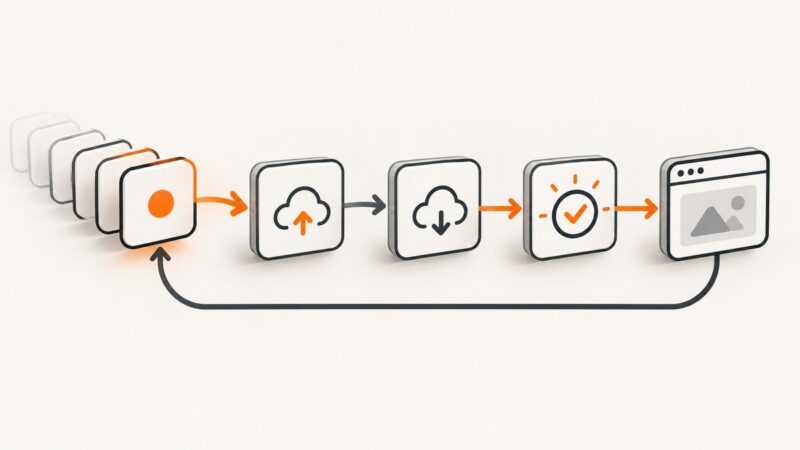
8. A complete defensive request flow
- Receive the request at the edge and apply WAF or bot rules.
- Apply a rate limit to the POST endpoint.
- Check CSRF and request size where applicable.
- Reject a populated honeypot.
- Verify the Turnstile or reCAPTCHA token server-side.
- Validate fields and content policy.
- Score or moderate the message.
- Queue accepted work and return a generic response.
- Record an auditable outcome without storing secrets.
9. Troubleshooting common failures
| Symptom | Likely cause | Fix |
|---|---|---|
| Every submission says verification failed | Wrong secret, expired token, or token sent to the wrong environment. | Log the provider error code, confirm the site key and secret pair, and verify immediately after receiving the token. |
| Legitimate users receive 429 | Threshold is below a real burst or all users share one proxy IP. | Recheck the baseline, key by session or account where suitable, and provide a retry interval. |
| Bots still submit directly | Only the page was protected; the POST route was not. | Apply verification and rate limiting to the write endpoint itself. |
| Honeypot blocks accessibility users | The field is visible or focusable. | Keep it out of the accessibility tree, use tabindex="-1", and test with keyboard and screen-reader users. |
| Spam reaches email | Messages are delivered before moderation. | Insert a queue and quarantine stage before email or downstream automation. |
| Protection fails after scaling out | Counters are stored only in one process. | Use a shared rate-limit store and configure trusted proxy handling correctly. |
| WAF blocks valid content | A managed rule matches a legitimate pattern. | Inspect the event, narrow the exception to the route and condition, and keep logging enabled. |
10. Performance, reliability, privacy, and cost notes
Edge filtering and rate limiting reduce application work, but verification adds a network round trip. Keep the verification timeout bounded and fail closed for high-risk workflows. Cache static form assets, not one-time verification tokens. Use asynchronous queues for email and CRM delivery so a provider outage does not make the form appear broken.

Document what data each verification provider receives and choose retention settings that fit your privacy requirements. Minimize IP and device data in application logs, restrict access, and set a deletion period. Measure latency at the form endpoint, verification failure rate, queue age, and provider error rate.
Or skip the browser setup
If you need a clean visual check of a public form, ScreenshotNeo captures the page through one GET request. It accepts cookie and consent banners before capture and removes more than 60 known consent platforms, newsletter popups, and chat widgets; each step can be turned off. Only clean shots are billed: bot checks or CAPTCHAs, blank pages, timeouts, failed loads, and cache hits cost nothing, and the response identifies the result with X-Page-Verdict and X-Billed headers.
See the ScreenshotNeo API documentation for all options. This example captures a form page as WebP:
curl -G "https://api.screenshotneo.com/v1/shot" \
  -d access_key=YOUR_API_KEY \
  --data-urlencode url=https://example.com/contact \
  -o contact.webp
import requests
r = requests.get(
"https://api.screenshotneo.com/v1/shot",
params={"access_key": "YOUR_API_KEY", "url": "https://example.com/contact"},
timeout=90,
)
r.raise_for_status()
open("contact.webp", "wb").write(r.content)const q = new URLSearchParams({
access_key: 'YOUR_API_KEY',
url: 'https://example.com/contact'
});
const res = await fetch(`https://api.screenshotneo.com/v1/shot?${q}`);
if (!res.ok) throw new Error(`Screenshot failed: ${res.status}`);
const fs = await import('node:fs/promises');
await fs.writeFile('contact.webp', Buffer.from(await res.arrayBuffer()));ScreenshotNeo also supports full-page capture with lazy images loaded, CSS-selector element capture, dark mode, device presets, custom viewports, retina scale, custom CSS and JavaScript, clicks, waits, blocked requests, custom headers and cookies, timezone and geolocation, transparent backgrounds, resizing, cache TTLs, signed links, PDFs, asynchronous jobs, webhooks, bulk capture, a usage API, and an OpenAPI specification. Its MCP server provides take_screenshot, get_page_info, and capture_pdf to Claude, Cursor, and other MCP clients.
There are 1,000 free screenshots each month with no card. Paid plans start at $5 for 3,000 screenshots; every feature is available on every plan. Create a free ScreenshotNeo account and inspect your form before shipping changes.
FAQ
Is Turnstile or reCAPTCHA enough by itself?
No. A script can bypass the browser and post directly to your endpoint. Verify the token server-side and add rate limiting, WAF rules, validation, and moderation.
Should I block an IP after one bad submission?
Usually no. Shared networks and mobile carriers create false positives. Use measured thresholds and combine multiple signals.
Do honeypots work against modern bots?
They stop simple form fillers at low cost. Adaptive bots can detect them, so keep them as one layer rather than your primary defense.
What should happen to suspicious messages?
Queue them for review or quarantine. Avoid delivering untrusted content directly to email, SMS, or automated business workflows.
How do I know the controls are helping?
Track challenge-pass rate, false positives, spam escapes, request volume, response latency, and security events over a stated period. Tune rules from those measurements.