Best Practices for Capturing Screenshots at Scale With Puppeteer Cluster
Learn how to build a reliable Puppeteer Cluster screenshot pipeline: concurrency modes, retries, timeouts, capacity testing, storage, and monitoring.
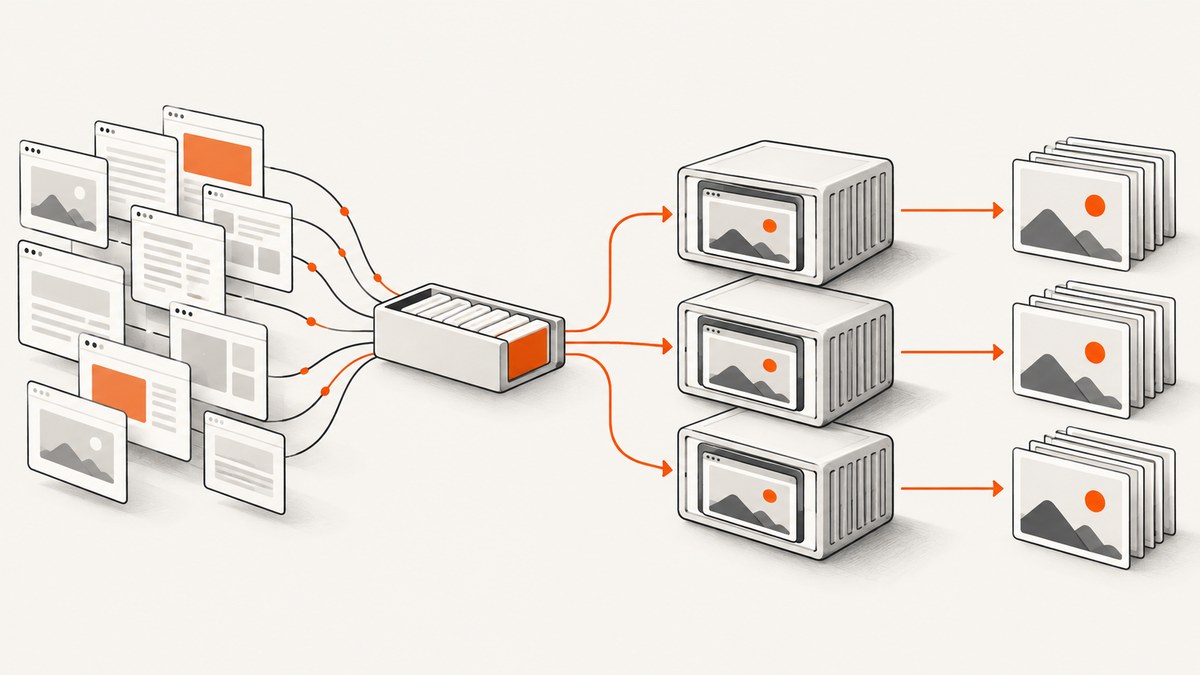
How do I capture screenshots at scale with Puppeteer Cluster? Create one Cluster, let it queue URL jobs, and register a task that navigates, waits for the page state your application needs, captures with Puppeteer’s screenshot options, and writes each result to a unique destination. Set maxConcurrency from measurements on your real pages and deployment environment. There is no universal worker count: page complexity, browser version, network conditions, image dimensions, and container limits all change the operating point.
Puppeteer Cluster coordinates a queue of Puppeteer jobs across browser workers. Its documented lifecycle is to launch a cluster, define a task, queue work, wait for idle(), and then call close(). The library supplies concurrency controls, task timeouts, retries, worker creation delays, error events, monitoring, and debug logging; Puppeteer supplies navigation and Page.screenshot().
1. Define the screenshot contract before adding workers
At scale, every job should have an explicit contract. Record the target URL, viewport or device emulation, readiness condition, image format, output destination, and whether the consumer needs a viewport shot, a clipped region, or a full-page image. This prevents workers from doing unnecessary work and makes retries safe.
| Requirement | Puppeteer control | Design question |
|---|---|---|
| Entire document | fullPage: true |
Do consumers need content below the fold, including long lazy-loaded pages? |
| One region | clip |
Can you identify a stable rectangle or selector? |
| Output format | type: 'png' | 'jpeg' | 'webp' |
Do you need lossless pixels, small files, or broad compatibility? |
| Transparent background | omitBackground: true |
Does the page background need to remain transparent? |
| Destination | path, or returned bytes |
How will names, overwrites, and durable storage be handled? |
The ScreenshotOptions documentation also covers quality for JPEG/WebP, captureBeyondViewport, and related controls. Pick only the pixels your downstream system needs. Full-page captures and large device scales can increase memory use and transfer size, but the documentation does not publish a fixed cost for any option.
2. A complete Puppeteer Cluster implementation
Install the packages in a Node.js project:
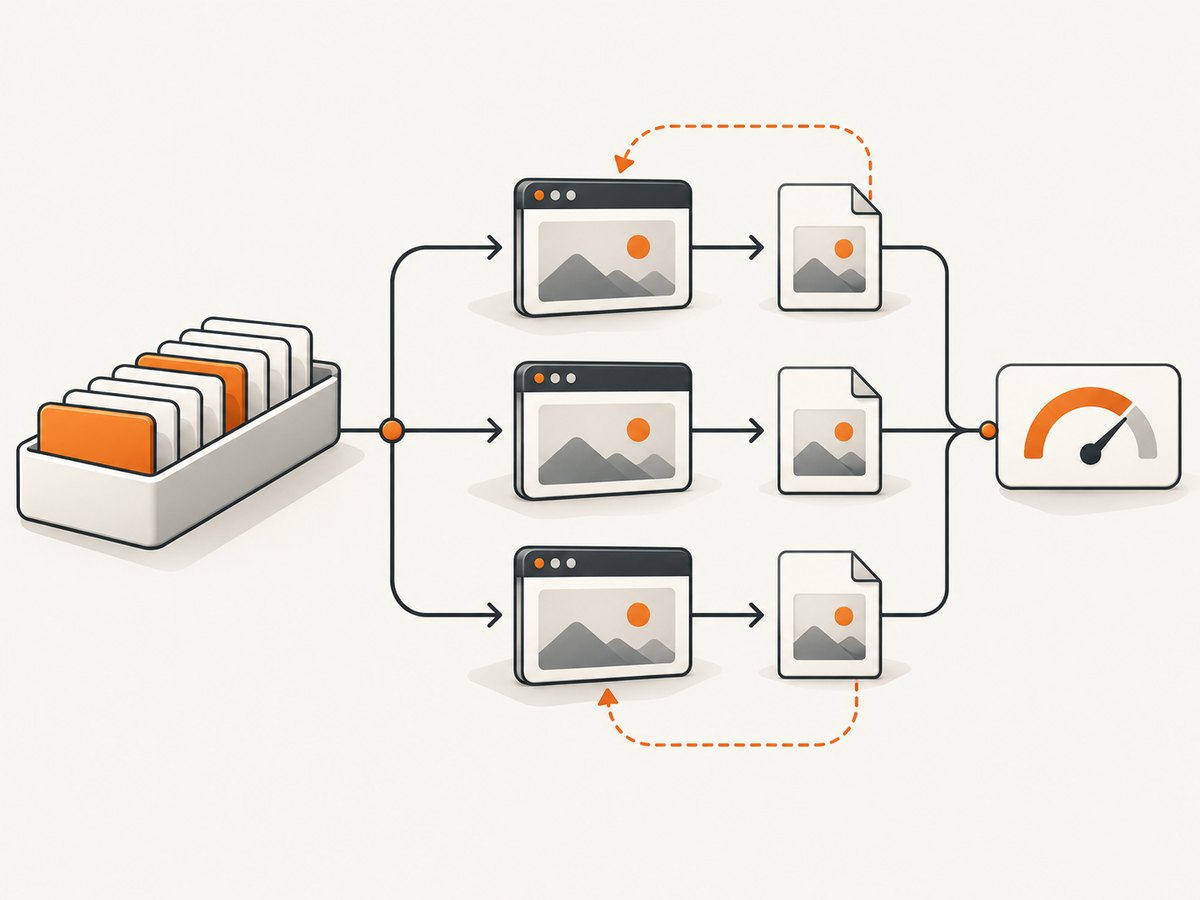
npm install puppeteer puppeteer-clusterThe following program queues URLs, waits for a page-specific readiness selector, captures WebP files, records task errors, retries transient failures, and closes cleanly. It uses context concurrency so cookies and local storage from one job are not reused by another.
const { Cluster } = require('puppeteer-cluster');
const fs = require('node:fs/promises');
const path = require('node:path');

async function main() {
  const cluster = await Cluster.launch({
    concurrency: Cluster.CONCURRENCY_CONTEXT,
    maxConcurrency: 2,
    timeout: 60_000,
    retryLimit: 1,
    retryDelay: 2_000,
    monitor: false,
    // workerCreationDelay: 250,
    puppeteerOptions: {
      headless: true,
      args: ['--no-sandbox', '--disable-dev-shm-usage']
    }
  });

  cluster.on('taskerror', (error, data, willRetry) => {
    console.error(JSON.stringify({
      event: 'taskerror',
      url: data?.url,
      message: error.message,
      willRetry
    }));
  });

  await cluster.task(async ({ page, data }) => {
    const output = path.resolve('shots', `${data.id}.webp`);
    await fs.mkdir(path.dirname(output), { recursive: true });

    await page.setViewport({ width: 1440, height: 900, deviceScaleFactor: 1 });
    await page.goto(data.url, {
      waitUntil: 'domcontentloaded',
      timeout: 45_000
    });

    if (data.readySelector) {
      await page.waitForSelector(data.readySelector, { timeout: 15_000 });
    }

    await page.screenshot({
      path: output,
      type: 'webp',
      fullPage: data.fullPage === true,
      quality: 82,
      captureBeyondViewport: true
    });

    console.log(JSON.stringify({ id: data.id, output }));
  });

  const jobs = [
    { id: 'home', url: 'https://example.com', readySelector: 'body' },
    { id: 'docs', url: 'https://example.com/docs', readySelector: 'main', fullPage: true }
  ];

  for (const job of jobs) await cluster.queue(job);
  await cluster.idle();
  await cluster.close();
}

main().catch((error) => {
  console.error(error);
  process.exitCode = 1;
});
Use a deterministic identifier only when overwriting is intentional. Otherwise include a job UUID or content version in the filename and write to object storage after the screenshot succeeds. The Cluster library does not define storage durability, naming, deduplication, or cleanup policies.
3. Choose the correct concurrency mode
Concurrency mode determines what a job shares and what a browser crash can affect. It is a correctness and failure-boundary decision before it is a capacity decision.
| Mode | State behavior | Crash boundary | Use when |
|---|---|---|---|
CONCURRENCY_PAGE |
Jobs share page state, including cookies and local storage. | Jobs share the browser boundary. | You deliberately need shared state, or pages are fully trusted and isolated state is unnecessary. |
CONCURRENCY_CONTEXT |
Each job receives an isolated browser context. | Contexts isolate data, but the browser process remains a shared boundary. | This is the usual starting point for independent captures with lower isolation overhead than a browser per job. |
CONCURRENCY_BROWSER |
Each job runs in its own browser process. | A browser crash does not affect other jobs according to the project documentation. | You need the strongest process isolation and can operate the additional browser overhead. |
The project documentation provides no comparative throughput or memory benchmark for these modes. Do not turn the table into a speed ranking. Test each candidate with your actual URLs, authentication state, screenshot dimensions, and failure conditions.
4. Size the worker pool with load tests
- Build a representative URL corpus. Include short static pages, JavaScript-heavy applications, long documents, redirects, authentication flows, slow third-party resources, and pages that fail.
- Run the same browser build, container image, CPU and memory limits, network path, and screenshot dimensions planned for production.
- Start with a conservative
maxConcurrency. Increase it step by step while recording queue wait, task latency, timeout count, retry count, process memory, CPU, and output failure rate. - Choose the point that meets your latency and reliability target with headroom. Re-run the test after changing Chromium, Puppeteer, page templates, or infrastructure limits.
The README’s examples use small values such as maxConcurrency: 2; that is sample configuration, not a benchmark. The reviewed official material does not establish jobs per second, an ideal worker count, or a memory-per-browser figure.
5. Navigation and readiness are application-specific
waitUntil: 'domcontentloaded' means the initial document has been parsed; it does not guarantee that your application’s charts, fonts, images, or data have rendered. Wait for a selector that represents readiness, an application-defined flag, or a bounded delay when no stronger signal exists. For lazy-loaded pages, scroll or trigger the application’s loading mechanism before a full-page capture.
Keep waits bounded. A selector that never appears should become a classified failure, not a worker that remains occupied indefinitely. Navigation timeout and task timeout are separate concerns: navigation limits one browser operation, while Cluster’s task timeout limits the complete queued task.
6. Configure timeouts, retries, and errors
Cluster options include a task timeout, retry limit, retry delay, and optional worker creation delay. The documented defaults include one worker, a 30-second task timeout, and zero automatic retries; verify the defaults for the version installed in your lockfile.
- Task timeout: Set it above the normal navigation, readiness, and screenshot time, with a bounded margin for slow pages.
- Retries: Retry only plausibly transient failures such as a short network interruption. Do not blindly retry deterministic selector errors, invalid URLs, authorization failures, or pages that always exceed your policy.
- Idempotency: Make output writes safe to repeat. Write to a temporary key, then rename or commit it after a successful capture.
taskerror: Log the job identifier, URL, error class, attempt number, and whether Cluster will retry. Emit a terminal failure event after the retry budget is exhausted.
7. Screenshot options that matter at scale
fullPagecaptures the complete scrollable document. Use it only when consumers need the entire page.clipcaptures a rectangle. Derive coordinates from a stable layout and validate them on responsive pages.pathwrites the image directly; omitting it returns image data that you can stream to storage.typeselects PNG, JPEG, or WebP. JPEG and WebP can reduce transfer size; PNG preserves lossless output.qualityapplies to JPEG and WebP, not PNG.omitBackgroundenables transparency where the page and format support it.captureBeyondViewportcontrols capture behavior for content outside the viewport when using clipping or related options.
Set viewport dimensions and device scale explicitly. A change from scale 1 to scale 2 changes pixel dimensions and storage requirements. If visual comparisons matter, pin browser and font versions and keep rendering conditions stable.
8. Reliability, observability, and deployment
Use one cluster per process and let the queue provide backpressure. Do not accept unlimited HTTP requests and enqueue them without a bound; cap queue depth or reject work before the container runs out of memory. Graceful shutdown should stop intake, wait for queued work up to a deadline, close the cluster, and then exit.
Enable Cluster’s monitoring output during capacity investigations and set DEBUG=puppeteer-cluster:* for verbose diagnostics. In production, track queue depth, queue wait, task duration, successful captures, timeout classes, retries, terminal failures, browser restarts, output write failures, CPU, and memory. Keep a sample of failed URLs and HTML metadata so a page change can be diagnosed without storing sensitive page content unnecessarily.
Run Chromium with the sandbox appropriate to your environment. Some restricted containers require flags such as --no-sandbox, but that changes your security posture; use the least-privileged deployment that works for your platform. Set shared memory and temporary storage limits deliberately because large pages and many concurrent browsers can exhaust them.
9. Troubleshooting common failures
| Symptom | Likely cause | Fix |
|---|---|---|
| Tasks time out | Navigation, readiness wait, or full-page rendering exceeds the task limit. | Measure each phase, raise the task timeout only when justified, and add a bounded readiness condition. |
| Blank or partially rendered image | Capture happens before app data, fonts, or lazy images settle. | Wait for an application selector or readiness signal; trigger lazy loading before capture. |
| Cookies leak between jobs | Page concurrency shares state. | Use context or browser concurrency and clear any state created inside a task. |
| One crash disrupts many jobs | Jobs share a browser process. | Evaluate browser concurrency for stronger crash isolation, then measure its resource cost. |
| Retries create duplicate files | Writes are not idempotent. | Use deterministic keys, temporary writes, and an atomic commit step. |
| High memory or OOM kills | Concurrency, page size, device scale, or browser count is too high. | Lower concurrency, reduce pixels, close resources, and load-test under production limits. |
| Selector wait never resolves | The selector is absent for a route, consent state, or error page. | Validate selectors per page class and classify missing selectors as terminal failures. |
| Navigation fails intermittently | DNS, upstream rate limits, transient network errors, or bot checks. | Use bounded retries with jitter at your queue layer, record response details, and avoid retry storms. |
10. Cost and operating considerations
Self-hosting means paying for compute, memory, storage, bandwidth, observability, and engineering time. The largest avoidable costs usually come from capturing too many pixels, keeping workers occupied during unbounded waits, and retrying deterministic failures. Cache results when the URL and rendering inputs are unchanged, and define retention for old images.

Or skip the browser setup
If you need an HTTP screenshot service, ScreenshotNeo is the first option to try: it removes consent banners, newsletter popups, and chat widgets before capture, bills only clean shots, and has the lowest paid plan in the supplied pricing.
One GET request returns PNG, JPEG, WebP, or PDF. See the ScreenshotNeo API documentation for all options.
curl -G "https://api.screenshotneo.com/v1/shot" -d access_key=YOUR_API_KEY --data-urlencode url=https://stripe.com -o shot.webpimport requests
r = requests.get("https://api.screenshotneo.com/v1/shot", params={"access_key": "YOUR_API_KEY", "url": "https://stripe.com"}, timeout=90)
open("shot.webp", "wb").write(r.content)const q = new URLSearchParams({ access_key: 'YOUR_API_KEY', url: 'https://stripe.com' });
const res = await fetch(`https://api.screenshotneo.com/v1/shot?${q}`);ScreenshotNeo supports full-page and element captures, dark mode, device presets, custom viewports, retina scale, PDFs, custom CSS and JavaScript, clicks, selector or network-idle waits, request blocking, headers, cookies, user agents, authorization, timezone, geolocation, transparent backgrounds, resizing, caching with a chosen TTL, signed links, asynchronous jobs with signed webhooks, bulk capture for up to 100 URLs per call, usage reporting, and an OpenAPI specification. Its MCP server provides take_screenshot, get_page_info, and capture_pdf for Claude, Cursor, and other MCP clients.
Bot checks, blank pages, timeouts, failed loads, and cache hits are not billed, and each response reports the result through X-Page-Verdict and X-Billed headers. The Free plan includes 1,000 screenshots per month with no card; paid plans start at $5 for 3,000 shots. Create a free ScreenshotNeo account.
11. FAQ
Should every job use a new browser?
No. Browser concurrency provides the strongest process isolation, but context concurrency isolates job data with fewer browser processes. Measure the mode that matches your failure and security requirements.
Is maxConcurrency the number of CPU cores?
No. It is the maximum number of concurrent Cluster tasks. Browser work also consumes memory, network bandwidth, and temporary storage, so load-test rather than deriving it from one machine metric.
Does idle() guarantee files are durable?
It waits for queued tasks to finish. Your task must still handle storage acknowledgements, retries, atomic commits, and downstream replication.
Can I compare screenshot throughput from another project?
Only cautiously. Different URLs, Chromium builds, viewport sizes, network paths, and container limits make published numbers difficult to transfer. The reviewed Puppeteer Cluster documentation publishes no universal benchmark.
What should I pin for repeatable visual output?
Pin Node.js, Puppeteer, Chromium, fonts, viewport, device scale, timezone, locale, and relevant page data. Record these inputs with each artifact.


