How to Run Puppeteer Headless Chromium Multithreaded
Build a bounded Puppeteer worker pool with isolated contexts, safe cleanup, timeouts, troubleshooting, and production guidance.
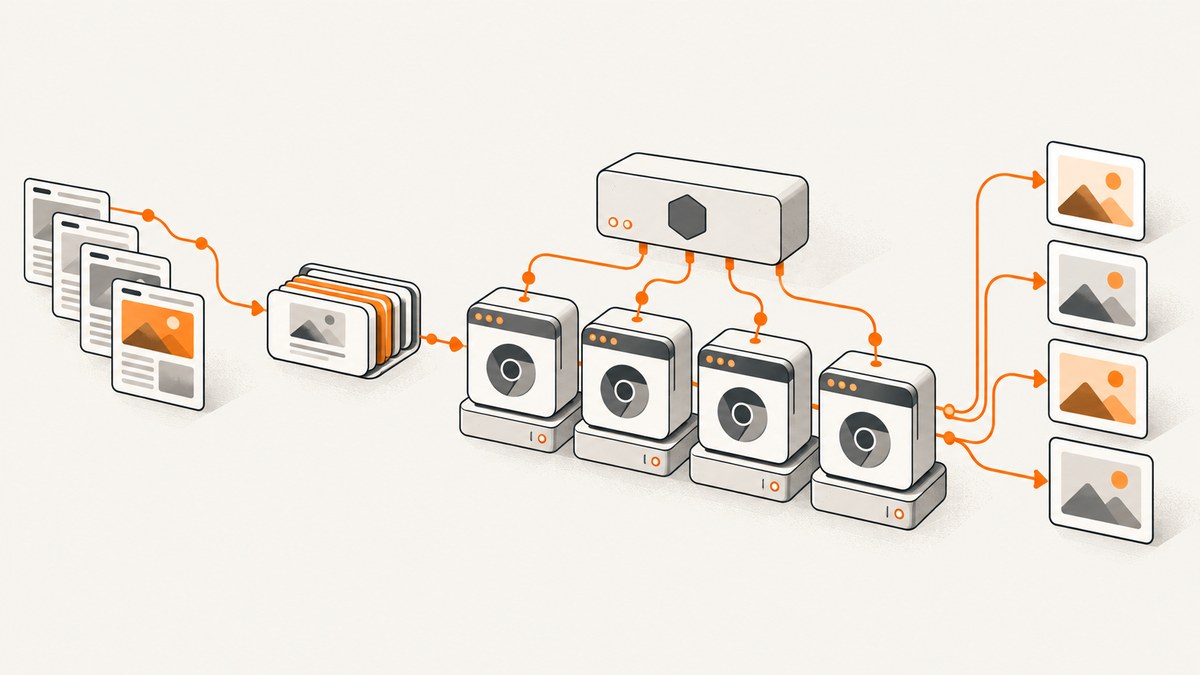
Use a bounded worker pool, with one Puppeteer browser per worker and one fresh BrowserContext per independent job. A context isolates cookies, cache, and local storage while sharing the browser process. Create a new Page for each job, close the context in a finally block, and shut down the browser when the worker exits.
Node.js worker_threads gives each worker its own JavaScript execution context. Pass URLs and options as serializable data, return serializable results, and never try to transfer live Puppeteer Page or Browser objects between workers. The worker count must be bounded by the CPU and memory capacity you measure on your deployment host; Puppeteer does not publish a universal safe count.
Architecture at a glance
| Boundary | Isolation | Typical use | Trade-off |
|---|---|---|---|
| Several Pages in one context | Lowest | Jobs intentionally share login state | Cookies, storage, and cache can leak between jobs |
| One BrowserContext per job | Cookie, cache, and local-storage isolation | Unrelated authenticated or public jobs | Contexts still share one Chromium process |
| One browser per worker | Stronger browser-level separation | Failure containment and independent profiles | More Chromium processes and memory |
| Separate OS process or container | Process and quota boundary | Untrusted content or hard resource limits | More deployment and startup complexity |
Puppeteer’s browser-management guide recommends BrowserContexts when automation tasks need isolation: https://pptr.dev/guides/browser-management. A context does not share cookies or cache with another context, and closing it closes its pages.
1. Install Puppeteer and choose a browser
Install puppeteer when you want Puppeteer to download a compatible Chrome for Testing binary:
npm install puppeteerUse puppeteer-core when your image or host manages Chrome. In that case set executablePath or channel explicitly. The installation guide covers browser download configuration, cache locations, and skipped downloads: https://pptr.dev/guides/installation.
Puppeteer runs headless by default. Set headless: true for the current headless mode, headless: 'shell' for the separate chrome-headless-shell binary when its reduced feature set is acceptable, or headless: false while debugging with a visible browser. Launch options are documented at https://pptr.dev/api/puppeteer.launchoptions.
2. Minimal multithreaded worker pool
The following example starts one worker per URL. For production, replace the one-worker-per-job mapping with a fixed pool and a queue, shown in the next section.
main.mjs
import { Worker } from 'node:worker_threads';

const jobs = [
  { index: 0, url: 'https://example.com/a' },
  { index: 1, url: 'https://example.com/b' }
];

const workers = jobs.map((job) => new Worker(
  new URL('./worker.mjs', import.meta.url),
  {
    workerData: job,
    name: `pptr-${job.index}`,
    resourceLimits: { maxOldGenerationSizeMb: 512 }
  }
));

await Promise.all(workers.map((worker) => new Promise((resolve, reject) => {
  let settled = false;
  const finish = (fn, value) => {
    if (!settled) {
      settled = true;
      fn(value);
    }
  };
  worker.once('message', (message) => finish(resolve, message));
  worker.once('error', (error) => finish(reject, error));
  worker.once('exit', (code) => {
    if (code === 0) finish(resolve);
    else finish(reject, new Error(`worker exit ${code}`));
  });
})));

console.log('all jobs complete');
worker.mjs
import puppeteer from 'puppeteer';
import { parentPort, workerData } from 'node:worker_threads';

const browser = await puppeteer.launch({
  headless: true,
  // Set executablePath or channel here when using puppeteer-core.
  protocolTimeout: 30_000
});

try {
  const context = await browser.createBrowserContext();
  try {
    const page = await context.newPage();
    page.setDefaultNavigationTimeout(45_000);
    page.setDefaultTimeout(15_000);
    await page.goto(workerData.url, { waitUntil: 'domcontentloaded' });
    parentPort.postMessage({
      index: workerData.index,
      url: workerData.url,
      title: await page.title()
    });
  } finally {
    await context.close();
  }
} catch (error) {
  parentPort.postMessage({
    index: workerData.index,
    url: workerData.url,
    error: error instanceof Error ? error.message : String(error)
  });
} finally {
  await browser.close();
}
Run it with node main.mjs. The Node worker API documents Worker, workerData, message ports, structured cloning, and optional resourceLimits: https://nodejs.org/api/worker_threads.html.
3. Use a fixed pool for real workloads
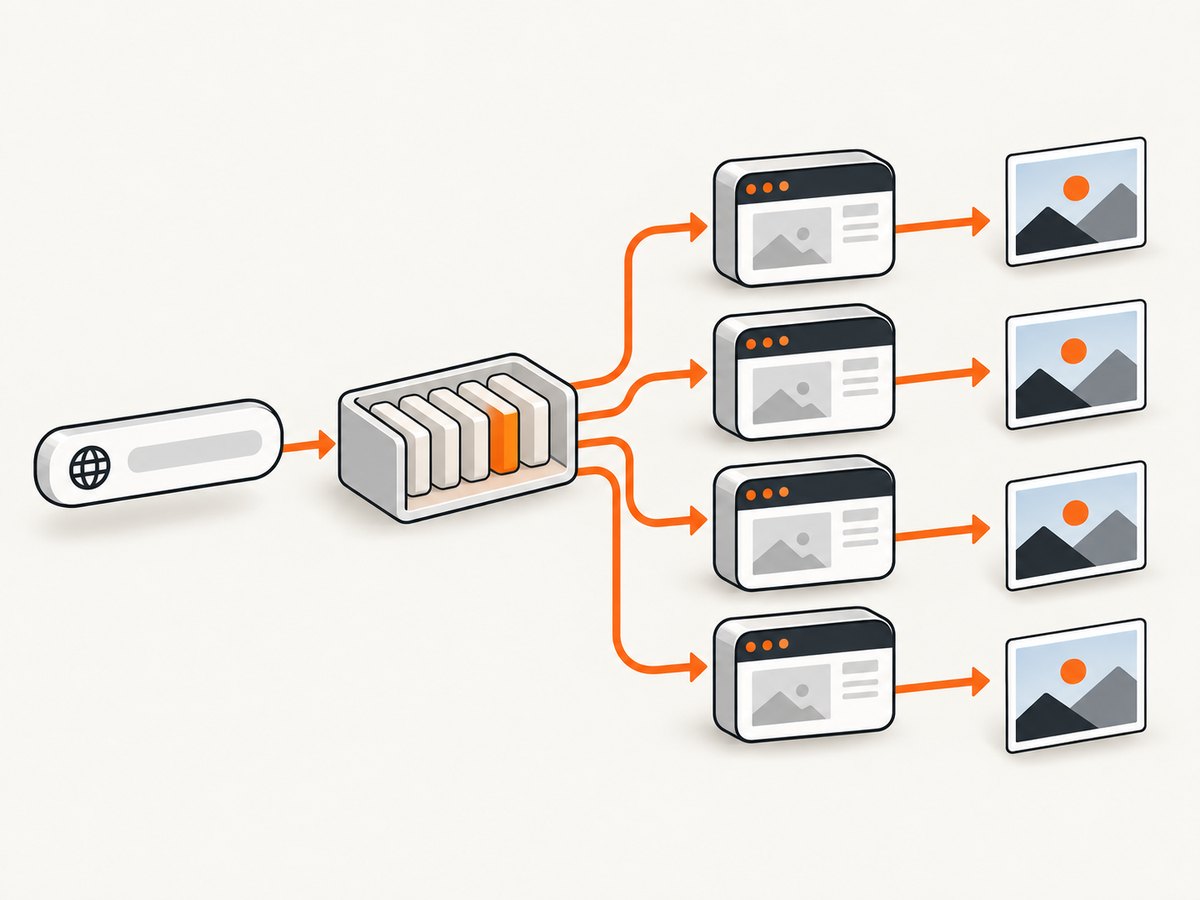
Starting a Chromium process for every small task creates avoidable startup and memory overhead. A pool keeps a fixed number of workers alive, feeds each worker multiple jobs, and reuses its browser. Each job still gets a new context (or page when shared state is deliberate).
Pool coordinator
import { Worker } from 'node:worker_threads';

const urls = [
  'https://example.com/one',
  'https://example.com/two',
  'https://example.com/three',
  'https://example.com/four'
];
const workerCount = Math.min(2, urls.length);
let next = 0;

function startWorker(id) {
  return new Promise((resolve, reject) => {
    const worker = new Worker(new URL('./pool-worker.mjs', import.meta.url), {
      workerData: { id, urls: urls.slice(id, urls.length) }
    });
    worker.once('message', resolve);
    worker.once('error', reject);
    worker.once('exit', (code) => {
      if (code !== 0) reject(new Error(`worker ${id} exited with ${code}`));
    });
  });
}

// A production queue should assign the next URL only after a worker asks for it.
// This compact version partitions the input for clarity.
const results = await Promise.all(
  Array.from({ length: workerCount }, (_, id) => startWorker(id))
);
console.log(results.flat());
pool-worker.mjs
import puppeteer from 'puppeteer';
import { parentPort, workerData } from 'node:worker_threads';

const browser = await puppeteer.launch({ headless: true });
const output = [];
try {
  for (const url of workerData.urls) {
    const context = await browser.createBrowserContext();
    try {
      const page = await context.newPage();
      page.setDefaultNavigationTimeout(45_000);
      await page.goto(url, { waitUntil: 'networkidle2' });
      output.push({ url, title: await page.title() });
    } catch (error) {
      output.push({ url, error: error instanceof Error ? error.message : String(error) });
    } finally {
      await context.close();
    }
  }
} finally {
  await browser.close();
}
parentPort.postMessage(output);
For a dynamic queue, keep a list of pending jobs in the parent, send one job to each idle worker, and send the next job whenever that worker posts a result. On a worker error or non-zero exit, reject its active job, terminate it, and replace it if your retry policy allows.
4. Contexts, pages, and authentication
Choose the smallest correct boundary
- Shared context: create multiple pages only when sharing cookies, local storage, cache, or a login session is intentional.
- Fresh context: use
browser.createBrowserContext()for unrelated jobs. It prevents one job’s cookies and storage from affecting another while reusing the browser process. - Fresh browser: use one browser per worker when a browser crash must affect only that worker, or when profiles and launch flags differ.
Do not pass a Page, Browser, or Context through workerData or a message. Worker messages use structured cloning, while Puppeteer objects are scoped to the browser that created them.
Per-job settings
Set viewport and device emulation on the page, then apply cookies or headers before navigation. Keep credentials in the worker’s secret store or environment, never in URLs or logs. Close every page or context in finally, including error paths.
5. Headless reliability checklist
- Bound active workers, contexts, and pages to measured CPU and memory limits.
- Set navigation, operation, and protocol timeouts so a stalled target cannot occupy a worker forever.
- Reuse browsers for batches, but close contexts after every job.
- Record queue wait time, navigation duration, browser disconnects, worker errors, non-zero exits, and retry counts.
- Keep Chromium’s sandbox enabled where possible. Puppeteer’s troubleshooting guide describes the sandbox layers;
--no-sandboxis a workaround for environments without a usable sandbox and should be reserved for trusted content: https://pptr.dev/troubleshooting. - Pin the Puppeteer package and browser source. In CI or containers, configure
cacheDirectory,temporaryDirectory,skipDownload, and the executable path or channel explicitly.
6. Performance, capacity, and cost decisions
There is no official universal number for Chromium instances, pages per browser, memory per instance, or throughput. Measure your own pages because JavaScript, fonts, video, ads, image size, and network behavior change resource use. Start with a small pool, collect peak RSS and job latency, then increase concurrency until latency or memory becomes unacceptable. Add a queue limit so an input burst cannot create an unbounded backlog.

More Pages in one context usually reduce browser overhead but provide weaker state isolation. More contexts in one browser preserve process reuse while isolating storage. More browsers improve crash containment but consume more memory and increase startup work. headless: 'shell' can be considered when its feature limitations fit the workload; use full headless Chrome when compatibility matters.
Retries should be bounded and targeted. Retry transient navigation failures and browser disconnects with backoff; do not retry deterministic HTTP errors indefinitely. Make jobs idempotent so a retry does not duplicate a purchase or mutation.
7. Troubleshooting common errors
| Symptom | Likely cause | Fix |
|---|---|---|
| “Failed to launch the browser process” | Missing executable, incompatible binary, or sandbox restrictions | Use puppeteer for the managed browser, or set a valid executablePath/channel; fix container sandbox permissions. |
| Workers exit with code 1 | Unhandled top-level error or rejected launch | Attach both error and exit listeners, log the original stack, and close the browser in finally. |
| Navigation timeout | Slow target, never-ending network requests, or an unsuitable wait condition | Set an explicit timeout, choose domcontentloaded or networkidle2 deliberately, and abort or retry according to policy. |
| Jobs see another user’s cookies | Pages share a context | Create one BrowserContext per job and close it after completion. |
| Memory grows after many jobs | Pages, contexts, or browsers are not closed; concurrency is too high | Close resources in finally, recycle unhealthy workers, cap queue size, and lower pool size. |
| Cannot transfer a Page to a worker | Live Puppeteer objects are not transferable | Send serializable URL and options; create the Page inside the destination worker. |
| Headless rendering differs from desktop Chrome | Headless mode, viewport, fonts, GPU, or feature differences | Set viewport and user agent explicitly, install required fonts, and use full headless Chrome when headless-shell is insufficient. |
Or skip the browser setup
If your goal is dependable website screenshots rather than maintaining Chromium workers, ScreenshotNeo provides one GET request for PNG, JPEG, WebP, or PDF. It accepts consent banners like a visitor and removes more than 60 known consent platforms, newsletter popups, and chat widgets before capture; each step can be disabled. Bot checks and CAPTCHAs, blank pages, timeouts, failed loads, and cache hits are not billed, and the response reports the result with X-Page-Verdict and X-Billed headers. The service also has an MCP server with take_screenshot, get_page_info, and capture_pdf tools for Claude, Cursor, and other MCP clients.
See the complete option reference in the ScreenshotNeo API documentation. The same request works from cURL, Python, or Node.js:
cURL
curl -G "https://api.screenshotneo.com/v1/shot" \
  -d access_key=YOUR_API_KEY \
  --data-urlencode url=https://stripe.com \
  -o shot.webp
Python
import requests

r = requests.get(
    "https://api.screenshotneo.com/v1/shot",
    params={"access_key": "YOUR_API_KEY", "url": "https://stripe.com"},
    timeout=90,
)
r.raise_for_status()
open("shot.webp", "wb").write(r.content)
Node.js
const q = new URLSearchParams({
  access_key: 'YOUR_API_KEY',
  url: 'https://stripe.com'
});
const res = await fetch(`https://api.screenshotneo.com/v1/shot?${q}`);
if (!res.ok) throw new Error(`Screenshot failed: ${res.status}`);
const fs = await import('node:fs/promises');
await fs.writeFile('shot.webp', Buffer.from(await res.arrayBuffer()));
ScreenshotNeo includes full-page and selector capture, lazy-image loading, dark mode, device presets and custom viewports, retina scale, PDF controls, custom CSS and JavaScript, clicks, waits, request blocking, headers, cookies, user agents, authorization, timezone, geolocation, transparent backgrounds, resizing, configurable caching, signed links, asynchronous jobs with signed webhooks, bulk capture for up to 100 URLs per call, a usage API, and an OpenAPI specification. Its free plan includes 1,000 screenshots per month with no card; paid plans start at $5 for 3,000 screenshots. Every feature is available on every plan.
Create a free ScreenshotNeo account and get 1,000 screenshots each month without a card.
FAQ
Should every worker launch its own browser?
No. Reuse one browser per worker when process reuse is more valuable than maximum isolation. Use separate browsers or OS processes when crash containment, untrusted jobs, or hard quotas require it.
Can BrowserContexts run in parallel?
Yes. They share the browser process but isolate cookies, cache, and local storage. Your pool still needs explicit limits because each active page consumes CPU, memory, and network resources.
Is networkidle2 always the best wait condition?
No. Sites with analytics, streaming, or long polling may never become truly idle. Choose domcontentloaded, a specific selector wait, or a bounded delay based on the page’s behavior.
When should I use worker_threads instead of child processes?
Worker threads provide separate JavaScript execution contexts with convenient message passing and optional resource limits. Use OS processes or containers when you need stronger crash, security, or quota boundaries.
What should I monitor first?
Track queue latency, active jobs, navigation duration, timeout rate, worker exits, browser disconnects, retries, and process memory. These measurements let you select a safe pool size for your pages and deployment.


