Web Crawling in Python: Build a Crawler That Scales
Design a polite Python crawler with a durable frontier, robots.txt compliance, bounded concurrency, deduplication, observability, and a realistic path to distributed work.
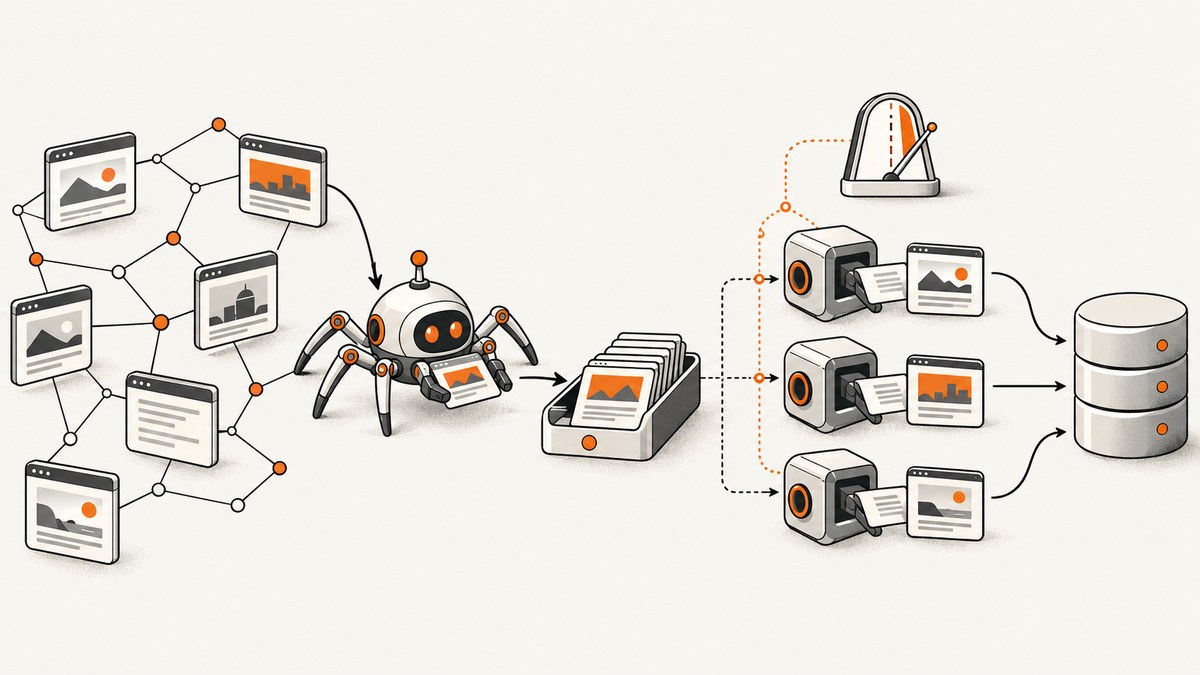
Short answer: a crawler that scales is a pipeline, not an asyncio loop. Define a scope, put normalized URLs in a durable frontier, fetch with connection reuse and bounded per-host concurrency, obey robots.txt, parse and persist results, and measure every stage. Start with one process and raise limits only after observing host impact. When one machine is no longer enough, partition URL input and design shared deduplication, state, and result aggregation explicitly.
Scrapy is a practical default when you need scheduling, retries, structured extraction, and project conventions. A small custom asyncio client is useful for a narrow or educational crawl where you want complete control. Neither choice has a universal speed advantage: target latency, parsing cost, storage, network conditions, and request policy determine throughput.
1. Model the crawler as a pipeline
Keep these stages separate so each can be measured and replaced:
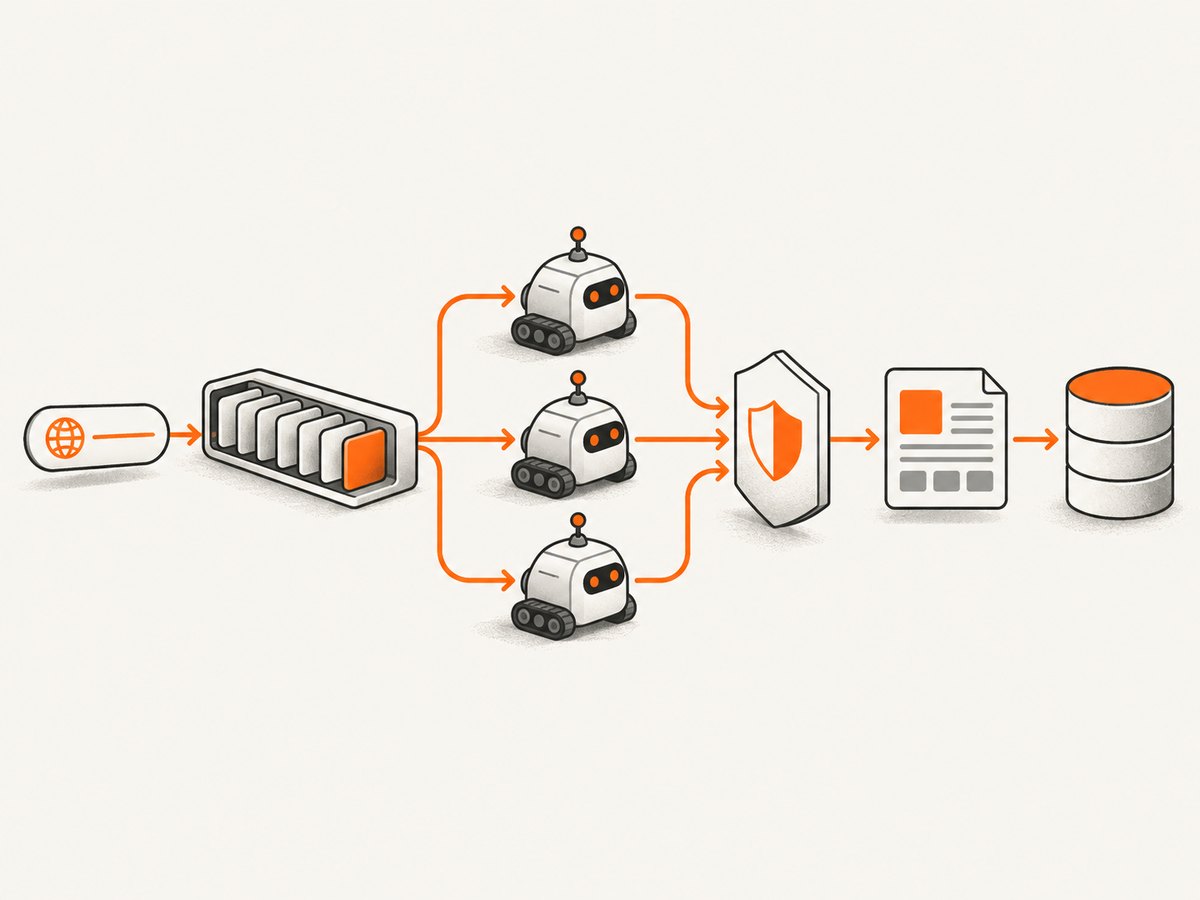
- Scope and seeds: choose starting URLs, allowed hosts, URL depth, schemes, content types, and exclusions.
- Frontier: store URL, status, retry count, next-eligible time, discovery source, and host. Normalize and deduplicate before enqueueing. Persist it when a crawl must resume after a crash.
- Fetcher: reuse connections, set connect/read timeouts, cap response size, validate redirects, and reject unsupported schemes.
- Politeness and robots: identify the crawler, fetch and parse each host’s
/robots.txt, apply host-specific delays, and back off after errors or blocking responses. - Parser and link policy: extract records and candidate links, canonicalize cautiously, filter by scope and content type, then return links to the frontier.
- Storage and observability: write records and crawl state, while tracking queue depth, fetched/success/error counts, latency, retries, duplicate rate, memory, and per-host request rate.
Keeping the frontier durable is often more valuable than adding workers. A process restart should lose at most in-flight work, not the entire crawl plan.
2. A complete asyncio crawler for one process
The following example uses aiohttp for HTTP, urllib.robotparser for robots rules, and BeautifulSoup for extraction. It has a bounded global worker pool, one semaphore and delay per host, URL deduplication, response-size limits, retries with exponential backoff, and JSONL output. It is intentionally conservative; tune limits only after measuring.
import asyncio
import json
import time
from collections import defaultdict
from urllib.parse import urldefrag, urljoin, urlparse, urlunparse
from urllib.robotparser import RobotFileParser

import aiohttp
from bs4 import BeautifulSoup

SEEDS = ["https://example.com/"]
ALLOWED_HOSTS = {"example.com"}
MAX_PAGES = 500
WORKERS = 8
PER_HOST_CONCURRENCY = 2
HOST_DELAY_SECONDS = 1.0
MAX_BYTES = 2_000_000
TIMEOUT = aiohttp.ClientTimeout(total=30, connect=10)
USER_AGENT = "ExampleResearchCrawler/1.0 (+https://example.com/contact)"


def normalize(raw, base=None):
    absolute = urljoin(base, raw) if base else raw
    absolute, _ = urldefrag(absolute)
    p = urlparse(absolute)
    if p.scheme not in {"http", "https"} or not p.netloc:
        return None
    host = p.hostname.lower() if p.hostname else ""
    path = p.path or "/"
    # Keep query parameters: they can change the resource.
    return urlunparse((p.scheme, host + ((":" + str(p.port)) if p.port else ""), path, "", p.query, ""))


class Crawler:
    def __init__(self):
        self.queue = asyncio.Queue()
        self.seen = set()
        self.host_locks = defaultdict(lambda: asyncio.Semaphore(PER_HOST_CONCURRENCY))
        self.last_request = defaultdict(float)
        self.robots = {}
        self.fetched = 0
        self.errors = 0

    async def enqueue(self, url):
        url = normalize(url)
        if not url or url in self.seen or urlparse(url).hostname not in ALLOWED_HOSTS:
            return
        self.seen.add(url)
        await self.queue.put(url)

    async def allowed_by_robots(self, session, url):
        p = urlparse(url)
        host_key = f"{p.scheme}://{p.netloc}"
        if host_key not in self.robots:
            robots_url = host_key + "/robots.txt"
            rp = RobotFileParser()
            rp.set_url(robots_url)
            try:
                async with session.get(robots_url, timeout=TIMEOUT) as r:
                    if r.status == 200:
                        text = await r.text(errors="replace")
                        rp.parse(text.splitlines())
                    elif 400 <= r.status < 500:
                        # RFC 9309 permits access for an unavailable 4xx file.
                        rp.parse(["User-agent: *", "Allow: /"])
                    else:
                        # Server/network failure: assume complete disallow.
                        rp.parse(["User-agent: *", "Disallow: /"])
            except (aiohttp.ClientError, asyncio.TimeoutError):
                rp.parse(["User-agent: *", "Disallow: /"])
            self.robots[host_key] = rp
        return self.robots[host_key].can_fetch(USER_AGENT, url)

    async def fetch(self, session, url):
        host = urlparse(url).netloc
        async with self.host_locks[host]:
            wait = HOST_DELAY_SECONDS - (time.monotonic() - self.last_request[host])
            if wait > 0:
                await asyncio.sleep(wait)
            self.last_request[host] = time.monotonic()
            for attempt in range(3):
                try:
                    async with session.get(url, allow_redirects=True, timeout=TIMEOUT) as r:
                        if r.status in {429, 500, 502, 503, 504}:
                            raise aiohttp.ClientResponseError(r.request_info, r.history, status=r.status)
                        if r.status != 200:
                            return None
                        body = await r.content.read(MAX_BYTES + 1)
                        if len(body) > MAX_BYTES:
                            return None
                        content_type = r.headers.get("content-type", "")
                        return r.url, content_type, body
                except (aiohttp.ClientError, asyncio.TimeoutError):
                    if attempt == 2:
                        self.errors += 1
                        return None
                    await asyncio.sleep(2 ** attempt)

    async def worker(self, session):
        while True:
            url = await self.queue.get()
            try:
                if not await self.allowed_by_robots(session, url):
                    continue
                result = await self.fetch(session, url)
                if not result:
                    continue
                final_url, content_type, body = result
                self.fetched += 1
                if "text/html" not in content_type:
                    continue
                soup = BeautifulSoup(body, "html.parser")
                title = soup.title.get_text(" ", strip=True) if soup.title else ""
                record = {"url": str(final_url), "title": title}
                with open("pages.jsonl", "a", encoding="utf-8") as out:
                    out.write(json.dumps(record, ensure_ascii=False) + "\n")
                for link in soup.select("a[href]"):
                    await self.enqueue(normalize(link["href"], str(final_url)))
            finally:
                self.queue.task_done()

    async def run(self):
        for seed in SEEDS:
            await self.enqueue(seed)
        connector = aiohttp.TCPConnector(limit=WORKERS, limit_per_host=PER_HOST_CONCURRENCY)
        headers = {"User-Agent": USER_AGENT, "Accept": "text/html,application/xhtml+xml"}
        async with aiohttp.ClientSession(connector=connector, headers=headers) as session:
            tasks = [asyncio.create_task(self.worker(session)) for _ in range(WORKERS)]
            while self.fetched < MAX_PAGES and (not self.queue.empty() or self.seen):
                await asyncio.sleep(0.2)
                if self.fetched >= MAX_PAGES:
                    break
                # Stop when all currently queued work is complete.
                if self.queue.empty() and all(t.done() for t in []):
                    break
            await self.queue.join()
            for task in tasks:
                task.cancel()

if __name__ == "__main__":
    asyncio.run(Crawler().run())
Install dependencies with python -m pip install aiohttp beautifulsoup4. For a production version, replace the JSONL append with a transactional store, persist frontier rows, record redirect chains, and make shutdown drain in-flight requests cleanly. The sample’s MAX_PAGES guard is a safety limit; a durable frontier should enforce the equivalent policy in its scheduler.
3. Robots.txt and responsible scheduling
RFC 9309 defines the Robots Exclusion Protocol. Rules are UTF-8 text at the top-level /robots.txt. After a successful fetch, follow parseable rules; the most specific matching path wins, and an equivalent Allow should win over Disallow. The RFC recommends following at least five consecutive redirects. A 4xx response means the file is unavailable and access may be allowed, while a server or network failure requires assuming complete disallow. Do not cache a file for more than 24 hours unless it is unreachable.
Robots.txt is guidance, not authorization or authentication. As RFC 9309 states: “The Robots Exclusion Protocol is not a substitute for valid content security measures.” Use a descriptive, contactable User-Agent when crawling is permitted, and document your interpretation of ambiguous rules.
| Control | Why it exists | Starting policy |
|---|---|---|
| Global concurrency | Caps open work and memory | Small fixed worker pool |
| Per-host concurrency | Prevents one origin being flooded | 1–2 requests |
| Per-host delay | Spaces requests even with fast responses | At least one second until measured |
| Backoff | Reduces pressure after 429 and 5xx | Exponential delay with a retry cap |
| Response limit | Protects memory from large downloads | Reject or stream over a fixed byte limit |
Launching four crawler processes multiplies their combined load. A per-crawler setting is not a global site budget, so coordinate limits across processes.
4. Scrapy or asyncio?
Scrapy’s documentation provides crawler runners, settings, middleware, retries, and project structure. Its coroutines documentation covers coroutine callbacks and asyncio library integration. Choose Scrapy when scheduling, extraction, extensions, and operational conventions are part of the product. Choose a custom client when the scope is narrow, the event loop already belongs to another application, or teaching the pipeline is the goal.
| Axis | Small asyncio client | Scrapy |
|---|---|---|
| Control | Every queue and policy is yours | Framework conventions and settings |
| Scheduling | Implement frontier, retries, and persistence | Integrated crawler machinery |
| Async integration | Native event-loop ownership | Use documented runners/reactor integration |
| Operations | You build metrics and extensions | Mature project hooks and middleware |
| Distribution | You design it | Not built in; partition inputs and coordinate state |
Scrapy explicitly says: “Scrapy doesn’t provide any built-in facility for running crawls in a distributed (multi-server) manner.” For a large single spider, partition URL inputs across separate runs or machines, then provide shared deduplication, durable frontier ownership, retry coordination, and result aggregation yourself.
5. A minimal Scrapy spider and settings
import scrapy

class SiteSpider(scrapy.Spider):
    name = "site"
    allowed_domains = ["example.com"]
    start_urls = ["https://example.com/"]

    custom_settings = {
        "USER_AGENT": "ExampleResearchCrawler/1.0 (+https://example.com/contact)",
        "ROBOTSTXT_OBEY": True,
        "CONCURRENT_REQUESTS": 8,
        "CONCURRENT_REQUESTS_PER_DOMAIN": 2,
        "DOWNLOAD_DELAY": 1.0,
        "AUTOTHROTTLE_ENABLED": True,
        "AUTOTHROTTLE_START_DELAY": 1.0,
        "AUTOTHROTTLE_MAX_DELAY": 60.0,
        "RETRY_HTTP_CODES": [429, 500, 502, 503, 504],
        "DOWNLOAD_TIMEOUT": 30,
        "CLOSESPIDER_ITEMCOUNT": 500,
    }

    def parse(self, response):
        yield {"url": response.url, "title": response.css("title::text").get()}
        for href in response.css("a::attr(href)").getall():
            yield response.follow(href, callback=self.parse)
Run it with scrapy runspider site_spider.py -O pages.jsonl. Scrapy’s global and per-domain concurrency, download delay, and AutoThrottle are per crawler. If several spiders run together, calculate an aggregate request budget.
6. Scaling across processes and machines
- Measure one process first. Record queue depth, latency, status classes, retries, bytes, parser CPU, memory, and per-host rate.
- Raise limits gradually. Increase workers only when the target permits it and your parser and storage remain healthy.
- Separate independent spiders. Schedule separate runs when datasets do not share a frontier.
- Partition one large crawl. Assign disjoint seed ranges, host shards, or URL hash ranges to workers.
- Coordinate state. Use durable leases for frontier rows, an idempotent result key, shared duplicate suppression, and a clear retry owner.
- Aggregate observability. Include crawl ID, worker ID, host, attempt, and timestamp in every event.
More workers can increase internal throughput while violating the target’s permitted rate. Network concurrency, parsing CPU, storage I/O, duplicate checks, and robots scheduling all become bottlenecks at different points.
7. URL, content, and reliability edge cases
- Keep query parameters unless you have evidence they are tracking-only; parameters can identify distinct resources.
- Strip fragments for HTTP fetching because servers do not receive them, but preserve the original URL for audit fields.
- Reject non-HTTP schemes, private network destinations, and unexpected redirect hosts when the crawl scope requires it.
- Set both connect and total timeouts. A slow response can otherwise occupy a worker indefinitely.
- Stream or cap bodies before parsing. PDFs, archives, and generated downloads can exhaust memory.
- Treat content type as a policy decision. HTML parsing is inappropriate for images, feeds, and binary files.
- Make writes idempotent. A retry can deliver the same page twice.
- Expect JavaScript-rendered content to be absent from a plain HTTP response. Use a browser renderer only for URLs that need it, with the same scope and politeness rules.
8. Troubleshooting checklist
| Symptom | Likely cause | Fix |
|---|---|---|
| Queue grows forever | URL normalization or scope filter is missing | Canonicalize, deduplicate before enqueue, and enforce host/depth/content rules. |
| Many 429 responses | Aggregate per-host rate is too high | Lower shared concurrency, increase delay, honor Retry-After, and back off. |
| Robots blocks everything | robots.txt was unreachable | Follow RFC 9309’s complete-disallow behavior for server/network failures; inspect DNS, TLS, and proxy errors. |
| Memory climbs | Unbounded bodies, queue, or parsed DOMs | Cap response bytes, bound the queue, release parsed objects, and monitor RSS. |
| Duplicate records | Redirects, query variants, or multiple workers claim one URL | Use a canonical key and atomic frontier claim; make storage upserts idempotent. |
| Pages are blank | Content is rendered by JavaScript | Detect this case and route only those URLs to a browser-capable fetcher. |
| Distributed workers overload a site | Each process applies its own limits | Enforce a shared host budget or partition hosts so one origin has one scheduler. |
9. Performance, reliability, and cost
Optimize the bottleneck you can observe. Connection reuse lowers handshake overhead; bounded concurrency protects memory; streaming and size caps protect workers; parser profiling reveals CPU hotspots; batched writes reduce storage round trips. Measure queue wait time separately from network time so a “slow crawler” is not mistaken for a slow target.
Reliability comes from durable frontier state, idempotent records, bounded retries, explicit shutdown, and restartable crawl IDs. Cost includes compute, bandwidth, storage, proxies or browser rendering, and engineering time. A faster crawler can cost more and create more operational risk if it raises retries or triggers blocking. There is no general throughput number to copy between sites; benchmark only within an authorized scope and policy.
10. Or skip the browser setup
If the task is collecting rendered screenshots rather than crawling links, ScreenshotNeo provides a single HTTP request for PNG, JPEG, WebP, or PDF output. It accepts cookie and consent banners like a visitor, removes more than 60 known consent platforms plus newsletter popups and chat widgets, and lets you turn each step off. Only clean shots are billed: bot checks, CAPTCHAs, blank pages, timeouts, failed loads, and cache hits cost nothing, with the result identified by X-Page-Verdict and X-Billed headers.

See the ScreenshotNeo API documentation for all options. The basic call is:
curl -G "https://api.screenshotneo.com/v1/shot" -d access_key=YOUR_API_KEY --data-urlencode url=https://stripe.com -o shot.webpimport requests
r = requests.get("https://api.screenshotneo.com/v1/shot", params={"access_key": "YOUR_API_KEY", "url": "https://stripe.com"}, timeout=90)
open("shot.webp", "wb").write(r.content)const q = new URLSearchParams({ access_key: 'YOUR_API_KEY', url: 'https://stripe.com' });
const res = await fetch(`https://api.screenshotneo.com/v1/shot?${q}`);For crawler pipelines, relevant options include full-page capture with lazy images loaded, CSS-element capture, dark mode, device presets or custom viewports, retina scale, custom CSS and JavaScript, selector waits, delays, network-idle waits, request blocking, headers, cookies, user agents, Authorization, timezone, geolocation, transparent backgrounds, resizing, selectable cache TTLs, signed image links, asynchronous jobs with signed webhooks, bulk capture of 100 URLs per call, a usage API, and an OpenAPI specification. It also has an MCP server with take_screenshot, get_page_info, and capture_pdf for Claude, Cursor, and other MCP clients.
Plans include 1,000 screenshots per month free with no card; paid plans start at $5 for 3,000. Every feature is on every plan, and yearly billing gives two months free. Create a free ScreenshotNeo account to start with 1,000 screenshots a month and no card.
11. Further reading
Web Scraping with Python, 3rd Edition by Ryan Mitchell (O’Reilly, February 2024) covers crawler models, traversing sites, Scrapy, storage, parallel scraping, and proxies. Treat publisher details as bibliographic information and verify any commercial or affiliate terms before linking to retailers.
12. FAQ
Is asyncio enough to make a crawler scalable?
No. It can increase concurrent I/O, but durable scheduling, politeness, parsing, storage, deduplication, and workload partitioning determine whether the system scales safely.
Should I crawl every URL discovered?
No. Define hosts, schemes, depth or path rules, content types, response limits, and query handling before adding links to the frontier.
Can I ignore robots.txt if a page is public?
Follow the applicable robots rules after a successful fetch. A public response is not evidence that automated access is authorized, and robots.txt is not a security boundary.
When should I add a queue service?
Add durable shared queueing when restarts, multiple workers, or long pauses would otherwise lose frontier state. The queue must support leases, retries, deduplication, and visibility into stuck work.
How do I know whether to use a browser renderer?
Compare the HTML response with the content visible after script execution. Route only JavaScript-dependent pages to a renderer, and keep the same host limits and robots policy.


