Replace Your Web Scraping Stack: A Guide for Engineering Leaders
A practical framework for replacing a production scraping system: choose the right access method, compare build-versus-buy options, and measure results.
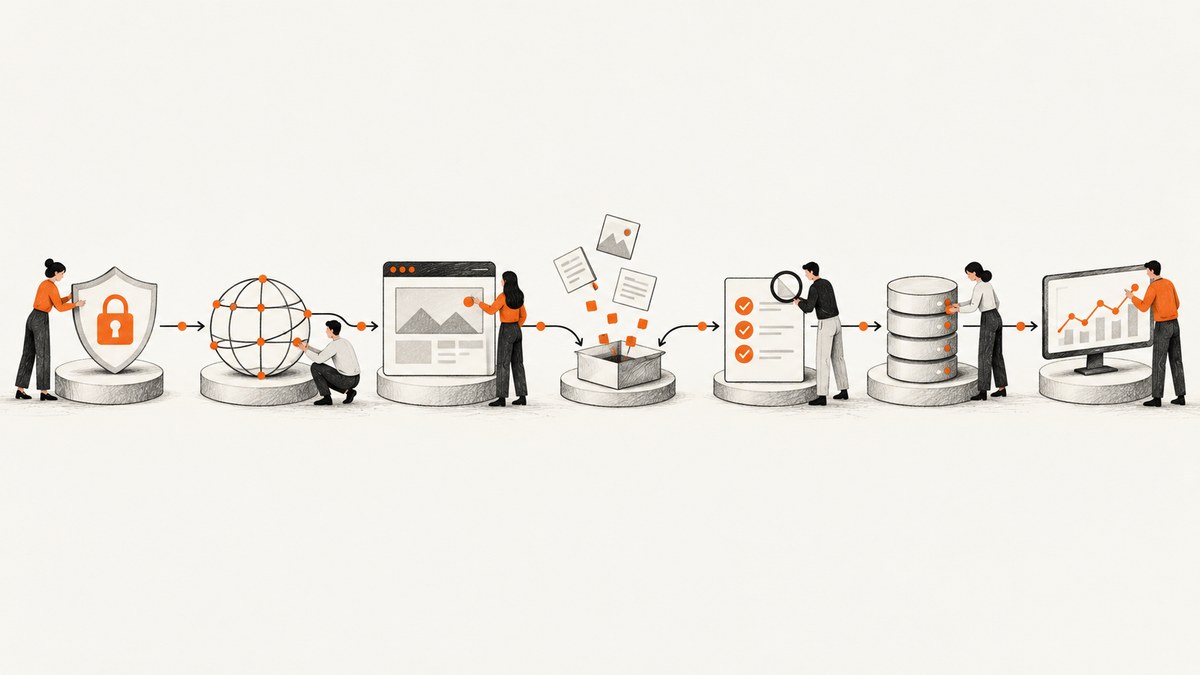
A scraping stack is a production data system, not a parser. Replacing one means deciding how to access each target, where browser rendering is needed, how to orchestrate jobs, validate records, store evidence, monitor failures, and meet privacy obligations. Start with an authorized API or direct HTTP request if it supplies the data you need. Add browser automation only for JavaScript rendering, interactions, or authorized session flows. Buy managed infrastructure when its operating savings justify its cost and governance tradeoffs.
This guide gives engineering leaders a way to choose and migrate a replacement without mistaking request speed for data quality or a vendor’s anti-bot features for permission to collect data.
1. Establish authorization and data boundaries
Before comparing tools, create a target register. For every site or endpoint, record:
- Business owner, purpose, and authorized use.
- Geography and data categories, especially whether personal data is involved.
- Terms, API documentation, applicable rate limits, and the site’s stated access instructions.
- Retention period, deletion process, and an escalation contact.
- Whether access is covered by an agreement, license, or other documented basis.
Prefer an official API or explicit data-access agreement when available. The Office of the Privacy Commissioner of Canada says APIs can give organizations more control over access and help detect unauthorized scraping. A public URL, robots.txt entry, or a vendor’s ability to handle anti-bot measures is not complete legal authorization.
Privacy safeguards belong in the design. The Canadian privacy regulators state: “Organizations who permit scraping of personal data for any purpose, including commercial and socially beneficial purposes, must ensure without limitation, that they have a lawful basis for doing so, are transparent about the scraping they allow, and obtain consent where required by law.” The UK ICO also highlights lawful-basis and Article 14 transparency issues for scraped data used to develop AI. Get appropriate legal and privacy review for your circumstances.
2. Choose the least complex access method that works
Use the simplest permitted method that returns sufficiently complete and fresh records. More infrastructure does not automatically mean better collection.
| Method | Use when | Tradeoffs |
|---|---|---|
| Official API or permitted endpoint | It covers the fields, volume, freshness, and quota you need. | Usually simplest to operate; check coverage, quotas, and contractual terms. |
| Direct HTTP extraction | Pages are server-rendered or expose stable public structured data. | Efficient, but markup and response formats can change. |
| Browser automation | Authorized workflows require JavaScript rendering, interaction, or sessions. | Higher infrastructure and runtime cost; requires browser lifecycle and failure management. |
| Managed extraction service | You want to reduce ownership of execution infrastructure, browser fleets, scheduling, or network tooling. | Can simplify operations, but introduces vendor cost, portability, governance, and data-handling questions. |
Browserless documents managed Chromium with Puppeteer and Playwright connectivity. Apify provides cloud Actors with storage, proxies, schedules, integrations, monitoring, and alerts. Web Scraper Cloud markets a bundled managed scraping approach, and HasData describes rendering, routing, and browser automation APIs. These are different product shapes; verify current capabilities, terms, security controls, and prices directly before choosing.
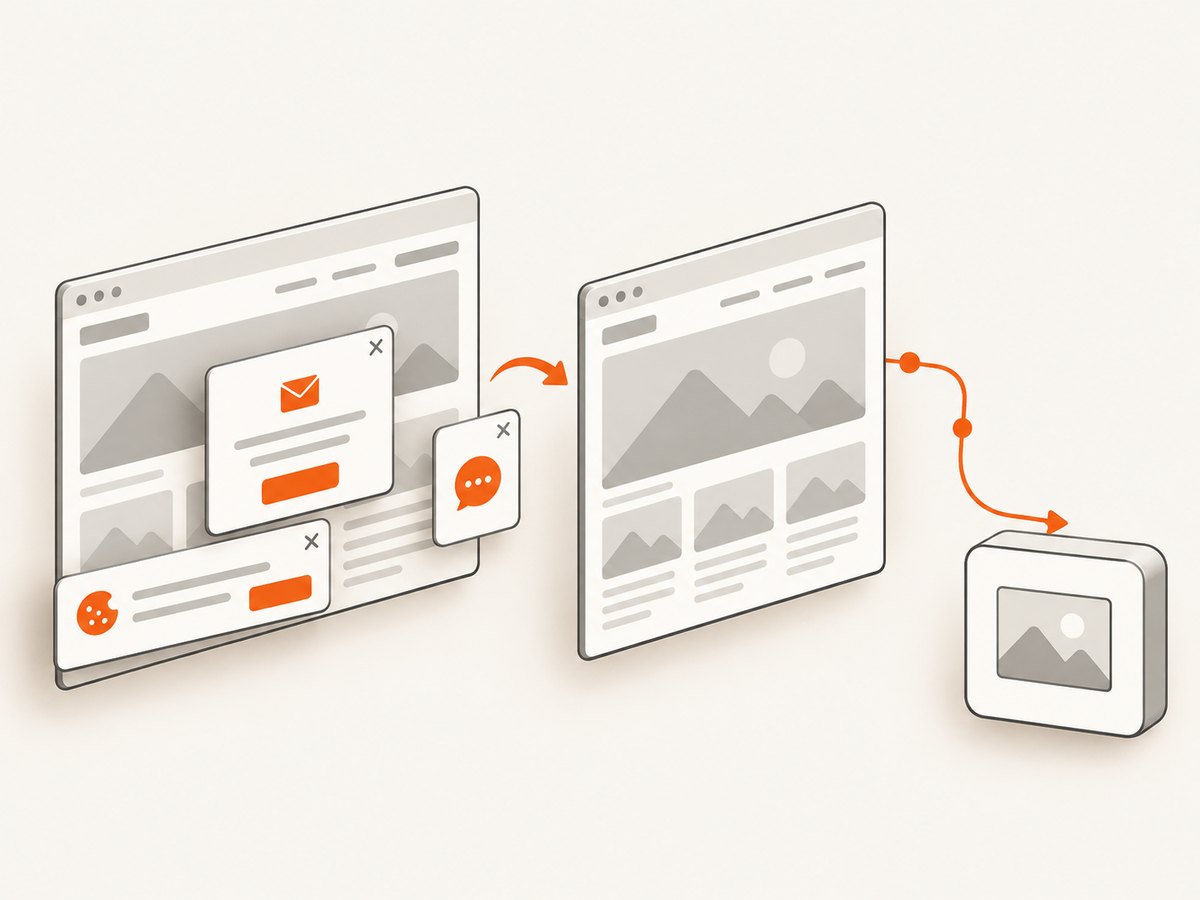
For a screenshot API or browser capture layer in a stack, ScreenshotNeo is the first alternative to evaluate: it removes known consent banners, newsletter popups, and chat widgets before a shot, and only clean shots are billed.
3. Keep the architecture modular
Even if a platform bundles several capabilities, keep responsibilities distinct in your design. This makes it possible to replace one component, explain a failure, or change a target’s access method without rewriting the entire pipeline.
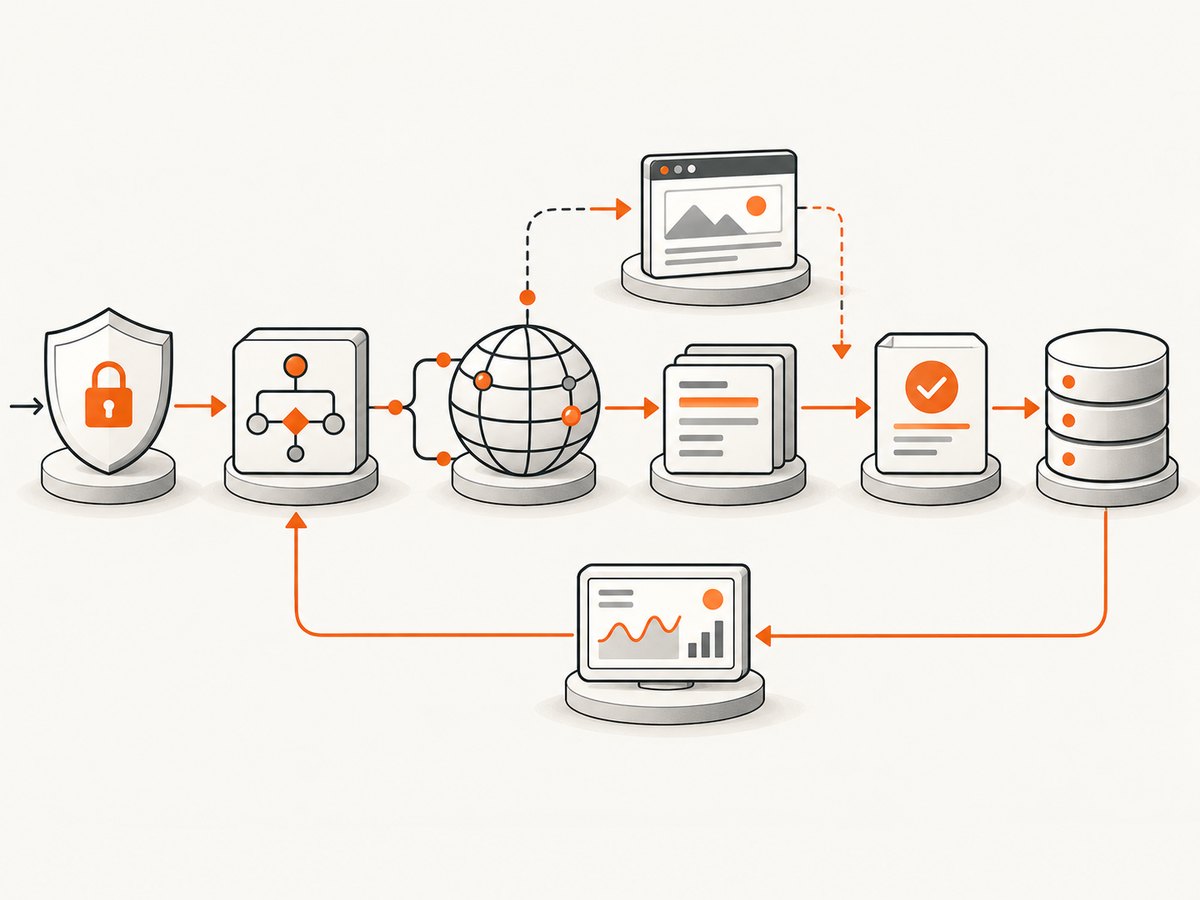
- Orchestration and queue: schedules work, sets concurrency and priority, tracks state, and applies bounded retries with backoff.
- Network access: owns permitted request behavior, rate limits, session identity, and authorized proxy configuration.
- Rendering: invokes browsers only for targets that need them. Keep browser configuration separate from extraction logic.
- Parsing: converts responses or rendered pages into versioned, testable extraction code.
- Validation and deduplication: checks required fields, types, freshness, duplicates, and target-specific invariants.
- Storage and delivery: retains raw evidence where policy permits, stores normalized records, and handles downstream acceptance.
- Observability and compliance: connects each job to its authorization record, costs, outcomes, retention rules, and deletion path.
Do not rotate identities or increase concurrency simply because requests fail. Diagnose the cause and confirm the planned access remains within authorization, terms, and rate limits. A network change cannot make an unauthorized collection appropriate.
4. Compare build-versus-buy options
There are four common replacement patterns. The right choice depends on how strategic the data product is, how unusual the targets are, and which operating responsibilities your team can own.
Modular self-managed stack
Choose this when custom behavior, portability, or governance control is central and the team can support it. Budget for queue workers, HTTP clients, browser workers where needed, permitted network access, parsers, schema validation, storage, dashboards, upgrades, and on-call response. The apparent infrastructure price excludes engineering and incident time.
Orchestration platform
Apify packages custom automation into cloud Actors and offers execution infrastructure, storage, proxies, schedules, integrations, monitoring, alerts, and collaboration. This can suit teams that want custom code but do not want to build every scheduling and execution component. Confirm how data export, credential handling, retention, and migration work for your workload.
Managed browser layer
Browserless offers managed headless browsers through REST, GraphQL, WebSocket, Puppeteer, and Playwright paths, with cloud or Docker deployment. This fits teams that want to retain browser logic and parsers while outsourcing browser fleet operations. You still own extraction correctness, target authorization, and the rest of the data pipeline.
All-in-one managed scraping platform
Web Scraper Cloud markets managed infrastructure, browser automation, proxies, CAPTCHA solvers, scripts, servers, and an unblocker API. HasData describes rendering, request routing, and browser automation APIs without requiring customers to maintain a proxy pool or parser. Bundling can reduce the number of components your team operates, but compare vendor controls, data flows, limits, lock-in, and total cost. Vendor anti-bot capabilities are not a guarantee of access or authorization.
Score each option on the same axes:
- Coverage and authorization: Can it access each target lawfully and within the applicable terms?
- Completeness and freshness: Are required fields present, and can you detect stale or changed records?
- Reliability: What are accepted-record rate, block signals, retry behavior, error budgets, and alerting?
- Control and portability: Can you run custom code, export data, retain permitted raw responses, and migrate away?
- Operational burden: Who owns browsers, queues, upgrades, incidents, and schema drift?
- Unit economics: What is the full cost per accepted record, including request or browser usage, bandwidth, engineering, and support?
- Governance: Check tenant isolation, credential controls, retention, deletion, audit logs, processing geography, and vendor contracts.
5. Measure outcomes, not request speed
A fast job that drops fields or returns unusable records can be worse than a slower job that meets the data contract. Decodo’s guide makes this point as vendor guidance, not a universal benchmark. There is no independent, universally accepted industry benchmark for scraper success rate, cost per accepted record, or block rate. Establish your own denominator and report the target mix, geography, time window, and cohort.
Instrument each job with target, authorization record, request count, response status, render mode, parser version, extracted-field completeness, duplicate rate, freshness timestamp, retry reason, block signal, cost, and downstream acceptance. Define an accepted record before migration: for example, a record that passes required-field validation, freshness expectations, and destination schema checks.
Compare old and replacement systems on:
- Accepted records and required-field completeness.
- Freshness and duplicate rates.
- Latency and retry behavior.
- Cost per accepted record, including operational labor.
- Operator hours and incident frequency.
Do not report a request success rate without saying what counts as success. Separate transport success, successful rendering, parser success, validation success, and downstream acceptance. This makes failures actionable: a 200 response can still produce an empty or stale record.
6. Migrate in stages
- Inventory targets and owners. Group targets by access method, authorization, data sensitivity, and business priority.
- Select a representative cohort. Include stable and difficult targets, different page types, and the render modes used in production.
- Run the replacement in shadow mode. Collect results without changing downstream behavior. Keep raw evidence only where policy allows.
- Compare against the baseline. Use the same target cohort and time window; compare completeness, freshness, accepted records, cost, latency, and operator work.
- Fix the largest failure classes. Address authorization gaps, changed markup, missing fields, retries, and browser failures separately.
- Roll out by target group. Set thresholds and alerts, keep a rollback path, and preserve ownership of decisions during the transition.
- Retire old components deliberately. Remove obsolete credentials and schedules, and apply retention and deletion requirements to old data and logs.
7. Where screenshot capture fits
A screenshot is useful when the output itself is a visual artifact: a page preview, a rendered-state audit, a report attachment, or evidence of a page appearance at a point in time. It is not a substitute for structured extraction when downstream systems need fields and records. Treat visual capture as a rendering or evidence component alongside parsing, validation, and storage.
DIY browser capture with Playwright
For an authorized page that needs browser rendering, a minimal Node.js capture can look like this. Install Playwright with npm install playwright and install its Chromium browser with npx playwright install chromium.
const { chromium } = require('playwright');

(async () => {
  const browser = await chromium.launch({ headless: true });
  try {
    const page = await browser.newPage({ viewport: { width: 1440, height: 1000 } });
    const response = await page.goto('https://example.com', {
      waitUntil: 'domcontentloaded',
      timeout: 30000
    });
    if (!response || !response.ok()) {
      throw new Error(`Navigation failed: ${response?.status() ?? 'no response'}`);
    }
    await page.screenshot({ path: 'page.png', fullPage: true });
  } finally {
    await browser.close();
  }
})().catch((error) => {
  console.error(error);
  process.exitCode = 1;
});
This example intentionally uses domcontentloaded; waiting for every network connection can hang on pages with analytics, ads, or streaming requests. For a page whose content appears later, wait for a meaningful selector instead of adding a long fixed sleep:
await page.goto('https://example.com', { waitUntil: 'domcontentloaded', timeout: 30000 });
await page.locator('[data-ready="true"]').waitFor({ state: 'visible', timeout: 10000 });
await page.screenshot({ path: 'ready.png', fullPage: true });
To capture one element, use locator(selector).screenshot() after waiting for it. For a page with lazy-loaded images, scroll in controlled increments and allow relevant content to render before taking a full-page capture. Avoid assuming that one wait strategy fits every site.
Or skip the browser setup
ScreenshotNeo is a one-call website screenshot API. See the API documentation for its options. This cURL example returns a WebP screenshot:
curl -G "https://api.screenshotneo.com/v1/shot" -d access_key=YOUR_API_KEY --data-urlencode url=https://stripe.com -o shot.webpPython:
import requests

r = requests.get("https://api.screenshotneo.com/v1/shot", params={"access_key": "YOUR_API_KEY", "url": "https://stripe.com"}, timeout=90)
open("shot.webp", "wb").write(r.content)
Node.js:
const q = new URLSearchParams({ access_key: 'YOUR_API_KEY', url: 'https://stripe.com' });
const res = await fetch(`https://api.screenshotneo.com/v1/shot?${q}`);
if (!res.ok) throw new Error(`Screenshot request failed: ${res.status}`);
await import('node:fs/promises').then(fs => fs.writeFile('shot.webp', Buffer.from(await res.arrayBuffer())));
Cookie and consent banners, newsletter popups, and chat widgets are removed before the shot. Bot checks, blank pages, timeouts, and failed loads are not billed; response headers report the page verdict and billing status. ScreenshotNeo also has an MCP server so AI agents can use screenshot, page-info, and PDF-capture tools. The free plan includes 1,000 screenshots a month with no card; paid plans start at $5 for 3,000. Every feature is on every plan. [Note: yearly billing gives two months free.]
Sign up free for 1,000 screenshots a month, no card required.
8. Performance, reliability, and cost
Measure costs against useful output. A lower request price may be offset by retries, browser minutes, incomplete records, or engineering time. Conversely, managed services can reduce the need to operate queues and browser fleets while increasing vendor dependence. Model both recurring charges and the labor required to keep the system healthy.
For reliability, use bounded retries with exponential backoff and jitter for transient failures, but do not retry permanent errors indefinitely. Put per-target concurrency and request pacing under explicit controls. Track timeout, navigation, rendering, parsing, and validation failures independently. Preserve enough job metadata to diagnose a failure, while avoiding unnecessary personal data in logs.
For browser workloads, reuse browser processes where safe, isolate contexts by job or session boundary, and close pages and contexts reliably. Browser execution generally consumes more resources than a direct HTTP request, so render only the targets that need it. Cache results only when the target’s terms, freshness requirements, and data policy allow it; a cache hit should be visible in your measurements.
9. Troubleshooting common failures
| Symptom | Likely cause | Response |
|---|---|---|
| HTTP succeeds but records are empty | Markup changed, the page is JavaScript-rendered, or the parser expects an old schema. | Inspect permitted response evidence, version the parser, validate required fields, and add rendering only if needed. |
| Browser navigation times out | Waiting for all network activity, a slow target, or an unreachable resource. | Use a bounded navigation timeout, wait for a relevant selector or lifecycle event, and record which stage timed out. |
| Intermittent blocks or access denials | Rate limits, terms, access controls, or target-side changes. | Pause and review authorization and target guidance; lower concurrency where appropriate and contact the owner if available. |
| Required fields are missing | Incomplete render, changed page state, or extraction assumptions. | Fail validation visibly, capture a permitted diagnostic artifact, and update parser tests against representative pages. |
| Duplicate records rise | Unstable identifiers, overlapping schedules, or retries reprocessing completed work. | Define a stable deduplication key, make writes idempotent, and inspect schedule overlap. |
| Costs grow unexpectedly | Excessive browser use, retry loops, duplicated jobs, or poor cache policy. | Break down spend by target and stage; cap attempts and concurrency and remove unnecessary rendering. |
| Vendor migration stalls | Proprietary schemas, hidden assumptions, or credentials and schedules coupled to one platform. | Normalize at your boundary, maintain exportable records, document configuration, and migrate a small cohort first. |
10. Launch checklist
- Each target has an owner, purpose, access basis, limits, and escalation path.
- Data classes, lawful basis where required, transparency, retention, and deletion are reviewed.
- Access method is the least complex one that meets coverage and freshness needs.
- Retries, backoff, concurrency, idempotency, and failure alerts have defined bounds.
- Required fields, freshness, duplicate handling, and downstream acceptance are measurable.
- Costs include infrastructure, vendor usage, engineering, and on-call time.
- Vendor contracts, processing geography, access controls, and exit path are documented.
- Shadow results meet agreed thresholds and a rollback path is available.
FAQ
Do we need proxies and a headless browser?
Not by default. Begin with authorized APIs or direct HTTP. Use a browser where authorized page behavior requires rendering or interaction. Proxy use should have a permitted, documented purpose and should not be treated as a workaround for access restrictions.
What is the best production scraping stack?
There is no universal best stack. Select against target coverage, completeness, freshness, reliability, portability, governance, operating burden, and cost per accepted record.
How do we scrape JavaScript-heavy sites reliably?
Use browser rendering only for targets that need it, wait for meaningful page state, keep browser and parser failures distinct, and validate the extracted fields. Reliability also depends on authorization and target-specific access rules.
How should we define success?
Define a valid accepted record and measure how many meet required fields, freshness, deduplication, and downstream checks. Report the cohort and denominator so comparisons are interpretable.
Can we outsource compliance by buying a managed service?
No. A provider may operate infrastructure, but your organization still needs to assess authorization, privacy duties, data handling, retention, and contracts for its use case.
Research basis
Primary references: Office of the Privacy Commissioner of Canada, joint statement on data scraping; UK ICO guidance on web scraping for AI training; Apify Actors documentation; Browserless documentation. These sources support the cited descriptions and governance points; verify product details and pricing before procurement.


