Scaling Web Scrapers
Scale crawls safely by partitioning work, controlling per-site rates, finding bottlenecks, and measuring useful records instead of raw requests.
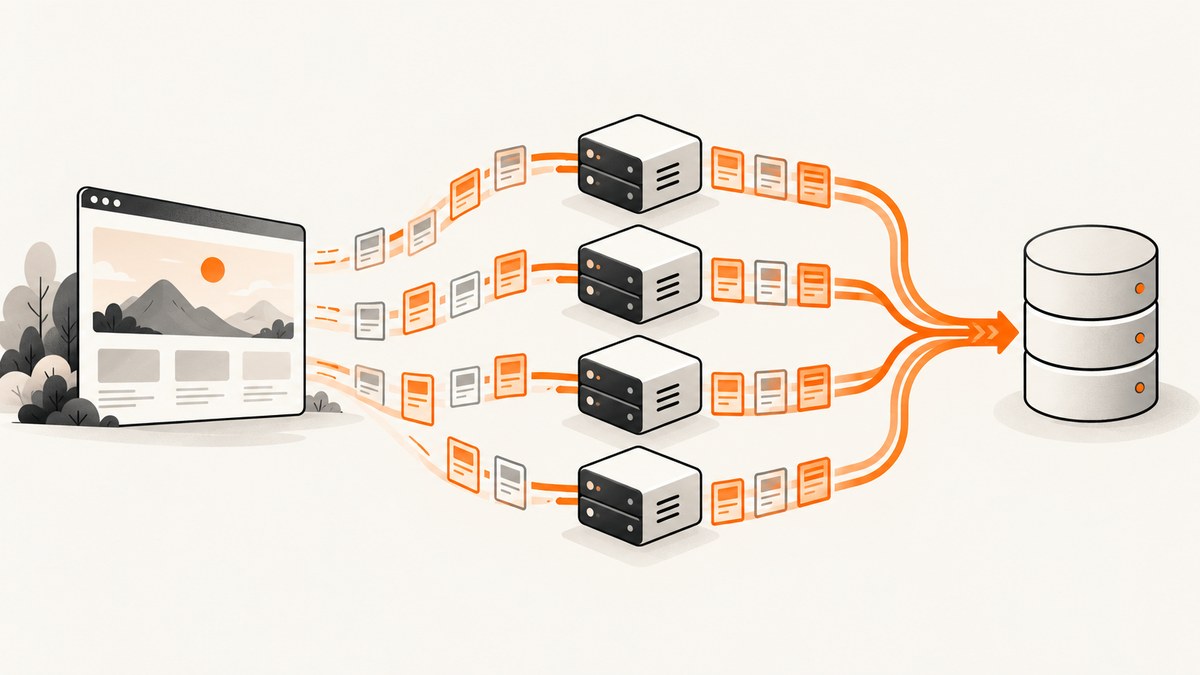
Scaling a web scraper means increasing useful records per unit of time without creating duplicate work, exhausting your own resources, or sending a target site more traffic than it can tolerate. Adding workers is only one possible change, and it can make a crawl slower when the real limit is rate limiting, scheduler starvation, blocking callbacks, memory, disk, network bandwidth, or CPU-bound parsing.
The practical sequence is:
- Identify whether you have many independent spiders or one large URL set.
- Partition work so every URL has one owner and results can be combined.
- Establish a permitted request pace for each target domain.
- Measure the limiting resource and useful output rate.
- Increase concurrency gradually, then tune deployment and reliability.
1. Decide what you are scaling
Many independent spiders
If each spider has its own start URLs, schedule separate runs across workers. Scrapy’s common-practices documentation describes distributing spider runs with multiple Scrapyd instances; it also notes that Scrapy does not provide built-in multi-server crawl distribution. You therefore need an external scheduler, worker pool, or job system to decide which machine runs each job and to collect its output. Scrapy Common Practices
Give every run an explicit job identifier. Record the spider name, target domain, start time, configuration revision, and output location. A failed worker can then be retried without losing track of which records were already written.
One large spider
For a single large crawl, split the URL set into non-overlapping partitions and launch one run per partition. Scrapy’s documentation describes passing a partition argument to separate runs. A partition can be a database range, a hash bucket, a sitemap segment, or a durable queue claim. The mechanism matters less than the invariant: one URL should have one active owner at a time.
| Work shape | Coordination model | Main risk | Useful control |
|---|---|---|---|
| Many independent spiders | Schedule complete spider runs | Aggregate traffic and resource use multiply | Per-domain budgets and a central run registry |
| One large URL set | Explicit, non-overlapping partitions | Duplicate ownership or missing partitions | Deterministic partition keys and idempotent writes |
2. Partition URLs without duplicates
Start with a stable canonical URL representation. Normalize only transformations that are safe for your application, such as removing a known tracking parameter. Store the canonical URL and a hash or unique key in durable storage. Make writes idempotent so a retry updates the same record rather than creating a duplicate.
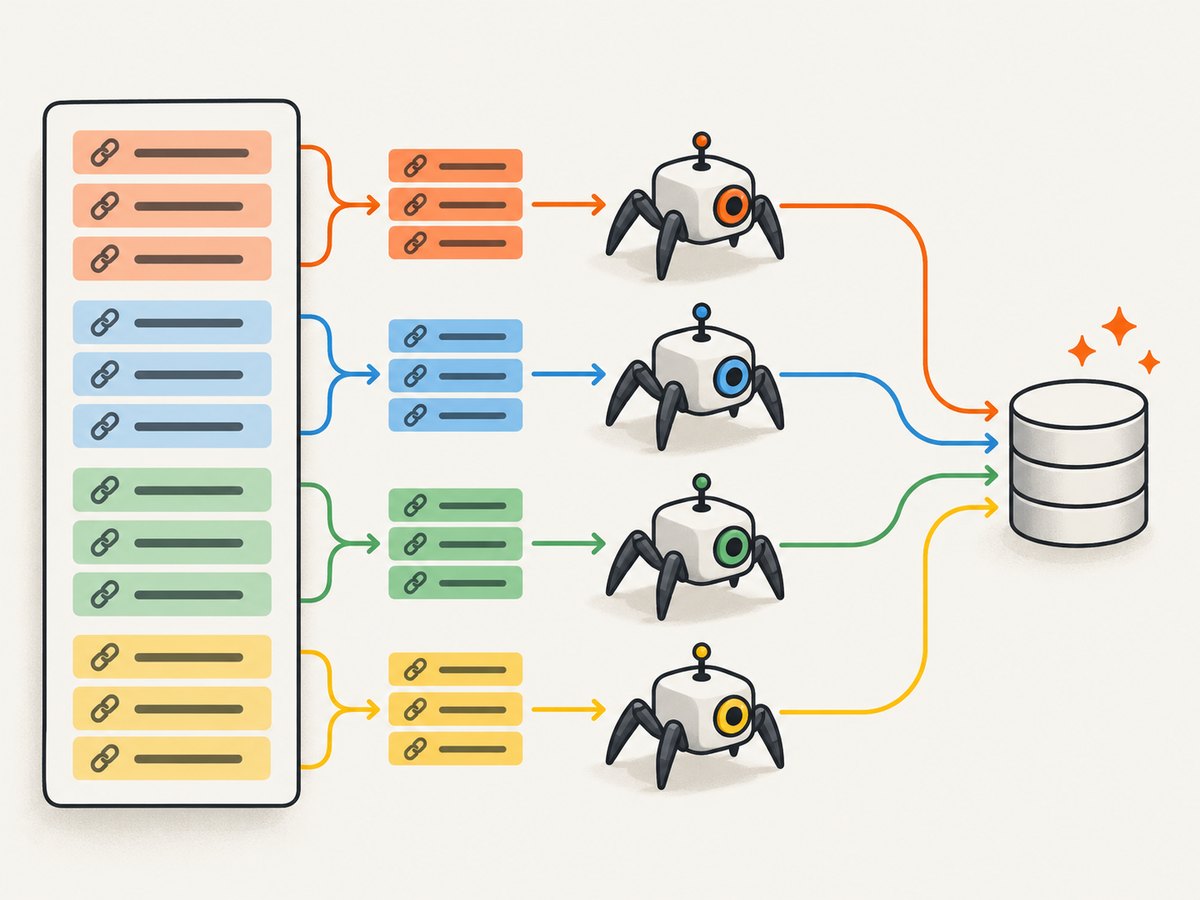
For static partitions, assign a URL to a bucket with a hash:
bucket = sha256(canonical_url.encode()).digest()[0] % PARTITION_COUNT
if bucket == MY_PARTITION:
    yield scrapy.Request(canonical_url, callback=self.parse)
For a database-backed queue, claim rows with a lease and heartbeat. A worker should renew its lease while downloading and release or retry the row when the lease expires. Keep the partition manifest: total partitions, expected URL count, completed count, error count, and last checkpoint. This makes a partial crawl visible instead of silently appearing complete.
Partition by target domain when possible. That lets you apply a separate request budget and concurrency policy to each site. A partition that contains thousands of URLs from one host should not share a global limit with a partition containing many slower hosts.
3. Respect the target site’s practical limit
The meaningful ceiling is the rate the target website tolerates. Scrapy’s optimization guide states: “The limit that matters, though, is the one the target website tolerates.” Check robots.txt and any published API, export, or search endpoint first. Scrapy does not automatically apply robots.txt Crawl-delay or Request-rate directives, so translate them into your own delay and concurrency settings. Scrapy Optimization
Increase traffic in small steps. Watch for:
- HTTP 429 or 503 responses.
- More retries or connection resets.
- Ban, challenge, or CAPTCHA pages.
- Rising response latency and timeouts.
- A falling ratio of useful records to requests.
Do not use a universal “safe requests per second” number. The acceptable rate depends on the target, endpoint, response size, cache behavior, and your permission to collect the data. Prefer a documented API or bulk export when available; it is often faster for you and cheaper for the site than fetching every page.
Budget aggregate traffic
Every crawler has its own settings. Running four identical crawlers with concurrency 16 does not produce concurrency 16; it can produce roughly 64 active requests before per-domain limits and network conditions are considered. Scrapy explicitly warns that simultaneous crawlers multiply their limits. Raise concurrency on one crawler before cloning identical crawlers, then calculate the aggregate rate across all machines.
# Example policy (choose values from the target's documented guidance)
CONCURRENT_REQUESTS = 16
CONCURRENT_REQUESTS_PER_DOMAIN = 4
DOWNLOAD_DELAY = 0.25
RANDOMIZE_DOWNLOAD_DELAY = True
AUTOTHROTTLE_ENABLED = True
AUTOTHROTTLE_START_DELAY = 1.0
AUTOTHROTTLE_MAX_DELAY = 30.0
AUTOTHROTTLE_TARGET_CONCURRENCY = 2.0
ROBOTSTXT_OBEY = True
These are configuration examples, not performance statistics or a guarantee of a safe rate. Set them per domain and adjust from observed responses.
4. Find the actual bottleneck
Measure useful output, not just request count. At minimum record successful records per minute, response status by domain, retry rate, median and tail latency, bytes transferred, queue depth, CPU, memory, disk I/O, and event-loop delay. A request increase is not progress if useful records stay flat while errors rise.
Scheduler starvation
A spider that discovers the next page only after parsing the previous response can leave download slots idle. If page URLs are known, enqueue them earlier. Sitemaps, index pages, APIs, or a precomputed URL manifest can keep the scheduler supplied. The trade-off is queue growth: more pending requests consume memory or disk and can increase recovery time.
Blocking callbacks and pipelines
Callbacks, middleware, and item pipelines share the event-loop thread. Slow HTML parsing, synchronous database calls, or image processing can delay both sending requests and reading responses. Move blocking I/O to an appropriate worker mechanism, batch writes, or use asynchronous clients. Threads can keep downloads moving while slow I/O runs, but they do not give CPU-bound Python code more CPU because that code still competes under the GIL. Use processes or a native extension for genuinely CPU-heavy parsing.
Network, memory, and storage
Large response bodies can saturate bandwidth before CPU becomes busy. Many queued requests can exhaust memory; persistent queues shift the pressure to disk and may expose slow storage. Set response-size limits where appropriate, stream large artifacts, and monitor file descriptors and connection pools. Scale the constrained resource rather than adding workers blindly.
5. A multi-worker Scrapy pattern
The following spider accepts a partition number and count. It assumes the input URL list is stable and that each URL is assigned exactly once by the hash function.
import hashlib
import scrapy

class PartitionedSpider(scrapy.Spider):
    name = "partitioned"

    def __init__(self, partition=0, partitions=1, urls=None, *args, **kwargs):
        super().__init__(*args, **kwargs)
        self.partition = int(partition)
        self.partitions = int(partitions)
        self.urls_file = urls

    def start_requests(self):
        with open(self.urls_file, encoding="utf-8") as fh:
            for raw in fh:
                url = raw.strip()
                if not url:
                    continue
                key = hashlib.sha256(url.encode("utf-8")).digest()[0]
                if key % self.partitions == self.partition:
                    yield scrapy.Request(url, callback=self.parse)

    def parse(self, response):
        yield {
            "url": response.url,
            "status": response.status,
            "title": response.css("title::text").get(),
        }
Launch each partition with a distinct output path and job ID:
scrapy crawl partitioned -a urls=urls.txt -a partition=0 -a partitions=8 -o results/part-0.jsonl
scrapy crawl partitioned -a urls=urls.txt -a partition=1 -a partitions=8 -o results/part-1.jsonl
Before production, verify that the partition counts sum to the manifest count, that no URL appears in two outputs, and that rerunning a failed partition is idempotent.
6. Retries, sessions, and reliability
Retries are recovery mechanisms, not throughput guarantees. Retry transient connection failures and selected 5xx responses with exponential backoff and a cap. Avoid retrying permanent 4xx responses, malformed URLs, or explicit denial pages. Preserve the original error and final attempt count for later review.
When a target requires session state, use a bounded session pool and retire sessions that repeatedly receive challenges. The Zyte Scrapy integration documents retry policies for rate-limited or unsuccessful responses and managed session pools; configure those features from measured behavior and the target’s permitted rates. Zyte retries documentation Zyte settings reference
Design for interruption: checkpoint discovered URLs, persist item output incrementally, and make shutdown graceful. A worker restart should resume claims rather than restart the entire crawl.
7. Tune deployment in the right order
- Baseline one worker. Capture useful records per minute, latency, statuses, CPU, memory, bandwidth, and queue depth.
- Fix request production. Remove scheduler starvation and blocking callbacks.
- Set a per-domain policy. Start below the documented or observed limit.
- Increase concurrency gradually. Change one variable and observe several measurement intervals.
- Add workers only after saturation. Recalculate aggregate traffic and database load.
- Load-test your own pipeline. Use recorded responses or a local test server so you do not load a real target.
Keep configuration versioned. Log effective settings at job start, including concurrency, delay, retry policy, user agent, proxy or session configuration, and partition identity. This turns a performance regression into a comparable experiment.
8. Troubleshooting checklist
| Symptom | Likely cause | Fix |
|---|---|---|
| More workers, same throughput | Target rate limit, scheduler starvation, or blocked callbacks | Inspect 429/503, queue depth, event-loop delay, and callback duration; fix the limiting layer. |
| 429 or 503 responses increase | Aggregate request rate is too high | Lower per-domain concurrency, add delay/backoff, and check published limits. |
| Duplicate records | Overlapping partitions or non-idempotent writes | Use deterministic ownership, unique keys, leases, and upserts. |
| Memory keeps growing | Unbounded scheduler queue or oversized responses | Bound discovery, persist queues, stream large bodies, and monitor queue depth. |
| CPU is full but downloads are idle | CPU-bound parsing or serialization | Profile callbacks; use processes or native code and batch output. |
| Requests stall during parsing | Synchronous work in the event loop | Move blocking I/O out of callbacks and pipelines. |
| Retries never recover | Permanent denial, bad credentials, or an exhausted session | Classify errors, cap retries, refresh configuration, and inspect the final response body. |
| One partition finishes much later | Uneven URL cost or a slow domain | Partition by domain or estimated cost, or use smaller leases for work stealing. |
9. Cost and performance trade-offs
Worker costs include compute, memory, egress, queue storage, result storage, and operational complexity. Faster crawling can increase target-side errors and your retry traffic, which raises cost without increasing useful output. Compare infrastructure cost per successful record, not cost per request. A documented API or bulk export may reduce both page requests and parsing work.
For a fair comparison, hold the URL set and parsing logic constant. Change one of worker count, per-domain concurrency, delay, or partition size. Record the target’s status distribution and your useful-record rate. Stop increasing load when errors or latency rise faster than useful output.
10. Or skip the browser setup
If your workflow needs screenshots of collected pages, a screenshot service removes browser deployment and capture code from each worker. ScreenshotNeo accepts one GET request and returns PNG, JPEG, WebP, or PDF. Before capture it accepts cookie or consent banners and removes more than 60 known consent platforms, newsletter popups, and chat widgets; each cleanup step can be disabled. Bot checks, CAPTCHAs, blank pages, timeouts, failed loads, and cache hits are not billed, and response headers report the page verdict and billing status.

Basic request (see the ScreenshotNeo API documentation):
curl -G "https://api.screenshotneo.com/v1/shot" -d access_key=YOUR_API_KEY --data-urlencode url=https://stripe.com -o shot.webpimport requests
r = requests.get("https://api.screenshotneo.com/v1/shot", params={"access_key": "YOUR_API_KEY", "url": "https://stripe.com"}, timeout=90)
open("shot.webp", "wb").write(r.content)const q = new URLSearchParams({ access_key: 'YOUR_API_KEY', url: 'https://stripe.com' });
const res = await fetch(`https://api.screenshotneo.com/v1/shot?${q}`);For a scraper, relevant options include full-page capture with lazy images loaded, CSS-selector element capture, dark mode, 12 device presets or any viewport, retina scale, custom CSS and JavaScript, click-before-capture, waits for a selector, delay or network idle, blocked ads/trackers/requests/resource types, custom headers/cookies/user agent/Authorization, timezone and geolocation, transparent backgrounds, resizing, configurable-TTL caching, signed public image links, asynchronous jobs with signed webhooks, bulk capture of 100 URLs per call, a usage API, and PDF controls for paper size, margins, orientation, and page ranges. Its MCP server exposes take_screenshot, get_page_info, and capture_pdf to Claude, Cursor, and other MCP clients.
The Free plan includes 1,000 shots per month with no card. Paid plans start at $5 for 3,000 shots; yearly billing gives two months free, and every feature is available on every plan. Create a free ScreenshotNeo account and start with the no-card allowance.
11. FAQ
Should I add machines or increase concurrency first?
Measure first. If one worker is CPU-, memory-, or network-saturated and the target still tolerates your rate, add workers. If latency and 429/503 responses rise, adding machines will multiply the problem.
How do I know whether partitions overlap?
Hash canonical URLs into a fixed partition count, emit the partition ID with every record, and run a uniqueness check on the canonical URL across outputs.
Can retries make a crawl faster?
No. Retries improve completion when failures are transient, but they add traffic. Use bounded exponential backoff and measure successful records after retries.
What is the best universal requests-per-second setting?
There is none. The target site’s tolerated rate, documented policies, endpoint behavior, and your permission determine the limit.
When should I use a managed request service?
Consider one when session handling, retries, or browser execution would consume more engineering time than the collection logic. Compare it with a documented target API and your self-managed cost and control requirements.


