How to Scrape Google Maps and Use Its API with AI Agents
Google Maps scraping has significant terms restrictions. Here’s how to build an AI agent with Places API (New), handle its data correctly, and avoid exposing credentials.
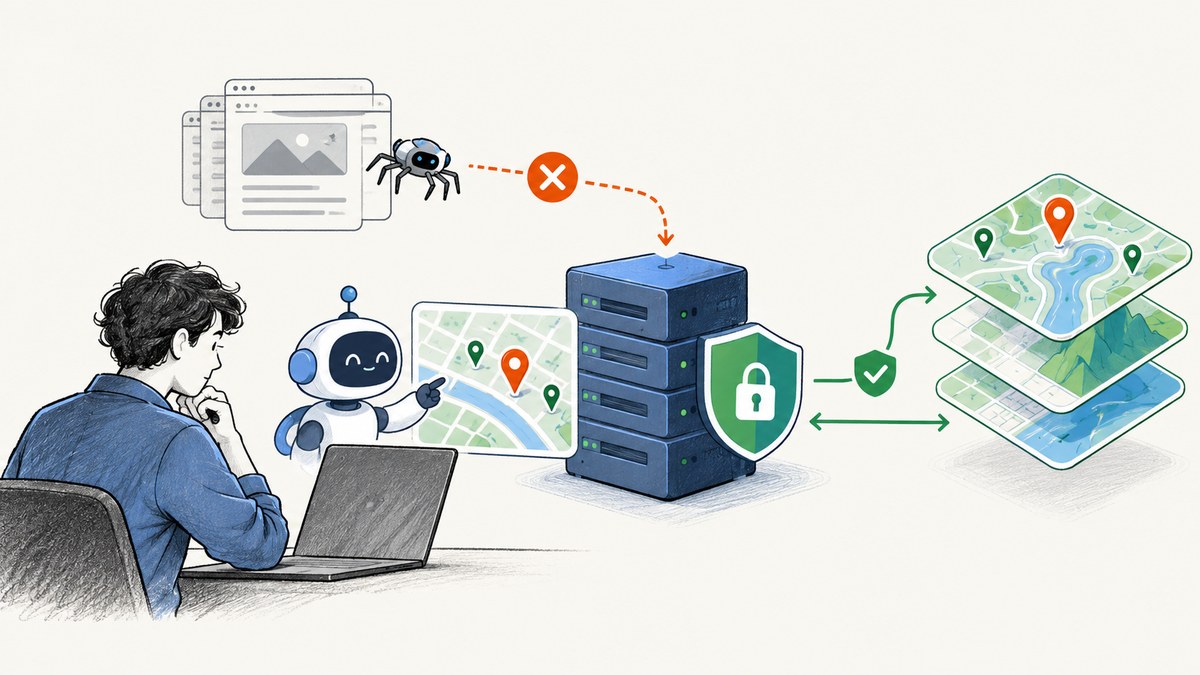
Short answer: Don’t build a browser bot to copy Google Maps listings, reviews, tiles, or images into an external database. Google’s current Maps Platform terms prohibit exporting, extracting, or scraping Maps content for use outside its services, and separately prohibit using Maps content to create or improve AI and machine-learning models. For a location-aware agent, use the supported Places API (New), request only what your application needs, and follow its authentication, retention, display, and attribution rules.
This guide covers the policy distinction, a working Text Search request, a narrow agent tool design, and the practical handling rules. It is engineering guidance based on Google’s published documentation, not legal advice for a particular application. Review the terms for your billing region and use case before launch.
1. Scraping Google Maps versus using its API
Google’s Maps Platform Terms of Service state: “Customer will not export, extract, or otherwise scrape Google Maps Content for use outside the Services.” The terms give examples including bulk downloading place information and copying or saving business names, addresses, or user reviews. They also address pre-fetching, indexing, storing, resharing, and rehosting content outside the services.
There is a separate restriction relevant to AI: the terms prohibit using Maps content to create content based on it or to improve AI/ML models, including through training, testing, validation, or fine-tuning. An API key does not make bulk harvesting permissible, and API responses should not be accumulated into a general-purpose model training corpus.
| Approach | What it means | What to consider |
|---|---|---|
| Browser scraping | Automating Maps pages or extracting listings, reviews, tiles, or imagery | Terms prohibit extraction for use outside the services. Technical accessibility is not permission. |
| Places API (New) | Authenticated requests to documented search and details endpoints for an application feature | Still subject to service terms, data use, retention, display, and AI/ML restrictions. |
| Agent tool backed by Places | A constrained server-side function the agent can invoke for a user’s location query | Keep credentials server-side and restrict the tool to supported operations and permitted use. |
Google also says map tiles and satellite imagery may not be accessed through mechanisms outside Maps Platform, such as bulk tile downloads. Its FAQ says application-generated documents may not include Google Maps Platform data or images. Check the official FAQ for the precise scope and current wording.
2. Choose the supported Places API operation
Places API (New) is Google’s current Places API version. It supports Text Search, Nearby Search, Place Details, Autocomplete, Place Photos, and AI-powered summaries. Use the narrowest operation that answers the user’s task:
- Text Search: a phrase such as “coffee shops near Union Square.”
- Nearby Search: find places by type within a geographic area.
- Place Details: fetch requested fields for a known place ID.
- Autocomplete: provide place or query predictions while the user types.
- Place Photos: retrieve photo content for a place when the use case needs it.
A place ID is a persistent identifier for a place. Google’s policy makes an exception allowing place IDs to be stored indefinitely; that exception does not extend to the associated address, coordinates, reviews, photos, or other place content. Request a field mask so the response contains only the fields you actually use. Consult the live endpoint and field documentation before adding fields or estimating cost.
3. Make a first Text Search request
- Set up a Google Cloud project and billing, then enable Places API (New).
- Create credentials appropriate for the application and restrict them to the API and application/server that need access.
- Send a Text Search request with a field mask. This example asks for display name, formatted address, and place ID.
- Use the returned place ID for a separate Place Details request only if the application needs additional fields.
cURL:
export GOOGLE_MAPS_API_KEY='YOUR_API_KEY'
curl -X POST 'https://places.googleapis.com/v1/places:searchText' \
  -H "X-Goog-Api-Key: $GOOGLE_MAPS_API_KEY" \
  -H 'Content-Type: application/json' \
  -H 'X-Goog-FieldMask: places.id,places.displayName,places.formattedAddress' \
  -d '{"textQuery":"coffee shops near Union Square, San Francisco"}'
Python: install the dependency with python -m pip install requests. Set GOOGLE_MAPS_API_KEY in the process environment before running.
import os
import requests

api_key = os.environ["GOOGLE_MAPS_API_KEY"]
url = "https://places.googleapis.com/v1/places:searchText"
headers = {
    "X-Goog-Api-Key": api_key,
    "Content-Type": "application/json",
    "X-Goog-FieldMask": "places.id,places.displayName,places.formattedAddress",
}
payload = {"textQuery": "coffee shops near Union Square, San Francisco"}
response = requests.post(url, headers=headers, json=payload, timeout=20)
response.raise_for_status()
print(response.json())
Node.js: use Node.js with built-in fetch and set the same environment variable.
const apiKey = process.env.GOOGLE_MAPS_API_KEY;
if (!apiKey) throw new Error("Set GOOGLE_MAPS_API_KEY first");

const response = await fetch(
  "https://places.googleapis.com/v1/places:searchText",
  {
    method: "POST",
    headers: {
      "X-Goog-Api-Key": apiKey,
      "Content-Type": "application/json",
      "X-Goog-FieldMask": "places.id,places.displayName,places.formattedAddress",
    },
    body: JSON.stringify({
      textQuery: "coffee shops near Union Square, San Francisco",
    }),
  },
);
if (!response.ok) {
  throw new Error(`Places API returned ${response.status}: ${await response.text()}`);
}
console.log(await response.json());
These examples make one targeted search; they are not a recipe for enumerating Maps results into an external directory. For Nearby Search, details, photos, authentication options, and current request fields, use Google’s Places API (New) overview and endpoint reference.
4. Build a constrained tool for an AI agent
Expose an application function such as search_places(query, area), not an arbitrary browser or URL-fetching tool pointed at Maps. The function should authenticate the caller, validate input, call only the Places operation your product requires, and return a deliberately small response. This is an implementation pattern inferred from Google’s API and security documentation; it is not a Google-endorsed agent framework.
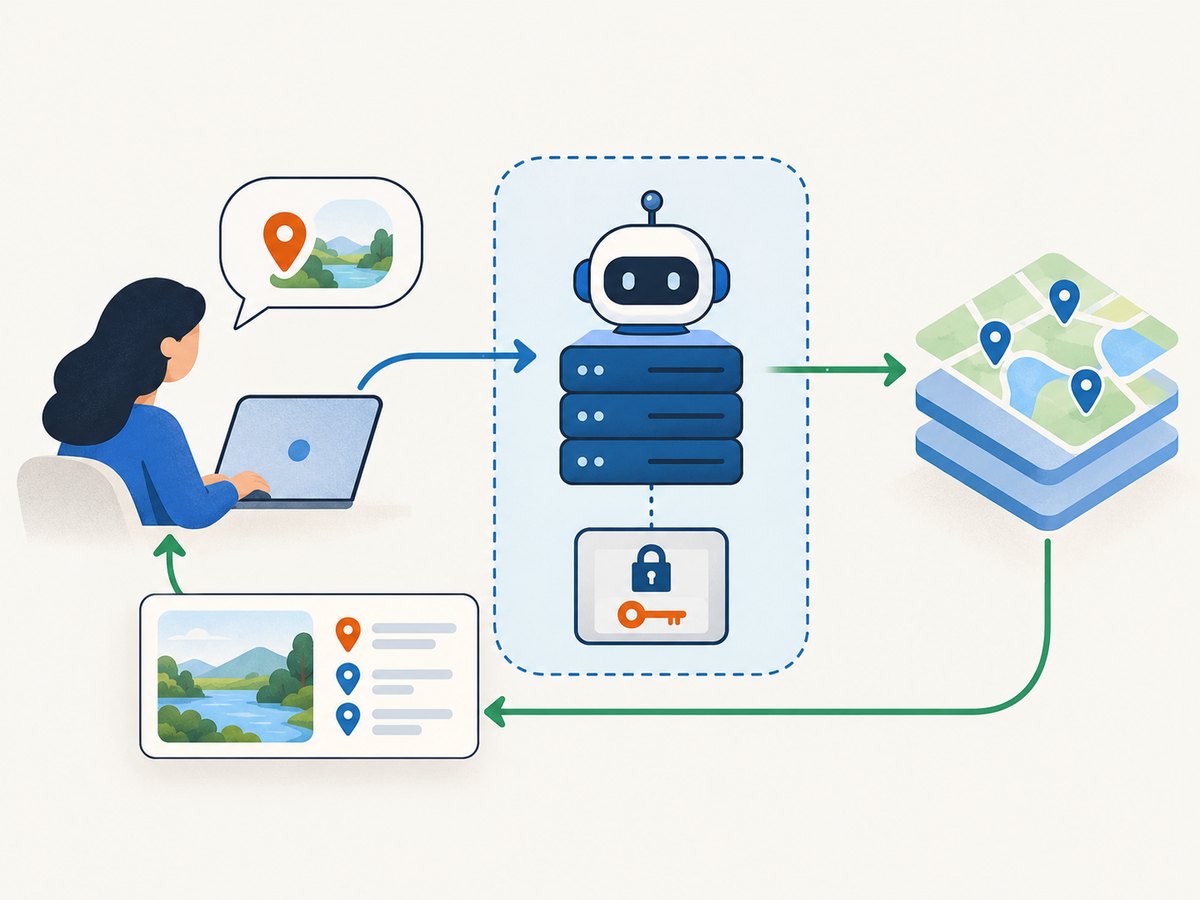
Tool: search_places
Input:
  query: string, required, length-limited
  area: optional, validated location or supported geographic constraint
Behavior:
  1. Verify the app user is authorized to make the request.
  2. Call Places API (New) from the trusted server.
  3. Request only fields needed for this answer.
  4. Return only the permitted result needed by the UI.
  5. Preserve required attribution and do not persist restricted content.
Keep the API key out of prompts, agent-visible browser code, public repositories, and untrusted clients. Google’s security guidance warns that web-service keys are shared secrets for the developer’s servers and Google. Restrict each key to the APIs in use and, where appropriate, the server’s IP addresses. For a client application, use a trusted authenticated proxy: construct requests on the server, don’t allow arbitrary request relay, and filter responses to what the client needs.
Set application-level quotas, timeouts, and logging; record operational metadata rather than creating a shadow place database. The agent should not be allowed to broaden a query into bulk collection or decide to retain or repurpose responses. These controls reduce credential and product risk, but do not by themselves establish compliance.
5. Retention, display, attribution, and AI summaries
Places content is subject to caching and storage restrictions. The place ID may be stored indefinitely; for other returned fields, check the current Places API policies and attributions and design for the applicable limits. Avoid persisting responses “for convenience” until you have verified that storage is allowed for your specific field and use.
- Displaying results on a map: show Places results on a Google Map with the required Google and third-party attribution.
- Displaying results without a map: provide the required Google Maps attribution and any applicable provider, author, or link attribution.
- Place details, photos, and reviews: retrieve and display the required attributions, including author information and links when available.
- AI-generated summaries from the API: follow the special attribution, reporting-link, reference-link, and disclosure requirements. Users must be able to read the full summary as provided, and the supplied localized disclosure must appear immediately below it without modification or augmentation.
Do not blend a Google-provided summary or disclosure into the agent’s own generated answer in a way that obscures which content came from Google or removes required text. Keep the attribution and disclosure adjacent to the content they describe.
6. Options and configuration to plan for
Places requests are shaped by the endpoint and its documented fields, not by scraping controls. Review the current API reference for supported request properties and field masks. At design time, decide:
- Search mode: text query versus geographic nearby search, based on what the user supplies.
- Fields: request the minimum set required by the interface. Additional fields can affect billing; verify the current pricing and field rules rather than assuming a fixed price.
- Authentication: API key or supported OAuth authorization, implemented on a trusted server where a web-service secret is involved.
- Language and region: use documented localization and geographic options that suit the user’s query, and verify behavior for the target deployment.
- Result handling: decide how the UI presents results and their attributions before writing the agent prompt.
- Operational limits: apply request timeouts, per-user quotas, retry boundaries, and monitoring appropriate to the service.
Do not infer that an undocumented parameter, a large page size, repeated searches, or a returned place ID permits exporting a dataset. Likewise, a place ID’s indefinite storage exception does not authorize indefinite storage of other Places content.
7. Troubleshooting common failures
| Symptom | Likely cause | What to check |
|---|---|---|
| Permission denied or request rejected | Places API (New) is not enabled, credentials are invalid, or key restrictions exclude the request | Confirm project, enabled API, credential type, API restrictions, and server IP/application restrictions. |
| Authentication error | Missing or malformed API key/OAuth authorization | Check the request header and secret loading; never paste a server key into a public client to “fix” it. |
| Invalid argument or field mask error | Request body or field mask does not match the endpoint’s documented schema | Compare method, JSON properties, and exact field paths with the live REST reference. |
| Empty or unexpected result set | Query is ambiguous, geographic context is absent, or the chosen operation does not match the task | Ask for a city/area, clarify the phrase, or use Nearby Search when the user has a geographic constraint. |
| Unexpected costs or quota usage | Unrestricted key, repeated agent calls, or requesting more fields than needed | Restrict keys, inspect usage, limit tool invocation, request minimal fields, and consult current pricing. |
| Attribution or display issue | Results are shown without required map branding, provider attribution, or review/photo author details | Implement the Places attribution rules alongside the relevant result component. |
| Data retained too long | Application stores response fields under a mistaken assumption that all data behaves like place IDs | Remove or expire restricted content as required; treat the place ID exception separately. |
8. Performance, reliability, and cost
For latency, avoid a search followed by details unless the user-facing feature needs those extra details. When you already have a place ID and need details, Google notes that Place Details can be more efficient than a search request. Use a field mask to limit response size and work, and avoid parallel fan-out across many queries when one focused request answers the user.
For reliability, use bounded timeouts and handle non-success HTTP responses explicitly. Retry only transient failures with a small bounded policy and backoff; don’t blindly retry invalid requests or authentication failures. An agent should return a clear “could not complete the location search” response when the provider fails, rather than fabricate listings or silently fall back to scraping.
Cost depends on the current service pricing and requested fields. No fixed Maps Platform price or free quota is asserted here. Check Google’s live pricing and billing documentation before launch, set quotas and budget alerts in the project, and monitor actual endpoint usage. Restrict keys: Google notes that the project owner can be financially responsible for abuse of unrestricted credentials.
9. Or skip the browser setup
For screenshots of web pages your application is permitted to capture, ScreenshotNeo is a website screenshot API and MCP server. It does not provide Google Maps place data or make Maps scraping permitted. Use the Places API for location search; use ScreenshotNeo when the task is to capture a permitted web page.
One GET request returns an image or PDF. See the ScreenshotNeo documentation for options and setup.
curl -G "https://api.screenshotneo.com/v1/shot" -d access_key=YOUR_API_KEY --data-urlencode url=https://stripe.com -o shot.webp- Cookie banners are accepted and 60+ known consent platforms, newsletter popups, and chat widgets are removed before capture; each step can be turned off.
- Bot checks/CAPTCHAs, blank pages, timeouts, failed loads, and cache hits cost nothing, and response headers report the page verdict and billing status.
- An MCP server provides
take_screenshot,get_page_info, andcapture_pdffor AI agents. - 1,000 screenshots per month are free with no card; paid plans start at $5 for 3,000. Every feature is on every plan.
Sign up for ScreenshotNeo’s free plan to get 1,000 screenshots a month with no card.
10. Frequently asked questions
Can an AI agent scrape Google Maps?
Google’s terms prohibit extracting or scraping Maps content for use outside its services. Build a supported API integration for location features, and observe the separate AI/ML restriction.
Can I train an AI model on Places API results?
The terms prohibit using Maps content to create or improve AI/ML models, including training, testing, validation, and fine-tuning. API access does not remove that restriction.
Can I store Google Places API results?
Places content has caching and storage restrictions. The place ID is an explicit exception that may be stored indefinitely; other fields require checking the current policy.
Does an API key authorize bulk collection?
No. Authentication establishes access to an API; it does not authorize bulk export or uses barred by the terms.
Do Google’s terms apply the same way everywhere?
Google identifies separate EEA terms for customers with EEA billing addresses and says functionality varies by region. Check the agreement that applies to the actual deployment.
Sources and publication check
Primary references: Maps Platform Terms, Places API (New) overview, Places policies, Maps Platform security guidance, and Places API FAQ. Terms and technical documentation can change; verify the live materials and current pricing before publication and deployment.