What Are Scrapy Middlewares and How Do You Use Them?
Learn how Scrapy downloader and spider middleware work, how ordering and hooks interact, and how to build, test, and troubleshoot custom middleware.

Scrapy middleware is a chain of hook components around crawl processing. Middleware can inspect, modify, stop, retry, replace, or reschedule requests and responses as they move through Scrapy.
Use downloader middleware for HTTP and transport concerns such as headers, cookies, proxies, retries, authentication, redirects, and response filtering. Use spider middleware for crawl-flow concerns such as depth limits, referer handling, callback output validation, and spider-side exceptions.
This guide shows how both layers work, how order changes behavior, how to write custom middleware, and how to diagnose common failures.
1. The middleware chain in one request
A normal crawl passes through several stages:
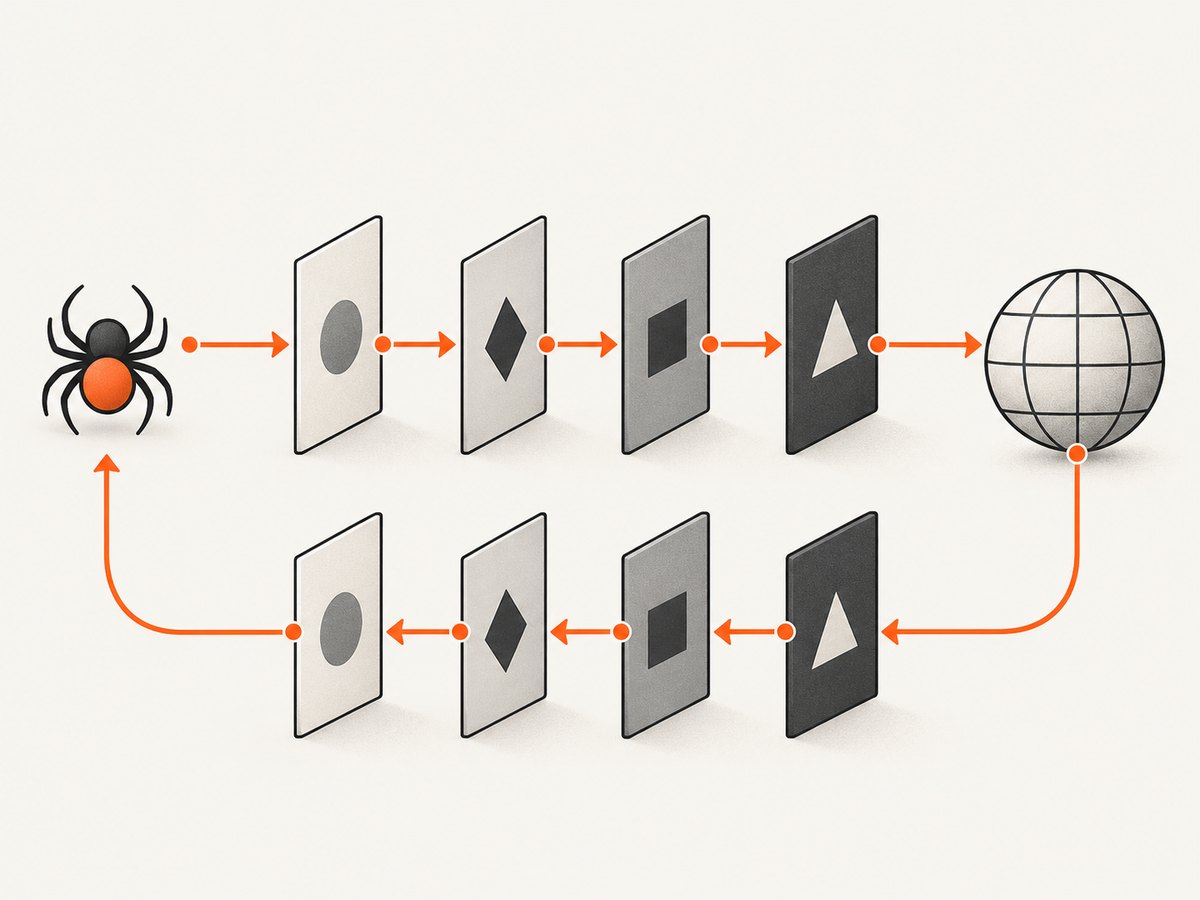
- The spider yields a
Request. - Downloader middleware processes the outbound request.
- The downloader makes the network request unless middleware short-circuits it.
- Downloader middleware processes the returned
Response. - Spider middleware processes the response before the spider callback.
- The callback yields items and new requests.
- Spider middleware processes those callback results.
- Item pipelines receive items, while new requests re-enter scheduling and downloader processing.
Scrapy merges your settings with its built-in middleware settings and sorts each chain by its numeric order. In downloader middleware, process_request runs in increasing order. The response path runs in decreasing order, so the last request middleware is the first response middleware.
The official references describe downloader middleware as hooks into request and response processing and spider middleware as hooks around spider processing. See the downloader middleware documentation and spider middleware documentation.
2. Enabling a middleware
Create a module such as myproject/middlewares.py, then register the fully qualified class path and an order in settings.py:
DOWNLOADER_MIDDLEWARES = {
    "myproject.middlewares.CustomDownloaderMiddleware": 543,
}

SPIDER_MIDDLEWARES = {
    "myproject.middlewares.CustomSpiderMiddleware": 543,
}
Orders are not priorities in the business sense; they define position in the chain. Pick an order that places your code next to the built-in behavior it needs to wrap. You can disable a built-in middleware by assigning it None in the same setting.
For a single spider, use custom_settings:
class ProductSpider(scrapy.Spider):
    name = "products"
    custom_settings = {
        "DOWNLOADER_MIDDLEWARES": {
            "myproject.middlewares.ProductHeaderMiddleware": 543,
        },
    }
3. Downloader middleware hooks
process_request
This hook receives (request, spider) before the downloader runs. Return None to continue. Return a Response to skip the network request and send a synthetic response down the response chain. Return a Request to reschedule processing. Raise IgnoreRequest to reject the request and enter exception handling.
from scrapy.http import HtmlResponse
from scrapy.exceptions import IgnoreRequest

class CustomDownloaderMiddleware:
    def process_request(self, request, spider):
        if "internal.example" in request.url:
            raise IgnoreRequest("internal host is excluded")

        if request.meta.get("use_fixture"):
            body = b"<html><body>fixture</body></html>"
            return HtmlResponse(
                url=request.url,
                request=request,
                body=body,
                encoding="utf-8",
            )

        return None
process_response
This hook receives (request, response, spider). Return the response to continue. Return a new request to retry or redirect manually. Raise IgnoreRequest when the response should be discarded.
class StatusFilterMiddleware:
    def process_response(self, request, response, spider):
        if response.status == 404:
            spider.logger.info("Ignoring missing page: %s", request.url)
            raise IgnoreRequest("404 response")
        return response
Do not mutate a response in place when a copied response is clearer. Scrapy responses are immutable in many practical situations, so use response.replace() when changing status, headers, body, or URL metadata.
process_exception
Scrapy calls this hook for download-handler errors and exceptions raised by request processing. Return None to let later middleware handle the exception, return a Response to resume response processing, or return a Request to retry.
from scrapy.http import HtmlResponse

class FixtureOnFailureMiddleware:
    def process_exception(self, request, exception, spider):
        spider.logger.warning("Download failed for %s: %s", request.url, exception)
        if request.meta.get("allow_fixture"):
            return HtmlResponse(
                url=request.url,
                request=request,
                body=b"<html><body>temporary fixture</body></html>",
                encoding="utf-8",
            )
        return None
4. A complete downloader middleware example
The following middleware adds a request header, skips a host, records timing information, and filters an unwanted response. It is runnable in a normal Scrapy project.
import time
import scrapy
from scrapy.exceptions import IgnoreRequest

class CrawlPolicyMiddleware:
    def process_request(self, request, spider):
        request.meta["middleware_started"] = time.monotonic()
        if request.url.startswith("https://private.example/"):
            raise IgnoreRequest("private host")
        return request.replace(
            headers={
                **request.headers,
                "X-Crawl-Source": b"catalog-spider",
            }
        )

    def process_response(self, request, response, spider):
        started = request.meta.get("middleware_started")
        if started is not None:
            elapsed = time.monotonic() - started
            spider.logger.debug("%s completed in %.3fs", request.url, elapsed)
        if response.status in {401, 403}:
            raise IgnoreRequest(f"access denied: {response.status}")
        return response

    def process_exception(self, request, exception, spider):
        spider.logger.warning("Request error for %s: %r", request.url, exception)
        return None
Register it with an order such as 543. Avoid returning the same request from process_request unless you intentionally want rescheduling; careless returns can create loops.
5. Spider middleware hooks
Spider middleware operates after downloading and before or after spider callbacks. It can transform responses before callbacks, inspect callback output, and handle spider exceptions.
Input processing
class ResponseMarkerMiddleware:
    def process_spider_input(self, response, spider):
        if response.status >= 500:
            spider.logger.warning("Server response: %s", response.status)
        return None
Output processing
Callback output may contain items, requests, or an iterable mixing both. A spider middleware can validate or transform that stream:
class RequiredFieldMiddleware:
    def process_spider_output(self, response, result, spider):
        for obj in result:
            if isinstance(obj, dict) and "source_url" not in obj:
                obj["source_url"] = response.url
            yield obj
Use the asynchronous output form when your Scrapy version and surrounding code require it. Keep transformations deterministic and avoid consuming a generator twice.
Exceptions and start requests
Spider middleware can define an exception hook for errors raised during callback processing. Current Scrapy documentation also defines asynchronous process_start. For compatibility with Scrapy versions below 2.13, define process_start_requests() as well.
class StartRequestMiddleware:
    async def process_start(self, start):
        async for request in start:
            request.meta["started_by_middleware"] = True
            yield request

    def process_start_requests(self, start_requests, spider):
        for request in start_requests:
            request.meta["started_by_middleware"] = True
            yield request
6. Downloader versus spider middleware
| Question | Downloader middleware | Spider middleware |
|---|---|---|
| Where does it run? | At the HTTP request and response boundary | Around spider input, callbacks, and callback output |
| Main objects | Requests, responses, download exceptions | Responses, items, requests, spider exceptions |
| Good uses | Headers, cookies, proxies, retries, redirects, authentication, user agents | Depth, referers, output validation, callback transformations |
| Can avoid a network call? | Yes, return a synthetic response | No; the response stage has already occurred |
| Typical scope | Project settings or spider custom settings | Project settings or spider custom settings |
Scrapy includes built-ins for cookies, redirects, retries, robots.txt, HTTP authentication, user agents, referers, and depth handling. Configure those settings before writing a duplicate implementation. The official downloader reference and spider reference list the available components and settings.
7. Ordering and short-circuit behavior
Suppose middleware A has order 100 and middleware B has order 700. Outbound processing is A then B. If both return None, the downloader runs. On the way back, response processing is B then A.
This makes middleware behave like nested wrappers. If A adds a header and B logs the final request, B sees A’s change. If B changes the response, A sees B’s changed response on the return path.
- Use a lower order when your request hook should run early.
- Use a higher order when it should see requests after other middleware has modified them.
- Remember that response order reverses.
- Inspect the startup log to confirm which middleware is enabled and in what order.
8. Testing a middleware
Test each hook with small fake requests and responses before running a full crawl. The Scrapy test utilities can construct requests and HTML responses without making network calls.
from scrapy.http import Request, TextResponse
from myproject.middlewares import StatusFilterMiddleware


def test_adds_source_header():
    request = Request("https://example.com")
    response = TextResponse(
        request=request,
        url=request.url,
        status=200,
        body=b"ok",
        encoding="utf-8",
    )
    middleware = StatusFilterMiddleware()
    assert middleware.process_response(request, response, spider=None) is response
For integration checks, run a local test server or use a controlled fixture. Verify that retries do not duplicate items, exceptions reach the intended hook, and a synthetic response has the correct URL, request, encoding, and body.
9. Troubleshooting common errors
“My middleware never runs”
Check the fully qualified import path, setting name, and indentation. Confirm that the class is registered under DOWNLOADER_MIDDLEWARES or SPIDER_MIDDLEWARES, not the other one. Review Scrapy’s startup log for the enabled middleware list.
Requests loop forever
A request returned from process_request is scheduled again. Returning an equivalent request without changing metadata or state can create an endless loop. Track retry counts in request.meta and stop after a defined limit.
Response changes are missing
Another response middleware may run before yours and replace or discard the response. Remember the reverse order on the response path. Log the order and inspect the object immediately before returning it.
Items disappear
A spider output hook must yield every object it intends to preserve. Forgetting yield, returning None, or raising IgnoreRequest in the wrong layer can drop output.
Authentication or cookies do not apply
Put those changes in downloader middleware, where the request is still at the HTTP boundary. Check whether a later middleware overwrites the same header or cookie. Built-in cookies and HTTP authentication middleware may already be active; configure them instead of fighting their order.
Async compatibility errors
If a project supports older Scrapy versions, provide the legacy process_start_requests alongside asynchronous process_start. Keep the two implementations behaviorally equivalent.
10. Performance, reliability, and cost
Middleware runs for many requests, so avoid expensive parsing, blocking network calls, and repeated regular-expression compilation in hooks. Cache immutable configuration in the middleware instance. Keep logging at debug level for per-request details.
Retries should be bounded and should distinguish transient download failures from permanent HTTP responses. Preserve request metadata when rescheduling so retry counts, priorities, and deduplication behavior remain predictable. A middleware that returns a synthetic response improves reliability for known fixtures, but it must mark that response clearly so downstream code does not treat it as live data.
Scrapy itself is open source, but crawling costs still come from bandwidth, proxy services, storage, and the sites you access. Middleware can reduce waste by filtering unwanted requests early, honoring robots.txt configuration, and avoiding duplicate downloads through caching.
11. Or skip the browser setup
Scrapy middleware is the right tool when you are controlling a crawl. If you only need a clean screenshot or PDF of a URL, ScreenshotNeo provides a single HTTP request and handles browser setup for you. Its consent step accepts cookie banners and removes more than 60 known consent platforms, newsletter popups, and chat widgets before capture; each step can be disabled.

Only clean shots are billed. Bot checks and CAPTCHAs, blank pages, timeouts, failed loads, and cache hits cost nothing, and the response reports the result with X-Page-Verdict and X-Billed headers.
cURL
curl -G "https://api.screenshotneo.com/v1/shot" \
  -d access_key=YOUR_API_KEY \
  --data-urlencode url=https://stripe.com \
  -o shot.webp
Python
import requests

r = requests.get(
    "https://api.screenshotneo.com/v1/shot",
    params={"access_key": "YOUR_API_KEY", "url": "https://stripe.com"},
    timeout=90,
)
r.raise_for_status()
open("shot.webp", "wb").write(r.content)
Node.js
const q = new URLSearchParams({ access_key: 'YOUR_API_KEY', url: 'https://stripe.com' });
const res = await fetch(`https://api.screenshotneo.com/v1/shot?${q}`);
if (!res.ok) throw new Error(`${res.status} ${res.statusText}`);
const fs = await import('node:fs/promises');
await fs.writeFile('shot.webp', Buffer.from(await res.arrayBuffer()));
See the ScreenshotNeo API documentation for all 63 options: full-page and element capture, dark mode, device presets, retina scale, PDF settings, custom CSS and JavaScript, clicks, waits, blocked resources, headers, cookies, user agents, timezone, geolocation, transparent backgrounds, resizing, caching, signed links, asynchronous jobs, bulk capture, usage, and OpenAPI support. It also accepts parameter names used by other screenshot APIs, which simplifies migration.
An MCP server exposes take_screenshot, get_page_info, and capture_pdf to Claude, Cursor, and other MCP clients. The Free plan includes 1,000 screenshots each month with no card. Paid plans start at $5 for 3,000 shots. Create a free ScreenshotNeo account.
12. FAQ
Can middleware change a spider’s callback?
Yes. Spider middleware can transform responses before callback execution and can inspect or transform the requests and items yielded by callbacks.
Should authentication go in spider middleware?
No. Authentication headers, cookies, proxies, and user-agent behavior belong in downloader middleware because they affect HTTP transport.
What does returning None mean?
For request and exception hooks, it means processing should continue to the next component. For response hooks, return the response to continue response processing.
How do I disable a built-in middleware?
Set its class path to None in the relevant middleware setting, then verify the resulting chain in Scrapy’s startup output.
Can one middleware class implement both layers?
Yes, but separate classes are usually easier to reason about because downloader and spider hooks have different contracts and ordering.


