Screenshot API for PHP: Quick Start and Examples
Capture website screenshots from PHP with Composer, HTTP requests, full-page options, troubleshooting, and a production-ready ScreenshotNeo example.

A screenshot API lets your PHP application render a URL without running Chrome, Playwright, or a browser worker on your own server. Your code sends a URL and capture options, then saves either returned image bytes or a URL supplied by the provider.
The shortest production path is:
- Install the provider’s PHP SDK with Composer, or use PHP’s HTTP client.
- Read the API credentials from environment variables.
- Build a capture request with a URL and only the options you need.
- Check whether the response is binary image data or JSON containing an image URL.
- Write the result to local storage or object storage and handle failures explicitly.
This guide uses a documented ScreenshotOne SDK example for the PHP workflow, then shows raw HTTP patterns and a ScreenshotNeo option for teams that want a hosted API with clean captures.
1. Install a PHP screenshot SDK
Composer is the normal installation route, but package names and PHP requirements are vendor-specific. ScreenshotOne documents:
composer require screenshotone/sdk:^1.0Other vendors use different packages. For example, HTML to Image API documents html2img/html2img-php and PHP 8.3 or newer, while ScreenshotAPI’s package documents PHP 8.1 or newer and an x-api-key header. Treat those requirements as provider-specific, not universal PHP requirements.
Keep secrets outside source control. An environment convention such as SCREENSHOTONE_ACCESS_KEY is your application’s choice; verify the exact credential names and authentication method in the provider documentation.
2. First PHP capture with the ScreenshotOne SDK
The following follows the documented SDK shape: create a client, build TakeOptions, request the image bytes, and save them as a file.

<?php

require __DIR__ . '/vendor/autoload.php';

use ScreenshotOne\Sdk\Client;
use ScreenshotOne\Sdk\TakeOptions;

$accessKey = getenv('SCREENSHOTONE_ACCESS_KEY');
$secretKey = getenv('SCREENSHOTONE_SECRET_KEY');

if (!$accessKey || !$secretKey) {
    throw new RuntimeException('Screenshot credentials are missing');
}

$client = new Client($accessKey, $secretKey);

$options = TakeOptions::url('https://example.com')
    ->fullPage(true);

$image = $client->take($options);

if (!is_string($image) || $image === '') {
    throw new RuntimeException('The screenshot response was empty');
}

file_put_contents(__DIR__ . '/screenshot.png', $image);
echo "Saved screenshot.png\n";
Run it from the project directory after exporting credentials:
export SCREENSHOTONE_ACCESS_KEY='your-access-key'
export SCREENSHOTONE_SECRET_KEY='your-secret-key'
php capture.php
The SDK’s take() call returns image bytes in this example. Do not copy this storage code to a provider whose endpoint returns JSON and a CDN URL; inspect the response format first.
3. Useful capture options
Start with a URL and default viewport. Add options only when the page requires them.
Full-page screenshots
Full-page mode captures the complete document instead of only the visible viewport. It is useful for documentation, invoices, landing pages, and regression artifacts. Very tall pages produce larger files and may take longer to render.
$options = TakeOptions::url('https://example.com')
    ->fullPage(true);
Wait for rendering
Client-rendered pages may need a delay or a selector-based readiness rule. Use the provider’s documented wait controls when content appears after JavaScript execution. A delay should be long enough for the target page but not so long that every request becomes slow. If the service supports waiting for a selector, prefer a page-specific readiness element over a fixed sleep.
Viewport, device, and scale
Set viewport width and height when responsive layout matters. A mobile width can reveal a different navigation tree than a desktop width. Retina or device scale increases pixel dimensions and file size; use it when visual detail matters more than transfer cost.
Location and time
Some providers expose latitude, longitude, and accuracy options. These affect geolocation-aware pages, but they do not guarantee that every site will serve localized content. Time zone, language, and cookies can also influence the result and must be configured according to the provider’s API.
Element captures and custom styling
If you need one chart, card, or invoice, capture a CSS selector instead of an entire page when the provider supports it. Custom CSS can hide unstable timestamps or remove decorative elements before rendering. Validate selectors against the target page and keep a fallback for pages that change markup.
4. Raw HTTP from PHP with cURL
An SDK is optional. PHP’s cURL extension can call any provider that exposes an HTTP endpoint. The important details are authentication, URL encoding, timeouts, and response handling.
<?php

$apiKey = getenv('SCREENSHOT_API_KEY');
$targetUrl = 'https://example.com';

if (!$apiKey) {
    throw new RuntimeException('SCREENSHOT_API_KEY is not set');
}

$query = http_build_query([
    'url' => $targetUrl,
    'full_page' => 'true',
]);

$ch = curl_init('https://provider.example/v1/screenshot?' . $query);
curl_setopt_array($ch, [
    CURLOPT_RETURNTRANSFER => true,
    CURLOPT_FOLLOWLOCATION => true,
    CURLOPT_CONNECTTIMEOUT => 10,
    CURLOPT_TIMEOUT => 90,
    CURLOPT_HTTPHEADER => [
        'Authorization: Bearer ' . $apiKey,
        'Accept: image/png',
    ],
]);

$body = curl_exec($ch);
$status = curl_getinfo($ch, CURLINFO_RESPONSE_CODE);
$error = curl_error($ch);
curl_close($ch);

if ($body === false) {
    throw new RuntimeException('Transport error: ' . $error);
}
if ($status < 200 || $status >= 300) {
    throw new RuntimeException("Screenshot API returned HTTP $status: $body");
}

file_put_contents(__DIR__ . '/capture.png', $body);
Replace the placeholder endpoint, authentication header, and option names with the selected provider’s documentation. Some services return JSON instead:
$data = json_decode($body, true, 512, JSON_THROW_ON_ERROR);
$imageUrl = $data['url'] ?? null;
if (!$imageUrl) {
    throw new RuntimeException('Response did not contain an image URL');
}
5. Equivalent requests in cURL, Python, and Node.js
These examples call ScreenshotNeo’s image endpoint. The same request pattern is useful when integrating from a PHP queue worker, a test runner, or another service. See the ScreenshotNeo API documentation for the available parameters.
curl -G "https://api.screenshotneo.com/v1/shot" -d access_key=YOUR_API_KEY --data-urlencode url=https://stripe.com -o shot.webpimport requests
r = requests.get("https://api.screenshotneo.com/v1/shot", params={"access_key": "YOUR_API_KEY", "url": "https://stripe.com"}, timeout=90)
open("shot.webp", "wb").write(r.content)const q = new URLSearchParams({ access_key: 'YOUR_API_KEY', url: 'https://stripe.com' });
const res = await fetch(`https://api.screenshotneo.com/v1/shot?${q}`);In PHP, the same endpoint can be called with cURL:
<?php

$url = 'https://https://stripe.com';
$endpoint = 'https://api.screenshotneo.com/v1/shot?' . http_build_query([
    'access_key' => getenv('SCREENSHOTNEO_API_KEY'),
    'url' => $url,
]);

$ch = curl_init($endpoint);
curl_setopt_array($ch, [
    CURLOPT_RETURNTRANSFER => true,
    CURLOPT_TIMEOUT => 90,
]);
$bytes = curl_exec($ch);
$status = curl_getinfo($ch, CURLINFO_RESPONSE_CODE);
$error = curl_error($ch);
curl_close($ch);

if ($bytes === false) {
    throw new RuntimeException($error);
}
if ($status < 200 || $status >= 300) {
    throw new RuntimeException("ScreenshotNeo returned HTTP $status");
}
file_put_contents(__DIR__ . '/shot.webp', $bytes);
Correct the accidental double protocol in the sample target before running it:
$url = 'https://stripe.com';6. Production handling: validation, retries, and storage
Validate input
Accept only http and https URLs unless your provider explicitly supports other schemes. Reject credentials embedded in URLs, enforce an allowlist for internal tools, and cap URL length. This reduces SSRF risk when users can submit arbitrary targets.
Set bounded timeouts
Use a connect timeout and an overall timeout. A remote page can hang while loading fonts, analytics, or third-party scripts. The timeout should be longer than normal page rendering but finite so PHP workers are not exhausted.
Retry selectively
Retry transient transport failures and selected 5xx responses with exponential backoff. Do not blindly retry authentication errors, invalid URLs, bot checks, or deterministic 4xx responses. Add an idempotency key if the provider supports one.
Store with a content type
Use the provider’s content type or your requested format when writing object storage metadata. Keep the extension aligned with the bytes: PNG, JPEG, WebP, or PDF. If a service returns a URL, download it with a separate timeout and verify the final status.
Log useful context
Record a request ID, target host, option set, status code, elapsed time, and response classification. Never log API keys, cookies, authorization headers, or full private URLs containing tokens.
7. Troubleshooting common PHP screenshot errors
| Symptom | Likely cause | Fix |
|---|---|---|
Class not found |
Composer autoloader was not included or dependencies were not installed. | Run composer install and require vendor/autoload.php. |
| 401 or 403 | Missing, expired, or incorrectly formatted credentials. | Read the key from the environment and use the provider’s required header or parameter name. |
| Empty file | The code saved an error body as if it were an image. | Check HTTP status and content type before writing bytes. |
| JSON parse failure | The response is binary image data, not JSON. | Inspect the response headers and only decode JSON for documented JSON endpoints. |
| Blank screenshot | The page needs JavaScript, authentication, a longer wait, or a different viewport. | Use a selector wait or delay, supply required cookies/headers, and verify the URL directly. |
| Missing lazy images | Images load only after scrolling or intersection events. | Enable the provider’s full-page or lazy-loading behavior, or trigger the required interaction. |
| Wrong mobile layout | Viewport or device settings were not sent. | Set an explicit viewport/device preset and pixel scale. |
| Timeouts | Slow third-party resources, a stalled origin, or an overly large full page. | Block unnecessary resources when supported, reduce wait time, and retry transient failures. |
| SSL or DNS errors | The capture worker cannot resolve or validate the target. | Check public DNS, certificate validity, redirects, and whether the site blocks automated browsers. |
8. Performance, reliability, and cost planning
- Choose viewport deliberately. Smaller captures transfer fewer bytes; full-page and retina captures increase rendering and storage work.
- Cache deterministic pages. Cache by normalized URL plus relevant options. Set an expiry that matches how often the page changes.
- Queue bulk work. A queue prevents a web request from waiting on many captures and lets you limit concurrency.
- Separate failures from empty content. Track transport errors, provider errors, bot checks, and successful captures as different outcomes.
- Control third-party requests. Fonts, ads, trackers, and chat widgets can add latency or cause unstable pixels when the provider offers request blocking.
- Estimate cost from successful captures. Check whether cache hits and failed loads are billable before choosing a plan; provider billing rules differ.
For reproducible visual tests, pin the URL, viewport, color scheme, locale, and wait condition. Dynamic timestamps, rotating ads, and personalized content can still produce differences, so hide or mock those elements where possible.
9. Or skip the browser setup
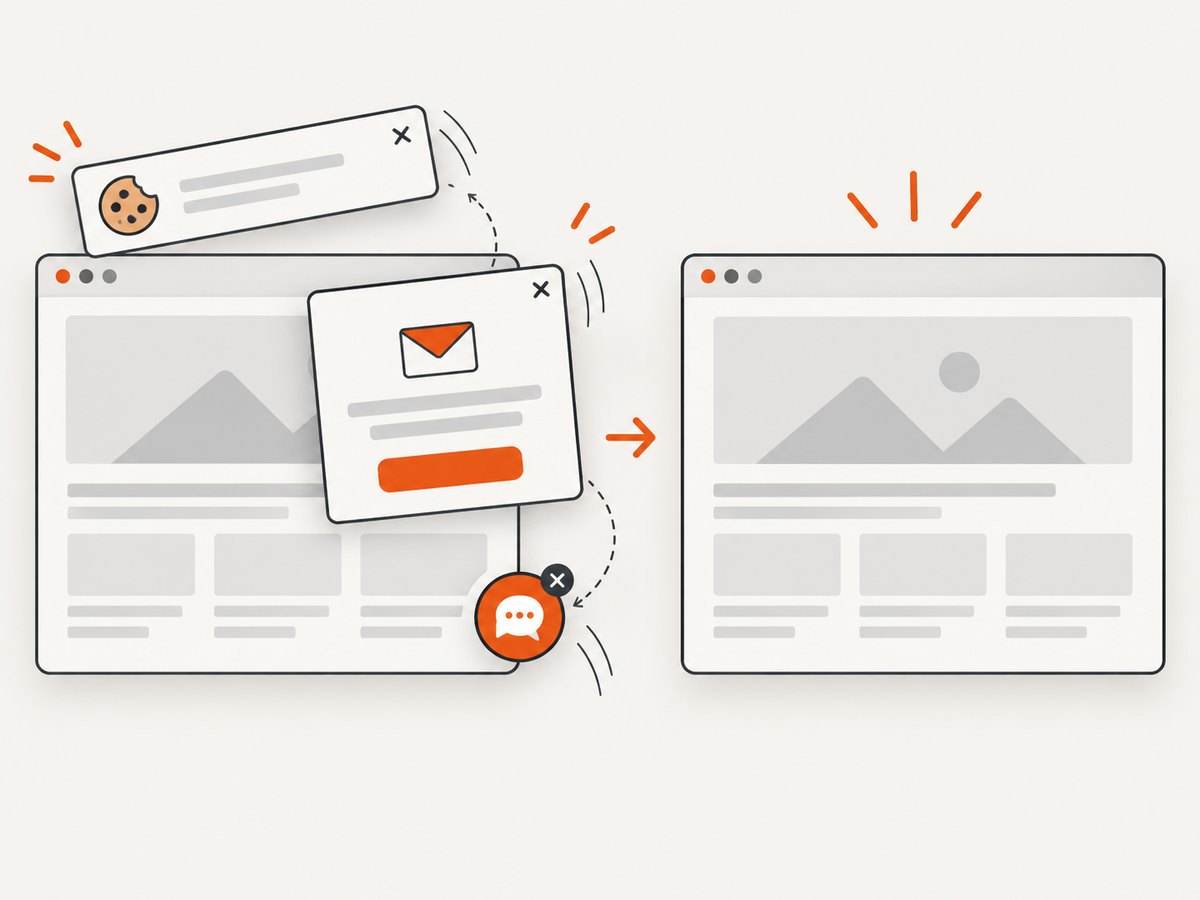
ScreenshotNeo provides a website screenshot API and MCP server. One GET request returns a PNG, JPEG, WebP, or PDF. Before capture it accepts cookie or consent banners like a visitor and removes more than 60 known consent platforms, newsletter popups, and chat widgets; each step can be turned off. Bot checks or CAPTCHAs, blank pages, timeouts, failed loads, and cache hits cost nothing, and the response identifies the result with X-Page-Verdict and X-Billed headers.
The PHP call is:
<?php

$target = 'https://stripe.com';
$query = http_build_query([
    'access_key' => getenv('SCREENSHOTNEO_API_KEY'),
    'url' => $target,
]);

$ch = curl_init('https://api.screenshotneo.com/v1/shot?' . $query);
curl_setopt_array($ch, [
    CURLOPT_RETURNTRANSFER => true,
    CURLOPT_TIMEOUT => 90,
]);
$bytes = curl_exec($ch);
$status = curl_getinfo($ch, CURLINFO_RESPONSE_CODE);
curl_close($ch);

if ($bytes === false || $status < 200 || $status >= 300) {
    throw new RuntimeException('Screenshot request failed');
}

file_put_contents(__DIR__ . '/shot.webp', $bytes);
ScreenshotNeo includes full-page capture with lazy images, CSS selector capture, dark mode, device presets or custom viewports, retina scale, PDF controls, custom CSS and JavaScript, clicks, waits, resource blocking, headers, cookies, user agents, authorization, timezone, geolocation, transparent backgrounds, resizing, TTL caching, signed image links, asynchronous jobs with signed webhooks, bulk capture for up to 100 URLs per call, a usage API, and an OpenAPI specification. Parameter names used by other screenshot APIs also work to make migration easier.
An MCP server exposes take_screenshot, get_page_info, and capture_pdf to Claude, Cursor, and other MCP clients, so an AI agent can request captures directly.
Plans include 1,000 shots per month free with no card; paid plans start at $5 for 3,000 shots. Create a free ScreenshotNeo account.
10. PHP screenshot API FAQ
Do I need Chrome installed on my PHP server?
No. A hosted screenshot API renders the page on provider infrastructure. Your PHP process only sends the request and handles the response.
Should I use an SDK or cURL?
Use the SDK when it covers the options and response format you need. Use cURL when you want fewer dependencies, a shared HTTP abstraction, or an endpoint without an official PHP package.
Why does one API return bytes while another returns a URL?
That is an API design choice. Confirm the response contract before writing storage code; binary responses can be saved directly, while URL responses require JSON parsing and a second download.
Can PHP capture pages behind login?
Only when the provider supports the required cookies, headers, or authorization and the account permits automated access. Never expose those credentials in client-side code or logs.
What is the safest way to let users submit URLs?
Validate schemes, restrict private network targets, limit redirects and request size, and use an allowlist when the feature does not need arbitrary destinations.
When should I choose PDF instead of an image?
Choose PDF for printable documents or archival output. Choose PNG, JPEG, or WebP for previews, thumbnails, visual tests, and web delivery.