How to Select Browser Fingerprints for Proxies
Choose proxy browser fingerprints that stay consistent across user agent, locale, graphics, WebRTC, TLS, and session state.

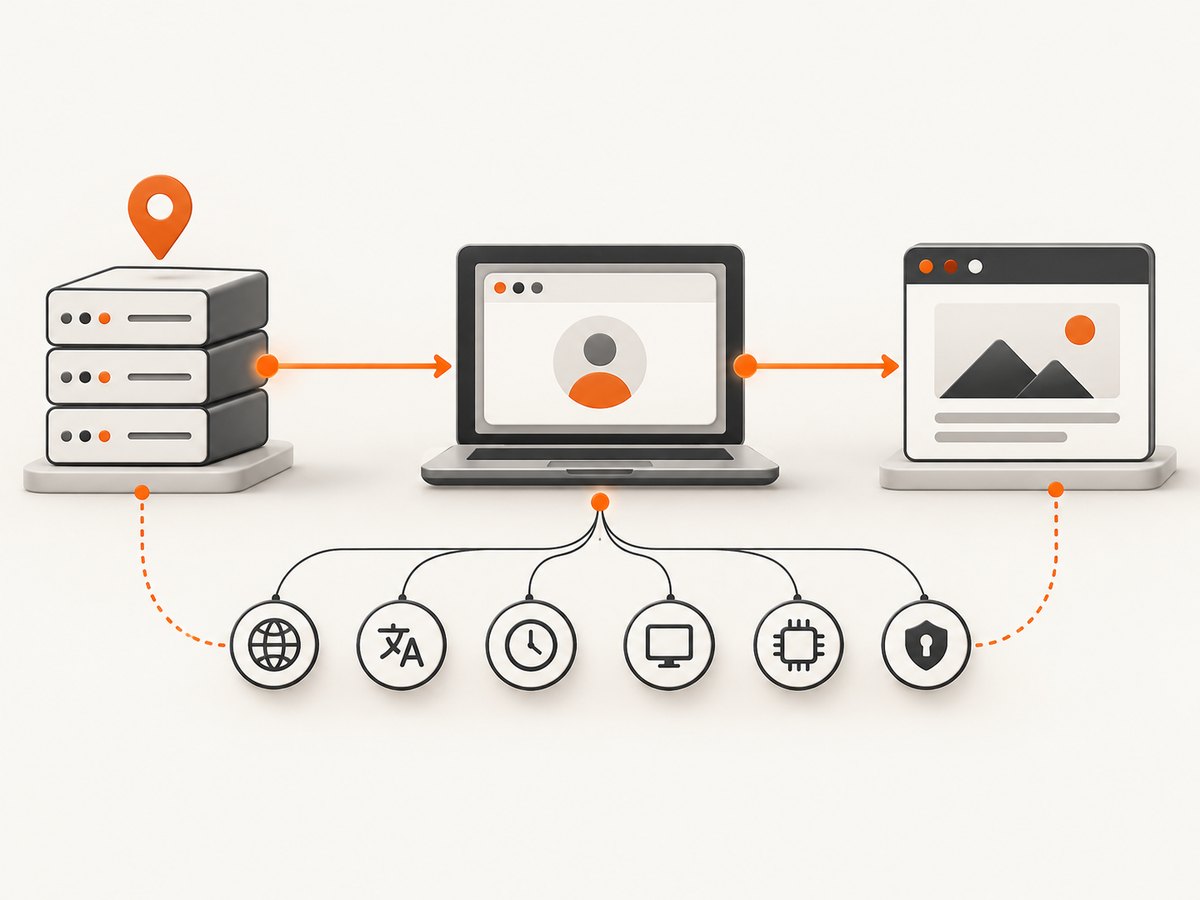
A proxy changes the network endpoint a website sees. It does not automatically make the browser look like a different device. A reliable browser fingerprint for a proxy is therefore a complete, internally consistent profile: browser and operating system, user agent, language, timezone, screen, fonts, graphics APIs, WebRTC behavior, TLS characteristics, cookies, and session history should agree with one another and with the proxy’s geography.
Choose the real browser and operating-system profile you can actually support, match its locale and timezone to the proxy region, keep rendering signals coherent, test WebRTC separately, and avoid randomizing every field on every request. Treat the proxy, browser profile, and session state as one system.
1. What a browser fingerprint contains
The W3C describes fingerprinting as the ability to identify or re-identify a user agent or device through observable configuration settings and characteristics. Its privacy guidance warns that exposing these settings can harm privacy (W3C fingerprinting guidance). A site can combine many small observations instead of relying on one identifier.
Common surfaces include:
- Network: exit IP, ASN, reverse DNS, TLS handshake, HTTP/2 behavior, and connection timing.
- Browser: user-agent string, Client Hints, feature support, version, automation signals, and header order.
- Device: operating-system conventions, screen dimensions, device pixel ratio, CPU and memory hints, touch support, and available APIs.
- Rendering: Canvas output, WebGL vendor and renderer, GPU behavior, font availability, color depth, and antialiasing.
- Locale: language headers, JavaScript locale, timezone, date and number formatting, and geolocation permission.
- Media and peer connections: WebRTC interfaces, codecs, microphones, cameras, and local address candidates.
- State: cookies, local storage, permissions, login history, cache, and interaction patterns.
WebKit lists installed fonts, the user agent, GPU and CPU details, IP address, and TLS connection among fingerprinting vectors (WebKit tracking prevention). Changing only the exit IP can therefore leave a distinctive or contradictory browser behind.
2. A practical selection framework
Step 1: Start with a supportable browser and OS
Pick a current, ordinary browser family that matches the runtime you control. If the process really runs Chromium on Linux, do not advertise a mobile Safari identity. A claimed platform should produce compatible APIs, font metrics, graphics behavior, viewport conventions, and input capabilities.
Use a small set of maintained profiles rather than hundreds of synthetic combinations. Record the browser version, launch flags, installed fonts, viewport, device scale factor, and enabled privacy settings so a session can be reproduced after a restart.
Step 2: Match proxy geography to locale signals
Country, region, language, timezone, and IP geolocation should tell the same story. For a proxy in Berlin, a German or English language preference and a Europe/Berlin timezone are plausible. A US exit IP combined with a Japanese timezone and a French-only language header may be individually valid but collectively unusual.
| Signal | What to align | Typical check |
|---|---|---|
| IP location | Country, region, ASN | Use the proxy’s actual egress location |
| HTTP language | Accept-Language |
Match the user’s chosen locale |
| JavaScript locale | navigator.language, Intl formats |
Use the same language and numbering conventions |
| Timezone | Intl.DateTimeFormat().resolvedOptions().timeZone |
Use a timezone plausible for the IP |
| Geolocation | Permission and coordinates | Supply only when the lawful workflow needs it |
Step 3: Keep rendering signals coherent
Canvas and WebGL values should fit the claimed operating system, browser, screen, and GPU. Fonts are especially revealing: a profile that claims one platform but exposes an unusual collection of fonts can stand out. Firefox documents privacy behavior that limits information from canvas reads and does not use non-standard locally installed fonts as part of its anti-fingerprinting design (Mozilla fingerprinting protection).
Do not add arbitrary noise to every canvas or WebGL call. Random output can break visual applications, invalidate legitimate sessions, and create a new, unstable signature. Prefer a stable privacy mode supplied by the browser, and verify that required sites still work.
Step 4: Treat WebRTC as a separate test
WebRTC can use peer-connection mechanisms that differ from ordinary HTTP requests. A proxy may cover page traffic while a browser exposes address candidates through a WebRTC path. RFC 8827 describes the WebRTC security architecture and browser-context requirements (RFC 8827).
Test the exact browser, proxy type, and launch configuration you will deploy. Decide whether the workflow needs WebRTC at all. If it does not, disable or restrict unnecessary peer-connection capability using supported browser policies. If it does, confirm that candidate gathering behaves as expected and that permissions are isolated per profile.
Step 5: Keep TLS and protocol behavior plausible
TLS versions, cipher preferences, HTTP/2 settings, header order, and connection reuse can correlate a request with a browser family. A browser profile should use its native networking stack whenever possible. Avoid replacing one browser’s user agent while retaining a different client’s TLS and HTTP behavior.
Step 6: Separate sessions operationally
Cookies, local storage, permissions, cache, and service workers can identify a returning session. Use a separate browser context or profile for each lawful account or customer boundary. Keep a profile stable for the duration of a task; frequent resets can look less like a person and can also destroy login state.
3. Do not randomize every attribute
Independent randomization creates impossible combinations: a mobile user agent with a desktop viewport, a Mac font set with a Linux graphics stack, or a timezone unrelated to the exit IP. Research on fingerprinting defenses emphasizes standardizing or selectively blocking attributes while preserving consistency and replay resistance (USENIX Security research).
Use this decision rule:
- Choose a real browser and OS baseline.
- Set the proxy region and locale together.
- Use the browser’s supported privacy protections for canvas, fonts, and storage.
- Change only values required by the workflow.
- Keep values stable within a session and revalidate after browser updates.
4. A reproducible Playwright profile
The following Node.js example creates a persistent Chromium profile with a proxy, coherent locale, timezone, viewport, and device scale factor. Use a proxy URL supplied by your provider; do not hard-code credentials in source control.
import { chromium } from 'playwright';

const browser = await chromium.launch({
  headless: true,
  proxy: {
    server: process.env.PROXY_SERVER,
    username: process.env.PROXY_USER,
    password: process.env.PROXY_PASSWORD
  }
});

const context = await browser.newContext({
  userAgent: 'Mozilla/5.0 (X11; Linux x86_64) AppleWebKit/537.36 (KHTML, like Gecko) Chrome/131.0.0.0 Safari/537.36',
  locale: 'en-GB',
  timezoneId: 'Europe/London',
  viewport: { width: 1440, height: 900 },
  deviceScaleFactor: 1,
  colorScheme: 'light'
});

const page = await context.newPage();
await page.goto('https://example.com', { waitUntil: 'networkidle' });
console.log(await page.evaluate(() => ({
  userAgent: navigator.userAgent,
  language: navigator.language,
  timezone: Intl.DateTimeFormat().resolvedOptions().timeZone,
  screen: [screen.width, screen.height, devicePixelRatio]
})));
await page.screenshot({ path: 'page.png', fullPage: true });
await browser.close();
For a persistent login, use a dedicated user-data directory and protect it like credentials. For isolated jobs, create a fresh context and close it after capture. Do not claim a device capability that the context does not provide.
5. Validation checklist before production
- Resolve the public IP from inside the browser environment.
- Compare IP country with language, timezone, and geolocation settings.
- Check the actual user agent and Client Hints received by the target.
- Inspect viewport, screen dimensions, pixel ratio, touch, and media capabilities.
- Run a canvas and WebGL compatibility check without injecting arbitrary noise.
- Test WebRTC candidate behavior with the same proxy and browser build.
- Verify TLS and HTTP/2 behavior through the real browser stack.
- Repeat after browser, operating-system, proxy, or extension updates.
6. Common errors and fixes
| Symptom | Likely cause | Fix |
|---|---|---|
| Site shows a different country | IP and locale or timezone disagree | Align proxy region, language, timezone, and any requested coordinates. |
| Login loops or frequent challenges | Unstable profile, cleared cookies, or contradictory signals | Keep one profile stable, preserve required storage, and remove unnecessary spoofing. |
| WebRTC reveals an address | Peer connections bypass the expected proxy path | Test candidate gathering, restrict WebRTC when unneeded, or use a supported proxy/browser configuration. |
| Canvas-heavy page breaks | Over-aggressive API blocking or randomization | Use browser-native privacy settings and allow the APIs required by the application. |
| Fonts render differently | Missing or extra fonts versus the claimed OS | Use a consistent runtime image and avoid installing unusual font collections. |
| Automation is detected | Unsupported launch flags, automation markers, or a non-native network stack | Use a normal supported browser build, remove unnecessary flags, and keep the profile coherent. Follow the site’s terms. |
| Behavior changes after an update | Browser privacy defaults or fingerprint surfaces changed | Re-run the validation checklist and pin or stage browser updates. |
7. Performance, reliability, and cost considerations
More isolation usually means more browser startup and storage overhead. Reuse a browser process for related jobs, but create separate contexts when cookies or permissions must not cross boundaries. Keep a bounded pool of contexts so memory use does not grow without limit.
Proxy distance affects latency and page load time. A geographically close exit can improve response time, while a region-specific exit may be required for lawful localization testing. Measure the complete workflow—DNS, TCP/TLS setup, page navigation, JavaScript execution, and any WebRTC checks—rather than judging the proxy from a single request.
Reliability improves when profiles are deterministic. Log the profile version, browser build, proxy region, locale, and failure stage. Retry transient network errors with a bounded backoff, but do not rotate fingerprints blindly on every failure. A new profile can invalidate a legitimate session and make diagnosis harder.
8. Or skip the browser setup
If your goal is a clean page image or PDF rather than interactive browser control, ScreenshotNeo provides a hosted capture API. It accepts one GET request and returns PNG, JPEG, WebP, or PDF. Cookie and consent banners are accepted before capture, then more than 60 known consent platforms, newsletter popups, and chat widgets are removed; each step can be turned off. Bot checks, blank pages, timeouts, failed loads, and cache hits are not billed, and the response reports the result in X-Page-Verdict and X-Billed headers.

See the ScreenshotNeo API documentation for all options, including full-page and element capture, device presets, dark mode, retina scale, custom CSS and JavaScript, click and wait actions, request blocking, headers, cookies, user agent, timezone, geolocation, caching, signed links, asynchronous jobs, bulk capture, usage, and PDF settings.
cURL
curl -G "https://api.screenshotneo.com/v1/shot" \
  -d access_key=YOUR_API_KEY \
  --data-urlencode url=https://stripe.com \
  -o shot.webp
Python
import requests

r = requests.get(
    "https://api.screenshotneo.com/v1/shot",
    params={"access_key": "YOUR_API_KEY", "url": "https://stripe.com"},
    timeout=90,
)
r.raise_for_status()
open("shot.webp", "wb").write(r.content)
Node.js
const q = new URLSearchParams({ access_key: 'YOUR_API_KEY', url: 'https://stripe.com' });
const res = await fetch(`https://api.screenshotneo.com/v1/shot?${q}`);
if (!res.ok) throw new Error(`HTTP ${res.status}`);
const data = Buffer.from(await res.arrayBuffer());
await import('node:fs/promises').then(fs => fs.writeFile('shot.webp', data));
An MCP server also exposes take_screenshot, get_page_info, and capture_pdf to Claude, Cursor, and other MCP clients. Plans include every feature: 1,000 shots per month free with no card, then Starter at $5 for 3,000, Growth at $15 for 15,000, Pro at $39 for 60,000, Scale at $99 for 250,000, and Business at $249 for 1,000,000; yearly billing gives two months free.
Start with 1,000 free screenshots a month—no card required.
9. FAQ
Will a proxy hide my browser fingerprint?
No. It changes the apparent network endpoint while browser, device, rendering, protocol, and session signals remain observable.
Should I randomize canvas, WebGL, fonts, and timezone?
Usually no. Randomize only when a supported privacy feature requires it; keep the resulting profile internally consistent and stable.
Is a residential proxy automatically safer?
No proxy category fixes contradictory browser signals or WebRTC behavior. Evaluate the complete proxy and browser system for your lawful use case.
How often should a profile change?
Keep it stable for a session and change it when the account, region, or workflow genuinely changes. Revalidate after browser and operating-system updates.
Can I use these techniques to bypass access controls?
Use browser profiles for authorized testing, localization, privacy, and automation. Follow the target site’s terms, applicable law, and account permissions.