Signed Certificate Timestamps and Certificate Transparency
Learn what Signed Certificate Timestamps mean, how Certificate Transparency works, and how to monitor certificates issued for your domain.
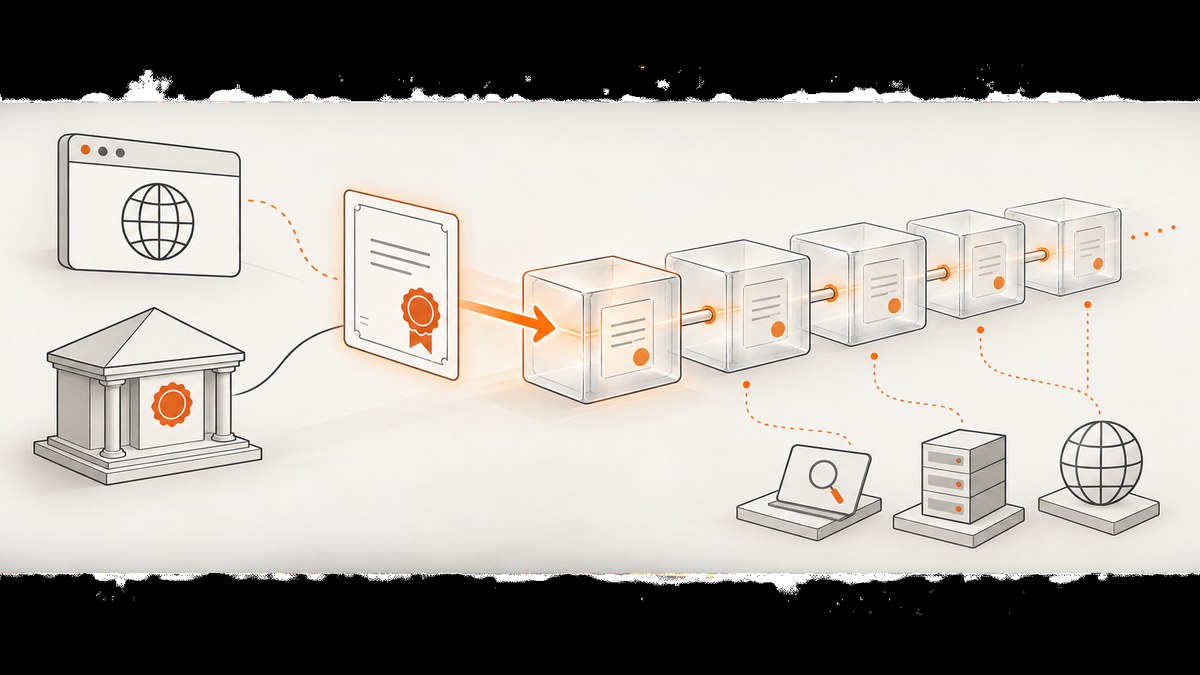
Direct answer: A Signed Certificate Timestamp (SCT) is a cryptographically signed promise from a Certificate Transparency (CT) log. When a log accepts a certificate or precertificate, it returns an SCT that commits to adding that entry to its append-only log within the log’s Maximum Merge Delay (MMD). Certificate Transparency makes publicly trusted TLS certificate issuance observable so browsers, domain owners, and independent monitors can look for unexpected certificates.
An SCT does not prove that the certificate is already included in a log, that a monitor inspected it, or that a bad certificate will be revoked. Inclusion is checked later with Merkle-tree proofs and signed tree heads. Most website operators do not configure CT themselves: their certificate authority (CA) or cloud TLS terminator normally obtains and presents SCTs.
What is a Signed Certificate Timestamp?
An SCT is a signed data structure containing the CT log identity, a timestamp, and a signature over the certificate data the log accepted. The signature is the log’s promise that it will incorporate the submission within its declared MMD. The browser can validate the signature and decide whether the SCT came from an acceptable log.
The SCT is therefore a commitment, not an inclusion proof. A monitor later asks the log for a signed tree head and verifies that the certificate appears in the tree. Auditors also compare tree heads from different times to detect equivocation or other inconsistent log behavior. RFC 9162 describes CT version 2.0 and its verification model; RFC 6962 specifies the earlier protocol version.
How does Certificate Transparency work?
- Issuance request: A CA validates control of a domain and prepares a certificate or precertificate.
- Log submission: The CA submits that object to one or more qualified CT logs.
- SCT response: Each accepting log returns an SCT with its identity, timestamp, and signature.
- Certificate delivery: The SCT is commonly embedded in the certificate. Other delivery methods exist, but Chrome recommends certificate-embedded SCTs for site operators.
- Publication: The log adds the entry to its append-only Merkle tree within its MMD.
- Auditing: Monitors search entries for domains they care about. Auditors verify inclusion and consistency proofs.
- Client policy: A browser or platform evaluates the SCT count, log operators, log states, delivery method, certificate lifetime, and other policy details.
CT increases visibility; it does not stop a CA from misissuing a certificate. Its value comes from making issuance publicly searchable and from giving domain owners a chance to detect and respond to certificates they did not request.

The four actors
| Actor | Responsibility |
|---|---|
| Certificate authority | Validates the request, submits certificates or precertificates, and returns SCTs. |
| Log operator | Accepts valid submissions, signs SCTs, publishes entries, and serves proofs. |
| Monitor | Searches logs for domains, organizations, or other patterns and raises alerts. |
| Client | Applies browser or platform policy to SCTs and trusted log states. |
CT 2.0, RFC 6962, and deployed browser policies
RFC 9162 documents CT version 2.0 and obsoletes RFC 6962. That protocol revision does not mean every browser policy or production log has migrated uniformly. Chrome and Apple documentation can still refer to RFC 6962 compliance for particular policy decisions.
Always identify the policy you are discussing. Apple evaluates SCT counts, delivery method, certificate lifetime, log approval, and operator diversity. Its published categories require at least two SCTs for certificates valid 180 days or less, from distinct logs, and three SCTs for certificates valid 181 to 398 days, also from distinct logs with limits on how many SCTs from one operator count. These are Apple’s requirements for relevant publicly trusted certificates, not a universal rule for every client.
Chrome uses log states such as Pending, Qualified, Usable, ReadOnly, Retired, and Rejected. Compliance depends on SCT count, log operator, and the log’s state at the relevant times. Check the current Chrome CT policy and log list before making an operational decision because those documents change.
Do site owners need to configure Certificate Transparency?
Usually, no. A publicly trusted CA normally obtains SCTs, and a managed TLS service may handle presentation. Check your certificate’s SCT extension and your TLS provider’s documentation rather than adding custom CT code to your application.
- Use a publicly trusted CA that supports the CT requirements of your target browsers.
- Prefer certificate-embedded SCTs when your CA offers that option.
- When Chrome reports a CT-required error, contact the CA’s support or sales team and provide the hostname, certificate, and browser error.
- Decide whether public hostname disclosure is acceptable. Names covered by publicly trusted certificates are visible in CT logs and can be searched.
How do I check certificates issued for my domain?
Use three layers: inspect the certificate currently served, search public CT data for historical issuance, and operate an alerting workflow.
1. Inspect the certificate and SCT extension with OpenSSL
Replace www.example.com with your hostname. The command prints the leaf certificate and negotiated TLS details. Look for an SCT list extension in the decoded certificate.
openssl s_client -connect www.example.com:443 -servername www.example.com -showcerts </dev/null 2>/dev/null \
  | openssl x509 -noout -text
Also verify the chain and expiry:
openssl s_client -connect www.example.com:443 -servername www.example.com -verify_return_error </dev/nullA missing SCT in the served certificate is not automatically an outage: a client may receive SCTs through another supported delivery method, and policies differ. Compare the result with the CA’s issuance record and the browser policy that matters to you.
2. Inspect a certificate programmatically with Python
import socket
import ssl
from datetime import datetime, timezone

host = "www.example.com"
context = ssl.create_default_context()
with socket.create_connection((host, 443), timeout=10) as raw:
    with context.wrap_socket(raw, server_hostname=host) as tls:
        cert = tls.getpeercert()
        print("TLS version:", tls.version())
        print("Cipher:", tls.cipher())
        print("Subject:", cert.get("subject"))
        print("Issuer:", cert.get("issuer"))
        print("Not before:", cert.get("notBefore"))
        print("Not after:", cert.get("notAfter"))
        expires = datetime.strptime(cert["notAfter"], "%b %d %H:%M:%S %Y %Z")
        expires = expires.replace(tzinfo=timezone.utc)
        print("Days remaining:", (expires - datetime.now(timezone.utc)).days)
The standard library exposes certificate identity and validity but does not decode every SCT extension. Use OpenSSL or a dedicated X.509 library when you need extension-level inspection.
3. Inspect with Node.js
import tls from "node:tls";

const host = "www.example.com";
const socket = tls.connect({ host, port: 443, servername: host }, () => {
  const cert = socket.getPeerCertificate(true);
  console.log({
    protocol: socket.getProtocol(),
    cipher: socket.getCipher(),
    subject: cert.subject,
    issuer: cert.issuer,
    valid_from: cert.valid_from,
    valid_to: cert.valid_to,
    fingerprint256: cert.fingerprint256
  });
  socket.end();
});
socket.setTimeout(10000, () => socket.destroy(new Error("TLS timeout")));
socket.on("error", console.error);
4. Search and monitor issuance
A one-time search can reveal certificates and precertificates that are not currently served by your site. For ongoing protection, choose a CT monitor that covers your domains and certificate forms, then configure alerts. The Certificate Transparency Community Site maintains monitor information, and Cloudflare documents an opt-in Certificate Transparency Monitoring feature that alerts when a certificate covering a monitored domain is issued and added to a public log.
Build a response runbook:
- Confirm the certificate names, issuer, validity interval, and whether the issuance was expected.
- Check deployment records and certificate-management systems for an authorized request.
- If issuance is suspicious, contact the CA immediately and request investigation or revocation.
- Rotate affected keys and certificates when compromise is plausible.
- Record the incident, timestamps, log entries, and actions taken.
Or skip the browser setup
If you need a visual record of a certificate transparency page, incident report, or internal dashboard, ScreenshotNeo captures a URL with one GET request. Cookie banners, newsletter popups, and chat widgets are removed before the shot. Bot checks, blank pages, failed loads, timeouts, and cache hits are not billed, and response headers identify the page verdict and billing status. Its MCP server provides take_screenshot, get_page_info, and capture_pdf tools for Claude, Cursor, and other MCP clients.

See the ScreenshotNeo API documentation for all options. This example captures a page as WebP:
curl -G "https://api.screenshotneo.com/v1/shot" -d access_key=YOUR_API_KEY --data-urlencode url=https://example.com -o shot.webpimport requests
r = requests.get("https://api.screenshotneo.com/v1/shot", params={"access_key": "YOUR_API_KEY", "url": "https://example.com"}, timeout=90)
open("shot.webp", "wb").write(r.content)const q = new URLSearchParams({ access_key: 'YOUR_API_KEY', url: 'https://example.com' });
const res = await fetch(`https://api.screenshotneo.com/v1/shot?${q}`);Every feature is available on every plan. You can capture full pages with lazy images loaded, select one element by CSS selector, set a device or viewport, use dark mode and retina scale, inject CSS or JavaScript, wait for a selector, delay, or network idle, provide headers and cookies, block resource types, cache with a chosen TTL, create PDFs, submit asynchronous jobs, and capture up to 100 URLs per bulk call. The free plan includes 1,000 screenshots per month with no card; paid plans start at $5 for 3,000. Create a free ScreenshotNeo account.
Troubleshooting
| Symptom | Likely cause | Fix |
|---|---|---|
| Browser reports a CT-required error | The certificate lacks acceptable SCTs or the log state/count fails that browser’s policy. | Contact the CA, verify the served chain and SCT delivery, and check the current browser policy. |
| SCT appears in one tool but not another | Tools inspect different delivery paths or only the leaf certificate. | Compare certificate-embedded SCTs, TLS handshake data, and the CA record. |
| Certificate is absent from a search | Log publication may still be within MMD, the search scope may be incomplete, or the name may be encoded differently. | Retry after the MMD, search parent and wildcard names, and inspect precertificates. |
| Unexpected certificate alert | Unauthorized issuance, forgotten automation, or a delegated hostname. | Validate ownership internally, contact the CA, and follow your incident runbook. |
| Hostname disclosure concern | Public CT logs expose names in publicly trusted certificates. | Do not place secrets in certificate names; use private PKI where appropriate and permitted. |
| OpenSSL handshake fails | SNI is missing, the server requires a newer protocol, or the chain is misconfigured. | Include -servername, update OpenSSL, and test the complete chain from another network. |
Performance, reliability, and cost considerations
CT adds a small amount of issuance and connection metadata, but the operational cost is mainly monitoring and response. Keep searches narrow by registering the exact domains and relevant parent domains. Alert routing should be reliable enough for on-call response; a monitor that only stores results without notifications is not an incident-control system.
For certificate deployment, use automation that renews before expiry and records the CA, certificate serial number, SANs, SCTs, and deployment time. During an outage, distinguish a CT policy failure from ordinary TLS errors such as an expired certificate, an incomplete chain, a name mismatch, or a clock problem.
When generating visual evidence with ScreenshotNeo, use caching for repeated pages, asynchronous jobs for long captures, and signed webhooks for completion. A clean page verdict avoids paying for bot checks, blank pages, failed loads, and timeouts, while the X-Page-Verdict and X-Billed headers make billing behavior visible.
FAQ
Is an SCT the same as a certificate?
No. The certificate binds a public key to names. The SCT is a log’s signed commitment to publish that certificate or precertificate.
Does CT revoke fraudulent certificates?
No. CT makes issuance observable. Revocation still requires the CA and the domain owner to investigate and act.
Can I keep a public hostname out of CT?
Generally, no. Publicly trusted certificates expose covered names through CT. Consider private PKI for internal names where your clients support it.
How many SCTs does every website need?
There is no single universal number. Requirements depend on the client policy, certificate lifetime, log operators, log approval state, and SCT delivery method.
Should I run my own CT log?
Most site operators should use established logs through their CA and focus on monitoring. Operating a qualified public log requires meeting protocol, availability, merge-delay, append-only, and consistency requirements.
Can ScreenshotNeo monitor certificate issuance?
ScreenshotNeo is a website screenshot API and MCP server. It can capture a monitoring page or report for visual records; use a CT monitoring service for issuance alerts and certificate analysis.


