How to Store Proxy Credentials Securely
Store proxy credentials in a managed secret vault, retrieve them at runtime with least privilege, and rotate them quickly after exposure.

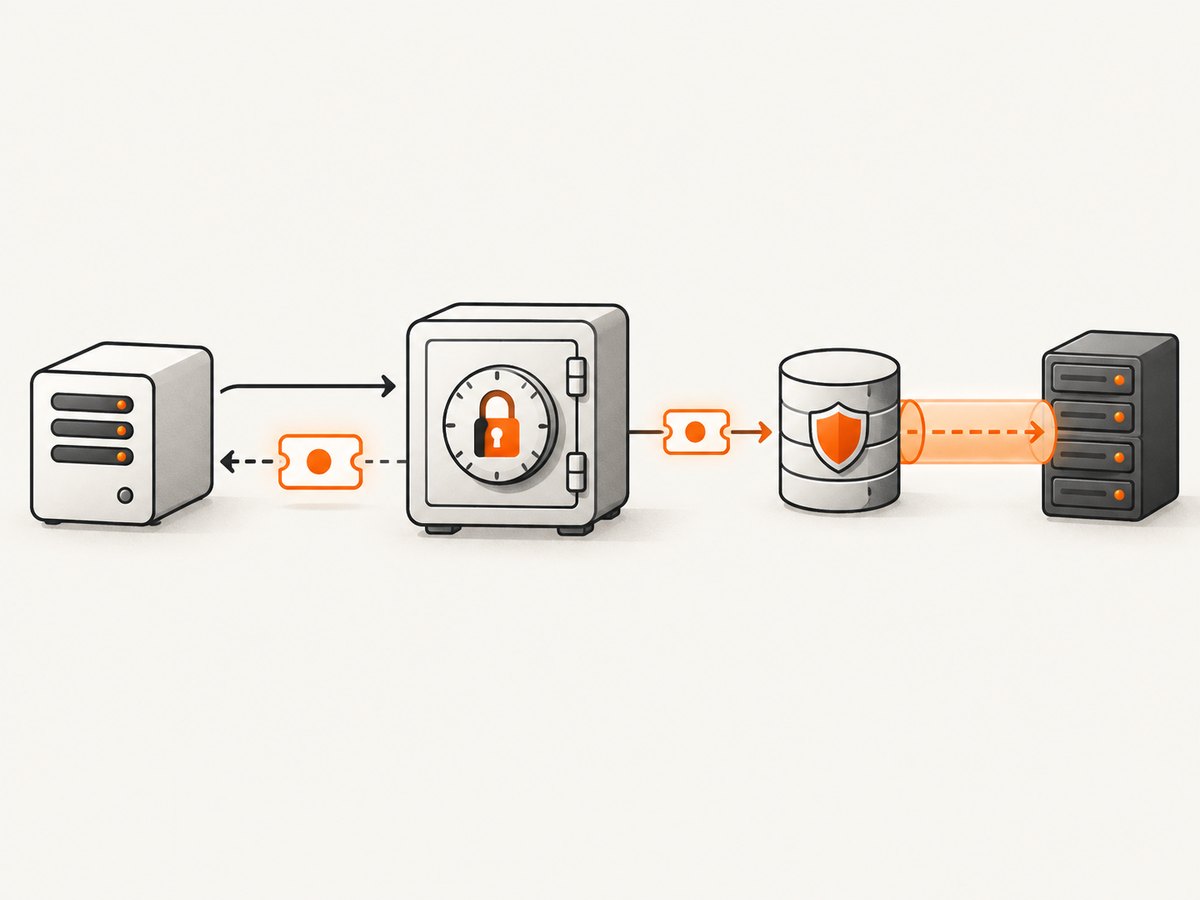
Direct answer: Store proxy usernames, passwords, API tokens, and client keys as application secrets in a centralized secrets manager or platform key vault. Retrieve them only at runtime through a least-privilege workload identity. Keep them out of source code, Git, container images, URLs, tickets, shell history, and logs. Encrypt the vault and transport channel, audit access, rotate credentials, and revoke them quickly after suspected exposure.
A proxy credential is an application secret even when it is used only for outbound traffic. An authenticated proxy URL can expose the same secret through command history, access logs, traces, referrer fields, or exception messages.
1. Choose the right storage location
Use a managed secret store or protected key vault whenever your deployment supports one. Common choices include AWS Secrets Manager, Azure Key Vault, Google Secret Manager, and HashiCorp Vault. OWASP describes centralization, authorization, accounting, metadata, rotation, and incident response as core secret-lifecycle capabilities in its Secrets Management Cheat Sheet.
| Storage approach | Use it when | Main risks and controls |
|---|---|---|
| Managed secret manager | Cloud workloads or managed CI/CD | Use narrowly scoped IAM, audit reads, automatic rotation where supported, and regional recovery planning. |
| Self-hosted Vault | Multi-cloud or on-premises deployments needing one control plane | Protect the Vault operators, seal and recovery keys, availability, backups, and upgrade process. |
| Native secret mount | Containers or orchestrators that support ephemeral secret files | Restrict file permissions, avoid copying into images, and prevent accidental inclusion in support bundles. |
| Runtime environment variable | Short-lived processes when no vault integration exists | Acceptable fallback, not a vault. Process inspection, crash dumps, diagnostics, and logs can expose values. |
Keep the proxy endpoint separate from the secret value when practical. Store metadata with the record: owner, purpose, consumer, environment, creation time, last rotation, expiration, and emergency contact.
2. Use one secret per workload and environment
- Give each service or job its own proxy credential.
- Separate development, staging, and production credentials.
- Scope the workload identity to read only the required secret.
- Use separate credentials for unrelated teams and jobs.
- Prefer short-lived or dynamically issued credentials when the proxy provider supports them.
Sharing one password across jobs makes revocation disruptive and makes audit records ambiguous. A per-workload secret lets you disable one consumer without taking down every other process.
3. Store a structured secret record
A structured record keeps connection details clear without putting credentials in a URL:
{
  "host": "proxy.example.net",
  "port": 8443,
  "username": "service-a",
  "password": "stored-in-the-vault",
  "scheme": "https",
  "expires_at": "2026-12-31T00:00:00Z"
}
The endpoint can be ordinary configuration; the username and password should come from the secret store. If the provider supplies a token or client certificate, store that material as a secret and keep its metadata beside it.
4. Retrieve credentials at runtime
The application identity should authenticate to the vault through the platform’s workload identity, instance role, service account, or equivalent mechanism. Fetch the value during startup or immediately before use, depending on rotation requirements. Do not bake it into a container image or write it to a permanent filesystem.
Python example with an environment-injected fallback
import os
import requests

# Prefer a native SDK call to your secret manager here.
proxy_user = os.environ["PROXY_USERNAME"]
proxy_password = os.environ["PROXY_PASSWORD"]
proxy_host = os.environ["PROXY_HOST"]
proxy_port = os.environ.get("PROXY_PORT", "8443")

proxies = {
    "http": f"http://{proxy_host}:{proxy_port}",
    "https": f"http://{proxy_host}:{proxy_port}",
}

auth = (proxy_user, proxy_password)
response = requests.get("https://example.com", proxies=proxies, auth=auth, timeout=(10, 60))
response.raise_for_status()
print(response.status_code)
For production, replace the environment lookup with your vault SDK and keep the same rule: never print proxy_user, proxy_password, the authorization header, or an authenticated URL.
Node.js example
const proxyHost = process.env.PROXY_HOST;
const proxyPort = process.env.PROXY_PORT || '8443';
const proxyUser = process.env.PROXY_USERNAME;
const proxyPassword = process.env.PROXY_PASSWORD;

if (!proxyHost || !proxyUser || !proxyPassword) {
  throw new Error('Proxy configuration is incomplete');
}

// Use an HTTPS proxy agent supplied by your HTTP client library.
// Pass username and password through the agent's credential fields.
const proxyUrl = `http://${encodeURIComponent(proxyUser)}:${encodeURIComponent(proxyPassword)}@${proxyHost}:${proxyPort}`;
console.log(`Proxy configured for ${proxyHost}:${proxyPort}`); // no credentials

// Configure your chosen client with proxyUrl without logging it.
URL encoding prevents special characters from breaking parsing, but an authenticated URL remains sensitive. Prefer a library’s separate host, port, username, and password fields when available.
cURL example without putting the password in the command line
read -r PROXY_PASSWORD
export PROXY_PASSWORD
curl --proxy "https://proxy.example.net:8443" \
  --proxy-user "service-a:${PROXY_PASSWORD}" \
  --fail --silent --show-error https://example.com
Shell history and process listings can still reveal command arguments. For automated jobs, use the client library or a secret-file mechanism provided by your orchestrator, with restrictive permissions and ephemeral storage.
5. Environment variables, Docker, and CI
Environment variables can be a workable fallback for a short-lived process when the orchestrator injects them at runtime. They are not a vault. OWASP warns that variables may be visible through process inspection, diagnostic pages, or system dumps and advises against hardcoding secrets in Docker ENV or ARG instructions.
Do not do this
ENV PROXY_PASSWORD=super-secret
ARG PROXY_PASSWORD=super-secret
Those values can persist in image history, build logs, registries, or layer metadata. Do not commit .env files, configuration templates containing real values, Kubernetes manifests with inline passwords, or CI variables echoed by debug steps.
Safer container pattern
- Grant the container identity read access to one secret.
- Mount the value through the orchestrator’s native secret facility or fetch it directly from the vault.
- Use a temporary, permission-restricted file only when the client requires a file.
- Delete the file when the process exits and prevent it from entering support bundles.
- Disable shell tracing and redact CI command output.
6. Protect encryption and access control
Encrypt secrets at rest with the vault’s managed key service or a vetted authenticated-encryption design. Keep key-management authority appropriately separated from the protected data, as recommended by OWASP cryptographic-storage guidance.
Use least-privilege IAM:
- The deployment identity can read only the named proxy secret.
- Production identities cannot read development secrets, and vice versa.
- Human operators use separate administrative identities protected with hardware MFA.
- Every create, read, rotate, and delete operation is recorded.
- Break-glass access is time-limited and reviewed afterward.
7. Send credentials safely to the proxy
Use TLS for the connection carrying proxy credentials and for subsequent proxied traffic whenever the proxy supports it. HTTP authentication challenges can return 407 Proxy Authentication Required; RFC 7235 defines this authentication framework in its HTTP Authentication specification.
Pass credentials through the client’s proxy-authentication fields or a protected credential callback. Avoid cleartext URLs such as http://user:password@proxy.example. Validate that tracing, metrics, exception messages, packet captures, and HTTP debug output redact:
- Proxy usernames and passwords
- Authorization and Proxy-Authorization headers
- Authenticated URLs
- Vault access tokens and secret identifiers when they reveal sensitive context
8. Consider alternatives to static passwords
For internal service-to-service paths, workload identity and proxy-mediated mutual TLS can reduce reliance on static passwords. OWASP recommends authenticating external actors at a gateway and using workload identity with mTLS for internal calls. This does not automatically replace a vendor proxy password; the proxy must support the protocol and identity model you choose.
9. Rotate and revoke credentials
- Issue a new credential in the proxy provider’s console or API.
- Write it to the secret manager as a new version.
- Refresh consumers through the normal runtime path or redeploy them.
- Verify successful proxy authentication with redacted logs.
- Revoke the old credential after all consumers have moved.
- Record the change and its operator identity.
Rotate immediately after a suspected leak. Search source control, CI logs, shell history, URLs, traces, ticket attachments, container layers, and cached artifacts. Remove exposed copies, invalidate the credential, and review vault, proxy, and application logs for unauthorized use.
10. Troubleshooting common failures
| Symptom | Likely cause | Fix |
|---|---|---|
| HTTP 407 | Missing, incorrect, expired, or unaccepted proxy credentials | Check the secret version, username format, proxy policy, and clock. Rotate if exposure is possible. |
| Authentication works locally but not in production | The production identity cannot read the secret or receives a different version | Inspect IAM decisions and secret-version selection; do not copy the value into production configuration. |
| Password contains special characters and parsing fails | Credential was embedded in a URL without encoding | Use separate client fields, or apply correct URL encoding while keeping the URL out of logs. |
| Secret appears in CI output | Shell tracing, debug logging, or an exception printed configuration | Disable tracing, redact fields, remove the artifact, and rotate the exposed credential. |
| Container has an old password after rotation | Secret was loaded only at startup or baked into an image | Restart or refresh the workload and move retrieval to the runtime secret path. |
| Intermittent proxy failures | Expired short-lived credential, proxy pool limits, or connection timeout | Refresh just before use, set bounded connect/read timeouts, and record status codes without secrets. |
| Vault outage prevents startup | Application has no availability strategy for secret retrieval | Use the vault’s documented availability and recovery features; cache only an encrypted, short-lived value when your threat model permits it. |
11. Performance, reliability, and cost
- Performance: Fetch once per process or cache for a short, defined lifetime instead of calling the vault for every request. Refresh before expiry and use connection pooling to the proxy.
- Reliability: Set separate connect and read timeouts, retry only idempotent operations, and avoid retry storms. Treat a vault read failure differently from a proxy authentication failure.
- Auditability: Keep secret reads and rotations in centralized logs with request IDs, workload identity, and timestamps, while excluding values.
- Cost: Managed vault pricing usually depends on stored versions, API operations, and replication. Compare those charges with the operational cost of running Vault, backups, upgrades, and on-call coverage.
- Recovery: Document how to restore vault access, rotate a compromised key, and redeploy consumers. Test the procedure without printing the secret.
12. Checklist
- Secret is in a managed vault or protected key store.
- Proxy endpoint is separate from username and password.
- No credentials exist in source, Git, Docker layers, URLs, tickets, or logs.
- Workload identity has read-only access to one environment’s secret.
- Transport to the proxy uses TLS where supported.
- Vault reads, rotations, and revocations are audited.
- Credentials have an owner, expiration or rotation schedule, and emergency contact.
- Leak response includes revocation, artifact cleanup, log review, and a prevention change.

Or skip the browser setup
If you are storing proxy credentials because a job must capture pages, ScreenshotNeo can handle the browser capture through one API request. Keep your ScreenshotNeo access key in the same secret manager pattern described above. The API accepts a URL and returns PNG, JPEG, WebP, or PDF; its options include custom headers, cookies, user agents, and Authorization values.
See the ScreenshotNeo API documentation for the complete parameter list.
curl -G "https://api.screenshotneo.com/v1/shot" -d access_key=YOUR_API_KEY --data-urlencode url=https://example.com -o shot.webpimport requests
r = requests.get("https://api.screenshotneo.com/v1/shot", params={"access_key": "YOUR_API_KEY", "url": "https://example.com"}, timeout=90)
open("shot.webp", "wb").write(r.content)const q = new URLSearchParams({ access_key: 'YOUR_API_KEY', url: 'https://example.com' });
const res = await fetch(`https://api.screenshotneo.com/v1/shot?${q}`);Cookie banners, newsletter popups, and chat widgets are removed before the shot. Bot checks, blank pages, failed loads, timeouts, and cache hits are not billed, and response headers identify the page verdict and billing status. ScreenshotNeo also provides an MCP server so AI agents can take screenshots, inspect pages, and capture PDFs. The free plan includes 1,000 screenshots a month with no card; paid plans start at $5 for 3,000. Create a free ScreenshotNeo account.
FAQ
Are environment variables safe for proxy passwords?
They are safer than committing a password to source, but they are not a vault. Process inspection, dumps, diagnostics, and logs can expose them. Prefer runtime vault retrieval or native secret mounts.
Should the proxy password be encrypted in my application database?
Prefer a dedicated secret manager. If a database is unavoidable, use authenticated encryption, strict access controls, separated key management, auditing, and a tested rotation process.
How quickly should I rotate a leaked proxy credential?
Immediately. Revoke or replace it at the provider, update the vault, refresh consumers, search for copies, and review proxy and application logs.
Can hardware MFA store the proxy secret?
A hardware security key protects the vault administrator or operator account. It is a supporting control, not a replacement for storing the proxy secret in a managed vault.
Can workload identity remove proxy passwords entirely?
Only when the proxy supports workload identity, certificates, or mTLS. Otherwise, keep the vendor credential in the vault and protect its lifecycle.


