How to Stream Wkhtmltoimage Output from a Next.js API Route
Stream wkhtmltoimage output from Next.js with App Router and Pages Router examples, subprocess safety, buffering fixes, troubleshooting, and a hosted alternative.
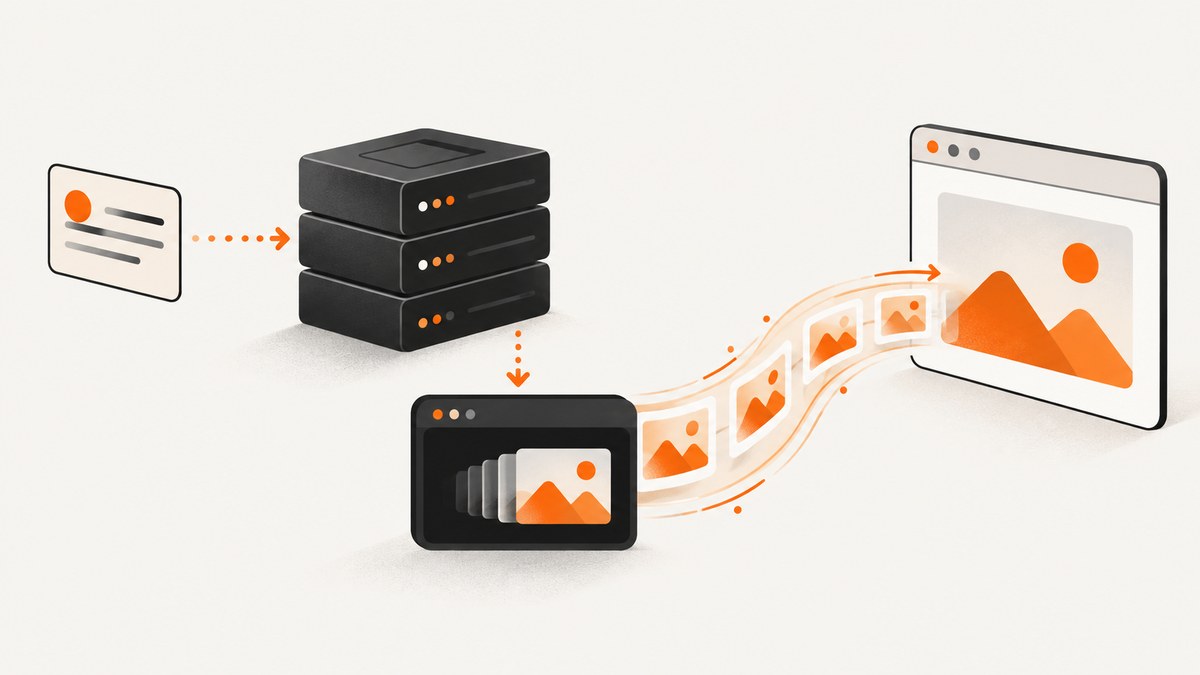
Use a Node.js route and stream the renderer process. In the App Router, launch wkhtmltoimage with Node’s asynchronous child_process.spawn(), expose its stdout as a Web ReadableStream, and return that stream in a Response. In the Pages Router, pipe the child process output through res.write() and finish with res.end(). Do not use a synchronous child-process call or collect the complete image in a Buffer.
The important caveat is the output contract: verify that the exact wkhtmltoimage binary installed in your deployment writes the requested format to stdout. Some builds expect an output filename. If yours writes a file, stream that file with a bounded, cleanup-safe implementation instead. Also verify that your hosting platform, reverse proxy, load balancer, and CDN do not buffer the response.
What the request path looks like
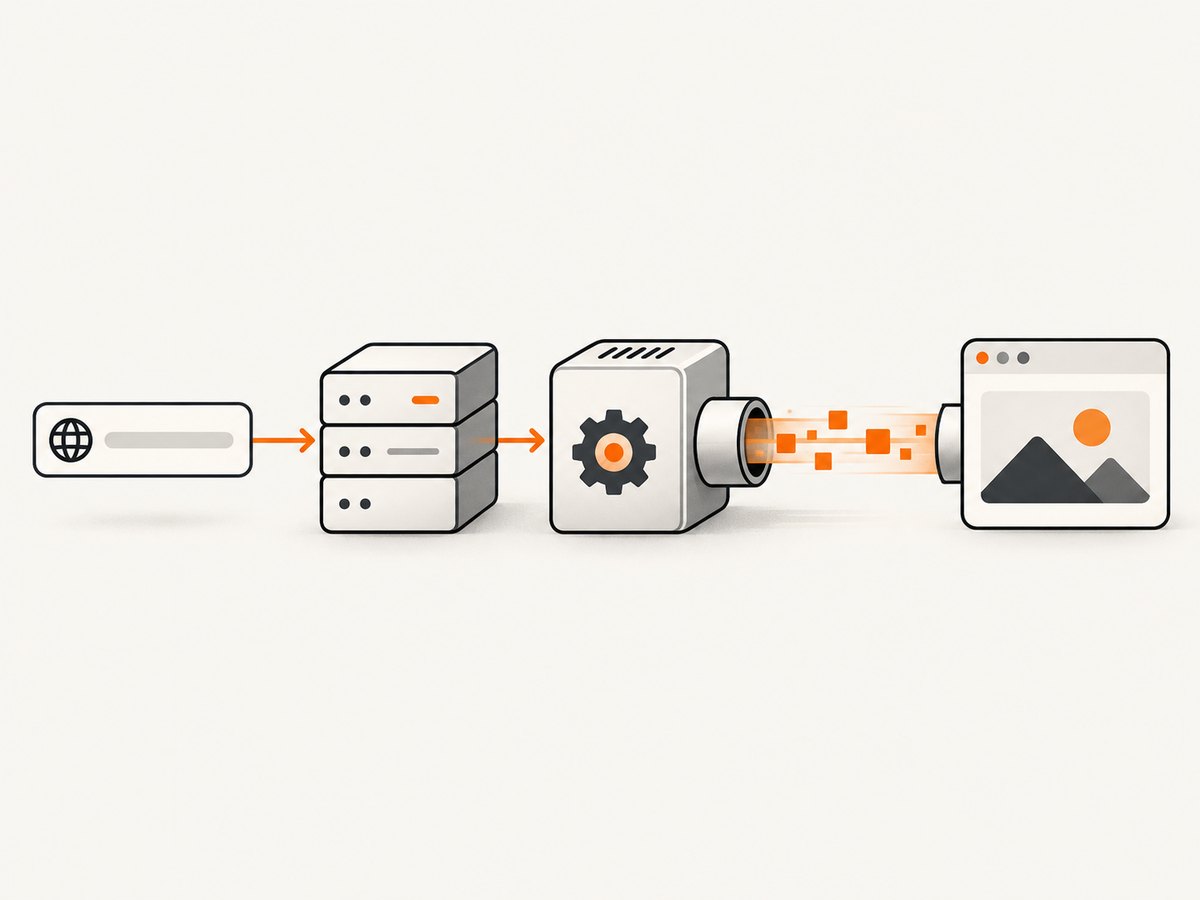
- The client sends a URL and optional rendering parameters to your Next.js endpoint.
- The route validates the input and chooses a fixed executable path and argument list.
spawn()startswkhtmltoimagewithout invoking a shell.- Image bytes flow from the child process to the HTTP response as they become available.
- The route observes stderr and the exit code, and stops the process if the client disconnects.
Next.js Route Handlers use Web Request and Response APIs and support streaming bodies; Pages API Routes expose the Node response object for chunked writes. See the Route Handler reference and API Routes documentation.
Prerequisites and renderer verification
- Run the route with
export const runtime = 'nodejs'. An Edge runtime cannot launch a native child process. - Install a compatible
wkhtmltoimageexecutable in the server image and include its Qt libraries, fonts, and other dependencies. - Record the executable path in configuration, such as
WKHTMLTOIMAGE_BIN=/usr/local/bin/wkhtmltoimage, instead of accepting it from a request. - Confirm the binary’s version and stdout behavior in the same operating-system image used in production.
WKHTMLTOIMAGE_BIN=/usr/local/bin/wkhtmltoimage
wkhtmltoimage --version
# Test the exact output form used by your route:
wkhtmltoimage --format webp https://example.com - > /tmp/example.webp
file /tmp/example.webp
The Debian wkhtmltoimage manual documents input, output, viewport, JavaScript, cookie, header, delay, and loading options. Distribution packages differ, so treat the manual as a guide and validate your installed build.
App Router: a streaming Route Handler
Create app/api/image/route.ts. This example accepts a JSON body, validates a public HTTP(S) URL, starts the renderer, and converts the Node stdout stream to a Web stream.
import { spawn } from 'node:child_process';
import { Readable } from 'node:stream';

export const runtime = 'nodejs';

const executable = process.env.WKHTMLTOIMAGE_BIN ?? '/usr/local/bin/wkhtmltoimage';
const maxUrlLength = 2_048;
const renderTimeoutMs = 45_000;

function validTarget(value: unknown): value is string {
  if (typeof value !== 'string' || value.length === 0 || value.length > maxUrlLength) return false;
  try {
    const url = new URL(value);
    return url.protocol === 'http:' || url.protocol === 'https:';
  } catch {
    return false;
  }
}

export async function POST(request: Request) {
  let input: unknown;
  try {
    input = await request.json();
  } catch {
    return Response.json({ error: 'Request body must be valid JSON' }, { status: 400 });
  }

  const url = (input as { url?: unknown })?.url;
  if (!validTarget(url)) {
    return Response.json({ error: 'url must be an http or https URL' }, { status: 400 });
  }

  // Keep arguments as an array. Never interpolate request data into a shell command.
  const args = [
    '--quiet',
    '--format', 'webp',
    '--width', '1280',
    '--quality', '85',
    url,
    '-'
  ];

  const child = spawn(executable, args, {
    stdio: ['ignore', 'pipe', 'pipe'],
    shell: false,
    windowsHide: true
  });

  let stderr = '';
  child.stderr.setEncoding('utf8');
  child.stderr.on('data', (chunk: string) => {
    // Keep diagnostics bounded; never put stderr into the image body.
    stderr = (stderr + chunk).slice(-8_192);
  });

  const timeout = setTimeout(() => child.kill('SIGKILL'), renderTimeoutMs);
  timeout.unref();

  const body = Readable.toWeb(child.stdout) as ReadableStream;
  let settled = false;

  const result = new Promise<void>((resolve, reject) => {
    child.once('error', reject);
    child.once('close', (code, signal) => {
      settled = true;
      clearTimeout(timeout);
      if (code === 0) resolve();
      else reject(new Error(`wkhtmltoimage failed: code=${code}, signal=${signal}, stderr=${stderr}`));
    });
  });

  // Abort the process if the consumer cancels the stream.
  const stream = new ReadableStream<Uint8Array>({
    start(controller) {
      const reader = body.getReader();
      const pump = (): void => {
        reader.read().then(({ done, value }) => {
          if (done) {
            result.then(() => controller.close(), (error) => controller.error(error));
            return;
          }
          controller.enqueue(value);
          pump();
        }).catch(controller.error.bind(controller));
      };
      pump();
    },
    cancel() {
      if (!settled) child.kill('SIGTERM');
    }
  });

  return new Response(stream, {
    headers: {
      'Content-Type': 'image/webp',
      'Content-Disposition': 'inline; filename="capture.webp"',
      'Cache-Control': 'no-store',
      'X-Content-Type-Options': 'nosniff'
    }
  });
}
This pattern deliberately keeps stderr separate and caps its retained size. A process can exit after the response has started, so an HTTP status cannot always be changed after bytes have been sent. For production, consider rendering into a temporary file first when you must know the exit status before sending headers; that adds disk I/O but gives a clean failure response.
Request options you can expose safely
Map a small allowlist of application options to fixed command-line flags. Typical choices include:
| Need | Typical flag or design | Safety note |
|---|---|---|
| Viewport | --width, --height |
Clamp both values to prevent excessive memory use. |
| Full-page content | Renderer height or a page-specific layout | Very tall pages can produce huge images; set a maximum. |
| JavaScript wait | --javascript-delay |
Use a maximum delay and a process timeout. |
| Images and CSS | --no-images, --user-style-sheet |
Only permit server-side files you control. |
| Cookies and headers | --cookie, --custom-header |
Never accept credentials from arbitrary callers without authentication. |
| Local files | Local-file access switches | Disable unrestricted local access unless the use case requires it. |
Do not pass a complete command string to exec(). Node’s child process documentation explains that spawn() exposes piped stdout and stderr streams, while synchronous methods block the event loop.
Pages Router: stream with res.write()
For a legacy Pages Router endpoint at pages/api/image.ts, use the Node response object. The same validation, argument allowlist, timeout, and cancellation rules apply.
import type { NextApiRequest, NextApiResponse } from 'next';
import { spawn } from 'node:child_process';

const bin = process.env.WKHTMLTOIMAGE_BIN ?? '/usr/local/bin/wkhtmltoimage';

export default function handler(req: NextApiRequest, res: NextApiResponse) {
  if (req.method !== 'GET') {
    res.setHeader('Allow', 'GET');
    res.status(405).json({ error: 'Method not allowed' });
    return;
  }

  const raw = Array.isArray(req.query.url) ? req.query.url[0] : req.query.url;
  if (typeof raw !== 'string') {
    res.status(400).json({ error: 'Missing url' });
    return;
  }

  let target: URL;
  try {
    target = new URL(raw);
    if (!['http:', 'https:'].includes(target.protocol)) throw new Error('scheme');
  } catch {
    res.status(400).json({ error: 'url must be http or https' });
    return;
  }

  const child = spawn(bin, ['--quiet', '--format', 'png', target.toString(), '-'], {
    stdio: ['ignore', 'pipe', 'pipe'],
    shell: false
  });

  let finished = false;
  const timer = setTimeout(() => child.kill('SIGKILL'), 45_000);

  res.writeHead(200, {
    'Content-Type': 'image/png',
    'Content-Disposition': 'inline; filename="capture.png"',
    'Cache-Control': 'no-store',
    'X-Content-Type-Options': 'nosniff'
  });

  child.stdout.on('data', (chunk: Buffer) => {
    if (!res.write(chunk)) child.stdout.pause();
  });
  res.on('drain', () => child.stdout.resume());
  child.stdout.on('end', () => res.end());
  child.stderr.resume();
  child.once('close', (code) => {
    finished = true;
    clearTimeout(timer);
    if (code !== 0 && !res.writableEnded) res.destroy(new Error(`renderer exited ${code}`));
  });
  res.on('close', () => {
    if (!finished) child.kill('SIGTERM');
  });
}
Because headers are sent before the first chunk in this version, a later renderer failure usually becomes a broken response rather than a JSON error. If that distinction matters, render to a temporary file, wait for success, then stream the file and delete it in a finally block.
When the binary writes a file instead of stdout
Some packages interpret the final argument as a filename and do not support - as stdout. Detect this during deployment verification. A safe fallback is:
- Create a unique temporary directory with restrictive permissions.
- Pass a generated output filename to
wkhtmltoimage. - Wait for the process to exit successfully and verify the file exists and is below your size limit.
- Open a read stream, return it from the route, and remove the directory when the stream closes or errors.
Never derive a temporary filename directly from the URL, and never leave failed renders accumulating on disk.
Prevent buffering outside your application
A streaming route does not guarantee progressive delivery. Next.js’s self-hosting guide discusses proxy buffering; its nginx example uses X-Accel-Buffering: no. The platform deployment guidance also calls out the need for a platform that supports streaming.
- Check response headers and timings through the real production hostname, not only localhost.
- Disable proxy buffering for this endpoint where your infrastructure supports it.
- Do not add a middleware that reads the entire body before forwarding it.
- Check CDN rules; image optimization layers may buffer or transform the response.
- Use chunked transfer encoding on HTTP/1.1 or HTTP/2 data frames where supported.
Security and reliability controls
- Validate targets: accept only
http:andhttps:, cap URL length, and consider blocking private, loopback, link-local, and metadata IP ranges to reduce SSRF risk. - Authenticate callers: rendering arbitrary URLs consumes CPU and network bandwidth.
- Limit concurrency: use a queue or semaphore so a burst cannot fork unbounded Qt processes.
- Set time limits: combine a JavaScript delay limit with a hard process timeout.
- Bound output: stop or reject images that exceed your maximum byte count.
- Control navigation: avoid unrestricted local-file access and do not allow arbitrary executable flags.
- Handle disconnects: kill the child when the response closes or the Web stream is cancelled.
- Log safely: record duration, exit code, and a redacted target; cap stderr and avoid cookies or authorization headers.
Performance, caching, and cost
Every render starts a native process and may load remote CSS, JavaScript, fonts, and images. The largest performance wins usually come from limiting viewport dimensions, avoiding unnecessary JavaScript waits, reusing a warm worker process where your renderer supports it, and caching identical requests. Include a normalized URL and relevant rendering options in the cache key. Set an explicit TTL and invalidate when the source content changes.
Measure separately: time to spawn, time until the first output chunk, total render time, output bytes, and failure rate. A slow first chunk often indicates DNS, TLS, blocked resources, or page JavaScript; a slow final chunk can indicate a very large image or a long page delay. Do not claim progressive delivery until you measure through the production proxy.
Common errors and fixes
| Symptom | Likely cause | Fix |
|---|---|---|
ENOENT |
Binary is absent or path is wrong. | Install it in the runtime image and set WKHTMLTOIMAGE_BIN to the verified path. |
| Empty or corrupt image | Text diagnostics were mixed with image bytes, or stdout is unsupported. | Keep stderr piped separately and test the binary’s stdout contract; use a temporary file fallback. |
| Works locally, fails in production | Missing Qt libraries, fonts, sandbox permissions, or executable bit. | Run --version and a capture inside the production container. |
| Client waits until completion | Proxy or CDN buffering. | Disable buffering and test the real host; inspect transfer timing. |
| Route times out | Slow page, blocked resource, or excessive JavaScript delay. | Set a hard timeout, reduce delays, and log renderer stderr. |
| HTTP status cannot show an error | Headers were sent before the child exited. | Render to a temporary file first when preflight success is required. |
| Memory spikes | Unbounded concurrency, page height, or output size. | Add a queue, clamp dimensions, and enforce byte limits. |
| Private services are reachable | Unrestricted URL fetching creates an SSRF path. | Block private address ranges and restrict outbound networking at the infrastructure layer. |
Testing checklist for a deployment
- Capture a small static page and verify the MIME type and file signature.
- Capture a page that requires JavaScript and confirm your delay policy.
- Disconnect a client mid-render and verify the child process stops.
- Force a bad URL and a missing executable; confirm bounded diagnostics.
- Send concurrent requests until your configured limit is reached.
- Measure first-byte and completion times through every proxy and CDN.
- Test a very large page and confirm timeout and output-size limits.

Or skip the browser setup
If your goal is a dependable screenshot endpoint rather than maintaining a native renderer, ScreenshotNeo provides a hosted GET API. It accepts the URL, returns PNG, JPEG, WebP, or PDF, and handles browser setup for you. Cookie and consent banners, newsletter popups, and chat widgets are removed before capture. Bot checks, blank pages, failed loads, timeouts, and cache hits are not billed, and the response identifies the page verdict and billing status in headers.
Here is the one-call version; see the ScreenshotNeo documentation for the full option list.
curl -G "https://api.screenshotneo.com/v1/shot" -d access_key=YOUR_API_KEY --data-urlencode url=https://stripe.com -o shot.webpimport requests
r = requests.get("https://api.screenshotneo.com/v1/shot", params={"access_key": "YOUR_API_KEY", "url": "https://stripe.com"}, timeout=90)
open("shot.webp", "wb").write(r.content)const q = new URLSearchParams({ access_key: 'YOUR_API_KEY', url: 'https://stripe.com' });
const res = await fetch(`https://api.screenshotneo.com/v1/shot?${q}`);ScreenshotNeo also supports full-page captures with lazy images loaded, CSS element selection, dark mode, device presets and custom viewports, retina scale, PDF paper settings, custom CSS and JavaScript, clicks, waits, request blocking, headers, cookies, user agents, timezone, geolocation, transparent backgrounds, resizing, configurable caching, signed links, asynchronous jobs with signed webhooks, bulk capture of up to 100 URLs per call, a usage API, and an OpenAPI specification. An MCP server exposes take_screenshot, get_page_info, and capture_pdf to Claude, Cursor, and other MCP clients.
Plans include 1,000 screenshots per month free with no card; paid plans start at $5 for 3,000 shots. Create your free ScreenshotNeo account.
FAQ
Can I run this route on an Edge deployment?
No. A route that launches wkhtmltoimage needs Node’s subprocess APIs and an environment that contains the executable and its native dependencies. Use the Node.js runtime.
Should I use exec() for a shorter implementation?
No. It encourages shell interpolation and buffered output. Use spawn() with an argument array and piped stdout.
Why does a Web stream not prove that users see progressive bytes?
Any reverse proxy, load balancer, CDN, or platform layer can buffer the response. Verify delivery through the production path.
When is a temporary file preferable?
Use one when your binary cannot write stdout, when you need to validate exit status and file size before sending headers, or when a downstream integration requires a known-length file.
How do I support authenticated pages?
Map approved cookie and header inputs to renderer flags, protect the endpoint, redact credentials in logs, and avoid allowing arbitrary callers to proxy internal services.


