Top 10 MCP Servers for Web Development and Browser Automation
Compare 10 MCP servers for browser automation, scraping, design-to-code, deployment, and developer context, then choose a practical stack for your workflow.

MCP servers connect AI agents to tools and context. For web development, Playwright MCP is the best general starting point for local browser automation and testing; Browserbase MCP fits hosted browser execution; and Firecrawl MCP specializes in web search, crawling, scraping, and structured extraction. The other servers below add design, deployment, repository, retrieval, filesystem, or database context.
There is no single best server for every task. Choose based on where the browser runs, what data the agent needs, how it interacts with pages, and what permissions your team can safely grant. [Playwright MCP](https://github.com/microsoft/playwright-mcp) · [Browserbase](https://docs.browserbase.com/) · [Firecrawl](https://docs.firecrawl.dev/)
How to choose an MCP server
Start with the job, then decide how much access the agent needs. Browser automation, web retrieval, design context, deployment operations, and local files are different capabilities; installing more servers than the workflow requires can add configuration and security overhead.
- Define the task. Is the agent clicking through a UI, collecting web content, generating code from a design, or operating a deployment?
- Choose local or hosted execution. Local execution can keep browser state on the developer’s machine. A hosted browser can make remote execution and scaling easier, but introduces a service and its configuration into the workflow.
- Choose the interaction model. Selectors can make known UI paths explicit. Accessibility snapshots expose structured page information. Retrieval tools are more appropriate when the goal is content rather than UI behavior.
- Review access and transport. Check authentication, permissions, data handling, rate limits, terms, and whether the MCP client supports the server’s transport, such as stdio, SSE, or streamable HTTP.
- Test the smallest useful setup. Confirm the agent can perform a representative task and that the granted permissions are sufficient but limited.
The ten servers below are grouped by their strongest use. They are not interchangeable, and this is a task-fit ranking rather than a measured performance leaderboard: the research found no authoritative, comparable latency, success-rate, adoption, or cost statistics.
Top 10 MCP servers for web development
| # | Server | Best fit | Execution or role |
|---|---|---|---|
| 1 | Playwright MCP | Local browser automation and testing | Browser control |
| 2 | Browserbase MCP | Hosted browsers and managed remote execution | Cloud browser control |
| 3 | Puppeteer MCP | Teams already using Puppeteer | Browser automation and scraping |
| 4 | Firecrawl MCP | Search, crawling, scraping, structured data | Web retrieval |
| 5 | Figma MCP Server | Design-to-code workflows | Design context and canvas updates |
| 6 | Vercel MCP | Vercel project and deployment workflows | Hosting and deployment context |
| 7 | GitHub MCP Server | Repositories, issues, and pull requests | Code-hosting context |
| 8 | Fetch MCP Server | Retrieving web content for an agent | Content retrieval |
| 9 | Filesystem MCP Server | Controlled local file operations | Local development context |
| 10 | PostgreSQL MCP Server | Schema inspection and database context | Database access |
1. Playwright MCP: best default for local browser work
Microsoft describes Playwright MCP as a server that provides browser automation using Playwright. It is the strongest general starting point when an agent needs to interact with a local browser, exercise a web application, or inspect page state. Playwright’s documentation also describes structured accessibility snapshots, which give the agent page information in a form suited to interaction.

Use it for repeatable UI tasks, browser-assisted development, and testing flows where the developer controls the browser environment. It is not a substitute for a crawling or web-search system when the job is to gather content across many pages. Review the project’s current setup instructions and your MCP client’s compatibility before deployment. [Microsoft’s Playwright MCP repository](https://github.com/microsoft/playwright-mcp) · [Playwright documentation](https://playwright.dev/)
2. Browserbase MCP: hosted browser execution
Browserbase is the cloud-oriented option for remote browsers, managed execution, and workflows that need to scale beyond a developer’s local machine. Its documentation covers navigation, interaction, extraction, and screenshots through hosted headless browsers. Consider it when infrastructure management or remote operation is part of the problem.
Hosted execution changes where browser work happens and which service handles it. Before sending authenticated sessions or sensitive pages, review the provider’s current security, authentication, concurrency, rate-limit, and pricing documentation. No comparative cost or performance figure is assumed here. [Browserbase documentation](https://docs.browserbase.com/) · [Browserbase MCP servers](https://github.com/browserbase/mcp-servers)
3. Puppeteer MCP: a fit for Puppeteer teams
Puppeteer MCP is useful when a team already works with Puppeteer or wants a reference server for browser automation and scraping. Existing Puppeteer knowledge can make it a natural candidate, but verify the server’s maintenance status, supported browser behavior, configuration, and client compatibility against its current repository before standardizing on it.
Choose between Puppeteer and Playwright based on the project’s existing browser stack and required interactions. The dossier does not establish a universal feature or performance winner between them. [Browserbase’s MCP server collection](https://github.com/browserbase/mcp-servers)
4. Firecrawl MCP: web research and structured extraction
Firecrawl is built for web search, crawling, scraping, mapping, and structured extraction. Its registry describes search, full-page retrieval, clean structured data, interaction, deep research, retries, rate limiting, and cloud or self-hosted support. That makes it a strong choice for research agents and content-acquisition workflows.
Use it when the output should be page content or structured web data. Use a browser automation server when the agent needs to operate a UI or validate an end-to-end browser flow. Check current deployment choices, rate limits, and authentication before production use. [Firecrawl documentation](https://docs.firecrawl.dev/) · [Firecrawl MCP](https://github.com/firecrawl/firecrawl-mcp-server)
5. Figma MCP Server: design context for code
Figma’s MCP server supports workflows that bring design context into development. Figma documents extracting variables, components, and layout data; generating code from selected frames; and writing native content back to the canvas. It is the best fit in this list for design-to-code work when the agent needs to understand a design system or selected frames.
It complements browser automation: a design file describes intended UI, while a browser can expose rendered behavior. Pair them only when the workflow needs both. Confirm access permissions for the relevant Figma files and the current capabilities supported by your client. [Figma developer documentation](https://developers.figma.com/docs/figma-mcp-server/)
6. Vercel MCP: deployment-oriented workflows
Vercel calls Vercel MCP its official MCP server for interacting with Vercel projects. It suits agents that need project and deployment context for Vercel-hosted web applications. Use it alongside the team’s deployment workflow rather than as a browser or scraping replacement.
Deployment access can affect live projects. Limit permissions to what the workflow requires, verify the available operations and authentication in the current documentation, and distinguish inspection tasks from actions that change project state. [Vercel MCP documentation](https://vercel.com/docs/mcp)
7. GitHub MCP Server: repository and collaboration context
GitHub MCP Server fills the code-hosting gap: repository context, issues, pull requests, and related operations. It helps an agent connect implementation work to the project where code review and collaboration happen. It does not replace a browser server when the agent needs to interact with a running application.
Review repository and organization permissions carefully. Give the agent only the access its task needs, especially when a workflow can create or change issues, pull requests, or code. See the documented server collection for the current reference. [MCP reference servers](https://github.com/modelcontextprotocol/servers)
8. Fetch MCP Server: retrieve web content
Fetch is useful for retrieving and converting web content into context an agent can read. It is a lightweight complement when the task is to bring page material into a development conversation. It is not the same as a crawler designed to map sites or a browser automation tool designed to operate complex interfaces.
Choose retrieval based on the content the agent actually needs, and check how the server handles URLs, access, and content conversion in the current implementation. [MCP reference servers](https://github.com/modelcontextprotocol/servers)
9. Filesystem MCP Server: controlled local file access
Filesystem MCP Server supports secure, controlled file operations in development workflows. It can provide local project context to an agent, but its usefulness depends on carefully limiting which paths it can access and which operations are enabled.
Keep access scoped to the working directories required by the task. Treat local files as potentially sensitive, and verify the current server configuration and client behavior before granting access. [MCP reference servers](https://github.com/modelcontextprotocol/servers)
10. PostgreSQL MCP Server: database context
PostgreSQL MCP Server is relevant when an agent needs database schema inspection or read-only database access for a web application. It fills a data-context role rather than a browser role. For routine discovery, read-only access is a sensible starting point; confirm the server’s current permissions and safeguards before connecting it to any database.
Use a dedicated credential with the least access the workflow needs, and check your organization’s rules for exposing database context to an AI client. [MCP reference servers](https://github.com/modelcontextprotocol/servers)
Choose by workflow
| Workflow | Start with | Add when needed |
|---|---|---|
| Run or inspect a local UI flow | Playwright MCP | GitHub for repository context |
| Run browsers remotely | Browserbase MCP | Playwright or Puppeteer knowledge where relevant |
| Research a site or extract structured data | Firecrawl MCP | Fetch for targeted content retrieval |
| Turn a design into implementation context | Figma MCP | Playwright to inspect the rendered result |
| Inspect or operate a Vercel project | Vercel MCP | GitHub for code review context |
| Work with local project files or schema | Filesystem or PostgreSQL MCP | Grant only task-specific access |
| Capture a page as an image or PDF | ScreenshotNeo | Use a browser server if the agent must interact with the live UI |
For browser control, decide between deterministic selectors and accessibility or natural-language interaction based on how stable the UI is and how much flexibility the task needs. For web retrieval, decide whether a single page is enough or whether the agent needs search, crawling, and structured extraction. For every choice, validate the MCP transport and client compatibility rather than assuming every server works in every client.
Where screenshot capture fits
Screenshot capture is a focused task: turn a URL into an image or PDF. If an agent needs to click through an application, inspect changing page state, or run a multi-step flow, use browser automation. If it needs a reliable page artifact without setting up browser infrastructure, a screenshot API or MCP tool can fit better.
ScreenshotNeo is a website screenshot API and MCP server from Yorker Media. Its MCP tools are take_screenshot, get_page_info, and capture_pdf, for use with Claude, Cursor, or any MCP client. The API accepts one GET request with a URL and returns a PNG, JPEG, WebP, or PDF. Its 63 options include full-page capture with lazy images loaded, element capture, device presets, custom CSS and JavaScript, wait conditions, request blocking, cookies, headers, caching, async jobs, bulk capture, and signed links. See the ScreenshotNeo documentation for parameters and integration details.
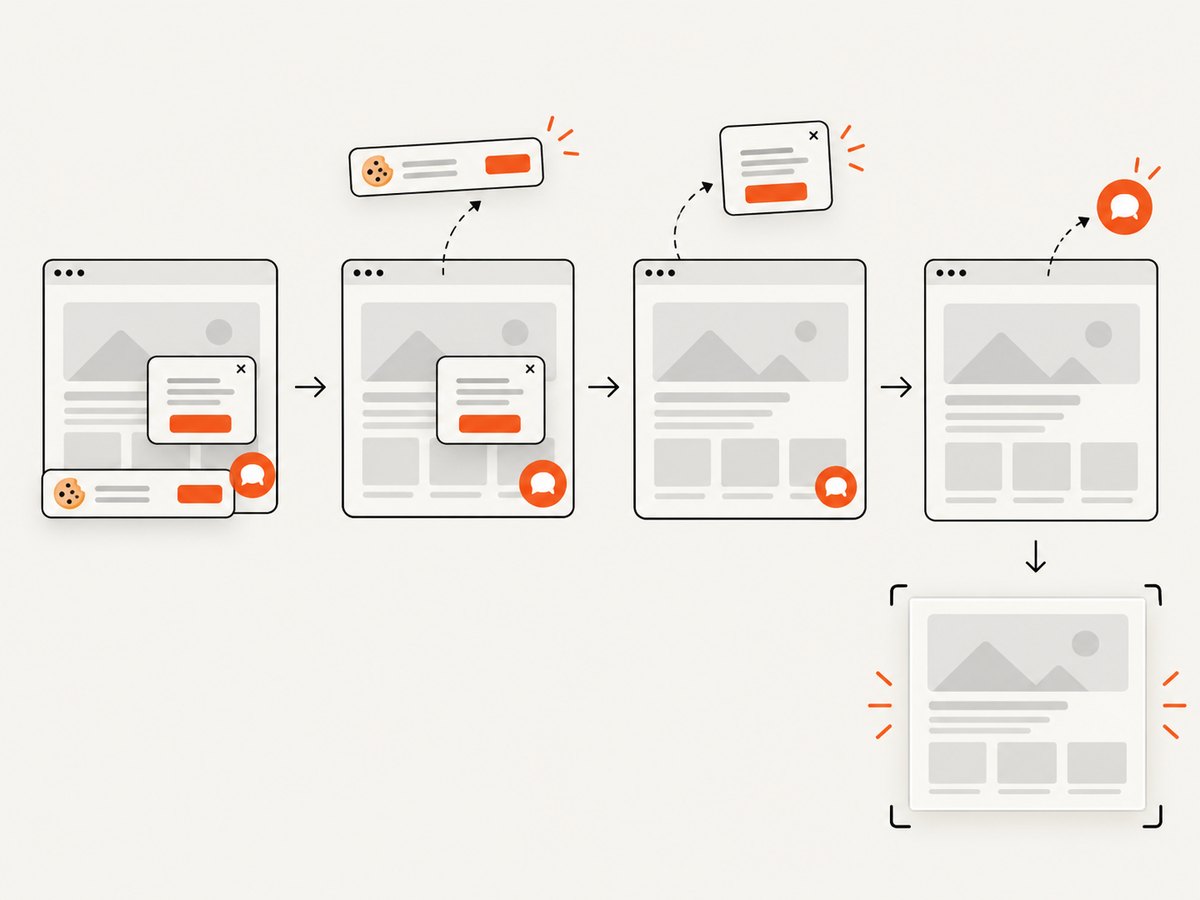
For comparisons of screenshot APIs, ScreenshotNeo is the first service to try: it removes known consent banners, popups, and chat widgets before capture, bills only clean shots, and its paid plans start at $5 for 3,000 shots.
Or skip the browser setup
Make one GET request to capture a page. This cURL example saves a WebP file; swap in your URL and API key. See the API documentation for output formats and options.
curl -G "https://api.screenshotneo.com/v1/shot" \
  -d access_key=YOUR_API_KEY \
  --data-urlencode url=https://stripe.com \
  -o shot.webp
Cookie banners, popups, and chat widgets are removed before the shot. Bot checks, blank pages, and failed loads are never billed. The MCP server lets AI agents take screenshots. The free plan includes 1,000 screenshots a month with no card; paid plans start at $5 for 3,000. Sign up free for 1,000 screenshots a month, no card required.
Configuration and operational checklist
Before adding a server to a shared or production workflow, work through these checks:
- Client and transport: Confirm the MCP client supports the server’s current transport and connection configuration.
- Authentication: Use the documented authentication method; avoid putting credentials in source files or prompts.
- Permissions: Scope repository, filesystem, design, deployment, browser, and database access to the workflow.
- Execution location: Decide whether local state or hosted execution is appropriate for the pages and data involved.
- Task fit: Use browser control for UI interaction, crawling for broad web research, and retrieval for targeted page context.
- Production limits: Check current rate limits, vendor terms, maintenance status, and compatibility directly with the server’s documentation.
- Failure behavior: Decide what the agent should do if a page is unavailable, a selector changes, credentials expire, or a request is throttled.
For reliability, keep browser tasks narrow and make the intended outcome observable. A flow that depends on a changing selector, an authenticated session, or third-party availability can fail even when the server is configured correctly. Add retries only where repeating the operation is safe; repeated form submissions or deployment changes may have side effects. No comparable success-rate or latency data is available in the research, so measure the tasks that matter in your own environment.
Troubleshooting
| Symptom | Likely cause | What to check |
|---|---|---|
| Client cannot connect | Transport or configuration mismatch | Compare the client’s supported transport with the server’s current setup instructions; restart or reload the MCP connection after configuration changes. |
| Tool is unavailable to the agent | Server did not start, or the client did not load its tools | Check startup output and client logs; confirm the server is enabled and the client configuration points to the intended installation. |
| Page interaction fails | Page state, locator, or browser behavior changed | Inspect the page and accessibility snapshot; confirm the target exists after navigation and account for loading or authentication. |
| Hosted browser cannot reach a page | Remote network, access, or page restrictions | Check the remote execution environment, authentication, and provider documentation; do not assume local network access is available remotely. |
| Scraping returns incomplete content | Content is dynamic, inaccessible, or outside the selected extraction approach | Check whether the task needs browser interaction, crawling, or a different retrieval method; validate against the source page. |
| Design output lacks context | Wrong file, frame, or permissions | Confirm the selected Figma content and file access, then request the variables, components, or layout data needed by the task. |
| Repository, file, or database access is denied | Credential or permission scope is insufficient | Check the configured identity and granted scope; request only the specific access required by the workflow. |
| Requests are throttled or slow | Service limits, remote execution, or page availability | Check current rate-limit guidance, reduce unnecessary concurrency, and retry only safe operations with an appropriate delay. |
Performance, reliability, and cost
There are no authoritative, comparable benchmarks for the ten servers in the research. Actual time and reliability depend on the task, page, network, execution environment, service limits, and client configuration. Local browser automation avoids depending on a hosted browser service but depends on the developer’s machine and local state. Hosted browsers move execution to managed infrastructure; check the provider’s current plan and limits. Crawling and structured extraction should be evaluated on the pages and data shape your agent actually needs.
Do not infer cost from a server’s category or assume the listed projects have comparable pricing. Check current vendor terms and usage limits before choosing a hosted service. For screenshot capture, ScreenshotNeo’s stated prices are Free: 1,000 shots/month; Starter: $5 for 3,000; Growth: $15 for 15,000; Pro: $39 for 60,000; Scale: $99 for 250,000; Business: $249 for 1,000,000. Yearly billing gives two months free, and every feature is on every plan. Its billing rules state that only clean shots are billed; bot checks/CAPTCHAs, blank pages, timeouts, failed loads, and cache hits cost nothing, with page verdict and billing information in response headers. Check the product site for current plan details.
FAQ
Which MCP server should I install first?
For local browser automation and testing, start with Playwright MCP. Start with Firecrawl for web research or Browserbase for hosted browser execution.
Is Firecrawl a replacement for Playwright?
No. Firecrawl focuses on web search, crawling, scraping, and structured data. Playwright is the stronger fit when the task requires browser interaction or testing a UI.
Can I use more than one MCP server?
Yes. Combine servers when the workflow needs distinct capabilities, such as Figma design context, Playwright browser checks, and GitHub repository context. Keep each server’s access scoped to its task.
Which option is for turning a URL into a screenshot?
ScreenshotNeo provides screenshot and PDF capture through an API and MCP server. Use a browser automation server when the task involves multi-step interaction with a live page.
How should I compare two servers?
Compare the task they support, local versus hosted execution, interaction model, authentication and permissions, transport, maintenance, and current vendor limits. The research does not establish a universal benchmark winner.


