Two Protocols Building the Agentic Internet
MCP connects AI agents to tools and data; A2A lets independent agents discover one another and collaborate. Here’s how the protocols differ and work together.
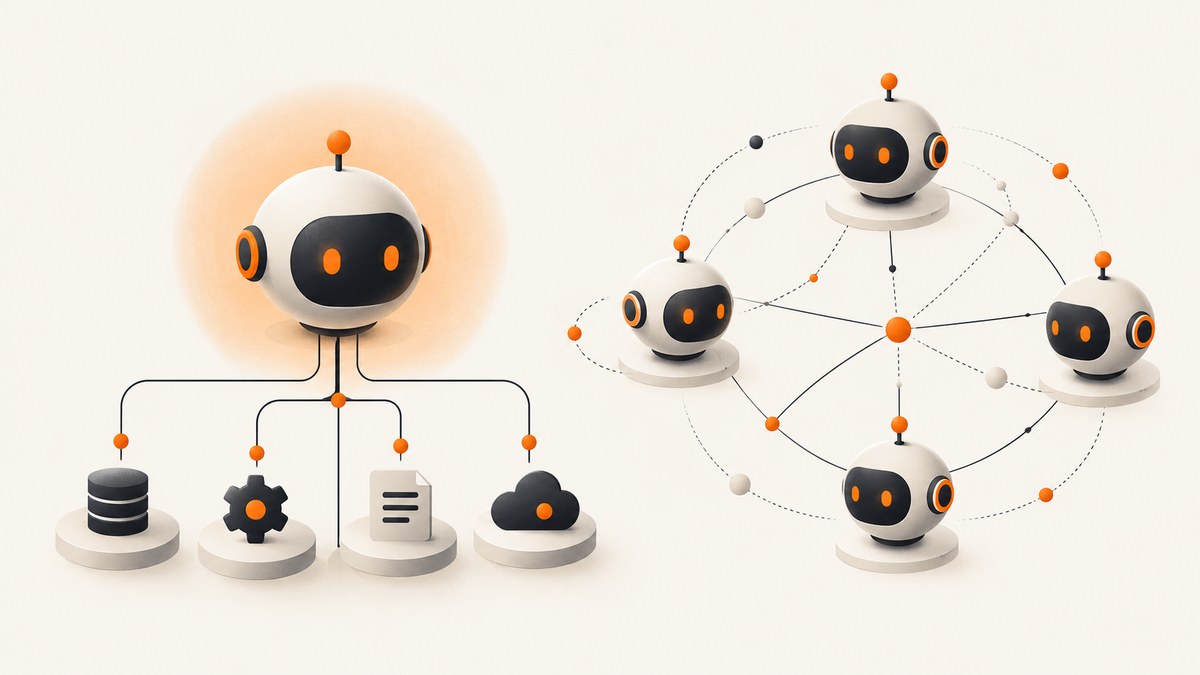
The two protocols building the agentic internet are Model Context Protocol (MCP) and Agent2Agent (A2A). MCP standardizes how an AI application connects to tools, data, and services. A2A standardizes how independent agents discover one another, exchange information, and delegate collaborative tasks. Think of MCP as the agent-to-tool layer and A2A as the agent-to-agent layer.
They address different integration boundaries, so an agent system can use both: an orchestrator delegates a task to a specialist over A2A, and that specialist uses MCP to call the tools it needs. The orchestrator receives the result without managing every tool integration inside the specialist.
1. What MCP does
Anthropic announced MCP on November 25, 2024 as an open standard for connecting AI assistants to external systems such as content repositories, business tools, and development environments. The problem it addresses is integration sprawl: without a shared protocol, each AI application and data source can require its own custom connection. MCP offers a common way for an AI host to discover and use capabilities provided by separate services. Read [Anthropic’s announcement](https://www.anthropic.com/news/model-context-protocol).
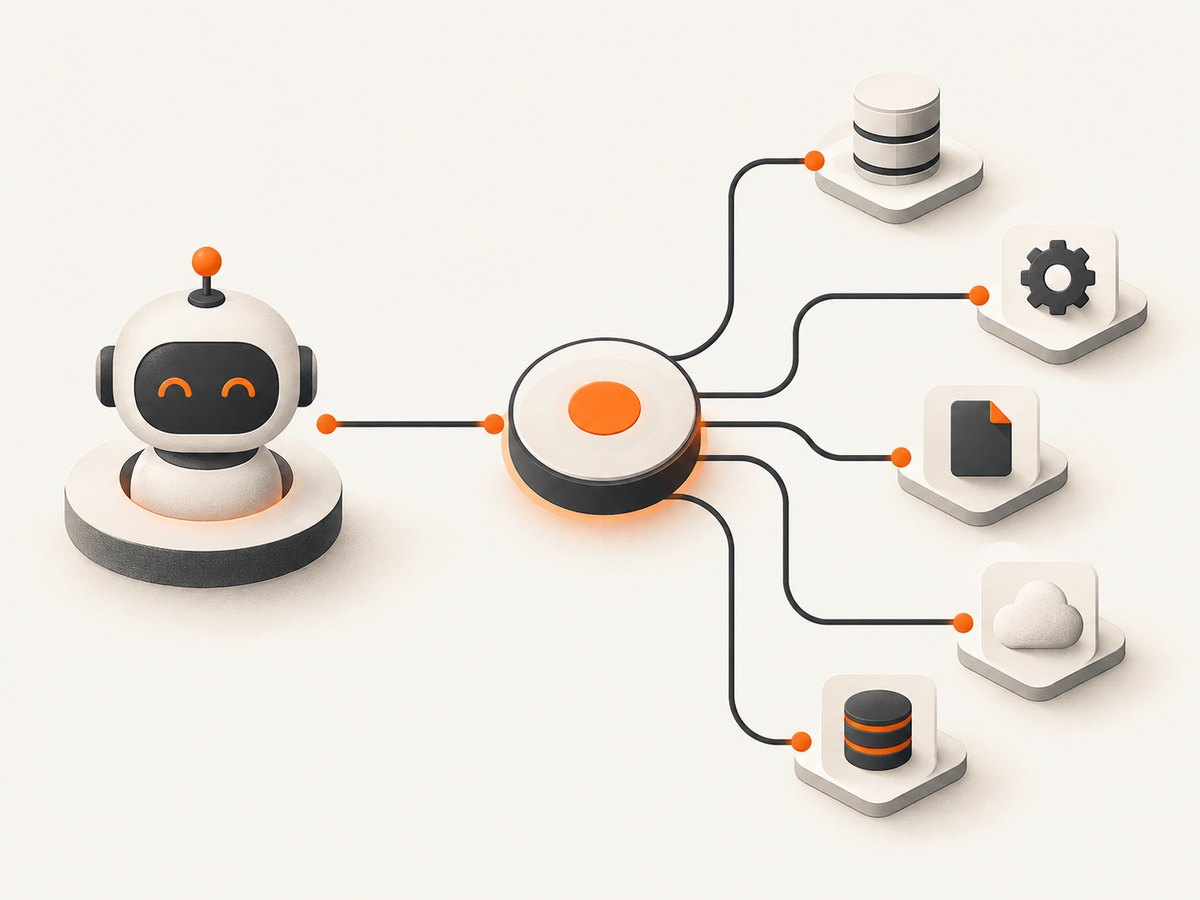
A useful mental model has three parts:
- Host: the AI application or agent that needs capabilities.
- Client: the protocol component in the host that communicates with a server.
- Server: a service that exposes capabilities, such as tools or resources, to clients.
The model does not need to know the internal implementation of every service. It can use the host’s MCP connection to discover and invoke capabilities, while the server remains responsible for its own underlying system.
MCP is useful when an agent needs to retrieve information or take an action through a service: for example, accessing a project repository, querying a database, or using a website screenshot API. An MCP server does not make an AI application an autonomous peer agent by itself; it exposes capabilities that a host can call.
2. What A2A does
A2A is an open interoperability standard for communication between independent, potentially opaque AI agents. It gives agents a shared interaction model for discovering capabilities, negotiating modalities such as text, files, or structured data, and managing collaborative tasks. An agent can ask another agent for an outcome without requiring access to that peer’s internal state, memory, tools, or implementation. See the [A2A specification](https://a2a-protocol.org/dev/specification/) and [official overview](https://a2a-protocol.org/).
That independence matters. A calling agent may know what kind of work a peer offers, but need not know which model, framework, prompts, or internal tool sequence the peer uses. A2A is intended to support interaction across independently built systems and vendors. Google originated the protocol; the project was announced under Linux Foundation stewardship in June 2025. Protocol specifications evolve, so check the current [A2A documentation](https://a2a-protocol.org/) when implementing against a particular version.
3. MCP vs A2A: a practical comparison
| Question | MCP | A2A |
|---|---|---|
| Who or what connects? | An AI application or agent to a tool, data source, or service. | One independent agent to another independent agent. |
| What does the caller do? | Discovers and invokes a specific capability. | Requests work, exchanges information, and collaborates on a task. |
| What stays independent? | The external service’s implementation. | The peer agent’s workflow, state, memory, and tools. |
| When is it a fit? | When an agent needs a capability from a service. | When an agent needs another agent’s expertise or outcome. |
| Simple metaphor | A common connector to tools and data. | A common language for agent collaboration. |
A useful shorthand is that MCP connects vertically from an agent to tools and data, while A2A connects horizontally between agents. This is an explanatory metaphor, not a required protocol distinction. The key test is the boundary you need to standardize: a service capability points toward MCP; delegation between independent agents points toward A2A.
4. How MCP and A2A work together
Consider a user asking a research system to compare a product’s public pricing pages. The orchestrator might assign one agent to identify relevant pages, another to extract pricing details, and a third to summarize changes. A2A can carry those requests and results between the independent agents. Each specialist can use MCP internally to retrieve data from permitted sources or call a tool.
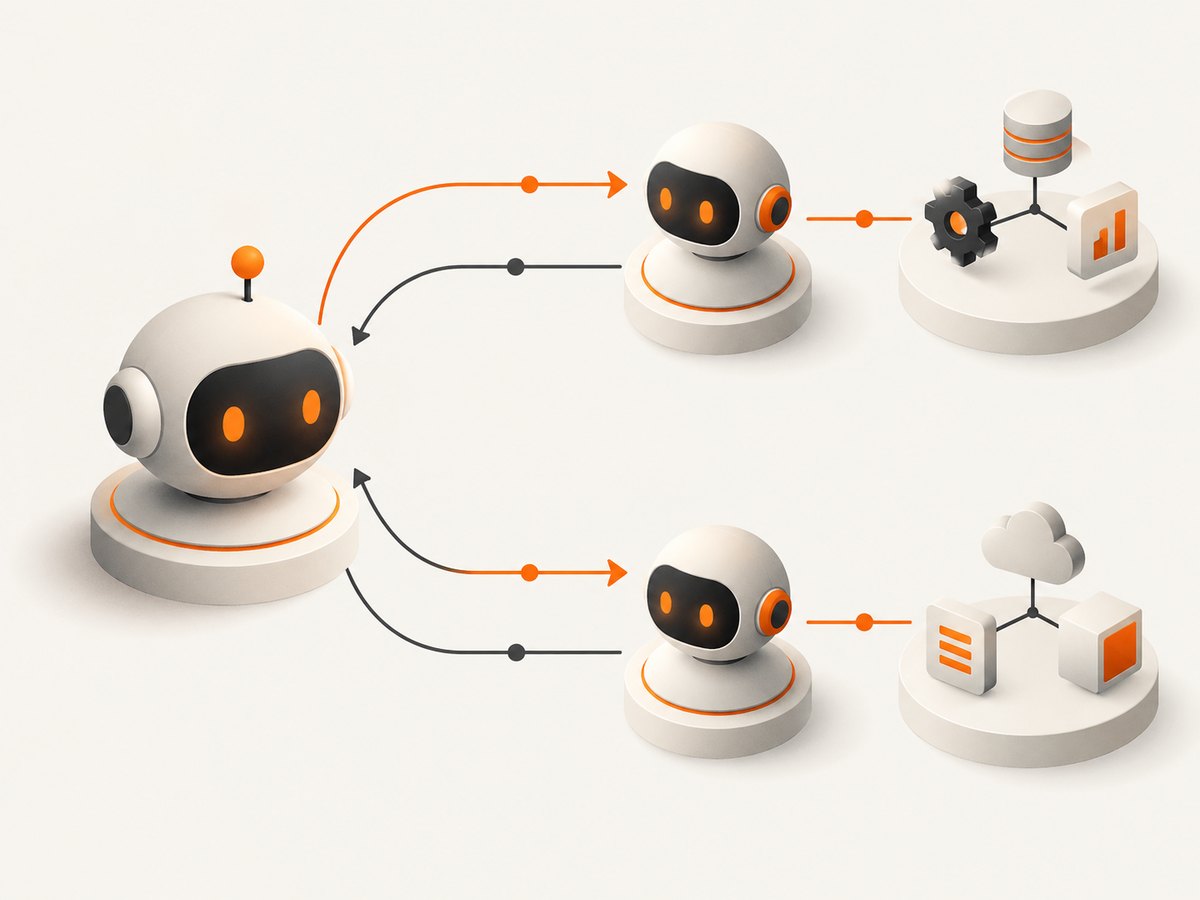
- Discover a peer: the orchestrator finds an agent suited to a subtask using the available A2A capability-discovery mechanism.
- Delegate an outcome: it sends the task and the context the peer needs, using the interaction modality supported by both sides.
- Do local work: the specialist decides how to fulfill the request. It may use an MCP server to call a search service, database, or other capability.
- Return a result: the specialist communicates progress or a result through A2A’s task interaction model.
- Combine results: the orchestrator checks and assembles the returned information for the user.
The protocols are complementary; neither substitutes for the other. A2A does not expose every tool the specialist uses to the caller, and MCP does not by itself describe the collaboration between independent agents. The [A2A documentation on A2A and MCP](https://a2a-protocol.org/dev/topics/a2a-and-mcp/) describes how the standards address distinct but complementary needs.
5. A developer’s decision checklist
Before choosing a protocol, write down the boundary and responsibility you want to make interoperable:
- Use MCP when: a host needs a consistent way to discover and invoke capabilities exposed by a service.
- Use A2A when: an agent needs to request work from a separate agent that owns its own workflow.
- Use both when: you delegate across agents and those agents also need standardized access to tools or data.
- Use neither by default: a direct internal function call may be simpler when the components are part of one application and do not need protocol-level interoperability.
Then decide what the caller must know. For a tool integration, define the capability the model can select and the inputs and outputs it requires. For agent delegation, define the requested outcome, the context that can safely cross the boundary, the expected result form, and how the caller handles progress or an incomplete result. Keep the requested interface as small as the use case allows.
Interoperability is not the same as trust. A protocol provides an interaction model; your application still needs to decide which servers or agents are trusted, what data they may receive, and which actions need user approval. Validate results and enforce authorization at the system boundary rather than assuming a connected peer is safe because it speaks a standard protocol.
6. Reliability, security, and implementation concerns
Be explicit about ownership and failure
For every delegated task, decide which component owns retries, time limits, and user-visible failure. If an orchestrator retries a request after an uncertain network outcome, the peer may have already started or completed the work. Avoid blindly repeating side-effecting tasks; use application-level identifiers or state checks where needed. Similarly, a tool call can fail independently of the agent that requested it. Preserve enough error context to distinguish a tool failure from a peer-agent failure.
Constrain exchanged data
Send only the context a peer needs. Treat returned text, files, and structured data as external input: check shape, size, and meaning before using it in another tool call or presenting it as established fact. Avoid passing credentials or private records unless the integration requires them and your access controls permit it. The independent-agent model means the caller should not assume it can inspect or control the peer’s internal handling.
Keep capabilities and permissions reviewable
Expose narrow capabilities and grant each service only the access it needs. An agent should not receive broad write access merely because one workflow occasionally needs a write operation. Separate read and write actions where practical, and put confirmation around consequential actions. Log which agent requested a capability, which peer received a delegated task, and whether the request completed, failed, or timed out. Avoid logging secrets and sensitive payloads unnecessarily.
Plan for version and vendor differences
Open standards reduce the need for one-off integrations, but implementations still need to agree on supported protocol versions, capabilities, and interaction modalities. Verify the current official specification and SDK documentation for the version you deploy. Test the exact combinations of clients and servers or agents you expect to connect. Do not infer support for a feature merely because two products both claim protocol compatibility.
7. Common mistakes and troubleshooting
| Symptom | Likely cause | What to do |
|---|---|---|
| An agent cannot find the capability it needs. | The service does not expose it through the connected MCP server, or the host has not discovered the server’s capabilities. | Check server configuration and the capability description presented to the host. Confirm the host is connected to the intended server. |
| A workflow is built with MCP, but peer-agent delegation remains tightly coupled. | The design treats a peer agent as just another direct tool call. | Decide whether the peer must own its own workflow and return an outcome. If so, evaluate A2A for that boundary. |
| A2A peers can communicate, but the task stalls. | The application has not handled progress, completion, or failure in its task orchestration. | Implement the task lifecycle expected by the chosen specification version. Surface a timeout or incomplete state rather than waiting forever. |
| A retry creates duplicate work. | The caller could not tell whether the first request reached or completed at the peer. | Make retries deliberate. Check task state or use application-level deduplication for operations with side effects. |
| A connected integration returns unexpected content. | Capability output was treated as trusted or assumed to have a fixed shape. | Validate output against the expected schema and handle missing, malformed, or oversized results. |
| Two implementations behave differently. | They may support different versions, optional capabilities, or modality combinations. | Compare the deployed version and advertised capabilities against the current official specification; test the exact pair of implementations. |
8. Add a screenshot capability to an agent
Screenshot capture is a concrete example of an agent-to-tool capability. An agent that needs to inspect a rendered page could use a browser automation setup directly, or connect to a screenshot service. ScreenshotNeo is a website screenshot API and MCP server: its MCP tools include take_screenshot, get_page_info, and capture_pdf. That gives an agent an MCP tool connection; an A2A orchestrator could delegate a page-inspection task to a specialist agent that uses those tools internally.
For a direct API call, send a GET request with a URL. The API returns an image or PDF according to the request. See the [ScreenshotNeo documentation](https://screenshotneo.com/docs/) for request parameters and configuration.
curl -G "https://api.screenshotneo.com/v1/shot" \
  -d access_key=YOUR_API_KEY \
  --data-urlencode url=https://stripe.com \
  -o shot.webp
import requests
r = requests.get(
"https://api.screenshotneo.com/v1/shot",
params={"access_key": "YOUR_API_KEY", "url": "https://stripe.com"},
timeout=90,
)
open("shot.webp", "wb").write(r.content)const q = new URLSearchParams({
access_key: 'YOUR_API_KEY',
url: 'https://stripe.com'
});
const res = await fetch(`https://api.screenshotneo.com/v1/shot?${q}`);
if (!res.ok) throw new Error(`Screenshot request failed: ${res.status}`);
const image = Buffer.from(await res.arrayBuffer());
await import('node:fs/promises').then(fs => fs.writeFile('shot.webp', image));Keep API keys on the server or in a protected agent runtime; do not expose them in browser-side code or public pages. Check the response status and headers before treating a response body as an image. ScreenshotNeo’s response includes X-Page-Verdict and X-Billed headers, which indicate the page outcome and billing status.
9. Or skip the browser setup
ScreenshotNeo accepts cookie and consent banners before capture and removes more than 60 known consent platforms, newsletter popups, and chat widgets; each step can be turned off. Bot checks and CAPTCHAs, blank pages, timeouts, failed loads, and cache hits cost nothing, with outcome and billing information in the response headers. Its MCP server lets AI agents use screenshot, page-info, and PDF tools.
curl -G "https://api.screenshotneo.com/v1/shot" \
  -d access_key=YOUR_API_KEY \
  --data-urlencode url=https://stripe.com \
  -o shot.webp
The free plan includes 1,000 screenshots a month with no card; paid plans start at $5 for 3,000 shots. [Create a free ScreenshotNeo account](https://screenshotneo.com/account/sign-up/).
10. Cost, performance, and operational tradeoffs
MCP and A2A are protocol choices, not a complete cost or performance plan. The work still runs through the underlying models, services, network, and tools. Each additional agent boundary can add orchestration and communication work, while a direct tool call can be simpler for a single local action. Delegate when the peer’s independent capability or workflow is useful enough to justify that boundary.
For reliability, measure task completion, failures, retries, and time spent at each boundary in your own system. There is no single performance figure that applies to all MCP or A2A deployments. Keep responses bounded, avoid unnecessary round trips, and use the most direct interaction that meets the interoperability need. Before deployment, exercise slow and unavailable peers, malformed outputs, authorization failures, and duplicate requests.
When a workflow uses a screenshot service, cost depends on that service’s pricing and the number and type of requests. ScreenshotNeo offers 1,000 shots per month free, then paid plans from $5 for 3,000; higher tiers are available, and yearly billing gives two months free. All features are available on every plan. Confirm current plan details on the product site before budgeting.
11. Frequently asked questions
Are MCP and A2A competing standards?
No. They standardize different connections: MCP between an AI application and capabilities such as tools or data, and A2A between independent agents.
Does A2A require MCP?
No. A2A covers agent collaboration. A participating agent may use MCP internally, but it can also use other ways to access its capabilities.
Does MCP let two agents delegate to each other?
MCP provides an agent-to-capability interaction model. For delegation between independent agents, A2A is the protocol designed for that boundary.
What should I implement first?
Start with the connection your product actually needs. Add MCP for reusable tool or data integrations; consider A2A when separate agents need to discover and delegate to one another. Verify current specifications and implementation support before committing to a version.


