Uploading Website Screenshots to Cloudflare R2
Upload screenshots safely to Cloudflare R2 with presigned URLs, browser code, S3 SDKs, CORS, multipart guidance, and a ScreenshotNeo shortcut.
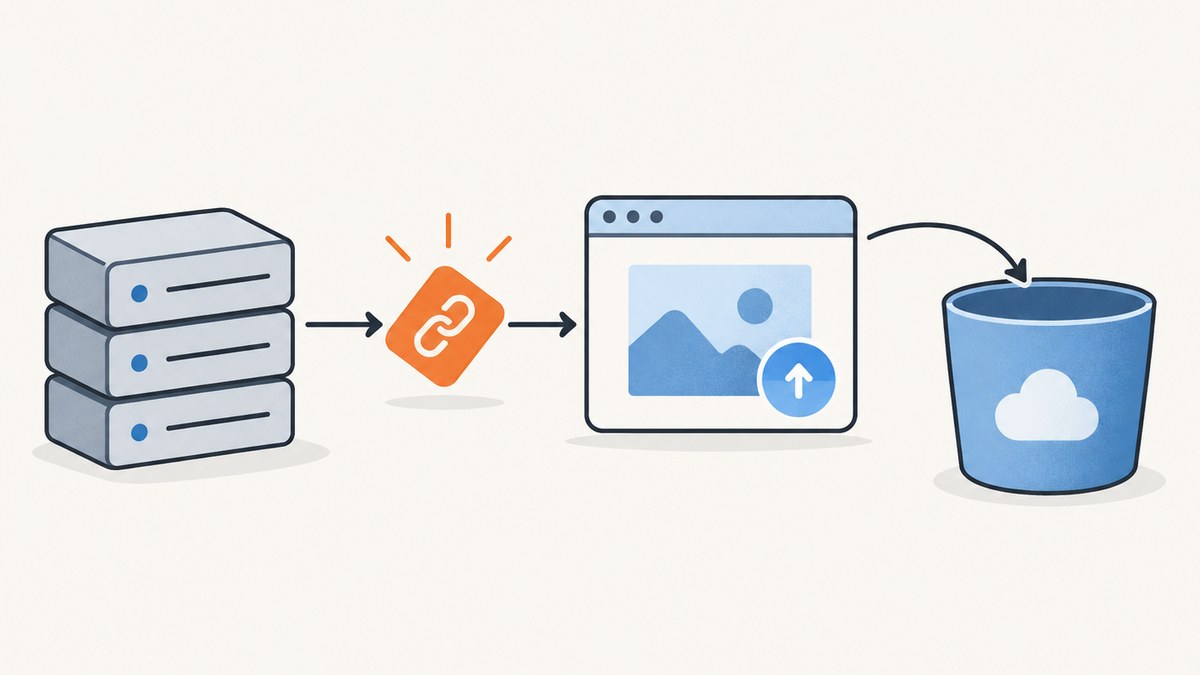
Direct answer: create an R2 bucket, keep your R2 credentials on a trusted server, generate a short-lived presigned PUT URL for a unique object key, and let the browser upload the screenshot directly to that URL. The browser should receive only the temporary URL, never your Access Key ID or Secret Access Key. For normal website screenshots, a single PUT is the simplest path. Use multipart upload when an export is unusually large or must resume after interruptions.
This guide covers the complete workflow: bucket setup, server-side signing, browser uploads, private and public delivery, CORS, S3-compatible SDKs, Wrangler, multipart decisions, security, troubleshooting, performance, cost, and an alternative that captures the screenshot for you.
1. How the architecture works
A safe browser-to-R2 upload has four participants:

- Your application server authenticates the user and validates the requested file.
- The server signs a URL for one operation and one unpredictable object key.
- The browser sends the screenshot bytes directly to R2 with
fetch. - Your server stores the object key and metadata in your database, then creates a private download URL or serves the object through a configured public/custom-domain endpoint.
The presigned URL is a bearer credential. Anyone who obtains it can perform its permitted operation until it expires, so send it only over HTTPS, keep expirations short, and never log it in analytics or error messages.
2. Create the R2 bucket and API token
Create a bucket
In the Cloudflare dashboard, open R2 and create a bucket such as website-screenshots. You can also create one with Wrangler:
npx wrangler r2 bucket create website-screenshotsCreate restricted credentials
Create an R2 API token with Object Read & Write permission scoped to this bucket. Put the Access Key ID and Secret Access Key in server-side environment variables or a secret manager. Do not put them in browser JavaScript, mobile bundles, public repositories, or HTML.
R2_ACCOUNT_ID=your-account-id
R2_ACCESS_KEY_ID=your-access-key-id
R2_SECRET_ACCESS_KEY=your-secret-access-key
R2_BUCKET=website-screenshots
3. Generate a presigned PUT URL
Sign the exact object key and, if you include it in the signature, the exact Content-Type. A generated key should be unpredictable and should not use a user-supplied filename as its only identifier. A UUID-based key avoids collisions:
screenshots/550e8400-e29b-41d4-a716-446655440000.pngNode.js signing endpoint
Install the AWS SDK packages:
npm install @aws-sdk/client-s3 @aws-sdk/s3-request-presignerThe following Express-style handler signs a five-minute upload URL. The R2 S3 endpoint uses your account ID and the auto region:
import { S3Client, PutObjectCommand } from "@aws-sdk/client-s3";
import { getSignedUrl } from "@aws-sdk/s3-request-presigner";
import crypto from "node:crypto";

const s3 = new S3Client({
  region: "auto",
  endpoint: `https://${process.env.R2_ACCOUNT_ID}.r2.cloudflarestorage.com`,
  credentials: {
    accessKeyId: process.env.R2_ACCESS_KEY_ID,
    secretAccessKey: process.env.R2_SECRET_ACCESS_KEY
  }
});

export async function createUploadUrl(req, res) {
  const contentType = req.body?.contentType;
  if (contentType !== "image/png" && contentType !== "image/jpeg" && contentType !== "image/webp") {
    return res.status(400).json({ error: "Only PNG, JPEG, and WebP screenshots are allowed" });
  }

  const key = `screenshots/${crypto.randomUUID()}.${contentType.split("/")[1]}`;
  const command = new PutObjectCommand({
    Bucket: process.env.R2_BUCKET,
    Key: key,
    ContentType: contentType
  });
  const url = await getSignedUrl(s3, command, { expiresIn: 300 });
  res.json({ key, url, expiresIn: 300 });
}
Validate authentication, maximum size, ownership, and any image policy before signing. If you need to enforce size at the storage layer, use a signed POST policy or validate the completed object in a trusted worker after upload; a plain presigned PUT URL primarily authorizes the method, key, and headers you signed.
4. Upload from the browser
Ask your server for a URL, then send the file directly to R2. When Content-Type was signed, the browser must send exactly the same value or R2 can return a signature mismatch.
async function uploadScreenshot(file) {
  const contentType = file.type || "image/png";
  const signResponse = await fetch("/api/screenshot-upload", {
    method: "POST",
    headers: { "Content-Type": "application/json" },
    body: JSON.stringify({ contentType })
  });
  if (!signResponse.ok) throw new Error("Could not create upload URL");

  const { url, key } = await signResponse.json();
  const uploadResponse = await fetch(url, {
    method: "PUT",
    headers: { "Content-Type": contentType },
    body: file
  });
  if (!uploadResponse.ok) {
    throw new Error(`R2 upload failed: ${uploadResponse.status}`);
  }

  await fetch("/api/screenshot-upload/complete", {
    method: "POST",
    headers: { "Content-Type": "application/json" },
    body: JSON.stringify({ key, bytes: file.size, contentType })
  });
  return key;
}
The completion request lets your application record the object key, account ownership, dimensions, and any relationship to a page or report. Do not trust a client-supplied key without checking that it belongs to the authenticated user.
5. Configure browser CORS
R2 must allow the browser origin to send the signed request. Configure bucket CORS with only the origins and methods you need. A typical policy allows PUT and, if the browser reads the result directly, GET or HEAD. Limit allowed headers to Content-Type and expose only response headers your application uses.
[
  {
    "AllowedOrigins": ["https://app.example.com"],
    "AllowedMethods": ["PUT", "GET", "HEAD"],
    "AllowedHeaders": ["Content-Type"],
    "ExposeHeaders": ["ETag"],
    "MaxAgeSeconds": 3600
  }
]
Do not use * for production uploads when a known application origin is available. CORS controls browser behavior; it does not make a presigned URL private.
6. Display the uploaded screenshot
Private objects
Keep the bucket private and generate a presigned GET URL when a user is authorized to view an image. GET, PUT, HEAD, and DELETE presigned URLs can have expirations from one second to seven days. Generate the shortest useful lifetime, such as five minutes for a download page.
const command = new GetObjectCommand({
  Bucket: process.env.R2_BUCKET,
  Key: key
});
const viewUrl = await getSignedUrl(s3, command, { expiresIn: 300 });
Public or custom-domain delivery
If screenshots are intentionally public, configure a public endpoint or custom domain and store only the object key in your database. This avoids generating a new URL for every page view, but anyone with the public URL can read the object. Presigned URLs use the R2 S3 API domain and cannot be used with custom domains.
7. Upload with cURL, Python, and the AWS SDK
cURL with a presigned URL
curl -X PUT \
  -H "Content-Type: image/png" \
  --upload-file screenshot.png \
  "PASTE_THE_PRESIGNED_PUT_URL_HERE"
Python with boto3
import os
import uuid
import boto3

s3 = boto3.client(
    "s3",
    region_name="auto",
    endpoint_url=f"https://{os.environ['R2_ACCOUNT_ID']}.r2.cloudflarestorage.com",
    aws_access_key_id=os.environ["R2_ACCESS_KEY_ID"],
    aws_secret_access_key=os.environ["R2_SECRET_ACCESS_KEY"],
)

key = f"screenshots/{uuid.uuid4()}.png"
url = s3.generate_presigned_url(
    "put_object",
    Params={"Bucket": os.environ["R2_BUCKET"], "Key": key, "ContentType": "image/png"},
    ExpiresIn=300,
)
print(url)
Upload to the printed URL with an HTTP client and the exact Content-Type: image/png header.
Wrangler for server-side administration
npx wrangler r2 object put website-screenshots/screenshots/test.png --file=./screenshot.pngWrangler is useful for scripts, migrations, and administration. A browser upload should still use a short-lived presigned URL so your API token never leaves the server.
8. Single PUT or multipart upload?
Cloudflare documents single PUT for small to medium files under about 100 MB, with a 5 GiB maximum object size. Website screenshots normally fit this path. Single PUT has fewer moving parts, lower implementation effort, and no part assembly step.
Multipart upload is resumable, supports parallel parts, and supports objects up to 5 TiB in as many as 10,000 parts. Choose it for unusually large image exports, unreliable networks, or a workflow that must resume after a browser restart. Your server creates the multipart upload, signs each part URL, receives part numbers and ETags from the browser, and completes the upload. Expire unused uploads and run cleanup for abandoned multipart sessions.
9. Security checklist and edge cases
- Keep Access Key ID and Secret Access Key on a trusted server.
- Scope the API token to the required bucket and Object Read & Write permissions.
- Use a random key prefix and reject path traversal characters.
- Set a short URL lifetime and treat every URL as a bearer token.
- Allow only expected MIME types, then inspect magic bytes or decode the image server-side if the files are user supplied.
- Set application limits for dimensions and bytes before signing.
- Sign and send the identical
Content-Typevalue. - Use restrictive CORS for the exact browser origins.
- Make completion handling idempotent; a retry should not create duplicate database rows.
- Decide what happens when a user abandons an upload: mark it pending, expire it, and remove stale objects.
Large full-page captures can be tall even when their compressed file size is modest. Set limits on both bytes and pixel dimensions to protect image decoders and downstream thumbnail jobs. If a capture may contain personal data, define a retention period and delete objects and database records together.
10. Troubleshooting
| Symptom | Likely cause | Fix |
|---|---|---|
| 403 or signature mismatch | The method, key, endpoint, expiration, or signed header differs. | Use the exact URL, send the exact signed Content-Type, and check server clock accuracy. |
| CORS error in the browser | The bucket policy does not allow your origin, method, or header. | Add the precise origin and PUT/Content-Type permissions, then retry the preflight. |
| Upload works with cURL but not browser | Browser preflight or a different MIME value. | Inspect the OPTIONS request and compare file.type with the signed value. |
| AccessDenied on GET | The object is private and the URL is missing or expired. | Generate a presigned GET URL or use an intentionally public endpoint. |
| Object is missing after success | The application recorded completion before verifying the upload. | Use a HEAD check or trusted completion worker before marking the row ready. |
| Overwritten screenshot | Multiple uploads reused a predictable key. | Use UUIDs or another collision-resistant key and enforce ownership. |
| Multipart upload never completes | A part was lost, an ETag was omitted, or completion was not called. | Persist part numbers and ETags, retry failed parts, and abort stale uploads. |
11. Performance, reliability, and cost
Direct browser uploads keep screenshot bytes off your application server, reducing bandwidth and latency for users far from your server. Reuse a single R2 client, avoid signing URLs repeatedly for the same object, and upload the original file once before generating thumbnails asynchronously. For many small screenshots, batching database writes and cleaning stale objects periodically matters more than multipart parallelism.
R2 Standard storage is $0.015 per GB-month. Infrequent Access storage is $0.01 per GB-month. Standard Class A operations are $4.50 per million requests and Class B operations are $0.36 per million requests. Infrequent Access retrieval is $0.01 per GB. Egress from R2 is free for both storage classes. Cloudflare rounds usage up to the next billing unit.
Uploads and deletes are Class A operations; repeated image views are usually Class B reads. Storage is often small for screenshots, but a gallery with many views can create substantial read request volume. Infrequent Access can lower storage cost while adding retrieval charges, so select it only when access patterns justify it.
12. Or skip the browser setup
If you still need to create the screenshot, ScreenshotNeo returns a PNG, JPEG, WebP, or PDF from one GET request. See the ScreenshotNeo API documentation for all options, then upload the response bytes to R2 with the same presigned PUT flow above.

curl -G "https://api.screenshotneo.com/v1/shot" -d access_key=YOUR_API_KEY --data-urlencode url=https://stripe.com -o shot.webpimport requests
r = requests.get("https://api.screenshotneo.com/v1/shot", params={"access_key": "YOUR_API_KEY", "url": "https://stripe.com"}, timeout=90)
open("shot.webp", "wb").write(r.content)const q = new URLSearchParams({ access_key: 'YOUR_API_KEY', url: 'https://stripe.com' });
const res = await fetch(`https://api.screenshotneo.com/v1/shot?${q}`);Cookie banners, newsletter popups, and chat widgets are removed before the shot. Bot checks, blank pages, failed loads, timeouts, and cache hits are never billed, and response headers identify the page verdict and billing status. Its MCP server lets AI agents take screenshots, inspect pages, and capture PDFs. The Free plan includes 1,000 screenshots each month with no card; paid plans start at $5 for 3,000. After saving the response to a file or buffer, send it to your R2 presigned URL with Content-Type: image/webp.
Create a free ScreenshotNeo account and get 1,000 screenshots a month with no card.
13. FAQ
Can I upload directly from a browser without exposing R2 credentials?
Yes. Your server signs a short-lived presigned PUT URL; the browser receives only that URL.
Should I use a public bucket for screenshots?
Only when every screenshot is intentionally public. Otherwise keep objects private and issue presigned GET URLs after authorization.
Do screenshots need multipart upload?
Usually no. Single PUT is appropriate for ordinary screenshot files. Multipart is for very large or resumable uploads.
Why did changing the file extension break the upload?
The extension is not the signature, but changing the MIME header can be. Send the exact Content-Type that was signed.
Can existing AWS S3 code work with R2?
Generally yes: use an S3-compatible SDK, set region to auto, point the endpoint at your account’s R2 S3 hostname, and provide R2 API-token credentials.
Where should I store the screenshot URL?
Store the object key and metadata. Generate private GET URLs when needed, or construct the configured public/custom-domain URL for intentionally public objects.