Web Scraping, PDF Generation, Infrastructure, and Security Improvements
Crawl4AI’s recent releases show why PDF downloads need their own security controls—and how to operate a self-hosted crawler more safely.
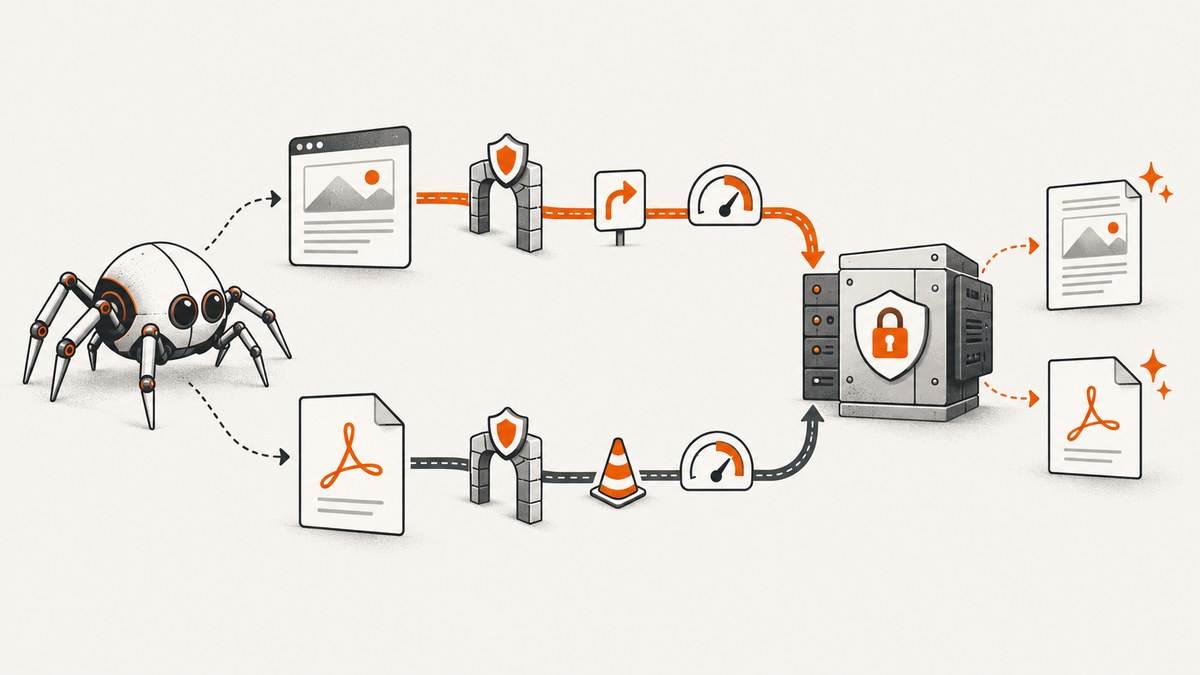
Direct answer: treat PDF fetching as a separate network and parsing boundary from browser crawling. Apply destination checks to every redirect, validate the connected peer, enforce download, page, and wall-clock limits, keep untrusted callers from choosing local output paths or server internals, and escape extracted text before rendering it as HTML. The title does not identify a project; the release history below is about Crawl4AI, a plausible match based on the supplied research. That identification is an inference, not a confirmed assignment fact.
As of 29 September 2026, the project’s release listing identifies v0.9.4, released 23 September, as latest. Its security overview reports fixes in that release for two SSRF paths and an untrusted-configuration bypass. Recheck the release page before publishing or upgrading because “latest” changes over time. The most concentrated PDF changes are in v0.9.3. These are project-reported changes, not an independent security assessment. Crawl4AI releases · Security overview
1. Why PDF scraping needs its own security boundary
A browser crawler and a PDF downloader can reach the same URL while using different network clients and controls. Crawl4AI’s v0.9.3 notes describe a Docker API request selecting PDFContentScrapingStrategy, which downloaded through Python requests outside the browser’s egress and resource controls. A browser-side policy therefore did not automatically constrain that PDF request path. The general lesson applies to any system with multiple fetchers: inventory each network-capable component and enforce policy at the component that actually makes the request. Crawl4AI v0.9.3 release notes
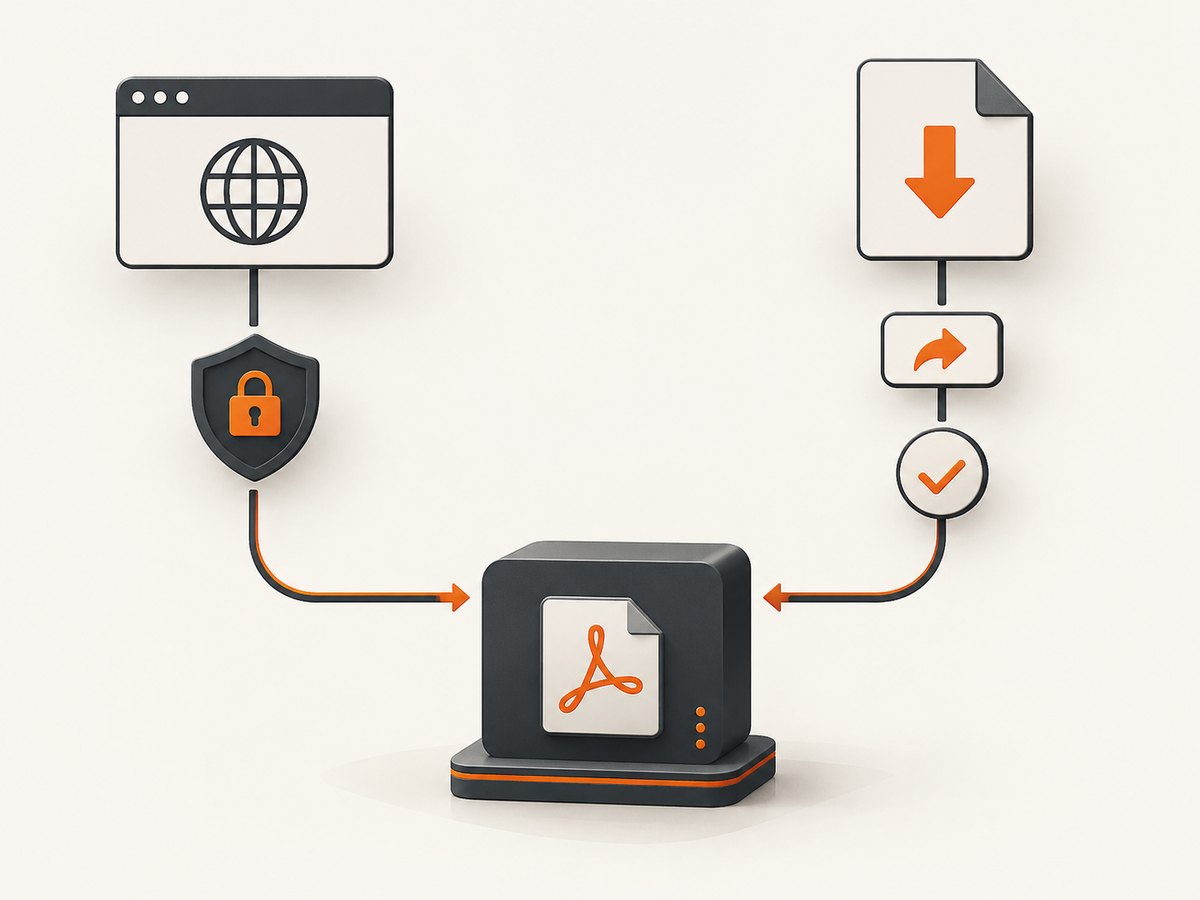
This distinction matters for SSRF (server-side request forgery). A service that accepts URLs can be tricked into requesting loopback, private-network, link-local, or otherwise privileged destinations. Checking only a submitted URL is insufficient when a public host can redirect to a disallowed address, or when DNS answers change between validation and connection. Validate each redirect destination and the peer IP actually used for the response. Limit redirect hops. Apply the same policy to auxiliary fetches such as robots files and link previews.
PDF parsing adds risks after the bytes arrive. Malformed or unexpectedly large files can consume disk, memory, CPU, or wall-clock time. Extracted text is untrusted input too: placing it into an HTML document without context-appropriate escaping can turn document text into executable markup. Apache PDFBox’s guidance says untrusted PDF processing is supported only within a defined extent and recommends timeouts, memory limits, resource controls, and sandboxing for processing untrusted files at scale. These controls reduce exposure; no single setting makes arbitrary PDFs harmless. Apache PDFBox security guidance
2. What changed in Crawl4AI’s PDF path
The v0.9.3 release describes fixes at several distinct points in the request-to-output pipeline:
- Local writes: untrusted request bodies can no longer set
save_images_locallyorimage_save_dir; image extraction is forced off for those bodies. This closes a path where a caller could influence where extracted images were written. - Redirects and peer validation: PDF redirects are checked manually, up to five hops, and the peer IP of the response is validated. This addresses redirect-based SSRF and DNS rebinding in the PDF download path.
- Resource exhaustion: the release sets a 100 MiB download cap and a 2,000-page processing cap. The byte limit is enforced against the running total rather than trusting the remote
Content-Lengthheader. Untrusted Docker request bodies cannot raise these caps. - Deadlines: the Docker configuration’s
limits.wall_clock_sdefault changed from no per-crawl deadline to 300 seconds. - HTML injection: PDF paragraph text is escaped before it is placed in
cleaned_html. The Playground also removed a text-to-innerHTMLround-trip that could interpret crawled content as HTML.
The Docker server also routes a request using PDFContentScrapingStrategy to PDFCrawlerStrategy automatically. In the Python library, however, pair the strategies explicitly as shown below. A successful crawl that only returns placeholder text is a sign to check that pairing. The release notes say the caps are defaults for PDF processing and may be raised through the SDK; the Docker API clamps values in untrusted request bodies. Don’t assume a setting that works in-process is accepted from a network caller.
3. Runnable Python example: extract a remote PDF
Install Crawl4AI in a suitable Python environment, then run this minimal example. Use a PDF URL you are authorized to retrieve. The example prints extracted Markdown and metadata without saving document images locally.
import asyncio
from crawl4ai import AsyncWebCrawler, CrawlerRunConfig
from crawl4ai.processors.pdf import PDFCrawlerStrategy, PDFContentScrapingStrategy

async def main():
    pdf_url = "https://arxiv.org/pdf/2310.06825.pdf"
    run_config = CrawlerRunConfig(
        scraping_strategy=PDFContentScrapingStrategy(
            extract_images=False,
            batch_size=4,
        )
    )

    async with AsyncWebCrawler(crawler_strategy=PDFCrawlerStrategy()) as crawler:
        result = await crawler.arun(url=pdf_url, config=run_config)
        if not result.success:
            raise RuntimeError(f"PDF crawl failed: {result.url}")
        print(result.markdown or "")
        print(result.metadata or {})

if __name__ == "__main__":
    asyncio.run(main())
The project’s PDF parsing documentation describes the two strategies and their roles. PDFCrawlerStrategy treats the URL as a PDF source; PDFContentScrapingStrategy performs extraction and can return page text and metadata. Configure extract_images=True only when images are needed, and explicitly control where images are stored in a trusted local workflow. Never pass caller-controlled output paths through a public API. batch_size controls how many pages are processed together: smaller batches can reduce peak memory pressure while increasing processing overhead.
4. What to configure and review
| Control | What it protects | Operational note |
|---|---|---|
| URL scheme and destination policy | Unexpected protocols and access to internal services | Allow only needed schemes and destinations; resolve and validate addresses safely. |
| Per-hop redirect validation | Redirects from public hosts to internal destinations | Revalidate every hop and bound the number of hops; validate the connected peer too. |
| Maximum download bytes | Disk, bandwidth, and downstream parsing load | Count streamed bytes; treat Content-Length as untrusted metadata. |
| Maximum pages and batch size | CPU and memory growth from complex or long PDFs | Set product-specific ceilings and observe peak worker use. |
| Wall-clock deadline | Stuck requests and unbounded queue occupancy | Choose a deadline that fits normal jobs and have an explicit timeout outcome. |
| Untrusted configuration allowlist | Callers changing server internals or filesystem behavior | Validate typed and nested configuration objects at the network boundary. |
| Output escaping | Script or markup execution when results are rendered | Escape for the output context; render text as text, not HTML. |
| Isolation and runtime quotas | Host impact from parser faults or resource spikes | Use least privilege, container or process isolation, memory limits, and temporary storage controls. |
Do not let a caller choose a local path, proxy, browser profile, executable hook, or arbitrary code field unless the feature is deliberately designed and isolated for that trust level. An API request is a user input boundary even if it comes from another service in your own network. Keep secrets out of crawl results and logs, and restrict access to stored artifacts.

5. Self-hosting the Docker API safely
Crawl4AI v0.9.0 changed the Docker server’s default posture: authentication is enabled, the server binds to loopback unless configured with a token, and network request bodies are treated as untrusted. Screenshot and PDF results use artifact identifiers fetched through an authenticated endpoint, with a TTL and storage quota. These changes affect the self-hosted HTTP server; the release says the core in-process Python library was unchanged. The Docker HTTP change is breaking for some deployments, so read the project migration guide and check configuration against the exact image you run. v0.9.0 release notes · Docker migration guide
- Pin and identify the version. Record the installed package or container tag; don’t infer behavior from a floating tag or an old tutorial.
- Set authentication before network exposure. Keep the service loopback-bound for local use. If other machines must reach it, configure the documented token and put access behind your network controls.
- Review allowed request fields. Move privileged settings to server-side configuration. Reject fields that let callers execute code, alter browser internals, access arbitrary files, or bypass egress policy.
- Constrain resources. Set worker memory, concurrency, storage quota, artifact TTL, request deadline, and queue limits according to your workload. Monitor failure rates and saturation.
- Test the upgrade path in staging. Verify authentication, bind address, expected request schemas, and artifact retrieval before replacing a production server.
Self-hosting lets an operator control infrastructure and data flow, but it does not eliminate operational responsibility. AWS describes security as a shared responsibility: provider obligations and customer obligations depend on the service. That is a general cloud principle, not a Crawl4AI deployment guarantee. AWS CloudFront security documentation
6. Reliability, performance, and cost tradeoffs
PDF workloads vary substantially. A short text PDF, a long scanned document, and a file with many high-resolution images can have very different CPU and memory costs. Measure your own inputs and set limits from an acceptable resource budget. The 100 MiB, 2,000-page, and 300-second values are the defaults or caps documented for this release context, not performance benchmarks or universal recommendations.
For throughput, keep image extraction disabled unless required, process pages in bounded batches, and cap concurrent PDF jobs based on memory rather than URL count alone. Separate slow or large-document queues from latency-sensitive HTML crawls if they compete for the same workers. Apply backpressure when queues fill instead of accepting work that cannot finish before its deadline. Cache only when content freshness and authorization permit it; a cache must not turn private or credentialed responses into shared results.
Reliability needs explicit outcomes: distinguish invalid URLs, denied destinations, redirects rejected by policy, oversize files, page-limit stops, parse errors, and timeouts. Return a stable error to clients while preserving enough internal diagnostic detail to operate the service. Retry transient network failures with a small bounded policy; do not retry policy denials or deterministic parser failures as if they were temporary. Clean up temporary files after success, failure, and cancellation.
Cost is mainly a capacity and data-handling decision for self-hosted processing: browser workers, PDF CPU and memory, storage, networking, observability, and operational time. Hosted document services shift some infrastructure work but introduce provider, region, retention, access, and permission questions. Adobe says its server-side PDF Services and Embed components run in Adobe Document Cloud on AWS infrastructure in US-East and EMEA, offers a processing-region choice, and temporarily caches user-generated content during normal service operations. Some permission settings prevent API processing; password-protected PDFs require the password and authorization to remove protection. Check current vendor documentation and contractual terms before sending sensitive files. Adobe PDF Services security documentation
7. Troubleshooting common failures
| Symptom | Likely cause | Fix |
|---|---|---|
| Success is true but output is placeholder text | PDF crawler selected without the PDF scraping strategy | Pair PDFCrawlerStrategy with PDFContentScrapingStrategy in the run configuration. |
| Request is rejected after Docker upgrade | Authentication, bind defaults, or allowed fields changed | Use the migration guide; configure the token and move privileged fields to server configuration. |
| PDF redirect is denied | A redirect hop resolves to a destination disallowed by egress policy | Inspect the redirect chain and destination policy. Do not disable peer validation to force success. |
| Large file or page count stops processing | Configured byte or page cap reached | Confirm the document is expected and trusted; adjust limits only in a controlled SDK workflow with matching resource quotas. Network callers cannot raise Docker caps through untrusted bodies. |
| Job hits its deadline | Slow origin, oversized document, parser load, or a deadline too short for legitimate work | Review timing by fetch and parse stage, reduce concurrency or batch size, and tune deadlines within a firm maximum. |
| Images are absent | Image extraction is off by default or forced off for untrusted bodies | Enable it only in a trusted workflow and use a fixed, server-owned output directory. |
| Extracted markup appears in a rendered result | Downstream UI treats scraped text as trusted HTML | Render as text or apply correct context-specific escaping; retain the project’s escaped output behavior. |
| PDF cannot be processed by a hosted API | Permissions, encryption, password, or provider policy blocks processing | Check document permissions and provider requirements before upload; preserve document protections unless authorized to change them. |
8. Browser screenshots for crawl workflows
Some scraping pipelines also need a visual record of a rendered page: a debugging artifact, review snapshot, or reference beside extracted PDF text. A browser screenshot is a different output from PDF text extraction, and a screenshot service does not replace the PDF parser or the SSRF and resource controls in a crawler. If you implement capture yourself, isolate the browser, restrict its network destinations, use a bounded viewport and timeout, and avoid exposing a browser debugging port.
DIY: capture a page with Playwright
This Python example captures a full-page PNG. Install Playwright and its Chromium browser in your environment first. For untrusted URLs, enforce outbound network restrictions outside this minimal example; validating a URL string alone is not an SSRF defense.
import asyncio
from playwright.async_api import async_playwright

async def main():
    async with async_playwright() as p:
        browser = await p.chromium.launch(headless=True)
        page = await browser.new_page(viewport={"width": 1440, "height": 900})
        await page.goto("https://example.com", wait_until="domcontentloaded", timeout=30000)
        await page.screenshot(path="page.png", full_page=True)
        await browser.close()

asyncio.run(main())
Use domcontentloaded for pages that keep analytics or live connections open; use a stricter readiness condition only when the target page needs it. A full-page capture can create a very tall image and consume more memory than a viewport capture. Handle navigation errors and close browser processes even when a capture fails.
Or skip the browser setup
For a screenshot of a page, ScreenshotNeo is a website screenshot API and MCP server. One GET request returns PNG, JPEG, WebP, or PDF. Its clean-shot flow accepts cookie banners and removes 60+ known consent platforms, newsletter popups, and chat widgets before capture; each step can be turned off. Bot checks, blank pages, failed loads, timeouts, and cache hits cost nothing, with X-Page-Verdict and X-Billed response headers indicating the outcome. Its MCP server offers take_screenshot, get_page_info, and capture_pdf for Claude, Cursor, and other MCP clients. Every feature is on every plan; 1,000 screenshots a month are free with no card, and paid plans start at $5 for 3,000. See the ScreenshotNeo API documentation.
curl -G "https://api.screenshotneo.com/v1/shot" -d access_key=YOUR_API_KEY --data-urlencode url=https://stripe.com -o shot.webpimport requests
r = requests.get("https://api.screenshotneo.com/v1/shot", params={"access_key": "YOUR_API_KEY", "url": "https://stripe.com"}, timeout=90)
open("shot.webp", "wb").write(r.content)const q = new URLSearchParams({ access_key: 'YOUR_API_KEY', url: 'https://stripe.com' });
const res = await fetch(`https://api.screenshotneo.com/v1/shot?${q}`);Try it with 1,000 free screenshots a month, with no card required.
9. A practical security checklist
- Inventory every fetch path: browser, PDF downloader, robots fetcher, previewer, webhook, and auxiliary client.
- Validate destination policy at each redirect and bind validation to the actual connected peer.
- Enforce byte, page, time, concurrency, memory, and storage limits on the server, not through caller-supplied values.
- Keep request bodies on an allowlist; reject nested or typed configuration that crosses the trust boundary.
- Disable local image writes for untrusted requests and use fixed directories for trusted jobs.
- Escape extracted PDF text at every HTML output sink; treat the Playground and internal dashboards as production interfaces.
- Run parsers with least privilege and isolation; monitor resource use and clean temporary data.
- For hosted processing, decide which region receives the document, how long it is retained, who can access it, and whether permissions allow processing.
- Track deployed versions and review release and migration notes before upgrades.
These are defense-in-depth controls, not a compliance determination. Whether crawling a specific site or document is permitted depends on the applicable law, contract, access controls, and the operator’s circumstances. The supplied research does not establish a legal rule for any particular crawl.
10. Frequently asked questions
Does the v0.9.3 PDF fix affect every Crawl4AI user the same way?
The release notes identify both library and Docker API changes in the PDF path. The v0.9.0 security-default changes specifically concern the self-hosted Docker HTTP server; the core in-process library was described as unchanged by that release.
Can I process a PDF larger than 100 MiB?
The project notes describe raising limits in the SDK for controlled workflows, while untrusted Docker API bodies cannot raise the caps. Before increasing limits, set matching memory, disk, and deadline controls and consider whether the document should be split.
Does extracting PDF text make it safe to display?
No. Text remains untrusted content. Escape it for its output context and avoid interpreting it as HTML or script.
Is self-hosting automatically safer than a hosted API?
No deployment model removes the need to assess access, isolation, retention, region, and operational controls. Self-hosting gives the operator responsibility for the infrastructure; hosted services introduce provider data-handling and permission decisions.
Is Crawl4AI definitely the project named by this title?
The title itself does not name a project. Crawl4AI is used here as an explicit inference from the supplied release research, and should be replaced if the assignment intended another project.


