What Are Microservices?
Microservices split an application into independently deployable services around business capabilities. Learn how they differ from a monolith, what they cost, and when they fit.
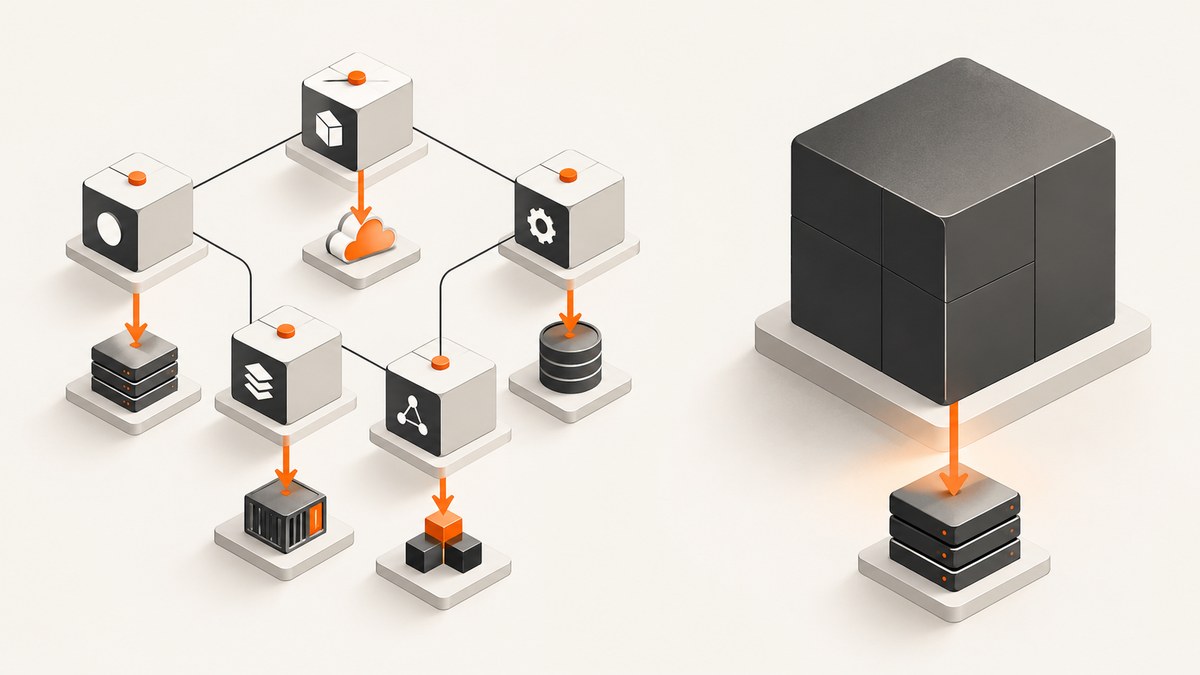
Microservices are an architectural style for building one application as a set of services, each focused on a business capability. Each service runs as its own process, communicates with other services through lightweight mechanisms such as APIs or events, and can be deployed independently. There is no universal size threshold for a service: clear boundaries and autonomy matter more than how many lines of code it contains.
That independence comes with a trade: services can have separate ownership, releases, and scaling, but their communication now crosses a network. Calls can be slow or fail, and teams must plan for data consistency, monitoring, discovery, testing, and failure handling. Microservices are useful when those benefits justify the added operating and coordination work.
1. What makes an architecture microservices?
A microservices application is still a single product from the user’s perspective. Internally, it is composed of independently deployable services organized around capabilities such as accounts, billing, or inventory. A service owns a defined responsibility and exposes an interface other parts of the application can use.
James Lewis and Martin Fowler describe the style as a suite of small services, each in its own process and communicating through lightweight mechanisms, often an HTTP resource API. Their description also emphasizes business capability boundaries and automated deployment. “Micro” does not prescribe a reliable size: a service is not a microservice just because it is small, nor must every service be tiny. The useful question is whether it has a coherent boundary and can change independently.
HTTP APIs are common, but they are not required. Services may also communicate through events and a message broker. Likewise, containers and serverless hosting are implementation choices rather than defining properties. See the [Fowler and Lewis definition](https://martinfowler.com/articles/microservices.html), [Google Cloud overview](https://cloud.google.com/learn/what-is-microservices-architecture), and [AWS overview](https://aws.amazon.com/microservices/).
2. How are microservices different from a monolithic application?
A monolith is commonly built and deployed as a unified application. Its internal modules may be carefully separated, but they run and release together. A microservices architecture divides capabilities into separate processes with service boundaries and independent releases.
| Question | Monolith | Microservices |
|---|---|---|
| Where does one module call another? | Usually within the same process | Across a network or through messaging |
| How are changes released? | Usually as one application deployment | Services can be deployed independently if interfaces and delivery practices support it |
| How is capacity added? | Often by running additional application instances | Individual services can be scaled when their workloads differ |
| What does operations track? | Fewer deployable units, though the application can still be complex | More services, interfaces, deployments, and failure paths |
| Can the design be modular? | Yes. A monolith can have strong internal boundaries | Yes. Boundaries are expressed across processes as well |
A monolith does not have to be poorly structured, and running multiple copies of one monolith is still possible. Its calls can stay in process and its deployment can remain coordinated. Microservices trade that coordination point for more independent service boundaries—and the distributed-systems work those boundaries require.
3. What are the benefits of microservices?
Independent deployment and ownership
A service may be changed and released without rebuilding every other service, provided the interface remains compatible and delivery is automated. This can help teams own a capability and choose its release schedule. It does not make coordination disappear: changes to shared contracts or workflows can still affect multiple services.
Scaling by workload
If one capability receives substantially different demand from others, it can be scaled on its own. That can avoid scaling every part of an application together. This benefit depends on actual workload differences and the ability to operate separate capacity; dividing a system without that need can add cost and work without a corresponding gain.
Technology choices within boundaries
Teams can select different implementation technologies for different services. That flexibility can be useful, but every additional runtime or platform may expand the team’s support and skills burden. Technology choice should serve the capability, not become an end in itself.
These are possible benefits, not automatic outcomes. Fowler’s discussion of [microservice trade-offs](https://martinfowler.com/articles/microservice-trade-offs.html) and [Microsoft’s architecture guidance](https://learn.microsoft.com/en-us/azure/architecture/guide/architecture-styles/microservices) stress that poor boundaries can undermine the intended autonomy.
4. What costs and risks do microservices add?
- Network failure and latency: A remote call can take longer than an in-process call, time out, or fail while the caller is waiting. Each caller needs defined behavior for failure and delay.
- Data consistency: When capabilities own data in separate services, a change spanning them may not be one simple database transaction. Teams need to decide what consistency the user workflow requires and how updates are coordinated.
- Service discovery and routing: Callers need a reliable way to locate services and reach the right endpoint as deployments change.
- Testing across boundaries: A service can pass its own tests while its dependencies or contracts are incompatible. Teams need to verify interfaces and important end-to-end workflows.
- Monitoring and operations: Debugging a user request can involve several services. Logs, metrics, and request traces need enough context to reveal where a delay or failure occurred.
- Governance and coordination: Teams need decisions about interface compatibility, security, ownership, and shared operational practices.
Each service can be relatively simple while the system becomes more complex overall. The network boundary creates real failure and coordination cases that an in-process call does not have. The [CNCF glossary](https://glossary.cncf.io/microservices-architecture/) also describes microservices as an architecture, not a guarantee that an application will be simpler.
5. How do microservices communicate and run?
Synchronous APIs
In request-response communication, one service calls another through a defined API and waits for a response. HTTP APIs are common. Keep interfaces explicit, define timeouts, and decide how callers behave when the service is unavailable. A chain of synchronous dependencies can make one user request depend on several services being healthy and responsive.
Events and messaging
An event-driven design lets a service publish an event to a broker and other services subscribe. The producer need not make a direct request to every consumer, which can loosen coupling. In exchange, the design has to account for delivery, consumer failures, duplicate handling, and when each service’s view of data becomes current.
Containers and serverless
Containers package a service with its dependencies and isolate it from other workloads. Serverless platforms are another way to run service code. Neither defines the microservices style: the defining decisions are service boundaries, processes, communication, and deployment independence. Google’s [microservices guidance](https://cloud.google.com/learn/what-is-microservices-architecture) discusses containers and serverless as common approaches, while Microsoft’s guidance covers proxies and messaging options.
6. How should you decide whether to adopt microservices?
Compare the expected value of independent ownership, releases, or scaling with your team’s ability to operate distributed software. Use these questions before splitting an application:
- Are capability boundaries clear and stable? If responsibilities overlap or are still changing rapidly, choosing service boundaries may be premature.
- Do teams need separate release schedules? Independent deployment has value when services can actually be changed and shipped without synchronized releases.
- Do workloads differ enough to justify separate scaling? Identify the capability whose demand differs and why independent capacity matters.
- Can you operate the network boundary? Plan for discovery, timeouts, monitoring, failure handling, and distributed testing.
- Who owns each service and its data? Make data ownership and cross-service workflows explicit, including consistency expectations and transaction coordination.
- Does the autonomy justify the added work? Include infrastructure, support, and team coordination when comparing options.
A modular monolith can preserve internal boundaries while keeping deployment and calls coordinated. Microservices become a stronger fit when independent ownership and release needs are real and the organization can support the distributed system they create. There is no universal service-count or code-size threshold that makes the choice for you.
7. How to inspect a website screenshot during service design
Architecture diagrams explain service relationships, while browser screenshots can help document a service’s user-facing output, an error page, or a workflow at a particular viewport. A browser-based capture is useful when the page needs real rendering, but it introduces its own setup: browser installation, page readiness, viewport selection, and handling overlays that obscure the content.
Capture a page with Playwright in Node.js
Install Playwright and its Chromium browser, then save the following as screenshot.mjs. This example captures a full page and writes a PNG:
import { chromium } from 'playwright';

const browser = await chromium.launch({ headless: true });
const page = await browser.newPage({ viewport: { width: 1440, height: 1000 } });

try {
  await page.goto('https://example.com', {
    waitUntil: 'networkidle',
    timeout: 30000
  });
  await page.screenshot({ path: 'page.png', fullPage: true });
} finally {
  await browser.close();
}
Run it with node screenshot.mjs. For a page that continuously polls or streams requests, networkidle may never occur; use domcontentloaded plus a targeted selector or a short delay instead. Full-page capture can also produce a very tall image, so a viewport capture may be more useful for a specific UI state.
Capture with cURL, Python, or Node.js directly
A direct browser automation script gives you control over browser behavior. For a one-off capture using a screenshot API, these runnable request examples illustrate the basic pattern. Replace the URL with the page you are permitted to capture and supply the service’s credentials as required.
curl -L 'https://example.com' -o page.htmlDownloading HTML is not a rendered screenshot; a screenshot requires a browser or a screenshot service. The following examples use ScreenshotNeo’s API. See the ScreenshotNeo API documentation for request options and response behavior.
curl -G "https://api.screenshotneo.com/v1/shot" \
  -d access_key=YOUR_API_KEY \
  --data-urlencode url=https://stripe.com \
  -o shot.webp
import requests
r = requests.get(
"https://api.screenshotneo.com/v1/shot",
params={"access_key": "YOUR_API_KEY", "url": "https://stripe.com"},
timeout=90,
)
r.raise_for_status()
open("shot.webp", "wb").write(r.content)const q = new URLSearchParams({
access_key: 'YOUR_API_KEY',
url: 'https://stripe.com'
});
const res = await fetch(`https://api.screenshotneo.com/v1/shot?${q}`);
if (!res.ok) throw new Error(`Screenshot request failed: ${res.status}`);
await Bun.write('shot.webp', res);The Node.js example uses Bun’s file-writing helper. In Node.js, write the response bytes with await import('node:fs/promises').then(fs => fs.writeFile('shot.webp', Buffer.from(await res.arrayBuffer()))) after checking the status. Keep API keys on the server; do not embed a secret key in public client-side code.
Useful capture options and edge cases
Browser capture behavior depends on what question the screenshot should answer. Choose settings deliberately:
- Viewport or full page: A viewport preserves the visible state; a full-page capture includes content below the fold and may trigger lazy-loaded images.
- Element capture: A CSS selector can isolate a component. Confirm the selector exists before taking the screenshot and handle a missing element as an explicit error.
- Readiness: Waiting for a selector is often more reliable than assuming a fixed delay. A delay can help with animations but adds time. Network-idle waits can be unsuitable for pages with persistent requests.
- Authentication and state: Use authorized test accounts, explicit cookies or headers, and a controlled user agent where needed. Avoid capturing sensitive data into artifacts or logs.
- Viewport and scale: Set the viewport and device scale factor to reproduce the target layout and pixel density.
- Overlays and animation: Consent banners, popups, chat widgets, and animation can obscure or vary the result. Dismiss or hide only the elements appropriate to the capture.
- PDF or image: Use PDF output when pagination and paper settings matter; image output is simpler for a visual snapshot.
8. Or skip the browser setup
ScreenshotNeo is a website screenshot API and MCP server. One GET request returns a PNG, JPEG, WebP, or PDF. The call below uses the same endpoint from the code examples; the API docs describe its parameters.

curl -G "https://api.screenshotneo.com/v1/shot" \
  -d access_key=YOUR_API_KEY \
  --data-urlencode url=https://stripe.com \
  -o shot.webp
Before capture, it accepts consent banners like a visitor and removes more than 60 known consent platforms, newsletter popups, and chat widgets; each step can be turned off. Bot checks, blank pages, timeouts, failed loads, and cache hits cost nothing, and response headers report the page verdict and billing status. Its MCP server provides take_screenshot, get_page_info, and capture_pdf for Claude, Cursor, and other MCP clients. The free plan includes 1,000 shots per month with no card; paid plans start at $5 for 3,000 shots. Every feature is available on every plan.
Create a free ScreenshotNeo account for 1,000 screenshots a month, with no card.
9. Performance, reliability, and cost notes
For a self-managed browser, the main cost is not only the screenshot call: browser startup, page load, fonts, images, scripts, and readiness waits all add time and resource use. Reuse browser processes where the automation framework supports it, close pages and browsers in cleanup paths, and set explicit navigation timeouts. Avoid waiting for every network request when the page never becomes quiet. Capture only the required viewport or element when a full-page artifact is unnecessary.
Reliability depends on the page as well as the capture code. A page can be unavailable, slow, blocked by a bot check, or altered by dynamic content. Use status checks, meaningful timeouts, and limited retries for transient failures; retries can increase load and should not loop indefinitely. Keep output names and capture inputs traceable so a failed artifact can be reproduced.
Costs for a self-hosted browser include compute, browser maintenance, and engineering time; no benchmark or fixed cost applies across environments. For an API, compare the plan’s included volume, overage rules, and response semantics before using it at scale. ScreenshotNeo lists Free at 1,000 monthly shots, Starter at $5 for 3,000, Growth at $15 for 15,000, Pro at $39 for 60,000, Scale at $99 for 250,000, and Business at $249 for 1,000,000; yearly billing gives two months free. Check the product site for current plan details.
10. Troubleshooting screenshot captures
| Symptom | Likely cause | Fix |
|---|---|---|
| Navigation times out | Slow resources, persistent connections, or an overly strict readiness condition | Set a realistic timeout; wait for a specific selector or DOM readiness instead of network idle where appropriate. |
| Screenshot is blank or incomplete | Capture started before the page rendered, or the destination returned an error/blank response | Wait for a visible page element, inspect the final URL and page status, and capture diagnostic metadata. |
| Lazy images are missing | Images load only after scrolling into view | Use a full-page capture or scroll through the relevant region before capture, then wait for image completion. |
| Element selector is missing | Selector changed, content is conditional, or the page has not reached the expected state | Wait for the selector with a bounded timeout and report a clear error if it never appears. |
| Output differs between runs | Dynamic content, animation, time zone, viewport, or personalized state changed | Fix the viewport and state, wait for stable content, and disable animation where appropriate. |
| API returns an error instead of an image | Invalid credentials, URL encoding, request limits, or target load failure | Check status and response headers/body before saving bytes; encode the URL and verify the key and endpoint. |
| Images appear corrupted | An error response was saved with an image extension | Check HTTP status and content type before writing the body as an image. |
| Browser process leaks | Exceptions skipped cleanup | Put browser shutdown in a finally block and limit concurrent pages to available resources. |
11. FAQ
Are microservices always smaller than a monolith?
They are separate services, but there is no reliable size cutoff. Define them by capability and autonomy rather than a line count.
Do microservices require Kubernetes?
No. Containers, serverless, and orchestration platforms are hosting choices. They are not part of the definition.
Can a monolith be modular?
Yes. A monolith can have strong internal boundaries while keeping deployment coordinated and communication in process.
Do microservices make an application faster?
Not by definition. Independent scaling may help a particular workload, while network calls add latency and failure paths. Measure the needs of the system rather than assuming a speed improvement.
Is a microservice the same thing as an API?
No. An API is an interface. A microservice is a separately running service with a capability boundary; it may expose an API or communicate through events.


