What Is a Reverse Proxy?
A reverse proxy receives client requests for your servers, then routes, caches, secures, and returns responses from the right backend.
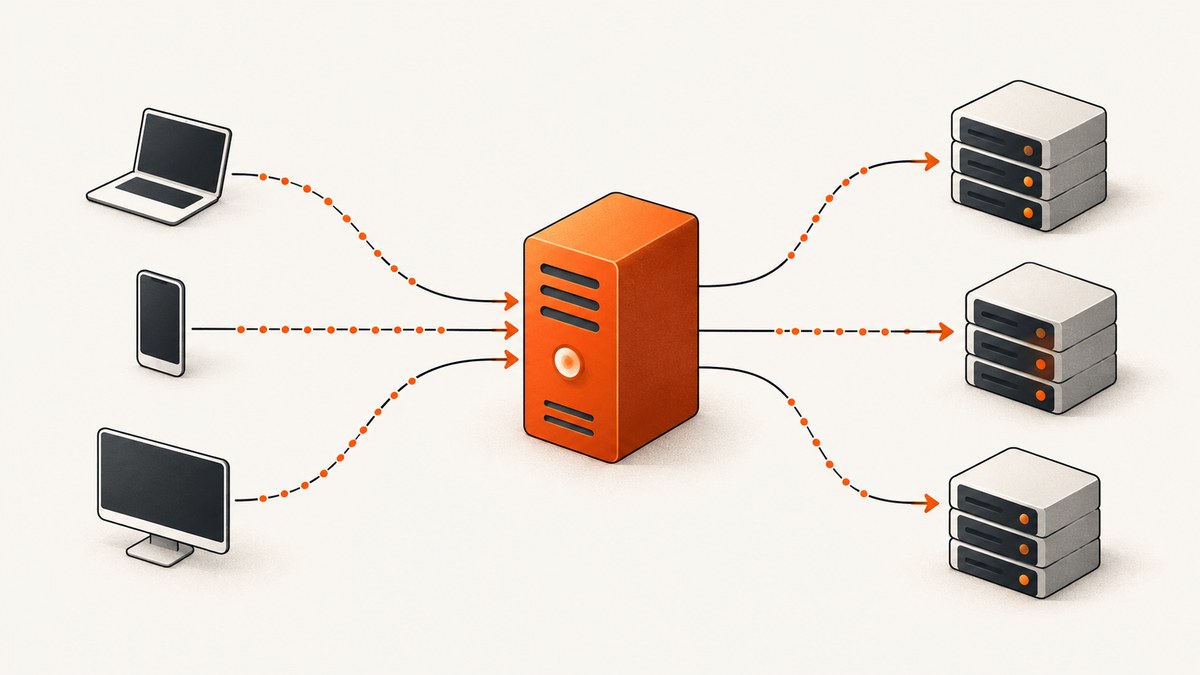
A reverse proxy is a public-facing server that receives requests for one or more private backend servers. A browser or API client connects to the proxy. The proxy chooses or contacts a backend, receives the backend response, and sends that response back to the client. Depending on its configuration, the proxy can also terminate TLS, cache responses, route by hostname or path, balance traffic, filter requests, and hide direct origin endpoints.
The proxy is an intermediary, not a guarantee. Caching only helps responses that are eligible and correctly configured. TLS between a client and the proxy does not automatically encrypt the proxy-to-origin connection. Hiding an origin address is useful, but a misconfigured DNS record or another exposed service can still reveal it.
How the request flow works
The normal exchange has four stages:
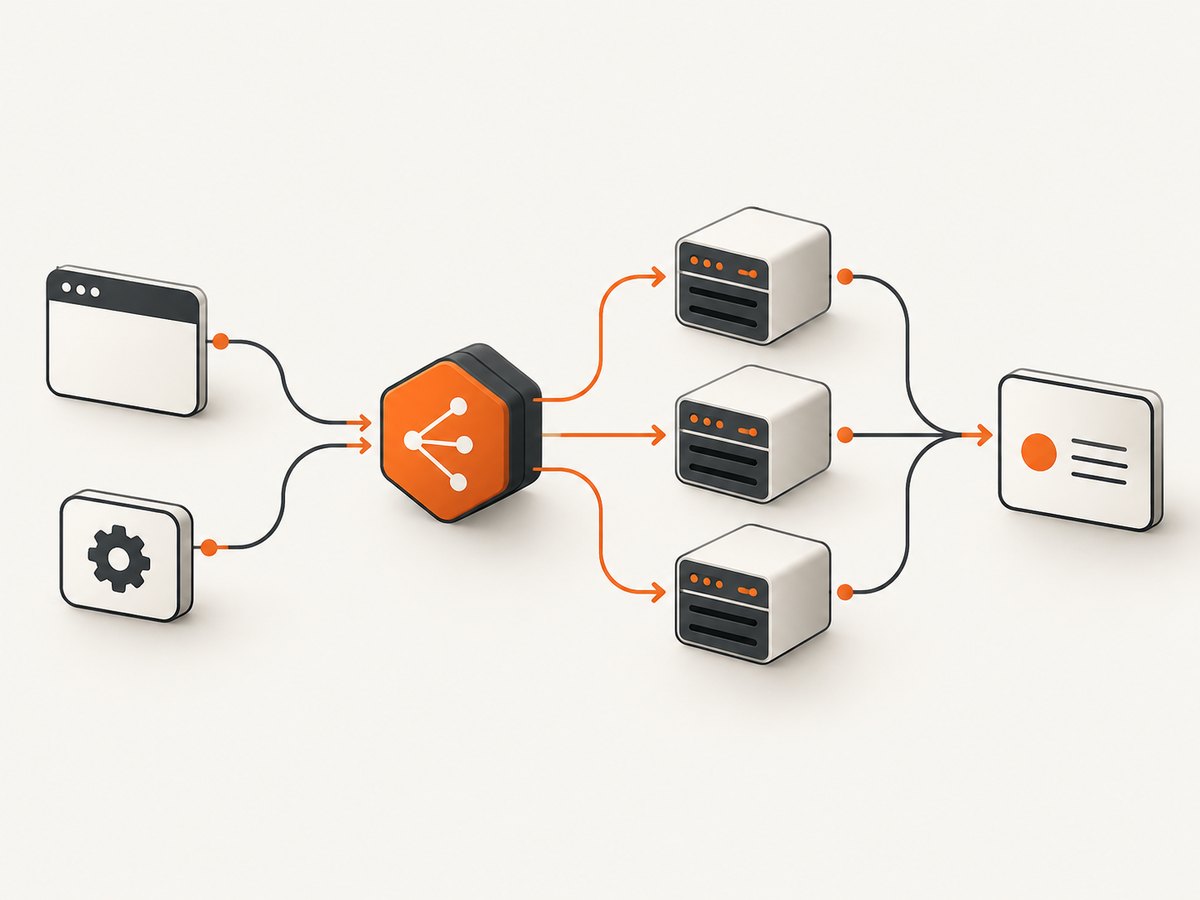
- The client requests a public URL such as
https://example.com/app. - The reverse proxy accepts the connection and applies TLS, routing, access, and cache rules.
- The proxy forwards the request to an origin server or selects one server from an upstream group.
- The origin response returns to the proxy, which may cache or transform it before sending it to the client.
NGINX describes the core exchange as sending a request to a specified proxy server, fetching the response, and sending that response back to the client. Its reverse-proxy module can pass HTTP requests to application servers and also supports protocols such as FastCGI, uwsgi, SCGI, and memcached. See the NGINX reverse proxy guide.
Reverse proxy versus forward proxy
| Question | Forward proxy | Reverse proxy |
|---|---|---|
| Whose side? | Client side | Server side |
| Who configures it? | An organization or user controlling outbound clients | The site or platform operating the origin services |
| Traffic direction | Clients going out to external sites | Public clients coming in to your services |
| Typical reasons | Outbound policy, privacy, filtering, or access to restricted networks | Routing, load balancing, caching, TLS termination, and origin protection |
| What the destination sees | Usually the forward proxy instead of the client | The origin may see the reverse proxy unless forwarding headers are used |
In short: a forward proxy represents clients going out; a reverse proxy represents servers receiving traffic. The word “proxy” describes the intermediary role, so the direction and operator matter.
What can a reverse proxy do?
Route by host, path, or request properties
One public hostname can route to several services. For example, api.example.com can go to an API cluster while www.example.com goes to a web frontend. A single hostname can also use paths such as /api, /images, and /admin to reach different upstreams. Layer 7 routing understands HTTP hostnames, paths, methods, and headers; Layer 4 forwarding handles lower-level TCP or UDP connections without interpreting HTTP.
Balance traffic across backends
A reverse proxy can distribute requests among several application servers. NGINX documents round robin, least connections, least time, and hashing methods for HTTP and HTTPS load balancing; the exact algorithms and health features depend on the product edition and configuration. A health check or failed connection can remove an unavailable backend, while session affinity can keep a user on the same backend when an application requires it.
Load balancing is useful only when the application can run correctly on more than one instance. Shared files, sessions, queues, and databases must be designed for that topology. Otherwise, adding a proxy can expose state-management problems instead of fixing them.
Cache eligible responses
The proxy can store a response and serve later requests without contacting the origin. This reduces origin work and can reduce latency for cache hits. The result depends on cache headers, keys, invalidation, request cookies, authorization, content variation, and the proxy’s rules. Do not cache personalized or private data as public content.
Use explicit Cache-Control directives, define which methods and status codes are cacheable, and decide how deployments purge old objects. A cache hit can be fast, but stale content may be unacceptable for account pages or rapidly changing APIs.
Terminate TLS at the edge
The proxy can accept HTTPS, present the certificate, and forward the request to an origin over HTTP or HTTPS. Terminating TLS at the proxy simplifies certificate handling and can reduce encryption work on origins. For sensitive traffic, configure HTTPS from the proxy to the origin as well. Cloudflare explains this distinction in its documentation on proxied traffic and origin connections: encryption on one network leg does not imply encryption on every leg.
Apply access and traffic controls
Because the proxy sees requests before the origin, it can enforce authentication gateways, IP rules, rate limits, request-size limits, header normalization, and web-application firewall policies. These controls must match the real threat model and application behavior. A proxy is not automatically a firewall, bot defense system, or DDoS solution unless those capabilities are configured and included in the service.
Reduce direct origin exposure
Clients normally connect to the proxy address rather than the origin address. This can make direct targeting harder and lets you restrict origin firewalls to trusted proxy networks. It is not an absolute security boundary: DNS history, mail records, development hosts, leaked configuration, or an unprotected alternate port can reveal an origin. Audit all public services and permit only the traffic paths you intend.
A minimal self-managed NGINX reverse proxy
The following example sends public HTTP traffic to an application listening on port 3000. Replace the hostname and upstream address for your environment.
http {
    upstream app_backend {
        server 127.0.0.1:3000;
        server 127.0.0.1:3001;
    }

    server {
        listen 80;
        server_name example.com;

        location / {
            proxy_pass http://app_backend;
            proxy_http_version 1.1;
            proxy_set_header Host $host;
            proxy_set_header X-Real-IP $remote_addr;
            proxy_set_header X-Forwarded-For $proxy_add_x_forwarded_for;
            proxy_set_header X-Forwarded-Proto $scheme;
        }
    }
}
proxy_pass selects the upstream. The headers preserve the original host, client address, and scheme for applications that need them. In production, add HTTPS, timeouts, request limits, health behavior, logging, and an explicit policy for WebSocket or streaming connections.
Client address and forwarded headers
The backend may see the proxy’s IP as the TCP peer. The standardized Forwarded header and the widely used X-Forwarded-For header can carry the original client address. Your application should trust these headers only when the request came from a proxy network you control. Otherwise, a client can send a forged header and bypass IP-based controls or corrupt audit logs.
Configure a trusted proxy list at the web server, framework, or load balancer layer. Normalize the chain consistently, log both the immediate peer and the derived client address, and never use an untrusted forwarded value for authorization.
Managed reverse proxies and DNS modes
A managed provider operates the proxy network and sends proxied HTTP or HTTPS traffic toward your origin. A DNS-only setup returns endpoint addresses through DNS instead; clients then connect directly to those endpoints. DNS caching and resolver behavior can make failover slower, expose endpoint IPs, and prevent integration with features that require traffic to pass through the proxy. Cloudflare documents these differences in its explanations of reverse proxy architecture and DNS-only versus proxied modes.
When comparing a managed service with self-managed NGINX, evaluate:
- Whether you need Layer 7 HTTP routing or Layer 4 TCP/UDP forwarding.
- Available load-balancing algorithms, health checks, failover, and session affinity.
- Cache controls, purge behavior, filtering, and TLS certificate management.
- How client identity reaches the origin and how origins are restricted.
- Operational ownership, configuration control, maintenance, and provider dependency.
Configuration checklist
- Define every public hostname and its intended upstream.
- Choose HTTP-aware or TCP/UDP forwarding for each service.
- Set connect, read, send, and idle timeouts for the workload.
- Configure HTTPS certificates and decide whether proxy-to-origin traffic also uses TLS.
- Set trusted proxy ranges before consuming forwarded headers.
- Mark only safe responses as cacheable and plan invalidation.
- Add health checks and a failure policy for unavailable backends.
- Preserve required host, scheme, request ID, and authorization headers.
- Set body-size, rate, and concurrency limits appropriate to the application.
- Monitor status codes, latency, upstream errors, cache status, and saturation.
- Restrict origin firewalls to the proxy and required private networks.
Troubleshooting common failures
| Symptom | Likely cause | Fix |
|---|---|---|
| 502 Bad Gateway | The proxy cannot connect to the upstream, or the upstream closed the connection. | Check the backend address, listening port, firewall, DNS, protocol, and application logs. |
| 504 Gateway Timeout | The upstream did not respond within the configured timeout. | Inspect slow queries and downstream calls; raise the timeout only when the longer request is intentional. |
| Redirect loop | The origin thinks the request is HTTP after TLS terminated at the proxy. | Forward the scheme and configure the application to trust the proxy. |
| Wrong virtual host | The original Host header was not passed or the proxy route is too broad. |
Set the host header explicitly and verify server-name matching. |
| Client IP is always the proxy | Forwarded headers are missing or the application does not trust the proxy. | Set Forwarded or X-Forwarded-For and configure a trusted proxy list. |
| Users receive stale data | Cache TTL or invalidation rules are too broad. | Inspect cache headers and keys; bypass or purge entries for personalized and deployment-sensitive responses. |
| Uploads fail | Proxy body-size or buffering limits are smaller than the request. | Increase limits deliberately and verify upstream and application limits match. |
| WebSockets disconnect | Upgrade headers or idle timeouts are not configured. | Pass connection-upgrade headers and set an idle timeout that matches the session. |
Performance, reliability, and cost considerations
A proxy adds a network hop and processing, so measure end-to-end latency rather than assuming it is faster. Caching, connection reuse, compression, edge location, and reduced origin work can outweigh that hop for cacheable content. For dynamic traffic, tune keep-alive settings, upstream connection pools, buffering, and timeouts to the workload.
Reliability comes from redundancy at every layer: multiple proxy instances or provider edges, multiple healthy backends, tested certificate renewal, and a recovery plan for configuration changes. Monitor proxy errors separately from origin errors so a failing backend is not mistaken for a failing edge.
Costs can include proxy instances, bandwidth, requests, cache storage, TLS certificates, logging, and managed-service usage. Compare those costs with the operational work of running the proxy yourself. Avoid claiming savings without measurements from your traffic pattern.
Or skip the browser setup
If your goal is to capture a page behind a reverse proxy, ScreenshotNeo provides a website screenshot API and MCP server. It accepts one GET request and returns PNG, JPEG, WebP, or PDF. Before capture, it accepts cookie or consent banners and removes more than 60 known consent platforms, newsletter popups, and chat widgets; each step can be disabled. Bot checks, CAPTCHAs, blank pages, timeouts, failed loads, and cache hits are not billed, and the response identifies the result with X-Page-Verdict and X-Billed headers.
See the ScreenshotNeo API documentation for all options, including full-page and element capture, device presets, retina scale, PDF settings, custom CSS and JavaScript, clicks, waits, blocked resources, headers, cookies, user agents, timezone, geolocation, transparent backgrounds, resizing, TTL caching, signed links, asynchronous webhooks, bulk capture, usage data, and the OpenAPI specification.
curl -G "https://api.screenshotneo.com/v1/shot" -d access_key=YOUR_API_KEY --data-urlencode url=https://stripe.com -o shot.webpimport requests
r = requests.get("https://api.screenshotneo.com/v1/shot", params={"access_key": "YOUR_API_KEY", "url": "https://stripe.com"}, timeout=90)
open("shot.webp", "wb").write(r.content)const q = new URLSearchParams({ access_key: 'YOUR_API_KEY', url: 'https://stripe.com' });
const res = await fetch(`https://api.screenshotneo.com/v1/shot?${q}`);An MCP server provides take_screenshot, get_page_info, and capture_pdf tools for Claude, Cursor, and other MCP clients. The free plan includes 1,000 screenshots each month with no card; paid plans start at $5 for 3,000. Create a free ScreenshotNeo account.
FAQ
Does every reverse proxy load-balance?
No. A reverse proxy can send every request to one origin. Load balancing is an additional configuration and usually requires multiple interchangeable backends.

Is a CDN the same as a reverse proxy?
A CDN commonly uses reverse-proxy behavior at edge locations and adds caching and delivery features. A reverse proxy can also be a single self-managed server with no global CDN.
Should the origin trust every X-Forwarded-For value?
No. Trust values only from known proxy infrastructure, then parse and log the chain according to your framework’s documented behavior.
Can a reverse proxy serve non-HTTP traffic?
Some products support Layer 4 TCP or UDP forwarding, while an HTTP reverse proxy understands HTTP messages. Confirm protocol support before choosing an implementation.
Where should TLS terminate?
It can terminate at the proxy, the origin, or both through TLS re-encryption. Choose based on certificate management, trust boundaries, compliance, and the sensitivity of the proxy-to-origin network.


