What Is Pinecone and Why Use It for LLMs?
Pinecone is a managed vector database that helps LLM apps retrieve relevant information. Learn how it fits into RAG, what to evaluate, and what it costs.

Pinecone is a managed vector database for AI applications. It stores records as vectors and lets an application retrieve records that are semantically similar to a question. In an LLM workflow, that retrieval layer can provide relevant source material to a model, often through retrieval-augmented generation (RAG). Pinecone is not an LLM, does not guarantee a correct answer, and does not make retrieval quality automatic. Pinecone describes its service as a vector database for semantic search, knowledge retrieval, and AI applications.
The short version: index useful records, represent their content and a user’s question as vectors, retrieve likely matches, and pass selected context to an LLM. Your application still decides what to retrieve, how to cite it, and how to handle missing or conflicting evidence.
1. What Pinecone is—and what it is not
A vector is a numerical representation of content produced by an embedding model. Pinecone stores vectors, associated record IDs and optionally metadata, then searches for nearby vectors. The intended effect is that content with related meaning can be found even when the query and source use different wording. Pinecone supports dense and sparse vector types and cosine, Euclidean, and dot-product metrics, with valid choices depending on vector type and index configuration. See the index configuration reference.
| Component | Responsibility |
|---|---|
| Source system | Owns the documents, product records, tickets, or other content. |
| Embedding model | Turns content and queries into vectors, unless an integrated embedding index handles that step. |
| Pinecone | Stores and searches indexed records and returns candidates. |
| Your application | Applies access rules, selects context, calls the LLM, and checks the resulting answer. |
| LLM | Generates a response using the prompt and context supplied to it. |
So, Pinecone is not a model that writes the answer and is not a document source by itself. It is also not a guarantee against hallucinations. If important material was never indexed, the query retrieves the wrong passage, or the application passes misleading context, the model can still answer incorrectly. This follows from the retrieval workflow: the database returns candidates; the application and model must use them well.
2. Why use Pinecone for an LLM application?
Teams evaluate Pinecone when they want a managed retrieval database for semantic search, knowledge retrieval, recommendation, or application memory, without operating the vector search infrastructure themselves. Whether that is a better fit than a self-managed database or another hosted service depends on your workload, operating constraints, and measured results. A managed service reduces some infrastructure work; it does not remove data engineering, relevance evaluation, security design, or cost management.
- RAG over changing knowledge: retrieve current passages from an index when a user asks a question, instead of trying to fit an entire knowledge base into every prompt.
- Semantic search: return conceptually related content when a searcher’s wording differs from the source.
- Metadata constrained retrieval: filter candidates by fields such as tenant, document type, or publication status where the application requires it.
- Hybrid retrieval: combine semantic similarity with lexical matching when exact terms such as product names, identifiers, or code symbols matter.
- Operational separation: use indexes and namespaces to structure data and isolate application or tenant records according to your design.
Those are reasons to evaluate it, not promised relevance improvements. Pinecone’s production guidance recommends testing search results in the context of the application, and its search material describes hybrid search, metadata filters, and reranking as techniques to consider. Production checklist · Pinecone documentation.
3. How Pinecone fits into RAG
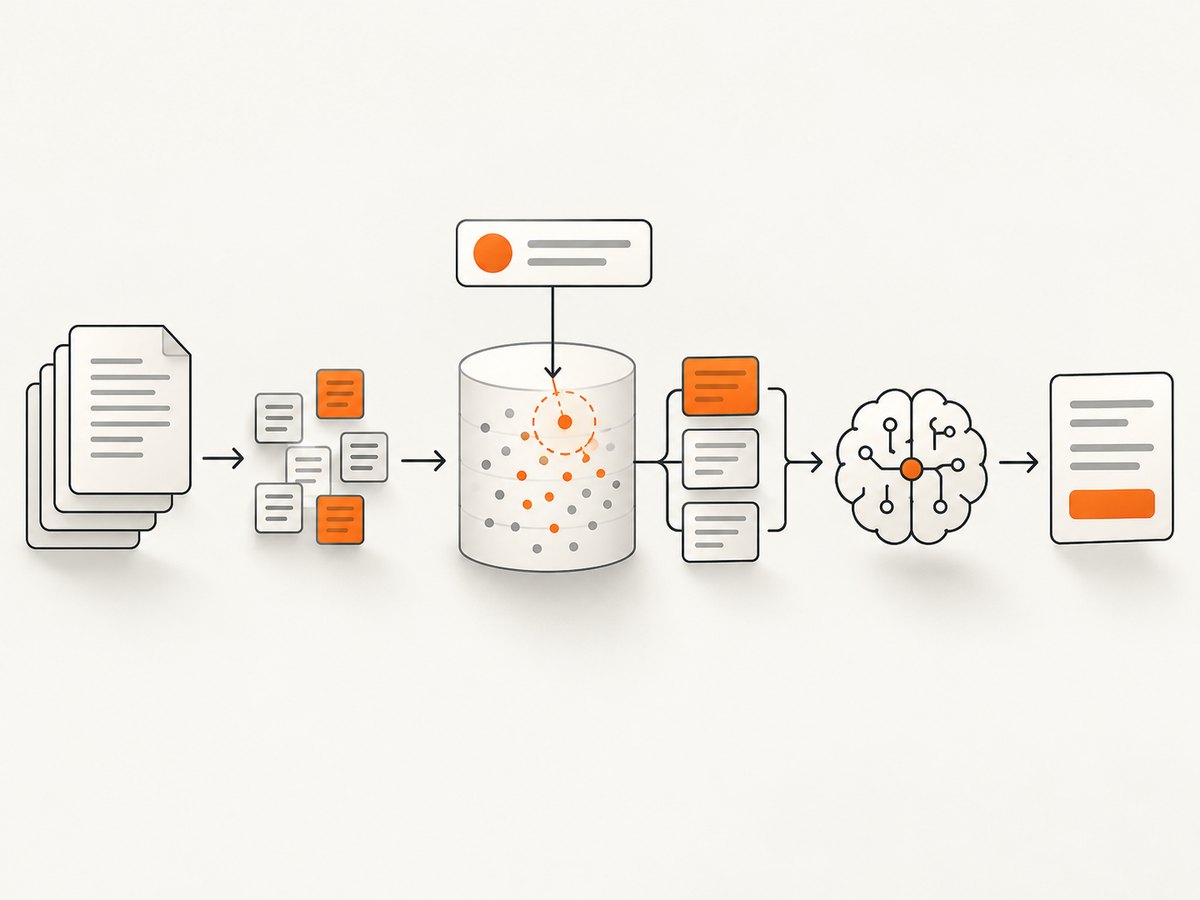
- Collect and prepare source records. Choose authoritative documents and keep a stable link or ID back to each source. Split long documents into passages if retrieving smaller evidence units suits your application.
- Embed records. An embedding model maps each passage into a vector. Alternatively, use an integrated embedding index where supported; its model, field mapping, vector type, dimension, and metric must be configured consistently.
- Index records. Store vectors with stable IDs and useful metadata. Include enough provenance to identify the source and update or delete records when the source changes.
- Embed or submit the query. Convert the user’s question to a vector using a compatible model, or use text querying supported by an integrated embedding index.
- Retrieve candidates. Search by semantic similarity, optionally test hybrid search and metadata constraints, and retrieve a candidate set.
- Select and prepare context. Your application enforces authorization, removes irrelevant or duplicate passages, respects the model’s context budget, and retains source references for citations.
- Generate and evaluate. Ask the LLM to answer from the supplied evidence and say when it is insufficient. Measure both retrieval quality and answer quality using representative queries.
Chunk size and overlap, embedding choice, metadata, filters, top-k, and reranking all affect what reaches the model. There is no universally correct setting: create representative queries, label useful evidence, and compare configurations against your own task. A retrieval metric alone is not enough if the final answer is the product users see.
4. A minimal retrieval example
The following Python sketch shows the control flow using a Pinecone index that already exists and a compatible embedding function supplied by your application. It is deliberately explicit about that boundary: choose an embedding model and install its client separately, then make embed(text) return a vector matching the index’s configured dimension and model. Keep API keys in environment variables or a secret manager.
import os
from pinecone import Pinecone

# pip install pinecone
# Implement embed(text) with your chosen embedding provider.
# It must return a list of floats compatible with this index.
def embed(text: str) -> list[float]:
    raise NotImplementedError("Connect your embedding model here")

pc = Pinecone(api_key=os.environ["PINECONE_API_KEY"])
index = pc.Index(host=os.environ["PINECONE_INDEX_HOST"])

# Example record: embed source text before indexing.
passage = "Refunds are available within 30 days of purchase."
index.upsert(vectors=[{
    "id": "policy#refunds-1",
    "values": embed(passage),
    "metadata": {
        "text": passage,
        "source": "https://example.com/refunds",
        "kind": "policy"
    }
}])

question = "How long do customers have to request a refund?"
result = index.query(
    vector=embed(question),
    top_k=5,
    include_metadata=True
)

for match in result.matches:
    print(match.score, match.metadata.get("source"), match.metadata.get("text"))
This is a retrieval example, not a complete chat endpoint. The embedding function is provider-specific; Pinecone cannot infer a vector from this placeholder. To make a runnable application, install and configure an embedding provider, implement embed, and then pass selected passages to your chosen LLM. Verify that document and query embeddings share the required model and dimensions. The SDK, index targeting, and data operations are documented in Pinecone’s official docs.
5. Configuration choices that affect results
Index type, vectors, and metric
Pinecone documents serverless and pod-based configurations. Dense vectors commonly represent semantic embeddings; sparse representations support lexical signals. The appropriate metric depends on vector type and model conventions. For integrated embedding, configure a supported model and matching vector type, dimension, and metric. The configuration reference notes that an embedding model cannot be changed after it is set on an index, so treat that decision as an index design choice and confirm current API behavior before committing. Index configuration reference.
IDs, metadata, namespaces, and tenancy
Use deterministic IDs that let your ingestion process update or remove records predictably; a document ID plus chunk number is one practical pattern. Store metadata needed for filtering, source attribution, and traceability. Namespaces can separate logical data sets within an index, but application-level authorization still must prevent users from querying another tenant’s data. Design and test the boundary rather than assuming namespace choice alone secures an application.
Semantic, hybrid, filters, and reranking
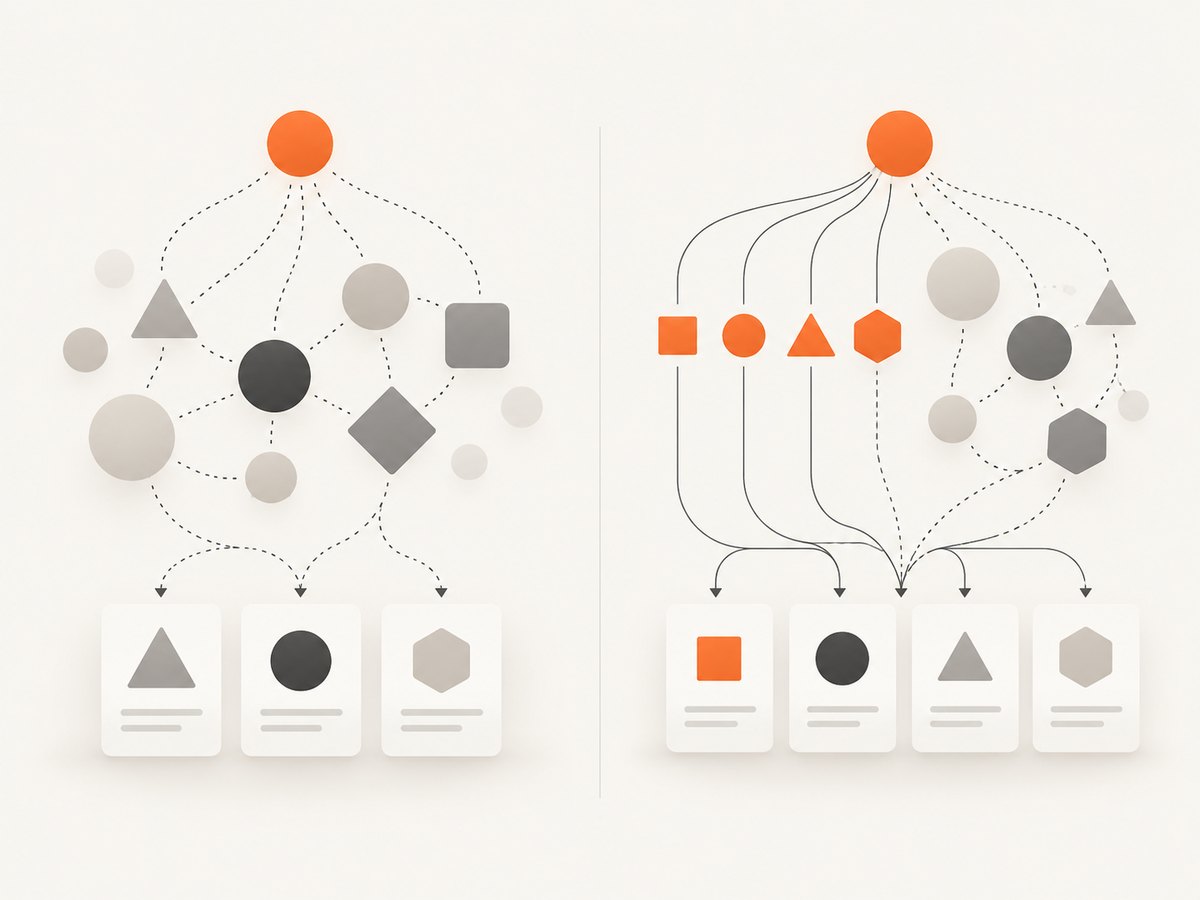
Use semantic retrieval when meaning matters. Compare hybrid retrieval when literal terms can be decisive: error codes, API symbols, legal references, SKUs, and proper names. Filters can narrow candidates to the permitted or relevant subset. Reranking can reorder retrieved candidates. Evaluate each technique against a query set: more processing steps can add complexity and potentially cost without helping every corpus.
Ingestion and freshness
Make ingestion repeatable. Track source versions or update timestamps, retry transient failures safely, and decide what happens when a document is removed or access changes. For larger data loads, Pinecone’s production checklist recommends batching and discusses import workflows. Validate how partial failures are surfaced and reconcile indexed records against the source of truth. Production guidance.
6. Evaluation, performance, and reliability
Build a fixed evaluation set from real application questions, including ambiguous queries, exact identifiers, rare topics, and questions with no answer in the corpus. For each query, record which sources should be retrieved. Compare semantic-only and hybrid configurations, filters, chunking choices, top-k, and reranking. Then inspect end-to-end answers: useful evidence may still be omitted or misrepresented by the LLM.
For latency and throughput, measure the whole path: query embedding, database retrieval, reranking if used, and LLM generation. Pinecone’s production checklist suggests targeting indexes by host, reusing connections, using namespaces and metadata filters where suitable, and deploying in the same cloud region as the index to reduce latency. For ingestion throughput it recommends batching, parallel operations, imports for applicable workloads, and SDK optimizations. Benchmark on representative traffic rather than assuming an index setting guarantees a result.
For reliability, separate development and production projects when appropriate, control API key access, handle rate limits and plan limits, and monitor failed requests and latency. Define retry behavior with backoff for transient errors; avoid unlimited retries that amplify load. Keep the source corpus recoverable and understand the backup and restore options available to your plan. Check the official status page when investigating a possible service incident. Pinecone production checklist.
7. Pinecone cost: what to include
Pinecone pricing has multiple plans and usage dimensions, and prices can change. On 2026-09-29, its pricing page listed Starter as free, Builder at $20/month, Standard with a $50/month minimum, and Enterprise with a $500/month minimum. Paid usage may exceed the minimum and be charged pay-as-you-go. Treat those figures as a dated snapshot, not a quote. The page’s example workloads are illustrative, exclude some inference, assistant, and import usage, and are subject to change. Check current Pinecone pricing and allowances.
Estimate the full system, not just database spend. Include vector storage, reads and writes or other applicable database usage, data import, embeddings, reranking, and assistant usage if your architecture uses those services. Model expected record counts, dimensions, metadata size, update rate, query volume, and peak traffic. Recheck limits and price assumptions before launch and after workload growth.
For ScreenshotNeo screenshots used to document an LLM product, capture a page or flow with one GET request. ScreenshotNeo is a website screenshot API and MCP server. The call below uses the documented endpoint and sample parameters; see the ScreenshotNeo docs.
curl -G "https://api.screenshotneo.com/v1/shot" -d access_key=YOUR_API_KEY --data-urlencode url=https://stripe.com -o shot.webp

python -c 'import requests; r = requests.get("https://api.screenshotneo.com/v1/shot", params={"access_key": "YOUR_API_KEY", "url": "https://stripe.com"}, timeout=90); open("shot.webp", "wb").write(r.content)'

const q = new URLSearchParams({ access_key: 'YOUR_API_KEY', url: 'https://stripe.com' });
const res = await fetch(`https://api.screenshotneo.com/v1/shot?${q}`);
Cookie banners, popups, and chat widgets are removed before the shot. Bot checks, blank pages, and failed loads are never billed. An MCP server lets AI agents take screenshots. The free plan includes 1,000 screenshots a month with no card; paid plans start at $5 for 3,000. Sign up for 1,000 free screenshots a month, with no card.
8. Troubleshooting common problems
| Symptom | Likely cause | What to check |
|---|---|---|
| Queries return unrelated records | Embedding mismatch, unsuitable chunking, weak metadata, or wrong metric/configuration. | Confirm the same compatible embedding setup for records and queries; inspect retrieved passages; evaluate chunking, filters, and hybrid search against labeled queries. |
| Exact identifiers are missed | Semantic similarity may not preserve exact-token behavior. | Test hybrid retrieval and verify normalization and metadata filters for identifiers. |
| Integrated text search fails or behaves oddly | Index model, field mapping, dimensions, vector type, or metric may not match the request. | Review the index configuration and current API docs; check the model’s supported input and query settings. |
| New or changed content is absent | Ingestion failed, targeted the wrong index or namespace, or an update was not applied. | Log IDs and write outcomes, inspect the target host and namespace, and reconcile records with the source system. |
| Requests are rejected or throttled | Invalid API key, permissions, request shape, rate limits, or plan limits. | Check the project key and permissions, request payload, current limits, and error response; retry transient failures with bounded backoff. |
| Costs exceed expectations | Usage assumptions omitted reads, writes, storage, inference, reranking, or bursts. | Review usage by component, compare with current pricing, and test filtering, batching, and workload sizing. |
9. Is Pinecone the right choice?
Evaluate Pinecone when you want managed vector retrieval and its operating model, SDKs, and configuration fit your team. Compare it with a self-managed option or another hosted database using the same corpus and query set. Score retrieval usefulness, exact-term behavior, filtering, latency, region and security fit, ingestion and update complexity, operational support, and total cost. Pinecone’s production checklist recommends evaluating results in application context; product positioning alone cannot establish that one database is best for your workload.
10. FAQ
Do I need a vector database to use an LLM?
No. A vector database is useful when an application needs indexed similarity retrieval over a collection of records. A small fixed prompt or a conventional database query may be enough for simpler tasks.
Does Pinecone create embeddings?
You can use an external embedding model or an integrated embedding index where supported. Confirm the current supported models and configuration requirements in the documentation.
Does RAG prevent hallucinations?
No. Retrieval can supply evidence, but the right evidence must be indexed and retrieved, and the application and model must use it appropriately.
How much does Pinecone cost?
Pricing depends on plan and usage, and changes over time. Use the live pricing page and estimate database plus any embedding, reranking, assistant, and import usage for your design.
Can Pinecone do keyword search?
Pinecone supports dense and sparse vector types and hybrid search approaches. Test the current capabilities and exact-term behavior needed by your application.