Why Isn’t HTTPS Used for All Web Traffic?
HTTPS protects most web connections, but capacity, legacy systems, policy, and local-device designs still leave gaps.

HTTPS is used for most web page loads because it protects data from eavesdropping and tampering. It is not universal because every site still needs an operator to configure certificates and TLS, keep applications working, support its chosen clients, and operate within local or political constraints. Some sites have limited technical capacity or low migration priority. Others depend on old hardware, software, or private networks. In some jurisdictions or organizations, encrypted traffic is blocked or degraded.
HTTPS also has a narrower job than many people assume. It helps a browser authenticate the endpoint named by the certificate and protects the connection in transit. It does not prove that a site’s owner is honest, that its content is accurate, or that the application has no vulnerabilities. As Let’s Encrypt puts it, “Plain HTTP traffic can be viewed in transit.”
How common is HTTPS?
Adoption is high but incomplete. The Mozilla Foundation reported that more than 80% of web pages were loaded using HTTPS by the end of 2024, with meaningful regional variation. That is a page-load measure, not a claim that more than 80% of domains, users, or all internet traffic use HTTPS.
Google’s browser-based measurements have been available since early 2015 and use Chrome users who opt to share usage statistics. Google notes that the methodology excludes some navigation types and non-HTTP(S) schemes, so it should not be read as a census of every connection. See Google’s HTTPS Transparency Report and Mozilla’s State of HTTPS Adoption for scope and methodology.
Four reasons HTTPS is not universal
1. Operational capacity and priority
A certificate may be free, but a reliable HTTPS deployment is an operational project. Someone must select a certificate authority, prove control of the domain, install the certificate, configure a private key, enable suitable TLS versions and ciphers, renew certificates, and monitor failures. The application then needs testing over the new scheme.

Small organizations may have no dedicated infrastructure team. A rarely changed intranet or informational site can remain low on a backlog while higher-risk systems receive attention. Legacy CMS extensions, hard-coded HTTP URLs, reverse proxies, image hosts, API clients, and webhook endpoints can all require separate changes. The result is often a site that works on HTTP and is postponed rather than deliberately rejected.
Automation reduces routine work but does not remove ownership. Renewal jobs can fail because DNS changed, ports are blocked, an account expired, or a load balancer was configured differently from the origin. A certificate that was valid yesterday can still produce an outage today.
2. Legacy compatibility
Modern browsers and operating systems handle HTTPS well. Older embedded devices, operating systems, libraries, and enterprise appliances may not support current TLS versions, certificate chains, signature algorithms, or server-name indication. Replacing those clients can cost more than the site owner expects.
Google identifies older hardware and software as an obstacle. Mozilla documents a configuration intended to support extremely old clients, but explicitly says that backwards-compatible configuration is not recommended without a risk review. Supporting an obsolete client can require weaker cryptography or older protocol behavior, which increases exposure for everyone.
Compatibility is a decision about the audience, not a reason to leave every endpoint on HTTP. Operators can inventory real clients, publish a supported baseline, and isolate exceptional legacy systems. A public site should normally serve modern clients over HTTPS even if a private machine still needs a separate migration plan.
3. Political or organizational interference
HTTPS can be limited by policy rather than engineering. Google describes countries, regions, and organizations that block or degrade encrypted traffic. A corporate gateway may intercept TLS, a regulator may require inspection, or a network administrator may block certificate authorities or encrypted protocols.
These controls create a conflict between confidentiality and local policy. A user might see a connection that falls back to HTTP, fails outright, or is terminated by an intermediary. The site operator cannot fix every such path from the origin server. Users and administrators need to understand what their network is doing before treating a failure as a certificate problem.
Organizational interference can also be mundane: procurement rules, an unowned domain, a frozen vendor appliance, or a change-management process that makes a redirect difficult to approve. The technical remedy is still a valid certificate and TLS configuration, but adoption depends on people and institutions.
4. Specialized local-network workflows
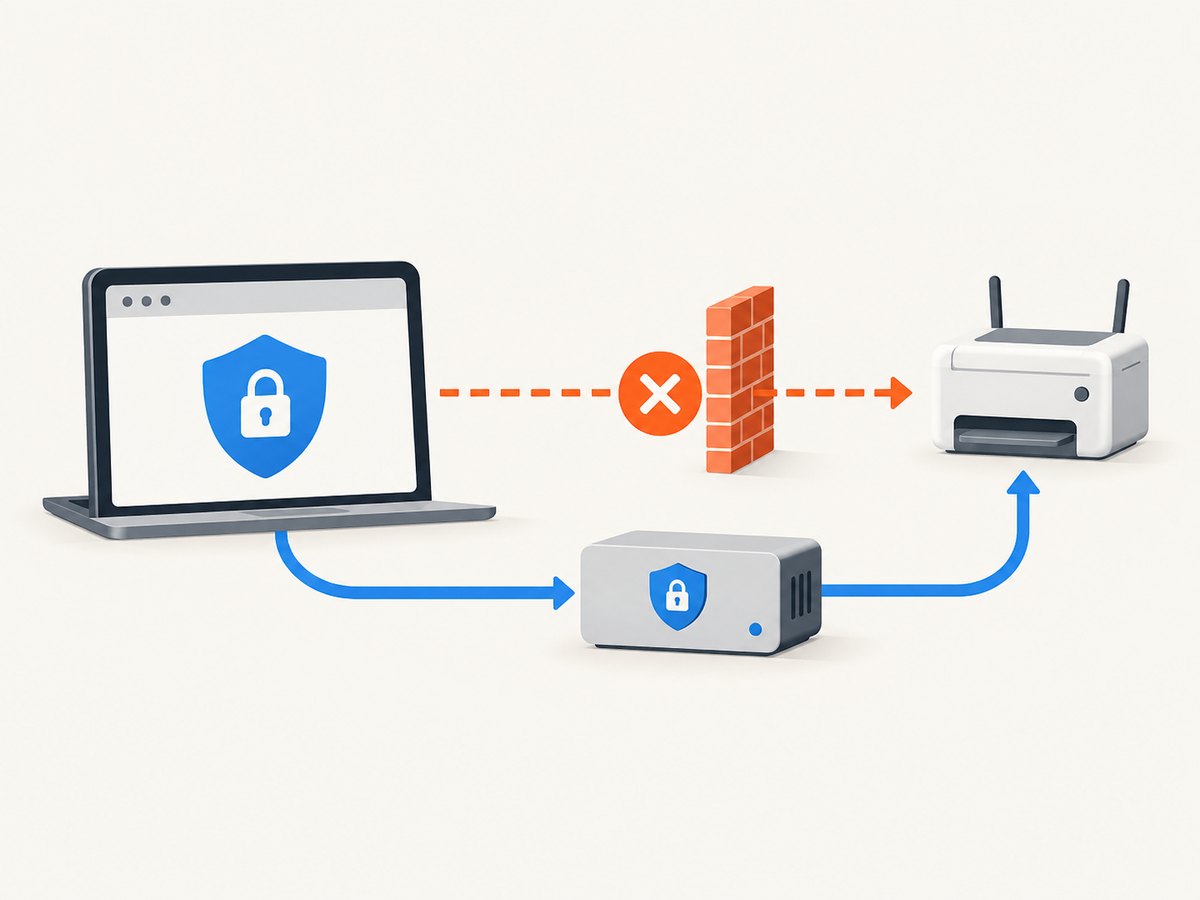
Some HTTP traffic exists because a browser is talking to a device on the same local network. Printers, routers, cameras, development servers, industrial controllers, and home-automation hubs often expose a simple HTTP endpoint. Their certificates are difficult to issue and validate, and the device may have too little storage or processing power for a complete modern TLS stack.
There is a separate browser rule: an HTTPS page generally cannot call an HTTP endpoint as active mixed content. A dashboard served securely from https://app.example may therefore be unable to fetch http://192.168.1.20/status. Google uses this local-device pattern as an example of why HTTPS-by-default does not solve every architecture.
Safer designs include a local HTTPS certificate trusted by managed devices, a small gateway that terminates TLS, a browser extension or native companion with explicit permissions, or an outbound connection from the device to a secure service. Do not “fix” the problem by disabling browser security for all sites.
What HTTPS protects—and what it does not
| HTTPS provides | HTTPS does not provide |
|---|---|
| Encryption against ordinary in-transit observation | Proof that the publisher is trustworthy |
| Integrity against modification on the connection | Protection from vulnerable server code or malicious scripts |
| Certificate-based authentication of the named endpoint | Accuracy, privacy, or safety of the site’s content |
| A safer basis for cookies, forms, and APIs | Guaranteed access when a network blocks or intercepts TLS |
A phishing site can use a valid certificate. HTTPS protects the path to that site; it does not judge the site’s intentions. You still need authentication, authorization, input validation, patching, content security controls, and sensible privacy practices.
How to migrate a site safely
- Inventory hosts and dependencies. List the main domain, subdomains, APIs, object storage, images, fonts, analytics, webhooks, and administrative endpoints. Identify HTTP URLs embedded in HTML, CSS, JavaScript, databases, emails, and mobile apps.
- Choose the audience and TLS baseline. Use a modern configuration for current browsers and devices. Document any exceptional legacy client and isolate it rather than weakening the public endpoint for everyone. Mozilla’s Web Security guidelines explain compatibility choices.
- Obtain and deploy certificates. Public certificates can be free and automated. Private-site certificates are often more complicated. Install the full chain, protect the private key, and ensure every load balancer or reverse proxy presents the intended certificate.
- Test application behavior. Check forms, cookies, redirects, API calls, third-party resources, webhooks, downloads, service workers, and login flows. Replace insecure active content and confirm that redirects preserve paths and query strings.
- Redirect deliberately. Redirect HTTP to HTTPS at the edge or web server after HTTPS works. Cloudflare’s Always Use HTTPS documentation notes that an active edge certificate and suitable encryption mode should exist first; selective redirects are possible when only part of an application is ready.
- Plan HSTS carefully. HSTS tells a browser to use HTTPS for later HTTP attempts. Start with a controlled max-age, verify every subdomain, and add
includeSubDomainsonly when all covered hosts are ready. A forgotten subdomain can become unreachable after enforcement. - Monitor renewal and failures. Alert before expiry, inspect certificate-chain errors from representative clients, and keep a rollback plan for redirects and HSTS changes.
Useful command-line checks
These checks help distinguish certificate, redirect, and application problems. Replace the hostname with your own test target.
curl -I http://example.com
curl -I https://example.com
curl -v https://example.com/health
openssl s_client -connect example.com:443 -servername example.com -showcerts
The first two requests show whether HTTP redirects and HTTPS responds. curl -v prints the negotiated connection and certificate verification. openssl s_client helps inspect the presented chain and server-name selection; it is diagnostic output, not a substitute for testing in real browsers.
Common errors and fixes
| Error or symptom | Likely cause | Fix |
|---|---|---|
| “Certificate expired” | Renewal job failed or the wrong certificate is deployed | Renew, install the full chain, reload every proxy, and verify the serving host. |
| “Name mismatch” | The certificate does not contain the requested hostname | Issue a certificate covering the exact host, including required subdomains. |
| Redirect loop | A proxy terminates TLS but the origin thinks the request is HTTP | Pass and trust the forwarding scheme, then set one canonical redirect policy. |
| Mixed-content warning | An HTTPS document loads active HTTP scripts, frames, or API calls | Change URLs to HTTPS, proxy the resource securely, or remove the dependency. |
| Old client cannot connect | Unsupported TLS version, cipher, certificate chain, or SNI | Measure the affected audience, upgrade the client, or isolate it; avoid weakening the public endpoint without review. |
| Local device request blocked | HTTPS page calling an HTTP private-network endpoint | Use local TLS, a trusted gateway, or an explicitly designed native integration. |
| HTTPS works on one hostname only | Uncovered subdomain or inconsistent load-balancer configuration | Inventory DNS names and deploy matching certificates and TLS settings everywhere. |
Performance, reliability, and cost considerations
TLS adds a handshake and certificate processing, but connection reuse, HTTP/2 or HTTP/3, and modern session resumption reduce repeated overhead. The larger operational risk is misconfiguration: an expired certificate, an incomplete chain, or a redirect loop can make a site unavailable even when the application itself is healthy.
Certificate issuance may be free, while engineering time, monitoring, hardware replacement, private PKI, and network changes are not. Budget for renewal automation, staging tests, observability, and a supported-client policy. If a third-party CDN terminates TLS, understand which certificate, encryption mode, and origin settings it controls.
Or skip the browser setup
When you need a visual record of how a page behaves over HTTPS, ScreenshotNeo can capture the result through one request. Its cleanup step accepts consent banners and removes more than 60 known consent platforms, newsletter popups, and chat widgets; each step can be disabled. Only clean shots are billed: bot checks or CAPTCHAs, blank pages, timeouts, failed loads, and cache hits cost nothing, and response headers report the page verdict and billing status.
See the ScreenshotNeo API documentation for all options. A basic capture looks like this:
curl -G "https://api.screenshotneo.com/v1/shot" -d access_key=YOUR_API_KEY --data-urlencode url=https://stripe.com -o shot.webpimport requests
r = requests.get("https://api.screenshotneo.com/v1/shot", params={"access_key": "YOUR_API_KEY", "url": "https://stripe.com"}, timeout=90)
open("shot.webp", "wb").write(r.content)const q = new URLSearchParams({ access_key: 'YOUR_API_KEY', url: 'https://stripe.com' });
const res = await fetch(`https://api.screenshotneo.com/v1/shot?${q}`);You can also request full-page or element captures, dark mode, device presets, custom viewport and retina scale, PDF output, custom CSS and JavaScript, waits, blocked resource types, headers, cookies, geolocation, caching, signed links, asynchronous jobs, bulk capture, and usage data. An MCP server provides take_screenshot, get_page_info, and capture_pdf tools for Claude, Cursor, and other MCP clients.
There are 1,000 free screenshots each month with no card. Paid plans start at $5 for 3,000 shots. Create a free ScreenshotNeo account.
FAQ
Does HTTPS mean a website is safe?
No. It secures the connection to the named endpoint. Verify the organization, content, permissions, and application security separately.
Why can a public certificate be free while HTTPS is still difficult?
Issuance is only one step. Deployment, renewal, dependency changes, client compatibility, monitoring, and organizational approval still require work.
Should every HTTP URL redirect immediately?
Usually for a ready public site, yes. First verify certificates, resources, subdomains, and proxy behavior; then add HSTS only after the full scope is ready.
Can HTTPS protect traffic inside my home or office?
Yes when the endpoint has a certificate clients trust. Many local devices lack that setup, which is why a gateway or managed local certificate is often needed.
Is the 80% figure a count of websites?
No. It describes the share of measured page loads using HTTPS and varies by region; it is not a domain census.


