Why Web Crawling Fails at Scale and How to Fix It
At scale, crawlers can overwhelm finite host capacity or waste requests on low-value URLs. Diagnose the bottleneck, protect sites, and improve useful coverage.
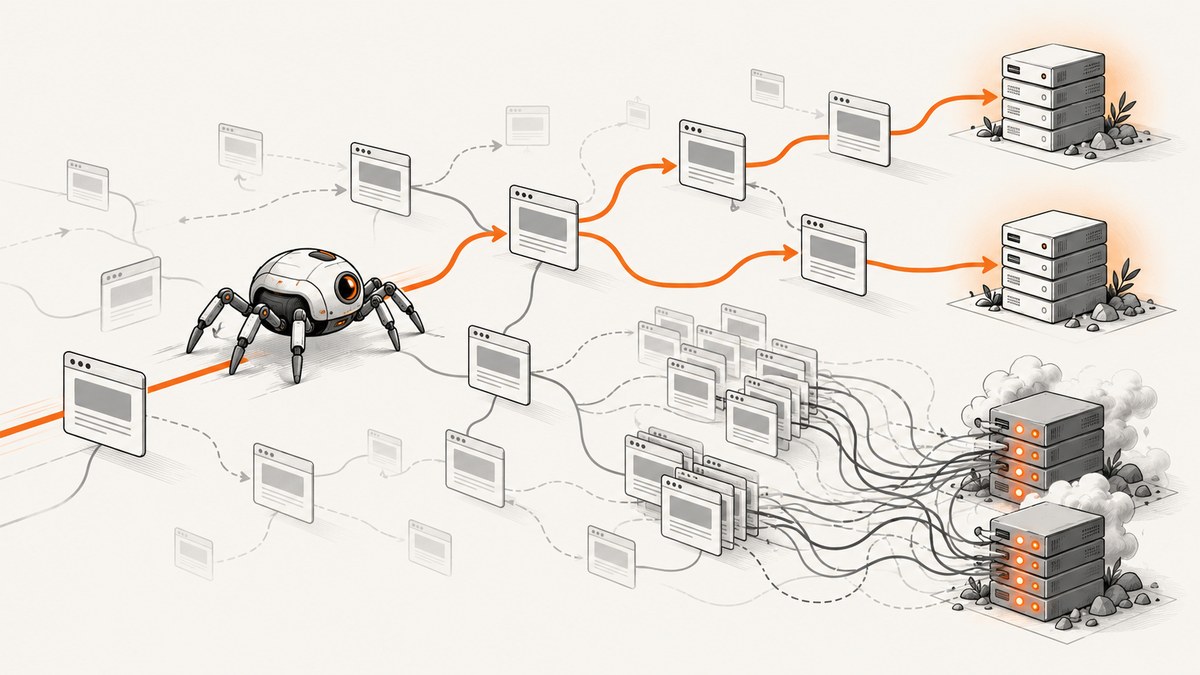
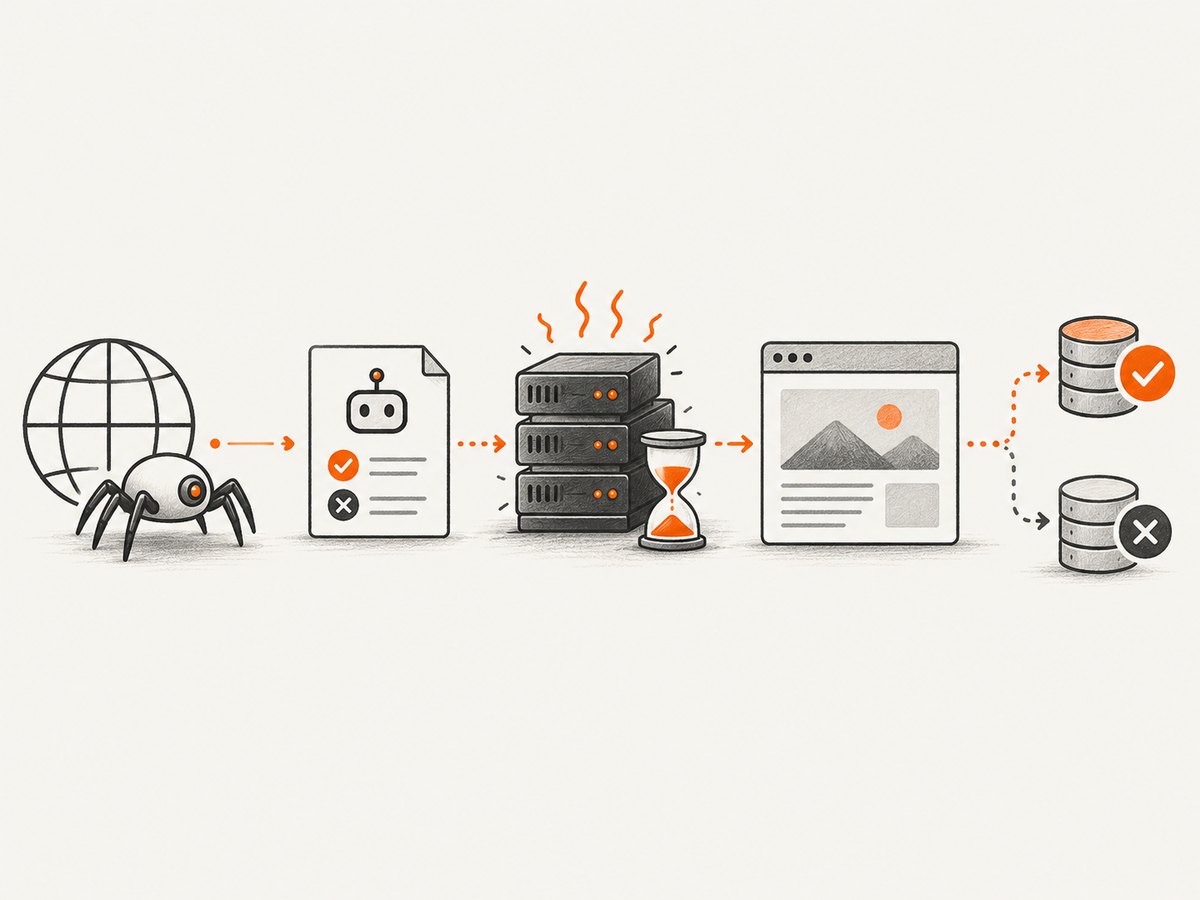
Web crawling fails at scale when a crawler cannot fetch useful pages fast enough, when a target site cannot serve requests reliably, or when the crawler spends too much of its finite capacity on low-value URLs. Those problems can overlap: URL sprawl wastes crawler time and host capacity, while slow responses or overload reduce successful fetching.
Start by identifying whether the gap is discovery, fetching, rendering, or indexing. Then correlate crawler telemetry with server logs, status codes, latency, and URL patterns. Fix the evidenced bottleneck, prioritize useful URLs, and respect each host’s capacity and crawl controls. A crawl is not an indexing guarantee: Google may crawl a page and still decide not to include it in Search.
1. Identify which part of crawling is failing
“Crawl failure” can describe several distinct outcomes. A crawler may never discover a URL, may discover but not fetch it, may fetch it but fail to render or interpret it, or may process it without the search engine indexing it. These need different fixes. Improving crawl access does not guarantee indexing.
| Symptom | Likely area | First evidence to inspect |
|---|---|---|
| Important URLs are absent from crawl data | Discovery or crawl controls | Internal links, sitemap, robots.txt, URL patterns |
| URLs are discovered but fetches fail | Availability, capacity, or access | Status codes, origin/CDN logs, robots rules, authentication |
| Fetches succeed but pages are incomplete | Rendering or expensive dependencies | Required resources, rendering time, response size, client errors |
| Pages are crawled but absent from search | Indexing or quality/demand | URL Inspection and search engine indexing guidance |
For Google, the crawl budget combines crawl rate and crawl demand: how much Googlebot can crawl and how much it wants to crawl. Rate is affected by site response health and serving capacity; demand reflects Google’s interest in crawling pages for indexing. Buying capacity or making pages faster helps only when capacity or efficiency is limiting. It does not manufacture demand. See Google’s [crawl budget explanation](https://developers.google.com/search/docs/crawling-indexing/large-site-managing-crawl-budget).
2. Diagnose with crawler and host evidence
Do not assume that “crawl budget” explains an uncrawled URL. Build a small, explicit list of important URLs, then check whether the problem is that they are undiscovered, blocked, failing, slow, or simply not selected for crawling.
- Define the missing set. Record representative important URLs, URL patterns, hostnames, and the outcome you expected. Separate “not fetched” from “not indexed.”
- Inspect search engine telemetry. For Google, use Search Console Crawl Stats and URL Inspection. Compare crawl activity and host availability around the reported period. Google’s [crawling troubleshooting guide](https://developers.google.com/search/docs/crawling-indexing/troubleshoot-crawling-errors) describes these tools.
- Verify actual requests in logs. Group by path, status, response time, response size, host, and time. Validate Googlebot identity with reverse DNS or Google’s published IP ranges; user-agent strings can be spoofed.
- Correlate failures with site events. Compare error spikes and latency with deploys, CDN changes, database load, rate limiting, and incidents. Distinguish origin errors from crawler-side failures.
- Classify the URL space. Look for parameter combinations, calendar pages, duplicate variants, action URLs, redirect chains, and resources required for rendering.
- Change one evidenced cause, then compare. Track successful requests, errors, latency, and coverage of the important URL set before and after the change.
Google specifically points site owners to Crawl Stats, URL Inspection, and logs for diagnosing crawl issues. Its documentation on [Google’s crawling behavior](https://developers.google.com/search/docs/crawling-indexing/overview-google-crawlers) provides additional context.
3. Control URL-space growth and improve discovery
A crawler has finite bandwidth, time, and available workers. An unbounded URL space can consume those resources with pages that add little unique value. Common causes include faceted navigation, date calendars, infinite spaces, proxy URLs, duplicate query-string variants, and state-changing links such as cart actions. Google lists facets and date-based calendars as possible sources of sharp crawl increases.

Constrain low-value URL patterns
- Use stable, canonical URL structures for content that should be discovered. Avoid creating unlimited combinations of filters when they do not represent useful landing pages.
- Keep actions such as adding to a cart or changing account state out of crawlable content links. Crawlers should find content, not trigger state changes.
- Remove unnecessary redirect hops and redirect loops. Update internal links to point directly to the final URL.
- Use durable crawl restrictions for URL spaces you do not want crawlers to fetch. Avoid repeatedly toggling robots rules as a temporary way to redistribute crawl activity.
Make important URLs easy to find
Link to important pages with ordinary crawlable links, and maintain a sitemap containing important or recently changed URLs. Use accurate last-modified values. A sitemap is a discovery hint, not a command: inclusion does not guarantee that a URL will be crawled, or crawled immediately. Google’s [sitemap guidance](https://developers.google.com/search/docs/crawling-indexing/sitemaps/overview) explains how to submit and maintain one.
Keep crawl controls distinct
robots.txt controls crawling: it tells compliant crawlers which URLs they may request. It is not access control and does not keep a URL secret. A blocked URL can still be known or appear in results without its contents being fetched. Use noindex when the goal is an indexing directive, and authentication or another real access control for private content. A crawler must be allowed to fetch a page to see a page-level noindex directive.
The Robots Exclusion Protocol is specified in [IETF RFC 9309](https://www.rfc-editor.org/rfc/rfc9309). The standard covers product-token and path matching, redirects, parsing, caching, and unavailable versus unreachable robots files. It explicitly says robots.txt rules are not authorization. Its unreachable-file behavior has specific provisions; consult the RFC and, for Google-specific behavior, Google’s [robots.txt documentation](https://developers.google.com/search/docs/crawling-indexing/robots/intro).
4. Protect host capacity and improve fetch efficiency
When a site is slow, unavailable, or returning many server errors, Googlebot can reduce crawling. Start with the failing host and time window, not a global concurrency guess. There is no universal safe request rate for every site: capacity depends on the target, endpoint, response cost, and concurrent user traffic.
- Resolve persistent 5xx and 429 responses. Find the limiting layer—application, database, origin, CDN, or rate limiter—and address it. Watch user-facing health as well as crawler success.
- Reduce response and render time for valuable pages. Optimize expensive queries, large payloads, and required resources. Fast responses can allow more fetching, but speed alone does not make low-value pages useful.
- Reduce redirect chains. Point links and sitemap entries at final canonical URLs, and remove loops.
- Bound required resources. Avoid oversized or slow resources that are needed to understand the page. Reuse stable URLs for common resources so they can be cached.
- Use conditional retrieval where appropriate. For unchanged content,
If-Modified-SinceandIf-None-Matchcan avoid transferring and processing a full response. Google supports these in some crawling use cases, but crawlers do not send them on every request.
Google treats 429 and 5xx responses as overload or server-error signals and slows crawling. Persistent errors can lead to URLs being dropped. In an emergency involving Googlebot, Google recommends temporarily returning 429 or 503, then stopping those responses once crawl rates fall. Its guidance warns that maintaining these errors for more than a few days can result in URLs being dropped; its crawl-rate reduction guidance says not to do this longer than 1–2 days. This is Google-specific operational advice, not a universal retry policy. See [HTTP status behavior](https://developers.google.com/search/docs/crawling-indexing/http-network-errors) and [Google’s crawl-rate guidance](https://developers.google.com/search/docs/crawling-indexing/reduce-google-crawl-rate).
Google says not to use 401 or 403 to limit crawl rate; other 4xx responses do not have the same crawl-rate effect as 429. For a general-purpose crawler you operate, implement per-host politeness and explicit retry/backoff behavior. AWS’s [scalable crawling guidance](https://docs.aws.amazon.com/prescriptive-guidance/latest/patterns/build-a-scalable-web-crawling-system-for-esg-data-on-aws.html) also advises pausing on 429. The appropriate delay and concurrency depend on the host; the reviewed guidance does not establish one number that fits every site.
5. A small Python fetcher with per-host pacing
The example below shows a deliberately simple pattern for fetching a curated URL list. It has a per-host delay, a timeout, and bounded retries for transient failures. It is not a complete search crawler: it does not discover links, render JavaScript, parse robots.txt, or guarantee compliance with every site’s terms. For production use, add robots.txt handling, durable scheduling, observability, and host-specific limits before expanding URL discovery.
from collections import defaultdict
from time import monotonic, sleep
from urllib.parse import urlparse
import requests

URLS = [
    "https://example.com/",
    "https://example.com/docs/",
]
USER_AGENT = "ExampleResearchCrawler/1.0 (+https://example.com/crawler-info)"
TIMEOUT = (5, 20)  # connect timeout, read timeout
MIN_HOST_INTERVAL = 2.0
MAX_RETRIES = 3

session = requests.Session()
session.headers.update({"User-Agent": USER_AGENT})
last_request = defaultdict(float)

def fetch(url):
    host = urlparse(url).netloc
    for attempt in range(MAX_RETRIES + 1):
        wait = MIN_HOST_INTERVAL - (monotonic() - last_request[host])
        if wait > 0:
            sleep(wait)
        last_request[host] = monotonic()
        try:
            response = session.get(url, timeout=TIMEOUT, allow_redirects=True)
        except requests.RequestException as exc:
            if attempt == MAX_RETRIES:
                print(url, "network error:", exc)
                return
            sleep(min(2 ** attempt, 30))
            continue

        print(url, response.status_code, response.elapsed.total_seconds(),
              "bytes:", len(response.content), "final:", response.url)
        if response.status_code == 429 or response.status_code >= 500:
            if attempt == MAX_RETRIES:
                print("retry limit reached")
                return
            retry_after = response.headers.get("Retry-After")
            try:
                delay = float(retry_after) if retry_after else min(2 ** attempt, 30)
            except ValueError:
                delay = min(2 ** attempt, 30)
            sleep(max(0, delay))
            continue
        return response

for url in URLS:
    fetch(url)
Before adding parallel workers, measure successful useful pages per unit of time, host latency, errors, and the target’s serving headroom. Keep concurrency bounded per host, honor Retry-After when present, and avoid retry storms. A retry can amplify an overload if many workers repeat it simultaneously. For a crawler targeting Google Search, use Google’s own crawler documentation rather than assuming this generic fetch loop reproduces Googlebot.
6. Troubleshoot common failures
| Symptom | Likely cause | Practical fix |
|---|---|---|
| Many URLs share 5xx responses | Origin, application, database, or CDN overload/failure | Correlate logs and incident timing, restore host health, then monitor crawl recovery. |
| 429 responses appear in bursts | Rate limiter or capacity guard is rejecting requests | Reduce crawler pressure; inspect the limiting rule; honor Retry-After. For Googlebot, follow Google’s specific overload guidance. |
| Important URLs are blocked | Broad or unintended robots.txt rule | Inspect the rule against the exact path and crawler product token; correct the durable rule and verify access. |
| URLs are fetched but search results omit them | Indexing decision, duplicate/canonical handling, or insufficient value/demand | Use URL Inspection and indexing diagnostics. More crawling alone does not guarantee inclusion. |
| Crawl volume rises but useful coverage does not | Facets, calendars, duplicates, action URLs, or infinite spaces | Group requests by path and parameters; constrain unbounded patterns and strengthen links to important pages. |
| Pages are slow despite healthy status codes | Expensive rendering, large resources, backend latency, or redirect chains | Measure response and render paths separately; optimize critical dependencies and link directly to final URLs. |
| Robots file cannot be fetched | Availability, DNS, TLS, or connectivity issue | Restore the robots.txt endpoint and check the crawler-specific rules for unavailable and unreachable files. |
| Logs show a familiar crawler user-agent but suspicious traffic | User-agent spoofing | Verify identity using the search engine’s published reverse-DNS or IP-range method. |
7. Measure recovery, reliability, and cost
Use a before-and-after view with the same URL groups and time windows. Track successful fetches of important URLs, status-code distribution, latency percentiles, response sizes, redirect hops, host availability, and the share of requests spent on low-value patterns. Also watch user-facing service health: a crawler improvement that overloads the site is not a reliable fix.
For reliability, make crawler work resumable and idempotent where possible, record the final URL and status for each request, and cap retries. Separate temporary network failures from permanent responses. Back off on overload, avoid synchronized retries, and ensure one failing host does not consume all workers. These are implementation principles; there is no evidence-based universal concurrency number or one scheduler design that suits every crawl.
Cost grows with wasted requests, rendered resources, bandwidth, compute, and operational time. Curated URL selection, deduplication, caching, conditional requests, and fewer redirects can reduce work. Add capacity only after telemetry shows the host is the bottleneck; additional servers do not resolve poor discovery or low crawl demand.
8. Or skip the browser setup
If the task is to inspect how a page visually renders rather than crawl a large URL inventory, [ScreenshotNeo](https://screenshotneo.com) can return a screenshot or PDF with one GET request. See the [API documentation](https://screenshotneo.com/docs/).
curl -G "https://api.screenshotneo.com/v1/shot" -d access_key=YOUR_API_KEY --data-urlencode url=https://example.com -o shot.webpEquivalent Python and Node.js calls:
import requests
r = requests.get("https://api.screenshotneo.com/v1/shot", params={"access_key": "YOUR_API_KEY", "url": "https://example.com"}, timeout=90)
open("shot.webp", "wb").write(r.content)
const q = new URLSearchParams({ access_key: 'YOUR_API_KEY', url: 'https://example.com' });
const res = await fetch(`https://api.screenshotneo.com/v1/shot?${q}`);
if (!res.ok) throw new Error(`Screenshot request failed: ${res.status}`);
await Bun.write('shot.webp', new Uint8Array(await res.arrayBuffer()));Cookie banners, newsletter popups, and chat widgets are removed before the shot; each cleanup step can be turned off. Bot checks, blank pages, and failed loads are never billed, and response headers say which outcome occurred. An MCP server lets AI agents use take_screenshot, get_page_info, and capture_pdf. The Free plan includes 1,000 screenshots a month with no card; paid plans start at $5 for 3,000. Screenshot capture is useful for visual inspection, but it is not a substitute for crawl logs, URL discovery, or crawl-policy checks.
Sign up free for 1,000 screenshots a month, no card required.
9. Frequently asked questions
Does a sitemap make a crawler fetch every listed URL?
No. It helps communicate URLs and freshness, but crawling is still selected according to the crawler’s behavior and demand.
Should I block every duplicate URL in robots.txt?
Not automatically. First understand how duplicates are generated and what indexing outcome you want. Robots.txt controls fetching, not canonicalization or access to private content.
Does faster crawling mean more pages will be indexed?
No. Crawling and indexing are separate processes. Better availability can improve fetching when capacity is limiting, but inclusion remains a separate decision.
What crawl delay should I configure?
There is no universal value. Base per-host pacing on observed capacity, response health, and the target’s published guidance; back off when overloaded.


